
 qeeqbox/social-analyzer
1000개의 소셜 미디어 \ 웹사이트에서 개인의 프로필을 분석하고 찾기 위한 API, CLI 및 웹 앱

Social Analyzer는 1000개 이상의 소셜 미디어 \ 웹사이트에서 개인의 프로필을 분석하고 찾기 위한 API, CLI 및 웹 앱입니다. 다양한 분석 및 탐지 모듈을 포함하며, 조사 과정에서 사용할 모듈을 선택할 수 있습니다.
탐지 모듈은 다양한 탐지 기법을 기반으로 한 등급 메커니즘을 사용하며, 0에서 100(No-Maybe-Yes) 사이의 평가 값을 생성합니다. 이 모듈은 오탐(false positive)을 줄이기 위해 설계되었습니다.
이 OSINT 도구의 분석 및 공개적으로 추출된 정보는 사이버 괴롭힘, 사이버 그루밍, 사이버 스토킹, 허위 정보 유포와 같은 의심스럽거나 악의적인 활동과 관련된 프로필을 조사하는 데 도움이 될 수 있습니다.
이 프로젝트는 현재 자원이 제한된 국가의 일부 법 집행 기관에서 사용되고 있습니다 - 탐지 데이터베이스는 여기에 공유된 것과 다릅니다..
사용자가 콘텐츠를 만들고 공유하거나 소셜 네트워킹에 참여할 수 있게 하는 웹사이트 및 애플리케이션 - 옥스포드 사전
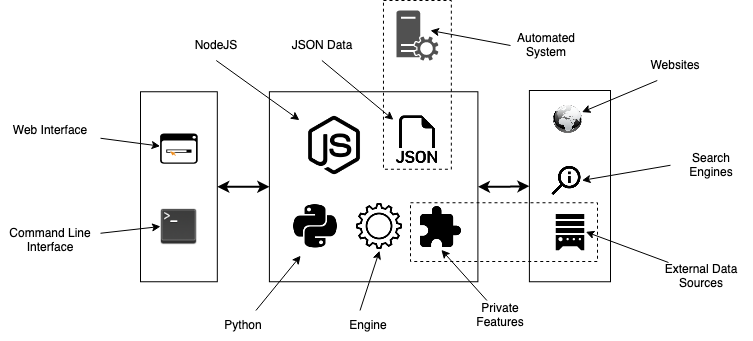
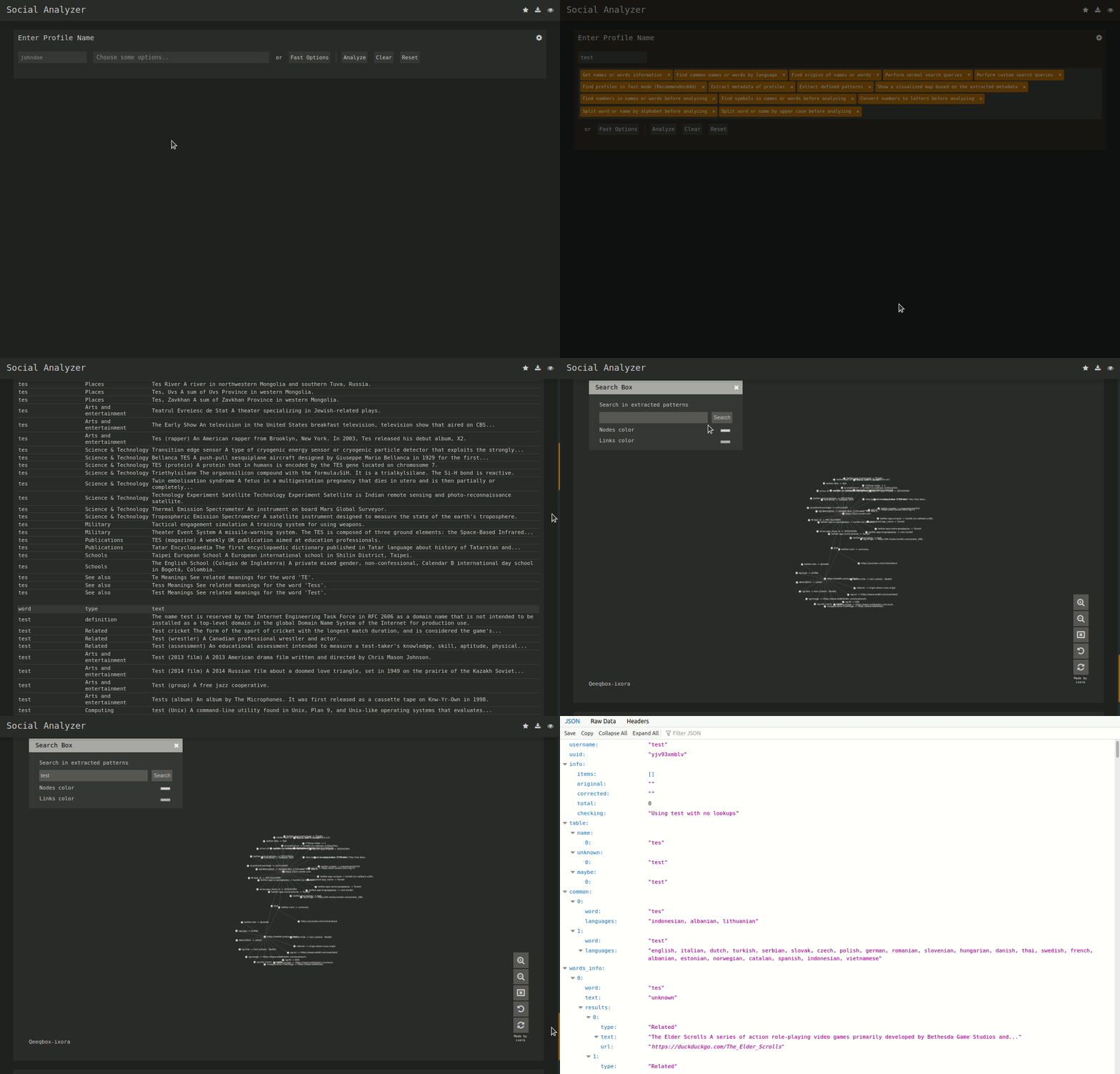
표준 localhost 웹 앱 URL: http://0.0.0.0:9005/app.html

sudo apt-get update
#Depedning on your Linux distro, you may or may not need these 2 lines
sudo DEBIAN_FRONTEND=noninteractive apt-get install -y software-properties-common
sudo add-apt-repository ppa:mozillateam/ppa -y
sudo apt-get install -y firefox-esr tesseract-ocr git nodejs npm
git clone https://github.com/qeeqbox/social-analyzer.git
cd social-analyzer
npm update
npm install
npm start
sudo apt-get update
#Depedning on your Linux distro, you may or may not need these 2 lines
sudo DEBIAN_FRONTEND=noninteractive apt-get install -y software-properties-common
sudo add-apt-repository ppa:mozillateam/ppa -y
sudo apt-get install -y firefox-esr tesseract-ocr git nodejs npm
git clone https://github.com/qeeqbox/social-analyzer.git
cd social-analyzer
npm install
nodejs app.js --username "johndoe"
#or
nodejs app.js --username "johndoe,janedoe" --metadata
#or
nodejs app.js --username "johndoe,janedoe" --metadata --top 100
#or
nodejs app.js --username "johndoe" --type "adult"
sudo apt-get update
sudo apt-get install python3 python3-pip
pip3 install social-analyzer
python3 -m social-analyzer --username "johndoe"
#or
python3 -m social-analyzer --username "johndoe" --metadata
#or
python3 -m social-analyzer --username "johndoe" --metadata --top 100
#or
python3 -m social-analyzer --username "johndoe" --type "adult"
#or
python3 -m social-analyzer --username "johndoe" --websites "car" --logs --screenshots
sudo apt-get update
sudo apt-get install git python3 python3-pip
git clone https://github.com/qeeqbox/social-analyzer
cd social-analyzer
pip3 install -r requirements.txt
python3 app.py --username "janedoe"
#or
python3 app.py --username "johndoe" --metadata
#or
python3 app.py --username "johndoe" --metadata --top 100
#or
python3 app.py --username "johndoe" --type "adult"
#or
python3 app.py --username "johndoe" --websites "car" --logs --screenshots
#E.g. #1
from importlib import import_module
SocialAnalyzer = import_module("social-analyzer").SocialAnalyzer()
results = SocialAnalyzer.run_as_object(username="johndoe",silent=True)
print(results)

#E.g. #2
from importlib import import_module
SocialAnalyzer = import_module("social-analyzer").SocialAnalyzer()
results = SocialAnalyzer.run_as_object(username="johndoe,janedoe",silent=True,output="json",filter="good",metadata=False,timeout=10, profiles="detected")
print(results)
Required Arguments:
  --username   E.g. johndoe, john_doe or johndoe9999

Optional Arguments:
  --websites    A website or websites separated by space E.g. youtube, tiktokor tumblr
  --mode        Analysis mode E.g.fast -> FindUserProfilesFast, slow -> FindUserProfilesSlow or special -> FindUserProfilesSpecial
  --output      Show the output in the following format: json -> json outputfor integration or pretty -> prettify the output
  --options     Show the following when a profile is found: link, rate, titleor text
  --method      find -> show detected profiles, get -> show all profiles regardless detected or not, all -> combine find & get
  --filter      Filter detected profiles by good, maybe or bad, you can do combine them with comma (good,bad) or use all
  --profiles    Filter profiles by detected, unknown or failed, you can do combine them with comma (detected,failed) or use all
  --countries   select websites by country or countries separated by space as: us br ru
  --type        Select websites by type (Adult, Music etc)
  --top         select top websites as 10, 50 etc...[--websites is not needed]
  --extract     Extract profiles, urls & patterns if possible
  --metadata    Extract metadata if possible (pypi QeeqBox OSINT)
  --trim        Trim long strings
  --gui         Reserved for a gui (Not implemented)
  --cli         Reserved for a cli (Not needed)

Listing websites & detections:
  --list        List all available websites

Setting:
  --headers     Headers as dict
  --logs_dir    Change logs directory
  --timeout     Change timeout between each request
  --silent      Disable output to screen

 , 저에게 직접 연락해 주세요 (GitHub에 이슈를 열지 마세요)
