 pvharmo2/gha-lab-6c3094af9e
# 승인된 보안 연구 랩: CVE-2026-27941 재현 (pull_request_target 워크플로우의 pwn 요청) — openlit/openlit 스냅샷

자동화된 연구 산출물 — 업스트림 프로젝트가 아님.
이 저장소는 Université Laval의 석사 논문에서 게시된 GitHub Actions 워크플로우 취약점 재현을 위해 자동화된 하네스가 구축한 일회용 실험실입니다. 이는 커밋
8529a7746ce2cae946bd2346cb3792c22f86cbee(2026-02-24) 시점의openlit/openlit에 대한 축어적 스냅샷이며, 해당 프로젝트의 자체 라이선스에 따라 재배포되며, 해당 라이선스 파일은 이 스냅샷에 변경 없이 포함되어 있습니다.업스트림 프로젝트는 관여하지 않으며, 결코 공격 대상이 아니며, 여기서 연구된 취약점은 이미 공개된 상태입니다. 이 저장소의 모든 시크릿과 변수는 무작위로 생성된 더미 값입니다 — 실제 자격 증명은 존재하지 않습니다. 액션 참조와 러너 이미지는 2026-02-24에 확인된 값으로 고정되어 있습니다. 스냅샷에 적용된 모든 변경 사항은 하네스 출력의
pinning.md를 참조하세요.질문 또는 이의 제기: [email protected]
❤️ 이 프로젝트 후원하기 ❤️





OpenLIT을 사용하면 특히 생성형 AI와 LLM을 위한 AI 개발 워크플로우를 간소화할 수 있습니다. LLM 실험, 프롬프트 구성 및 버전 관리, API 키의 안전한 처리와 같은 필수 작업을 간소화합니다. 단 한 줄의 코드로 OpenTelemetry 네이티브 관측 가능성을 활성화하여 LLM, 벡터 데이터베이스, GPU를 포함한 풀스택 모니터링을 제공할 수 있습니다. 이를 통해 개발자는 테스트에서 프로덕션으로 원활하게 전환하며 AI 기능과 애플리케이션을 자신 있게 구축할 수 있습니다.
이 프로젝트는 OpenTelemetry 커뮤니티와 함께 Semantic Conventions을 준수하고 유지하며, 관측 가능성 분야의 최신 표준에 맞춰 지속적으로 업데이트합니다.
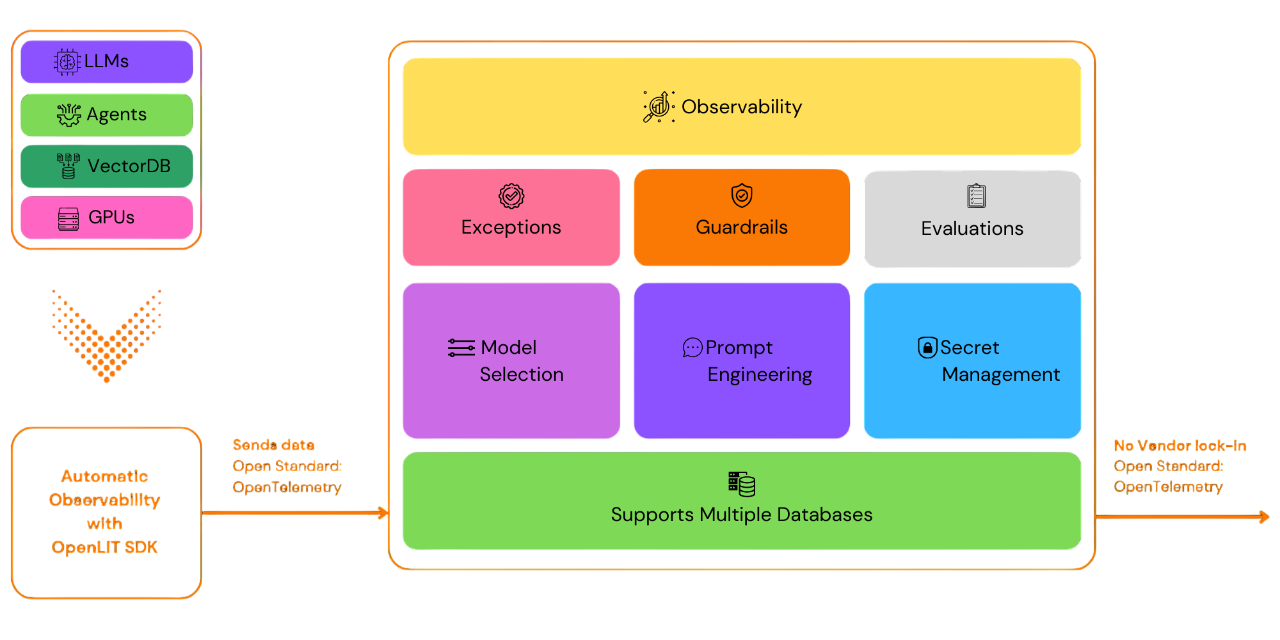
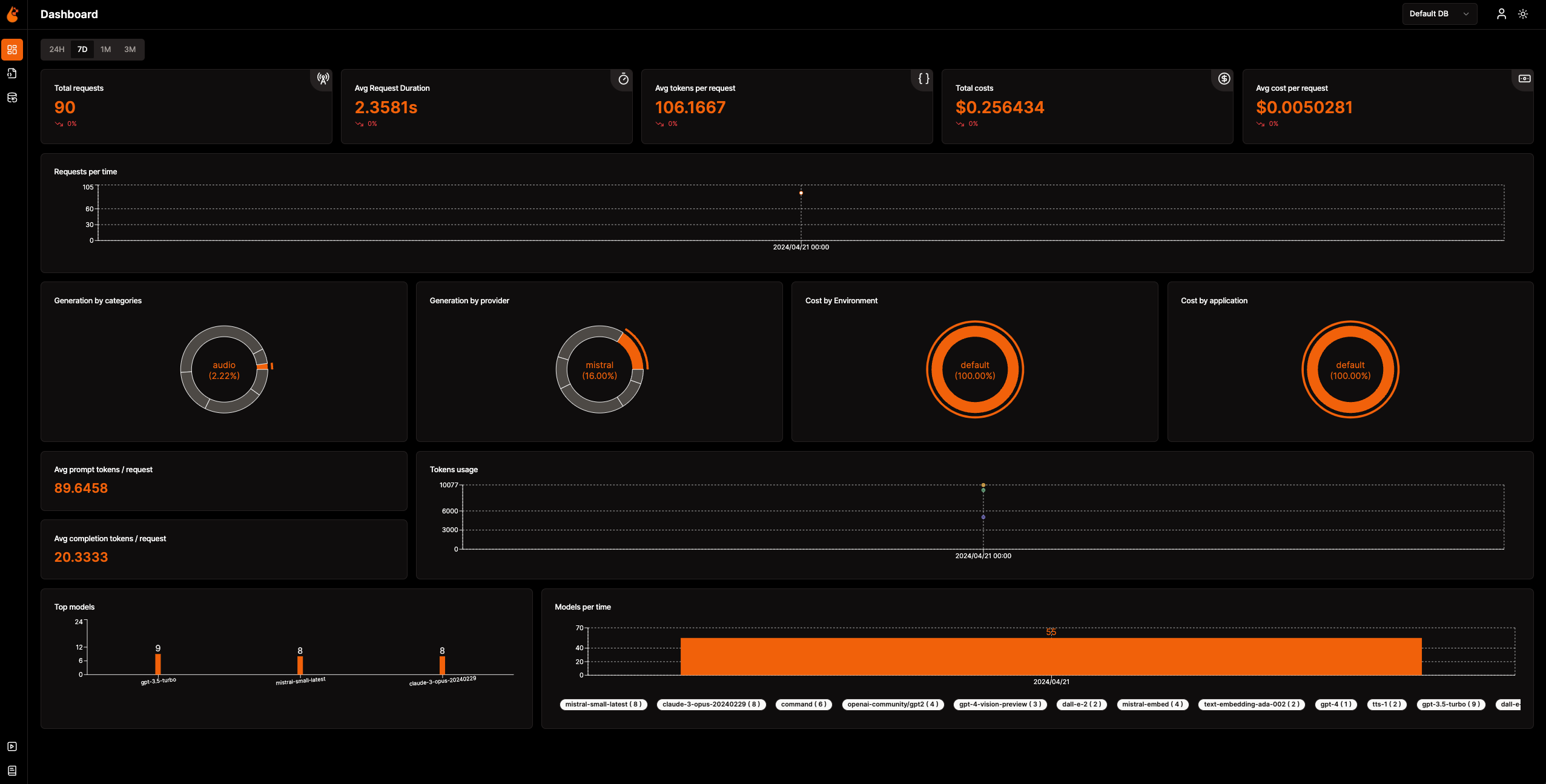
📈 분석 대시보드: 메트릭, 비용, 사용자 상호작용을 추적하는 상세 대시보드로 AI 애플리케이션의 상태와 성능을 모니터링하여 전반적인 효율성을 명확하게 파악할 수 있습니다.
🔌 OpenTelemetry 네이티브 관측 가능성 SDK: 기존 관측 가능성 도구에 트레이스와 메트릭을 전송하는 벤더 중립적 SDK입니다.
💲 커스텀 및 파인튜닝 모델 비용 추적: 정확한 예산 책정을 위해 커스텀 가격 파일을 사용하여 특정 모델에 대한 비용 추정을 맞춤화합니다.
🐛 예외 모니터링 대시보드: 전용 모니터링 대시보드에서 일반적인 예외와 오류를 추적하여 문제를 신속하게 발견하고 해결합니다.
💭 프롬프트 관리: Prompt Hub를 사용하여 프롬프트를 관리하고 버전을 지정하여 여러 애플리케이션에서 일관되고 쉽게 접근할 수 있도록 합니다.
🔑 API 키 및 시크릿 관리: API 키와 시크릿을 중앙에서 안전하게 관리하여 안전하지 않은 관행을 방지합니다.
🎮 다양한 LLM 실험: OpenGround를 사용하여 다양한 LLM을 나란히 탐색, 테스트, 비교할 수 있습니다.
🚀 OpAMP 관리를 위한 Fleet Hub: 보안 TLS 통신을 통해 OpAMP(Open Agent Management Protocol)를 사용하여 인프라 전반의 OpenTelemetry Collector를 중앙에서 관리하고 모니터링합니다.
flowchart TB; subgraph " " direction LR; subgraph " " direction LR; OpenLIT_SDK[OpenLIT SDK] -->|Sends Traces & Metrics| OTC[OpenTelemetry Collector]; OTC -->|Stores Data| ClickHouseDB[ClickHouse]; end subgraph " " direction RL; OpenLIT_UI[OpenLIT] -->|Pulls Data| ClickHouseDB; end end
### 1단계: OpenLIT 스택 배포

1. OpenLIT 저장소 Git 클론

   명령줄 또는 터미널을 열고 다음을 실행하세요:   ```shell
   git clone [email protected]:openlit/openlit.git
Docker를 사용한 자체 호스팅
다음 명령어로 OpenLIT을 배포하고 실행합니다: ```shell docker compose up -d
Kubernetes에서 Helm을 사용하여 설치하는 방법에 대한 지침은 Kubernetes Helm 설치 가이드를 참조하세요.
명령줄 또는 터미널을 열고 다음을 실행하세요:```bash pip install openlit
> TypeScript SDK 사용 방법에 대한 지침은 [TypeScript SDK 설치 가이드](https://github.com/openlit/openlit/tree/main/sdk/typescript#-installation)를 참조하세요.

### 3단계: 애플리케이션에서 OpenLIT 초기화

AI 애플리케이션에 OpenLIT을 통합하려면 코드에 다음 줄을 추가하세요.```python
import openlit

openlit.init()
아래와 같이 텔레메트리 데이터 대상을 구성합니다:
| 용도 | 매개변수/환경 변수 | OpenLIT로 전송 시 |
|---|---|---|
| HTTP OTLP 엔드포인트로 데이터 전송 | otlp_endpoint 또는 OTEL_EXPORTER_OTLP_ENDPOINT | "http://127.0.0.1:4318" |
| 텔레메트리 백엔드 인증 | otlp_headers 또는 OTEL_EXPORTER_OTLP_HEADERS | 기본적으로 필요하지 않음 |
💡 정보:
otlp_endpoint또는OTEL_EXPORTER_OTLP_ENDPOINT가 제공되지 않으면 OpenLIT SDK는 추적을 콘솔에 직접 출력하며, 이는 개발 단계에서 권장됩니다.
애플리케이션 코드에 다음 두 줄을 추가합니다: ```python import openlit
openlit.init( otlp_endpoint="http://127.0.0.1:4318", )
</details>

---

<details>

---

<summary>환경 변수를 사용한 초기화</summary>

애플리케이션 코드에 다음 두 줄을 추가하세요:  ```python
import openlit

openlit.init()
그런 다음, 환경 변수를 사용하여 OTLP 엔드포인트를 구성하세요: ```env export OTEL_EXPORTER_OTLP_ENDPOINT = "http://127.0.0.1:4318"
</details>
---
### 4단계: 시각화 및 최적화
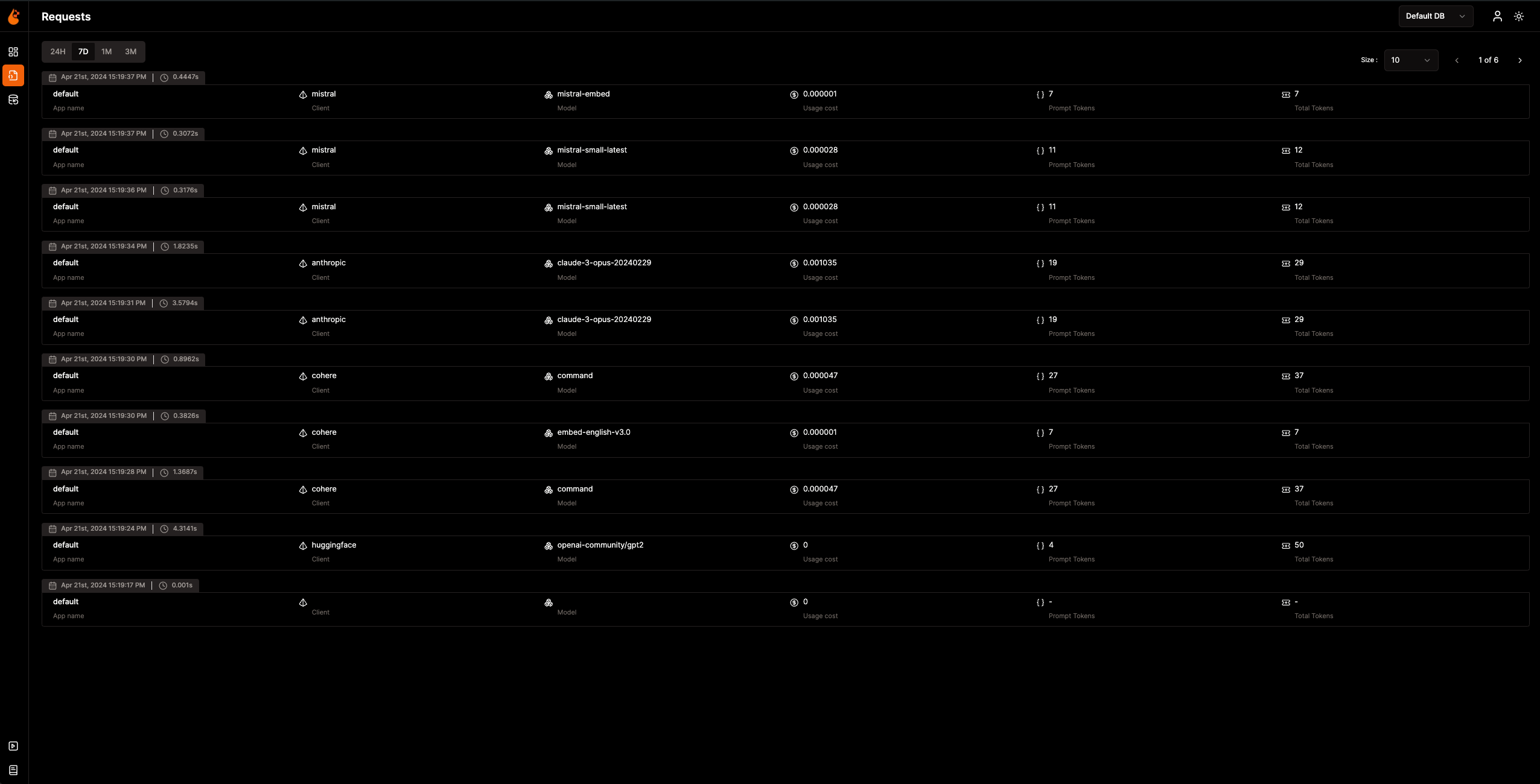
이제 Observability 데이터가 수집되어 OpenLIT으로 전송되었으므로, 다음 단계는 이 데이터를 시각화하고 분석하여 AI 애플리케이션의 성능과 동작에 대한 인사이트를 얻고 개선 영역을 파악하는 것입니다.
브라우저에서 `127.0.0.1:3000`의 OpenLIT으로 이동하여 탐색을 시작하세요. 기본 자격 증명으로 로그인할 수 있습니다:
- **이메일**: `[email protected]`
- **비밀번호**: `openlituser`
## 📦 지원 통합
OpenLIT은 단 한 줄의 코드로 **44개 이상의 LLM 제공업체, AI 프레임워크 및 벡터 데이터베이스**를 자동 계측합니다. 각 통합은 [OpenTelemetry-네이티브](https://opentelemetry.io/) 트레이스와 메트릭을 생성합니다. 통합 문서를 보려면 카드를 클릭하세요.
<sub>
<img src="https://img.shields.io/badge/Python-3776AB?logo=python&logoColor=white&style=flat-square" height="16"> Python SDK
<img src="https://img.shields.io/badge/TypeScript-3178C6?logo=typescript&logoColor=white&style=flat-square" height="16"> TypeScript SDK
</sub>
### LLM 제공업체
<table>
<tr>
<td align="center" width="160"><a href="https://docs.openlit.io/latest/sdk/integrations/openai"><b>OpenAI</b></a><br/><img src="https://img.shields.io/badge/Python-3776AB?logo=python&logoColor=white&style=flat-square" height="18"> <img src="https://img.shields.io/badge/TypeScript-3178C6?logo=typescript&logoColor=white&style=flat-square" height="18"></td>
<td align="center" width="160"><a href="https://docs.openlit.io/latest/sdk/integrations/anthropic"><b>Anthropic</b></a><br/><img src="https://img.shields.io/badge/Python-3776AB?logo=python&logoColor=white&style=flat-square" height="18"> <img src="https://img.shields.io/badge/TypeScript-3178C6?logo=typescript&logoColor=white&style=flat-square" height="18"></td>
<td align="center" width="160"><a href="https://docs.openlit.io/latest/sdk/integrations/cohere"><b>Cohere</b></a><br/><img src="https://img.shields.io/badge/Python-3776AB?logo=python&logoColor=white&style=flat-square" height="18"> <img src="https://img.shields.io/badge/TypeScript-3178C6?logo=typescript&logoColor=white&style=flat-square" height="18"></td>
<td align="center" width="160"><a href="https://docs.openlit.io/latest/sdk/integrations/mistral"><b>Mistral AI</b></a><br/><img src="https://img.shields.io/badge/Python-3776AB?logo=python&logoColor=white&style=flat-square" height="18"> <img src="https://img.shields.io/badge/TypeScript-3178C6?logo=typescript&logoColor=white&style=flat-square" height="18"></td>
</tr>
<tr>
<td align="center" width="160"><a href="https://docs.openlit.io/latest/sdk/integrations/groq"><b>Groq</b></a><br/><img src="https://img.shields.io/badge/Python-3776AB?logo=python&logoColor=white&style=flat-square" height="18"> <img src="https://img.shields.io/badge/TypeScript-3178C6?logo=typescript&logoColor=white&style=flat-square" height="18"></td>
<td align="center" width="160"><a href="https://docs.openlit.io/latest/sdk/integrations/google-ai-studio"><b>Google AI Studio</b></a><br/><img src="https://img.shields.io/badge/Python-3776AB?logo=python&logoColor=white&style=flat-square" height="18"> <img src="https://img.shields.io/badge/TypeScript-3178C6?logo=typescript&logoColor=white&style=flat-square" height="18"></td>
<td align="center" width="160"><a href="https://docs.openlit.io/latest/sdk/integrations/together"><b>Together AI</b></a><br/><img src="https://img.shields.io/badge/Python-3776AB?logo=python&logoColor=white&style=flat-square" height="18"> <img src="https://img.shields.io/badge/TypeScript-3178C6?logo=typescript&logoColor=white&style=flat-square" height="18"></td>
<td align="center" width="160"><a href="https://docs.openlit.io/latest/sdk/integrations/ollama"><b>Ollama</b></a><br/><img src="https://img.shields.io/badge/Python-3776AB?logo=python&logoColor=white&style=flat-square" height="18"> <img src="https://img.shields.io/badge/TypeScript-3178C6?logo=typescript&logoColor=white&style=flat-square" height="18"></td>
</tr>
<tr>
<td align="center" width="160"><a href="https://docs.openlit.io/latest/sdk/integrations/bedrock"><b>AWS Bedrock</b></a><br/><img src="https://img.shields.io/badge/Python-3776AB?logo=python&logoColor=white&style=flat-square" height="18"> <img src="https://img.shields.io/badge/TypeScript-3178C6?logo=typescript&logoColor=white&style=flat-square" height="18"></td>
<td align="center" width="160"><a href="https://docs.openlit.io/latest/sdk/integrations/azure-ai-inference"><b>Azure AI Inference</b></a><br/><img src="https://img.shields.io/badge/Python-3776AB?logo=python&logoColor=white&style=flat-square" height="18"></td>
<td align="center" width="160"><a href="https://docs.openlit.io/latest/sdk/integrations/vertexai"><b>Vertex AI</b></a><br/><img src="https://img.shields.io/badge/Python-3776AB?logo=python&logoColor=white&style=flat-square" height="18"></td>
<td align="center" width="160"><a href="https://docs.openlit.io/latest/sdk/integrations/vllm"><b>vLLM</b></a><br/><img src="https://img.shields.io/badge/Python-3776AB?logo=python&logoColor=white&style=flat-square" height="18"></td>
</tr>
<tr>
<td align="center" width="160"><a href="https://docs.openlit.io/latest/sdk/integrations/reka"><b>Reka</b></a><br/><img src="https://img.shields.io/badge/Python-3776AB?logo=python&logoColor=white&style=flat-square" height="18"></td>
<td align="center" width="160"><a href="https://docs.openlit.io/latest/sdk/integrations/litellm"><b>LiteLLM</b></a><br/><img src="https://img.shields.io/badge/Python-3776AB?logo=python&logoColor=white&style=flat-square" height="18"></td>
<td align="center" width="160"><a href="https://docs.openlit.io/latest/sdk/integrations/huggingface"><b>Hugging Face</b></a><br/><img src="https://img.shields.io/badge/Python-3776AB?logo=python&logoColor=white&style=flat-square" height="18"></td>
<td align="center" width="160"><a href="https://docs.openlit.io/latest/sdk/integrations/ai21"><b>AI21</b></a><br/><img src="https://img.shields.io/badge/Python-3776AB?logo=python&logoColor=white&style=flat-square" height="18"></td>
</tr>
<tr>
<td align="center" width="160"><a href="https://docs.openlit.io/latest/sdk/integrations/gpt4all"><b>GPT4All</b></a><br/><img src="https://img.shields.io/badge/Python-3776AB?logo=python&logoColor=white&style=flat-square" height="18"></td>
<td align="center" width="160"><a href="https://docs.openlit.io/latest/sdk/integrations/premai"><b>PremAI</b></a><br/><img src="https://img.shields.io/badge/Python-3776AB?logo=python&logoColor=white&style=flat-square" height="18"></td>
<td align="center" width="160"><a href="https://docs.openlit.io/latest/sdk/integrations/sarvam"><b>Sarvam AI</b></a><br/><img src="https://img.shields.io/badge/Python-3776AB?logo=python&logoColor=white&style=flat-square" height="18"></td>
<td align="center" width="160"><a href="https://docs.openlit.io/latest/sdk/integrations/julep-ai"><b>Julep</b></a><br/><img src="https://img.shields.io/badge/Python-3776AB?logo=python&logoColor=white&style=flat-square" height="18"></td>
</tr>
<tr>
<td align="center" width="160"><a href="https://docs.openlit.io/latest/sdk/integrations/multion"><b>MultiOn</b></a><br/><img src="https://img.shields.io/badge/Python-3776AB?logo=python&logoColor=white&style=flat-square" height="18"></td>
</tr>
</table>
### AI 프레임워크
<table>
<tr>
<td align="center" width="160"><a href="https://docs.openlit.io/latest/sdk/integrations/langchain"><b>LangChain</b></a><br/><img src="https://img.shields.io/badge/Python-3776AB?logo=python&logoColor=white&style=flat-square" height="18"> <img src="https://img.shields.io/badge/TypeScript-3178C6?logo=typescript&logoColor=white&style=flat-square" height="18"></td>
<td align="center" width="160"><a href="https://docs.openlit.io/latest/sdk/integrations/llama-index"><b>LlamaIndex</b></a><br/><img src="https://img.shields.io/badge/Python-3776AB?logo=python&logoColor=white&style=flat-square" height="18"> <img src="https://img.shields.io/badge/TypeScript-3178C6?logo=typescript&logoColor=white&style=flat-square" height="18"></td>
<td align="center" width="160"><a href="https://docs.openlit.io/latest/sdk/integrations/crewai"><b>CrewAI</b></a><br/><img src="https://img.shields.io/badge/Python-3776AB?logo=python&logoColor=white&style=flat-square" height="18"></td>
<td align="center" width="160"><a href="https://docs.openlit.io/latest/sdk/integrations/pydantic"><b>Pydantic AI</b></a><br/><img src="https://img.shields.io/badge/Python-3776AB?logo=python&logoColor=white&style=flat-square" height="18"></td>
</tr>
<tr>
<td align="center" width="160"><a href="https://docs.openlit.io/latest/sdk/integrations/phidata"><b>Agno</b></a><br/><img src="https://img.shields.io/badge/Python-3776AB?logo=python&logoColor=white&style=flat-square" height="18"></td>
<td align="center" width="160"><a href="https://docs.openlit.io/latest/sdk/integrations/browser-use"><b>Browser Use</b></a><br/><img src="https://img.shields.io/badge/Python-3776AB?logo=python&logoColor=white&style=flat-square" height="18"></td>
<td align="center" width="160"><a href="https://docs.openlit.io/latest/sdk/integrations/haystack"><b>Haystack</b></a><br/><img src="https://img.shields.io/badge/Python-3776AB?logo=python&logoColor=white&style=flat-square" height="18"></td>
<td align="center" width="160"><a href="https://docs.openlit.io/latest/sdk/integrations/letta"><b>Letta</b></a><br/><img src="https://img.shields.io/badge/Python-3776AB?logo=python&logoColor=white&style=flat-square" height="18"></td>
</tr>
<tr>
<td align="center" width="160"><a href="https://docs.openlit.io/latest/sdk/integrations/mem0"><b>Mem0</b></a><br/><img src="https://img.shields.io/badge/Python-3776AB?logo=python&logoColor=white&style=flat-square" height="18"></td>
<td align="center" width="160"><a href="https://docs.openlit.io/latest/sdk/integrations/ag2"><b>AG2 (AutoGen)</b></a><br/><img src="https://img.shields.io/badge/Python-3776AB?logo=python&logoColor=white&style=flat-square" height="18"></td>
<td align="center" width="160"><a href="https://docs.openlit.io/latest/sdk/integrations/controlflow"><b>Controlflow</b></a><br/><img src="https://img.shields.io/badge/Python-3776AB?logo=python&logoColor=white&style=flat-square" height="18"></td>
<td align="center" width="160"><a href="https://docs.openlit.io/latest/sdk/integrations/crawl4ai"><b>Crawl4AI</b></a><br/><img src="https://img.shields.io/badge/Python-3776AB?logo=python&logoColor=white&style=flat-square" height="18"></td>
</tr>
<tr>
<td align="center" width="160"><a href="https://docs.openlit.io/latest/sdk/integrations/dynamiq"><b>Dynamiq</b></a><br/><img src="https://img.shields.io/badge/Python-3776AB?logo=python&logoColor=white&style=flat-square" height="18"></td>
<td align="center" width="160"><a href="https://docs.openlit.io/latest/sdk/integrations/openai-agents"><b>OpenAI Agents</b></a><br/><img src="https://img.shields.io/badge/Python-3776AB?logo=python&logoColor=white&style=flat-square" height="18"></td>
<td align="center" width="160"><a href="https://docs.openlit.io/latest/sdk/integrations/firecrawl"><b>Firecrawl</b></a><br/><img src="https://img.shields.io/badge/Python-3776AB?logo=python&logoColor=white&style=flat-square" height="18"></td>
</tr>
</table>
### 벡터 데이터베이스
<table>
<tr>
<td align="center" width="160"><a href="https://docs.openlit.io/latest/sdk/integrations/pinecone"><b>Pinecone</b></a><br/><img src="https://img.shields.io/badge/Python-3776AB?logo=python&logoColor=white&style=flat-square" height="18"> <img src="https://img.shields.io/badge/TypeScript-3178C6?logo=typescript&logoColor=white&style=flat-square" height="18"></td>
<td align="center" width="160"><a href="https://docs.openlit.io/latest/sdk/integrations/chromadb"><b>ChromaDB</b></a><br/><img src="https://img.shields.io/badge/Python-3776AB?logo=python&logoColor=white&style=flat-square" height="18"></td>
<td align="center" width="160"><a href="https://docs.openlit.io/latest/sdk/integrations/qdrant"><b>Qdrant</b></a><br/><img src="https://img.shields.io/badge/Python-3776AB?logo=python&logoColor=white&style=flat-square" height="18"></td>
<td align="center" width="160"><a href="https://docs.openlit.io/latest/sdk/integrations/milvus"><b>Milvus</b></a><br/><img src="https://img.shields.io/badge/Python-3776AB?logo=python&logoColor=white&style=flat-square" height="18"></td>
</tr>
<tr>
<td align="center" width="160"><a href="https://docs.openlit.io/latest/sdk/integrations/astradb"><b>Astra DB</b></a><br/><img src="https://img.shields.io/badge/Python-3776AB?logo=python&logoColor=white&style=flat-square" height="18"></td>
<td align="center" width="160"><a href="https://docs.openlit.io/latest/sdk/integrations/psycopg"><b>PostgreSQL</b></a><br/><img src="https://img.shields.io/badge/Python-3776AB?logo=python&logoColor=white&style=flat-square" height="18"></td>
</tr>
</table>
### 특수 도구
<table>
<tr>
<td align="center" width="160"><a href="https://docs.openlit.io/latest/sdk/integrations/elevenlabs"><b>ElevenLabs</b></a><br/><img src="https://img.shields.io/badge/Python-3776AB?logo=python&logoColor=white&style=flat-square" height="18"></td>
<td align="center" width="160"><a href="https://docs.openlit.io/latest/sdk/integrations/assemblyai"><b>AssemblyAI</b></a><br/><img src="https://img.shields.io/badge/Python-3776AB?logo=python&logoColor=white&style=flat-square" height="18"></td>
</tr>
</table>
## 🛣️ 로드맵
우리는 OpenLIT을 지속적으로 개선하기 위해 전념하고 있습니다. 다음은 완료된 작업과 향후 계획입니다:
| 기능 | 상태 |
| --------------------------------------------------------------------------------------------------------------------------------- | ------------- |
| [트레이싱 및 메트릭을 위한 OpenTelemetry-네이티브 Observability SDK](https://github.com/openlit/openlit/tree/text-upgrade/sdk/python) | ✅ 완료 |
| [OpenTelemetry-네이티브 GPU 모니터링](https://docs.openlit.io/latest/features/gpu) | ✅ 완료 |
| [예외 및 오류 모니터링](https://docs.openlit.io/latest/features/exceptions) | ✅ 완료 |
| [프롬프트 관리 및 버전 관리를 위한 Prompt Hub](https://docs.openlit.io/latest/features/prompt-hub) | ✅ 완료 |
| [LLM 테스트 및 비교를 위한 OpenGround](https://docs.openlit.io/latest/features/openground) | ✅ 완료 |
| [LLM API 키 및 비밀번호 중앙 관리를 위한 Vault](https://docs.openlit.io/latest/features/vault) | ✅ 완료 |
| [사용자 정의 모델 비용 추적](https://docs.openlit.io/latest/features/pricing) | ✅ 완료 |
| [실시간 Guardrails 구현](https://docs.openlit.io/latest/features/guardrails) | ✅ 완료 |
| [LLM 응답 프로그래매틱 평가](https://docs.openlit.io/latest/features/evaluations) | ✅ 완료 |
| [OpAMP 관리를 위한 Fleet Hub](https://docs.openlit.io/latest/openlit/observability/fleet-hub) | ✅ 완료 |
| [사용량 기반 자동 평가 메트릭](https://github.com/openlit/openlit/issues/470) | 🔜 곧 출시 예정 |
| [LLM 이벤트에 대한 인간 피드백](https://github.com/openlit/openlit/issues/471) | 🔜 곧 출시 예정 |
| [LLM 이벤트 기반 데이터셋 생성](https://github.com/openlit/openlit/issues/472) | 🔜 곧 출시 예정 |
| [트레이스 검색]() | 🔜 곧 출시 예정 |
## 🌱 기여하기
크든 작든, 우리는 기여를 사랑합니다 💚. 시작하려면 [기여 가이드](https://github.com/pvharmo2/gha-lab-6c3094af9e/blob/main/CONTRIBUTING.md)를 확인하세요.
어디서부터 시작해야 할지 모르시겠나요? 참여할 수 있는 몇 가지 방법은 다음과 같습니다:
- [Slack](https://join.slack.com/t/openlit/shared_invite/zt-2etnfttwg-TjP_7BZXfYg84oAukY8QRQ) 또는 [Discord](https://discord.gg/rjvTm6zd) 커뮤니티에 가입하여 아이디어를 논의하고, 피드백을 공유하며, 우리 팀 및 더 넓은 OpenLIT 커뮤니티와 소통하세요.
여러분의 의견은 우리가 성장하고 개선하는 데 도움이 되며, 우리는 모든 단계에서 여러분을 지원하기 위해 여기 있습니다.
[](https://www.producthunt.com/posts/openlit?embed=true&utm_source=badge-featured&utm_medium=badge&utm_souce=badge-openlit)
<a href="https://fazier.com/launches/openlit-2" target="_blank" rel="noopener noreferrer"><img src="https://fazier.com/api/v1/public/badges/embed_image.svg?launch_id=779&badge_type=daily" width="270" alt="Example Image" class="d-inline-block mt-3 p-3 rounded img-fluid" /></a>
## 💚 커뮤니티 및 지원
지원, 토론 및 업데이트를 위해 OpenLIT 커뮤니티 및 관리자와 소통하세요:
- 🌟 마음에 드신다면 [GitHub](https://github.com/openlit/openlit/)에 스타를 남겨주세요.
- 🌍 실시간 상호작용과 질문을 위해 [Slack](https://join.slack.com/t/openlit/shared_invite/zt-2etnfttwg-TjP_7BZXfYg84oAukY8QRQ) 또는 [Discord](https://discord.gg/CQnXwNT3) 커뮤니티에 가입하세요.
- 🐞 OpenLIT 개선을 위해 [GitHub Issues](https://github.com/openlit/openlit/issues)에 버그를 신고해 주세요.
- 𝕏 최신 업데이트와 소식을 위해 [X](https://twitter.com/openlit_io)에서 우리를 팔로우하세요.
## 라이선스
OpenLIT은 [Apache-2.0 라이선스](https://github.com/pvharmo2/gha-lab-6c3094af9e/blob/main/LICENSE)에 따라 제공됩니다.
## 🙇♂️ 감사의 말
<p>이 프로젝트는 다음의 지원을 받고 있습니다:</p>
<p>
<a href="https://www.testmuai.com/?utm_medium=sponsor&utm_source=openlit" target="_blank">
<img src="https://assets.kitploit.com/production/public/readmes/54232/59e406ce9676e24c2e228a1804d1810579038817584ead02e904e630264533c7/3ca662f501e7be9fcc4af3ff06d2755ca0712b463591ada282d81325365618bb-display-v1.webp" style={{ verticalAlign: 'middle' }} height="80" />
</a>
<a href="https://www.digitalocean.com/">
<img src="https://opensource.nyc3.cdn.digitaloceanspaces.com/attribution/assets/SVG/DO_Logo_horizontal_blue.svg" height="80px" width="200px">
</a>
</p>