 projectdiscovery/vulnx
강력한 검색, 필터링 및 분석 기능을 갖춘 취약점 데이터 탐색용 최신 CLI





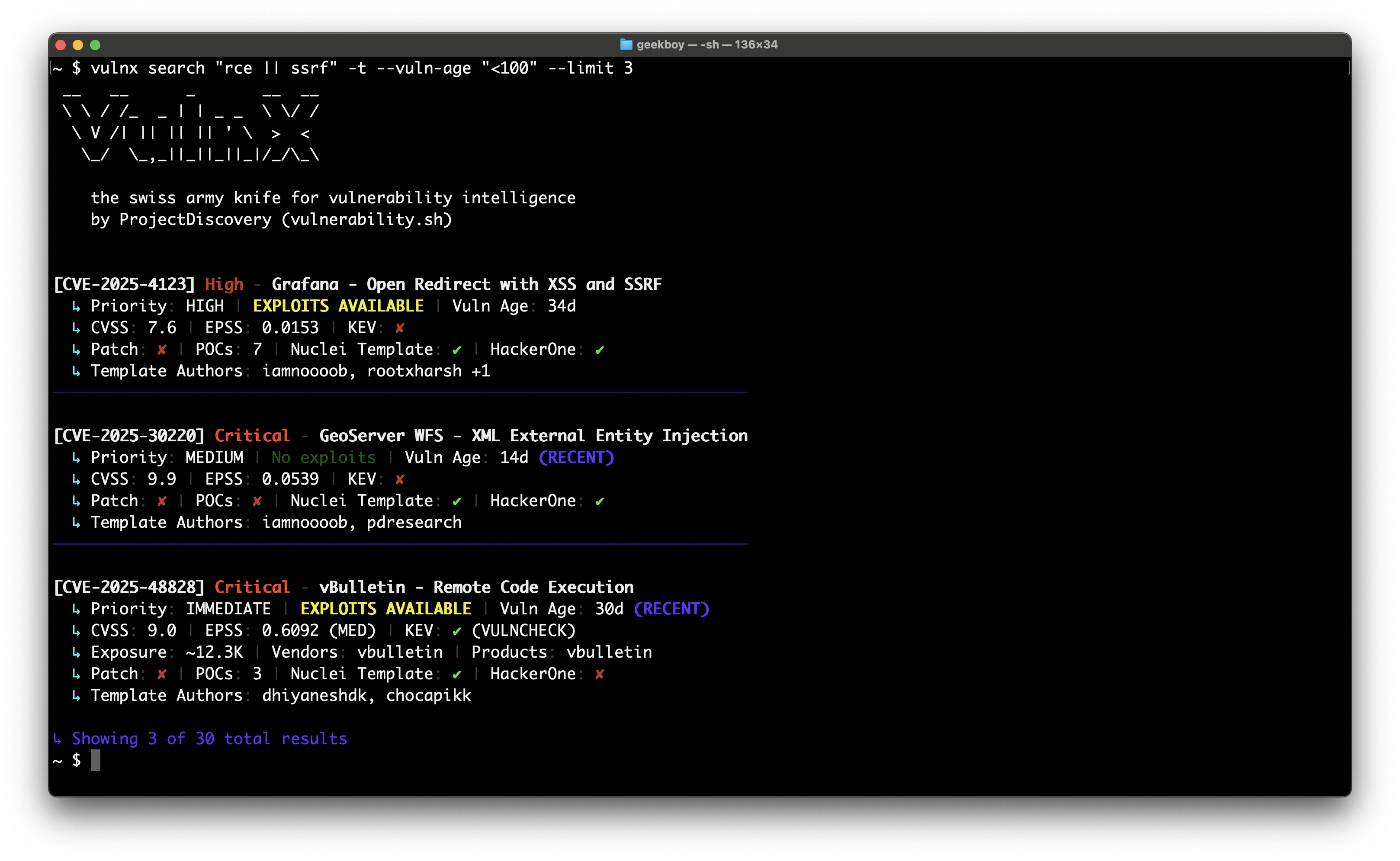
# 1. Get vulnx
go install github.com/projectdiscovery/vulnx/v2/cmd/vulnx@latest

# 2. Explore commands
vulnx --help
vulnx search --help

# 3. Start exploring vulnerabilities (no API key required)
vulnx filters                          # See all available search fields
vulnx search apache                    # Basic search (subject to rate limits)

# 4. Set up your API key (recommended to avoid rate limits)
vulnx auth                              # Get free API key at https://cloud.projectdiscovery.io

# 5. Enhanced exploration with higher limits
vulnx search apache                    # No rate limits
vulnx id CVE-2021-44228               # Faster responses
취약점을 정밀하게 검색:
vulnx search "severity:critical && is_remote:true"
vulnx search "apache || nginx" --limit 20
vulnx search "cvss_score:>8.0 && cve_created_at:2024"
상세 취약점 정보 확인:
vulnx id CVE-2021-44228
vulnx id CVE-2024-1234 --json
취약점 패턴 분석:
vulnx analyze --fields severity
vulnx analyze --fields affected_products.vendor
| 명령어 | 용도 | 예시 |
|---|---|---|
search | 고급 필터로 취약점 검색 | vulnx search "apache && severity:high" |
id | 특정 CVE의 세부 정보 확인 | vulnx id CVE-2021-44228 |
filters | 사용 가능한 모든 검색 필드와 필터 나열 | vulnx filters |
analyze | 필드별 데이터 집계 | vulnx analyze -f severity |
auth | API 접근 구성 | vulnx auth |
version | 버전 정보 표시 및 업데이트 확인 | vulnx version |
update | vulnx를 최신 버전으로 업데이트 | vulnx update |
healthcheck | 연결 상태 테스트 | vulnx healthcheck |
출력 형식:
vulnx search "apache" --json              # Machine-readable JSON
vulnx search "apache" --output results.json  # Save to file
vulnx search "apache" --silent            # Quiet output
검색 제어:
vulnx search "apache" --limit 50          # Get 50 results
vulnx search "apache" --sort-desc cvss_score  # Sort by CVSS score
vulnx search "apache" --fields cve_id,severity  # Specific fields only
고급 검색:
vulnx search --term-facets severity=5,tags=10 "apache"
vulnx search --range-facets numeric:cvss_score:high:8:10 "remote"
vulnx search --highlight "apache"            # Enable search highlighting
vulnx search --facet-size 20 "nginx"         # More facet buckets
vulnx search --detailed "xss"                # Detailed output like 'id' command
검색 가능한 항목 탐색:
vulnx filters                           # Show all available search fields
vulnx filters --json                    # Machine-readable field list
vulnx filters --output fields.json      # Save field info to file
filters 명령어는 모든 검색 가능한 필드에 대한 상세 정보를 표시합니다:
출력 예시:
Field: severity
Data Type: string
Description: Vulnerability severity level (e.g., critical, high, medium, low, info)
Can Sort: Yes
Facet Possible: Yes
Search Analyzer: keyword-lower
Examples: severity:critical, severity:high
Enum Values: critical, high, medium, low, info, unknown

Total: 69 filters available
이 명령어를 사용하면 복잡한 쿼리를 작성하기 전에 새로운 검색 가능성을 발견하고 필드 구문을 이해할 수 있습니다.
고위험 취약점 찾기:
vulnx search "severity:critical && is_remote:true && is_kev:true"
vulnx search "cvss_score:>8.0 && cve_created_at:>=2024"  # High CVSS from 2024
vulnx search "is_kev:true && age_in_days:<90"            # Recent KEV exploits
기술별 검색:
vulnx search "apache"                     # Apache vulnerabilities
vulnx search "apache || nginx"          # Multiple technologies
vulnx search "affected_products.vendor:microsoft"  # By vendor
심각도 및 점수별 필터링:
vulnx search "severity:high"              # High severity
vulnx search "cvss_score:>7.0"            # CVSS score above 7
vulnx search "epss_score:>0.8"            # High EPSS score
시간 기반 검색:
vulnx search "cve_created_at:>=2024"      # Published in 2024 or later
vulnx search "cve_created_at:>=2024-01-01 && cve_created_at:<2024-07-01"  # First half of 2024
vulnx search "age_in_days:<30"            # Recent vulnerabilities (last 30 days)
악용 가능한 취약점 찾기:
vulnx search "is_poc:true"                # Has proof of concept
vulnx search "is_kev:true"                # Known exploited vulns
vulnx search "is_template:true"           # Has Nuclei templates
vulnx search --detailed "log4j"          # Detailed analysis of specific vuln
| 플래그 | 약어 | 설명 | 예시 |
|---|---|---|---|
--product | -p | 제품별 필터링 | --product apache,nginx |
--vendor | 공급업체별 필터링 | --vendor microsoft,oracle | |
--severity | -s | 심각도별 필터링 | --severity critical,high |
--tags | 태그별 필터링 | --tags rce,injection | |
--cvss-score | CVSS 점수별 필터링 | --cvss-score ">8.0" | |
--epss-score | EPSS 점수별 필터링 | --epss-score ">0.8" | |
--vuln-age | -a | 기간(나이)별 필터링 | --vuln-age "<30" |
--vuln-type | 취약점 유형별 필터링 | --vuln-type sql_injection | |
--kev | KEV 취약점만 | --kev | |
--template | -t | Nuclei 템플릿 보유 | --template |
--poc | 개념 증명(PoC) 보유 | --poc | |
--hackerone | HackerOne 신고됨 | --hackerone | |
--remote-exploit | 원격 악용 가능 | --remote-exploit | |
--vuln-status | 취약점 상태별 필터링 | --vuln-status confirmed |
| 플래그 | 약어 | 설명 | 예시 |
|---|---|---|---|
--detailed | 'id'와 같은 상세 출력 | --detailed | |
--highlight | 검색 하이라이트 활성화 | --highlight | |
--limit | -n | 결과 수 | --limit 50 |
--offset | 페이지네이션 오프셋 | --offset 100 | |
--sort-asc | 오름차순 정렬 | --sort-asc cvss_score | |
--sort-desc | 내림차순 정렬 | --sort-desc cve_created_at | |
--fields | 특정 필드 선택 | --fields cve_id,severity | |
--term-facets | 용어 패싯 계산 | --term-facets severity=5 | |
--range-facets | 범위 패싯 계산 | --range-facets numeric:cvss_score:high:8:10 | |
--facet-size | 패싯 버킷 수 | --facet-size 20 |
제품 및 공급업체 필터링:
vulnx search --product apache,nginx     # Filter by products (searches both vendor and product fields)
vulnx search --vendor microsoft,oracle  # Filter by vendors only
vulnx search "NOT apache"               # Exclude products using query syntax
vulnx search "NOT affected_products.vendor:microsoft"  # Exclude vendors using query syntax
