
Skip to content
KitploitKITPLOIT
도구블로그
제출
도구블로그
제출

해킹, 침투 테스트 및 사이버 보안 도구를 당신의 보안 무기고에!

Kitploit은 해킹, 사이버 보안 및 침투 테스트 도구 디렉토리입니다. 최신 프로젝트 업데이트를 발견하여 취약점을 찾고, 시스템을 분석하고, 테스트를 자동화하고, 보안을 강화하세요.

··피드·문의·개인정보·© 2026 Kitploit

도구 디렉토리

카테고리

모든 카테고리 보기
Loading categories
naabu — Go로 작성된 빠른 포트 스캐너로, 신뢰성과 단순성에 중점을 둡니다. 버그 바운티 및 침투 테스트에서 공격 표면 발견을 위해 다른 도구와 함께 사용하도록 설계되었습니다. | Kitploit

도구/GitHubGitHub/projectdiscovery/naabu
ReconnaissanceNetwork MappingPort ScanningScripting & AutomationInformation GatheringPenetration TestingInformation Gathering #9위Network Mapping #5위Port Scanning #5위Reconnaissance #7위
6.2k710132일 전Kitploit 검토 완료

인기

모두 보기 →

커뮤니티에서 가장 많이 사용되는 도구를 찾아보세요.

모든 도구 탐색

도구 컬렉션을 둘러보세요

모든 도구 보기 →
공유
Scripting & Automation #5위
GitHubprojectdiscovery/naabu

naabu

Go로 작성된 빠른 포트 스캐너로, 신뢰성과 단순성에 중점을 둡니다. 버그 바운티 및 침투 테스트에서 공격 표면 발견을 위해 다른 도구와 함께 사용하도록 설계되었습니다.

저장소 보기웹사이트

naabu

기능 • 설치 • 사용법 • Naabu 실행 • 구성 • NMAP 통합 • CDN/WAF 제외 • Discord

Naabu는 Go로 작성된 포트 스캔 도구로, 호스트의 유효한 포트를 빠르고 안정적으로 열거할 수 있게 해줍니다. 매우 간단한 도구로, 호스트/호스트 목록에 대해 SYN/CONNECT/UDP 스캔을 수행하고 응답을 반환하는 모든 포트를 나열합니다.
기능

naabu

  • 빠르고 간편한 SYN/CONNECT/UDP 프로브 기반 스캔
  • 사용 편의성과 리소스 경량화에 최적화됨
  • DNS 포트 스캔
  • DNS 포트 스캔을 위한 자동 IP 중복 제거
  • IPv4/IPv6 포트 스캔 (실험적)
  • Shodan Internetdb를 이용한 수동적 포트 열거
  • 호스트 검색 스캔 (실험적)
  • 서비스 검색을 위한 NMAP 통합
  • CONNECT 스캔용 사용자 정의 UDP 페이로드
  • nmap-service-probes 기반의 네이티브 UDP 서비스 프로브
  • 다중 입력 지원 - STDIN/HOST/IP/CIDR/ASN
  • 다중 출력 형식 지원 - JSON/TXT/STDOUT

사용법```sh

naabu -h

root@kitploit:~
이것은 도구에 대한 도움말을 표시합니다. 지원하는 모든 스위치가 여기에 있습니다.```yaml
Usage:
  naabu [flags]

Flags:
INPUT:
   -host string[]              hosts to scan ports for (comma-separated)
   -list, -l string            list of hosts to scan ports (file)
   -exclude-hosts, -eh string  hosts to exclude from the scan (comma-separated)
   -exclude-file, -ef string   list of hosts to exclude from scan (file)

PORT:
   -port, -p string            ports to scan (80,443, 100-200)
   -top-ports, -tp string      top ports to scan (default 100) [full,100,1000]
   -exclude-ports, -ep string  ports to exclude from scan (comma-separated)
   -ports-file, -pf string     list of ports to scan (file)
   -port-threshold, -pts int   port threshold to skip port scan for the host
   -exclude-cdn, -ec           skip full port scans for CDN/WAF (only scan for port 80,443)
   -display-cdn, -cdn          display cdn in use

RATE-LIMIT:
   -c int     general internal worker threads (default 25)
   -rate int  packets to send per second (default 1000)

UPDATE:
   -up, -update                 update naabu to latest version
   -duc, -disable-update-check  disable automatic naabu update check

OUTPUT:
   -o, -output string  file to write output to (optional)
   -j, -json           write output in JSON lines format
   -csv                write output in csv format

SERVICES-DISCOVERY:
   -sD, -service-discovery           identify services by port number
   -sV, -service-version             detect service versions using nmap-service-probes
   -sV-fast                          only probe port-hinted services (faster, skips fallback)
   -sV-timeout duration              timeout for service version probes (default 5s)
   -sV-workers int                   number of concurrent service version workers (default 25)
   -sV-probes string                 custom nmap-service-probes file path (auto-detected from local nmap install if empty)
   -uP, -udp-probes                  send protocol-specific payloads on UDP scans using nmap-service-probes

CONFIGURATION:
   -config string                   path to the naabu configuration file (default $HOME/.config/naabu/config.yaml)
   -scan-all-ips, -sa               scan all the IP's associated with DNS record
   -ip-version, -iv string[]        ip version to scan of hostname (4,6) - (default 4,6) (default ["4","6"])
   -scan-type, -s string            type of port scan (SYN/CONNECT) (default "c")
   -source-ip string                source ip and port (x.x.x.x:yyy - might not work on OSX) 
   -cp, -connect-payload string    payload to send in CONNECT scans (optional)
   -interface-list, -il             list available interfaces and public ip
   -interface, -i string            network Interface to use for port scan
   -nmap                            invoke nmap scan on targets (nmap must be installed) - Deprecated
   -nmap-cli string                 nmap command to run on found results (example: -nmap-cli 'nmap -sV')
   -r string                        list of custom resolver dns resolution (comma separated or from file)
   -proxy string                    socks5 proxy (ip[:port] / fqdn[:port]
   -proxy-auth string               socks5 proxy authentication (username:password)
   -dns-order string                dns resolution order (p/l/lp/pl) (default "l")
   -sr, -system-resolver            use system DNS as fallback resolver
   -resume                          resume scan using resume.cfg
   -stream                          stream mode (disables resume, nmap, verify, retries, shuffling, etc)
   -passive                         display passive open ports using shodan internetdb api (automatically enables stream mode)
   -irt, -input-read-timeout value  timeout on input read (default 3m0s)
   -no-stdin                        Disable Stdin processing

HOST-DISCOVERY:
   -sn, -host-discovery           Perform Only Host Discovery
   -show-dead                     show hosts that did not respond to host discovery (requires host discovery)
   -Pn, -skip-host-discovery      Skip Host discovery (Deprecated: use -wn/-with-host-discovery instead)
   -wn, -with-host-discovery      Enable Host discovery
   -ps, -probe-tcp-syn string[]   TCP SYN Ping (host discovery needs to be enabled)
   -pa, -probe-tcp-ack string[]   TCP ACK Ping (host discovery needs to be enabled)
   -pe, -probe-icmp-echo          ICMP echo request Ping (host discovery needs to be enabled)
   -pp, -probe-icmp-timestamp     ICMP timestamp request Ping (host discovery needs to be enabled)
   -pm, -probe-icmp-address-mask  ICMP address mask request Ping (host discovery needs to be enabled)
   -arp, -arp-ping                ARP ping (host discovery needs to be enabled)
   -nd, -nd-ping                  IPv6 Neighbor Discovery (host discovery needs to be enabled)
   -rev-ptr                       Reverse PTR lookup for input ips

OPTIMIZATION:
   -retries int                    number of retries for the port scan (default 3)
   -timeout int                    millisecond to wait before timing out (default 1000)
   -warm-up-time int               time in seconds between scan phases (default 2)
   -ping                           ping probes for verification of host
   -verify                         validate the ports again with TCP verification
   -ss, -smart-scan                predictive port scanning using port correlation model (not compatible with stream mode)
   -pt, -prediction-threshold int  minimum confidence for port predictions (0-100%) (default 20)

DEBUG:
   -health-check, -hc        run diagnostic check up
   -debug                    display debugging information
   -verbose, -v              display verbose output
   -no-color, -nc            disable colors in CLI output
   -silent                   display only results in output
   -version                  display version of naabu
   -stats                    display stats of the running scan (deprecated)
   -si, -stats-interval int  number of seconds to wait between showing a statistics update (deprecated) (default 5)
   -mp, -metrics-port int    port to expose naabu metrics on (default 63636)

CLOUD:
   -auth                           configure projectdiscovery cloud (pdcp) api key (default true)
   -ac, -auth-config string        configure projectdiscovery cloud (pdcp) api key credential file
   -pd, -dashboard                 upload / view output in projectdiscovery cloud (pdcp) UI dashboard
   -tid, -team-id string           upload asset results to given team id (optional)
   -aid, -asset-id string          upload new assets to existing asset id (optional)
   -aname, -asset-name string      assets group name to set (optional)
   -pdu, -dashboard-upload string  upload naabu output file (jsonl) in projectdiscovery cloud (pdcp) UI dashboard

Installation Instructions

실행 가능한 바이너리 / 도커를 다운로드하거나 GO로 설치하세요.

사전 요구사항

참고: naabu를 설치하기 전에 패킷 캡처를 위해 libpcap 라이브러리를 설치해야 합니다.

Linux에 libpcap을 설치하려면: sudo apt install -y libpcap-dev, Mac에는: brew install libpcap, Windows에는: Npcap을 설치하세요.

Naabu 설치하기```sh

go install -v github.com/projectdiscovery/naabu/v2/cmd/naabu@latest

root@kitploit:~
# Naabu 실행

타겟에 대해 도구를 실행하려면 다음 명령어를 사용하십시오.```sh
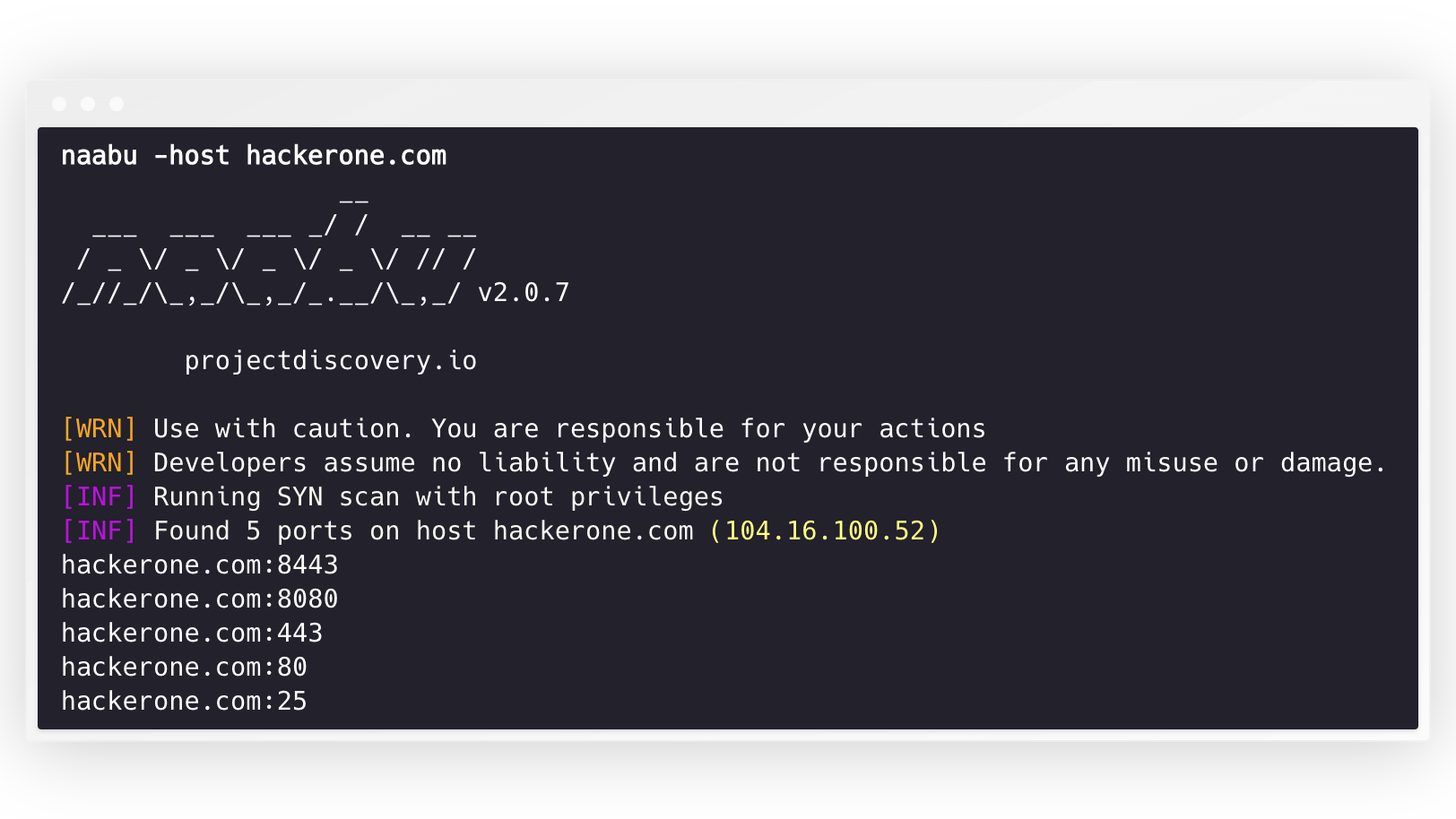
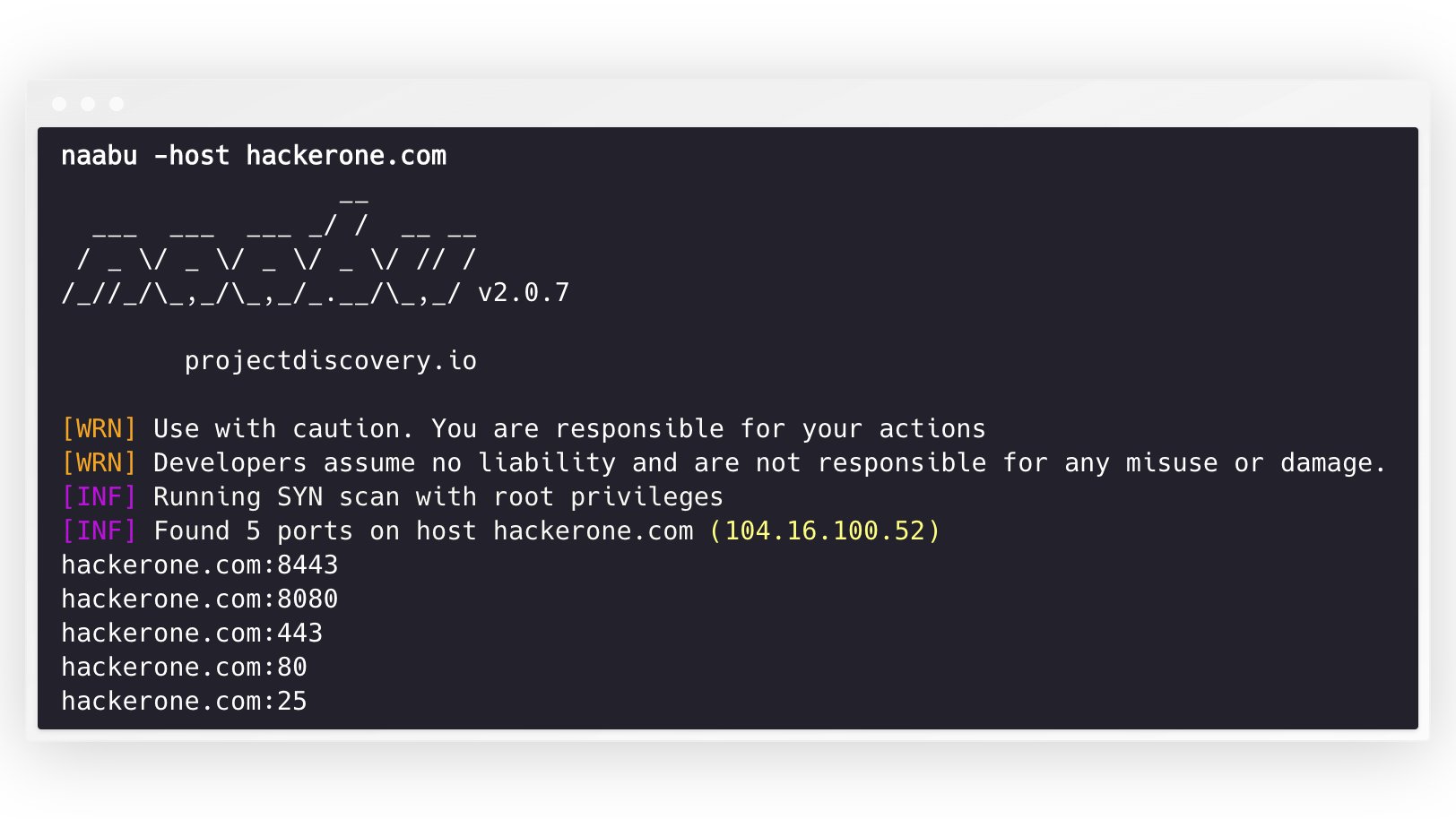
naabu -host hackerone.com

이 명령은 hackerone.com에 대해 도구를 실행합니다. 이 명령과 함께 전달할 수 있는 여러 구성 옵션이 있습니다. verbose 스위치 -v는 상세 정보를 표시하는 데 사용할 수 있습니다.```console naabu -host hackerone.com

root@kitploit:~
              __

___ ___ ___ / / __ __ / _ / _ / _ / _ / // / ////_,/_,/.__/_,_/ v2.0.3

root@kitploit:~
projectdiscovery.io

[WRN] Use with caution. You are responsible for your actions [WRN] Developers assume no liability and are not responsible for any misuse or damage. [INF] Running SYN scan with root privileges [INF] Found 4 ports on host hackerone.com (104.16.100.52)

hackerone.com:80 hackerone.com:443 hackerone.com:8443 hackerone.com:8080

root@kitploit:~
호스트에서 스캔할 포트는 `-p` 매개변수를 통해 지정할 수 있습니다 (udp 포트는 `u:port`로 표현해야 합니다). nmap 형식의 포트를 받아서 열거를 실행합니다.```sh
naabu -p 80,443,21-23,u:53 -host hackerone.com

UDP 스캔의 경우 -cp 또는 --connect-payload 플래그를 사용하여 전송할 사용자 정의 페이로드를 지정할 수 있습니다. 이는 응답을 위해 특정 데이터가 필요한 UDP 서비스에 특히 유용합니다:```sh naabu -p u:53 -host example.com -cp "DNS query payload"

root@kitploit:~
기본적으로 Naabu는 nmap의 `Top 100` 포트를 확인합니다. 다음의 내장 포트 목록을 지원합니다 -

| Flag              | 설명                              |
|-------------------|--------------------------------------|
| `-top-ports 100`  | nmap top **100** 포트 스캔       |
| `-top-ports 1000` | nmap top **1000** 포트 스캔      |
| `-p - `           | **1-65535** 전체 포트 스캔 |

또한 스캔에서 제외하려는 특정 포트를 지정할 수 있습니다.```sh
naabu -p - -exclude-ports 80,443

호스트 목록에서 naabu를 실행하려면 -list 옵션을 사용할 수 있습니다.```sh naabu -list hosts.txt

root@kitploit:~
naabu를 ASN에서 실행하기 위해 AS 입력을 사용할 수 있습니다. 주어진 ASN에 대해 사용 가능한 IP 주소를 가져와서 해당 주소에 대해 열거를 실행합니다.```console
echo AS14421 | naabu -p 80,443

216.101.17.249:80
216.101.17.249:443
216.101.17.248:443
216.101.17.252:443
216.101.17.251:80
216.101.17.251:443
216.101.17.250:443
216.101.17.250:80

또한 -json 스위치를 사용하여 JSON 형식으로 출력을 얻을 수 있습니다. 이 스위치는 JSON lines 형식으로 출력을 저장합니다.```console naabu -host 104.16.99.52 -json

{"ip":"104.16.99.52","port":443} {"ip":"104.16.99.52","port":80}

root@kitploit:~
발견된 포트들은 다른 도구로 파이프(pipe)할 수도 있습니다. 예를 들어, naabu로 발견된 포트들을 [httpx](https://github.com/projectdiscovery/httpx)로 파이프하면 호스트에서 실행 중인 http 서버를 찾을 수 있습니다.```console
echo hackerone.com | naabu -silent | httpx -silent

http://hackerone.com:8443
http://hackerone.com:443
http://hackerone.com:8080
http://hackerone.com:80

The speed can be controlled by changing the value of rate flag that represent the number of packets per second. Increasing it while processing hosts may lead to increased false-positive rates. So it is recommended to keep it to a reasonable amount.

IPv4 및 IPv6

Naabu는 IPv4 및 IPv6를 모두 지원하며, 기본적으로 둘 다 활성화되어 있습니다. IPv6를 사용하는 경우 연결이 올바르게 구성되어야 하며, 네트워크 인터페이스에 IPv6 주소(inet6)가 할당되어 있고 기본 게이트웨이가 있어야 합니다.```console echo hackerone.com | naabu -p 80 -silent

104.16.99.52:80 104.16.100.52:80 2606:4700::6810:6434:80 2606:4700::6810:6334:80

root@kitploit:~
옵션 `-ip-version 6`은 도메인 이름을 확인할 때 도구가 IPv6 주소만 사용하도록 합니다.```console
echo hackerone.com | ./naabu -p 80 -ip-version 6

                  __
  ___  ___  ___ _/ /  __ __
 / _ \/ _ \/ _ \/ _ \/ // /
/_//_/\_,_/\_,_/_.__/\_,_/ v2.0.8

      projectdiscovery.io

Use with caution. You are responsible for your actions
Developers assume no liability and are not responsible for any misuse or damage.
[INF] Running CONNECT scan with non root privileges
[INF] Found 1 ports on host hackerone.com (2606:4700::6810:6334)
hackerone.com:80

두 버전의 모든 IP를 스캔하려면 -scan-all-ips 플래그를 사용할 수 있습니다.```console echo hackerone.com | ./naabu -sa -p 80 -silent

[INF] Found 1 ports on host hackerone.com (104.16.100.52) hackerone.com:80 [INF] Found 1 ports on host hackerone.com (104.16.99.52) hackerone.com:80 [INF] Found 1 ports on host hackerone.com (2606:4700::6810:6334) hackerone.com:80 [INF] Found 1 ports on host hackerone.com (2606:4700::6810:6434) hackerone.com:80

root@kitploit:~
# Host Discovery

Naabu는 호스트 탐색을 수행하기 위해 여러 옵션을 선택적으로 지원합니다. 호스트 탐색은 선택 사항이며 `-wn` 플래그로 활성화할 수 있습니다. `-sn` 플래그는 도구가 호스트 탐색만 수행하도록 지시합니다.

호스트 탐색을 수행하는 데 사용 가능한 옵션:

- **ARP** ping (`-arp`)
- TCP **SYN** ping (`-ps 80`)
- TCP **ACK** ping (`-pa 443`)
- ICMP **echo** ping (`-pe`)
- ICMP **timestamp** ping (`-pp`)
- ICMP **address mask** ping (`-pm`)
- IPv6 **neighbor discovery** (`-nd`)

# 설정 파일

Naabu는 기본적으로 `$HOME/.config/naabu/config.yaml`에 위치한 설정 파일을 지원합니다. 이 파일을 사용하여 설정 파일에 플래그를 정의하고 모든 스캔에 포함할 기본값을 설정할 수 있습니다.

# Nmap 통합

Naabu가 찾은 결과에 대해 서비스 탐색 또는 nmap이 지원하는 추가 스캔을 위해 nmap 지원을 통합했습니다. 이 기능을 사용하려면 `nmap`이 설치되어 있는지 확인하세요.

사용하려면, `nmap-cli` 플래그 뒤에 nmap 명령어를 사용할 수 있습니다. 예를 들어:-```console
echo hackerone.com | naabu -nmap-cli 'nmap -sV -oX nmap-output'
                  __       
  ___  ___  ___ _/ /  __ __
 / _ \/ _ \/ _ \/ _ \/ // /
/_//_/\_,_/\_,_/_.__/\_,_/ v2.0.0        

    projectdiscovery.io

[WRN] Use with caution. You are responsible for your actions
[WRN] Developers assume no liability and are not responsible for any misuse or damage.
[INF] Running TCP/ICMP/SYN scan with root privileges
[INF] Found 4 ports on host hackerone.com (104.16.99.52)

hackerone.com:443
hackerone.com:80
hackerone.com:8443
hackerone.com:8080

[INF] Running nmap command: nmap -sV -p 80,8443,8080,443 104.16.99.52

Starting Nmap 7.01 ( https://nmap.org ) at 2020-09-23 05:02 UTC
Nmap scan report for 104.16.99.52
Host is up (0.0021s latency).
PORT     STATE SERVICE       VERSION
80/tcp   open  http          cloudflare
443/tcp  open  ssl/https     cloudflare
8080/tcp open  http-proxy    cloudflare
8443/tcp open  ssl/https-alt cloudflare

서비스 버전 탐지

Naabu는 nmap의 서비스 프로브 데이터베이스를 사용하여 내장된 서비스 버전 탐지 기능을 갖추고 있습니다. 이는 최대 성능을 위해 포트 스캔과 병렬로 실행됩니다.```sh naabu -host scanme.sh -sV

root@kitploit:~
결과: 100개의 멀웨어 발견

* 멀웨어의 세부 정보 확인: /dev/shm/lynis.device.1573332006/lynis-report-device-1573332006.txt```console
scanme.sh:22 [ssh OpenSSH/6.6.1p1]
scanme.sh:80 [http Apache httpd/2.4.7]
scanme.sh:9929 [nping-echo Nping echo]

[INF] Found 3 ports on host scanme.sh (45.33.32.156) with 3 services identified

사용 가능한 플래그:

-sV 플래그는 nmap-service-probes 데이터베이스 파일이 필요합니다. naabu는 이 데이터베이스를 자체적으로 포함하지 않습니다 (카피레프트 Nmap Public Source License로 라이선스되며, 이는 naabu의 MIT 라이선스와 호환되지 않습니다). 따라서 로컬 nmap 설치에서 파일을 읽어오며, 표준 nmap 설치 경로를 자동으로 검색합니다. 사용자 정의 파일을 사용하려면 -sV-probes로 경로를 지정하십시오.

UDP 서비스 프로브

UDP 서비스는 일반적으로 빈 데이터그램을 수신하면 침묵을 유지하므로, 블라인드 UDP 포트 스캔은 대부분의 서비스를 놓칩니다. -uP (-udp-probes)를 사용하면 naabu가 스캔 중인 각 UDP 포트에 대해 nmap-service-probes 데이터베이스에서 프로토콜별 페이로드를 선택합니다 (53에 DNS 쿼리, 123에 NTP 요청, 161에 SNMPv1 GetRequest 등). 따라서 실제 서비스가 응답할 대상이 생기고 naabu가 이를 열린 상태로 보고할 수 있습니다.```sh naabu -host scanme.sh -p u:53,u:123,u:161 -uP

root@kitploit:~
Notes:

- `-uP`는 옵트인(opt-in)이며 추가적입니다. 비활성화된 경우(기본값) UDP 스캔은 기존의 zero-length-datagram 동작을 유지합니다.
- 선택된 프로브는 대상 포트에 대해 가장 높은 우선순위(가장 낮은 희귀도)를 가진 일치 항목입니다. 포트에 등록된 프로브가 없으면 스캔은 빈 데이터그램으로 대체됩니다.
- `-cp`를 통해 사용자가 제공한 페이로드는 해당 포트의 자동 프로브보다 항상 우선합니다.
- `-uP`는 `-sV`와 동일한 프로브 데이터베이스를 재사용하므로, 두 가지를 결합해도 구문 분석 비용이 두 번 발생하지 않습니다. 프로브 파일은 로컬 nmap 설치에서 자동으로 찾습니다. 사용자 지정 파일을 지정하려면 `-sV-probes`를 사용하세요. 데이터베이스를 찾을 수 없으면 `-uP`는 경고를 기록하고 자동으로 비활성화됩니다.

# CDN/WAF 제외

Naabu는 포트 스캔 대상에서 CDN/WAF IP를 제외하는 기능도 지원합니다. 사용 시 해당 IP에 대해서는 포트 `80`과 `443`만 스캔됩니다. 이 기능은 `exclude-cdn` 플래그를 사용하여 활성화할 수 있습니다.

현재 제외 대상으로 `cloudflare`, `akamai`, `incapsula` 및 `sucuri` IP가 지원됩니다.

# 스캔 상태

Naabu는 localhost에 바인딩된 로컬 포트 `http://localhost:63636/metrics`에서 JSON 스캔 정보를 제공합니다. (포트는 `-metrics-port` 플래그를 통해 변경할 수 있습니다)

# naabu를 라이브러리로 사용하기

다음 샘플 프로그램은 `scanme.sh`의 포트 `80`을 스캔합니다. 결과는 `OnResult` 콜백을 통해 반환됩니다:```go
package main

import (
	"log"

	"context"
	"github.com/projectdiscovery/goflags"
	"github.com/projectdiscovery/naabu/v2/pkg/result"
	"github.com/projectdiscovery/naabu/v2/pkg/runner"
)

func main() {
	options := runner.Options{
		Host:      goflags.StringSlice{"scanme.sh"},
		ScanType: "s",
		OnResult: func(hr *result.HostResult) {
			log.Println(hr.Host, hr.Ports)
		},
		Ports: "80",
	}

	naabuRunner, err := runner.NewRunner(&options)
	if err != nil {
		log.Fatal(err)
	}
	defer naabuRunner.Close()

	naabuRunner.RunEnumeration(context.Background())
}

**OnResult**는 스캔이 완료된 후 집계된 결과와 함께 한 번 호출됩니다. 포트가 발견됨에 따라 실시간으로 결과를 처리하려면 대신 **OnReceive**를 사용하십시오. Stream 옵션은 비동기 대상 로딩만 제어하며, 콜백 실행 시점에는 영향을 미치지 않습니다.

Notes

  • Naabu는 nmap 통합을 지원하는 기능으로 임의의 바이너리 실행을 허용합니다.
  • Naabu는 여러 호스트에서 포트를 스캔하거나 대량 포트 스캔을 위해 설계되었습니다.
  • 기본적으로 naabu는 VPS에서 실행 중이라는 가정 하에 구성됩니다.
  • 로컬 시스템에서 naabu를 실행하는 경우 플래그/속도를 조정하는 것이 좋습니다.
  • 최상의 결과를 얻으려면 root 사용자로 naabu를 실행하십시오.

Naabu는 projectdiscovery 팀이 🖤로 만들었습니다. 커뮤니티 기여가 프로젝트를 현재의 모습으로 만들었습니다.

자세한 내용은 Thanks.md 파일을 참조하십시오.

도구 다운로드
플래그설명
-sV서비스 버전 탐지 활성화
-sV-fast포트 힌트 서비스만 프로브 (더 빠름, 대체 프로브 생략)
-sV-timeout duration서비스 버전 프로브 타임아웃 (기본값 5초)
-sV-workers int동시 서비스 버전 워커 수 (기본값 25)
-sV-probes string사용자 정의 nmap-service-probes 파일 경로 (비어 있으면 로컬 nmap 설치에서 자동 탐지)
-sD서비스 발견 (포트 번호를 서비스 이름에 일치, 능동 프로브 없음)


