
Skip to content
KitploitKITPLOIT
도구블로그
제출
도구블로그
제출

해킹, 침투 테스트 및 사이버 보안 도구를 당신의 보안 무기고에!

Kitploit은 해킹, 사이버 보안 및 침투 테스트 도구 디렉토리입니다. 최신 프로젝트 업데이트를 발견하여 취약점을 찾고, 시스템을 분석하고, 테스트를 자동화하고, 보안을 강화하세요.

··피드·문의·개인정보·© 2026 Kitploit

도구 디렉토리

카테고리

모든 카테고리 보기
Loading categories
titus — 고성능 비밀 정보 스캐너. CLI, Go 라이브러리, Burp Suite 확장 기능 및 Chrome 확장 프로그램. 실시간 자격 증명 검증이 포함된 487개의 탐지 규칙. | Kitploit
도구/GitHubGitHub/praetorian-inc/titus
Static AnalysisVulnerability ScannersContainer SecurityWeb Proxies & InterceptionCode AnalysisPenetration TestingDevSecOpsSecret DetectionSupply Chain Security
GitHubpraetorian-inc/titus

titus

고성능 비밀 정보 스캐너. CLI, Go 라이브러리, Burp Suite 확장 기능 및 Chrome 확장 프로그램. 실시간 자격 증명 검증이 포함된 487개의 탐지 규칙.
66775183일 전Kitploit 검토 완료

인기

모두 보기 →

커뮤니티에서 가장 많이 사용되는 도구를 찾아보세요.

모든 도구 탐색

도구 컬렉션을 둘러보세요

모든 도구 보기 →
저장소 보기웹사이트
공유
Titus - 소스 코드, git 이력, 바이너리 파일을 위한 고성능 시크릿 스캐너

Titus: 고성능 시크릿 스캐너

Go License CI

Titus는 소스 코드, 파일, git 이력에서 자격 증명, API 키, 토큰을 탐지하는 고성능 시크릿 스캐너입니다. 수백 개의 서비스와 자격 증명 유형을 포괄하는 487개의 탐지 규칙을 기본 제공하며, 이는 NoseyParker와 Kingfisher에서 가져온 것입니다. Titus는 CLI, Go 라이브러리, Burp Suite 확장, Chrome 브라우저 확장으로 실행되며, 모두 동일한 탐지 엔진과 규칙 세트를 공유합니다.

보안 엔지니어, 침투 테스터, DevSecOps 팀을 위해 설계된 Titus는 Hyperscan/Vectorscan 가속 정규식 매칭과 실시간 자격 증명 검증을 결합하여 전체 코드베이스에서 유출된 시크릿을 찾아내고 검증합니다.

목차

  • Titus를 사용하는 이유
  • 설치
  • 빠른 시작
  • 스캔 옵션
  • 탐지 결과 점수 산정
  • Go 라이브러리
  • Burp Suite 확장
  • 브라우저 확장
  • 소스에서 빌드
  • 기여
  • 라이선스
  • Titus를 사용하는 이유

    • 빠른 시크릿 스캔: 사용 가능한 경우 Hyperscan/Vectorscan으로 가속되는 정규식 매칭을 제공하며, 모든 플랫폼에서 이식성을 위해 순수 Go 폴백을 지원합니다.
    • 폭넓은 자격 증명 탐지 범위: 487개의 규칙이 AWS, GCP, Azure, GitHub, Slack, 데이터베이스, CI/CD 시스템 및 수백 개 이상의 서비스에 대한 API 키, 토큰, 자격 증명을 탐지합니다.
    • 실시간 시크릿 검증: 탐지된 시크릿을 해당 소스 API에 대해 확인하여 활성 상태인지 검증함으로써 오탐을 줄이고 수정 우선순위를 정합니다.
    • 위험 기반 심각도 점수 산정: 모든 탐지 결과는 숫자 점수(0–100)와 심각도 등급(info → critical)을 받습니다. 점수는 정적 규칙 메타데이터, 코드 접근성 컨텍스트, 자격 증명의 실제 영향 범위를 측정하는 실시간 API 호출에 의해 조정되므로, 가장 위험한 탐지 결과가 항상 먼저 표시됩니다.
    • 컨테이너 이미지 스캔: 모든 레지스트리, tarball 또는 OCI 레이아웃 디렉터리에서 Docker 및 OCI 이미지를 직접 스캔합니다. Docker 데몬이나 바이너리가 필요하지 않습니다.
    • 모든 워크플로를 위한 다양한 인터페이스: CLI에서 스캔하고, Go 라이브러리로 임베드하고, Burp Suite에서 HTTP 트래픽을 수동적으로 스캔하거나, 애플리케이션 보안 테스트 중에 Chrome에서 웹 페이지를 스캔합니다.
    • 바이너리 파일 추출: Office 문서, PDF, 아카이브(zip, tar, 7z), 모바일 앱(APK, IPA), 브라우저 확장 등에서 시크릿을 추출하고 스캔합니다.

    설치

    Releases 페이지에서 미리 빌드된 바이너리를 다운로드하거나 소스에서 빌드하세요:```bash make build

    root@kitploit:~
    바이너리는 `dist/titus`에 위치합니다.
    
    ## 빠른 시작```bash
    # Scan a file for secrets
    titus scan path/to/file.txt
    
    # Scan a directory for leaked credentials
    titus scan path/to/directory
    
    # Scan a public GitHub repository (no token needed)
    titus scan github.com/org/repo
    
    # Scan a public GitLab project (no token needed)
    titus scan gitlab.com/namespace/project
    
    # Scan git history for secrets in past commits
    titus scan --git path/to/repo
    
    # Scan a Docker / OCI image (pulled from a registry — no docker daemon required)
    titus scan --docker alpine:latest
    
    # Validate detected secrets against source APIs
    titus scan path/to/code --validate
    

    결과는 데이터스토어(기본값 titus.ds)에 기록되고 콘솔에 출력됩니다.

    스캔 옵션

    GitHub & GitLab 스캔

    API 토큰 없이 URL로 공개 저장소를 직접 스캔할 수 있습니다:```bash

    Scan a GitHub repository

    titus scan github.com/kubernetes/kubernetes

    Scan a GitLab project

    titus scan gitlab.com/gitlab-org/cli

    Full URLs work too

    titus scan https://github.com/org/repo titus scan https://gitlab.com/namespace/project.git

    root@kitploit:~
    조직 전체 또는 사용자 전체 스캔에는 전용 하위 명령을 사용하십시오:```bash
    # Scan all public repos in a GitHub org
    titus github --org kubernetes
    
    # Scan all repos in a GitHub org with a token (private repos + higher rate limits)
    titus github --org kubernetes --token $GITHUB_TOKEN
    
    # Scan all repos for a GitHub user
    titus github --user octocat
    
    # Scan all projects in a GitLab group
    titus gitlab scan --group mygroup --token $GITLAB_TOKEN
    
    # Scan a single repo with git history (finds deleted secrets)
    titus github owner/repo --git
    

    토큰은 공개 저장소의 경우 선택 사항입니다. 비공개 저장소 접근과 더 높은 API 속도 제한을 위해 GITHUB_TOKEN 또는 GITLAB_TOKEN을 설정하세요 (또는 --token을 사용하세요).

    Docker / OCI 이미지 스캔

    컨테이너 이미지를 직접 스캔하세요 — docker 데몬도, docker 바이너리도 필요하지 않습니다. Titus는 HTTPS를 통해 모든 OCI 레지스트리에서 이미지를 바로 가져오거나 (~/.docker/config.json의 자격 증명 사용), 로컬 docker save tarball 또는 OCI 이미지 레이아웃 디렉터리에서 이미지를 읽습니다. 그런 다음 이미지 manifest/config 메타데이터와 모든 레이어의 모든 일반 파일을 스캔하며, 여기에는 이후 레이어에서 삭제된 하위 레이어 파일도 포함됩니다 (이미지 기록에서 시크릿이 복구 가능하게 남아 있을 수 있기 때문입니다).```bash

    Pull from a registry and scan

    titus scan --docker alpine:latest titus scan docker://ghcr.io/owner/repo:tag

    Scan an image saved to a tarball:

    docker save my-app:latest -o my-app.tar

    podman save my-app:latest -o my-app.tar

    titus scan --docker ./my-app.tar

    Scan an OCI image layout directory:

    docker buildx build --output type=oci,dest=./img/ .

    skopeo copy docker://my-app:latest oci:./img:latest

    titus scan --docker ./img/

    root@kitploit:~
    인증은 기존 Docker / Podman 설정(`~/.docker/config.json`, `${XDG_RUNTIME_DIR}/containers/auth.json`)을 사용합니다. 새로 로그인이 필요한 프라이빗 레지스트리는 먼저 `docker login`(또는 `podman login`, `crane auth login`)으로 인증해야 합니다 — titus는 자격 증명을 묻는 프롬프트를 표시하지 않습니다.
    
    ### 스캔 결과 보기
    
    `report`를 사용하여 이전 스캔의 발견 사항을 다시 읽습니다:```bash
    # Human-readable summary of detected secrets
    titus report
    
    # JSON output for programmatic processing
    titus report --format json
    
    # SARIF output for CI/CD integration with GitHub Advanced Security
    titus report --format sarif
    
    # Report from a specific datastore
    titus report --datastore path/to/titus.ds
    

    스캔 시 --format으로 출력 형식을 제어할 수도 있습니다:```bash titus scan path/to/code --format json

    root@kitploit:~
    ### 탐지된 시크릿 검증
    
    스캔 중 `--validate`를 전달하여 탐지된 시크릿을 해당 소스 API에 대해 확인합니다:```bash
    titus scan path/to/code --validate
    

    검증은 동시에 실행되며(기본적으로 4개의 워커, --validate-workers로 구성 가능) 각 발견 사항을 확인됨, 부인됨 또는 알 수 없음으로 표시합니다.

    필터링 탐지 규칙```bash

    List all available detection rules

    titus rules list

    Scan with only specific rules (e.g., AWS and GCP credentials)

    titus scan path/to/code --rules-include "aws,gcp"

    Exclude rules by pattern

    titus scan path/to/code --rules-exclude "kingfisher.generic"

    Use a custom rules file for organization-specific secrets

    titus scan path/to/code --rules path/to/custom-rules.yaml

    Opt in to rules marked noisy: true (high false-positive rate, off by default)

    titus scan path/to/code --include-noisy

    root@kitploit:~
    ### 바이너리 파일에서 시크릿 추출
    
    Titus는 바이너리 파일 형식에서 텍스트를 추출하고 내용에서 시크릿을 스캔할 수 있습니다:```bash
    # Extract and scan all supported binary formats
    titus scan path/to/files --extract=all
    
    # Target specific formats
    titus scan path/to/files --extract=xlsx,docx,pdf,zip
    

    지원되는 형식에는 Office 문서(xlsx, docx, pptx, odp, ods, odt), PDF, Jupyter 노트북, SQLite 데이터베이스, 이메일(eml, rtf), 아카이브(zip, tar, tar.gz, jar, war, ear, apk, ipa, crx, xpi, 7z)가 포함됩니다. 아카이브는 구성 가능한 깊이와 크기 제한까지 재귀적으로 추출됩니다.```bash

    Tune extraction limits for large codebases

    titus scan path/to/files --extract=all
    --extract-max-size 10MB
    --extract-max-total 100MB
    --extract-max-depth 5

    root@kitploit:~
    SQLite 데이터베이스의 경우, Titus는 모든 테이블에서 텍스트를 추출합니다(기본적으로 테이블당 1000행). 조정하려면 `--sqlite-row-limit`을 사용하세요:```bash
    # Full dump of all SQLite tables (no row limit)
    titus scan path/to/files --extract=all --sqlite-row-limit 0
    
    # Custom row limit per table
    titus scan path/to/files --extract=all --sqlite-row-limit 5000
    

    파인딩 스코어링

    Titus가 생성하는 모든 파인딩은 0–100 범위의 숫자 점수와 심각도 등급을 가집니다:

    점수심각도
    0–20info
    21–40low
    41–60medium
    61–80high
    81–100critical

    점수는 규칙의 base_score에서 시작하며, 자격 증명에 대해 알려진 정보를 기반으로 점수를 높이거나 낮추는 수정자(modifier) 에 의해 조정됩니다:```bash

    Score findings using static rule metadata only (no network calls)

    titus scan path/to/code

    Score findings AND make live API calls to verify credential blast radius

    (calls AWS STS/IAM and GitHub API for supported credential types)

    titus scan path/to/code --score-scope

    Override the accessibility context (default: auto-detected from git remote)

    titus scan path/to/code --accessibility public # no penalty for public repos titus scan path/to/code --accessibility private # -25 penalty (default for local scans)

    root@kitploit:~
    Titus는 AWS 자격 증명, GitHub PAT, Slack 토큰을 위한 YAML 스코어러와 함께 제공되며, `--score-scope`가 활성화된 경우 실시간 IAM 정책 열거(AWS)와 저장소 권한 확인(GitHub 세분화된 PAT)을 수행하는 Go 기반 SDK 스코어러도 포함합니다.
    
    전체 참조 자료는 [docs/scoring.md](https://github.com/praetorian-inc/titus/blob/main/docs/scoring.md)를 참조하세요: 심각도 등급, 수정자 종류, 내장 스코어러 세부 정보, 그리고 자체 YAML 또는 Go 스코어러를 작성하는 방법이 설명되어 있습니다.
    
    ## 시크릿 탐지를 위한 Go 라이브러리
    
    Titus는 자체 도구와 파이프라인에 시크릿 탐지를 추가할 수 있도록 Go 라이브러리로 임포트할 수 있습니다.```bash
    go get github.com/praetorian-inc/titus
    

    2.4.2.2.2.2.2.2.2.2.2.2.2.2.2.2.2.2.2.2.2.2.2.2.2.2.2.2.2.2.2.2.2.2.2.2.2.2.2.2.2.2.2.2.2.2.2.2.2.2.2.2.2.2.2.2.2.2.2.2.2.2.2.2.2.2.2.2.2.2.2.2.2.2.2.2.2.2.2.2.2.2.2.2.2.2.2.2.2.2.2.2.2.2.2.2.2.2.2.2.2.2.2.2.2.2.2.2.2.2.2.2.2.2.2.2.2.2.2.2.2.2.2.2.2.2.2.2.2.2.2.2.2.2.2.2.2.2.2.2.2.2.2.2.2.2.2.2.2.2.2.2.2.2.2.2.2.2.2.2.2.2.2.2.2.2.2.2.2.2.2.2.2.2.2.2.2.2.2.2.2.2.2.2.2.2.2.2.2.2.2.2.2.2.2.2.2.2.2.2.2.2.2.2.2.2.2.2.2.2.2.2.2.2.2.2.2.2.2.2.2.2.2.2.2.2.2.2.2.2.2.2.2.2.2.2.2.2.2.2.2.2.2.2.2.2.2.2.2.2.2.2.2.2.2.2.2.2.2.2.2.2.2.2.2.2.2.2.2.2.2.2.2.2.2.2.2.2.2.2.2.2.2.2.2.2.2.2.2.2.2.2.2.2.2.2.2.2.2.2.2.2.2.2.2.2.2.2.2.2.2.2.2.2.2.2.2.2.2.2.2.2.2.2.2.2.2.2.2.2.2.2.2.2.2.2.2.2.2.2.2.2.2.2.2.2.2.2.2.2.2.2.2.2.2.2.2.2.2.2.2.2.2.2.2.2.2.2.2.2.2.2.2.2.2.2.2.2.2.2.2.2.2.2.2.2.2.2.2.2.2.2.2.2.2.2.2.2.2.2.2.2.2.2.2.2.2.2.2.2.2.2.2.2.2.2.2.2.2.2.2.2.2.2.2.2.2.2.2.2.2.2.2.2.2.2.2.2.2.2.2.2.2.2.2.2.2.2.2.2.2.2.2.2.2.2.2.2.2.2.2.2.2.2.2.2.2.2.2.2.2.2.2.2.2.2.2.2.2.2.2.2.2.2.2.2.2.2.2.2.2.2.2.2.2.2.2.2.2.2.2.2.2.2.2.2.2.2.2.2.2.2.2.2.2.2.2.2.2.2.2.2.2.2.2.2.2.2.2.2.2.2.2.2.2.2.2.2.2.2.2.2.2.2.2.2.2.2.2.2.2.2.2.2.2.2.2.2.2.2.2.2.2.2.2.2.2.2.2.2.2.2.2.2.2.2.2.2.2.2.2.2.2.2.2.2.2.2.2.2.2.2.2.2.2.2.2.2.2.2.2.2.2.2.2.2.2.2.2.2.2.2.2.2.2.2.2.2.2.2.2.2.2.2.2.2.2.2.2.2.2.2.2.2.2.2.2.2.2.2.2.2.2.2.2.2.2.2.2.2.2.2.2.2.2.2.2.2.2.2.2.2.2.2.2.2.2.2.2.2.2.2.2.2.2.2.2.2.2.2.2.2.2.2.2.2.2.2.2.2.2.2.2.2.2.2.2.2.2.2.2.2.2.2.2.2.2.2.2.2.2.2.2.2.2.2.2.2.2.2.2.2.2.2.2.2.2.2.2.2.2.2.2.2.2.2.2.2.2.2.2.2.2.2.2.2.2.2.2.2.2.2.2.2.2.2.2.2.2.2.2.2.2.2.2.2.2.2.2.2.2.2.2.2.2.2.2.2.2.2.2.2.2.2.2.2.2.2.2.2.2.2.2.2.2.2.2.2.2.2.2.2.2.2.2.2.2.2.2.2.2.2.2.2.2.2.2.2.2.2.2.2.2.2.2.2.2.2.2.2.2.2.2.2.2.2.2.2.2.2.2.2.2.2.2.2.2.2.2.2.2.2.2.2.2.2.2.2.2.2.2.2.2.2.2.2.2.2.2.2.2.2.2.2.2.2.2.2.2.2.2.2.2.2.2.2.2.2.2.2.2.2.2.2.2.2.2.2.2.2.2.2.2.2.2.2.2.2.2.2.2.2.2.2.2.2.2.2.2.2.2.2.2.2.2.2.2.2.2.2.2.2.2.2.2.2.2.2.2.2.2.2.2.2.2.2.2.2.2.2.2.2.2.2.2.2.2.2.2.2.2.2.2.2.2.2.2.2.2.2.2.2.2.2.2.2.2.2.2.2.2.2.2.2.2.2.2.2.2.2.2.2.2.2.2.2.2.2.2.2.2.2.2.2.2.2.2.2.2.2.2.2.2.2.2.2.2.2.2.2.2.2.2.2.2.2.2.2.2.2.2.2.2.2.2.2.2.2.2.2.2.2.2.2.2.2.2.2.2.2.2.2.2.2.2.2.2.2.2.2.2.2.2.2.2.2.2.2.2.2.2.2.2.2.2.2.2.2.2.2.2.2.2.2.2.2.2.2.2.2.2.2.2.2.2.2.2.2.2.2.2.2.2.2.2.2.2.2.2.2.2.2.2.2.2.2.2.2.2.2.2.2.2.2.2.2.2.2.2.2.2.2.2.2.2.2.2.2.2.2.2.2.2.2.2.2.2.2.2.2.2.2.2.2.2.2.2.2.2.2.2.2.2.2.2.2.2.2.2.2.2.2.2.2.2.2.2.2.2.2.2.2.2.2.2.2.2.2.2.2.2.2.2.2.2.2.2.2.2.2.2.2.2.2.2.2.2.2.2.2.2.2.2.2.2.2.2.2.2.2.2.2.2.2.2.2.2.2.2.2.2.2.2.2.2.2.2.2.2.2.2.2.2.2.2.2.2.2.2.2.2.2.2.2.2.2.2.2.2.2.2.2.2.2.2.2.2.2.2.2.2.2.2.2.2.2.2.2.2.2.2.2.2.2.2.2.2.2.2.2.2.2.2.2.2.2.2.2.2.2.2.2.2.2.2.2.2.2.2.2.2.2.2.2.2.2.2.2.2.2.2.2.2.2.2.2.2.2.2.2.2.2.2.2.2.2.2.2.2.2.2.2.2.2.2.2.2.2.2.2.2.2.2.2.2.2.2.2.2.2.2.2.2.2.2.2.2.2.2.2.2.2.2.2.2.2.2.2.2.2.2.2.2.2.2.2.2.2.2.2.2.2.2.2.2.2.2.2.2.2.2.2.2.2.2.2.2.2.2.2.2.2.2.2.2.2.2.2.2.2.2.2.2.2.2.2.2.2.2.2.2.2.2.2.2.2.2.2.2.2.2.2.2.2.2.2.2.2.2.2.2.2.2.2.2.2.2.2.2.2.2.2.2.2.2.2.2.2.2.2.2.2.2.2.2.2.2.2.2.2.2.2.2.2.2.2.2.2.2.2.2.2.2.2.2.2.2.2.2.2.2.2.2.2.2.2.2.2.2.2.2.2.2.2.2.2.2.2.2.2.2.2.2.2.2.2.2.2.2.2.2.2.2.2.2.2.2.2.2.2.2.2.2.2.2.2.2.2.2.2.2.2.2.2.2.2.2.2.2.2.2.2.2.2.2.2.2.2.2.2.2.2.2.2.2.2.2.2.2.2.2.2.2.2.2.2.2.2.2.2.2.2.2.2.2.2.2.2.2.2.2.2.2.2.2.2.2.2.2.2.2.2.2.2.2.2.2.2.2.2.2.2.2.2.2.2.2.2.2.2.2.2.2.2.2.2.2.2.2.2.2.2.2.2.2.2.2.2.2.2.2.2.2.2.2.2.2.2.2.2.2.2.2.2.2.2.2.2.2.2.2.2.2.2.2.2.2.2.2.2.2.2.2.2.2.2.2.2.2.2.2.2.2.2.2.2.2.2.2.2.2.2.2.2.2.2.2.2.2.2.2.2.2.2.2.2.2.2.2.2.2.2.2.2.2.2.2.2.2.2.2.2.2.2.2.2.2.2.2.2.2.2.2.2.2.2.2.2.2.2.2.2.2.2.2.2.2.2.2.2.2.2.2.2.2.2.2.2.2.2.2.2.2.2.2.2.2.2.2.2.2.2.2.2.2.2.2.2.2.2.2.2.2.2.2.2.2.2.2.2.2.2.2.2.2.2.2.2.2.2.2.2.2.2.2.2.2.2.2.2.2.2.2.2.2.2.2.2.2.2.2.2.2.2.2.2.2.2.2.2.2.2.2.2.2.2.2.2.2.2.2.2.2.2.2.2.2.2.2.2.2.2.2.2.2.2.2.2.2.2.2.2.2.2.2.2.2.2.2.2.2.2.2.2.2.2.2.2.2.2.2.2.2.2.2.2.2.2.2.2.2.2.2.2.2.2.2.2.2.2.2.2.2.2.2.2.2.2.2.2.2.2.2.2.2.2.2.2.2.2.2.2.2.2.2.2.2.2.2.2.2.2.2.2.2.2.2.2.2.2.2.2.2.2.2.2.2.2.2.2.2.2.2.2.2.2.2.2.2.2.2.2.2.2.2.2.2.2.2.2.2.2.2.2.2.2.2.2.2.2.2.2.2.2.2.2.2.2.2.2.2.2.2.2.2.2.2.2.2.2.2.2.2.2.2.2.2.2.2.2.2.2.2.2.2.2.2.2.2.2.2.2.2.2.2.2.2.2.2.2.2.2.2.2.2.2.2.2.2.2.2.2.2.2.2.2.2.2.2.2.2.2.2.2.2.2.2.2.2.2.2.2.2.2.2.2.2.2.2.2.2.2.2.2.2.2.2.2.2.2.2.2.2.2.2.2.2.2.2.2.2.2.2.2.2.2.2.2.2.2.2.2.2.2.2.2.2.2.2.2.2.2.2.2.2.2.2.2.2.2.2.2.2.2.2.2.2.2.2.2.2.2.2.2.2.2.2.2.2.2.2.2.2.2.2.2.2.2.2.2.2.2.2.2.2.2.2.2.2.2.2.2.2.2.2.2.2.2.2.2.2.2.2.2.2.2.2.2.2.2.2.2.2.2.2.2.2.2.2.2.2.2.2.2.2.2.2.2.2.2.2.2.2.2.2.2.2.2.2.2.2.2.2.2.2.2.2.2.2.2.2.2.2.2.2.2.2.2.2.2.2.2.2.2.2.2.2.2.2.2.2.2.2.2.2.2.2.2.2.2.2.2.2.2.2.2.2.2.2.2.2.2.2.2.2.2.2.2.2.2.2.2.2.2.2.2.2.2.2.2.2.2.2.2.2.2.2.2.2.2.2.2.2.2.2.2.2.2.2.2.2.2.2.2.2.2.2.2.2.2.2.2.2.2.2.2.2.2.2.2.2.2.2.2.2.2.2.2.2.2.2.2.2.2.2.2.2.2.2.2.2.2.2.2.2.2.2.2.2.2.2.2.2.2.2.2.2.2.2.2.2.2.2.2.2.2.2.2.2.2.2.2.2.2.2.2.2.2.2.2.2.2.2.2.2.2.2.2.2.2.2.2.2.2.2.2.2.2.2.2.2.2.2.2.2.2.2.2.2.2.2.2.2.2.2.2.2.2.2.2.2.2.2.2.2.2.2.2.2.2.2.2.2.2.2.2.2.2.2.2.2.2.2.2.2.2.2.2.2.2.2.2.2.2.2.2.2.2.2.2.2.2.2.2.2.2.2.2.2.2.2.2.2.2.2.2.2.2.2.2.2.2.2.2.2.2.2.2.2.2.2.2.2.2.2.2.2.2.2.2.2.2.2.2.2.2.2.2.2.2.2.2.2.2.2.2.2.2.2.2.2.2.2.2.2.2.2.2.2.2.2.2.2.2.2.2.2.2.2.2.2.2.2.2.2.2.2.2.2.2.2.2.2.2.2.2.2.2.2.2.2.2.2.2.2.2.2.2.2.2.2.2.2.2.2.2.2.2.2.2.2.2.2.2.2.2.2.2.2.2.2.2.2.2.2.2.2.2.2.2.2.2.2.2.2.2.2.2.2.2.2.2.2.2.2.2.2.2.2.2.2.2.2.2.2.2.2.2.2.2.2.2.2.2.2.2.2.2.2.2.2.2.2.2.2.2.2.2.2.2.2.2.2.2.2.2.2.2.2.2.2.2.2.2.2.2.2.2.2.2.2.2.2.2.2.2.2.2.2.2.2.2.2.2.2.2.2.2.2.2.2.2.2.2.2.2.2.2.2.2.2.2.2.2.2.2.2.2.2.2.2.2.2.2.2.2.2.2.2.2.2.2.2.2.2.2.2.2.2.2.2.2.2.2.2.2.2.2.2.2.2.2.2.2.2.2.2.2.2.2.2.2.2.2.2.2.2.2.2.2.2.2.2.2.2.2.2.2.2.2.2.2.2.2.2.2.2.2.2.2.2.2.2.2.2.2.2.2.2.2.2.2.2.2.2.2.2.2.2.2.2.2.2.2.2.2.2.2.2.2.2.2.2.2.2.2.2.2.2.2.2.2.2.2.2.2.2.2.2.2.2.2.2.2.2.2.2.2.2.2.2.2.2.2.2.2.2.2.2.2.2.2.2.2.2.2.2.2.2.2.2.2.2.2.2.2.2.2.2.2.2.2.2.2.2.2.2.2.2.2.2.2.2.2.2.2.2.2.2.2.2.2.2.2.2.2.2.2.2.2.2.2.2.2.2.2.2.2.2.2.2.2.2.2.2.2.2.2.2.2.2.2.2.2.2.2.2.2.2.2.2.2.2.2.2.2.2.2.2.2.2.2.2.2.2.2.2.2.2.2.2.2.2.2.2.2.2.2.2.2.2.2.2.2.2.2.2.2.2.2.2.2.2.2.2.2.2.2.2.2.2.2.2.2.2.2.2.2.2.2.2.2.2.2.2.2.2.2.2.2.2.2.2.2.2.2.2.2.2.2.2.2.2.2.2.2.2.2.2.2.2.2.2.2.2.2.2.2.2.2.2.2.2.2.2.2.2.2.2.2.2.2.2.2.2.2.2.2.2.2.2.2.2.2.2.2.2.2.2.2.2.2.2.2.2.2.2.2.2.2.2.2.2.2.2.2.2.2.2.2.2.2.2.2.2.2.2.2.2.2.2.2.2.2.2.2.2.2.2.2.2.2.2.2.2.2.2.2.2.2.2.2.2.2.2.2.2.2.2.2.2.2.2.2.2.2.2.2.2.2.2.2.2.2.2.2.2.2.2.2.2.2.2.2.2.2.2.2.2.2.2.2.2.2.2.2.2.2.2.2.2.2.2.2.2.2.2.2.2.2.2.2.2.2.2.2.2.2.2.2.2.2.2.2.2.2.2.2.2.2.2.2.2.2.2.2.2.2.2.2.2.2.2.2.2.2.2.2.2.2.2.2.2.2.2.2.2.2.2.2.2.2.2.2.2.2.2.2.2.2.2.2.2.2.2.2.2.2.2.2.2.2.2.2.2.2.2.2.2.2.2.2.2.2.2.2.2.2.2.2.2.2.2.2.2.2.2.2.2.2.2.2.2.2.2.2.2.2.2.2.2.2.2.2.2.2.2.2.2.2.2.2.2.2.2.2.2.2.2.2.2.2.2.2.2.2.2.2.2.2.2.2.2.2.2.2.2.2.2.2.2.2.2.2.2.2.2.2.2.2.2.2.2.2.2.2.2.2.2.2.2.2.2.2.2.2.2.2.2.2.2.2.2.2.2.2.2.2.2.2.2.2.2.2.2.2.2.2.2.2.2.2.2.2.2.2.2.2.2.2.2.2.2.2.2.2.2.2.2.2.2.2.2.2.2.2.2.2.2.2.2.2.2.2.2.2.2.2.2.2.2.2.2.2.2.2.2.2.2.2.2.2.2.2.2.2.2.2.2.2.2.2.2.2.2.2.2.2.2.2.2.2.2.2.2.2.2.2.2.2.2.2.2.2.2.2.2.2.2.2.2.2.2.2.2.2.2.2.2.2.2.2.2.2.2.2.2.2.2.2.2.2.2.2.2.2.2.2.2.2.2.2.2.2.2.2.2.2.2.2.2.2.2.2.2.2.2.2.2.2.2.2.2.2.2.2.2.2.2.2.2.2.2.2.2.2.2.2.2.2.2.2.2.2.2.2.2.2.2.2.2.2.2.2.2.2.2.2.2.2.2.2.2.2.2.2.2.2.2.2.2.2.2.2.2.2.2.2.2.2.2.2.2.2.2.2.2.2.2.2.2.2.2.2.2.2.2.2.2.2.2.2.2.2.2.2.2.2.2.2.2.2.2.2.2.2.2.2.2.2.2.2.2.2.2.2.2.2.2.2.2.2.2.2.2.2.2.2.2.2.2.2.2.2.2.2.2.2.2.2.2.2.2.2.2.2.2.2.2.2.2.2.2.2.2.2.2.2.2.2.2.2.2.2.2.2.2.2.2.2.2.2.2.2.2.2.2.2.2.2.2.2.2.2.2.2.2.2.2.2.2.2.2.2.2.2.2.2.2.2.2.2.2.2.2.2.2.2.2.2.2.2.2.2.2.2.2.2.2.2.2.2.2.2.2.2.2.2.2.2.2.2.2.2.2.2.2.2.2.2.2.2.2.2.2.2.2.2.2.2.2.2.2.2.2.2.2.2.2.2.2.2.2.2.2.2.2.2.2.2.2.2.2.2.2.2.2.2.2.2.2.2.2.2.2.2.2.2.2.2.2.2.2.2.2.2.2.2.2.2.2.2.2.2.2.2.2.2.2.2.2.2.2.2.2.2.2.2.2.2.2.2.2.2.2.2.2.2.2.2.2.2.2.2.2.2.2.2.2.2.2.2.2.2.2.2.2.2.2.2.2.2.2.2.2.2.2.2.2.2.2.2.2.2.2.2.2.2.2.2.2.2.2.2.2.2.2.2.2.2.2.2.2.2.2.2.2.2.2.2.2.2.2.2.2.2.2.2.2.2.2.2.2.2.2.2.2.2.2.2.2.2.2.2.2.2.2.2.2.2.2.2.2.2.2.2.2.2.2.2.2.2.2.2.2.2.2.2.2.2.2.2.2.2.2.2.2.2.2.2.2.2.2.2.2.2.2.2.2.2.2.2.2.2.2.2.2.2.2.2.2.2.2.2.2.2.2.2.2.2.2.2.2.2.2.2.2.2.2.2.2.2.2.2.2.2.2.2.2.2.2.2.2.2.2.2.2.2.2.2.2.2.2.2.2.2.2.2.2.2.2.2.2.2.2.2.2.2.2.2.2.2.2.2.2.2.2.2.2.2.2.2.2.2.2.2.2.2.2.2.2.2.2.2.2.2.2.2.2.2.2.2.2.2.2.2.2.2.2.2.2.2.2.2.2.2.2.2.2.2.2.2.2.2.2.```go

    package main

    import ( "fmt" "log"

    root@kitploit:~
    "github.com/praetorian-inc/titus"
    

    )

    func main() { // Initialize the secrets scanner with default rules scanner, err := titus.NewScanner() if err != nil { log.Fatal(err) } defer scanner.Close()

    root@kitploit:~
    // Scan a string for API keys, tokens, and credentials
    matches, err := scanner.ScanString(`aws_access_key_id = AKIAIOSFODNN7EXAMPLE`)
    if err != nil {
        log.Fatal(err)
    }
    
    for _, match := range matches {
        fmt.Printf("%s (rule: %s) at line %d\n",
            match.RuleName, match.RuleID,
            match.Location.SourceSpan.Start.Line,
        )
    }
    

    }

    root@kitploit:~
    라이브러리는 바이트와 파일 스캔, 탐지된 시크릿 검증, 사용자 정의 규칙 로드도 지원합니다:```go
    // Scan a file for leaked credentials
    matches, err := scanner.ScanFile("/path/to/config.json")
    
    // Enable validation to check if detected secrets are live
    scanner, err := titus.NewScanner(titus.WithValidation())
    
    // Load custom detection rules for organization-specific secrets
    rules, err := titus.LoadRulesFromFile("/path/to/rules.yaml")
    scanner, err := titus.NewScanner(titus.WithRules(rules))
    

    전체 API 레퍼런스, 동시성 패턴, 더 많은 예제는 docs/library-usage.md를 참조하세요.

    시크릿 스캐닝을 위한 Burp Suite 확장

    Burp 확장은 프록시 트래픽 및 능동 침투 테스트 중에 HTTP 응답에서 시크릿을 스캔합니다.

    설정

    Linux / macOS (소스에서 빌드)```bash

    Build the CLI and Burp extension JAR, install CLI to ~/.titus/

    make install-burp

    root@kitploit:~
    그런 다음 Burp Suite의 Extensions > Add에서 `dist/titus-burp-1.0.0-all.jar`를 로드합니다.
    
    #### Windows (Releases에서 다운로드)
    
    1. [Releases](../../releases)에서 `titus-windows-amd64.exe`와 `titus-burp-<version>.jar`를 다운로드합니다
    2. Titus 디렉터리를 생성하고 바이너리를 설치합니다:   ```powershell
       mkdir %USERPROFILE%\.titus
       copy titus-windows-amd64.exe %USERPROFILE%\.titus\titus.exe
    
    1. Burp Suite에서 Extensions > Add 아래에 JAR을 로드합니다

    Linux / macOS (Releases에서 다운로드)

    1. 플랫폼에 맞는 바이너리와 titus-burp-<version>.jar를 Releases에서 다운로드합니다:
      • Linux의 경우 titus-linux-amd64 또는 titus-linux-arm64
      • macOS의 경우 titus-darwin-amd64 또는 titus-darwin-arm64
    2. 바이너리를 설치합니다: ```bash mkdir -p ~/.titus cp titus- ~/.titus/titus chmod +x ~/.titus/titus
      root@kitploit:~
    3. Burp Suite의 Extensions > Add에서 JAR을 로드합니다

    이 확장 프로그램은 백그라운드에서 titus serve 프로세스를 실행하고 NDJSON을 사용하여 stdin/stdout으로 통신합니다. 탐지 규칙은 시작 시 한 번 로드됩니다.

    Burp 확장 프로그램 기능

    • 수동 시크릿 스캔: Burp를 통해 흐르는 프록시 트래픽을 자동으로 스캔합니다
    • 능동 시크릿 스캔: 선택한 요청을 스캔하는 우클릭 컨텍스트 메뉴
    • 중복 제거: 동일한 시크릿은 참여(engagement)당 한 번만 보고됩니다
    • 고속 경로 필터링: 바이너리 콘텐츠, 이미지, 비텍스트 응답은 건너뜁니다
    • 실시간 자격 증명 검증: 탐지된 시크릿을 소스 API에 대해 확인하여 활성 상태인지 검증합니다
    • 오탐 관리: 노이즈를 필터링하기 위해 발견 항목을 오탐으로 표시합니다
    • 심각도 분류: 발견 항목은 위험도(높음/중간/낮음)에 따라 색상으로 구분됩니다
    • 내보내기: 보고를 위해 발견 항목을 JSON으로 저장합니다

    Burp 확장 프로그램 인터페이스

    이 확장 프로그램은 Burp에 Titus 탭을 추가하며, 세 개의 하위 탭이 있습니다:

    Secrets: 유형, 호스트, 검증 상태별로 필터링할 수 있는 모든 탐지된 시크릿입니다.

    Titus Burp Suite extension secrets tab showing detected API keys and credentials with validation status

    • 검증 상태: 시크릿이 확인되었는지 여부를 표시합니다(Active/Inactive/Unknown)
    • 필터링: Type, Host, Status 버튼을 클릭하여 특정 값으로 필터링하고, 검색 상자를 사용하여 텍스트 및 정규식 매칭을 수행합니다
    • 일괄 작업: 여러 행을 선택하여 일괄적으로 검증하거나 오탐으로 표시합니다
    • Secret Details 패널: 발견 항목을 선택하여 다음을 확인합니다:
      • Details: 규칙 정보, 카테고리, 전체 시크릿 값, 최초 발견 타임스탬프
      • URLs: 이 시크릿이 발견된 모든 위치
      • Validation: 세부 정보가 포함된 검증 결과(예: AWS 계정 ID, ARN)
      • Request/Response: 시크릿이 강조 표시된 전체 HTTP 트래픽

    Statistics: 유형 및 호스트별로 그룹화된 시크릿의 집계 보기입니다.
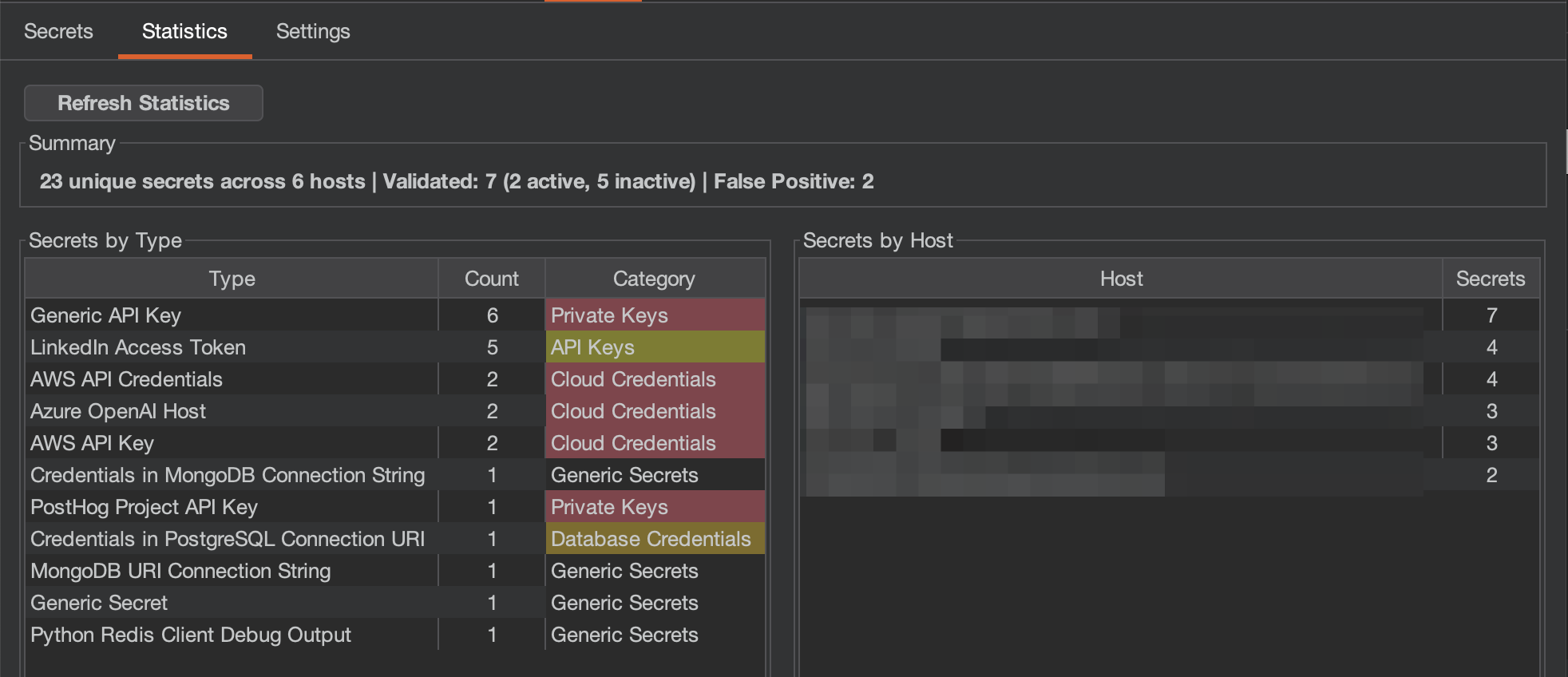
    Titus Burp Suite extension statistics tab showing secrets by type and host
    • Summary: 총 고유 시크릿 수, 스캔된 호스트, 검증 분석(활성 vs 비활성), 오탐 수
    • Secrets by Type: 카테고리 분류가 포함된 각 시크릿 유형의 개수
    • Secrets by Host: 호스트별로 발견된 시크릿 수

    Settings: 스캔 옵션, 검증, 심각도 매핑을 구성합니다.

    Titus Burp Suite extension settings tab with scan configuration options

    • 스캔 설정:
      • 수동 스캔: 모든 프록시 트래픽을 자동으로 스캔합니다(기본적으로 활성화됨)
      • 요청 본문 스캔: 애플리케이션이 전송한 요청 본문에서도 시크릿을 스캔합니다
      • 검증: 시크릿을 소스 API에 대해 확인하도록 활성화합니다(아웃바운드 요청을 수행하며 경고를 트리거할 수 있음)
    • 스캔 매개변수: 워커 스레드, 최대 파일 크기, 컨텍스트 스니펫 길이
    • 심각도 구성: 시크릿 카테고리별로 심각도 수준을 사용자 지정합니다
    • 작업: 캐시 지우기, 설정 초기화, 발견 항목을 JSON으로 저장/내보내기

    Burp에서 요청을 볼 때 시크릿이 탐지되면 응답 검사기에 Titus 탭이 나타나, 메인 Titus 탭으로 전환하지 않고도 발견 항목에 빠르게 접근할 수 있습니다.

    Titus tab in Burp Suite response inspector highlighting detected secrets in HTTP responses

    시크릿 스캔을 위한 Chrome 브라우저 확장 프로그램

    Chrome 확장 프로그램은 웹 애플리케이션 보안 평가 중에 웹 페이지에서 시크릿을 스캔합니다.

    설정```bash

    make build-extension

    root@kitploit:~
    1. `chrome://extensions/`로 이동합니다
    2. **개발자 모드**를 활성화합니다
    3. **압축해제된 확장 프로그램을 로드**를 클릭하고 `extension/` 디렉터리를 선택합니다
    
    ### 브라우저 확장 프로그램 기능
    
    - 인라인 및 외부 JavaScript와 스타일시트에서 API 키와 토큰을 스캔합니다
    - localStorage와 sessionStorage에서 유출된 자격 증명을 스캔합니다
    - 포괄적인 시크릿 탐지를 위한 선택적 네트워크 응답 캡처
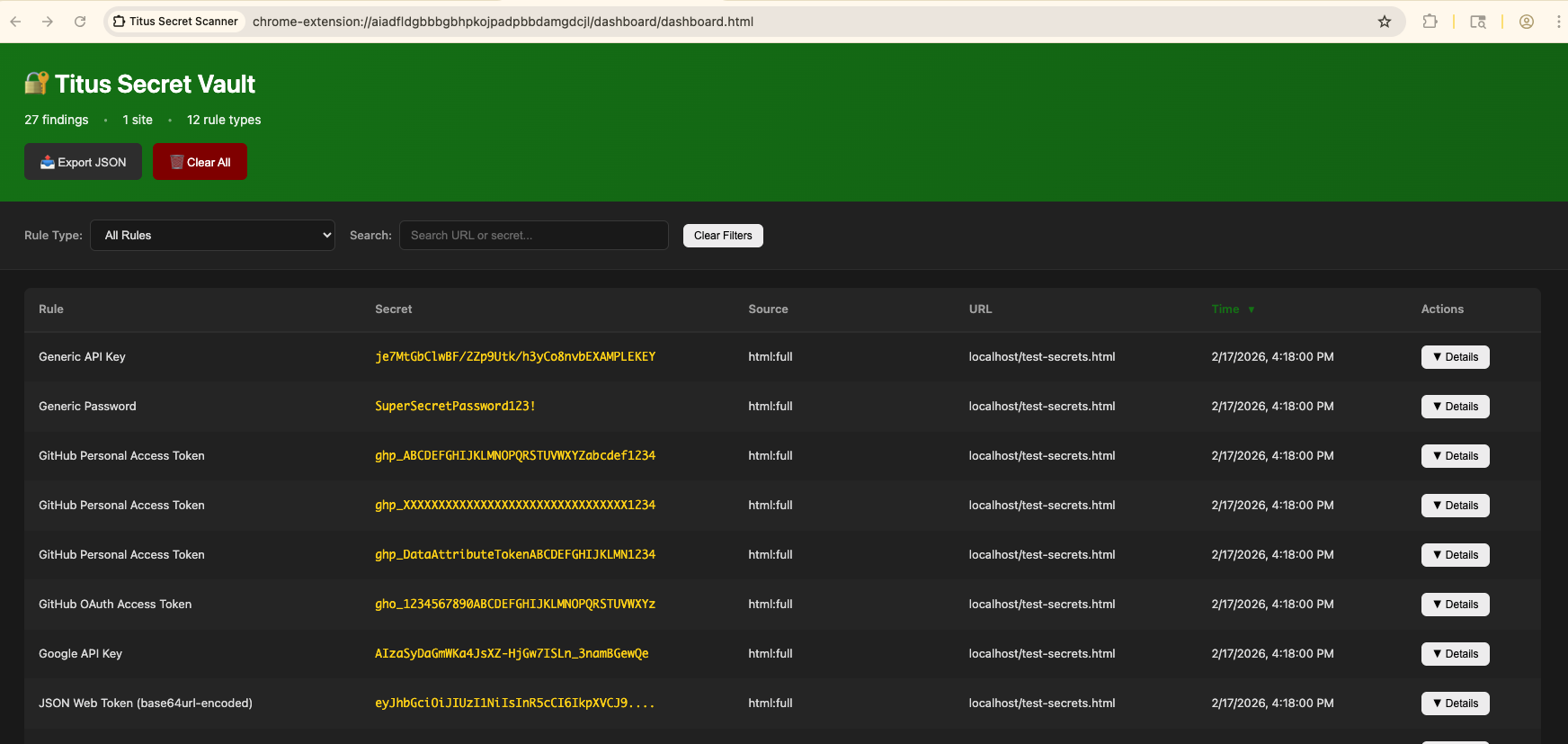
    - 결과는 팝업과 대시보드에 표시됩니다
    
    <img width="1719" height="958" alt="Titus Chrome extension popup showing detected secrets on a web page" src="https://assets.kitploit.com/production/public/readmes/11969/057a24e2746412ceabe1aac0292a2de463de1efee5bca2489ca34b59d8b0dc2c.png" />
    
    <img width="1744" height="827" alt="Titus Chrome extension dashboard with aggregated secret detection results" src="https://assets.kitploit.com/production/public/readmes/11969/265d972fadcc7f212944d7a1d8fd58a43446e7199d1209900e83b96a546ffb00.png" />
    
    ### 보안 공지
    
    브라우저 확장 프로그램은 외부 리소스를 스캔하기 위해 방문한 페이지에서 Content Security Policy와 CORS 헤더를 제거합니다. 이는 확장 프로그램이 활성화된 동안 방문하는 사이트의 보안 태세를 약화시킵니다. **활성 보안 테스트 중에만 활성화하십시오.**
    
    ## 소스에서 빌드
    
    ### 표준 빌드 (Vectorscan 가속)
    
    기본적으로 Titus는 SIMD 가속 정규식 매칭을 위해 [Vectorscan](https://github.com/VectorCamp/vectorscan) (ARM) / [Hyperscan](https://github.com/intel/hyperscan) (x86)과 함께 컴파일됩니다. 이를 위해서는 CGO, C 라이브러리, 그리고 `pkg-config`(cgo가 라이브러리를 찾는 데 사용)가 필요합니다. `make build`는 이를 확인하고 누락된 항목이 있으면 Homebrew / apt / dnf를 통해 설치를 시도합니다:```bash
    # Build the CLI binary with vectorscan acceleration (outputs to dist/titus)
    make build
    
    # Build the Burp Suite extension JAR
    make build-burp
    
    # Build the Chrome browser extension
    make build-extension
    
    # Run unit tests
    make test
    
    # Run integration tests
    make integration-test
    

    시작 시 가속 엔진이 활성화되어 있으면 [vectorscan] N/N rules compiled for Hyperscan이 표시됩니다.

    자동 설치에 의존하지 않고 C 라이브러리를 직접 설치하려면:```bash

    macOS (Homebrew)

    brew install pkg-config vectorscan

    Ubuntu/Debian

    sudo apt-get install pkg-config libhyperscan-dev

    Fedora/RHEL

    sudo dnf install pkgconf-pkg-config vectorscan-devel

    Or build vectorscan from source:

    git clone --depth 1 --branch vectorscan/5.4.11 https://github.com/VectorCamp/vectorscan.git cd vectorscan && cmake -B build -DCMAKE_INSTALL_PREFIX=/usr/local && cmake --build build && sudo cmake --install build

    root@kitploit:~
    `go build`를 직접 실행하는 경우(예: Titus 임베딩 시), 태그를 전달하고 CGO를 활성화하세요:```bash
    # macOS (Homebrew) — adjust PKG_CONFIG_PATH to your installed version
    CGO_ENABLED=1 PKG_CONFIG_PATH="$(brew --prefix vectorscan)/lib/pkgconfig" \
      go build -tags vectorscan -o dist/titus ./cmd/titus
    
    # Linux (system-installed)
    CGO_ENABLED=1 go build -tags vectorscan -o dist/titus ./cmd/titus
    

    Pure-Go 빌드 (C 의존성 없음)

    C 라이브러리를 설치할 수 없거나 완전히 이식 가능한 정적 바이너리를 원한다면, 대신 pure-Go 엔진을 빌드하세요. Titus는 vectorscan이 컴파일되어 있지 않을 때마다 런타임에 자동으로 이 엔진으로 폴백합니다:```bash

    Portable pure-Go binary (no CGO, no vectorscan)

    make build-pure

    Fully static binary

    make build-static

    root@kitploit:~
    #### 자동 Hyperscan 데이터베이스 캐시
    
    Titus는 성공적으로 컴파일된 각 Hyperscan 데이터베이스를 표준 사용자 캐시에 자동으로 직렬화합니다. 이후에 정확히 동일한 순서의 규칙과 플래그를 가진 스캐너 인스턴스는 해당 데이터베이스를 다시 컴파일하는 대신 로드합니다. 캐시 파일은 Hyperscan의 `hs_serialize_database`가 생성한 수정되지 않은 바이트 스트림이며, Titus는 `hs_deserialize_database`로 이를 로드합니다.
    
    `TITUS_CACHE_DIR`은 캐시 위치를 재정의할 수 있습니다. 캐시 쓰기는 원자적이며 최선 노력 방식으로 수행됩니다. 캐시를 사용할 수 없거나 읽기 전용이더라도 스캔을 방해하지 않습니다. 누락되었거나 손상되었거나 호환되지 않거나 지문이 다른 데이터베이스는 정상적인 컴파일을 트리거하고 가능한 경우 캐시를 갱신합니다.
    
    직렬화된 데이터베이스는 아키텍처, CPU 기능, Hyperscan 버전에 따라 다릅니다. Titus는 역직렬화 중에 호환되지 않는 항목을 감지하고 현재 런타임용으로 컴파일된 데이터베이스로 교체합니다.
    
    ## 기여
    
    기여를 환영합니다! Titus에 기여하는 방법에 대한 지침은 [CONTRIBUTING.md](https://github.com/praetorian-inc/titus/blob/main/CONTRIBUTING.md)를 참조하세요.
    
    ## 라이선스
    
    Apache License 2.0 — [LICENSE](https://github.com/praetorian-inc/titus/blob/main/LICENSE)를 참조하세요.
    
    탐지 규칙은 [NoseyParker](https://github.com/praetorian-inc/noseyparker)(Praetorian Security, Inc.)와 [Kingfisher](https://github.com/mongodb/kingfisher)(MongoDB, Inc.)에서 파생되었으며, 둘 다 Apache 2.0에 따라 라이선스가 부여됩니다. 전체 출처 표시는 [NOTICE](https://github.com/praetorian-inc/titus/blob/main/NOTICE)를 참조하세요.
    
    도구 다운로드
