
Skip to content
KitploitKITPLOIT
도구블로그
제출
도구블로그
제출

해킹, 침투 테스트 및 사이버 보안 도구를 당신의 보안 무기고에!

Kitploit은 해킹, 사이버 보안 및 침투 테스트 도구 디렉토리입니다. 최신 프로젝트 업데이트를 발견하여 취약점을 찾고, 시스템을 분석하고, 테스트를 자동화하고, 보안을 강화하세요.

··피드·문의·개인정보·© 2026 Kitploit

도구 디렉토리

카테고리

모든 카테고리 보기
Loading categories
Steganography-Online-Codec-JavaScript — 스테가노그래피 온라인 코덱을 사용하면 256비트 PBKDF2 파생 키를 사용하는 AES 암호화 알고리즘으로 이미지 및 사진 내부에 비밀번호로 암호화된 메시지를 숨길 수 있습니다. | Kitploit
도구/GitHubGitHub/pelock/steganography-online-codec-javascript
Encryption/Decryption ToolsWeb SecuritySteganographyCryptographyPrivacy
GitHubpelock/steganography-online-codec-javascript

Steganography-Online-Codec-JavaScript

스테가노그래피 온라인 코덱을 사용하면 256비트 PBKDF2 파생 키를 사용하는 AES 암호화 알고리즘으로 이미지 및 사진 내부에 비밀번호로 암호화된 메시지를 숨길 수 있습니다.

저장소 보기

인기

모두 보기 →

커뮤니티에서 가장 많이 사용되는 도구를 찾아보세요.

모든 도구 탐색

도구 컬렉션을 둘러보세요

모든 도구 보기 →
공유
웹사이트
354개월 전아직 검토되지 않음

JavaScript 및 NPM용 스테가노그래피 온라인 코덱 SDK

스테가노그래피 온라인 코덱(Steganographic Online Codec) 을 사용하면 AES 암호화 알고리즘과 256비트 PBKDF2 파생 키를 사용하여 이미지 및 사진 내부에 비밀번호로 암호화된 메시지를 숨길 수 있습니다.

다음 사이트에서 무료로 사용할 수 있습니다:

https://www.pelock.com/products/steganography-online-codec

이 SDK는 WebAPI 인터페이스를 통해 코덱과 그 인코딩 및 디코딩 기능에 대한 프로그래밍 방식의 접근을 제공합니다.

스테가노그래피란 무엇이며 어떻게 작동하나요?

스테가노그래피는 겉보기에는 무해해 보이는 다른 이미지 파일 내에 메시지를 삽입하여 정보를 숨기는 기술과 과학을 설명하는 용어입니다.

이 경우, 암호화된 숨겨진 메시지의 개별 비트는 선택한 이미지의 픽셀에 있는 RGB 색상 구성 요소의 최하위 비트(LSB)로 저장됩니다.
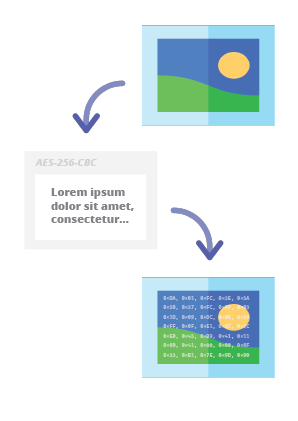
스테가노그래피 온라인 코덱 - 이미지에 메시지 숨기기

당사의 스테가노그래피 인코더를 사용하면 모든 텍스트 메시지를 안전한 방식으로 이미지에 숨기고 의심을 불러일으키지 않고 보낼 수 있습니다. 올바른 복호화 비밀번호를 제공한 후에만 메시지를 읽을 수 있습니다.

설치

Web API SDK 설치의 권장 방법은 NPM(Node Package Manager)을 통한 것입니다.

다음을 실행하세요:

root@kitploit:~
npm i steganography-online-codec

또는 package.json의 dependencies 섹션에 다음 항목을 직접 추가하세요:

root@kitploit:~
  "dependencies": {
    "steganography-online-codec": "latest"
  },

설치 패키지는 https://www.npmjs.com/package/steganography-online-codec 에서 확인할 수 있습니다.

다른 프로그래밍 언어용 패키지

설치 패키지는 여러 인기 프로그래밍 언어의 저장소에 업로드되었으며 해당 소스 코드는 GitHub에 게시되었습니다:

대체 사용법

Python 모듈을 사용하고 싶지 않다면 파일에서 직접 가져올 수 있습니다:

root@kitploit:~
from pelock.steganography_online_codec import *

이미지 파일 내에 비밀 메시지를 숨기는 방법

root@kitploit:~
"use strict";

/******************************************************************************
 *
 * Steganography Online Codec WebApi interface usage example.
 *
 * In this example shows how to hide an encrypted secret message in an image file.
 *
 * Version      : v1.00
 * Language     : JavaScript
 * Author       : Bartosz Wójcik (original example)
 * Project      : https://www.pelock.com/products/steganography-online-codec
 * Homepage     : https://www.pelock.com
 *
 * @link https://www.pelock.com/products/steganography-online-codec
 * @copyright Copyright (c) 2020-2025 PELock LLC
 * @license Apache-2.0
 *
/*****************************************************************************/

// include Steganography Online Codec module
import { SteganographyOnlineCodec, Errors } from 'steganography-online-codec';
// or if tested locally use:
//import { SteganographyOnlineCodec, Errors } from '../src/SteganographyOnlineCodec.mjs';

// create Steganography Online Codec class instance (we are using our activation key)
const mySteganographyOnlineCodec = new SteganographyOnlineCodec('YOUR-WEB-API-KEY');

// encode a hidden message (encrypted with your password) within an image file
(async () => {

	const inputFile = 'input_file.jpg';
	const secretMessage = 'Secret message';
	const password = 'Pa$$word';
	const outputFile = 'output_file_with_hidden_secret_message.png';

	try {
		const result = await mySteganographyOnlineCodec.encode(inputFile, secretMessage, password, outputFile);

		// result object holds the encoding results as well as other information
		console.log('Secret messaged encoded and saved to the output PNG file.');
	} catch (err) {
		console.error('Encoding failed:', err.error_message || err.message || String(err));
	}
})();

더 자세한 설명과 적절한 오류 코드 확인이 포함된 복잡한 예제

root@kitploit:~
"use strict";

/******************************************************************************
 *
 * Steganography Online Codec WebApi interface usage example.
 *
 * In this example, we will see how to hide an encrypted message in an
 * image file using our codec.
 *
 * Version      : v1.00
 * Language     : JavaScript
 * Author       : Bartosz Wójcik
 * Project      : https://www.pelock.com/products/steganography-online-codec
 * Homepage     : https://www.pelock.com
 *
 * @link https://www.pelock.com/products/steganography-online-codec
 * @copyright Copyright (c) 2020-2025 PELock LLC
 * @license Apache-2.0
 *
 /*****************************************************************************/

// include Steganography Online Codec module
import { SteganographyOnlineCodec, Errors } from 'steganography-online-codec';
// or if tested locally use:
//import { SteganographyOnlineCodec, Errors } from '../src/SteganographyOnlineCodec.mjs';


// create Steganography Online Codec class instance (we are using our activation key)
const mySteganographyOnlineCodec = new SteganographyOnlineCodec('YOUR-WEB-API-KEY');

// encode a hidden message within the source image file
(async () => {
	// full version image size limit is set to 10 MB (demo 50 kB max)
	// supported image formats are PNG, JPG, GIF, BMP, WBMP, GD2, AVIF, WEBP (mail me for more)
	const inputFilePath = 'input_file.webp';

	// full version message size is unlimited (demo 16 chars max)
	const secretMessage = 'Secret message';

	// full version password length is 128 characters max (demo 8 chars max)
	const password = 'Pa$$word';

	// where to save encoded image with the secret message
	const outputFilePath = 'output_file_with_hidden_secret_message.png';

	try {
		// encode a hidden message (encrypted with your password) within an image file
		const result = await mySteganographyOnlineCodec.encode(inputFilePath, secretMessage, password, outputFilePath);

		// result object holds the encoding results as well as other information
		const versionType = result.license && result.license.activationStatus ? 'full' : 'demo';
		console.log(`You are running in ${versionType} version`);

		console.log(`Secret messaged encoded and saved to ${outputFilePath}`);
		if (result.license && result.license.usagesCount !== undefined) {
			console.log(`Remaining number of usage credits - ${result.license.usagesCount}`);
		}
	} catch (err) {
		const errorCode = err.error;

		switch (errorCode) {
			case Errors.INVALID_INPUT:
				console.log(`Invalid input file ${inputFilePath} or file doesn't exist`);
				break;
			case Errors.MESSAGE_TOO_LONG:
				console.log('Message is too long for the provided image file, use larger file');
				break;
			case Errors.IMAGE_TOO_BIG:
				console.log(`Image file is too big, current limit is set to ${err.raw?.limits?.maxFileSize ?? 'unknown'}`);
				break;
			case Errors.LIMIT_MESSAGE:
				console.log(`Message is too long, current limit is set to ${err.raw?.limits?.maxMessageLen ?? 'unknown'}`);
				break;
			case Errors.LIMIT_PASSWORD:
				console.log(`Password is too long, current limit is set to ${err.raw?.limits?.maxPasswordLen ?? 'unknown'}`);
				break;
			case Errors.INVALID_PASSWORD:
				console.log('Invalid password');
				break;
			default:
				console.log(`An error occurred: ${err.error_message ?? `Error code ${errorCode}`}`);
		}
	}
})();

이미지 파일에서 인코딩된 비밀 메시지를 추출하는 방법

root@kitploit:~
"use strict";

/******************************************************************************
 *
 * Steganography Online Codec WebApi interface usage example.
 *
 * In this example, we will see how to extract a previously encrypted & hidden
 * secret message from an image file.
 *
 * Version      : v1.00
 * Language     : JavaScript
 * Author       : Bartosz Wójcik
 * Project      : https://www.pelock.com/products/steganography-online-codec
 * Homepage     : https://www.pelock.com
 *
 * @link https://www.pelock.com/products/steganography-online-codec
 * @copyright Copyright (c) 2020-2025 PELock LLC
 * @license Apache-2.0
 *
 /*****************************************************************************/

// include Steganography Online Codec module
import { SteganographyOnlineCodec, Errors } from 'steganography-online-codec';
// or if tested locally use:
//import { SteganographyOnlineCodec, Errors } from '../src/SteganographyOnlineCodec.mjs';

// create Steganography Online Codec class instance (we are using our activation key)
const mySteganographyOnlineCodec = new SteganographyOnlineCodec('YOUR-WEB-API-KEY');

// extract a hidden message from the previously encoded image file
(async () => {
	// full version image size limit is set to 10 MB (demo 50 kB max)
	// supported image format is PNG and only PNG!
	const inputFilePath = 'output_file_with_hidden_secret_message.png';

	// full version password length is 128 characters max (demo 8 chars max)
	const password = 'Pa$$word';

	try {
		// extract a hidden message from the image (PNG files only)
		const result = await mySteganographyOnlineCodec.decode(inputFilePath, password);

		// result object holds the decoding results as well as other information
		console.log(`You are running in ${result.license?.activationStatus ? 'full' : 'demo'} version`);

		console.log(`Secret message is "${result.message}"`);

		if (result.license && result.license.usagesCount !== undefined) {
			console.log(`Remaining number of usage credits - ${result.license.usagesCount}`);
		}
	} catch (err) {
		switch (err.error) {
			case Errors.INVALID_INPUT:
				console.log(`Invalid input file ${inputFilePath} or file doesn't exist`);
				break;
			case Errors.IMAGE_TOO_BIG:
				console.log(`Image file is too big, current limit is set to ${err.raw?.limits?.maxFileSize ?? 'unknown'}`);
				break;
			case Errors.LIMIT_MESSAGE:
				console.log(`Extracted message is too long, current limit is set to ${err.raw?.limits?.maxMessageLen ?? 'unknown'}`);
				break;
			case Errors.LIMIT_PASSWORD:
				console.log(`Password is too long, current limit is set to ${err.raw?.limits?.maxPasswordLen ?? 'unknown'}`);
				break;
			case Errors.INVALID_PASSWORD:
				console.log('Invalid password');
				break;
			default:
				console.log(`An error occurred: ${err.error_message ?? String(err)}`);
		}
	}
})();

라이선스 키 상태 및 현재 제한 사항을 확인하는 방법

root@kitploit:~
"use strict";

/******************************************************************************
 *
 * Steganography Online Codec WebApi interface usage example.
 *
 * In this example we will verify our activation key status.
 *
 * Version      : v1.00
 * Language     : JavaScript
 * Author       : Bartosz Wójcik
 * Project      : https://www.pelock.com/products/steganography-online-codec
 * Homepage     : https://www.pelock.com
 *
 * @link https://www.pelock.com/products/steganography-online-codec
 * @copyright Copyright (c) 2020-2025 PELock LLC
 * @license Apache-2.0
 *
 /*****************************************************************************/

// include Steganography Online Codec module
import { SteganographyOnlineCodec, Errors } from 'steganography-online-codec';
// or if tested locally use:
//import { SteganographyOnlineCodec, Errors } from '../src/SteganographyOnlineCodec.mjs';

// create Steganography Online Codec class instance (we are using our activation key)
const mySteganographyOnlineCodec = new SteganographyOnlineCodec('YOUR-WEB-API-KEY');

// login to the service
(async () => {
	try {
		const result = await mySteganographyOnlineCodec.login();

		// result object holds the information about the license & current limits
		const versionType = result.license && result.license.activationStatus ? 'full' : 'demo';
		console.log(`You are running in ${versionType} version`);

		// information about the current license
		if (result.license && result.license.activationStatus) {
			console.log(`Registered for - ${result.license.userName}`);
			const licenseType = result.license.type === 0 ? 'personal' : 'company';
			console.log(`License type - ${licenseType}`);
			console.log(`Total number of purchased usage credits - ${result.license.usagesTotal}`);
			console.log(`Remaining number of usage credits - ${result.license.usagesCount}`);
		}

		// current limits (different for DEMO and FULL versions)
		if (result.limits) {
			console.log(`Max. password length - ${result.limits.maxPasswordLen}`);
			const msgLen = result.limits.maxMessageLen === -1 ? 'unlimited' : result.limits.maxMessageLen;
			console.log(`Max. message length - ${msgLen}`);
			console.log(`Max. input image file size - ${mySteganographyOnlineCodec.convert_size(result.limits.maxFileSize)}`);
		}
	} catch (err) {
		console.error(`Login failed: ${err.error_message || String(err)}`);
	}
})();

질문이 있으신가요?

스테가노그래피 온라인 코덱 Web API에 관심이 있거나 SDK 패키지, 기술적인 사항 또는 명확하지 않은 부분에 대해 질문이 있다면 저에게 연락해 주세요. 모든 질문에 기꺼이 답변해 드리겠습니다.

Bartosz Wójcik

  • 제 사이트 방문 — https://www.pelock.com
  • X — https://x.com/PELock
  • GitHub — https://github.com/PELock
도구 다운로드
저장소언어설치패키지GitHub
Python용 PyPI 저장소Pythonpip install steganography-online-codec 실행PyPI소스
JavaScript 및 TypeScript용 NPM 저장소JavaScript, TypeScriptnpm i steganography-online-codec 실행 또는 package.json의 dependencies 아래에 "steganography-online-codec": "latest" 추가NPM소스
Rust crates.ioRustcargo add steganography-online-codec 실행 또는 Cargo.toml에 steganography-online-codec = "1" 추가 (선택 사항: 미출시 또는 벤더 빌드의 경우 git / path)crates.io소스