
Skip to content
KitploitKITPLOIT
도구블로그
제출
도구블로그
제출

해킹, 침투 테스트 및 사이버 보안 도구를 당신의 보안 무기고에!

Kitploit은 해킹, 사이버 보안 및 침투 테스트 도구 디렉토리입니다. 최신 프로젝트 업데이트를 발견하여 취약점을 찾고, 시스템을 분석하고, 테스트를 자동화하고, 보안을 강화하세요.

··피드·문의·개인정보·© 2026 Kitploit

도구 디렉토리

카테고리

모든 카테고리 보기
Loading categories
PowerShell-Pro-Obfuscator-Python — PowerShell 스크립트 소스 코드 난독화 및 가상화를 유연한 Web API로 자동화하는 Python(pip 패키지) 도구입니다. | Kitploit
도구/GitHubGitHub/pelock/powershell-pro-obfuscator-python
Code AnalysisScripting & AutomationUtilities & Frameworks
GitHubpelock/powershell-pro-obfuscator-python

PowerShell-Pro-Obfuscator-Python

PowerShell 스크립트 소스 코드 난독화 및 가상화를 유연한 Web API로 자동화하는 Python(pip 패키지) 도구입니다.

저장소 보기

인기

모두 보기 →

커뮤니티에서 가장 많이 사용되는 도구를 찾아보세요.

모든 도구 탐색

도구 컬렉션을 둘러보세요

모든 도구 보기 →
공유
웹사이트
11개월 전아직 검토되지 않음

PowerShell Pro Obfuscator — PowerShell 코드 난독화 및 가상화

PowerShell Pro Obfuscator는 독점 .ps1 스크립트를 이름 변경, 다형성 문자열 및 정수 암호화, 제어 흐름 평탄화, 유한 상태 오토마타(FSA), VM 엔진, 자체 방어 무결성 검사, 보호 링커, 그리고 안티 디버깅 프로브로 보호합니다.

다형성 문자열 암호화, VM 엔진, 유한 상태 오토마타 변환, 자체 무결성 및 안티 디버깅 검사를 통해 PowerShell .ps1 스크립트를 난독화, 가상화 및 보호하세요 — GUI, CLI, 온라인 도구 또는 API를 통해 사용할 수 있습니다.

더 자세한 기술 정보, 다운로드, 문서는 다음에서 확인하세요:

https://www.pelock.com/products/powershell-pro-obfuscator
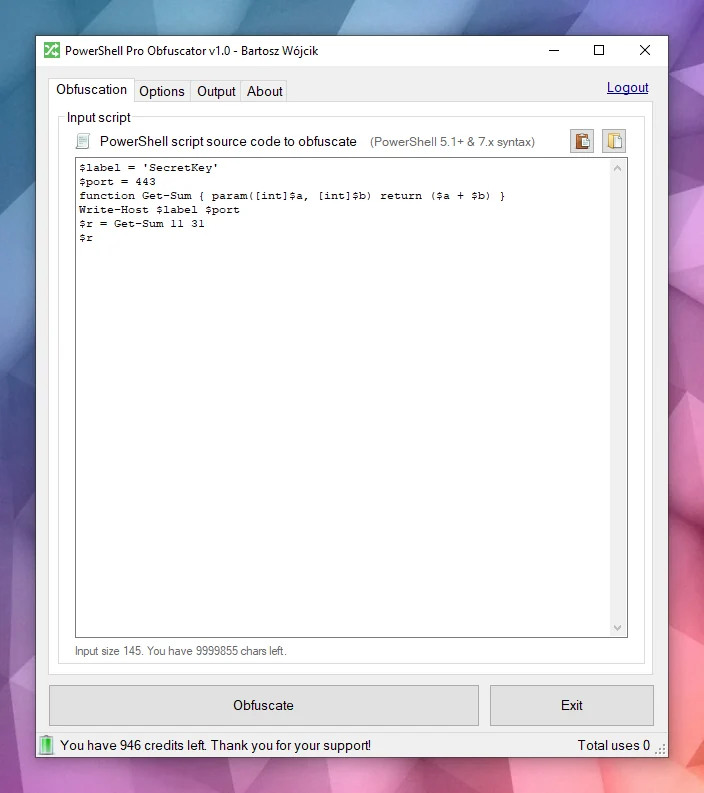
PowerShell Pro Obfuscator Windows Client

Windows 및 Linux에서 사용할 수 있습니다:

  • https://www.pelock.com/products/powershell-pro-obfuscator/download

다양한 프로그래밍 API 사용 가능:

  • https://www.pelock.com/products/powershell-pro-obfuscator/api

온라인 난독화 인터페이스:

  • https://www.pelock.com/powershell-pro-obfuscator/

PowerShell 스크립트에 난독화가 필요한 이유는 무엇인가요?

스크립트는 일반적으로 일반 .ps1 파일로 배포되거나 모듈에 포함됩니다. 이러한 편의성 때문에 파일에 접근할 수 있는 사람이라면 누구나 전체 로직을 읽고, 문자열에서 자격 증명이나 API 키를 찾아내며, 의도를 숨기기 위한 추가 조치를 취하지 않는 한 알고리즘을 도용할 수 있습니다.

PowerShell은 .NET 기반의 크로스 플랫폼 셸이자 스크립팅 언어입니다. Windows와 Linux에서 자동화, 구성, DevOps 파이프라인 및 엔드포인트 관리에 널리 사용됩니다.

난독화 전략

PowerShell Pro Obfuscator는 다양한 고급 난독화, 가상화 및 보호 전략을 제공합니다. 보호 수준과 크기 및 성능 간의 균형을 쉽게 조정할 수 있습니다.
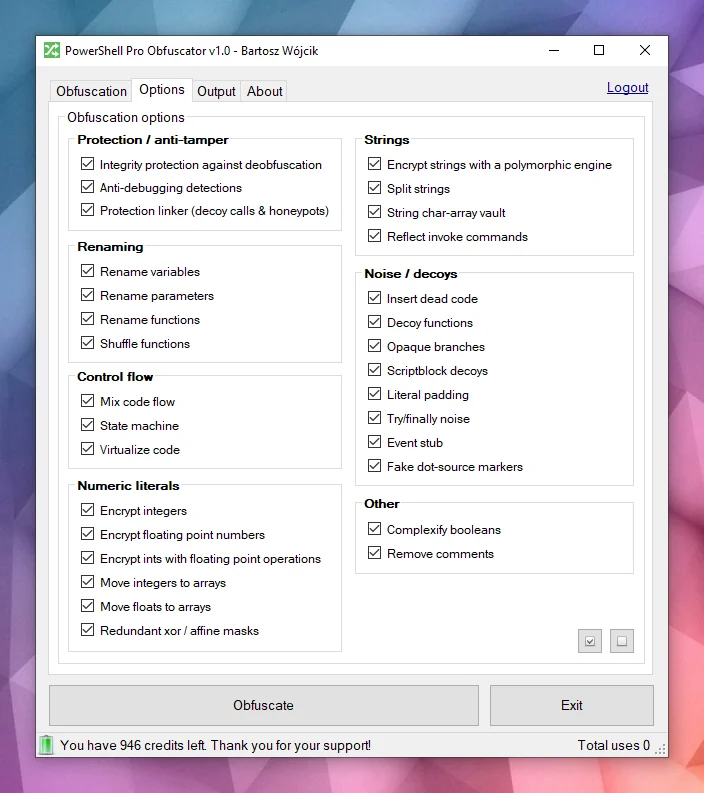
PowerShell Obfuscation options

Obfuscation 강력한 난독화

PowerShell Pro Obfuscator는 다형성 문자열 암호화, 정수 및 부동소수점 암호화, 디코이 노이즈 삽입과 같은 최첨단 난독화 전략을 사용합니다. 그 결과 리터럴과 구조를 숨기면서도 검증된 런타임 동작을 유지합니다.

Processor 코드 가상화

선택된 명령문은 셔플된 switch 케이스, 디코이 opcode 및 난독화된 디스패처 루프가 포함된 무작위 생성 VM 엔진 opcode로 변환됩니다. 분석가는 일반 PowerShell을 읽는 대신 가상 머신을 해석해야 합니다.

Node 유한 상태 오토마타(FSA)

유한 상태 오토마타(FSA) 난독화는 선형 PowerShell 명령문 블록을 불투명 스케줄러와 셔플된 디스패치 핸들러가 있는 이중 상태 오토마타로 재작성합니다. 분석가는 코드를 위에서 아래로 읽는 대신 숫자 상태, 전이 테이블 및 디코이 경로를 따라 원래 순서를 재구성해야 합니다.

Bug 안티 디버깅

안티 디버깅 보호는 연결된 디버거, PowerShell 중단점, 디버그 기본 설정 및 추적 모드, 관련 호스트 신호를 감지하는 다형성 프로브를 삽입합니다. 검사가 트리거되면 난독화된 스크립트는 대화형 분석 중에 보호된 로직을 노출하는 대신 조용히 종료됩니다.

System monitor 자체 무결성 검사

부트스트랩 프로브는 디스크에 있는 스크립트 형태(함수 수 및 무결성 토큰)를 검증하고 파일이 난독화된 빌드와 더 이상 일치하지 않을 때 변조 키를 설정합니다. 문자열 복호화기는 해당 키를 사용하므로 패치된 스크립트는 평문 대신 쓰레기 값을 반환합니다. 이 자체 방어 계층은 일반적인 역난독화 및 파일 편집 비용을 높입니다.

Brick link 보호 링커

후반 패스에서 허니팟 리졸버, 무작위 인수를 가진 가짜 헬퍼 호출 및 부트스트랩 완료 전에만 활성화되는 얕은 스택 트립와이어를 연결합니다. 추출된 스니펫은 정적 검토에서 실제처럼 보이는 노이즈 호출 표면을 유지합니다. 무결성 검사 성공 후의 정상 실행은 변경되지 않습니다.

난독화 전후 비교

이 예시를 살펴보세요 — 동일한 스크립트가 난독화 후에는 한눈에 읽기 어려워집니다.

난독화 전 샘플 PowerShell 스크립트

root@kitploit:~
function Get-Greeting {
    param([string]$Name)
    Write-Host "Hello World from $Name!"
}
Get-Greeting "PowerShell Pro Obfuscator"

난독화 후

root@kitploit:~
$script:_HnJTskg = 0
$jwNTQ = 297 * 400 + 36
$x4e8bfda = [Math]::Abs($jwNTQ - 8074)
$_EvKocNn = [Math]::Max($jwNTQ, $x4e8bfda) - [Math]::Min($jwNTQ, $x4e8bfda)
[void]$_EvKocNn
$script:_jUoXkBYh = 0
function gnJjzMCN3V8P {
    param([int]$slot, [int]$salt, [int]$guard)
    if (-not ((Get-Variable -Name _HnJTskg -Scope Script -ErrorAction SilentlyContinue).Value)) { return '' }
    @('JFE', 'm0ao', 'R8Ysw') | ForEach-Object { $_.ToUpper() } | Out-Null
if ((((($slot * 31) + $salt) -band 65535) -ne $guard)) { return '' }
    $tk = (Get-Variable -Name _jUoXkBYh -Scope Script -ErrorAction SilentlyContinue).Value
    $IEm39CSpDOEFp = @{ 'Ouj1' = 455; 'vjzO' = 170; 'IQNV' = 291 }
$IEm39CSpDOEFp['R5LrM'] = $IEm39CSpDOEFp['Ouj1'] + $IEm39CSpDOEFp['vjzO']
$YWxSO = ($IEm39CSpDOEFp.Values | Measure-Object -Sum).Sum
[void]$YWxSO
if ($null -eq $tk) { [long]$tk = 0 }
    $v93a130f2e4 = 508
switch ($v93a130f2e4) {
    524 { $_GYF7IA14Go = 'H1Vph' }
    561 { $_GYF7IA14Go = 'HAWoB' }
    default { $_GYF7IA14Go = $v93a130f2e4 * 2 }
}
[void]$_GYF7IA14Go
$dk = (Get-Variable -Name vb6a18ffee4 -Scope Script -ErrorAction SilentlyContinue).Value
    try { $xgLN5KZyEusFo7 = [Math]::Sqrt(850) } finally { [void]$xgLN5KZyEusFo7 }
if ($null -eq $dk) { [long]$dk = 0 }
    $d = @(46866, 46865)
    if ((((-not 113))-and(([int](272 -ne 272) -eq 21)))-and(([Math]::Sign(-12) -eq 4))) { $w4iTzi2hooy1GW = @(711, 562, 665); $w4iTzi2hooy1GW = ($w4iTzi2hooy1GW | Measure-Object -Sum).Sum }
$r = ''
    for ($s9qOSpiZzufQlVyV = 0; $s9qOSpiZzufQlVyV -lt $d.Length; $s9qOSpiZzufQlVyV++) {
        [long]$v = [long]$d[$s9qOSpiZzufQlVyV]
        for ($jL9gL7PEtQeIS = 2; $jL9gL7PEtQeIS -ge 0; $jL9gL7PEtQeIS--) {
            for ($PsbomDHxAy = 2; $PsbomDHxAy -ge 0; $PsbomDHxAy--) {
                    [long]$v = [long]$v + ([long](https://github.com/pelock/powershell-pro-obfuscator-python/blob/HEAD/230))
            }
        }
        for ($zhH33vzxjIzegl9 = 0; $zhH33vzxjIzegl9 -ge 0; $zhH33vzxjIzegl9--) {
                [long]$v = [long]$v + ([long]([int]((((((236 + (-3 * $s9qOSpiZzufQlVyV) + (3 * $zhH33vzxjIzegl9))) % 256) + 256) % 256))))
                [long]$v = [long]$v -bxor ([long](https://github.com/pelock/powershell-pro-obfuscator-python/blob/HEAD/53766))
        }
        [long]$v = [long]$v - ([long]($salt + $slot + $tk + $dk + 0))
        if ([long]$v -ge 0 -and [long]$v -le 0xFFFF) { $r += [char][int][long]$v }
        elseif ([long]$v -ge 0x10000 -and [long]$v -le 0x10FFFF) { $r += [System.Char]::ConvertFromUtf32([int][long]$v) }
    }
    return $r
}
and more...

난독화된 텍스트만 있고 원본 스크립트 사본이 없다면 원래 의도를 여전히 알아볼 수 있을까요?
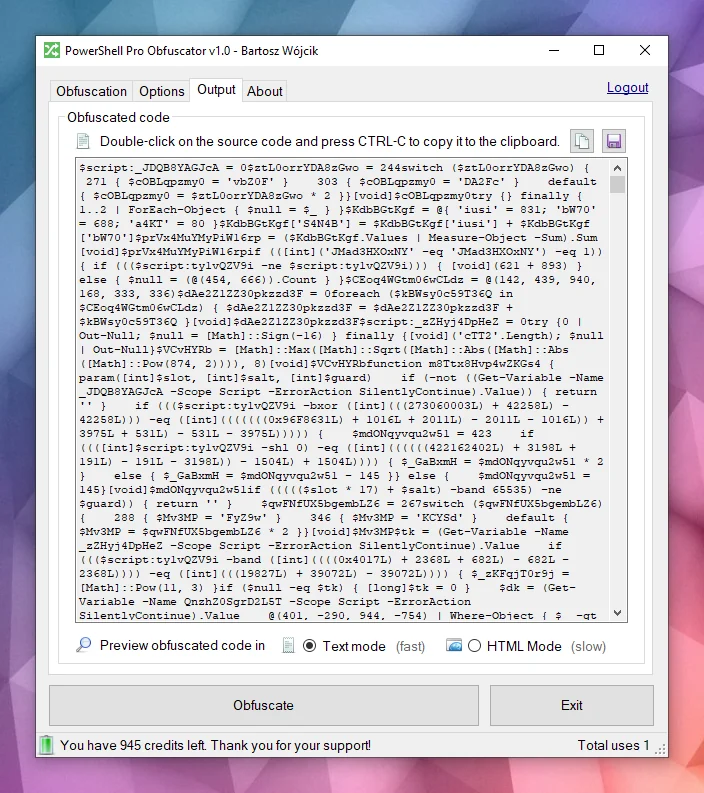
Obfuscated PowerShell script

PowerShell Pro Obfuscator는 어떻게 작동하나요?

엔진은 PowerShell 소스를 AST 트리로 파싱한 다음 선택 가능한 변환을 적용합니다: 식별자 이름 변경, 제어 흐름 평탄화, 유한 상태 오토마타(FSA), VM 가상화, 다형성 문자열 및 정수 암호화, 노이즈 및 디코이 삽입, 자체 방어 무결성 프로브, 보호 링커 및 안티 디버깅 검사. 많은 기법이 이 제품에 고유하며, 일부 아이디어는 당사의 다른 보호 도구와 공유됩니다.
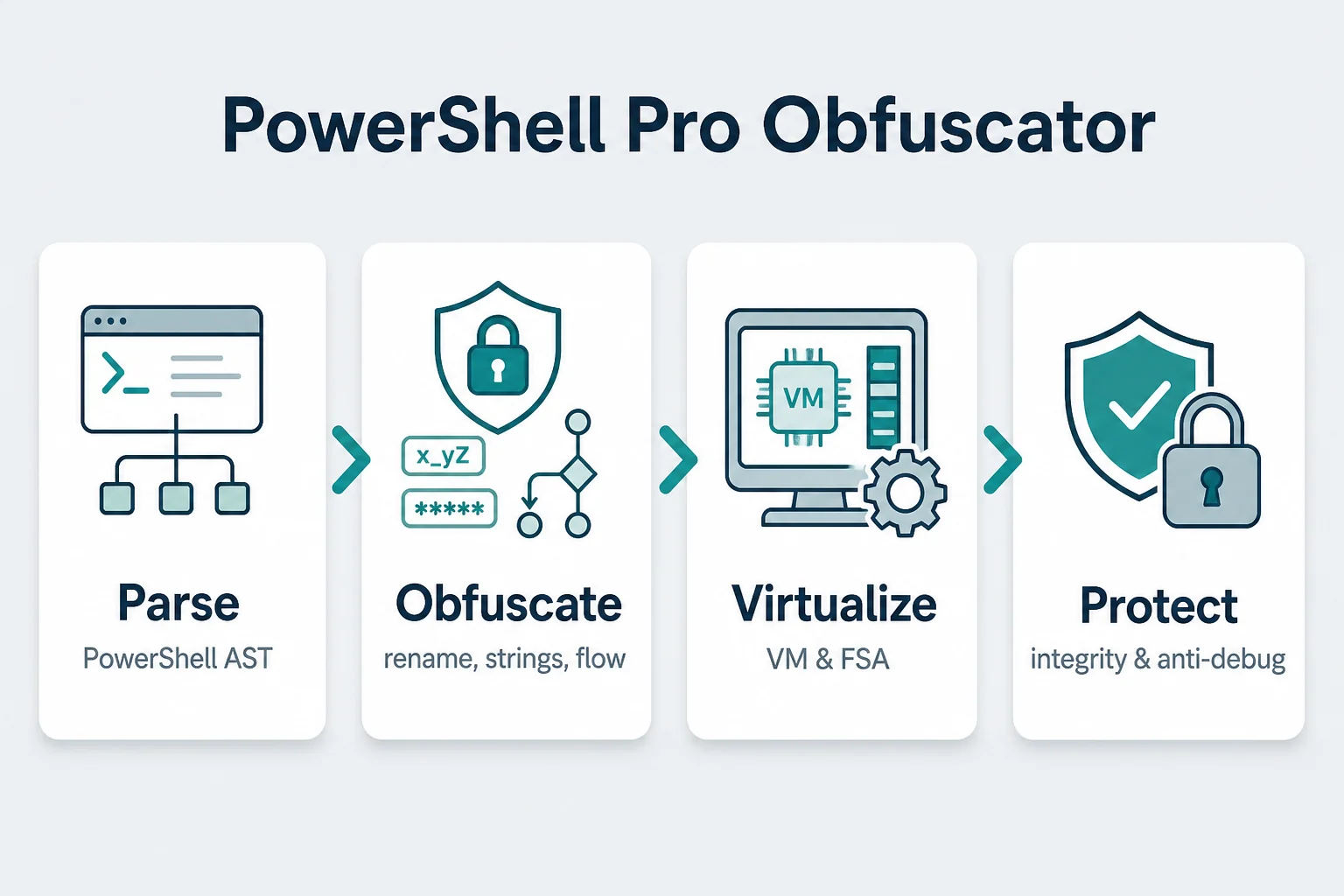
PowerShell Pro Obfuscator Pipeline

모든 패스가 완료되면 엔진은 새로운 .ps1 파일을 생성합니다. PowerShell 문법 및 호스팅 환경의 엣지 케이스로 인해 항상 대상 런타임에서 출력을 테스트해야 합니다.

PowerShell 스크립트 및 알고리즘 보호

위험을 감수하지 마세요. PowerShell Pro Obfuscator를 사용하여 PowerShell 스크립트와 알고리즘을 난독화, 가상화 및 보호하세요.

당사는 난독화 기술 및 코드 난독화 도구 분야에서 오랜 역사를 가지고 있습니다 (x86 Assembly, AutoIt 및 Java 난독화 도구 참조).

당사는 도구에 대한 버그 수정, 연구 및 새로운 난독화 전략 개발을 적극적으로 수행하고 있습니다.

이 분야에서 당사의 전문성과 지원을 신뢰하실 수 있습니다.

설치

WebApi 인터페이스 설치의 권장 방법은 pip를 통한 것입니다.

실행:

root@kitploit:~
pip install powershell-pro-obfuscator

또는

root@kitploit:~
python3 -m pip install powershell-pro-obfuscator

그런 다음 소스 코드에 다음 import를 추가하세요:

root@kitploit:~

from powershellproobfuscator import PowerShellProObfuscator

설치 패키지는 https://pypi.org/project/powershell-pro-obfuscator/ 에서 확인할 수 있습니다.

기본 옵션을 사용한 PowerShell 스크립트 소스 코드 난독화 예시

root@kitploit:~

#!/usr/bin/env python

###############################################################################
#
# PowerShell Pro Obfuscator WebApi interface usage example.
#
# In this example we will obfuscate sample source with default options.
#
# Version        : v1.0.0
# Language       : Python
# Author         : Bartosz Wójcik
# Web page       : https://www.pelock.com
#
###############################################################################

#
# include PowerShell Pro Obfuscator module
#
from powershellproobfuscator import PowerShellProObfuscator

#
# if you don't want to use Python module, you can import directly from the file
#
#from pelock.powershellproobfuscator import PowerShellProObfuscator

#
# create PowerShell Pro Obfuscator class instance (we are using our activation key)
#
myPowerShellProObfuscator = PowerShellProObfuscator("ABCD-ABCD-ABCD-ABCD")

#
# source code in PowerShell format
#
scriptSourceCode = """function Get-Greeting {
    param([string]$Name)
    Write-Host "Hello World from $Name!"
}
Get-Greeting "PowerShell Pro Obfuscator\""""

#
# by default all obfuscation options are enabled, so we can just simply call
#
result = myPowerShellProObfuscator.obfuscate_script_source(scriptSourceCode)

#
# it's also possible to pass a PowerShell script file path instead of a string with the source e.g.
#
# result = myPowerShellProObfuscator.obfuscate_script_file("/path/to/project/script.ps1")

#
# result[] array holds the obfuscation results as well as other information
#
# result["error"]         - error code
# result["output"]        - obfuscated code
# result["demo"]          - was it used in demo mode (invalid or empty activation key was used)
# result["credits_left"]  - usage credits left after this operation
# result["credits_total"] - total number of credits for this activation code
# result["expired"]       - if this was the last usage credit for the activation key it will be set to True
#
if result and "error" in result:

    # display obfuscated code
    if result["error"] == PowerShellProObfuscator.ERROR_SUCCESS:

        # format output code for HTML display
        print(result["output"])

    else:
        print(f'An error occurred, error code: {result["error"]}')

else:
    print("Something unexpected happen while trying to obfuscate the code.")

사용자 지정 난독화 전략을 사용한 PowerShell 스크립트 소스 코드 난독화 예시

root@kitploit:~
#!/usr/bin/env python

###############################################################################
#
# PowerShell Pro Obfuscator WebApi interface usage example.
#
# In this example we will obfuscate sample source with custom options.
#
# Version        : v1.0.0
# Language       : Python
# Author         : Bartosz Wójcik
# Web page       : https://www.pelock.com
#
###############################################################################

#
# include PowerShell Pro Obfuscator module
#
from powershellproobfuscator import PowerShellProObfuscator

#
# if you don't want to use Python module, you can import directly from the file
#
#from pelock.powershellproobfuscator import PowerShellProObfuscator

#
# create PowerShell Pro Obfuscator class instance (we are using our activation key)
#
myPowerShellProObfuscator = PowerShellProObfuscator("ABCD-ABCD-ABCD-ABCD")

#
# should the source code be compressed (both input & compressed)
#
myPowerShellProObfuscator.enableCompression = False

#
# global obfuscation options
#
# you can disable a particular obfuscation strategy globally if it
# fails or you don't want to use it without modifying the source codes
#
# by default all obfuscation strategies are enabled
#

#
# protection against tampering with protected code (integrity verification)
#
myPowerShellProObfuscator.selfDefending = True

#
# protection linker (decoy call graph)
#
myPowerShellProObfuscator.protectionLinker = True

#
# rename variable names to random string values
#
myPowerShellProObfuscator.renameVariables = True

#
# rename parameter names to random string values
#
myPowerShellProObfuscator.renameParameters = True

#
# rename function names to random string values
#
myPowerShellProObfuscator.renameFunctions = True

#
# shuffle function order in the output source
#
myPowerShellProObfuscator.shuffleFunctions = True

#
# change linear code execution flow via control-flow flattening
#
myPowerShellProObfuscator.controlFlowFlatten = True

#
# rewrite statement blocks into finite-state automata (state-machine obfuscation)
#
myPowerShellProObfuscator.stateMachine = True

#
# lift selected statements into a VM engine (virtualized statements)
#
myPowerShellProObfuscator.vmStrategy = True

#
# encrypt integers
#
myPowerShellProObfuscator.encryptIntegers = True

#
# split strings into concatenated chunks
#
myPowerShellProObfuscator.splitStrings = True

#
# encrypt strings using randomly generated polymorphic encryption algorithms
#
myPowerShellProObfuscator.encryptStrings = True

#
# move integers to arrays
#
myPowerShellProObfuscator.integersToArrays = True

#
# move floats to arrays
#
myPowerShellProObfuscator.floatsToArrays = True

#
# insert dead code
#
myPowerShellProObfuscator.insertDeadCode = True

#
# replace boolean conditions with equivalent complex expressions
#
myPowerShellProObfuscator.complexifyBooleans = True

#
# represent integers via floating-point math
#
myPowerShellProObfuscator.integersToFloating = True

#
# encrypt floating point numbers
#
myPowerShellProObfuscator.encryptFloating = True

#
# insert decoy functions
#
myPowerShellProObfuscator.decoyFunctions = True

#
# insert anti-debugging detections
#
myPowerShellProObfuscator.detectDebugger = True

#
# insert fake dot-source comment markers
#
myPowerShellProObfuscator.fakeDotSourceMarkers = True

#
# insert opaque predicate branches
#
myPowerShellProObfuscator.opaqueBranches = True

#
# insert scriptblock decoys
#
myPowerShellProObfuscator.scriptblockDecoys = True

#
# insert here-string padding
#
myPowerShellProObfuscator.literalPadding = True

#
# use indirect command invocation
#
myPowerShellProObfuscator.reflectInvokeCommands = True

#
# store string fragments in char-code array vaults
#
myPowerShellProObfuscator.stringCharArrayVault = True

#
# wrap code in try/finally blocks with dead noise
#
myPowerShellProObfuscator.tryFinallyNoise = True

#
# apply redundant xor / affine integer masks
#
myPowerShellProObfuscator.affineIntegerMask = True

#
# insert dead event/timer stubs
#
myPowerShellProObfuscator.eventStub = True

#
# strip comments from the output source
#
myPowerShellProObfuscator.removeComments = True

#
# source code in PowerShell format
#
scriptSourceCode = """function Get-Greeting {
    param([string]$Name)
    Write-Host "Hello World from $Name!"
}
Get-Greeting "PowerShell Pro Obfuscator\""""

#
# by default all obfuscation options are enabled, so we can just simply call
#
result = myPowerShellProObfuscator.obfuscate_script_source(scriptSourceCode)

#
# it's also possible to pass a PowerShell script file path instead of a string with the source e.g.
#
# result = myPowerShellProObfuscator.obfuscate_script_file("/path/to/project/script.ps1")

#
# result[] array holds the obfuscation results as well as other information
#
# result["error"]         - error code
# result["output"]        - obfuscated code
# result["demo"]          - was it used in demo mode (invalid or empty activation key was used)
# result["credits_left"]  - usage credits left after this operation
# result["credits_total"] - total number of credits for this activation code
# result["expired"]       - if this was the last usage credit for the activation key it will be set to True
#
if result and "error" in result:

    # display obfuscated code
    if result["error"] == PowerShellProObfuscator.ERROR_SUCCESS:

        # format output code for HTML display
        print(result["output"])

    else:
        print(f'An error occurred, error code: {result["error"]}')

else:
    print("Something unexpected happen while trying to obfuscate the code.")

활성화 키 상태 확인

root@kitploit:~
#!/usr/bin/env python

###############################################################################
#
# PowerShell Pro Obfuscator WebApi interface usage example.
#
# In this example we will verify our activation key status.
#
# Version        : v1.0.0
# Language       : Python
# Author         : Bartosz Wójcik
# Web page       : https://www.pelock.com
#
###############################################################################

#
# include PowerShell Pro Obfuscator module
#
from powershellproobfuscator import PowerShellProObfuscator

#
# if you don't want to use Python module, you can import directly from the file
#
#from pelock.powershellproobfuscator import PowerShellProObfuscator

#
# create PowerShell Pro Obfuscator class instance (we are using our activation key)
#
myPowerShellProObfuscator = PowerShellProObfuscator("ABCD-ABCD-ABCD-ABCD")

#
# login to the service
#
result = myPowerShellProObfuscator.login()

#
# result[] array holds the information about the license
#
# result["demo"]          - is it a demo mode (invalid or empty activation key was used)
# result["credits_left"]  - usage credits left after this operation
# result["credits_total"] - total number of credits for this activation code
# result["string_limit"]  - max. source code size allowed (it's 1000 bytes for demo mode)
#
if result:

    print(f'Demo version status - {"True" if result["demo"] else "False"}')
    print(f'Usage credits left - {result["credits_left"]}')
    print(f'Total usage credits - {result["credits_total"]}')
    print(f'Max. source code size - {result["string_limit"]}')

else:
    print("Something unexpected happen while trying to login to the service.")

PowerShell Pro Obfuscator 온라인 사용

PowerShell Pro Obfuscator의 온라인 인터페이스는 다음에서 사용할 수 있습니다:

https://www.pelock.com/powershell-pro-obfuscator/

Windows GUI 클라이언트 및 명령줄 버전

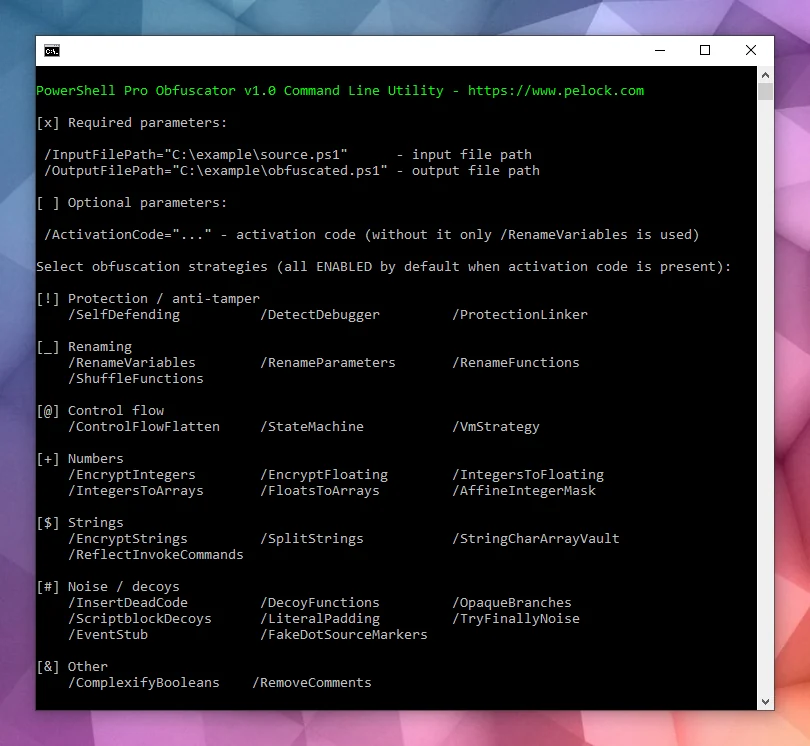
PowerShell Pro Obfuscator는 Windows용 전체 GUI 버전도 함께 제공합니다:

PowerShell Pro Obfuscator Windows Client

난독화 옵션:

PowerShell Obfuscation options

난독화된 PowerShell 스크립트:

Obfuscated PowerShell script

다운로드

다음에서 다운로드할 수 있습니다:

https://www.pelock.com/products/powershell-pro-obfuscator/download

설치 패키지에는 추가 명령줄 인터페이스가 포함되어 있습니다:

PowerShell Pro Obfuscator command-line interface

PowerShell Pro Obfuscator는 Windows 및 Linux 자동화를 위한 명령줄 인터페이스를 제공합니다.

빌드 서버, CI 작업 또는 배치 패키징에 난독화를 통합하는 데 사용하세요.

Bartosz Wójcik

  • 내 사이트 방문 — https://www.pelock.com
  • X — https://x.com/PELock
  • GitHub — https://github.com/PELock
도구 다운로드