 papermtn/lil-pwny
Active Directory 비밀번호의 빠른 오프라인 감사를 위한 Python 도구입니다.




Python을 사용한 Active Directory 비밀번호의 빠른 오프라인 감사.
Lil Pwny는 Active Directory에서 복구된 사용자 비밀번호의 NTLM 해시를 Have I Been Pwned의 알려진 손상된 비밀번호와 비교하여 오프라인 감사를 수행하는 Python 애플리케이션입니다. 결과는 사용자 이름, 일치하는 해시(난독화 가능) 및 HIBP에서 해당 비밀번호가 발견된 횟수를 포함하는 JSON 형식으로 출력됩니다.
Lil Pwny에 대한 자세한 정보는 제 블로그에서 확인할 수 있습니다.
Lil Pwny는 사용자 정의 비밀번호 목록에 일반적으로 사용되는 변형을 추가하여 향상시키는 기능을 제공합니다. 여기에는 다음이 포함됩니다:
P@ssw0rd)PASSWORD, Password)password!, !password)password123!, !passwordabc, passwordpassword)
password1950, password2034)100개의 일반 텍스트 비밀번호로 구성된 사용자 정의 목록은 49848660개의 변형을 생성합니다.
Lil Pwny는 사용자 이름의 변형을 비밀번호로 사용하는 사용자를 찾습니다.
사용자 이름을 다음 형식으로 변환합니다:
이 변환된 값들은 NTLM 해시로 변환된 후 AD 해시와 비교됩니다.
이 애플리케이션은 Python의 멀티프로세싱을 최대한 활용하여 소비자 수준 하드웨어에서 가능한 한 빠르게 작동하도록 개발되었습니다.
멀티프로세싱을 사용하기 때문에 사용 가능한 코어가 많을수록 Lil Pwny가 더 빠르게 실행됩니다. 적은 수의 논리적 코어에서도 매우 좋은 결과를 보였습니다:
Lil Pwny는 결과를 표준 출력(stdout):
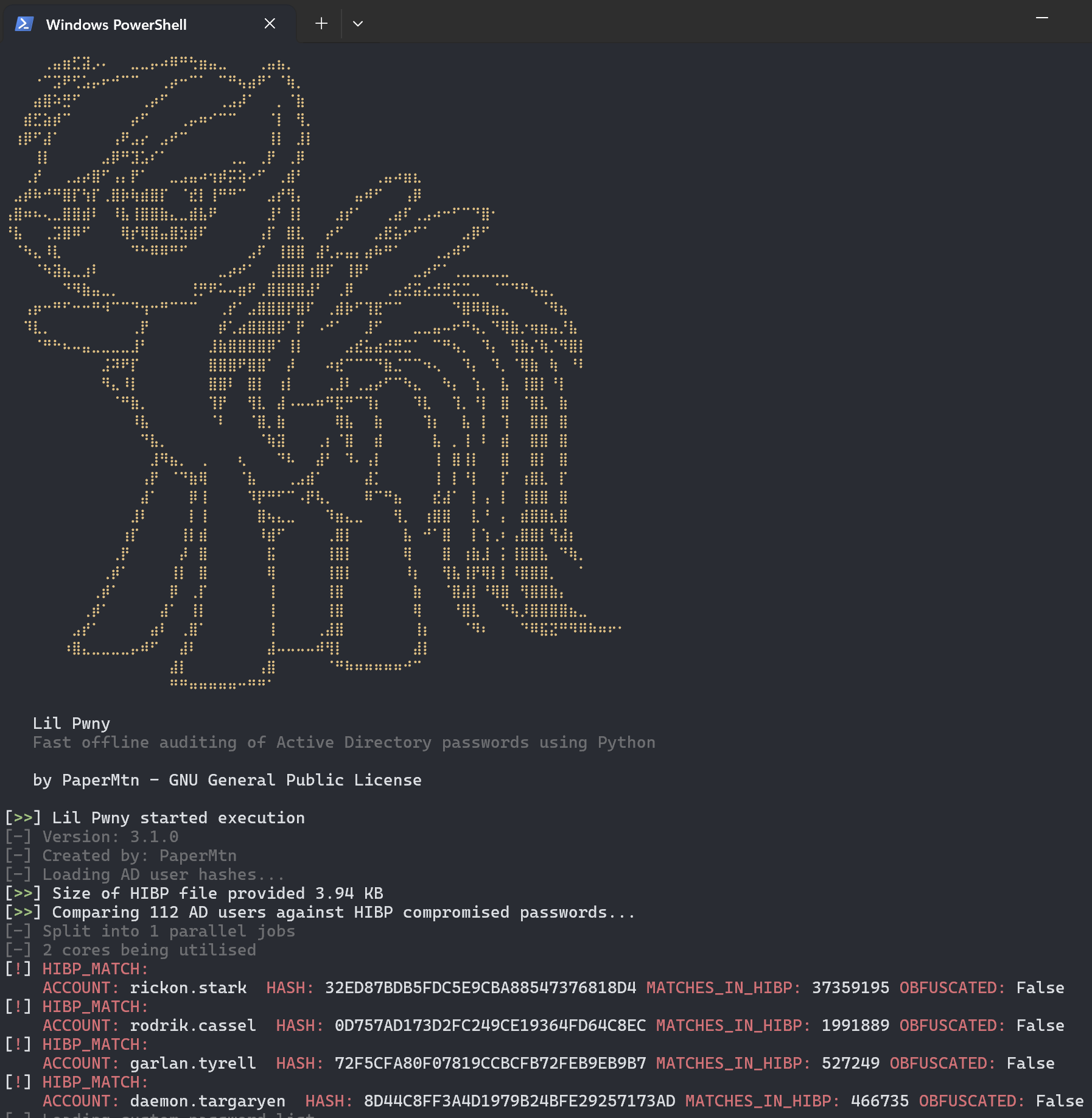
또는 JSON으로 출력합니다:
{"localtime": "2021-00-00 00:00:00,000", "level": "NOTIFY", "source": "Lil Pwny", "match_type": "hibp", "detection_data": {"username": "RICKON.STARK", "hash": "32ED87BDB5FDC5E9CBA88547376818D4", "matches_in_hibp": "24230577", "obfuscated": "True"}}
Lil Pwny의 JSON 출력을 파일로 리디렉션할 수 있습니다:
lil-pwny -ad ... > lil-pwny-results.json
이 JSON 형식의 로깅은 SIEM 또는 기타 로그 분석 도구에 쉽게 수집될 수 있으며, 자동화된 해결 조치를 위해 다른 스크립트나 플랫폼에 제공될 수 있습니다.
pip를 통해 설치
pip install lil-pwny
lil-pwny는 전역 명령어로 설치되며, 다음과 같이 사용합니다:
usage: lil-pwny [-h] -hibp HIBP [-v] [-c CUSTOM] [-custom-enhance CUSTOM_ENHANCE] -ad AD_HASHES [-d] [-output {file,stdout,json}] [-o] [--verbose]

Python을 사용한 Active Directory 비밀번호의 빠른 오프라인 감사

options:
  -h, --help            show this help message and exit
  -hibp HIBP, --hibp HIBP
                        The .txt file containing HIBP NTLM hashes
  -v, --version         show program's version number and exit
  -c CUSTOM, --custom CUSTOM
                        .txt file containing additional custom passwords to check for
  -custom-enhance CUSTOM_ENHANCE, --custom-enhance CUSTOM_ENHANCE
                        generate an enhanced custom password list based on the provided custom password list. Must be used with -c/--custom flag. The enhanced list will stored in memory and not
                        written to disk. Provide the minimum length of the passwords you want. Default is 8
  -ad AD_HASHES, --ad-hashes AD_HASHES
                        The .txt file containing NTLM hashes from AD users
  -d, --duplicates      Output a list of duplicate password users
  -output {file,stdout,json}, --output {file,stdout,json}
                        Where to send results
  -o, --obfuscate       Obfuscate hashes from discovered matches by hashing with a random salt
  --verbose             Turn on verbose logging
예시:
lil-pwny -hibp ~/hibp_hashes.txt -ad ~/ad_user_hashes.txt -c ~/custom_passwords.txt -output stdout -do
도메인 컨트롤러에서 ntdsutil을 사용하여 AD 도메인의 IFM 덤프를 생성합니다. 상승된 PowerShell 창에서 다음을 실행합니다:
ntdsutil
activate instance ntds
ifm
create full **출력 경로**
AD IFM 데이터에서 NTLM 해시를 복구하려면 PowerShell 모듈 DSInternals가 필요합니다.
설치 후, IFM 데이터의 SYSTEM 하이브를 사용하여 해시를 username:hash 형식으로 복구하고 파일 ad_ntlm_hashes.txt에 저장합니다.
$bootKey = Get-BootKey -SystemHivePath '.\registry\SYSTEM'
Get-ADDBAccount -All -DBPath '.\Active Directory\ntds.dit' -BootKey $bootKey | Format-Custom -View HashcatNT | Out-File ad_ntlm_hashes.txt -Encoding ASCII
이 파일은 여기에서 .net 유틸리티를 사용하여 HIBP API에서 다운로드할 수 있습니다.
scripts 디렉토리의 PowerShell 스크립트를 사용하여 처리 전 IFM 출력에서 원하지 않는 계정을 제거할 수 있습니다. 여기에는 다음이 포함됩니다:
