 p0dalirius/extractbitlockerkeys
도메인에서 BitLocker 복구 키를 자동으로 추출하는 시스템 관리 또는 사후 침투 스크립트입니다.


도메인에서 Bitlocker 복구 키를 자동으로 추출하는 시스템 관리 또는 사후 침투 스크립트입니다.



[!WARNING] 이 백업을 도메인의 온라인 SMB 공유에 저장하지 마십시오. 인쇄하여 잠긴 금고에 물리적으로 보관하는 것이 좋습니다.
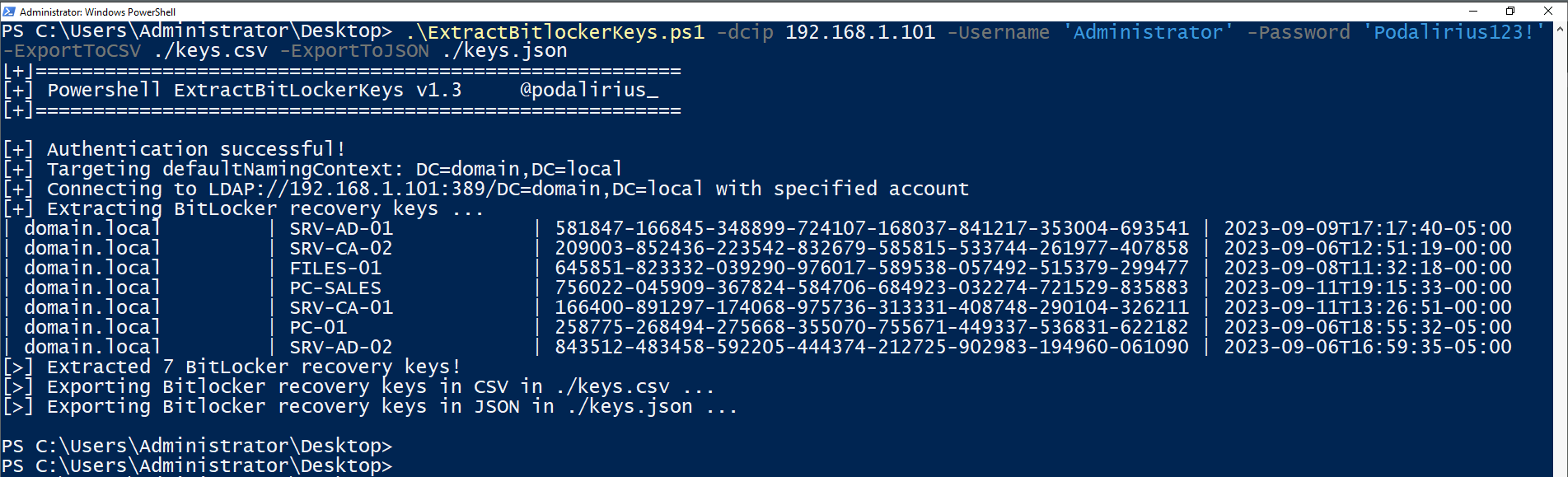
도메인 domain.local의 모든 컴퓨터에서 Bitlocker 복구 키를 추출하려면 다음 명령어를 사용하십시오:
./ExtractBitlockerKeys.py -d 'domain.local' -u 'Administrator' -p 'Podalirius123!' --dc-ip 192.168.1.101
다음과 같은 출력이 나타납니다:
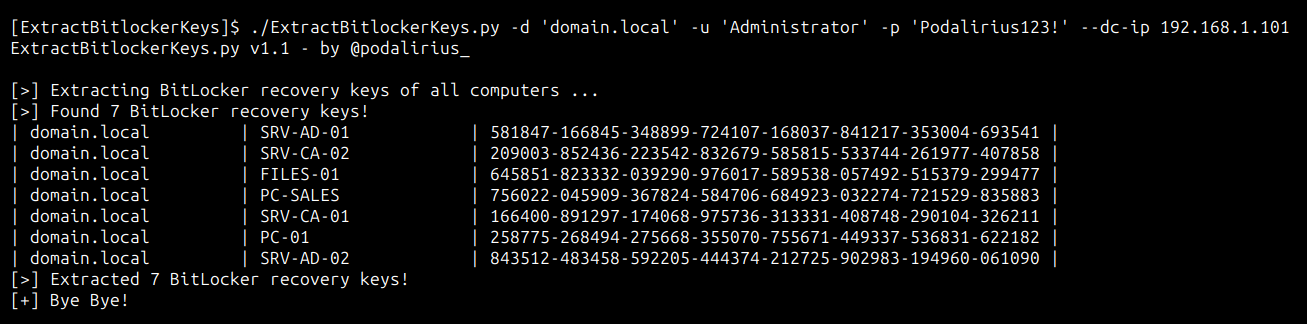
도메인 domain.local의 모든 컴퓨터에서 Bitlocker 복구 키를 추출하려면 다음 명령어를 사용하십시오:
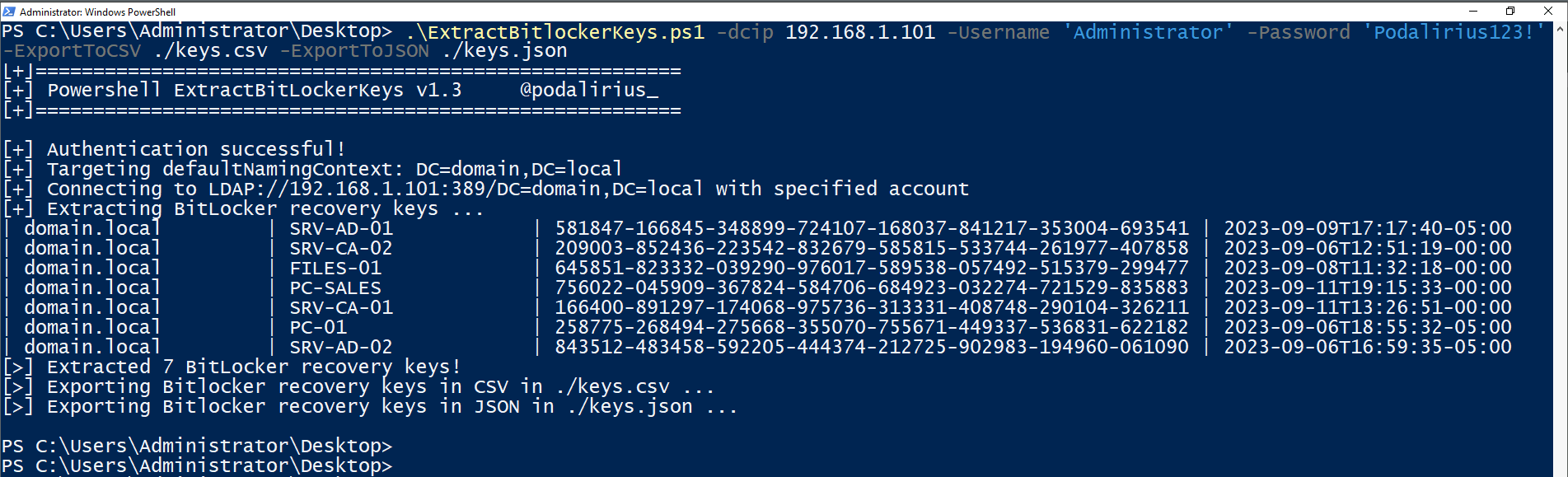
.\ExtractBitlockerKeys.ps1 -dcip 192.168.1.101 -ExportToCSV ./keys.csv -ExportToJSON ./keys.json
다음과 같은 출력이 나타납니다:
$ ./ExtractBitlockerKeys.py -h
ExtractBitlockerKeys.py v1.1 - by Remi GASCOU (Podalirius)

usage: ExtractBitlockerKeys.py [-h] [-v] [-q] [-t THREADS] [--export-xlsx EXPORT_XLSX] [--export-json EXPORT_JSON] [--export-sqlite EXPORT_SQLITE] --dc-ip ip address [-d DOMAIN] [-u USER]
                               [--no-pass | -p PASSWORD | -H [LMHASH:]NTHASH | --aes-key hex key] [-k]

options:
  -h, --help            show this help message and exit
  -v, --verbose         Verbose mode. (default: False)
  -q, --quiet           Show no information at all.
  -t THREADS, --threads THREADS
                        Number of threads (default: 4).

Output files:
  --export-xlsx EXPORT_XLSX
                        Output XLSX file to store the results in.
  --export-json EXPORT_JSON
                        Output JSON file to store the results in.
  --export-sqlite EXPORT_SQLITE
                        Output SQLITE3 file to store the results in.

Authentication & connection:
  --dc-ip ip address    IP Address of the domain controller or KDC (Key Distribution Center) for Kerberos. If omitted it will use the domain part (FQDN) specified in the identity parameter
  -d DOMAIN, --domain DOMAIN
                        (FQDN) domain to authenticate to
  -u USER, --user USER  user to authenticate with

Credentials:
  --no-pass             Don't ask for password (useful for -k)
  -p PASSWORD, --password PASSWORD
                        Password to authenticate with
  -H [LMHASH:]NTHASH, --hashes [LMHASH:]NTHASH
                        NT/LM hashes, format is LMhash:NThash
  --aes-key hex key     AES key to use for Kerberos Authentication (128 or 256 bits)
  -k, --kerberos        Use Kerberos authentication. Grabs credentials from .ccache file (KRB5CCNAME) based on target parameters. If valid credentials cannot be found, it will use the ones specified in the command line.
풀 리퀘스트를 환영합니다. 다른 기능을 추가하고 싶다면 이슈를 열어 주세요.
