
Skip to content
KitploitKITPLOIT
도구블로그
제출
도구블로그
제출

해킹, 침투 테스트 및 사이버 보안 도구를 당신의 보안 무기고에!

Kitploit은 해킹, 사이버 보안 및 침투 테스트 도구 디렉토리입니다. 최신 프로젝트 업데이트를 발견하여 취약점을 찾고, 시스템을 분석하고, 테스트를 자동화하고, 보안을 강화하세요.

··피드·문의·개인정보·© 2026 Kitploit

도구 디렉토리

카테고리

모든 카테고리 보기
Loading categories
dep-scan — 도달 가능성 분석, SBOM 생성, 라이선스 감사 및 CI/CD 통합을 위한 컨테이너 이미지 스캐닝 기능을 갖춘 차세대 의존성 취약점 스캐너. | Kitploit
도구/GitHubGitHub/owasp-dep-scan/dep-scan
Vulnerability ScannersContainer SecurityDevSecOpsSupply Chain Security
GitHubowasp-dep-scan/dep-scan

dep-scan

도달 가능성 분석, SBOM 생성, 라이선스 감사 및 CI/CD 통합을 위한 컨테이너 이미지 스캐닝 기능을 갖춘 차세대 의존성 취약점 스캐너.

저장소 보기
1.3k1373일 전Kitploit 검토 완료

인기

모두 보기 →

커뮤니티에서 가장 많이 사용되는 도구를 찾아보세요.

모든 도구 탐색

도구 컬렉션을 둘러보세요

모든 도구 보기 →
공유
웹사이트

소개

OWASP dep-scan은 프로젝트 종속성에 대해 알려진 취약점, 권고사항 및 라이선스 제한을 기반으로 하는 차세대 보안 및 위험 감사 도구입니다. 로컬 저장소와 컨테이너 이미지 모두 입력으로 지원되며, 이 도구는 ASPM/VM 플랫폼 및 CI 환경과의 통합에 이상적입니다.

SBOM release

목차

  • 기능
    • 정확한 도달 가능 데이터 흐름
    • 도달 가능성 매트릭스
    • Rust 도달 가능성 (rusi를 통해)
    • Go 도달 가능성 (golem을 통해)
    • .NET 도달 가능성 (dosai를 통해)
    • JVM, JavaScript, Python 및 PHP 도달 가능성 (atom을 통해)
    • 취약점 데이터 소스
    • Linux 배포판
  • 빠른 시작
    • 로컬에서 프로젝트 스캔 (Python 버전)
    • 독립 실행형 바이너리 (Python 또는 Node.js 불필요)
    • 로컬에서 컨테이너 스캔 (Python 버전)
    • 로컬에서 프로젝트 스캔 (Docker 컨테이너)
    • 서버 모드
  • 로컬 개발
  • 문서 (depscan.readthedocs.io)
  • 라이선스

기능

  • 대부분의 애플리케이션 코드(로컬 저장소, Linux 컨테이너 이미지, Kubernetes 매니페스트 및 OS)를 스캔하여 우선순위가 지정된 알려진 CVE 식별
  • 여러 언어에 대한 고급 도달 가능성 분석 수행 (아래 도달 가능성 매트릭스 참조)
  • 패키지 취약점 스캔은 로컬에서 수행되며 매우 빠름. 서버가 사용되지 않음
  • 취약점 공개 보고서(VDR) 정보가 포함된 SBOM(Software Bill-of-Materials) 생성
  • CSAF(Common Security Advisory Framework) 2.0/2.1 VEX 문서 생성 (CSAF Readme 확인)
  • 종속성 혼동 공격 및 유지 관리 위험에 대한 심층 패키지 위험 감사 수행 (위험 감사 문서 참조)

정확한 도달 가능 데이터 흐름

전체 컨텍스트를 기반으로 애플리케이션에서 도달 가능 및 비도달 경로를 모두 식별하는 상세한 데이터 흐름입니다.
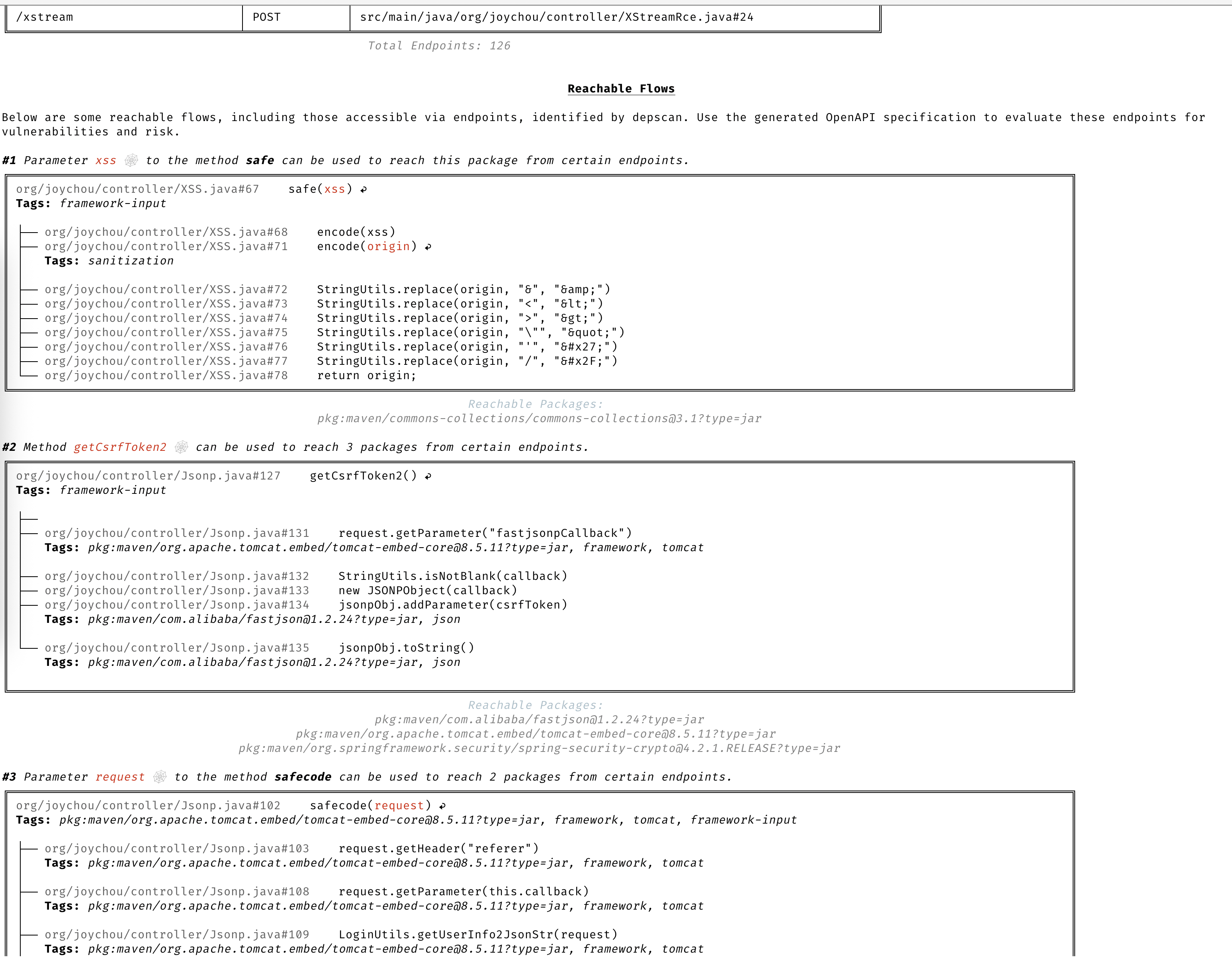
Reachable Flows

도달 가능성 매트릭스

dep-scan은 4개의 슬라이서를 통해 7가지 언어 생태계에 대한 도달 가능성을 계산합니다. 코드가 실제로 실행 경로에 있는 취약한 패키지는 Reachable(도달 가능)로 표시되며, BOM에 선언만 되어 있고 호출되지 않는 패키지는 그렇지 않습니다. 모든 슬라이서는 동일한 공유 purl 키 기반 도달 가능성 엔진에 데이터를 제공하므로 언어 전반에 걸쳐 동작이 일관됩니다. 도달 가능성은 기본적으로 활성화되어 있습니다(--reachability-analyzer FrameworkReachability). SemanticReachability는 도달된 서비스, 엔드포인트 및 빌드 후(바이너리/컨테이너) 도달 가능성을 추가로 귀속시킵니다.

도달 가능성 및 우선순위 지정의 개념에 대해서는 도달 가능성 모델 및 우선순위 지정 장을 참조하세요. 언어별 작업 예제는 Language Guides를 참조하세요. 규정 준수(VDR 및 CSAF VEX)에 대한 내용은 VDR 가이드 및 CSAF VEX 가이드를 참조하세요.

도달 가능성은 --profile research에서 기본적으로 활성화되며, dep-scan은 도달 가능성이 켜져 있을 때 이를 사용합니다. 아래 명령어를 사용하여 시작할 수 있습니다. 언어별 가이드는 바이너리 해결, 백엔드 및 네트워크 안전, 복원 요구 사항, 저장소 내 픽스처에 대한 작업 예제를 다룹니다.

Rust (rusi). cdxgen은 rusi를 실행하고 해당 보고서를 유지하며, dep-scan은 이를 공유 파이프라인으로 변환합니다. 따라서 실제로 호출되는 크레이트(예: RUSTSEC-2020-0071에 대한 time::now())는 Reachable로 표시되고 단순히 존재하는 크레이트는 그렇지 않습니다. Rust 도달 가능성 가이드를 참조하세요.```bash depscan -i ./my-rust-app -o ./reports --profile research

root@kitploit:~
**Go (golem).** dep-scan은 Go 프로젝트에 대해 [golem](https://github.com/cdxgen/cdxgen-plugins-bin)을 직접 호출합니다 (`PATH`에 `go` 필요). 함수가 추적된 경로에 있을 때 모듈을 Reachable로 표시합니다. 신뢰할 수 없는 저장소와 웜 모듈 캐시를 사용하는 경우 `--go-analyzer-network offline`을 사용하세요. [Go 도달 가능성 가이드](https://depscan.readthedocs.io/languages/go-reachability)를 참조하십시오.```bash
depscan -i ./my-go-app -o ./reports -t go

.NET (dosai). cdxgen은 dosai를 실행하며, 이는 각 패키지에 대한 명시적 도달 가능성 판정(PackageReachability with ReachabilityKind and Confidence)을 생성합니다. dep-scan은 이 판정을 신뢰할 수 있는 것으로 간주하므로, 예를 들어 제어된 입력에 대해 JsonConvert.DeserializeObject라고 실제로 호출되는 NuGet 패키지는 도달 가능합니다. 복원된 트리에서 버전이 지정된 purl을 스캔합니다. .NET 도달 가능성 가이드를 참조하십시오.```bash depscan -i ./my-dotnet-app -o ./reports -t dotnet

root@kitploit:~
**JVM, JavaScript/TypeScript, Python, PHP (atom).** 이 네 가지 생태계는 언어에 구애받지 않는 중간 표현을 구축하고 정적 슬라이싱을 수행하는 [atom](https://github.com/AppThreat/atom) 슬라이서를 공유합니다. [JVM, JS, Python, PHP 도달 가능성 가이드](https://depscan.readthedocs.io/languages/jvm-js-python-php-reachability)를 참조하세요.```bash
depscan --profile research -t java -i ./my-java-app -o ./reports --explain

To move beyond framework-forward reachability to endpoint, service, and post-build tiers, pass --reachability-analyzer SemanticReachability with a --bom-dir of lifecycle BOMs. See the semantic reachability guide.

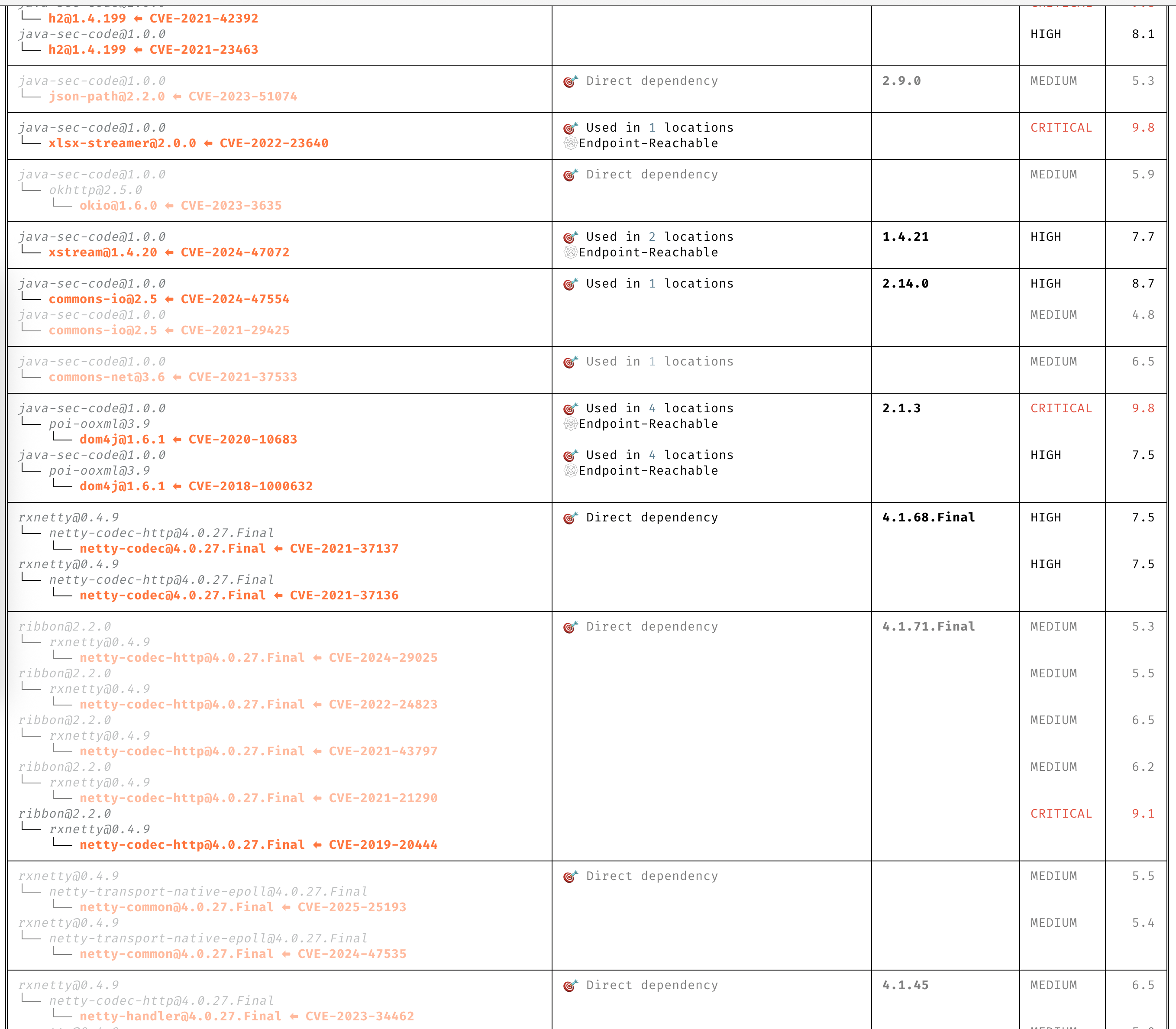
CVE에 대한 명확한 인사이트

설명을 읽지 않고도 CVE를 명확히 이해할 수 있습니다.

인사이트가 포함된 의존성 트리

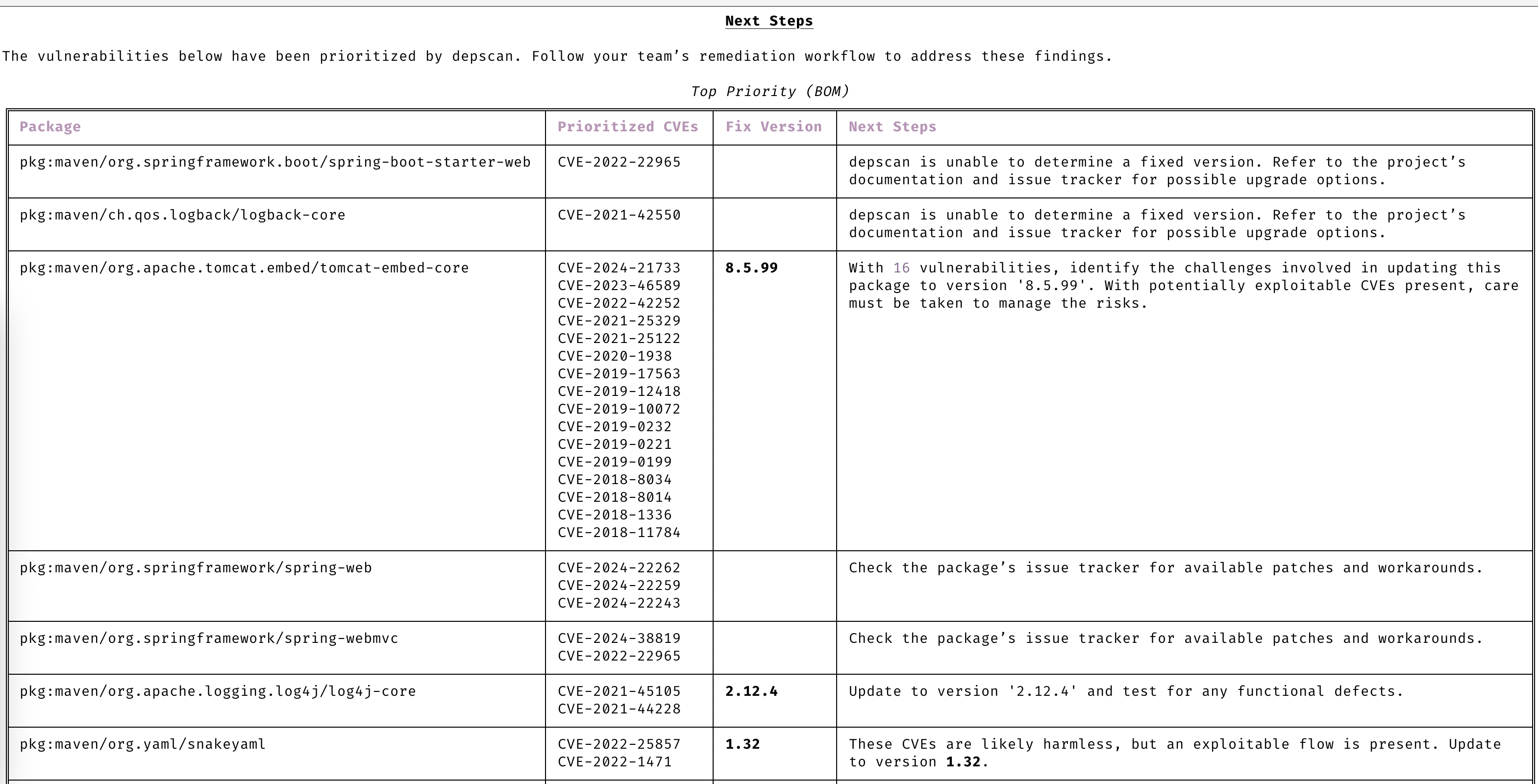
자동 우선순위 지정

관심이 필요한 CVE에만 집중하세요.

우선순위 지정

선제적 대응

고급 취약점 및 익스플로잇 예측을 통해 항상 한 발 앞서 나가세요.
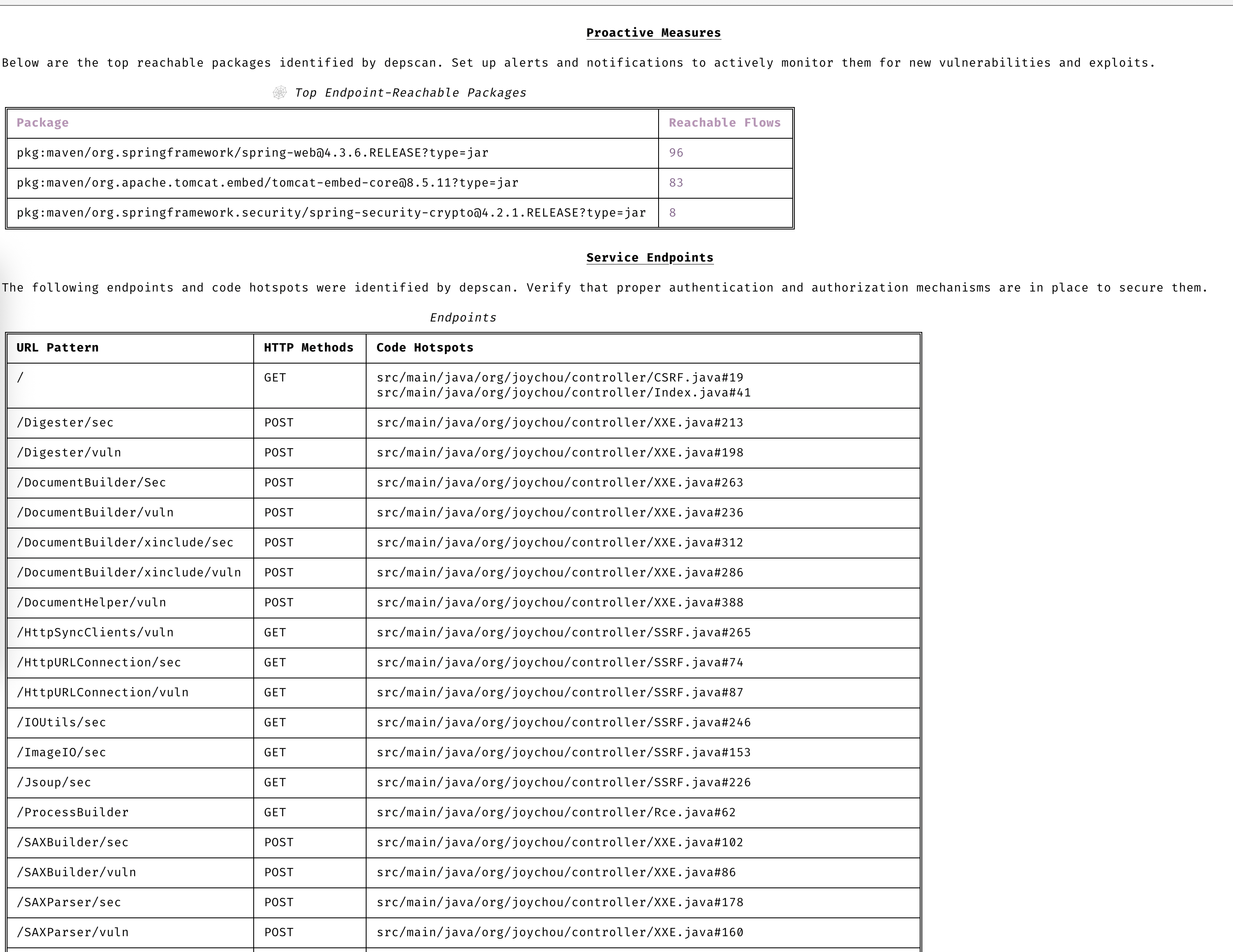
선제적 조치

취약점 데이터 소스

  • OSV
  • NVD
  • GitHub
  • NPM
  • Linux vuln-list

Linux 배포판

  • AlmaLinux
  • Debian
  • Alpine
  • Amazon Linux
  • Arch Linux
  • RHEL/CentOS
  • Rocky Linux
  • Ubuntu
  • OpenSUSE/SLES
  • Photon
  • Chainguard
  • Wolfi OS

빠른 시작

dep-scan은 지속적 통합(CI) 및 로컬 개발 도구로 사용하기에 이상적입니다.

로컬에서 프로젝트 스캔하기 (Python 버전)```bash

sudo npm install -g @cyclonedx/cdxgen

Normal version recommended for most users (MIT)

pip install owasp-depscan

For a full version with all extensions and server mode (Multiple Licenses)

pip install owasp-depscan[all]

root@kitploit:~
이것은 `cdxgen`과 `depscan`이라는 두 명령어를 설치합니다.

스캔 명령어를 다양한 옵션과 함께 직접 호출할 수 있습니다.```bash
cd <project to scan>
depscan --src $PWD --reports-dir $PWD/reports

전체 옵션 목록은 아래와 같습니다:```text usage: depscan [-h] [--config CONFIG] [--no-banner] [-i SRC_DIR_IMAGE] [-o REPORTS_DIR] [--csaf] [--profile {appsec,research,operational,threat-modeling,license-compliance,generic,machine-learning,ml,deep-learning,ml-deep,ml-tiny}] [--lifecycle {pre-build,build,post-build} [{pre-build,build,post-build} ...]] [--technique {auto,source-code-analysis,binary-analysis,manifest-analysis,hash-comparison,instrumentation,filename} [{auto,source-code-analysis,binary-analysis,manifest-analysis,hash-comparison,instrumentation,filename} ...]] [--bom-engine {auto,CdxgenGenerator,CdxgenServerGenerator,CdxgenImageBasedGenerator,BlintGenerator} | --vulnerability-analyzer {auto,VDRAnalyzer,LifecycleAnalyzer}] [--reachability-analyzer {off,FrameworkReachability,SemanticReachability}] [--no-suggest] [--risk-audit] [--cdxgen-args CDXGEN_ARGS] [--private-ns PRIVATE_NS] [-t PROJECT_TYPE [PROJECT_TYPE ...]] [--bom BOM | --bom-dir BOM_DIR | --purl SEARCH_PURL] [--report-template REPORT_TEMPLATE] [--report-name REPORT_NAME] [--deep] [--fuzzy-search] [--search-order {purl,pcu,cpe,cpu,url}] [--no-universal] [--no-vuln-table] [--server] [--server-host SERVER_HOST] [--server-port SERVER_PORT] [--cdxgen-server CDXGEN_SERVER] [--debug] [-q | --explain] [-v]

Fully open-source security and license audit for application dependencies and container images based on known vulnerabilities and advisories.

options: -h, --help show this help message and exit --config CONFIG Path to the configuration file. Default: $PWD/.config/depscan.toml --no-banner Do not display the logo and donation banner. Please make a donation to OWASP before using this argument. -i, --src SRC_DIR_IMAGE Source directory or container image or binary file -o, --reports-dir REPORTS_DIR Reports directory --csaf Generate a OASIS CSAF VEX document --profile {appsec,research,operational,threat-modeling,license-compliance,generic,machine-learning,ml,deep-learning,ml-deep,ml-tiny} Profile to use while generating the BOM. For granular control, use the arguments --bom-engine, --vulnerability-analyzer, or --reachability-analyzer. --lifecycle {pre-build,build,post-build} [{pre-build,build,post-build} ...] Product lifecycle for the generated BOM. Multiple values allowed. --technique {auto,source-code-analysis,binary-analysis,manifest-analysis,hash-comparison,instrumentation,filename} [{auto,source-code-analysis,binary-analysis,manifest-analysis,hash-comparison,instrumentation,filename} ...] Analysis technique to use for BOM generation. Multiple values allowed. --bom-engine {auto,CdxgenGenerator,CdxgenServerGenerator,CdxgenImageBasedGenerator,BlintGenerator} BOM generation engine to use. Defaults to automatic selection based on project type and lifecycle. --vulnerability-analyzer {auto,VDRAnalyzer,LifecycleAnalyzer} Vulnerability analyzer to use. Defaults to automatic selection based on bom_dir argument. --reachability-analyzer {off,FrameworkReachability,SemanticReachability} Reachability analyzer to use. Default FrameworkReachability. --no-suggest Disable suggest mode --risk-audit Perform package risk audit (slow operation). Npm only. --cdxgen-args CDXGEN_ARGS Additional arguments to pass to cdxgen --private-ns PRIVATE_NS Private namespace to use while performing oss risk audit. Private packages should not be available in public registries by default. Comma separated values accepted. -t, --type PROJECT_TYPE [PROJECT_TYPE ...] Override project types if auto-detection is incorrect. Multiple values supported. --bom BOM Examine using the given Software Bill-of-Materials (SBOM) file in CycloneDX format. Use cdxgen command to produce one. --bom-dir BOM_DIR Examine all the Bill-of-Materials (BOM) files in the given directory. --purl SEARCH_PURL Scan a single package url. --custom-data CUSTOM_DATA Path to directory containing custom vulnerability data (JSON/YAML/TOML) to override/augment results. --report-template REPORT_TEMPLATE Jinja template file used for rendering a custom report --report-name REPORT_NAME Filename of the custom report written to the --reports-dir --deep Perform deep scan by passing this --deep argument to cdxgen. Useful while scanning docker images and OS packages. --fuzzy-search Perform fuzzy search by creating variations of package names. Use this when the input SBOM lacks a PURL. --search-order {purl,pcu,cpe,cpu,url} Attributes to use while searching for vulnerabilities. Default: PURL, CPE, URL (pcu). --no-universal Depscan would attempt to perform a single universal scan instead of individual scans per language type. --no-vuln-table Do not print the table with the full list of vulnerabilities. This can help reduce console output. --server Run depscan as a server --server-host SERVER_HOST depscan server host --server-port SERVER_PORT depscan server port --server-allowed-hosts [SERVER_ALLOWED_HOSTS ...] List of allowed hostnames or IPs that can access the server (e.g., 'localhost 192.168.1.10'). If unspecified, no host allowlist is enforced. --server-allowed-paths [SERVER_ALLOWED_PATHS ...] List of allowed filesystem paths that can be scanned by the server. Restricts parameter in /scan requests. --cdxgen-server CDXGEN_SERVER cdxgen server url. Eg: --debug Run depscan in debug mode. -q, --quiet Makes depscan quiet. --explain Makes depscan to explain the various analysis. Useful for creating detailed reports. --explanation-mode {Endpoints,EndpointsAndReachables,NonReachables,LLMPrompts} Style of explanation needed. Defaults to Endpoints and Reachables. --annotate Include the generated text VDR report as an annotation. Defaults to true when explain is enabled; false otherwise. -v, --version Display the version

root@kitploit:~
### 독립 실행형 바이너리 (Python 또는 Node.js 필요 없음)

미리 빌드된 단일 파일 실행 파일은 각 [GitHub 릴리스](https://github.com/owasp-dep-scan/dep-scan/releases)에 첨부되어 있습니다. 이들은 일치하는 [cdxgen](https://github.com/cdxgen/cdxgen) SEA 바이너리를 번들로 포함하므로, Python, Node.js 또는 cdxgen을 설치하지 않고도 BOM 생성이 즉시 작동합니다.

| 플랫폼              | 아키텍처       | 에셋                           |
| ------------------- | -------------- | ------------------------------ |
| Linux (glibc)       | x86_64         | `depscan-linux-amd64`          |
| Linux (glibc)       | arm64          | `depscan-linux-arm64`          |
| Linux (musl / Alpine) | x86_64       | `depscan-linux-amd64-musl`     |
| Linux (musl / Alpine) | arm64        | `depscan-linux-arm64-musl`     |
| macOS               | Apple silicon  | `depscan-darwin-arm64`         |
| macOS               | Intel          | `depscan-darwin-amd64`         |
| Windows             | x86_64         | `depscan-windows-amd64.exe`    |

각 에셋에는 검증을 위한 일치하는 `.sha256` 파일이 있습니다.```bash
# Example: Linux x86_64
curl -LO https://github.com/owasp-dep-scan/dep-scan/releases/latest/download/depscan-linux-amd64
curl -LO https://github.com/owasp-dep-scan/dep-scan/releases/latest/download/depscan-linux-amd64.sha256
sha256sum -c depscan-linux-amd64.sha256
chmod +x depscan-linux-amd64
./depscan-linux-amd64 --src $PWD --reports-dir $PWD/reports

[!NOTE] 현재 macOS 바이너리는 서명되지 않았습니다. 처음 실행 시 macOS Gatekeeper가 이를 차단할 수 있습니다. xattr -d com.apple.quarantine ./depscan-darwin-arm64 명령으로 격리 속성을 제거하거나 (시스템 설정 > 개인정보 보호 및 보안에서 바이너리를 허용)하십시오.

[!NOTE] 취약점 데이터베이스는 여전히 첫 실행 시 다운로드됩니다. cdxgen만 번들로 포함되며 vuln DB는 포함되지 않습니다. depscan-vdb 명령을 사용하여 특정 데이터베이스 변형을 선택하세요. 예를 들어 depscan-vdb download --scope app은 더 작은 앱 전용 데이터베이스를 다운로드합니다. 전체 이미지 매트릭스는 취약점 데이터베이스 가이드를 참조하세요.

모든 독립 실행형 바이너리는 blint를 번들로 포함하지만, 선택적 nyxstone 디스어셈블리 백엔드(휠이 없고 Windows를 지원하지 않음)는 포함하지 않습니다. 따라서 딥 디스어셈블리 기반 바이너리 분석은 독립 실행형 바이너리에서 사용할 수 없습니다. 필요한 경우 Python 패키지(pip install owasp-depscan[all])를 사용하세요.

로컬에서 컨테이너 스캔 (Python 버전)

Java 프로젝트를 스캔합니다.```bash depscan --src -o containertests -t java

root@kitploit:~
컨테이너 `shiftleft/scan-slim`의 `latest` 태그를 스캔합니다.```bash
depscan --src shiftleft/scan-slim -o containertests -t docker

license를 유형에 포함하여 라이선스 감사를 수행합니다.```bash depscan --src shiftleft/scan-slim -o containertests -t docker license

root@kitploit:~
sha256 다이제스트를 사용하여 이미지를 지정할 수도 있습니다.```bash
depscan --src redmine@sha256:a5c5f8a64a0d9a436a0a6941bc3fb156be0c89996add834fe33b66ebeed2439e -o containertests -t docker

또한 docker 또는 podman save 명령어를 사용하여 컨테이너 이미지를 저장하고 아카이브를 depscan에 전달하여 스캔할 수 있습니다.```bash docker save -o /tmp/scanslim.tar shiftleft/scan-slim:latest

podman save --format oci-archive -o /tmp/scanslim.tar shiftleft/scan-slim:latest

depscan --src /tmp/scanslim.tar -o reports -t docker

root@kitploit:~
더 많은 예제는 이 저장소의 GitHub 액션 워크플로우 아래 있는 도커 테스트를 참조하세요.

### 로컬에서 프로젝트 스캔 (Docker 컨테이너)

`ghcr.io/owasp-dep-scan/dep-scan` 컨테이너 이미지를 사용하여 스캔을 수행할 수 있습니다.

기본 설정으로 스캔하려면```bash
docker run --rm -v $PWD:/app ghcr.io/owasp-dep-scan/dep-scan depscan --src /app --reports-dir /app/reports

사용자 정의 환경 변수 기반 구성으로 스캔하려면```bash docker run --rm
-e VDB_HOME=/db
-e GITHUB_TOKEN=
-v /tmp:/db
-v $PWD:/app ghcr.io/owasp-dep-scan/dep-scan depscan --src /app --reports-dir /app/reports

root@kitploit:~
위 예시에서는 `/tmp`가 컨테이너 내부에 `/db`로 마운트됩니다. 이 디렉토리는 취약점 정보를 캐싱하기 위해 `VDB_HOME`으로 지정됩니다. 이렇게 하면 데이터베이스를 캐싱하고 재사용하여 성능을 향상시킬 수 있습니다.

### 서버 모드

dep-scan과 cdxgen은 서버 모드로 실행할 수 있습니다. 포함된 docker-compose 파일을 사용하여 시작하세요.```bash
git clone https://github.com/owasp-dep-scan/dep-scan
docker compose up

번들된 compose 파일은 기본적으로 DEPSCAN_SERVER_API_KEY를 개발용 플레이스홀더로 설정하여 dep-scan 서비스가 0.0.0.0에 바인딩될 수 있도록 합니다. 로컬 연구실 외부에 서비스를 노출하기 전에 이 값을 재정의하십시오.```bash depscan --server --server-host 127.0.0.1 --server-port 7070

root@kitploit:~
dep-scan을 로컬 주소가 아닌 주소에 바인딩해야 하는 경우, 먼저 API 키를 설정하십시오:```bash
export DEPSCAN_SERVER_API_KEY="change-this-before-production"
depscan --server --server-host 0.0.0.0 --server-port 7070

[!IMPORTANT] dep-scan은 DEPSCAN_SERVER_API_KEY 또는 DEPSCAN_SERVER_ALLOW_UNAUTHENTICATED_BIND=true를 통한 명시적 옵트인이 없는 한 로컬이 아닌 주소에 바인딩하는 것을 거부합니다.

/scan 엔드포인트를 사용하여 스캔을 수행하세요.

[!NOTE] 서버 모드에서는 type 매개변수가 필수입니다. API 키 인증이 활성화된 경우 X-API-Key 또는 Authorization: Bearer <key>를 사용하여 키를 보내세요.

  • 로컬 디렉터리 스캔. 로컬에 있는 SBOM 파일 스캔.```bash curl
    -H 'X-API-Key: dev-only-change-me'
    --json '{"path": "/tmp/vulnerable-aws-koa-app/sbom_file.json", "type": "js"}'
    http://127.0.0.1:7070/scan
root@kitploit:~
- GitHub 리포지토리 스캔 중.```bash
curl \
  -H 'Authorization: Bearer dev-only-change-me' \
  --json '{"url": "https://github.com/HooliCorp/vulnerable-aws-koa-app", "type": "js"}' \
  http://127.0.0.1:7070/scan \
  -o app.vdr.json
  • SBOM 파일을 업로드하고 이를 기반으로 결과를 생성합니다.```bash curl -X POST
    -H 'X-API-Key: dev-only-change-me'
    -H 'Content-Type: multipart/form-data'
    -F 'file=@/tmp/app/sbom_file.json'
    http://127.0.0.1:7070/scan?type=js
root@kitploit:~
## 로컬 개발

공식 [문서](https://docs.astral.sh/uv/)를 따라 uv를 설정하세요.```shell
uv sync --all-extras --all-packages
uv run depscan --help
uv run pytest

로컬 VDB 설정```shell

vdb --clean vdb --download-image

To scan containers and OS images

vdb --download-full-image

root@kitploit:~
### 로컬 스캔 depscan```shell
uv run depscan --config .config/depscan-dev.toml

로컬 구성 파일에 지정된 구성을 자동으로 사용합니다.

문서

전체 문서는 depscan.readthedocs.io에 있습니다. 주요 페이지:

  • 지원 언어 및 도달 가능성 행렬
  • 도달 가능성 분석 (허브)
    • 도달 가능성 모델
    • dep-scan이 우선순위를 지정하는 방법
    • SBOM 및 증거
    • 언어 가이드: Rust, Go, .NET, JVM/JS/Python/PHP
    • 분석기: 프레임워크 도달 가능성, 의미론적 도달 가능성
  • 출력 및 규정 준수: VDR 가이드, CSAF VEX 가이드
  • 환경 변수를 통한 사용자 정의
  • 고급 사용법: GitHub Security Advisory, 제안 모드, 패키지 위험 감사, 라이브 OS 스캔, 라이선스 스캔, 사용자 정의 보고서

라이선스

MIT 라이선스

이 프로젝트는 2023년 8월 AppThreat Ltd.에 의해 OWASP 재단에 기증되었습니다.

자금 지원

이 프로젝트는 NLnet이 설립하고 유럽 위원회의 Next Generation Internet 프로그램의 재정 지원을 받는 NGI Zero Core를 통해 자금이 지원됩니다. 자세한 내용은 NLnet 프로젝트 페이지에서 확인하세요.

NLnet foundation logo NGI Zero Logo

도구 다운로드
언어 / 생태계도달 가능성 엔진기본 분석기
Java / JVM (Groovy, Kotlin, Scala)atomFrameworkReachability
JavaScript / TypeScriptatomFrameworkReachability
PythonatomFrameworkReachability
PHPatomFrameworkReachability
RustrusiFrameworkReachability
GogolemFrameworkReachability
.NET (C#, VB, F#, R)dosaiFrameworkReachability
path
http://cdxgen:9090