
Skip to content
KitploitKITPLOIT
도구익스플로잇블로그
Log in
제출
도구익스플로잇블로그
제출

해킹, 침투 테스트 및 사이버 보안 도구를 당신의 보안 무기고에!

Kitploit은 해킹, 사이버 보안 및 침투 테스트 도구 디렉토리입니다. 최신 프로젝트 업데이트를 발견하여 취약점을 찾고, 시스템을 분석하고, 테스트를 자동화하고, 보안을 강화하세요.

피드문의개인정보© 2026 Kitploit

도구 디렉토리

카테고리

모든 카테고리 보기
Loading categories
도구/GitHubGitHub/nybaywatch/agrusscanner
Defensive ToolsReconnaissanceVulnerability ScannersNetwork MappingPort ScanningInformation GatheringNetwork SecurityUtilities & FrameworksAI Security
GitHubnybaywatch/agrusscanner

AgrusScanner

Windows network reconnaissance scanner with ping sweeps, TCP port scanning, and deep AI/ML service detection for finding shadow AI, rogue LLM deployments, and GPU infrastructure.

4161621일 전Kitploit 검토 완료
공유
저장소 보기웹사이트
요청한 언어로 콘텐츠를 사용할 수 없습니다. 영어 버전을 표시합니다.

Agrus Scanner

Downloads (all channels) GitHub Stars Latest release Signature downloads Signatures

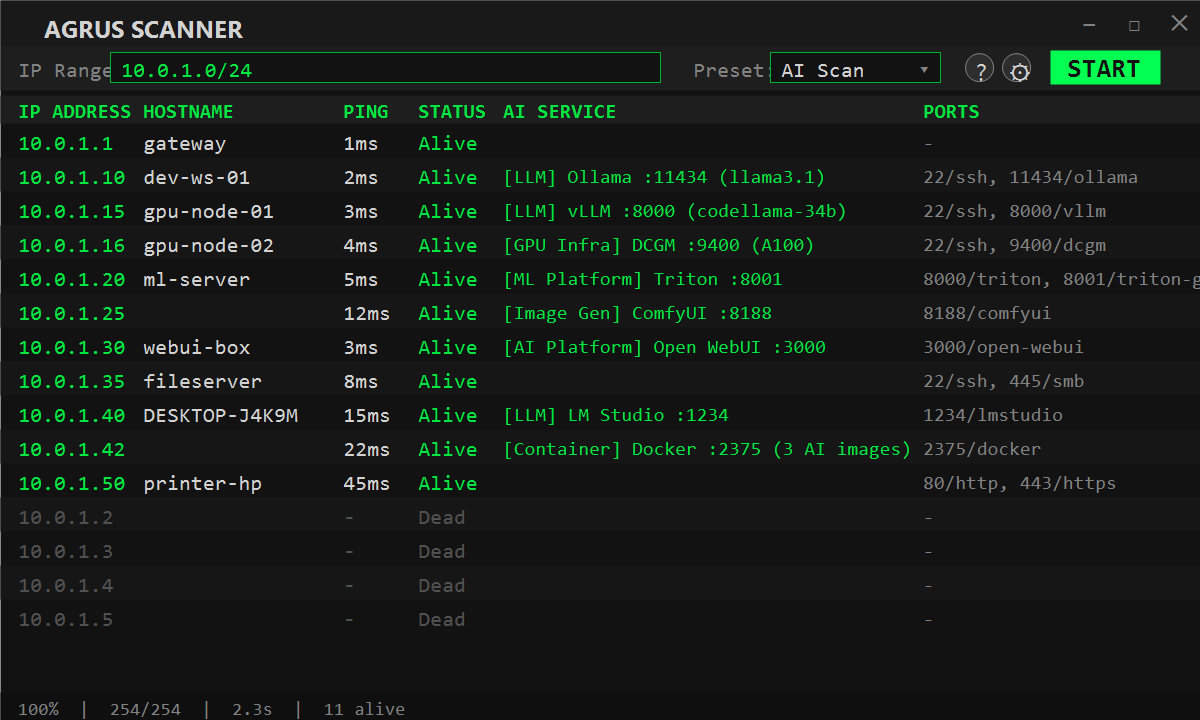
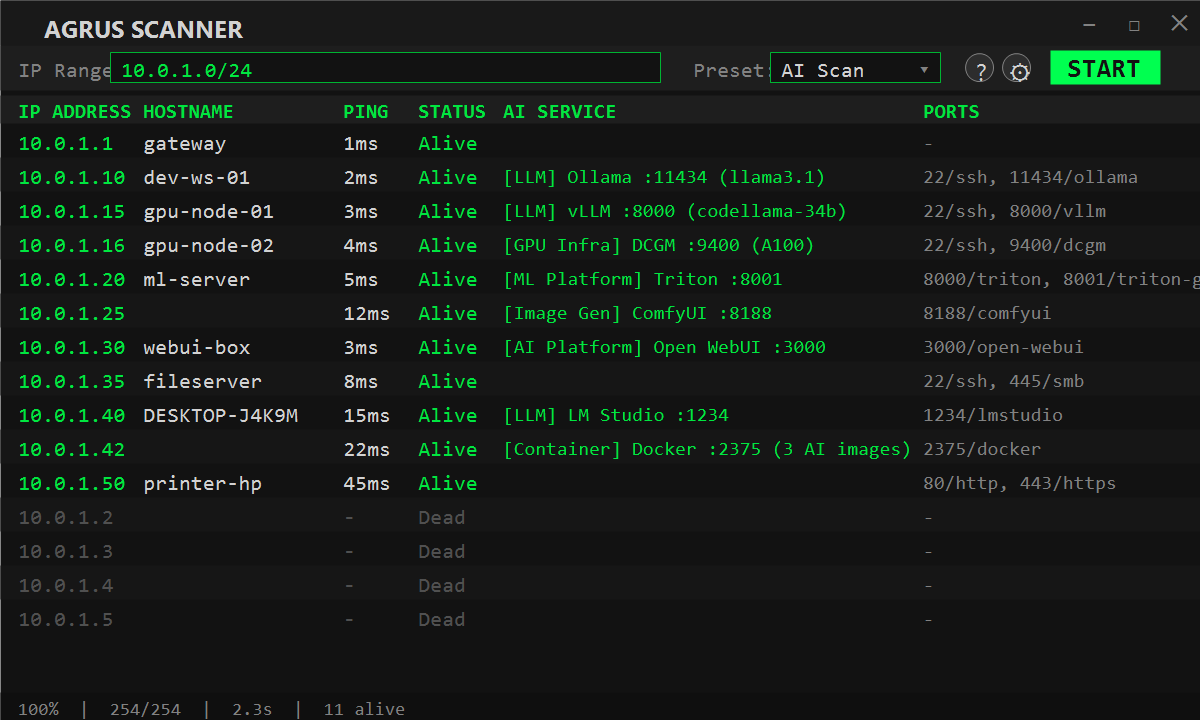
Network reconnaissance tool with deep AI/ML service detection. Scans your network to discover hosts, open ports, and identifies AI services running across your infrastructure.

Built for security teams, IT admins, and researchers who need visibility into shadow AI, rogue LLM deployments, and GPU infrastructure on their networks.

Why

There is a growing concern for shadow AI, and this provides a simple way to scan networks. Also many of the typical scanning tools for windows are slow and have poorly written interfaces, specifically for anyone running a 4k+ monitor. Agrus Scanner is built in native C#/.NET with WPF — no Electron, no embedded browser — so it launches fast, scans fast, and stays light on resources. I've been tired of trying to read tiny print so when a friend/client was looking for a way to scan for shadow AI, and without any windows type tool available, it seemed like a natural fit together.

It also works as a straightforward network scanner — ping sweeps, port scanning, and hostname resolution are all built in. You don't need a separate tool for basic recon. But where Agrus really stands out is AI detection: it goes beyond port scanning by actively probing discovered services with AI-specific API calls, pulling back model names, GPU details, container info, and version data. If someone on your network is running an AI service, Agrus finds it and tells you exactly what it is.

It also runs as an MCP server, so AI agents like Claude Code and OpenClaw can use it as a tool — scan networks, probe hosts, and pull back results autonomously. Point your agent at the endpoint and it handles the rest.
Agrus Scanner

Install

Download the latest installer from Releases, or directly:

AgrusScanner-Setup-1.0.6.msi — self-contained, no .NET runtime needed.

Also available on the Microsoft Store. Or visit the Tools page for the download link, checksum, and winget install command.

Requires Windows 10/11. The installer and the installed binaries are Authenticode-signed (Azure Trusted Signing, publisher Joseph Fago). Once installed, detection signatures keep themselves current; you only need a new installer when the app itself changes.

What's New

Signatures — November 15, 2026

  • NVIDIA GPU Exporter detection (GPU Infra) — the popular nvidia-smi-backed Prometheus exporter (utkuozdemir/nvidia_gpu_exporter) used on homelab/workstation GPUs, complementing the data-center-focused DCGM Exporter already detected; identified via the nvidia_smi_gpu_info identity metric on its documented default port 9835
  • Probe catalog grows to 135 definitions; signatures ship automatically through the rolling feed — no app update needed
  • Dependency check: Microsoft.NET.Test.Sdk 18.11.0 → 18.12.0 (test-only, no runtime impact); no vulnerable packages found

Signatures — November 8, 2026

  • Comet Opik detection (LLM) — self-hosted LLM/RAG/agent observability and evaluation platform, no auth by default; identified via its frontend page title on its standard docker-compose port 5173
  • Agenta detection (LLM) — self-hosted LLMOps platform for prompt management, evaluation and observability; identified via its root page title
  • Attu detection (Vector DB) — official web GUI for self-hosted Milvus, commonly bundled in Milvus docker-compose stacks with no auth by default; identified via its root page title
  • Easy Diffusion detection (Image Gen) — one-click self-hosted Stable Diffusion web app, unauthenticated by default; identified via its root page title on its distinctive default port 9000
  • ClearML detection (ML Platform) — self-hosted open-source MLOps platform for experiment tracking and pipeline management; identified via its webserver root page tagline
  • Rasa detection (Agent Platform) — self-hosted conversational AI/chatbot framework; identified via /version's minimum_compatible_version field on its default REST server port 5005


  • Chainlit detection (AI Platform) — popular self-hosted Python framework for building LLM chat apps, publicly accessible with no auth by default; identified via a generator marker on its root page
  • FastGPT detection (RAG Platform) — self-hosted open-source LLM knowledge-base/RAG platform; identified via its root page branding on its docker-compose default port 3000
  • Probe catalog grows to 134 definitions; signatures ship automatically through the rolling feed — no app update needed

Features

  • Ping Sweep - Fast ICMP discovery across subnets (256 concurrent)
  • Port Scanning - TCP connect scan with preset profiles (Quick, Common, Extended, AI, Deep AI)
  • AI Service Detection - 135 probe definitions identifying 100+ AI/ML services and MCP servers
  • Self-updating Signatures - detection definitions arrive automatically through a signed feed; no reinstall for new services
  • Docker Container Enumeration - Detects AI containers via exposed Docker API
  • GPU Infrastructure - Finds NVIDIA DCGM exporters and inference metrics
  • Export Results - Save scan results to CSV or TXT via the toolbar EXPORT button
  • Real-time Results - Live-updating UI as scan progresses
  • MCP Server - Expose scanning tools to AI agents via Model Context Protocol
  • Agent Skills - Works with Claude Code, OpenClaw, Cursor, and other AgentSkills-compatible tools

AI Detection Categories

도구 다운로드

인기

모두 보기 →

커뮤니티에서 가장 많이 사용되는 도구를 찾아보세요.

  • 1

    OsintHunter

    letox4/osinthunter

    🎯 궁극의 OSINT 툴킷: 조사 그래프, 신뢰도 점수 산정, 별칭 패밀리, 지도, 타임라인 및 보고서. 49개 모듈, 400개 이상 사이트, API 키 불필요.

    994
  • 2

    ghostlock-app

    yukonga/ghostlock-app

    # GhostLock 원탭 실행 앱 (CVE-2026-43499)

    656
  • 3

    looking-glass

    anonghosty/looking-glass

    Shadowserver 보고서를 MongoDB로 수집하고 이를 대화형 지도, 분석, 발견 사항, 권고 및 경영진 대시보드로 재생하는 CSIRT 플랫폼입니다.

    422
  • 4

    jumpserver

    jumpserver/jumpserver

    JumpServer는 오픈소스 권한 접근 관리(PAM) 플랫폼으로, DevOps 및 IT 팀이 웹 브라우저를 통해 SSH, RDP, Kubernetes, 데이터베이스 및 RemoteApp 엔드포인트에 주문형 보안 액세스를 제공합니다.

    389
  • 5

    SafeLine

    chaitin/safeline

    악성 HTTP 트래픽을 필터링하고 SQL 인젝션, XSS, 봇 공격을 차단하며, 속도 제한 및 동적 HTML/JS 암호화를 제공하는 자체 호스팅 WAF 및 리버스 프록시입니다.

    333
  • 6

    ARTEX

    baarai/artex

    LLM 멀티 에이전트 자율 침투 테스트 플랫폼으로, 플래너/워커 에이전트, 자산 및 탐색 그래프, MITM 트래픽 기록, 취약점 재테스트 기능을 제공합니다.

    330

모든 도구 탐색

도구 컬렉션을 둘러보세요

모든 도구 보기 →




