 ngwg/ceasta
리버스 엔지니어링 도구에 내장된 MCP 서버: AI가 단순히 바이너리를 읽는 것이 아니라 디버깅할 수 있습니다 — 중단점, 스테핑, 메모리, 함수 호출. 디스어셈블러 + 디컴파일러 + x64dbg 스타일 디버거를 하나로. windows gui, linux cli.


디스어셈블러, 디컴파일러, 디버거를 하나로 — windows와 linux용




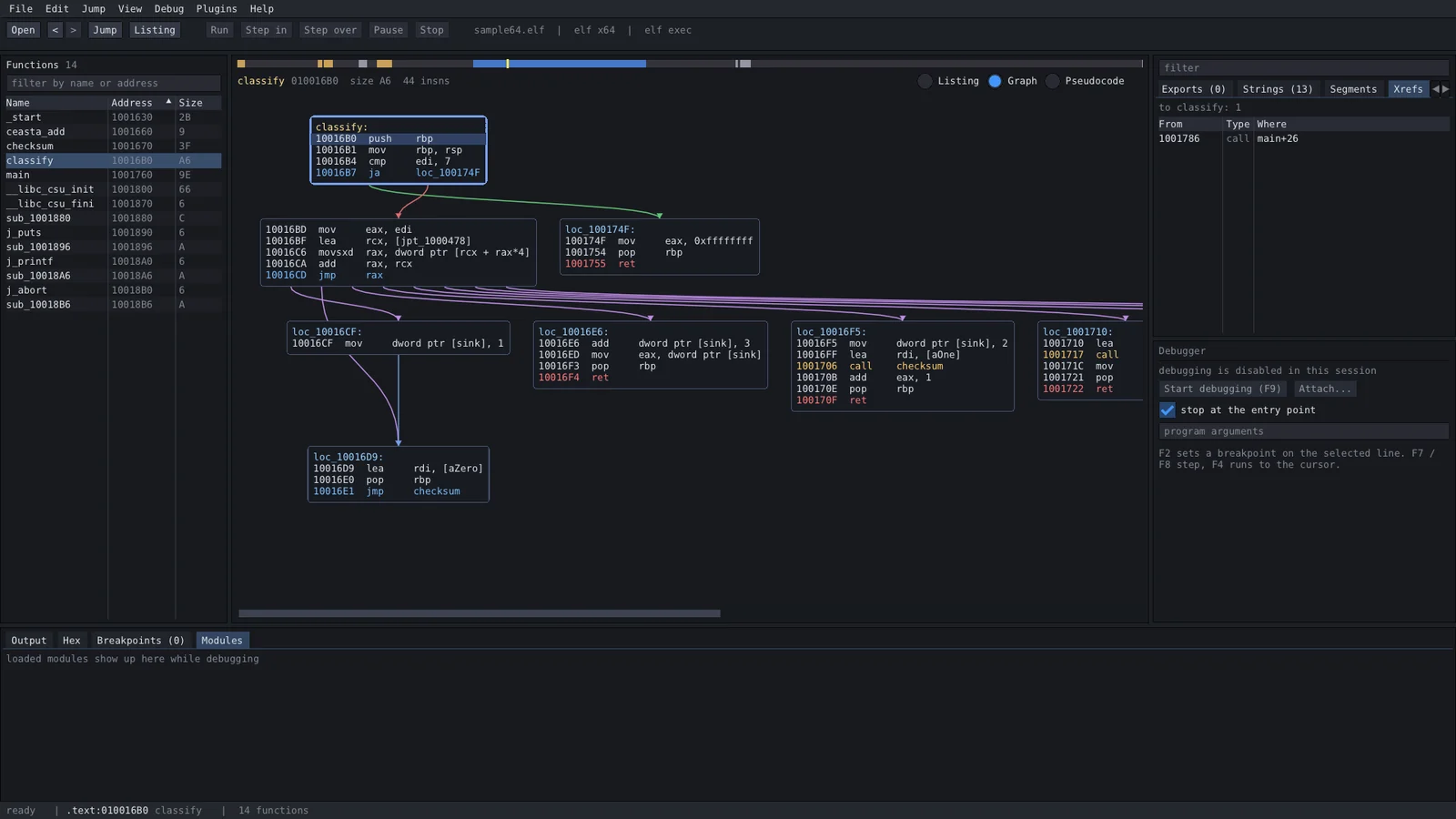
ida 스타일 리스팅, 디컴파일러, 함수 그래프, x64dbg 스타일 디버거, lua 플러그인, 그리고 바이너리에 AI를 연결할 수 있는 내장 MCP 서버까지 — 작은 프로그램 하나, 모든 것이 내장되어 있고, 빌드하는 데 설치할 것은 없습니다.
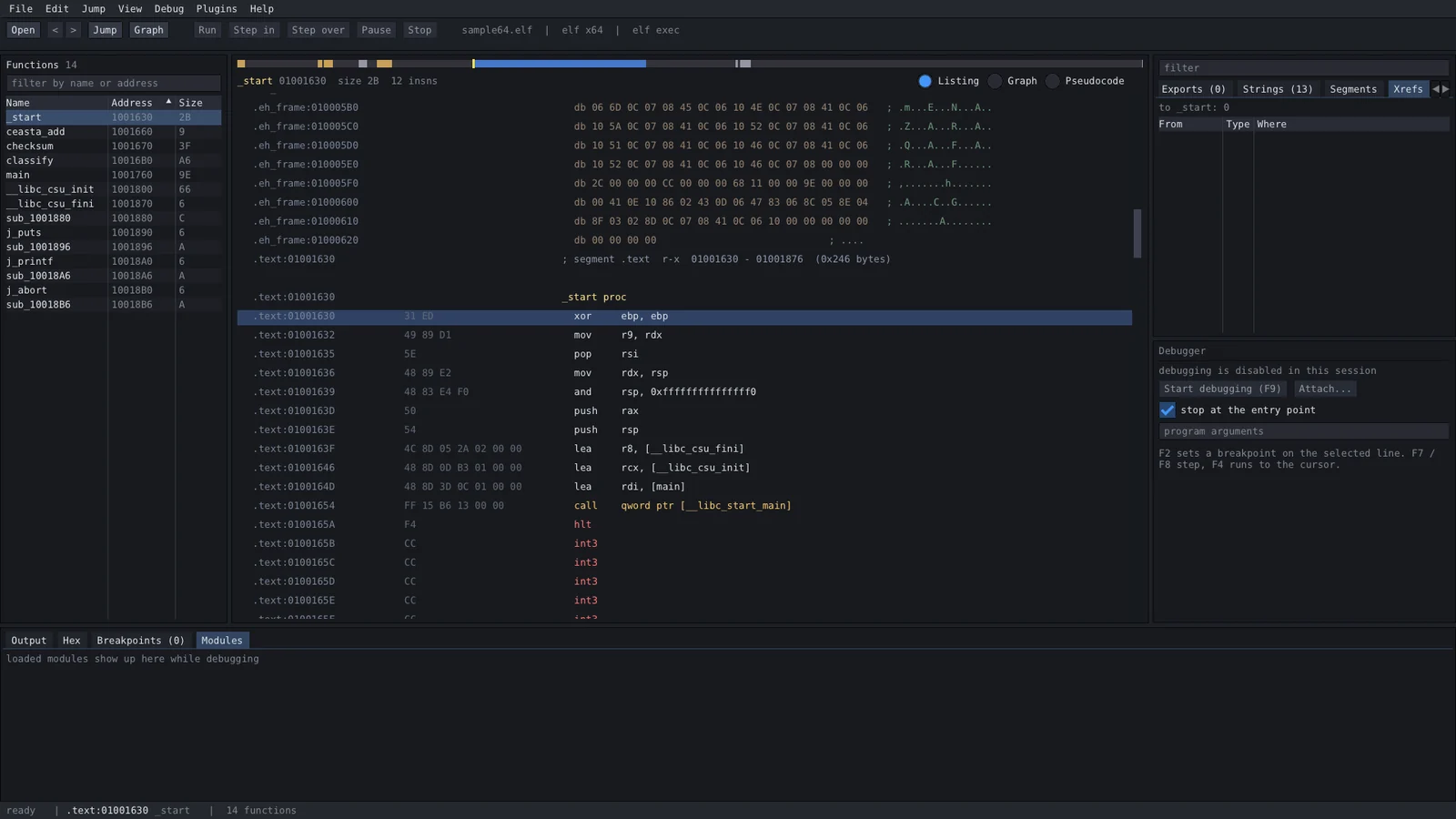
ceasta는 동일한 코드를 원시 바이트부터 읽을 수 있는 c까지 보여주므로, 필요한 수준으로 바로 내려갈 수 있습니다:
; assembly - the real instructions  // pseudocode (f5) - reconstructed c

checksum proc                       int checksum(int rdi)
  movzx   edx, byte ptr [rdi]       {
  test    dl, dl                        rdx = *(char*)rdi;
  je      loc_1191                      if (rdx == 0) {
  mov     eax, 0x1505                       return 0x1505;
loc_1179:                               }
  mov     ecx, eax                      rax = 0x1505;
  shl     ecx, 5                        do {
  add     eax, ecx                          rax = rax + (rax << 5) + rdx;
  add     rdi, 1                            rdi = rdi + 1;
  movzx   edx, dl                           rdx = *(char*)rdi;
  add     eax, edx                      } while (rdx != 0);
  movzx   edx, byte ptr [rdi]           return rax;
  test    dl, dl                    }
  jne     loc_1179
  ret
loc_1191:
  mov     eax, 0x1505
  ret
이것은 djb2입니다 (5381은 0x1505이고, (h << 5) + h는 h * 33입니다). 디컴파일러는 최선을 다하는 수준입니다: 아직 타입이나 구조체가 없어서 레지스터와 캐스트를 읽어야 합니다 — 루틴을 빠르게 파악하는 데는 훌륭하지만, 리스팅이 진실의 원천으로 남습니다.
릴리스 페이지에서 받으세요:
| file | platform | what you get |
|---|---|---|
ceasta-x.y.z-setup.exe | windows 10/11 x64 | 전체 앱, 사용자 계정에 설치 (관리자 권한 불필요), 시작 메뉴 + 선택적 "open with ceasta" |
ceasta-x.y.z-windows-x64.zip | windows x64 | 전체 앱, 포터블 — 압축을 풀고 ceasta.exe 실행 |
ceasta-cli-x.y.z-linux-x64.tar.gz | linux x64 | ceasta-cli + 플러그인: 분석, 디스어셈블리, 디컴파일러, 스크립팅, 터미널 디버거 (linux에서) |
ceasta-cli dbg) — 브레이크포인트, 스테핑, 레지스터, 메모리. 기본적이지만 실제로 동작함; 단일 스레드 대상에서 가장 잘 작동call decrypt "..."), 간접 호출 대상을 xref로 기록 (trace)sigmake / sigapply)<binary>.ceasta 파일로 옆에 저장됨ceasta-cli창 하나, 떠다니는 것 없음:
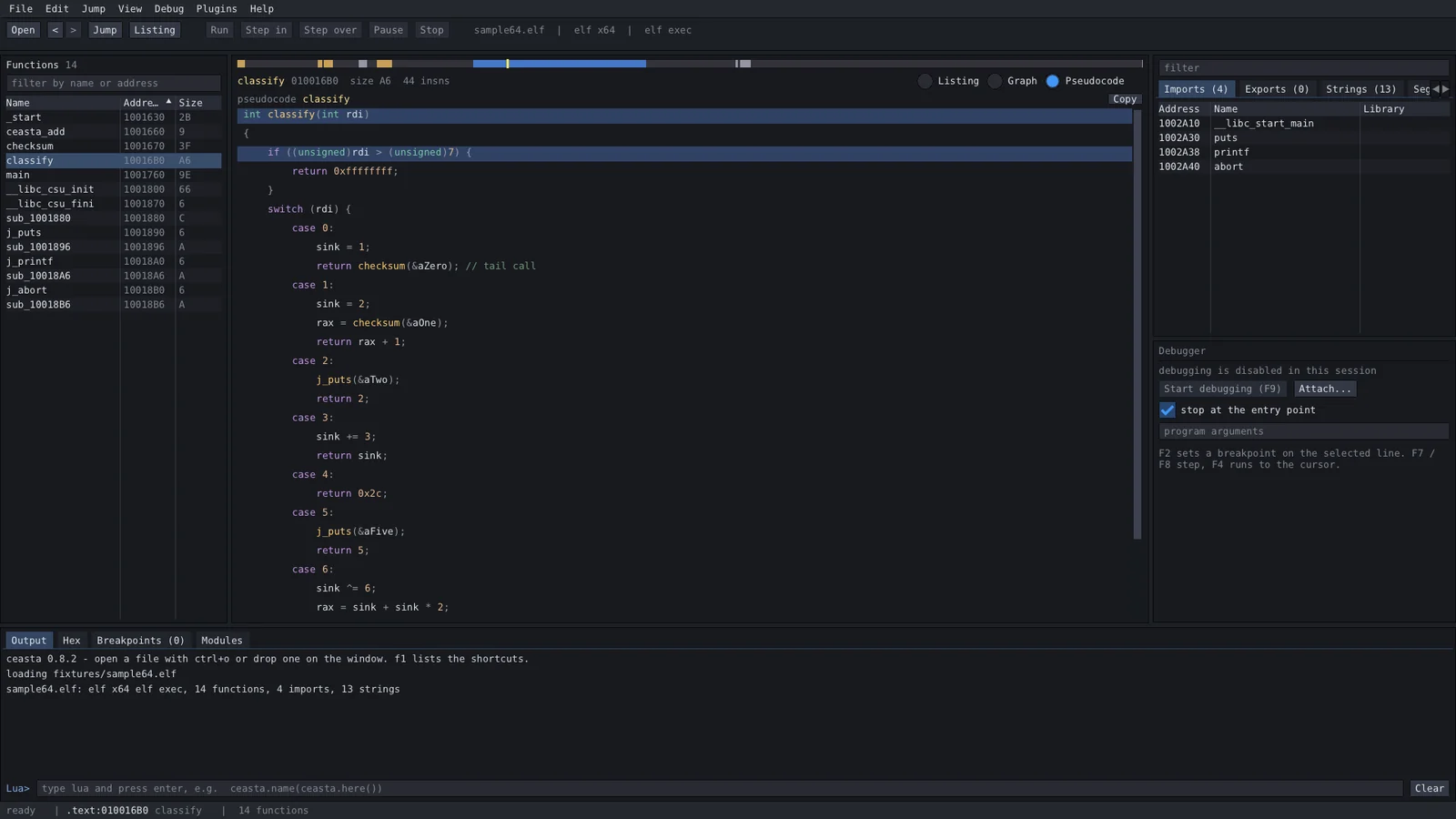
디컴파일러 (f5):
| key | what | key | what |
|---|---|---|---|
| ctrl+o | 파일 열기 | space | 리스팅 / 그래프 |
| g | 주소 또는 이름으로 이동 | f5 | 의사코드 (디컴파일러) |
| enter / double click | 피연산자 따라가기 | alt+b | 바이트 검색 |
| esc / ctrl+enter | 뒤로 / 앞으로 | f9 | 디버깅 시작 / 계속 |
| n | 이름 변경 | f7 / f8 | step into / over |
| ; | 주석 | f4 | 커서까지 실행 |
| x | 여기에 대한 참조 | f2 | 브레이크포인트 토글 |
| ctrl+s | 이름과 주석 저장 | f1 | 모든 단축키 |
플러그인은 plugins/ (프로그램 옆) 또는 %APPDATA%\ceasta\plugins에 있는 lua 파일입니다. 플러그인 메뉴에 명령을 추가합니다. 다섯 개가 기본 제공됩니다: 파일 요약, 암호 탐지기, 래퍼 네이머, 문자열 리포트, 호출 추적기 (디버거).
ceasta.register_command("Count calls", function()
    local n = 0
    for _, fn in ipairs(ceasta.functions()) do
        n = n + #ceasta.xrefs_to(fn.addr)
    end
    ceasta.log(n .. " references to functions")
end)
전체 api는 lua 스크립팅 가이드에 있습니다. 출력 패널에는 lua 프롬프트도 있습니다 — ceasta.name(ceasta.here())를 시도해 보세요.
ceasta-cli info file.exe            format, entry, segments
ceasta-cli funcs file.exe           functions
ceasta-cli disasm file.exe main 40  listing from a name or address
ceasta-cli graph file.exe start     basic blocks of a function
ceasta-cli decompile file.exe main  pseudocode for a function
ceasta-cli xrefs file.exe CreateFileW
ceasta-cli find file.exe "48 8b ?? 05"
ceasta-cli run file.exe script.lua  run a plugin / script
ceasta-cli dbg ./program [args]     interactive debugger (linux + windows)
ceasta-cli diff old.exe new.exe     match functions, show what changed
ceasta-cli sigmake libc.a lib.sig   make signatures from a file with symbols
ceasta-cli sigapply stripped lib.sig  name matching functions
ceasta-cli mcp file.exe             serve the file to an AI over MCP
ceasta의 내장 MCP 서버를 통해 AI (Claude Code, Claude Desktop, Cursor, ...)를 바이너리에 연결하세요:
claude mcp add ceasta -- ceasta-cli mcp /path/to/target.exe
디컴파일, xref 읽기, 함수 이름 변경, 빌드 diff가 가능하며 — --allow-debug를 사용하면 브레이크포인트 설정, 스테핑, 메모리 읽기, 심지어 실행 중인 프로그램에서 함수 호출까지 가능합니다. 디버거 도구와 안전 관련 주의사항을 포함한 전체 가이드는 connect an AI에 있습니다.
gui는 windows 전용이지만, 명령줄 도구는 분석, 디스어셈블리, 디컴파일러, 스크립팅, 터미널 디버거를 수행합니다. ceasta-cli-x.y.z-linux-x64.tar.gz를 받아서 압축을 풀고 실행하세요 — 설치할 것은 없습니다:
tar xzf ceasta-cli-*-linux-x64.tar.gz
cd ceasta-cli-*-linux-x64

./ceasta-cli info /bin/ls                   format, entry, function / import / string counts
./ceasta-cli decompile /bin/ls start        pseudocode for the entry point
./ceasta-cli run /bin/ls plugins/hello.lua  run a lua plugin
./ceasta-cli dbg ./program                  debug it (break, step, registers, memory)
elf (x86 / x64)와 windows pe 파일을 모두 읽으므로, linux에서 windows exe도 볼 수 있습니다.
터미널 디버거 (dbg)는 ceasta의 이름, 디스어셈블리, 디컴파일러가 내장된 ptrace 디버거입니다:
(ceasta) b main            break at a name or address
(ceasta) c                 continue
(ceasta) ni / si           step over / into      until <addr>  run to
(ceasta) r                 registers             k  stack       x <addr>  memory
(ceasta) u                 disassemble here (with names)
(ceasta) dec               decompile the function you're stopped in
(ceasta) lua ...           run lua against the live process
필요한 모든 것이 저장소에 있습니다 — 컴파일러만 있으면 되고, 받아올 것은 없습니다.
windows
ceasta.sln을 열고 Release | x64를 선택한 후 빌드 → build\msvc\Releasecmake -S . -B build 후 cmake --build build --config Releasepowershell -ExecutionPolicy Bypass -File installer\package.ps1linux (코어 + cli, gui는 windows 전용)
cmake -S . -B build && cmake --build build -j
src/app.* — 상태, 액션, 메인 레이아웃src/ui/ — 패널당 파일 하나 (top_bar, left_panel, ida_view, graph_view, pseudo_view, right_panel, cpu_panel, bottom_panel, status_bar, dialogs)src/widgets/ — 작은 공용 조각들 (nav_band, splitter)src/core/ — ui 없음: 로더 (binary, pe, elf), disasm (capstone), analysis, database, decompiler, lua_host, debugger (win32) + debugger_linux (ptrace), ossrc/cli/ — ceasta-cli와 dbg 터미널 디버거plugins/ — 함께 배포되는 lua 플러그인docs/ — lua 가이드, 체인지로그, 서드파티 라이선스, 스크린샷installer/ — inno setup 스크립트와 패키징third_party/ — imgui, capstone (x86 전용), lua 5.4ceasta는 GPLv3입니다. 내장된 라이브러리들은 각자의 (허용적) 라이선스를 유지합니다 — dear imgui와 lua는 MIT, capstone은 BSD; 자세한 내용은 docs/THIRD_PARTY_NOTICES.md에 있습니다.
