 nextronsystems/ransomware-simulator
안전한 랜섬웨어 시뮬레이션 도구로, 안티바이러스 탐지를 테스트합니다. 실제 파일에 손상을 주지 않고 매크로 스테이징, 볼륨 섀도 복사본 삭제, 문서 암호화, 노트 드롭을 시뮬레이션합니다.

  ____         _       __    ___              __
 / __ \ __ __ (_)____ / /__ / _ ) __ __ ____ / /__
/ /_/ // // // // __//  '_// _  |/ // // __//  '_/
\___\_\\_,_//_/ \__//_/\_\/____/ \_,_/ \__//_/\_\

Nextron Systems GmbH
이 저장소의 목표는 랜섬웨어에 대한 안티바이러스 보호를 확인할 수 있는 간단하고 무해한 방법을 제공하는 것입니다.
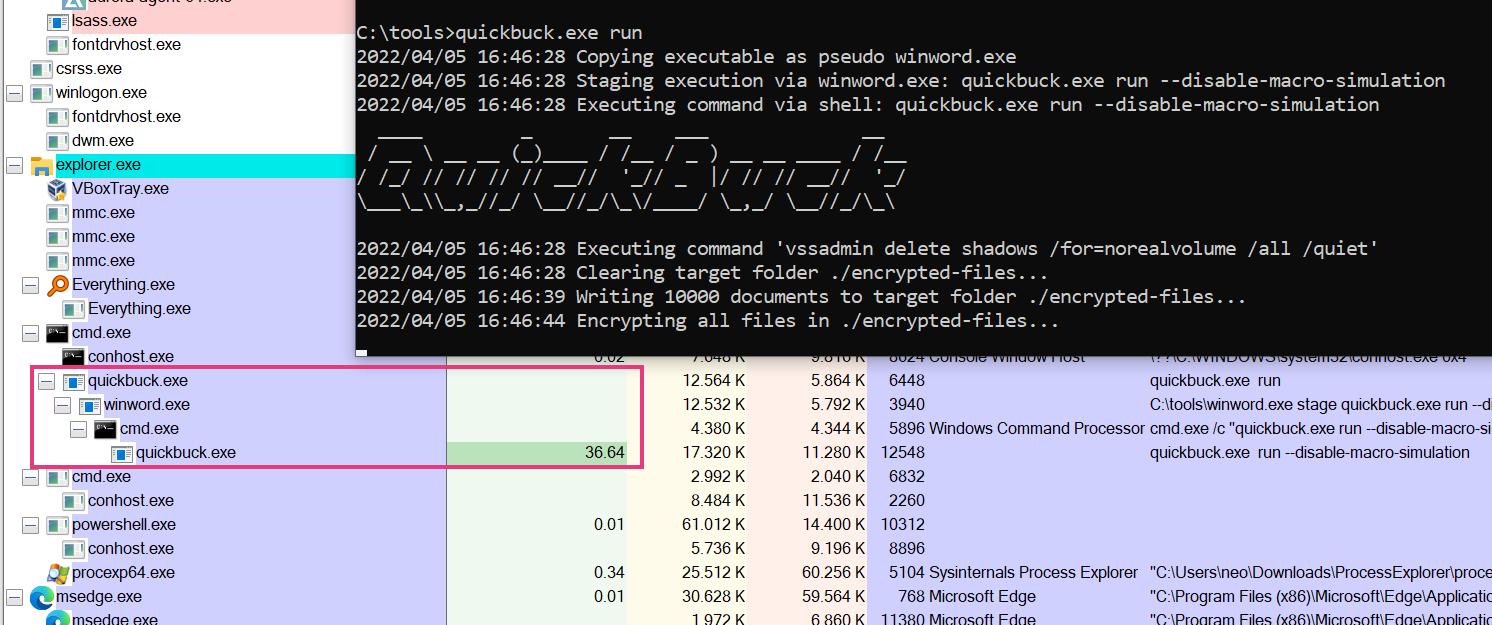
이 도구는 다음과 같은 일반적인 랜섬웨어 동작을 시뮬레이션합니다:
랜섬웨어 시뮬레이터는 기기에 있는 기존 파일을 실제로 암호화하거나 볼륨 섀도 복사본을 삭제하는 작업을 수행하지 않습니다. 하지만 이러한 동작을 탐지하는 안티바이러스 제품은 여전히 트리거될 수 있습니다.
위에 나열된 각 단계는 명령줄 플래그를 통해 비활성화할 수 있습니다. 이를 통해 AV가 이전 단계를 이미 탐지하더라도 이후 단계에 대한 대응을 확인할 수 있습니다.
Ransomware Simulator

Usage:
ransomware-simulator [command]

Examples:
ransomware-simulator run

Available Commands:
help        Help about any command
run         Run ransomware simulator

Flags:
-h, --help   help for ransomware-simulator

Use "ransomware-simulator [command] --help" for more information about a command.
실행 명령:
Run Ransomware Simulator

Usage:
ransomware-simulator run [flags]

Flags:
    --dir string                     Directory where files that will be encrypted should be staged (default "./encrypted-files")
    --disable-file-encryption        Don't simulate document encryption
    --disable-macro-simulation       Don't simulate start from a macro by building the following process chain: winword.exe -> cmd.exe -> ransomware-simulator.exe
    --disable-note-drop              Don't drop pseudo ransomware note
    --disable-shadow-copy-deletion   Don't simulate volume shadow copy deletion
-h, --help                           help for run
    --note-location string           Ransomware note location (default "C:\\Users\\neo\\Desktop\\ransomware-simulator-note.txt")