
Skip to content
KitploitKITPLOIT
도구블로그
제출
도구블로그
제출

해킹, 침투 테스트 및 사이버 보안 도구를 당신의 보안 무기고에!

Kitploit은 해킹, 사이버 보안 및 침투 테스트 도구 디렉토리입니다. 최신 프로젝트 업데이트를 발견하여 취약점을 찾고, 시스템을 분석하고, 테스트를 자동화하고, 보안을 강화하세요.

··피드·문의·개인정보·© 2026 Kitploit

도구 디렉토리

카테고리

모든 카테고리 보기
Loading categories
munin — Virustotal 및 기타 서비스를 위한 온라인 해시 검사기 | Kitploit
도구/GitHubGitHub/neo23x0/munin
OSINT (Open Source Intelligence)Vulnerability AnalysisHash AnalysisInformation GatheringMalware AnalysisThreat Intelligence
GitHubneo23x0/munin

munin

Virustotal 및 기타 서비스를 위한 온라인 해시 검사기

저장소 보기
85215041년 전Kitploit 검토 완료

인기

모두 보기 →

커뮤니티에서 가장 많이 사용되는 도구를 찾아보세요.

모든 도구 탐색

도구 컬렉션을 둘러보세요

모든 도구 보기 →
공유

Actively Maintained

root@kitploit:~
 _________   _    _   ______  _____  ______
| | | | | \ | |  | | | |  \ \  | |  | |  \ \     /.)
| | | | | | | |  | | | |  | |  | |  | |  | |    /)\|
|_| |_| |_| \_|__|_| |_|  |_| _|_|_ |_|  |_|   // /
                                              /'" "

Online Hash Checker for Virustotal and Other Services
Florian Roth

Munin이란?

Munin은 다양한 온라인 소스에서 유용한 정보를 검색하는 온라인 해시 검사 유틸리티입니다.

현재 버전의 Munin은 다음 서비스를 조회합니다:

  • Virustotal
  • HybridAnalysis
  • Any.Run
  • URLhaus
  • MISP
  • CAPE
  • Malshare
  • Valhalla
  • Hashlookup

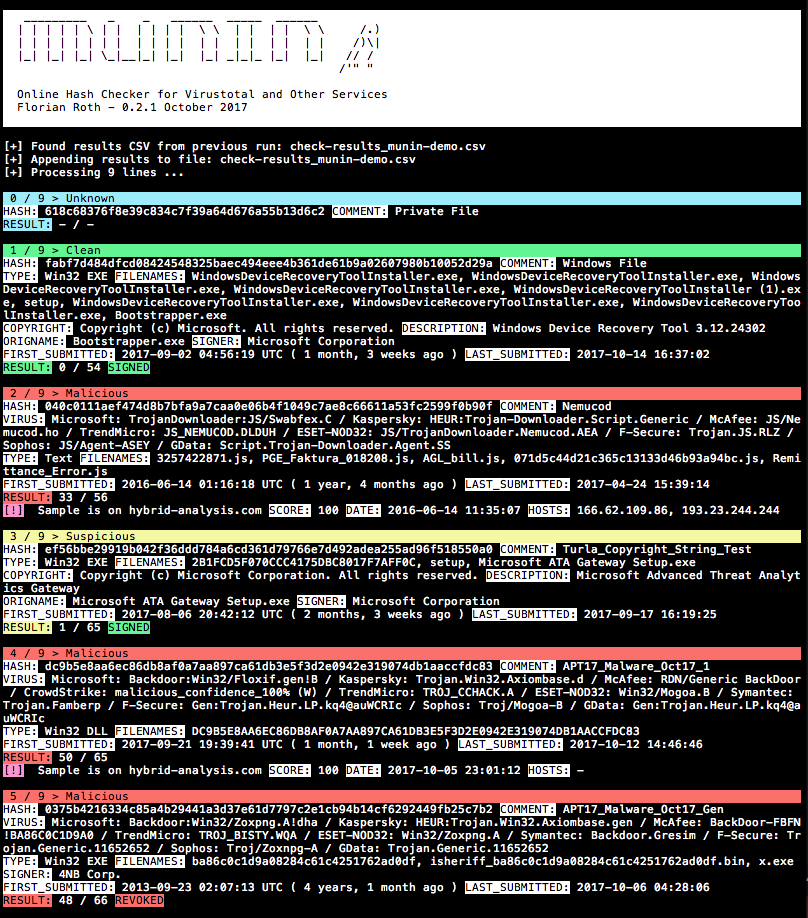
스크린샷

기본 모드 - 파일에서 해시 읽기

Munin Screenshot

사용법

root@kitploit:~
usage: munin.py [-h] [-f path] [--vh search-string]
                [--vhrule search-string] [-o output] [--vtwaitquota]
                [--vtminav min-matches] [--limit hash-limit]
                [--vhmaxage days] [-c cache-db] [-i ini-file]
                [-s sample-folder] [--comment] [-p vt-comment-prefix]
                [--download] [-d download_path] [--nocache] [--nocsv]
                [--verifycert] [--sort] [--web] [-w port] [--cli]
                [--rescan] [--debug]

Online Hash Checker

optional arguments:
  -h, --help            show this help message and exit
  -f path               File to process (hash line by line OR csv with hash
                        in each line - auto-detects position and comment)
  --vh search-string    Query Valhalla for hashes by keyword, tags, YARA
                        rule name, Mitre ATT&CK software (e.g. S0154),
                        technique (e.g. T1023) or threat group (e.g. G0049)
  --vhrule search-string
                        Query Valhalla for hashes via rules by keyword,
                        tags, YARA rule name, Mitre ATT&CK software (e.g.
                        S0154), technique (e.g. T1023) or threat group
                        (e.g. G0049)
  -o output             Output file for results (CSV)
  --vtwaitquota         Do not continue if VT quota is exceeded but wait
                        for the next day
  --vtminav min-matches
                        Minimum number of AV matches to query hash info
                        from VT"
  --limit hash-limit    Exit after handling this much new hashes in batch
                        mode (cache ignored).
  --vhmaxage days       Maximum age of sample on Valhalla to process
  -c cache-db           Name of the cache database file (default: vt-hash-
                        db.json)
  -i ini-file           Name of the ini file that holds the API keys
  -s sample-folder      Folder with samples to process
  --comment             Posts a comment for the analysed hash which
                        contains the comment from the log line
  -p vt-comment-prefix  Virustotal comment prefix
  --download            Enables Sample Download from Hybrid Analysis.
                        SHA256 of sample needed.
  -d download_path      Output Path for Sample Download from Hybrid
                        Analysis. Folder must exist
  --nocache             Do not use cache database file
  --nocsv               Do not write a CSV with the results
  --verifycert          Verify SSL/TLS certificates
  --sort                Sort the input lines
  --web                 Run Munin as web service
  -w port               Web service port
  --cli                 Run Munin in command line interface mode
  --rescan              Trigger a rescan of each analyzed file
  --debug               Debug output

기능

  • Virustotal에서 API(JSON 응답)를 통해 유용한 정보를 검색하고, permalink(HTML 파싱)를 통해 다른 정보를 검색합니다
  • 여러 플랫폼에서 추가 정보를 검색합니다
  • 텍스트 파일에 여러 번 나타날 수 있는 해시에 대해 서비스를 한 번만 조회하도록 기록(캐시)을 유지합니다
  • 캐시된 객체는 JSON으로 저장됩니다
  • 발견 사항을 CSV 파일로 생성하여 후처리 및 보고를 용이하게 합니다
  • 이전 CSV가 있으면 결과를 추가합니다

표시 항목

  • 해시 및 설명(설명은 해시가 추출된 줄의 나머지 부분)
  • 사용자 정의 목록에 기반한 AV 벤더 매칭
  • 실제 사용된 파일 이름
  • 설명, 원본 파일 이름, 저작권 문구와 같은 PE 정보
  • 서명된 PE 실행 파일의 서명자
  • Virustotal 비율 기반 결과
  • 첫 번째 및 마지막 제출
  • 특정 지표에 대한 태그: Harmless, Signed, Expired, Revoked, MSSoftware

추가 검사

  • Malshare.com에 샘플 업로드 조회
  • Hybrid-Analysis.com에서 보고서 조회
  • 여러 MISP 인스턴스에서 사용 가능한 이벤트 조회
  • Any.run 샌드박스에서 보고서 조회
  • CAPE 샌드박스에서 보고서 조회
  • URLhaus에서 보고서 조회
  • Malshare에서 사용 가능한 샘플 조회
  • Valhalla에서 YARA 규칙 매칭 조회
  • 현재 배치 내 Imphash 중복 확인 - 가져오기 테이블 해시의 중복을 발견할 수 있습니다
  • PE 서명 중복 확인

작동 모드

  1. 기본 - 해시가 포함된 입력 파일(-f) 또는 샘플 디렉터리(-s)를 제공
  2. 조회 - Valhalla에서 키워드, 태그, ATT&CK 기술(예: T1023), ATT&CK 위협 그룹(예: G0049) 또는 규칙 이름으로 해시 검색(-q)
  3. 명령줄 인터페이스 - --cli 매개변수 사용
  4. 웹 서비스 모드 - --web 매개변수 사용

시작하기

  1. 저장소 다운로드/클론
  2. 필요한 패키지 설치: pip3 install -r requirements.txt (macOS에서는 --user 추가)
  3. 사용자 정의 ini 파일에 각 서비스의 API 키 설정: cp munin.ini my.ini (도움말은 API 키 얻기 섹션 참조)
  4. 데모 파일로 첫 실행: python munin.py -i my.ini -f munin-demo.txt

요구 사항

  • Python 3.7 이상
  • 인터넷 연결 (프록시 지원; SSL/TLS 차단 문제 가능)

일반적인 명령줄

Virustotal Retrohunt 결과를 처리하기 전에 줄을 정렬하여 일치하는 시그니처가 블록 단위로 확인되도록 합니다

root@kitploit:~
python3 munin.py -i my.ini -f ~/Downloads/retro_hunt

샘플이 포함된 디렉터리를 처리하고 해시를 온라인에서 확인합니다

root@kitploit:~
python3 munin.py -i my.ini -s ~/malware/case34

명령줄 인터페이스 모드 사용 (v0.14 신규)

root@kitploit:~
python3 munin.py -i my.ini

API 키 얻기

Virustotal

  1. 계정 생성: https://www.virustotal.com/#/join-us
  2. 프로필 > 내 API 키에서 공개 API 키 확인

MalShare

여기에서 등록: https://malshare.com/register.php

Malware Bazaar

여기에서 등록: https://bazaar.abuse.ch/. 그런 다음 계정 개요에서 API 키를 찾을 수 있습니다.

Hybrid Analysis

  1. 계정 생성: https://www.hybrid-analysis.com/signup
  2. 로그인 후 프로필 > API 키 확인

MISP

  1. MISP에 로그인
  2. 프로필로 이동 "내 프로필"
  3. Authkey 값을 API 키로 사용
  4. .ini 파일은 MISP 인스턴스 목록과 각 API 키 목록을 모두 사용합니다

Valhalla

현재 고객 또는 초청 연구원 전용
https://valhalla.nextron-systems.com/

Hashlookup

Hashlookup CIRCL의 인스턴스는 무료로 제공되며 최선의 노력을 기준으로 제공됩니다.

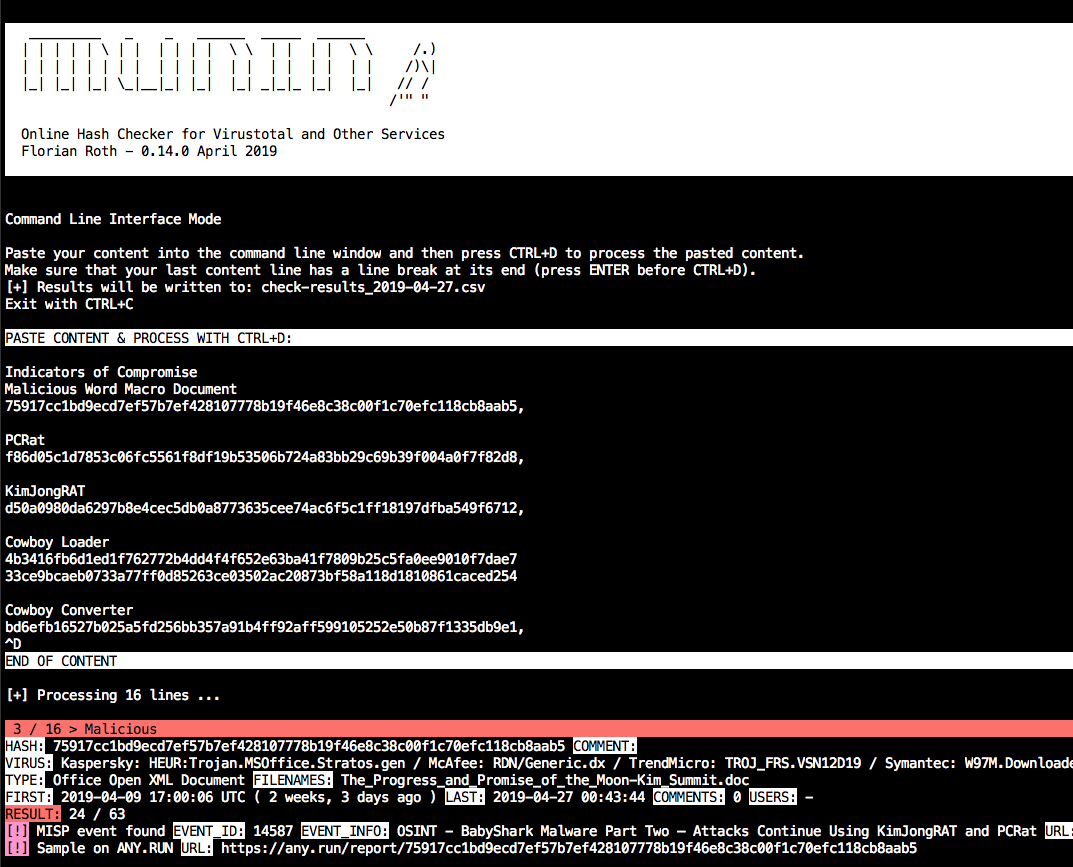
명령줄 인터페이스 모드

--cli로 munin을 시작하고 지시를 따릅니다.

예:

root@kitploit:~
python3 munin.py -i my.ini --cli

해시 값이 포함된 내용을 붙여넣고 CTRL+D를 눌러 입력을 완료합니다. 마지막 줄은 끝에 줄 바꿈이 필요합니다.

기본적으로 파일 이름에 현재 날짜가 포함된 CSV 파일이 생성됩니다.
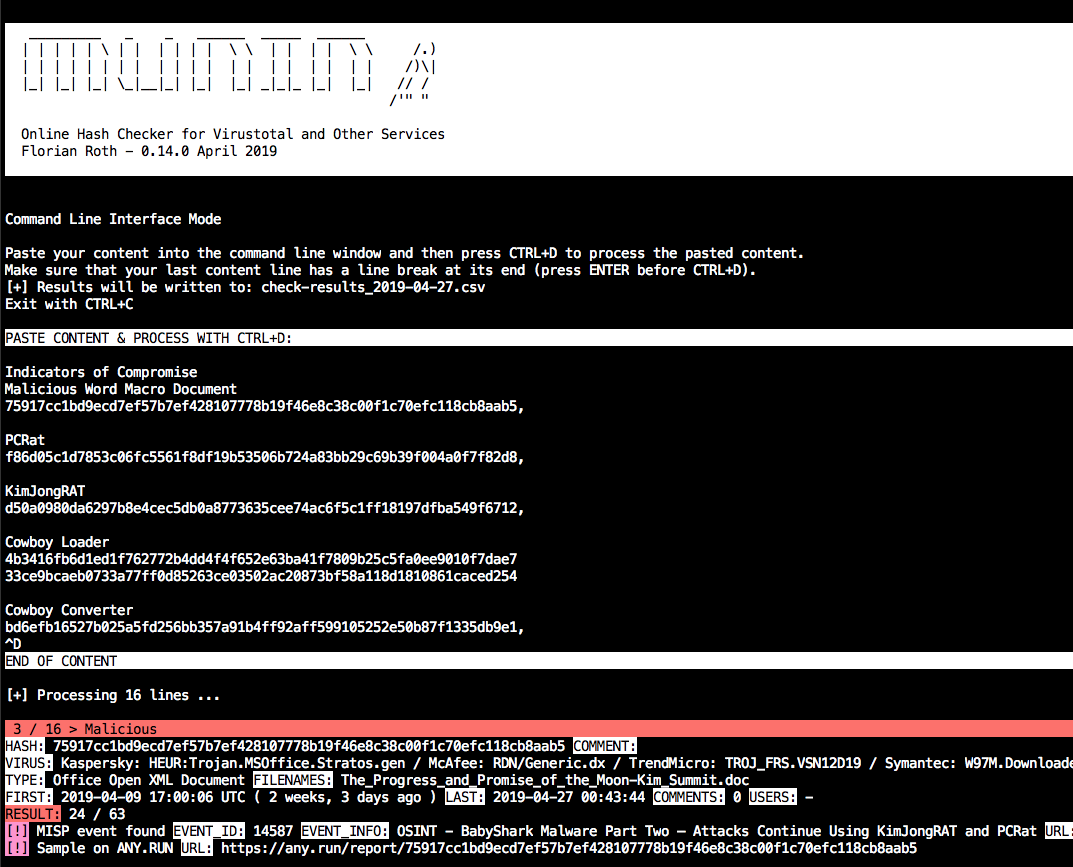
Munin CLI

웹 서비스 모드

--web으로 munin을 시작하고 선택적으로 포트 -w port를 지정합니다.

예:

root@kitploit:~
python3 munin.py -i my.ini --web -w 8080

웹 서비스는 다음 URL 구성표에 문자열을 기다립니다.

root@kitploit:~
http://server:port/<string>

문자열은 줄 바꿈이 없는 임의의 문자열일 수 있습니다. 예:

root@kitploit:~
Emotet:1585ad28f7d1e0ca696e6c6c2f1d008a
ed01ebfbc9eb5bbea545af4d01bf5f1071661840480439c6e5babe8e080e41aa;IOC1
dc9b5e8aa6ec86db8af0a7aa897ca61db3e5f3d2e0942e319074db1aaccfdc83

결과는 다음과 같습니다:

root@kitploit:~
{
    "comment": "Emotet",
    "commenter": "-",
    "comments": "0",
    "copyright": "Copyright (C) America Online, Inc. 1999 - 2004",
    "description": "Utilities",
    "expired": false,
    "filenames": "sourcedev.exe, MISCUTIL, x8ykNnr_9WofXq7Nh_xuEzSPW.exe, jwuKBLWN681ztj6Zks.exe",
    "filetype": "Win32 EXE",
    "first_submitted": "2019-01-19 13:46:21 UTC ( 2 months, 2 weeks ago )",
    "firstsubmission": "2019-01-19 13:46:21 UTC ( 2 months, 2 weeks ago )",
    "harmless": false,
    "hash": "1585ad28f7d1e0ca696e6c6c2f1d008a",
    "hybrid_available": false,
    "hybrid_compromised": "-",
    "hybrid_date": "-",
    "hybrid_score": "-",
    "imphash": "2820d9bdc397f88a8a1e957e1a824482",
    "last_submitted": "2019-02-27 09:44:03",
    "malshare_available": false,
    "md5": "1585ad28f7d1e0ca696e6c6c2f1d008a",
    "misp_available": true,
    "misp_events": "",
    "misp_info": [],
    "mssoft": false,
    "origname": "-",
    "positives": 48,
    "rating": "malicious",
    "res_color": "\u001b[41m",
    "result": "48 / 64",
    "revoked": false,
    "sha1": "4561d0ad575d5f02fb06e062a37de15861c3bd89",
    "sha256": "35e304d10d53834e3e41035d12122773c9a4d183a24e03f980ad3e6b2ecde7fa",
    "signed": false,
    "signer": "-",
    "total": 64,
    "urlhaus_available": true,
    "vendor_results": {
        "CrowdStrike": "win/malicious_confidence_100% (W)",
        "ESET-NOD32": "a variant of Win32/Kryptik.GOUY",
        "F-Secure": "Trojan.TR/AD.Emotet.pdiuu",
        "GData": "Trojan.GenericKD.40960256",
        "Kaspersky": "HEUR:Trojan.Win32.Generic",
        "McAfee": "Emotet-FLL!1585AD28F7D1",
        "Microsoft": "Trojan:Win32/Emotet.DN",
        "Sophos": "Mal/Emotet-Q",
        "Symantec": "Trojan.Gen.2",
        "TrendMicro": "-"
    },
    "virus": "Microsoft: Trojan:Win32/Emotet.DN / Kaspersky: HEUR:Trojan.Win32.Generic / McAfee: Emotet-FLL!1585AD28F7D1 / CrowdStrike: win/malicious_confidence_100% (W) / ESET-NOD32: a variant of Win32/Kryptik.GOUY / Symantec: Trojan.Gen.2 / F-Secure: Trojan.TR/AD.Emotet.pdiuu / Sophos: Mal/Emotet-Q / GData: Trojan.GenericKD.40960256",
    "virusbay_available": false,
    "vt_positives": 48,
    "vt_queried": false,
    "vt_total": 64,
    "vt_verbose_msg": "Scan finished, information embedded"
}

Virustotal에 대한 쿼리는 제한(throttle)되어야 합니다. 따라서 웹 서비스는 쿨다운 시간을 적용하며, 이는 15초 대기 시간에서 다른 모든 플랫폼을 처리하는 데 걸린 시간을 빼서 최소화됩니다.

root@kitploit:~
cooldown_time = vt_wait_time - process_time

쿨다운 중에 요청은 다음 응답을 반환합니다:

root@kitploit:~
{"status": "VT cooldown active"}

조회 캐시에 이미 있는 해시를 요청할 때는 쿨다운이 적용되지 않습니다.

Munin Hosts

Munin 호스트 및 IP 검사 스크립트(munin-host.py)는 IOC 목록의 IP 주소 및 호스트/도메인 이름에 대한 추가 정보를 검색합니다.

사용법

root@kitploit:~
    usage: munin-host.py [-h] [-f path] [-o output] [-m max-items] [-c cache-db]
                        [-i ini-file] [--nocache] [--nocsv] [--recursive]
                        [--download] [-d download_path] [--dups] [--noresolve]
                        [--ping] [--debug]

    Virustotal Online Checker (IP/Domain)

    optional arguments:
      -h, --help        show this help message and exit
      -f path           File to process (hash line by line OR csv with hash in
                        each line - auto-detects position and comment)
      -o output         Output file for results (CSV)
      -m max-items      Maximum number of items (urls, hosts, samples) to show
      -c cache-db       Name of the cache database file (default: vt-hosts-
                        db.json)
      -i ini-file       Name of the ini file that holds the API keys
      --nocache         Do not use the load the cache db (vt-check-cache.pkl)
      --nocsv           Do not write a CSV with the results
      --recursive       Process the resolved IPs as well
      --download        Try to download the URLs (directories with host/ip names)
      -d download_path  Store the downloads to the given directory
      --dups            Do not skip duplicate hashes
      --noresolve       Do not perform DNS resolve test on found domain names
      --ping            Perform ping check on IPs (speeds up process if many
                        public but internally routed IPs appear in text file)
      --debug           Debug output

스크린샷

Munin Hosts_Screenshot

예시

데모 파일을 파싱하여 IP와 호스트를 추출하고, 여전히 확인 가능한 도메인만 확인하지 않고 원격 시스템에서 직접 샘플을 다운로드합니다.

root@kitploit:~
python3 munin-host.py -i your-key.ini -f ./munin-hosts-demo.txt --noresolve --download

경고

IDS 모니터링 네트워크에서 munin-host.py를 사용하면 많은 경보가 발생할 수 있습니다. munin-host.py는 악성 도메인에 대한 DNS 조회를 수행하고 악성 샘플을 다운로드하는 옵션이 있기 때문입니다.

문제

macOS에서 pycurl

munin-host.py 스크립트는 pycurl 모듈이 필요합니다. macOS에서 작동하게 만드는 것은 까다로울 수 있으며, 빌드 과정에서 openssl이 설치되어 있어야 합니다.

오류가 발생하면 다음을 시도해보세요 (일부 환경에서는 pip3 필요)

root@kitploit:~
pip uninstall pycurl
brew update
brew reinstall openssl
export PKG_CONFIG_PATH="/usr/local/opt/openssl/lib/pkgconfig"
export LDFLAGS="-L/usr/local/opt/openssl/lib"
export CPPFLAGS="-I/usr/local/opt/openssl/include"
export PYCURL_SSL_LIBRARY=openssl
pip install pycurl --global-option="--with-openssl"

Virustotal Retrohunts를 위한 Hugin

Hugin 스크립트(hugin.py)는 레트로헌트에서 반환된 모든 샘플에 대한 정보를 검색하고 표시합니다. 큰 장점은 각 샘플 요청 사이에 15초를 기다리지 않고 Virustotal API v3를 통해 전체 JSON 결과 파일을 가져오는 것입니다. 이렇게 하면 결과를 즉시 얻을 수 있습니다. 단점은 Any.run, Hybrid-Analysis, MISP 또는 Valhalla와 같은 다른 서비스가 Hugin과 함께 조회되지 않는다는 것입니다.

사용법

root@kitploit:~
usage: hugin.py [-h] [-r retrohunt-name] [-i ini-file]
                [--csv-path CSV_PATH] [--debug] [--no-comments]

Retrohunt Checker

optional arguments:
  -h, --help           show this help message and exit
  -r retrohunt-name    Name for the queried retrohunt
  -i ini-file           Name of the ini file that holds the VT API key
  --csv-path CSV_PATH  Write a CSV with the results
  --debug              Debug output
  --no-comments        Skip VirusTotal comments

예시

레트로헌트를 파싱하고 결과를 CSV 파일로 내보냅니다.

root@kitploit:~
python3 hugin.py -i config-with-your-key.ini -r retrohunt-123456789
도구 다운로드