
idahunt is a framework to analyze binaries with IDA Pro and hunt for things in IDA Pro

idahunt는 IDA Pro로 바이너리를 분석하고 IDA Pro에서 다양한 항목을 찾기 위한 프레임워크입니다. 주어진 폴더에서 모든 실행 파일을 재귀적으로 분석하는 명령줄 도구입니다. 각 파일을 수동으로 열 필요 없이 백그라운드에서 IDA를 실행합니다. 외부 IDA Python 스크립트 실행을 지원합니다.
유용한 예시는 다음과 같습니다(완전한 목록은 아님):
IDA Python 스크립트의 기능은 무한합니다. 기존 IDA Python 스크립트를 가져오거나 직접 만들 수 있습니다. 몇 가지 예는 다음과 같습니다:
idahunt.py: 실행 파일을 분석하는 주요 도구filters/: 입력 디렉터리에서 IDA로 분석할 파일을 결정하는 기본 필터 포함
filters/default.py: 아무것도 필터링하지 않으며 기본적으로 사용되는 기본 필터filters/ciscoasa.py: Cisco ASA 방화벽 이미지 분석에 유용filters/hpilo.py: HP iLO 이미지 분석에 유용filters/names.py: 이름, 이름 길이 또는 확장자에 기반한 기본 필터script_template.py: hello world IDA Python 스크립트 포함C:\idahunt> C:\Python37-x64\python.exe .\idahunt.py -h
usage: idahunt.py [-h] [--inputdir INPUTDIR] [--analyse] [--open]
[--ida-args IDA_ARGS] [--scripts SCRIPTS [SCRIPTS ...]]
[--filter FILTER] [--cleanup] [--temp-cleanup] [--verbose]
[--max-ida MAX_IDA] [--list-only] [--version IDA_VERSION]
optional arguments:
-h, --help show this help message and exit
--inputdir INPUTDIR Input folder to search for files
--analyse, --analyze analyse all files i.e. create .idb for all of them
--open open all files into IDA (debug only)
--ida-args IDA_ARGS Additional arguments to pass to IDA (e.g.
-p<processor> -i<entry_point> -b<load_addr>)
--scripts SCRIPTS [SCRIPTS ...]
List of IDA Python scripts to execute in this order
--filter FILTER External python script with optional arguments
defining a filter for the names of the files to
analyse. See filters/names.py for example
--cleanup Cleanup i.e. remove .asm files that we don't need
--temp-cleanup Cleanup temporary database files i.e. remove .id0,
.id1, .id2, .nam, .dmp files if IDA Pro crashed and
did not delete them
--verbose be more verbose to debug script
--max-ida MAX_IDA Maximum number of instances of IDA to run at a time
(default: 10)
--list-only List only what files would be handled without
executing IDA
--version IDA_VERSION
Override IDA version (e.g. "7.5"). This is used to
find the path of IDA on Windows.
--list-only를 명령줄과 함께 사용하면 도구가 실제로 수행하지 않고 수행할 작업만 나열할 수 있습니다.
C:\idahunt>idahunt.py --inputdir C:\re --analyse --filter "filters\names.py -a 32 -v" --list-only
[idahunt] Simulating only...
[idahunt] ANALYSING FILES
[idahunt] Analysing C:\re\cves\cve-2014-4076.dll
[idahunt] Analysing C:\re\cves\cve-2014-4076.exe
[idahunt] Analysing C:\re\DownloadExecute.exe
[idahunt] Analysing C:\re\ReverseShell.exe
여기서 초기 분석을 시작합니다. 몇 초 후에 완료됩니다:
C:\idahunt>idahunt.py --inputdir C:\re --analyse --filter "filters\names.py -a 32 -v"
[idahunt] ANALYSING FILES
[idahunt] Analysing C:\re\cves\cve-2014-4076.dll
[idahunt] Analysing C:\re\cves\cve-2014-4076.exe
[idahunt] Analysing C:\re\DownloadExecute.exe
[idahunt] Analysing C:\re\ReverseShell.exe
[idahunt] Waiting on remaining 4 IDA instances
여기서 초기 분석으로 생성된 임시 .asm 파일을 정리합니다:
C:\idahunt>idahunt.py --inputdir C:\re --cleanup
[idahunt] Deleting C:\re\cves\cve-2014-4076.asm
[idahunt] Deleting C:\re\DownloadExecute.asm
[idahunt] Deleting C:\re\ReverseShell.asm
생성된 .idb와 IDA Pro 출력 창을 포함하는 일부 .log 파일을 확인할 수 있습니다.
C:\idahunt>tree /f C:\re
Folder PATH listing
Volume serial number is XXXX-XXXX
C:\RE
│ DownloadExecute.exe
│ DownloadExecute.idb
│ DownloadExecute.log
│ ReverseShell.exe
│ ReverseShell.idb
│ ReverseShell.log
│
└───cves
cve-2014-4076.dll
cve-2014-4076.exe
cve-2014-4076.idb
cve-2014-4076.log
여기서는 IDA Pro 출력 창에 [script_template] I execute in IDA, yay!를 출력하는 기본적인 IDA Python 스크립트를 실행합니다.
C:\idahunt>idahunt.py --inputdir C:\re --filter "filters\names.py -a 32 -v" --scripts C:\idahunt\script_template.py
[idahunt] EXECUTE SCRIPTS
[idahunt] Executing script C:\idahunt\script_template.py for C:\re\cves\cve-2014-4076.dll
[idahunt] Executing script C:\idahunt\script_template.py for C:\re\cves\cve-2014-4076.exe
[idahunt] Executing script C:\idahunt\script_template.py for C:\re\DownloadExecute.exe
[idahunt] Executing script C:\idahunt\script_template.py for C:\re\ReverseShell.exe
[idahunt] Waiting on remaining 4 IDA instances
.log 파일에 저장되므로 성공적으로 실행되었는지 확인할 수 있습니다:
Autoanalysis subsystem has been initialized.
Database for file 'ReverseShell.exe' has been loaded.
Compiling file 'C:\Program Files (x86)\IDA 6.95\idc\ida.idc'...
Executing function 'main'...
[script_template] I execute in IDA, yay!
idahunt는 이 PR 이후로 바이너리 diffing을 위해 diaphora와 훌륭하게 통합됩니다.
동일한 파일 이름의 서로 다른 버전이 있는 폴더 계층 구조가 필요합니다. 예:
C:\> tree C:\tests\ /F
C:\tests
├───patch
│ tm.sys
│
└───vuln
tm.sys
아직 수행하지 않았다면 IDB를 만들기 위해 초기 IDA 분석을 수행해야 합니다.
C:\idahunt> python idahunt.py --inputdir C:\tests\ --analyse --verbose
[idahunt] IDA32 = C:\Program Files\IDA Core 8.1\ida.exe
[idahunt] IDA64 = C:\Program Files\IDA Core 8.1\ida64.exe
[idahunt] ANALYSING FILES
[idahunt] Analysing C:\tests\patch\tm.sys
[idahunt] C:\Program Files\IDA Core 8.1\ida64.exe -B -oC:\tests\patch\tm.i64 -LC:\tests\patch\tm.log C:\tests\patch\tm.sys
[idahunt] Analysing C:\tests\vuln\tm.sys
[idahunt] C:\Program Files\IDA Core 8.1\ida64.exe -B -oC:\tests\vuln\tm.i64 -LC:\tests\vuln\tm.log C:\tests\vuln\tm.sys
[idahunt] Executed IDA 2/2 times IDA instances
[idahunt] Took 0:00:15.03 to execute this
C:\> tree C:\tests\ /F
C:\tests
├───patch
│ tm.i64
│ tm.log
│ tm.sys
│
└───vuln
tm.i64
tm.log
tm.sys
이는 diaphora를 사용하여 각 파일에 대한 diff 내보내기(<filename>.sqlite sqlite3 데이터베이스 생성)를 수행한 다음 버전 간 diff(<filename>.diaphora sqlite3 데이터베이스 생성)를 수행합니다.
C:\idahunt> python idahunt.py --diaphora-path C:\diaphora --inputdir C:\tests --diff --filename tm.sys --verbose
[idahunt] IDA32 = C:\Program Files\IDA Core 8.1\ida.exe
[idahunt] IDA64 = C:\Program Files\IDA Core 8.1\ida64.exe
[idahunt] EXECUTE DIFF-EXPORT
[idahunt] Executing script C:\diaphora\diaphora_ida.py for C:\tests\patch\tm.sys
[idahunt] C:\Program Files\IDA Core 8.1\ida64.exe -A -SC:\diaphora\diaphora_ida.py -LC:\tests\patch\tm.log C:\tests\patch\tm.i64
[idahunt] Environment variables:
[idahunt] DIAPHORA_AUTO2=1
[idahunt] DIAPHORA_EXPORT_FILE=tm.sqlite
[idahunt] Executing script C:\diaphora\diaphora_ida.py for C:\tests\vuln\tm.sys
[idahunt] C:\Program Files\IDA Core 8.1\ida64.exe -A -SC:\diaphora\diaphora_ida.py -LC:\tests\vuln\tm.log C:\tests\vuln\tm.i64
[idahunt] Environment variables:
[idahunt] DIAPHORA_AUTO2=1
[idahunt] DIAPHORA_EXPORT_FILE=tm.sqlite
[idahunt] Executed IDA 2/2 times IDA instances
[idahunt] EXECUTE DIFF
[idahunt] Diffing patch vs vuln
[idahunt] C:\Program Files\Python39\python.exe C:\diaphora\diaphora.py C:\tests\patch\tm.sqlite C:\tests\vuln\tm.sqlite -o C:\tests\vuln\patch_vs_vuln\tm.sys.diaphora
[diaphora][Wed Dec 14 10:33:49 2022] Diffing...es
[diaphora][Wed Dec 14 10:33:49 2022] Callgraphs from both programs differ in 0.706714%
[diaphora][Wed Dec 14 10:33:49 2022] Finding best matches...
[diaphora][Wed Dec 14 10:33:49 2022] Finding with heuristic 'Perfect match, same name'
[diaphora][Wed Dec 14 10:33:50 2022] All functions matched in at least one database, finishing.
[diaphora][Wed Dec 14 10:33:50 2022] Finding partial matches
[diaphora][Wed Dec 14 10:33:50 2022] All functions matched in at least one database, finishing.
[diaphora][Wed Dec 14 10:33:50 2022] Finding with heuristic 'Small names difference'
[diaphora][Wed Dec 14 10:33:50 2022] Finding with heuristic 'Call address sequence'
[diaphora][Wed Dec 14 10:33:50 2022] Finding with heuristic 'Call address sequence'
[diaphora][Wed Dec 14 10:33:50 2022] Finding unmatched functions
[diaphora][Wed Dec 14 10:33:50 2022] Done. Took 1.110000000000582 seconds.
[diaphora][Wed Dec 14 10:33:50 2022] Diffing results saved in file 'C:\tests\vuln\patch_vs_vuln\tm.sys.diaphora'.
[idahunt] Executed Python 1/1 times
[idahunt] Took 0:00:30.07 to execute this
C:\> tree C:\tests\ /F
C:\tests
├───patch
│ tm.i64
│ tm.log
│ tm.sqlite
│ tm.sys
│
└───vuln
│ tm.i64
│ tm.log
│ tm.sqlite
│ tm.sys
│
└───patch_vs_vuln
tm.sys.diaphora
tm.sys.txt
위와 같이 <filename>.diaphora 파일과 함께 최상의 일치 목록이 포함된 <filename>.txt 파일도 생성합니다:
partial,00000,1c0002708,WPP_SF_DDq,1c0002708,WPP_SF_DDq,0.950,1,1,Perfect match, same name
partial,00001,1c0002770,WPP_SF_Dq,1c0002770,WPP_SF_Dq,0.940,1,1,Perfect match, same name
partial,00002,1c00027c8,WPP_SF_qq_guid_D,1c00027c8,WPP_SF_qq_guid_D,0.960,1,1,Perfect match, same name
partial,00003,1c0002844,WPP_SF_qqi,1c0002844,WPP_SF_qqi,0.950,1,1,Perfect match, same name
partial,00004,1c00028a8,WPP_SF_qqii,1c00028a8,WPP_SF_qqii,0.960,1,1,Perfect match, same name
partial,00005,1c0015500,TmRecoverResourceManagerExt,1c0015500,TmRecoverResourceManagerExt,0.860,37,36,Perfect match, same name
partial,00006,1c001a610,TmpHeuristicAbortTransaction,1c001a640,TmpHeuristicAbortTransaction,0.986,6,6,Perfect match, same name
partial,00007,1c001a6c0,TmpHeuristicAbortTransactionAfterCheckpoint,1c001a6f0,TmpHeuristicAbortTransactionAfterCheckpoint,0.992,11,11,Perfect match, same name
partial,00008,1c001ad58,TmpIsClusteredTransactionManager,1c001ad88,TmpIsClusteredTransactionManager,0.994,15,15,Perfect match, same name
partial,00009,1c001b0c0,TmpMigrateEnlistments,1c001b0f0,TmpMigrateEnlistments,0.980,10,10,Perfect match, same name
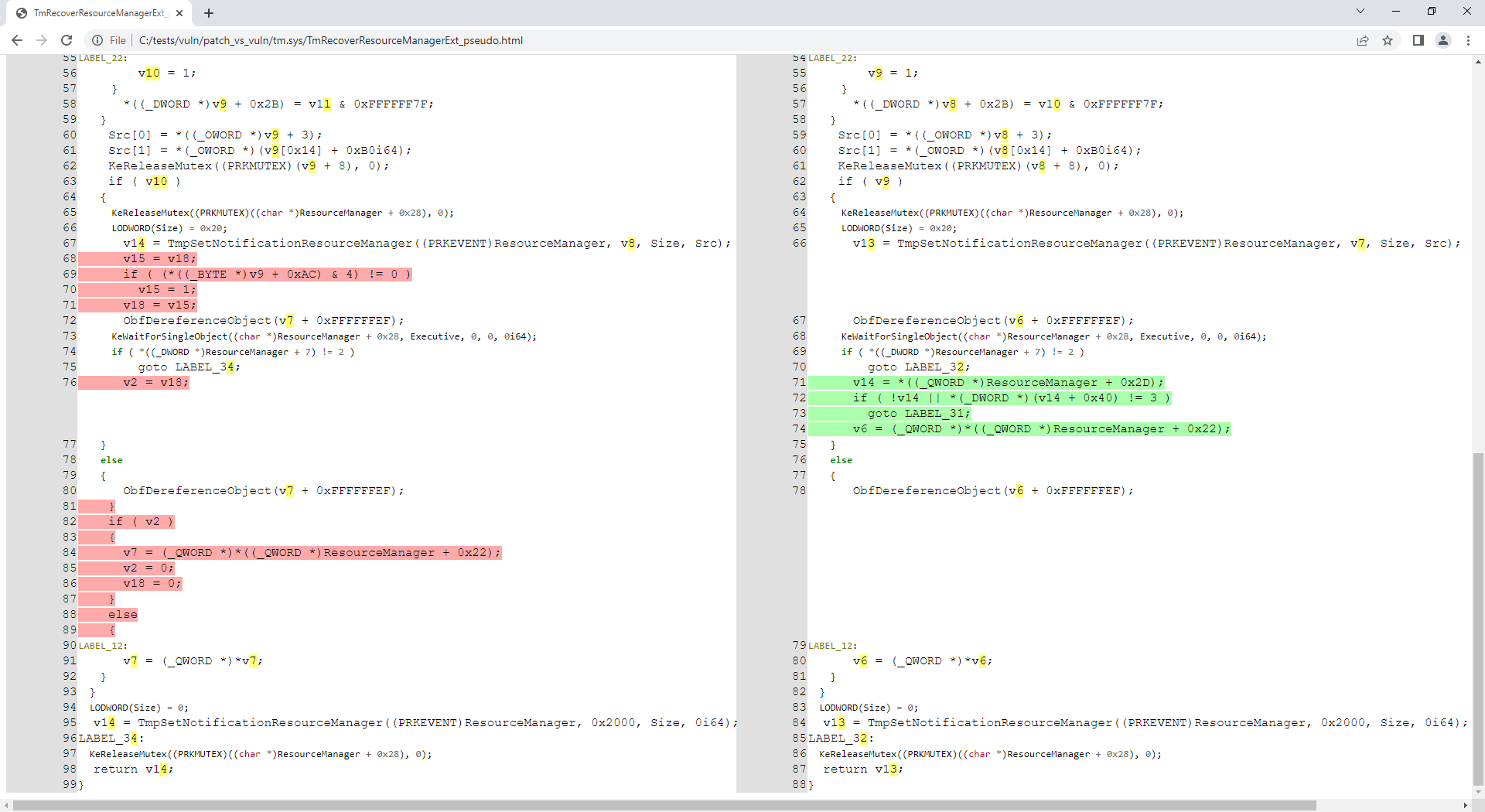
저장소에 제공된 tm.sys 파일은 CVE-2018-8611과 관련이 있음이 밝혀졌습니다. 이제 패치된 함수 TmRecoverResourceManagerExt()를 분석해 보겠습니다:
C:\idahunt> python idahunt.py --diaphora-path C:\diaphora\ --inputdir C:\tests\ --html --filename tm.sys --funcname TmRecoverResourceManagerExt --verbose
[idahunt] IDA32 = C:\Program Files\IDA Core 8.1\ida.exe
[idahunt] IDA64 = C:\Program Files\IDA Core 8.1\ida64.exe
[idahunt] EXECUTE GENERATE HTML
C:\tests\patch\tm.sqlite C:\tests\vuln\tm.sqlite
C:\tests\vuln\patch_vs_vuln\tm.sys\TmRecoverResourceManagerExt_asm.html C:\tests\vuln\patch_vs_vuln\tm.sys\TmRecoverResourceManagerExt_pseudo.html
[idahunt] Showing patch vs vuln for TmRecoverResourceManagerExt
[idahunt] C:\Program Files\IDA Core 8.1\ida64.exe -A -SC:\diaphora\diaphora_ida.py -LC:\tests\patch\tm.log C:\tests\patch\tm.i64
[idahunt] Environment variables:
[idahunt] DIAPHORA_AUTO4=1
[idahunt] DIAPHORA_DB1=C:\tests\patch\tm.sqlite
[idahunt] DIAPHORA_DB2=C:\tests\vuln\tm.sqlite
[idahunt] DIAPHORA_DIFF=C:\tests\vuln\patch_vs_vuln\tm.sys.diaphora
[idahunt] DIAPHORA_EA1=1c0015500
[idahunt] DIAPHORA_EA2=1c0015500
[idahunt] DIAPHORA_HTML_ASM=C:\tests\vuln\patch_vs_vuln\tm.sys\TmRecoverResourceManagerExt_asm.html
[idahunt] DIAPHORA_HTML_PSEUDO=C:\tests\vuln\patch_vs_vuln\tm.sys\TmRecoverResourceManagerExt_pseudo.html
[idahunt] Executed IDA 1/1 times IDA instances
[idahunt] Took 0:00:10.03 to execute this
이제 이 함수에 대해 생성된 어셈블리와 디컴파일된 코드가 있습니다:
C:\idahunt> tree C:\tests\ /F
C:\tests
├───patch
│ tm.i64
│ ...
│
└───vuln
│ tm.i64
│ ...
│
└───patch_vs_vuln
│ tm.sys.diaphora
│ tm.sys.txt
│
└───tm.sys
TmRecoverResourceManagerExt_asm.html
TmRecoverResourceManagerExt_pseudo.html

idahunt가 이름에 특정 패턴이 있는 파일만 분석하도록 필터링할 수 있습니다(아래 -n Download):
C:\idahunt>idahunt.py --inputdir C:\re --filter "filters\names.py -a 32 -v -n Download" --scripts C:\idahunt\script_template.py --list-only
[idahunt] Simulating only...
[idahunt] EXECUTE SCRIPTS
[names] Skipping non-matching name Download in cve-2014-4076.dll
[names] Skipping non-matching name Download in cve-2014-4076.exe
[idahunt] Executing script C:\idahunt\script_template.py for C:\re\DownloadExecute.exe
[names] Skipping non-matching name Download in ReverseShell.exe
idahunt가 특정 확장자를 가진 파일만 분석하도록 필터링할 수도 있습니다(아래 -e dll):
C:\idahunt>idahunt.py --inputdir C:\re --filter "filters\names.py -a 32 -v -e dll" --scripts C:\idahunt\script_template.py --list-only
[idahunt] Simulating only...
[idahunt] EXECUTE SCRIPTS
[idahunt] Executing script C:\idahunt\script_template.py for C:\re\cves\cve-2014-4076.dll
[names] Skipping non-matching extension .dll in cve-2014-4076.exe
[names] Skipping non-matching extension .dll in DownloadExecute.exe
[names] Skipping non-matching extension .dll in ReverseShell.exe
IDA Pro 아키텍처와 32비트 및 64비트 두 아키텍처의 바이너리를 분석하기 위해 idaq.exe와 idaq64.exe라는 두 개의 서로 다른 실행 파일을 포함하고 있기 때문에 아키텍처를 사전에 알아야 합니다. 이는 HexRays 디컴파일러를 사용하려는 경우 특히 중요합니다.
idahunt는 Windows PE 파일에서 i386, ia64, amd64 아키텍처를 자동으로 감지합니다. 다른 아키텍처를 자동으로 감지해야 하는 경우 이슈를 만들거나 idahunt에 추가하여 PR을 보낼 수 있습니다.
분석하려는 파일의 아키텍처를 제공하는 것을 잊으면 기본 filters\names.py가 오류를 반환합니다:
C:\idahunt>idahunt.py --inputdir C:\re --filter "filters\names.py -v -e dll" --scripts C:\idahunt\script_template.py --list-only
[idahunt] Simulating only...
[idahunt] EXECUTE SCRIPTS
[names] Unknown architecture: None. You need to specify it with -a
[names] Skipping non-matching extension .dll in cve-2014-4076.exe
[names] Skipping non-matching extension .dll in DownloadExecute.exe
[names] Skipping non-matching extension .dll in ReverseShell.exe
HP iLO 또는 Cisco ASA 펌웨어 분석을 위한 필터가 있습니다.
