 nautilus-fuzz/nautilus
문법 기반 피드백 퍼저

Nautilus는 커버리지 가이드, 문법 기반 퍼저입니다. 이를 사용하여 테스트 커버리지를 개선하고 더 많은 버그를 찾을 수 있습니다. 반 유효한 입력의 문법을 지정함으로써 Nautilus는 복잡한 변이를 수행하고 더 흥미로운 테스트 케이스를 발견할 수 있습니다. 이 퍼저의 많은 아이디어는 NDSS 2019에 발표된 논문에 문서화되어 있습니다.
버전 2.0은 이 초기 프로토타입에 많은 개선 사항을 추가했으며 현재 AFL++와 100% 호환됩니다. 일반적인 사용성 개선 외에도 버전 2.0에는 많은 새로운 기능이 포함되어 있습니다:
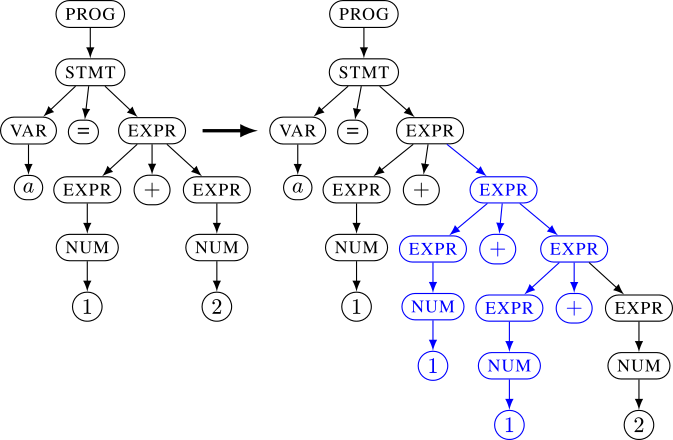
EXPR -> EXPR + EXPR 또는 EXPR -> NUM 및 NUM -> 1과 같은 규칙을 사용하여 문법을 지정합니다. 이러한 규칙에서 퍼저는 트리를 구성합니다. 이 내부 표현을 사용하면 원시 바이트보다 훨씬 복잡한 변이를 적용할 수 있습니다. 이 트리는 대상 애플리케이션의 실제 입력으로 변환됩니다. 일반 컨텍스트 프리 문법에서 이 프로세스는 간단합니다. 모든 리프가 연결됩니다. 아래 예시의 왼쪽 트리는 입력 a=1+2로, 오른쪽 트리는 a=1+1+1+2로 언파싱됩니다. 문법의 표현력을 높이기 위해 Nautilus를 사용하면 언파싱 프로세스에 파이썬 함수를 제공하여 훨씬 더 복잡한 사양을 허용할 수 있습니다.
# checkout the git
git clone '[email protected]:nautilus-fuzz/nautilus.git'
cd nautilus
/path/to/AFLplusplus/afl-clang-fast test.c -o test #afl-clang-fast as provided by AFL

# all arguments can also be set using the config.ron file
cargo run --release -- -g grammars/grammar_py_example.py -o /tmp/workdir -- ./test @@

# or if you want to use QEMU mode:
cargo run /path/to/AFLplusplus/afl-qemu-trace -- ./test_bin @@
여기서는 유효한 xml 유사 입력에 대한 문법을 생성하기 위해 파이썬을 사용합니다. 여는 태그와 닫는 태그가 일치하도록 스크립트 규칙을 사용합니다.
#ctx.rule(NONTERM: string, RHS: string|bytes) adds a rule NONTERM->RHS. We can use {NONTERM} in the RHS to request a recursion.
ctx.rule("START","<document>{XML_CONTENT}</document>")
ctx.rule("XML_CONTENT","{XML}{XML_CONTENT}")
ctx.rule("XML_CONTENT","")

#ctx.script(NONTERM:string, RHS: [string]], func) adds a rule NONTERM->func(*RHS).
# In contrast to normal `rule`, RHS is an array of nonterminals.
# It's up to the function to combine the values returned for the NONTERMINALS with any fixed content used.
ctx.script("XML",["TAG","ATTR","XML_CONTENT"], lambda tag,attr,body: b"<%s %s>%s</%s>"%(tag,attr,body,tag) )
ctx.rule("ATTR","foo=bar")
ctx.rule("TAG","some_tag")
ctx.rule("TAG","other_tag")

#sometimes we don't want to explore the set of possible inputs in more detail. For example, if we fuzz a script
#interpreter, we don't want to spend time on fuzzing all different variable names. In such cases we can use Regex
#terminals. Regex terminals are only mutated during generation, but not during normal mutation stages, saving a lot of time.
#The fuzzer still explores different values for the regex, but it won't be able to learn interesting values incrementally.
#Use this when incremantal exploration would most likely waste time.

ctx.regex("TAG","[a-z]+")
문법을 테스트하려면 생성기를 사용할 수 있습니다:
$ cargo run --bin generator -- -g grammars/grammar_py_exmaple.py -t 100
<document><some_tag foo=bar><other_tag foo=bar><other_tag foo=bar><some_tag foo=bar></some_tag></other_tag><some_tag foo=bar><other_tag foo=bar></other_tag></some_tag><other_tag foo=bar></other_tag><some_tag foo=bar></some_tag></other_tag><other_tag foo=bar></other_tag><some_tag foo=bar></some_tag></some_tag></document>
AFL과 결합하여 Nautilus를 사용할 수도 있습니다. AFL -o를 동일한 작업 디렉터리로 지정하기만 하면 AFL이 Nautilus와 동기화됩니다. 이는 단방향입니다. AFL은 Nautilus 입력을 가져오지만 그 반대는 아닙니다.
#Terminal/Screen 1
./afl-fuzz -Safl -i /tmp/seeds -o /tmp/workdir/ ./test @@

#Terminal/Screen 2
cargo run --release -- -o /tmp/workdir -- ./test @@
