 mschwager/route-detect
웹 애플리케이션 라우트에서 인증(authn) 및 권한 부여(authz) 보안 버그를 찾습니다.




웹 애플리케이션 라우트에서 인증(authn) 및 인가(authz) 보안 버그를 찾습니다:
웹 애플리케이션 HTTP 라우트 인증 및 인가 버그는 오늘날 발견되는 가장 일반적인 보안 문제 중 일부입니다. 다음 업계 표준 리소스는 이 문제의 심각성을 강조합니다:
| 언어 | 프레임워크 | Semgrep | CodeQL |
|---|---|---|---|
| Python | Django | ✅ | ❌ |
| Python | Django REST framework | ✅ | ❌ |
| Python | Flask | ✅ | ❌ |
| Python | Sanic | ✅ | ❌ |
| Python | FastAPI | ✅ | ❌ |
| PHP | Laravel | ✅ | ❌ |
| PHP | Symfony | ✅ | ❌ |
| PHP | CakePHP | ✅ | ❌ |
| Ruby | Rails | ❌ | ✅ |
| Ruby | Grape | ✅ | ❌ |
| Java | JAX-RS | ✅ | ❌ |
| Java | Spring | ✅ | ❌ |
| Go | Gorilla | ✅ | ❌ |
| Go | Gin | ✅ | ❌ |
| Go | Chi | ✅ | ❌ |
| JavaScript/TypeScript | Express | ✅ | ❌ |
| JavaScript/TypeScript | React | ✅ | ❌ |
| JavaScript/TypeScript | Angular | ✅ | ❌ |
pip을 사용하여 route-detect를 설치합니다:
$ python -m pip install --upgrade route-detect
다음 명령어로 route-detect가 올바르게 설치되었는지 확인할 수 있습니다:
$ echo 'print(1 == 1)' | semgrep --config $(routes which test-route-detect) -
Scanning 1 file.

Findings:

  /tmp/stdin
     routes.rules.test-route-detect
        Found '1 == 1', your route-detect installation is working correctly

          1┆ print(1 == 1)


Ran 1 rule on 1 file: 1 finding.
route-detect는 routes CLI 명령을 사용하며 다음 명령 트리를 제공합니다:
routes
whichviz먼저, semgrep이 설치되어 있고 PATH에 포함되어 있는지 확인하세요.
[!IMPORTANT]
route-detect가 코드 조각을 표시하기 위해 의존하는 Semgrep 기능이 클라우드 앱 뒤로 이동되었습니다. 자세한 내용은 #10762를 참조하세요. 그러나 이전 버전의 Semgrep에서는 여전히 이 동작을 지원합니다.route-detect를 사용할 때는1.97.0이전 버전의 Semgrep을 설치해야 합니다. 이는 다음 명령으로 수행할 수 있습니다:python -m pip install 'semgrep<1.97.0'.
which 하위 명령을 사용하여 semgrep를 올바른 웹 애플리케이션 규칙으로 지정하세요:
$ semgrep --config $(routes which django) path/to/django/code
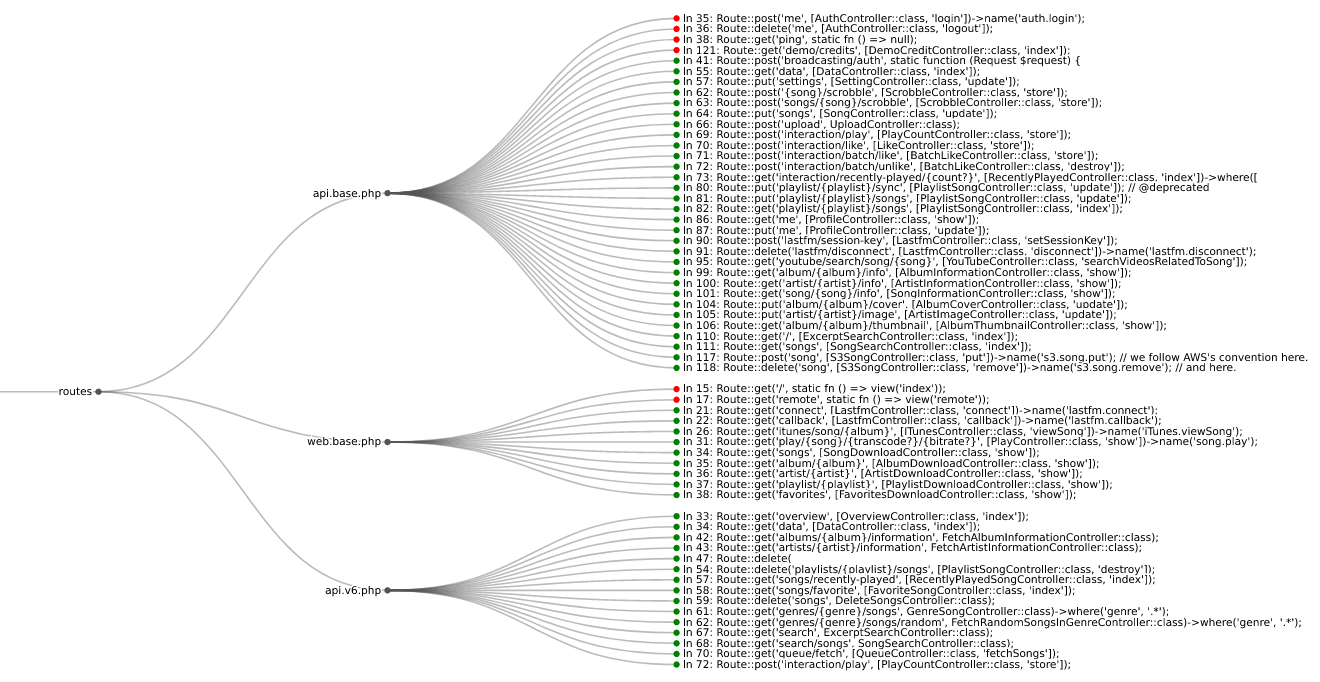
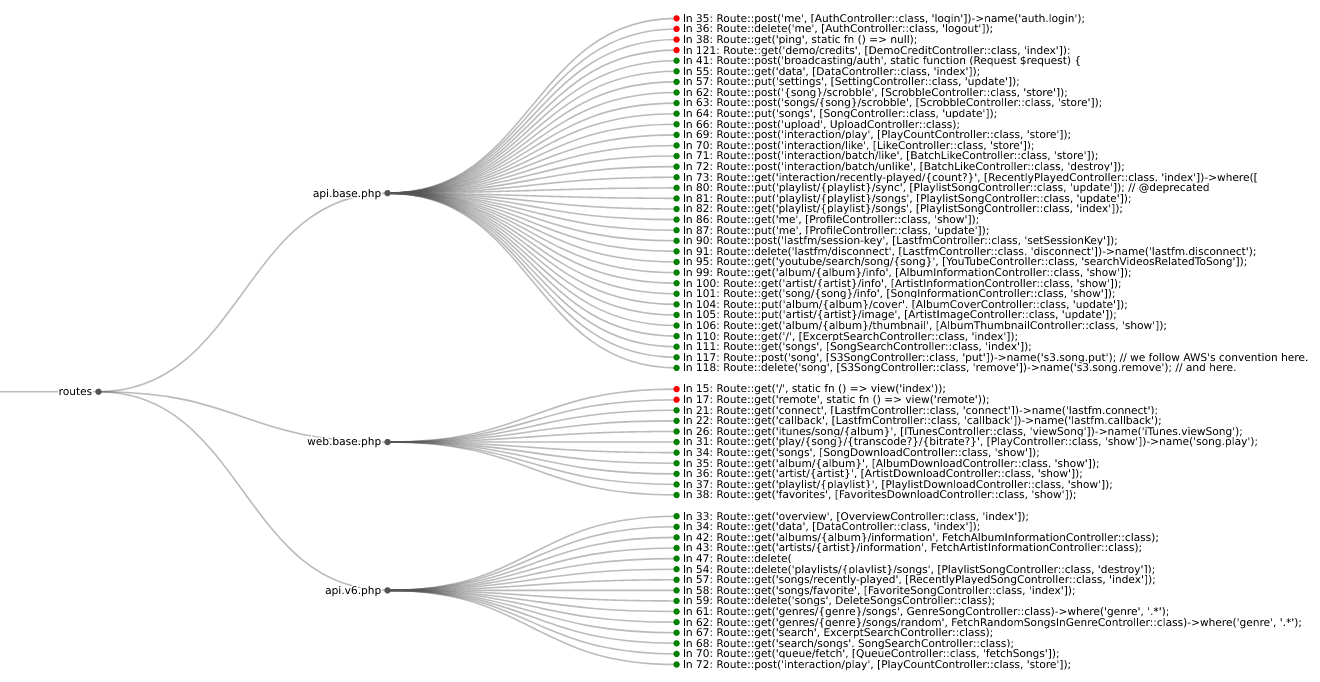
viz 하위 명령을 사용하여 브라우저에서 라우트 정보를 시각화하세요:
$ semgrep --json --config $(routes which django) --output routes.json path/to/django/code
$ routes viz --browser routes.json
어떤 프레임워크를 찾아야 할지 확실하지 않은 경우, 특수 all ID를 사용하여 모든 것을 확인할 수 있습니다:
$ semgrep --json --config $(routes which all) --output routes.json path/to/code
사용자 정의 인증 또는 인가 로직이 있는 경우, route-detect의 규칙을 복사할 수 있습니다:
$ cp $(routes which django) my-django.yml
그런 다음 필요에 따라 규칙을 수정하고 위와 같이 실행할 수 있습니다:
$ semgrep --json --config my-django.yml --output routes.json path/to/django/code
$ routes viz --browser routes.json
먼저, codeql이 설치되어 있고 PATH에 포함되어 있는지 확인하세요.
which 하위 명령을 사용하여 먼저 팩의 종속성을 설치한 다음 적절한 쿼리를 실행하세요:
$ codeql pack install $(poetry run routes which -c rails)
$ codeql database analyze \
    --output routes.sarif \
    --format sarif-latest \
    --sarif-add-file-contents \
    --no-group-results \
    -- \
    /path/to/codeql/db \
    $(routes which --codeql rails)
viz 하위 명령을 사용하여 브라우저에서 라우트 정보를 시각화하세요:
$ routes viz --codeql --browser routes.sarif
route-detect는 의존성 및 구성 관리를 위해 poetry를 사용합니다.
진행하기 전에 다음 명령으로 프로젝트 의존성을 설치하세요:
$ poetry install --with dev
다음 명령으로 모든 프로젝트 파일을 린트하세요:
$ poetry run pre-commit run --all-files
다음 명령으로 Python 테스트를 실행하세요:
$ poetry run pytest --cov
다음 명령으로 Semgrep 규칙 테스트를 실행하세요:
$ poetry run semgrep --test --config routes/rules/ tests/test_rules/
다음 명령으로 CodeQL 쿼리 테스트를 실행하세요:
$ codeql test run routes/queries/rails/test/
