ChatGPT API, Bard API, Llama2, Python-Nmap, DNS Recon, PCAP 및 JWT 재구성 모듈을 사용하며, GPT3 모델을 이용하여 Nmap 스캔 데이터와 DNS 스캔 정보를 기반으로 취약점 보고서를 생성합니다. 또한 상당한 규모의 서브도메인 열거를 수행할 수 있습니다.
이것은 AI를 사용하여 취약점 분석에 대한 정확한 결과를 생성할 수 있는 방법을 보여주는 개념 증명 애플리케이션이며, 이미 유용한 ChatGPT를 더욱 활용할 수 있도록 합니다. openai-api, python-nmap, dnsresolver 파이썬 모듈을 사용하여 만들어졌으며, GUI 버전의 코드에는 customtkinter와 tkinter도 사용합니다. 이 프로젝트는 CLI 및 GUI 인터페이스를 모두 갖추고 있으며, 네트워크 취약점 분석, DNS 열거 및 서브도메인 열거를 수행할 수 있습니다.
cd package && pip3/pip install .
3개의 패키지 중 하나를 간단히 import한 후, 그에 따라 변수를 정의하십시오.```python
from GVA.scanner import NetworkScanner
from GVA.dns_recon import DNSRecon
from GVA.geo import geo_ip_recon
from GVA.jwt import JWTAnalyzer
from GVA.menus import Menus
from GVA.packet_analysis import PacketAnalysis
from GVA.ai_models import NMAP_AI_MODEL
from GVA.ai_models import DNS_AI_MODEL
from GVA.ai_models import JWT_AI_MODEL
from GVA.assets import Assets
from GVA.subdomain import sub_enum
from GVA import gui
# The components defined
dns_enum = DNSRecon()
geo_ip = geo_ip_recon()
p_ai_models = NMAP_AI_MODEL()
dns_ai_models = DNS_AI_MODEL()
port_scanner = NetworkScanner()
jwt_analizer = JWTAnalyzer()
sub_recon = sub_enum()
asset_codes = Assets()
packet_analysis = PacketAnalysis()
# KEEP IT BLANK IF YOU HAVE NO CLUE THE MENU WILL ASK TO FILL IT ONCE ACTIVE
lkey = "LLAMA API KEY"
lendpoint = "LLAMA ENDPOINT"
keyset = "AI API KEY"
output_loc = "OUTPUT LOCATION FOR PCAP"
threads = 200 # Default INT 200 but can be increased.
target_ip_hostname_or_token = "TARGET IP, HOSTNAME OR TOKEN"
profile_num = "PROFILE FOR NMAP SCAN"
ai_set = "AI OF CHOICE"
akey_set = "OPENAI API KEY"
bkey_set = "BARD API KEY"
ai_set_args = "" # Keep it blank at any cost
llamakey = "LLAMA RUNPOD API KEY"
llamaendpoint = "LLAMA RUNPOD ENDPOINT"
Menus(
lamma_key=lkey,
llama_api_endpoint=lendpoint,
initial_keyset=keyset,
threads=threads,
output_loc=output_loc,
target=target_ip_hostname,
profile_num=profile_num,
ai_set=ai_set,
openai_akey_set=akey_set,
bard_key_set=bkey_set,
ai_set_args=ai_set_args,
llama_runpod_key=llamakey,
llama_endpoint=llamaendpoint
)
gui.application()
패키지 내 passcracker 업데이트와 GUI는 아직 진행 중입니다.
.env 파일에서 코드의 "OPENAI_API_KEY", "GEOIP_API_KEY" 및 "BARD_API_KEY" 부분을 OpenAI API 키와 IPGeolocation API 키로 변경하세요.llama-api 옵션 또는 특정 llama runpod 서버리스 엔드포인트 배포 옵션의 경우 runpod의 serverless endpoint ID와 RUNPOD API KEY를 입력해야 합니다.```python
GEOIP_API_KEY = ''
OPENAI_API_KEY = ''
BARD_API_KEY = ''
RUNPOD_ENDPOINT_ID = ''
RUNPOD_API_KEY = ''- 두 번째로 패키지를 설치합니다```bash
pip3 install -r requirements.txt
or
pip install -r requirements.txt
python gpt_vuln.py --help
python gpt_vuln.py --r help
python gpt_vuln.py --target <IP/hostname/token> --attack dns/nmap/jwt
python gpt_vuln.py --target <IP/hostname/token> --attack nmap --profile <1-13> (Default:1)
python gpt_vuln.py --target <IP/hostname/token> --attack dns
python gpt_vuln.py --target --attack sub
python gpt_vuln.py --target --attack sub --sub_list
python gpt_vuln.py --target --attack geo
python gpt_vuln.py --target --attack pcap --output --thread NUM of threads <200:default>
python gpt_vuln.py --target --attack nmap --profile <1-5> --ai llama /llama-api /bard / openai
python gpt_vuln.py --target --attack dns --ai llama /llama-api /bard / openai
python gpt_vuln.py --target --attack jwt --ai llama /llama-api /bard / openai
python gpt_vuln.py --password_hash --wordlist_file --algorithm --parallel --complexity
python gpt_vuln.py --menu True
#### CLI 인터페이스 옵션```bash
________________________
| GVA Usage in progress... |
========================
\
\
^__^
(oo)\_______
(__)\ )\/\
||----w |
|| ||
┏━━━━━━━━━┳━━━━━━━━━━━━━━━━┓
┃ Options ┃ Utility ┃
┡━━━━━━━━━╇━━━━━━━━━━━━━━━━┩
│ 1 │ Nmap Enum │
│ 2 │ DNS Enum │
│ 3 │ Subdomain Enum │
│ 4 │ GEO-IP Enum │
| 5 | JWT Analysis |
| 6 | PCAP Analysis |
| 6 | Hash Cracker |
│ q │ Quit │
└─────────┴────────────────┘
Enter your choice:
CLI 인터페이스에는 몇 가지 주의할 점이 있습니다.
.env 파일에 정의된 키는 인수 옵션과 함께 작동합니다.OpenAI GPT-3.5와 동일하지만 더 빠릅니다. 동일한 답변을 2배의 속도로 생성할 수 있습니다.
프로필:
프로필은 nmap 하위 프로세스에서 실행될 스캔 유형입니다. IP 또는 대상은 argparse를 통해 제공됩니다. 먼저, 스캔을 계속하는 데 필요한 모든 중요한 인수를 갖춘 사용자 정의 nmap 스캔이 실행됩니다. 다음으로, nmap이 생성한 방대한 데이터에서 스캔 데이터가 추출됩니다. "scan" 객체는 "tcp" 아래에 열린 포트에 따라 레이블이 지정된 하위 데이터 목록을 가지고 있습니다. 데이터가 추출되면 프롬프트를 통해 데이터가 openai API Davinci 모델로 전송됩니다. 프롬프트는 특히 JSON 출력을 요청하고 데이터도 특정 방식으로 사용되도록 요청합니다.
openai API로 전송해야 하는 요청의 전체 구조는 프로그램의 완성 섹션에서 설계됩니다.```python class NetworkScanner(): profile_arguments = { 1: '-Pn -sV -T4 -O -F', 2: '-Pn -T4 -A -v', 3: '-Pn -sS -sU -T4 -A -v', 4: '-Pn -p- -T4 -A -v', 5: '-Pn -sS -sU -T4 -A -PE -PP -PY -g 53 --script=vuln', 6: '-Pn -sV -p- -A', 7: '-Pn -sS -sV -O -T4 -A', 8: '-Pn -sC', 9: '-Pn -p 1-65535 -T4 -A -v', 10: '-Pn -sU -T4', 11: '-Pn -sV --top-ports 100', 12: '-Pn -sS -sV -T4 --script=default,discovery,vuln', 13: '-Pn -F' }
def scanner(self, ip: Optional[str], profile: int, akey: Optional[str],
bkey: Optional[str], lkey, lendpoint, AI: str) -> str:
nm.scan(ip, arguments=self.profile_arguments.get(profile))
json_data = nm.analyse_nmap_xml_scan()
analyze = json_data["scan"]
try:
ai_methods = {
'openai': lambda: AIModels.GPT_AI(akey, analyze),
'bard': lambda: AIModels.BardAI(bkey, analyze),
'llama': lambda: AIModels.Llama_AI(analyze, "local", lkey, lendpoint),
'llama-api': lambda: AIModels.Llama_AI(analyze, "runpod", lkey, lendpoint)
}
if AI in ai_methods and (akey or bkey):
response = ai_methods[AI]()
else:
raise ValueError("Invalid AI type or missing keys")
except KeyboardInterrupt:
print("Bye")
quit()
return str(response)
# Regex
제공된 커스텀 프롬프트에서 중요한 정보만 추출하기 위해 Regex를 사용합니다. 이렇게 하면 원치 않는 데이터의 총량이 줄어듭니다.
AI 코드는 출력 형식을 정의하고 AI가 정확도를 높이기 위해 몇 가지 사전 결정된 규칙을 따르도록 명령합니다.
Regex 추출 코드가 추출을 수행하고, 메인 함수가 이를 테이블로 정리합니다.
## Bard AI 사용하기
Bard AI를 사용하려면 개발자 액세스를 위해 MakerSuit Palm API에 가입하고 거기서 API 키를 생성해야 합니다. 링크 및 작동 방식에 대한 자세한 내용은 이 동영상 [MakerSuit](https://www.youtube.com/watch?v=Ce1AOchQMzA&t=128s)을 참조하세요.
API를 획득한 후에는 `.env` 파일에 추가하기만 하면 사용할 수 있습니다.
## 이전 LLama2 구현
LLama2를 사용하는 것은 현재 사용 가능한 최고의 오프라인 및 무료 옵션 중 하나입니다. 현재 개선 중이며, AI에 사이버 보안 관점을 더 잘 통합할 수 있는 프롬프트를 작업 중입니다.
**@thisserand** 님과 그의 [llama2_local](https://github.com/thisserand/llama2_local) 저장소 및 YT 동영상 [YT_Video](https://youtu.be/WzCS8z9GqHw)에 감사드립니다. 이들은 훌륭한 자료였습니다. 솔직히 llama2 코드의 95%는 그의 것이며, 저는 코드를 가져와 Flask API 기능만 추가했습니다.
오프라인 및 코드 외부 테스트에서 AI의 정확도는 훌륭했으며 openai나 bard와 동등한 정확도를 보였지만, 코드 내에서는 프롬프팅 등의 문제로 몇 가지 문제가 있었습니다. 이를 고치기 위해 노력하겠습니다.
속도는 시스템과 보유한 GPU 및 CPU 구성에 따라 다릅니다. 현재는 `TheBloke/Llama-2-7B-Chat-GGML` 모델을 사용 중이며, `portscanner` 및 `dnsrecon` 파일을 통해 변경할 수 있습니다.
현재로서는 llama 코드와 스캔이 별도로 처리됩니다. 몇 가지 테스트 후, llama가 의도한 대로 작동하려면 약간의 훈련이 필요하다는 것을 알게 되어 시간이 좀 필요합니다. 이를 수행하는 방법에 대한 제안 사항은 이 저장소의 토론 [Discussions Link](https://github.com/morpheuslord/GPT_Vuln-analyzer/discussions)에 추가해 주세요. 현재로서는 출력이 모든 데이터의 분할 목록이 아니라 AI가 발견한 취약점이나 문제에 대한 설명이 됩니다.
모델 사용을 위한 프롬프트는 다음과 같습니다:```prompt
[INST] <<SYS>> {user_instruction}<</SYS>> NMAP Data to be analyzed: {user_message} [/INST]
지침은 다음과 같습니다.```prompt Do a NMAP scan analysis on the provided NMAP scan information. The NMAP output must return in a asked format accorging to the provided output format. The data must be accurate in regards towards a pentest report. The data must follow the following rules: 1) The NMAP scans must be done from a pentester point of view 2) The final output must be minimal according to the format given. 3) The final output must be kept to a minimal. 4) If a value not found in the scan just mention an empty string. 5) Analyze everything even the smallest of data. 6) Completely analyze the data provided and give a confirm answer using the output format. 7) mention all the data you found in the output format provided so that regex can be used on it. 8) avoid unnecessary explaination. 9) the critical score must be calculated based on the CVE if present or by the nature of the services open 10) the os information must contain the OS used my the target. 11) the open ports must include all the open ports listed in the data[tcp] and varifying if it by checking its states value. you should not negect even one open port. 12) the vulnerable services can be determined via speculation of the service nature or by analyzing the CVE's found. The output format: critical score: - Give info on the criticality "os information": - List out the OS information "open ports and services": - List open ports - List open ports services "vulnerable service": - Based on CVEs or nature of the ports opened list the vulnerable services "found cve": - List the CVE's found and list the main issues.
제공된 프롬프트를 통해 제공된 명령어 세트와 데이터를 사용하여 llama AI가 출력을 생성합니다.
가장 많이 사용하려면 llama의 runpod 서버리스 엔드포인트 배포를 생성하는 것이 좋습니다. 이 튜토리얼을 참조하세요 [tutorial](https://www.youtube.com/watch?v=Ftb4vbGUr7U). 더 나은 사용을 위해 튜토리얼을 따라가실 수 있습니다.
### Llama2 Ollama
이 최신 업데이트는 ollama 도커 이미지를 사용하여 로컬라이즈된 llama 시스템을 구현하며, 이는 더 나은 구성 등의 이유로 출력의 정확도를 높입니다. 이에 대해 자세히 설명하지는 않겠지만, GPU 통합 부분을 작업하여 GPU 성능을 처리에 추가하고 더 효율적으로 만들 예정입니다. 논의를 시작해 준 @andr6에게 감사드리며, 이 구현에 대해 더 잘 이해하고 계신 분은 자유롭게 개선하여 PR을 생성해 주세요.
### 출력
#### JWT 출력:```
GVA Report for JWT
┏━━━━━━━━━━━━━━━━━━━━━┳━━━━━━━━━━━━━━━━━━━━━━━━━━━━━━━━━━━━━━━━━━━━━━━━━━━━━━━━━━━━━━━━━━━━━━━━━━━━━━━━━━┓
┃ Variables ┃ Results ┃
┡━━━━━━━━━━━━━━━━━━━━━╇━━━━━━━━━━━━━━━━━━━━━━━━━━━━━━━━━━━━━━━━━━━━━━━━━━━━━━━━━━━━━━━━━━━━━━━━━━━━━━━━━━┩
│ Algorithm Used │ HS256 │
│ Header │ eyJhbGciOiAiSFMyNTYiLCAidHlwIjogIkpXVCJ9 │
│ Payload │ eyJzdWIiOiAiMTIzNDU2Nzg5MCIsICJuYW1lIjogIkpvaG4gRG9lIiwgImlhdCI6IDE1MTYyMzkwMjJ9 │
│ Signature │ │
│ PossibleAttacks │ None identified │
│ VulnerableEndpoints │ Unable to determine without additional information │
└─────────────────────┴──────────────────────────────────────────────────────────────────────────────────┘
┏━━━━━━━━━━━━━━━━━━━━┳━━━━━━━━━━━━━━━━━━━━━━━━━━━━━━━━━━━━━━━━━━━━━━━━━━━━━┓ ┃ Elements ┃ Results ┃ ┡━━━━━━━━━━━━━━━━━━━━╇━━━━━━━━━━━━━━━━━━━━━━━━━━━━━━━━━━━━━━━━━━━━━━━━━━━━━┩ │ critical score │ High │ │ os information │ Microsoft Windows 11 21H2 │ │ open ports │ 80, 22, 445, 902, 912 │ │ open services │ http, ssh, microsoft-ds, vmware-auth, vmware-auth │ │ vulnerable service │ OpenSSH │ │ found cve │ CVE-2023-28531 │ └────────────────────┴─────────────────────────────────────────────────────┘
##### LLama2```table
╭───────────────────────────────────────────── The GVA LLama2 ──────────────────────────────────────────────╮
│ │
│ │
│ │
│ Based on the provided NMAP data, I have conducted a thorough analysis of the target system's open ports │
│ and services, vulnerabilities, and operating system information. Here is my findings: Critical Score: │
│ The critical score for this target system is 7 out of 10. The system has several open ports that could │
│ potentially be exploited, including port 80 (HTTP), port 135 (RPC), and port 445 (Microsoft DS). While │
│ These ports are not necessarily vulnerable, they do indicate that the system is running services that │
│ could be targeted by attackers. Additionally, the system has an outdated version of Microsoft IIS │
│ running on port 80, which could be a potential vulnerability. OS Information: The target system is │
│ running Microsoft Windows 10 1607. Open Ports and Services: The target system has the following open │
│ ports: │
│ │
│ • Port 80: HTTP (Microsoft IIS httpd) │
│ • Port 135: RPC (Microsoft Windows RPC) │
│ • Port 445: Microsoft DS │
│ • Port 8000: Splunkd httpd All of these ports are currently open and have a state of "open". │
│ Vulnerable Services: Based on the CVEs found in the NMAP data, there are several potential │
│ vulnerabilities in the target system's services. These include: │
│ • CVE-2019-1489: An elevation of privilege vulnerability in Microsoft IIS that could be exploited by │
│ an attacker to gain control of the system. This vulnerability is related to the outdated version of │
│ Microsoft IIS running on port 80. │
│ • CVE-2017-0143: A remote code execution vulnerability in Microsoft Windows RPC that could be │
│ exploited by an attacker to execute arbitrary code on the target system. This vulnerability is │
│ related to the outdated version of Microsoft Windows RPC running on port 135. │
│ • CVE-2020-1362: A remote code execution vulnerability in Microsoft DS that could be exploited by an │
│ attacker to execute arbitrary code on the target system. This vulnerability is related to the │
│ outdated version of Microsoft DS running on port 445. Found CVEs: The following C │
│ │
╰───────────────────────────────────────────────────────────────────────────────────────────────────────────╯
대상은 jainuniversity.ac.in```table ┏━━━━━━━━━━┳━━━━━━━━━━━━━━━━━━━━━━━━━━━━━━━━━━━━━━━━━━━━━━━━━━━━━━━━━━━━━━━━━━━━━━━━━━━━━━━━━━━━━━━━━━━━━━━━━━━━━━━━━━━━━━━━━━━┓ ┃ Elements ┃ Results ┃ ┡━━━━━━━━━━╇━━━━━━━━━━━━━━━━━━━━━━━━━━━━━━━━━━━━━━━━━━━━━━━━━━━━━━━━━━━━━━━━━━━━━━━━━━━━━━━━━━━━━━━━━━━━━━━━━━━━━━━━━━━━━━━━━━━┩ │ A │ 172.67.147.95", "104.21.41.132 │ │ AAA │ │ │ NS │ mia.ns.cloudflare.com.","paul.ns.cloudflare.com. │ │ MX │ 30 aspmx5.googlemail.com.","30 aspmx4.googlemail.com.","20 alt2.aspmx.l.google.com.","30 │ │ │ aspmx3.googlemail.com.","30 aspmx2.googlemail.com.","20 alt1.aspmx.l.google.com.","10 aspmx.l.google.com. │ │ PTR │ │ │ SOA │ mia.ns.cloudflare.com. dns.cloudflare.com. 2309618668 10000 2400 604800 3600 │ │ TXT │ atlassian-sending-domain-verification=5b358ce4-5ad3-404d-b4b4-005bf933603b","include:_spf.atlassian.net │ └──────────┴───────────────────────────────────────────────────────────────────────────────────────────────────────────────────┘
#### GEO 위치 출력:```table
┏━━━━━━━━━━━━━━━━━━━━━━━━━━━━━┳━━━━━━━━━━━━━━━━━━━━━━━━━━━━━━━━━━━━━━━━━━━━━━━━━━━━━━━━━━━━━━━━━━━━━━━━━┓
┃ Identifiers ┃ Data ┃
┡━━━━━━━━━━━━━━━━━━━━━━━━━━━━━╇━━━━━━━━━━━━━━━━━━━━━━━━━━━━━━━━━━━━━━━━━━━━━━━━━━━━━━━━━━━━━━━━━━━━━━━━━┩
│ ip │ █████████████ │
│ continent_code │ AS │
│ continent_name │ Asia │
│ country_code2 │ IN │
│ country_code3 │ IND │
│ country_name │ India │
│ country_capital │ New Delhi │
│ state_prov │ Haryana │
│ state_code │ IN-HR │
│ district │ │
│ city │ Gurugram │
│ zipcode │ 122003 │
│ latitude │ 28.44324 │
│ longitude │ 77.05501 │
│ is_eu │ False │
│ calling_code │ +91 │
│ country_tld │ .in │
│ languages │ en-IN,hi,bn,te,mr,ta,ur,gu,kn,ml,or,pa,as,bh,sat,ks,ne,sd,kok,doi,mni,… │
│ country_flag │ https://ipgeolocation.io/static/flags/in_64.png │
│ geoname_id │ 9148991 │
│ isp │ Bharti Airtel Limited │
│ connection_type │ │
│ organization │ Bharti Airtel Limited │
│ currency.code │ INR │
│ currency.name │ Indian Rupee │
│ currency.symbol │ ₹ │
│ time_zone.name │ Asia/Kolkata │
│ time_zone.offset │ 5.5 │
│ time_zone.current_time │ 2023-07-11 17:08:35.057+0530 │
│ time_zone.current_time_unix │ 1689075515.057 │
│ time_zone.is_dst │ False │
│ time_zone.dst_savings │ 0 │
└─────────────────────────────┴─────────────────────────────────────────────────────────────────────────┘
Collecting Json Data Extracting IP details... Extracting DNS details... Extracting EAPOL details... Extracting TCP STREAMS details... TCP streams can take some time.. Total Streams combination: 252 Number of workers in progress: 250 Completed GVA Report for PCAP ┏━━━━━━━━━━━━━━━━━━━━━━━━━━━━━━━━━━━━┳━━━━━━━━━━━━━━━━━━━━━━━━━━━━━━━━━━━━━━━━━━━━━━━━━━━━━━━━━━━━━━━━━━━━━━━━━━━━━━━━━━━━━━━━━━━━━━━━━━━━┓ ┃ Identifiers ┃ Data ┃ ┡━━━━━━━━━━━━━━━━━━━━━━━━━━━━━━━━━━━━╇━━━━━━━━━━━━━━━━━━━━━━━━━━━━━━━━━━━━━━━━━━━━━━━━━━━━━━━━━━━━━━━━━━━━━━━━━━━━━━━━━━━━━━━━━━━━━━━━━━━━┩ │ PacketAnalysis.Services │ ['49943', '49958', '49934', '49944', '49931', '443', '49957'] │ │ PacketAnalysis.TCP Streams │ ['1', '4', '5', '2', '0', '3'] │ │ PacketAnalysis.Sources Address │ ['█████████████', '1.1.1.1', '█████████████', '█████████████', '█████████████', '█████████████'] │ │ PacketAnalysis.Destination Address │ ['█████████████', '1.1.1.1', '█████████████', '█████████████', '█████████████', '█████████████'] │ │ PacketAnalysis.DNS Resolved │ [] │ │ PacketAnalysis.DNS Query │ ['oneclient.sfx.ms'] │ │ PacketAnalysis.DNS Response │ ['oneclient.sfx.ms.edgekey.net', 'e9659.dspg.akamaiedge.net', 'oneclient.sfx.ms'] │ │ PacketAnalysis.EAPOL Data │ [] │ │ PacketAnalysis. Total Streams Data │ 126 │ └────────────────────────────────────┴────────────────────────────────────────────────────────────────────────────────────────────────────┘
#### 비밀번호 크래커 출력```
________________________
| GVA Usage in progress... |
========================
\
\
^__^
(oo)\_______
(__)\ )\/\
||----w |
|| ||
Cracking... ━━━━━━━━━━━━━━━━━━━━━━━━━━━━━━━━━━━━━━━━ 100% 0:00:00
╭────────────────────────────────────────────── The GVA Password Cracker ──────────────────────────────────────────────╮ │ │ │ │
│ Password Cracked! Password: legion │
│ │
╰───────────────────────────────────────────────────────────────────────────────────────────────────────────────────────╯
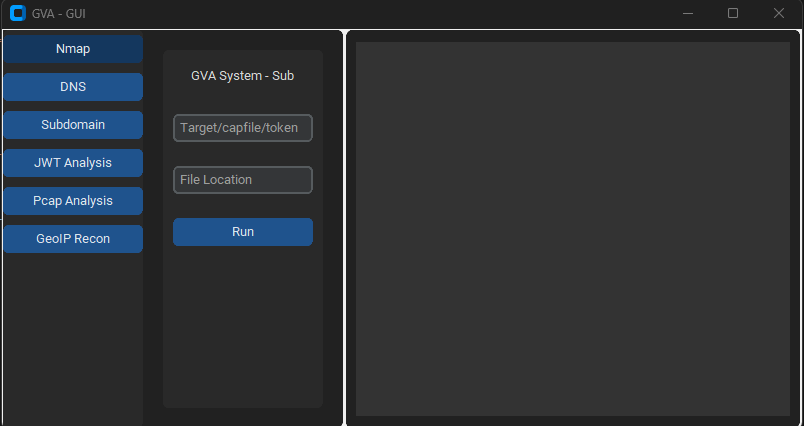
GUI는 코드 실행을 위해 customtkinter를 사용합니다. 인터페이스는 직관적이며 기억해야 할 유일한 사항은 다음과 같습니다:
### 초기 창

### NMAP 창

### DNS 창

### GEOIP 창

### PCAP 창

### SUBDOMAIN 창

### JWT 창

| Preview | Code | Name | Working Status | OpenAI Status | Bard Status | LLama2 Status |
|---|
![]() | LIN | GNU/Linux | ✅ | ✅ | ✅ | ❌ [테스트하지 않음] |
![]() | WIN | Windows | ✅ | ✅ | ✅ | ✅ |
| 매개변수 | 반환 데이터 | 설명 | Nmap 명령 |
|---|
p1 | json | 효과적 스캔 | -Pn -sV -T4 -O -F |
p2 | json | 간단한 스캔 | -Pn -T4 -A -v |
p3 | json | 저전력 스캔 | -Pn -sS -sU -T4 -A -v |
p4 | json | 부분 집중 스캔 | -Pn -p- -T4 -A -v |
p5 | json | 전체 집중 스캔 | -Pn -sS -sU -T4 -A -PE -PP -PY -g 53 --script=vuln |
p6 | json | 포괄적 서비스 버전 탐지 | -Pn -sV -p- -A |
p7 | json | 운영체제 탐지를 포함한 적극적 스캔 | -Pn -sS -sV -O -T4 -A |
p8 | json | 일반 취약점 스크립트 스캔 | -Pn -sC |
p9 | json | 집중 스캔, 모든 TCP 포트 | -Pn -p 1-65535 -T4 -A -v |
p10 | json | UDP 스캔 | -Pn -sU -T4 |
p11 | json | 상위 포트에 대한 서비스 및 버전 탐지 | -Pn -sV --top-ports 100 |
p12 | json | 취약점 NSE 스크립트를 포함한 적극적 스캔 | -Pn -sS -sV -T4 --script=default,discovery,vuln |
p13 | json | 일반 포트 빠른 스캔 | -Pn -F |
