 mdsadiqmd/av-chaos-monkey
오디오/비디오 테스트를 위한 Chaos Monkey (webRTC 및 UDP)

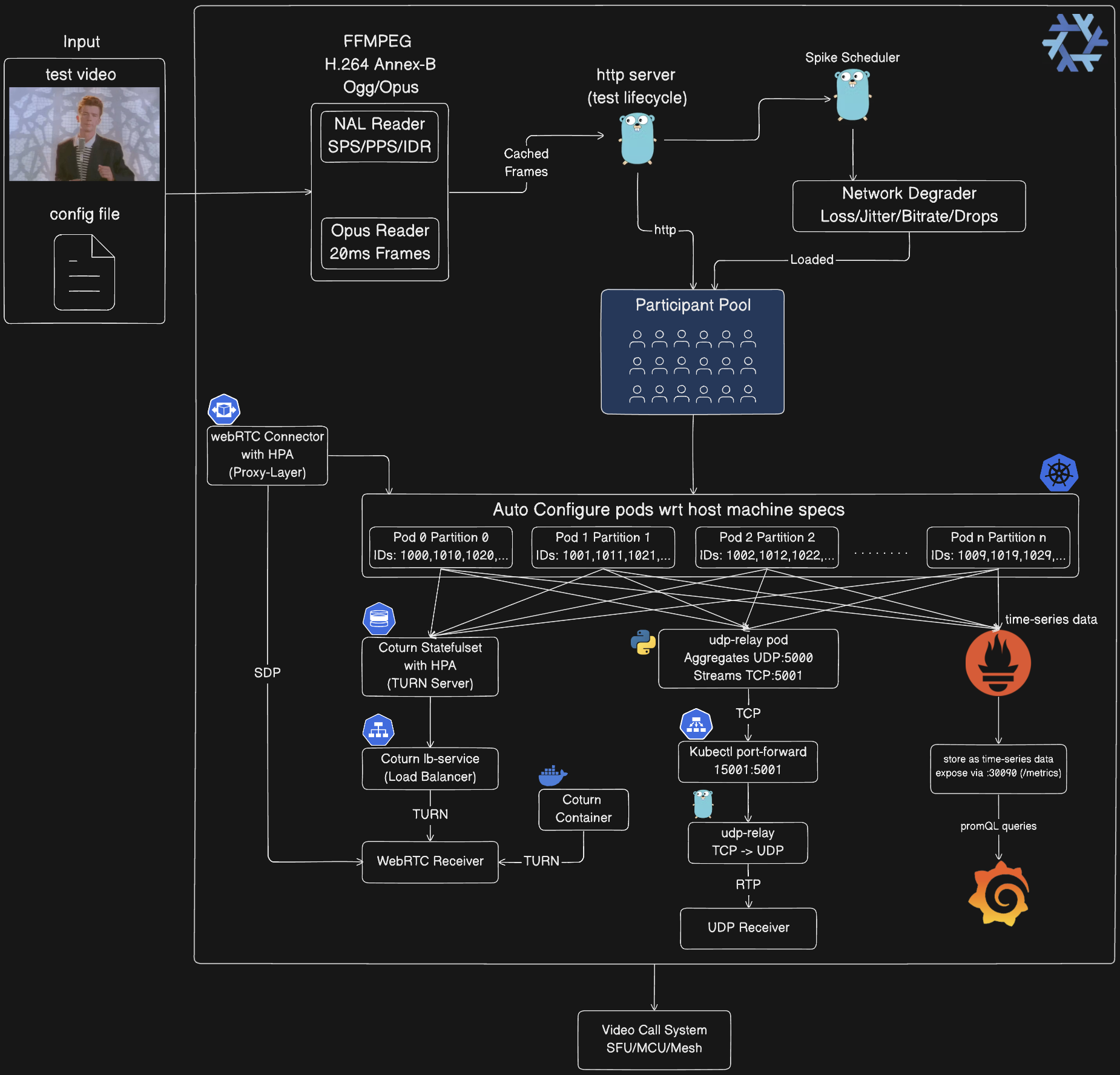
분산 카오스 엔지니어링 플랫폼으로, 화상 회의 시스템의 부하 테스트를 수행합니다. H.264/Opus 스트림으로 1500명 이상의 WebRTC 참가자를 시뮬레이션하고 네트워크 카오스 스파이크를 주입하여 저하된 조건에서 시스템 복원력을 검증합니다.
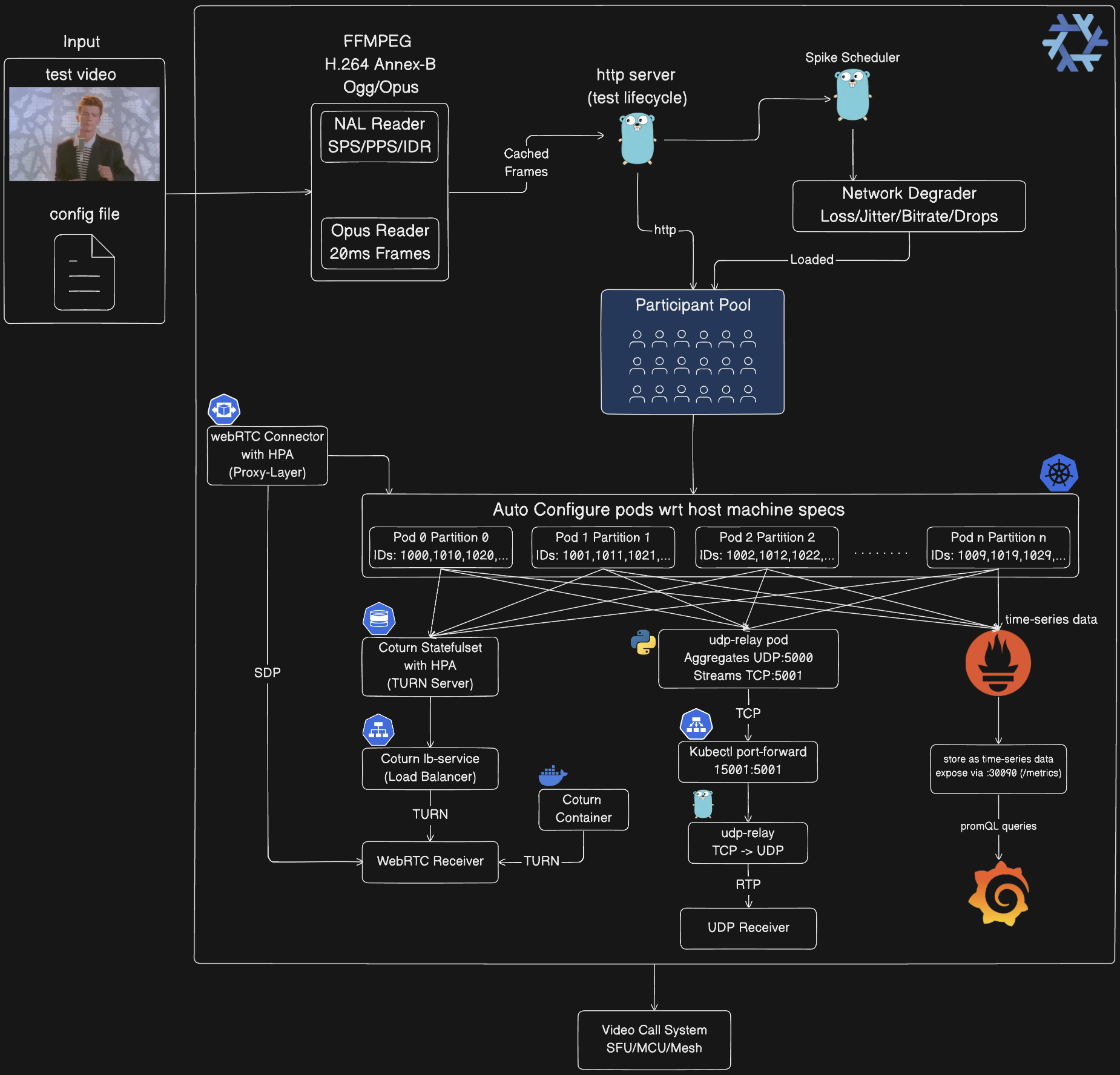
미디어 처리 파이프라인:
컨트롤 플레인:
참가자 풀:
participant_id % total_partitions = partition_idKubernetes 자동 구성:
orchestrator-3 → PARTITION_ID=3base_port + (partition_id × 10000) + participant_indexUDP 릴레이 체인(Kubernetes 전용):
Orchestrator Pods (10×) → UDP :5000 → udp-relay Pod (Python)
→ Length-Prefixed TCP :5001 → kubectl port-forward 15001:5001
→ tools/udp-relay (Go) → UDP :5002 → Your Receiver
WebRTC 인프라:
클라이언트 통합:
관측 가능성 스택(선택 사항):
/metrics 엔드포인트를 5초마다 스크래핑prometheus.io/scrape: "true"각 가상 참가자가 실제 미디어 스트림을 생성:
다섯 가지 스파이크 유형으로 실제 네트워크 조건 시뮬레이션:
스파이크는 구성 가능한 전략을 사용해 테스트 기간에 분배:
Kubernetes 배포는 수평 확장을 위해 참가자 파티셔닝 사용:
participant_id % total_partitions == partition_id 처리base_port + (partition_id * 10000) + participant_index적합한 경우: 개발, 디버깅, 소규모 테스트(1-100명 참가자)
# Start orchestrator
go run cmd/main.go

# In another terminal: Start UDP receiver
go run examples/go/udp_receiver.go 5002

# Edit config/config.json to set num_participants: 10
# Run chaos test
go run tools/chaos-test/main.go -config config/config.json
동작:
:8080에서 단일 오케스트레이터 프로세스127.0.0.1:5002로 UDP 전송구성(config/config.json):
{
  "base_url": "http://localhost:8080",
  "media_path": "public/rick-roll.mp4",
  "num_participants": 10,
  "duration_seconds": 300,
  "spikes": {
    "count": 20,
    "interval_seconds": 5,
    "types": { "rtp_packet_loss": {...}, "network_jitter": {...} }
  },
  "spike_distribution": {
    "strategy": "random",
    "min_spacing_seconds": 5,
    "jitter_percent": 15
  }
}
적합한 경우: 격리된 테스트, CI/CD, 중간 규모 테스트(100-500명 참가자)
전제 조건:
docker-compose 설치# Build and start orchestrator container
./scripts/start_everything.sh build
# In another terminal: Start UDP receiver
go run examples/go/udp_receiver.go 5002
# Edit config/config.json to set num_participants: 100
# Run chaos test (targets container)
go run tools/chaos-test/main.go -config config/config.json
리소스 제한(docker-compose.yaml 편집):
services:
  orchestrator:
    deploy:
      resources:
        limits:
          cpus: "14.0"
          memory: 6G  # Increase for more participants
확장 가이드:
| Docker 메모리 | 최대 참가자 | CPU 코어 |
|---|---|---|
| 8 GB | ~100 | 4 |
| 16 GB | ~250 | 8 |
| 24 GB | ~400 | 12 |
| 32 GB | ~500 | 14 |
적합한 경우: 대규모 테스트(500-1500명 참가자), 수평 확장, 프로덕션 검증
전제 조건:
# Nix provides: Go, Docker, kubectl, kind, ffmpeg
nix develop

# Or use direnv for auto-activation
echo "use flake" > .envrc
direnv allow
# Auto-deploy with optimal settings (detects system resources)
./scripts/start_everything.sh run -config config/config.json

# Or specify custom media files
./scripts/start_everything.sh run --media=path/to/video.mp4 -config config/config.json
동작:
kubectl port-forward 설정옵션 A: UDP 수신기(Kubernetes에 권장)
# Receives aggregated stream from all 1500 participants
go run ./examples/go/udp_receiver.go 5002
옵션 B: WebRTC 수신기(다중 참가자)
# Connect to up to 150 participants via WebRTC
go run ./examples/go/webrtc_receiver.go http://localhost:8080 <test_id> 150
아키텍처 흐름:
10개 파드에 걸친 1500명 참가자
  → 각 파드: 150명 참가자
  → participant_id % 10으로 파티셔닝
  → 모두 udp-relay:5000으로 UDP 전송
  → UDP 릴레이가 집계 → TCP :5001
  → kubectl port-forward 15001:5001
  → 로컬 릴레이가 TCP를 UDP :5002로 변환
  → 수신기가 1500개 스트림 모두 수신
참고: start_everything.sh 스크립트가 자동으로 설정:
# Build and load image
docker build -t chaos-monkey-orchestrator:latest .
kind load docker-image chaos-monkey-orchestrator:latest

# Deploy
kubectl apply -f k8s/orchestrator/orchestrator.yaml
kubectl apply -f k8s/udp-relay/udp-relay.yaml

# Wait for pods
kubectl wait --for=condition=ready pod -l app=orchestrator --timeout=300s

# Port-forward UDP relay
kubectl port-forward udp-relay 15001:5001 &

# Start local TCP→UDP relay
go run tools/udp-relay/main.go &

# In another terminal: Start receiver
go run ./examples/go/udp_receiver.go 5002

# In another terminal: Run chaos test
go run tools/chaos-test/main.go -config config/config.json
# Delete Kubernetes resources
./scripts/cleanup.sh

# Or delete entire cluster
kind delete cluster --name av-chaos-monkey
# Build for Linux x86_64 (most common)
nix build .#packages.x86_64-linux.av-chaos-monkey

# Build for ARM64 (Raspberry Pi, AWS Graviton)
nix build .#packages.aarch64-linux.av-chaos-monkey

# Build for macOS Intel
nix build .#packages.x86_64-darwin.av-chaos-monkey
