
Skip to content
KitploitKITPLOIT
도구블로그
제출
도구블로그
제출

해킹, 침투 테스트 및 사이버 보안 도구를 당신의 보안 무기고에!

Kitploit은 해킹, 사이버 보안 및 침투 테스트 도구 디렉토리입니다. 최신 프로젝트 업데이트를 발견하여 취약점을 찾고, 시스템을 분석하고, 테스트를 자동화하고, 보안을 강화하세요.

··피드·문의·개인정보·© 2026 Kitploit

도구 디렉토리

카테고리

모든 카테고리 보기
Loading categories
capa — Rule-based static and dynamic analysis tool that identifies capabilities in PE, ELF, .NET, and shellcode files, mapping them to MITRE ATT&CK techniques for malware triage. | Kitploit
도구/GitHubGitHub/mandiant/capa
Indicator of Compromise (IOC) ManagementStatic AnalysisDynamic Analysis (Sandboxing)Memory ForensicsThreat Feeds & AggregatorsCode AnalysisReverse EngineeringMobile ForensicsMalware AnalysisBinary AnalysisThreat IntelligenceAI-Assisted Reversing
6.1k714151일 전Kitploit 검토 완료

인기

모두 보기 →

커뮤니티에서 가장 많이 사용되는 도구를 찾아보세요.

모든 도구 탐색

도구 컬렉션을 둘러보세요

모든 도구 보기 →
공유
Incident Response
AI-Assisted Reversing #13위
Binary Analysis #7위
Code Analysis #7위
Dynamic Analysis (Sandboxing) #14위
Incident Response #15위
Indicator of Compromise (IOC) Management #17위
Malware Analysis #3위
Memory Forensics #11위
Mobile Forensics #20위
Reverse Engineering #20위
Static Analysis #2위
Threat Feeds & Aggregators #15위
Threat Intelligence #12위
GitHubmandiant/capa

capa

Rule-based static and dynamic analysis tool that identifies capabilities in PE, ELF, .NET, and shellcode files, mapping them to MITRE ATT&CK techniques for malware triage.

저장소 보기웹사이트

웹사이트 | 다운로드 | 웹 인터페이스

PyPI - Python 버전 최신 릴리스 규칙 수 CI 상태 다운로드 라이선스


capa는 실행 파일에서 기능을 탐지합니다. PE, ELF, .NET 모듈, 셸코드 파일 또는 샌드박스 보고서에 대해 실행하면 프로그램이 무엇을 할 수 있다고 생각하는지 알려줍니다. 예를 들어, 파일이 백도어이거나 서비스를 설치할 수 있거나 HTTP를 통신에 사용한다고 제안할 수 있습니다.

브라우저에서 capa 결과를 대화형으로 검사하려면 capa Explorer Web을 사용하십시오.

capa 규칙을 검사하거나 작성하려면 capa-rules 저장소로 이동하세요. 그렇지 않으면 계속 읽으십시오.

아래에 자세한 내용이 있는 당사의 capa 블로그 게시물 목록이 있습니다.

예제 capa 출력```

$ capa.exe suspicious.exe

+--------------------+------------------------------------------------------------------------+ | ATT&CK Tactic | ATT&CK Technique | |--------------------+------------------------------------------------------------------------| | DEFENSE EVASION | Obfuscated Files or Information [T1027] | | DISCOVERY | Query Registry [T1012] | | | System Information Discovery [T1082] | | EXECUTION | Command and Scripting Interpreter::Windows Command Shell [T1059.003] | | | Shared Modules [T1129] | | EXFILTRATION | Exfiltration Over C2 Channel [T1041] | | PERSISTENCE | Create or Modify System Process::Windows Service [T1543.003] | +--------------------+------------------------------------------------------------------------+

+-------------------------------------------+-------------------------------------------------+ | CAPABILITY | NAMESPACE | |-------------------------------------------+-------------------------------------------------| | read and send data from client to server | c2/file-transfer | | execute shell command and capture output | c2/shell | | receive data (2 matches) | communication | | send data (6 matches) | communication | | connect to HTTP server (3 matches) | communication/http/client | | send HTTP request (3 matches) | communication/http/client | | create pipe | communication/named-pipe/create | | get socket status (2 matches) | communication/socket | | receive data on socket (2 matches) | communication/socket/receive | | send data on socket (3 matches) | communication/socket/send | | connect TCP socket | communication/socket/tcp | | encode data using Base64 | data-manipulation/encoding/base64 | | encode data using XOR (6 matches) | data-manipulation/encoding/xor | | run as a service | executable/pe | | get common file path (3 matches) | host-interaction/file-system | | read file | host-interaction/file-system/read | | write file (2 matches) | host-interaction/file-system/write | | print debug messages (2 matches) | host-interaction/log/debug/write-event | | resolve DNS | host-interaction/network/dns/resolve | | get hostname | host-interaction/os/hostname | | create process | host-interaction/process/create | | create registry key | host-interaction/registry/create | | create service | host-interaction/service/create | | create thread | host-interaction/thread/create | | persist via Windows service | persistence/service | +-------------------------------------------+-------------------------------------------------+

root@kitploit:~
# 다운로드 및 사용법

안정적인 독립형 capa 바이너리의 릴리스를 [여기](https://github.com/mandiant/capa/releases)에서 다운로드하세요. 설치 없이 독립형 바이너리를 실행할 수 있습니다. capa는 터미널에서 실행해야 하는 명령줄 도구입니다.

capa를 라이브러리로 사용하거나 다른 도구와 통합하려면 추가 설정 지침은 [doc/installation.md](https://github.com/mandiant/capa/blob/master/doc/installation.md)를 참조하세요.

**문서:** [사용법 및 팁](https://github.com/mandiant/capa/blob/master/doc/usage.md) · [설치](https://github.com/mandiant/capa/blob/master/doc/installation.md) · [제한사항](https://github.com/mandiant/capa/blob/master/doc/limitations.md) · [FAQ](https://github.com/mandiant/capa/blob/master/doc/faq.md)

# capa Explorer Web
[capa Explorer Web](https://mandiant.github.io/capa/explorer/)을 사용하면 웹 브라우저에서 대화형으로 capa 결과를 탐색할 수 있습니다. 온라인 버전 외에도 로컬 오프라인 사용을 위한 독립형 HTML 파일을 다운로드할 수 있습니다.
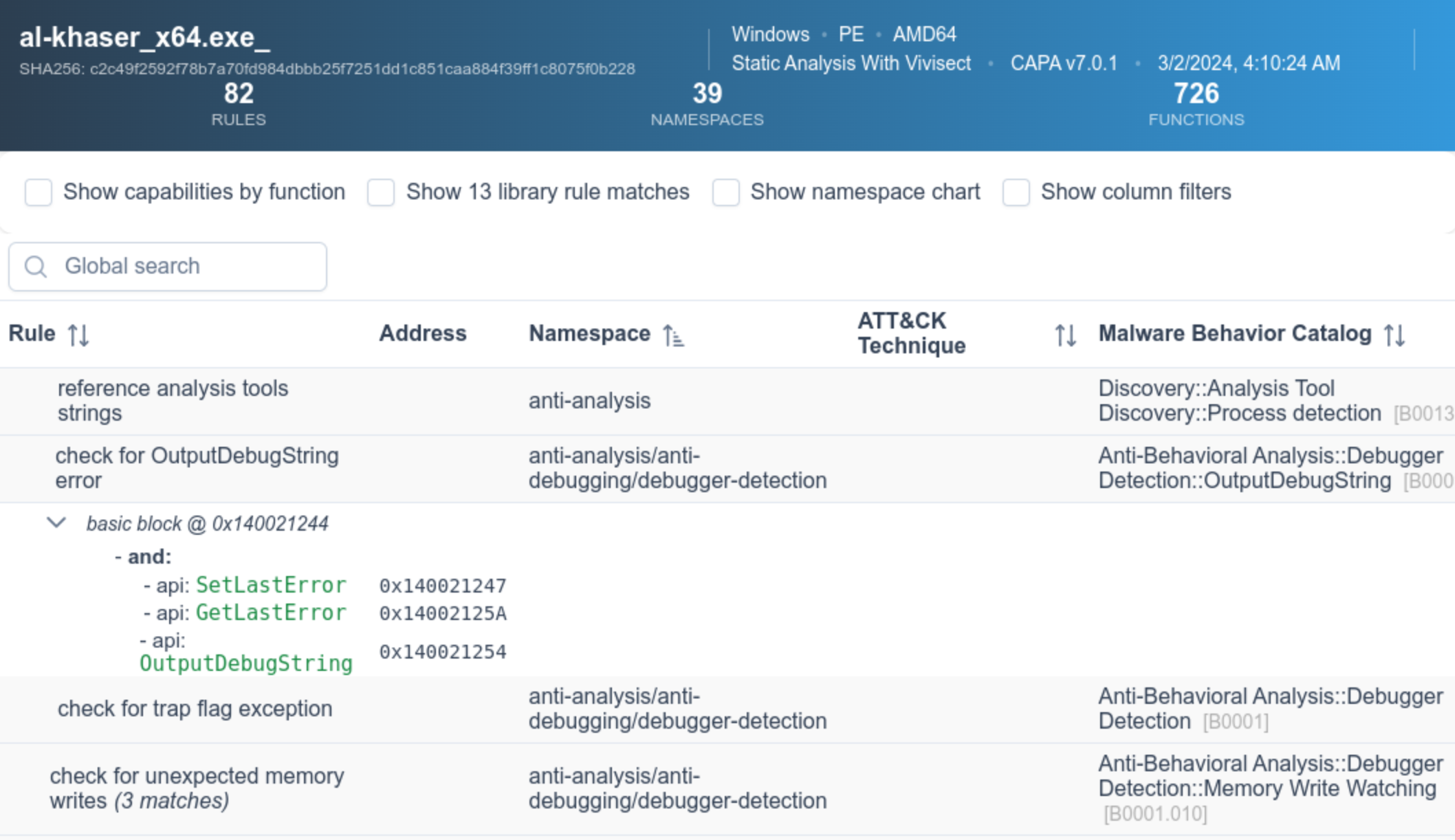
![capa Explorer Web 스크린샷](https://raw.githubusercontent.com/mandiant/capa/master/doc/img/capa_web_explorer.png)

웹 UI에 대한 자세한 내용은 [capa Explorer Web README](https://github.com/mandiant/capa/blob/master/web/explorer/README.md)에서 확인할 수 있습니다.

# 예제

위 샘플 출력에서 알 수 없는 바이너리(`suspicious.exe`)에 대해 capa를 실행하고, 도구는 프로그램이 HTTP 요청을 보내고, XOR 및 Base64를 통해 데이터를 디코딩하고, 서비스를 설치하고, 새 프로세스를 생성할 수 있다고 보고합니다. 종합해 보면, `suspicious.exe`가 지속형 백도어일 수 있다고 생각됩니다. 따라서 다음 분석 단계는 샌드박스에서 `suspicious.exe`를 실행하고 명령 및 제어 서버를 복구하는 것일 수 있습니다.

## 상세 결과

`-vv` 플래그(매우 자세한 출력)를 전달하면 capa가 이러한 기능의 증거를 찾은 위치를 정확히 보고합니다. 이는 적어도 두 가지 이유로 유용합니다:

  - 결과를 신뢰해야 하는 이유를 설명하고 결론을 검증할 수 있도록 도와줍니다.
  - 경험이 풍부한 분석가가 IDA Pro로 연구할 수 있는 바이너리 내 위치를 보여줍니다.```
$ capa.exe suspicious.exe -vv
...
execute shell command and capture output
namespace   c2/shell
author      [email protected]
scope       function
att&ck      Execution::Command and Scripting Interpreter::Windows Command Shell [T1059.003]
references  https://docs.microsoft.com/en-us/windows/win32/api/processthreadsapi/ns-processthreadsapi-startupinfoa
function @ 0x4011C0
  and:
    match: create a process with modified I/O handles and window @ 0x4011C0
      and:
        number: 257 = STARTF_USESTDHANDLES | STARTF_USESHOWWINDOW @ 0x4012B8
        or:
          number: 68 = StartupInfo.cb (size) @ 0x401282
        or: = API functions that accept a pointer to a STARTUPINFO structure
          api: kernel32.CreateProcess @ 0x401343
    match: create pipe @ 0x4011C0
      or:
        api: kernel32.CreatePipe @ 0x40126F, 0x401280
    optional:
      match: create thread @ 0x40136A, 0x4013BA
        or:
          and:
            os: windows
            or:
              api: kernel32.CreateThread @ 0x4013D7
        or:
          and:
            os: windows
            or:
              api: kernel32.CreateThread @ 0x401395
    or:
      string: "cmd.exe" @ 0x4012FD
...

동적 capa

capa는 다음과 같은 여러 샌드박스에 대한 동적 기능 탐지를 지원합니다:

  • CAPE (지원 보고서 형식: .json, .json_, .json.gz)
  • DRAKVUF (지원 보고서 형식: .log, .log.gz)
  • VMRay (지원 보고서 형식: 분석 아카이브 .zip)

이 기능을 사용하려면 지원되는 샌드박스에 파일을 제출한 후 생성된 보고서 파일을 다운로드하여 capa를 실행하세요. 이 기능을 통해 capa는 실행 중 샌드박스가 캡처한 동적 및 정적 기능을 매칭할 수 있습니다.

다음은 패킹된 파일에 대해 capa를 실행한 후, 동일한 패킹된 파일에 대해 생성된 CAPE 보고서에 대해 capa를 실행하는 예입니다.```yaml $ capa 05be49819139a3fdcdbddbdefd298398779521f3d68daa25275cc77508e42310.exe WARNING:capa.capabilities.common:-------------------------------------------------------------------------------- WARNING:capa.capabilities.common: This sample appears to be packed. WARNING:capa.capabilities.common: WARNING:capa.capabilities.common: Packed samples have often been obfuscated to hide their logic. WARNING:capa.capabilities.common: capa cannot handle obfuscation well using static analysis. This means the results may be misleading or incomplete. WARNING:capa.capabilities.common: If possible, you should try to unpack this input file before analyzing it with capa. WARNING:capa.capabilities.common: Alternatively, run the sample in a supported sandbox and invoke capa against the report to obtain dynamic analysis results. WARNING:capa.capabilities.common: WARNING:capa.capabilities.common: Identified via rule: (internal) packer file limitation WARNING:capa.capabilities.common: WARNING:capa.capabilities.common: Use -v or -vv if you really want to see the capabilities identified by capa. WARNING:capa.capabilities.common:--------------------------------------------------------------------------------

$ capa 05be49819139a3fdcdbddbdefd298398779521f3d68daa25275cc77508e42310.json

┍━━━━━━━━━━━━━━━━━━━━━━━━┯━━━━━━━━━━━━━━━━━━━━━━━━━━━━━━━━━━━━━━━━━━━━━━━━━━━━━━━━━━━━━━━━━━━━━━━━━━━━━━━━━━━━┑ │ ATT&CK Tactic │ ATT&CK Technique │ ┝━━━━━━━━━━━━━━━━━━━━━━━━┿━━━━━━━━━━━━━━━━━━━━━━━━━━━━━━━━━━━━━━━━━━━━━━━━━━━━━━━━━━━━━━━━━━━━━━━━━━━━━━━━━━━━┥ │ CREDENTIAL ACCESS │ Credentials from Password Stores T1555 │ ├────────────────────────┼────────────────────────────────────────────────────────────────────────────────────┤ │ DEFENSE EVASION │ File and Directory Permissions Modification T1222 │ │ │ Modify Registry T1112 │ │ │ Obfuscated Files or Information T1027 │ │ │ Virtualization/Sandbox Evasion::User Activity Based Checks T1497.002 │ ├────────────────────────┼────────────────────────────────────────────────────────────────────────────────────┤ │ DISCOVERY │ Account Discovery T1087 │ │ │ Application Window Discovery T1010 │ │ │ File and Directory Discovery T1083 │ │ │ Query Registry T1012 │ │ │ System Information Discovery T1082 │ │ │ System Location Discovery::System Language Discovery T1614.001 │ │ │ System Owner/User Discovery T1033 │ ├────────────────────────┼────────────────────────────────────────────────────────────────────────────────────┤ │ EXECUTION │ System Services::Service Execution T1569.002 │ ├────────────────────────┼────────────────────────────────────────────────────────────────────────────────────┤ │ PERSISTENCE │ Boot or Logon Autostart Execution::Registry Run Keys / Startup Folder T1547.001 │ │ │ Boot or Logon Autostart Execution::Winlogon Helper DLL T1547.004 │ │ │ Create or Modify System Process::Windows Service T1543.003 │ ┕━━━━━━━━━━━━━━━━━━━━━━━━┷━━━━━━━━━━━━━━━━━━━━━━━━━━━━━━━━━━━━━━━━━━━━━━━━━━━━━━━━━━━━━━━━━━━━━━━━━━━━━━━━━━━━┙

┍━━━━━━━━━━━━━━━━━━━━━━━━━━━━━━━━━━━━━━━━━━━━━━━━━━━━━━┯━━━━━━━━━━━━━━━━━━━━━━━━━━━━━━━━━━━━━━━━━━━━━━━━━━━━━━┑ │ Capability │ Namespace │ ┝━━━━━━━━━━━━━━━━━━━━━━━━━━━━━━━━━━━━━━━━━━━━━━━━━━━━━━┿━━━━━━━━━━━━━━━━━━━━━━━━━━━━━━━━━━━━━━━━━━━━━━━━━━━━━━┥ │ check for unmoving mouse cursor (3 matches) │ anti-analysis/anti-vm/vm-detection │ │ gather bitkinex information │ collection/file-managers │ │ gather classicftp information │ collection/file-managers │ │ gather filezilla information │ collection/file-managers │ │ gather total-commander information │ collection/file-managers │ │ gather ultrafxp information │ collection/file-managers │ │ resolve DNS (23 matches) │ communication/dns │ │ initialize Winsock library (7 matches) │ communication/socket │ │ act as TCP client (3 matches) │ communication/tcp/client │ │ create new key via CryptAcquireContext │ data-manipulation/encryption │ │ encrypt or decrypt via WinCrypt │ data-manipulation/encryption │ │ hash data via WinCrypt │ data-manipulation/hashing │ │ initialize hashing via WinCrypt │ data-manipulation/hashing │ │ hash data with MD5 │ data-manipulation/hashing/md5 │ │ generate random numbers via WinAPI │ data-manipulation/prng │ │ extract resource via kernel32 functions (2 matches) │ executable/resource │ │ interact with driver via control codes (2 matches) │ host-interaction/driver │ │ get Program Files directory (18 matches) │ host-interaction/file-system │ │ get common file path (575 matches) │ host-interaction/file-system │ │ create directory (2 matches) │ host-interaction/file-system/create │ │ delete file │ host-interaction/file-system/delete │ │ get file attributes (122 matches) │ host-interaction/file-system/meta │ │ set file attributes (8 matches) │ host-interaction/file-system/meta │ │ move file │ host-interaction/file-system/move │ │ find taskbar (3 matches) │ host-interaction/gui/taskbar/find │ │ get keyboard layout (12 matches) │ host-interaction/hardware/keyboard │ │ get disk size │ host-interaction/hardware/storage │ │ get hostname (4 matches) │ host-interaction/os/hostname │ │ allocate or change RWX memory (3 matches) │ host-interaction/process/inject │ │ query or enumerate registry key (3 matches) │ host-interaction/registry │ │ query or enumerate registry value (8 matches) │ host-interaction/registry │ │ delete registry key │ host-interaction/registry/delete │ │ start service │ host-interaction/service/start │ │ get session user name │ host-interaction/session │ │ persist via Run registry key │ persistence/registry/run │ │ persist via Winlogon Helper DLL registry key │ persistence/registry/winlogon-helper │ │ persist via Windows service (2 matches) │ persistence/service │ ┕━━━━━━━━━━━━━━━━━━━━━━━━━━━━━━━━━━━━━━━━━━━━━━━━━━━━━━┷━━━━━━━━━━━━━━━━━━━━━━━━━━━━━━━━━━━━━━━━━━━━━━━━━━━━━━┙

root@kitploit:~
# capa 규칙
capa는 프로그램 내에서 기능을 식별하기 위해 규칙 모음을 사용합니다.
이 규칙은 리버스 엔지니어링에 처음인 사람도 쉽게 작성할 수 있습니다.
규칙을 작성함으로써 capa가 인식하는 기능을 확장할 수 있습니다.
일부 측면에서 capa 규칙은 OpenIOC, Yara 및 YAML 형식의 혼합입니다.

다음은 capa에서 사용하는 예제 규칙입니다:```yaml
rule:
  meta:
    name: create TCP socket
    namespace: communication/socket/tcp
    authors:
      - [email protected]
      - [email protected]
      - [email protected]
    scopes:
      static: basic block
      dynamic: call
    mbc:
      - Communication::Socket Communication::Create TCP Socket [C0001.011]
    examples:
      - Practical Malware Analysis Lab 01-01.dll_:0x10001010
  features:
    - or:
      - and:
        - number: 6 = IPPROTO_TCP
        - number: 1 = SOCK_STREAM
        - number: 2 = AF_INET
        - or:
          - api: ws2_32.socket
          - api: ws2_32.WSASocket
          - api: socket
      - property/read: System.Net.Sockets.TcpClient::Client

The github.com/mandiant/capa-rules 저장소에는 capa와 함께 배포되는 수백 개의 표준 규칙이 포함되어 있습니다. 악성코드에서 흥미로운 기술을 발견하면 규칙 작성 방법을 배우고 새로운 항목을 기여해 주시기 바랍니다.

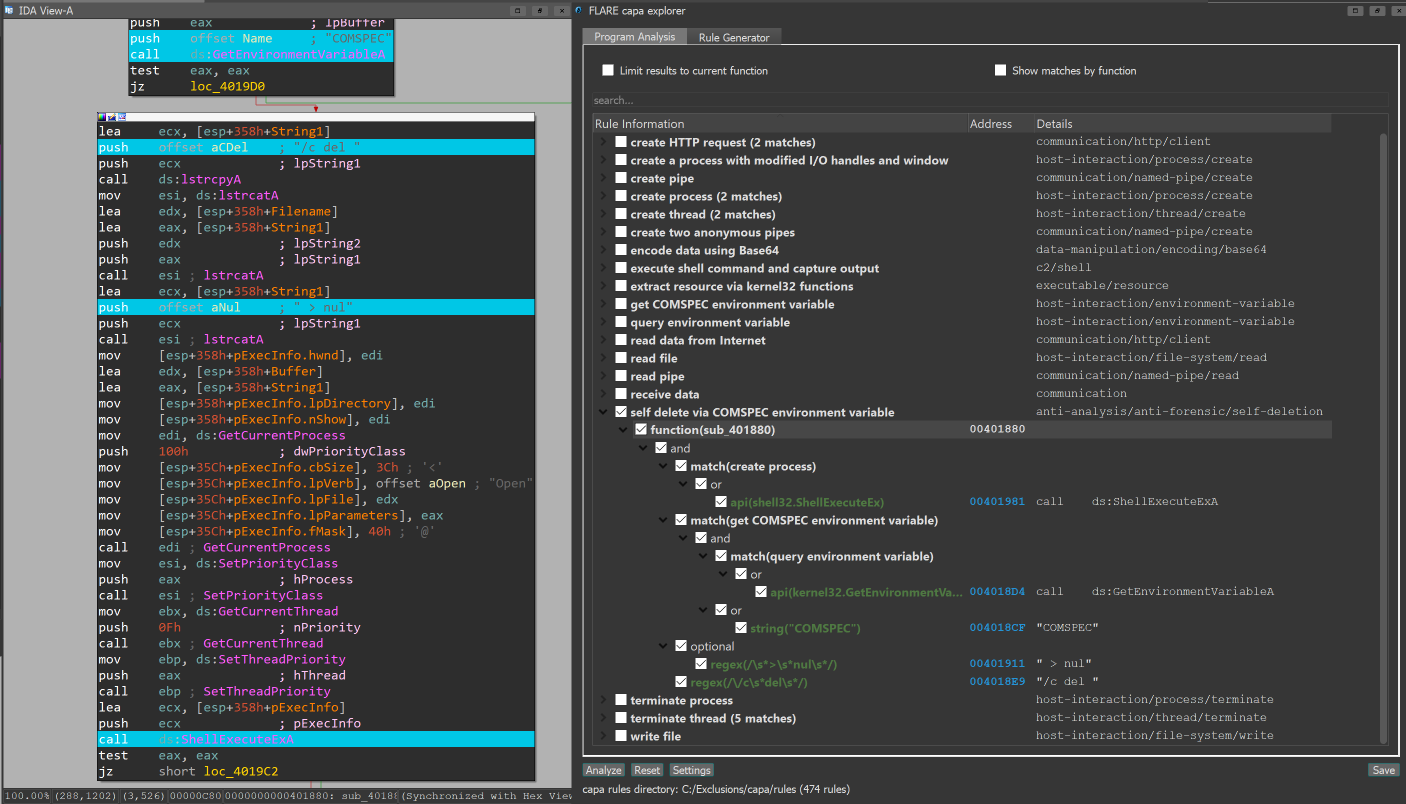
IDA Pro 플러그인: capa explorer

IDA Pro를 사용하는 경우 capa explorer 플러그인을 사용할 수 있습니다. capa explorer는 프로그램의 흥미로운 영역을 식별하고 IDA Pro 데이터베이스에서 직접 추출한 특징을 사용하여 새로운 capa 규칙을 작성하는 데 도움을 줍니다. 또한 동적으로 해석된 API 주소를 포함하는 전역 변수의 이름을 바꾸는 등 .idb에 대한 로컬 변경 사항을 사용하여 더 나은 특징을 추출합니다.

capa + IDA Pro integration

Ghidra 통합

capa는 Ghidra를 (PyGhidra 통해) 특징 추출 백엔드로 사용하는 것을 지원합니다. 이를 통해 Ghidra의 분석 엔진을 사용하여 바이너리에 대해 capa를 실행할 수 있습니다.

capa explorer for Ghidra를 사용하여 Ghidra UI에서 capa 결과를 실행하고 볼 수 있습니다.

또한 Ghidra backend를 사용하여 명령줄에서 capa를 실행할 수 있습니다.

블로그 게시물

  • 용을 타며: capa가 Ghidra를 활용하다
  • 동적 capa: CAPE 샌드박스로 실행 파일 런타임 동작 탐구
  • capa v4: 더 넓은 .NET 그물을 던지다 (.NET 지원)
  • 방 안의 ELF – capa v3 (ELF 지원)
  • capa 2.0: 더 좋고, 더 강하고, 더 빠르게
  • capa: 악성코드 기능 자동 식별

추가 정보

capa

  • 설치
  • 사용법
  • 제한 사항
  • 기여 가이드

capa rules

  • capa-rules 저장소
  • capa-rules 규칙 형식

capa 테스트 파일

capa-testfiles 저장소에는 capa의 코드와 규칙을 테스트하는 데 사용하는 데이터가 포함되어 있습니다.

메일링 리스트

커뮤니티 공지를 위해 FLARE 메일링 리스트를 구독하세요! [email protected]로 "subscribe" 이메일을 보내주세요.

도구 다운로드