

로그 파싱을 위한 머신러닝 툴킷 [ICSE'19, DSN'16]
Logparser는 구조화된 로그 분석을 위한 핵심 단계인 자동화된 로그 파싱을 위한 머신러닝 툴킷과 벤치마크를 제공합니다. logparser를 적용하면 사용자는 비구조화된 로그에서 이벤트 템플릿을 자동으로 추출하고 원시 로그 메시지를 일련의 구조화된 이벤트로 변환할 수 있습니다. 로그 파싱 과정은 문헌에서 메시지 템플릿 추출, 로그 키 추출 또는 로그 메시지 클러스터링이라고도 합니다.
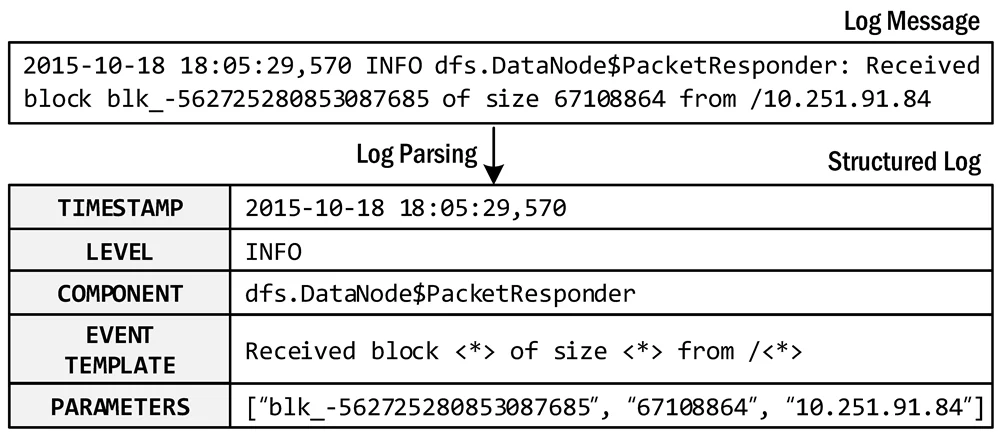
로그 파싱의 예
pip install logparser3로 설치하세요.💡 파서 코드를 logparser에 푸시하고 논문을 표에 추가하려면 PR을 제출해 주세요.
pip install을 통해 logparser 패키지와 요구사항을 설치할 것을 권장합니다.``` pip install logparser3
특히 이 패키지는 다음 요구 사항에 의존합니다. Python에서의 regex 매칭은 불안정하므로, regex 라이브러리를 버전 2022.3.2로 고정할 것을 권장합니다.
참고: ``"Error: need to escape..."`` 오류가 발생하면 [여기](https://github.com/logpai/logparser/issues/122)의 지침을 따르세요.
+ python 3.6+
+ regex 2022.3.2
+ numpy
+ pandas
+ scipy
+ scikit-learn
조건부 요구 사항:
+ MoLFI 사용 시: `deap`
+ SHISO 사용 시: `nltk`
+ SLCT 사용 시: `gcc`
+ LogCluster 사용 시: `perl`
+ NuLog 사용 시: `torch`, `torchvision`, `keras_preprocessing`
+ DivLog 사용 시: `openai`, `tiktoken` (python 3.8+ 필요)
### 시작하기
1. 데모 실행:
각 로그 파서에 대해 시작하는 데 도움이 되는 데모를 제공합니다. 각 데모는 대상 로그 파서의 기본 사용법과 구성할 하이퍼파라미터를 보여줍니다. 예를 들어, 다음 명령은 Drain에 대한 데모를 실행하는 방법을 보여줍니다.
```
cd logparser/Drain
python demo.py
```
2. 벤치마크 실행:
각 로그 파서에 대해 파싱 정확도를 평가하기 위해 [loghub_2k 데이터셋](https://github.com/logpai/logparser/tree/main/data#loghub_2k)에서 로그 파싱을 실행하는 벤치마크 스크립트를 제공합니다. [다른 로그 파싱 벤치마크 데이터셋](https://github.com/logpai/logparser/tree/main/data#datasets)도 사용할 수 있습니다.
```
cd logparser/Drain
python benchmark.py
```
벤치마킹 결과는 각 파서의 readme 파일에서 확인할 수 있습니다 (예: https://github.com/logpai/logparser/tree/main/logparser/Drain#benchmark).
3. 자신의 로그 파싱:
logparser를 사용자 고유의 로그 데이터 파싱에 적용하는 것은 쉽습니다. 그러려면 먼저 logparser3 패키지를 설치해야 합니다. 그런 다음 아래 코드 스니펫을 따라 자신만의 스크립트를 작성하여 로그 파싱을 시작할 수 있습니다. 전체 예제 코드는 [example/parse_your_own_logs.py](https://github.com/logpai/logparser/blob/main/example/parse_your_own_logs.py)에서 확인하세요.
```python
from logparser.Drain import LogParser
input_dir = 'PATH_TO_LOGS/' # The input directory of log file
output_dir = 'result/' # The output directory of parsing results
log_file = 'unknow.log' # The input log file name
log_format = '<Date> <Time> <Level>:<Content>' # Define log format to split message fields
# Regular expression list for optional preprocessing (default: [])
regex = [
r'(/|)([0-9]+\.){3}[0-9]+(:[0-9]+|)(:|)' # IP
]
st = 0.5 # Similarity threshold
depth = 4 # Depth of all leaf nodes
parser = LogParser(log_format, indir=input_dir, outdir=output_dir, depth=depth, st=st, rex=regex)
parser.parse(log_file)
```
logparser를 실행한 후 출력 폴더에서 추출된 이벤트 템플릿과 파싱된 구조화 로그를 얻을 수 있습니다.
+ `*_templates.csv` (예시 [HDFS_2k.log_templates.csv](https://github.com/logpai/logparser/blob/main/logparser/Drain/demo_result/HDFS_2k.log_templates.csv))
| EventId | EventTemplate | Occurrences |
|----------|------------------------------------------------|-------------|
| dc2c74b7 | PacketResponder <*> for block <*> terminating | 311 |
| e3df2680 | Received block <*> of size <*> from <*> | 292 |
| 09a53393 | Receiving block <*> src: <*> dest: <*> | 292 |
+ `*_structured.csv` (예시 [HDFS_2k.log_structured.csv](https://github.com/logpai/logparser/blob/main/logparser/Drain/demo_result/HDFS_2k.log_structured.csv))
| ... | Level | Content | EventId | EventTemplate | ParameterList |
|-----|-------|-----------------------------------------------------------------------------------------------|----------|---------------------------------------------------------------------|--------------------------------------------|
| ... | INFO | PacketResponder 1 for block blk_38865049064139660 terminating | dc2c74b7 | PacketResponder <*> for block <*> terminating | ['1', 'blk_38865049064139660'] |
| ... | INFO | Received block blk_3587508140051953248 of size 67108864 from /10.251.42.84 | e3df2680 | Received block <*> of size <*> from <*> | ['blk_3587508140051953248', '67108864', '/10.251.42.84'] |
| ... | INFO | Verification succeeded for blk_-4980916519894289629 | 32777b38 | Verification succeeded for <*> | ['blk_-4980916519894289629'] |
### 프로덕션 사용
logparser의 주요 목적은 연구 및 벤치마크 용도입니다. 연구자들은 logparser를 코드베이스로 사용하여 새로운 로그 파서를 개발할 수 있으며, 실무자들은 벤치마킹을 통해 현재 로그 파싱 방법의 성능과 확장성을 평가할 수 있습니다. 실무 환경에서 logparser를 사용해 볼 것을 강력히 권장합니다. 다만 현재 logparser 구현은 프로덕션 사용에 적합하지 않다는 점에 유의하세요. 현재 그렇게 할 계획은 없지만, 지능형 프로덕션 수준 로그 파서를 구축하려는 개발자를 위한 몇 가지 제안 사항이 있습니다.
+ logparser에 사용된 [타사 라이브러리 라이선스](https://github.com/logpai/logparser/blob/main/LICENSE.md)를 반드시 확인하세요. 파서 하나만 유지하고 나머지는 삭제한 다음 패키지 휠을 다시 빌드할 것을 권장합니다. 이렇게 해도 logparser 사용에는 문제가 없습니다.
+ logparser에 멀티프로세싱을 통한 효율성과 확장성, 장애 복구, 디스크 또는 메시지 큐 Kafka 영속성을 추가하여 개선하세요.
+ [Drain3](https://github.com/logpai/Drain3)은 프로덕션 시나리오를 위한 [실용적 개선 사항](https://github.com/logpai/Drain3#new-features)으로 구축된 좋은 참고 사례입니다.
### 🔥 인용
출판물에서 logparser 도구나 벤치마킹 결과를 사용하는 경우 다음 논문을 인용해 주세요.
+ [**ICSE'19**] Jieming Zhu, Shilin He, Jinyang Liu, Pinjia He, Qi Xie, Zibin Zheng, Michael R. Lyu. [Tools and Benchmarks for Automated Log Parsing](https://arxiv.org/pdf/1811.03509.pdf). *International Conference on Software Engineering (ICSE)*, 2019.
+ [**DSN'16**] Pinjia He, Jieming Zhu, Shilin He, Jian Li, Michael R. Lyu. [An Evaluation Study on Log Parsing and Its Use in Log Mining](https://jiemingzhu.github.io/pub/pjhe_dsn2016.pdf). *IEEE/IFIP International Conference on Dependable Systems and Networks (DSN)*, 2016.
### 🤗 기여자
<!-- readme: zhujiem,contributors -start -->
<table>
<tbody>
<tr>
<td align="center">
<a href="https://github.com/zhujiem">
<img src="https://assets.kitploit.com/production/public/readmes/51023/471767126e4450e42b40b8e3f5437c2d9d0616f468675dde6feccac1976b18d0/ee334336551226b1483445bee71089fdf5e61115652a2a99375e54566f34c9bf-display-v1.webp" width="80;" alt="zhujiem"/>
<br />
<sub><b>Zhujiem</b></sub>
</a>
</td>
<td align="center">
<a href="https://github.com/PinjiaHe">
<img src="https://assets.kitploit.com/production/public/readmes/51023/e9f83f96ab3d84e92152317c8d85d54a12fb0b0baea267d29e7d317a5caff94b/5b4a6af1bda6245edbb5c40ea1467625828536aeb88e984716753945b6235da2-display-v1.webp" width="80;" alt="PinjiaHe"/>
<br />
<sub><b>Pinjia He</b></sub>
</a>
</td>
<td align="center">
<a href="https://github.com/JinYang88">
<img src="https://assets.kitploit.com/production/public/readmes/51023/7785c7974d5753fa21792097907be1e20efb5fc5bbf3aba61b0b4d2f4fe26fec/19a47a39c4db07a8a052ed05304e166cca4cf18683d89a1400688c576ae48b52-display-v1.webp" width="80;" alt="JinYang88"/>
<br />
<sub><b>LIU, Jinyang</b></sub>
</a>
</td>
<td align="center">
<a href="https://github.com/Siyuexi">
<img src="https://assets.kitploit.com/production/public/readmes/51023/fe7de7203a407b36e2f44a57603594e01266d124ef558b53cb95ba28afc6127c/f7a7173a142ced37b910b650e3ad957b27fcf2f13f4c828ff6a72fb87111435f-display-v1.webp" width="80;" alt="Siyuexi"/>
<br />
<sub><b>Junjielong Xu</b></sub>
</a>
</td>
<td align="center">
<a href="https://github.com/ShilinHe">
<img src="https://assets.kitploit.com/production/public/readmes/51023/c8b37cadfeb622c955b807776ab0fa19f058c8ad512ebb22eb98c79ad5e90c17/fc476296c1b1aa6b1dd7c3220a81a1b70838d5c113a65e6b2f98196d0615b8a3-display-v1.webp" width="80;" alt="ShilinHe"/>
<br />
<sub><b>Shilin HE</b></sub>
</a>
</td>
<td align="center">
<a href="https://github.com/JosephMeghanathD">
<img src="https://assets.kitploit.com/production/public/readmes/51023/c2036c74a3116c7de955cae32687ffae61d8be46868cbcc61f771a7e9be4fa33/011ea30ec30f0db362d75632b310850b2783bd2c2428dfee7dc0fff182dc1bf8-display-v1.webp" width="80;" alt="JosephMeghanathD"/>
<br />
<sub><b>Joseph</b></sub>
</a>
</td>
</tr>
<tr>
<td align="center">
<a href="https://github.com/jcordon5">
<img src="https://assets.kitploit.com/production/public/readmes/51023/a4f67dd9f820a1dc763ae05e6d66ec6418d7e70abad8a9b5906413ab909f709e/4c8dc9fc08525d6d3c2334983160c0c9a48077fcc22b3498fe658aa133a2da02-display-v1.webp" width="80;" alt="jcordon5"/>
<br />
<sub><b>José A. Cordón </b></sub>
</a>
</td>
<td align="center">
<a href="https://github.com/rustamtemirov">
<img src="https://assets.kitploit.com/production/public/readmes/51023/3690f9e2cd318e8555a586fb32e221080e59e5de8917d82584da1f69e00be8cc/95300504879ab023f96e1cd73ca726c6720367b23e0d476e9a0b6cc23b89ff4d-display-v1.webp" width="80;" alt="rustamtemirov"/>
<br />
<sub><b>Rustam Temirov</b></sub>
</a>
</td>
<td align="center">
<a href="https://github.com/gaiusyu">
<img src="https://assets.kitploit.com/production/public/readmes/51023/68c5eeea49f8a2ee2cd39b633ed1fb9765cde38399b12636dea0a3dd0920c86d/8faa00619c5b17d96e80dff1b124695997ece681c0931519346fa0e62407c578-display-v1.webp" width="80;" alt="gaiusyu"/>
<br />
<sub><b>Siyu Yu (Youth Yu)</b></sub>
</a>
</td>
<td align="center">
<a href="https://github.com/thomasryck">
<img src="https://assets.kitploit.com/production/public/readmes/51023/ad3710fbbe7106ffe560fe918f87e77a95a6bf7a21dbf65827f93138c96aca5a/ed736bf9ffd9aa54686cc7a3d404f7c0072ecaced2403ff467d112482255c2b3-display-v1.webp" width="80;" alt="thomasryck"/>
<br />
<sub><b>Thomas Ryckeboer</b></sub>
</a>
</td>
<td align="center">
<a href="https://github.com/IsuruBoyagane15">
<img src="https://assets.kitploit.com/production/public/readmes/51023/dca9ea34301dd9441404246eb535a39d034518fd1311bebd68f1725bc38ba6b3/57b77cdaafca63553a32d53d83f1859d971c1628ef640c36ab1125939bb43a00-display-v1.webp" width="80;" alt="IsuruBoyagane15"/>
<br />
<sub><b>Isuru Boyagane</b></sub>
</a>
</td>
</tr>
<tbody>
</table>
<!-- readme: zhujiem,contributors -end -->
### 토론
질문이나 토론을 위해 언제든지 WeChat 그룹에 참여하세요. 또는 [여기에서 이슈를 열](https://github.com/logpai/logparser/issues/new) 수도 있습니다.

| 발표 | 파서 | 논문 제목 | 벤치마크 |
|---|