
 lissy93/web-check
🕵️♂️ 모든 웹사이트 분석을 위한 올인원 OSINT 도구
<h1 align="center">Web-Check</h1>
<p align="center">
<img src="https://cdn.as93.net/logo/web-check/w256" width="96" /><br />
<b><i>모든 웹사이트를 위한 포괄적인 온디맨드 오픈 소스 인텔리전스</i></b>
<br />
<b>🌐 <a href="https://web-check.xyz/">web-check.xyz</a></b><br />
</p>
---
<p align="center">후원:</p>
<table align="center">
<tr>
<td align="center" width="33%">
<a href="https://nubela.co/?utm_source=github&utm_medium=sponsorship&utm_campaign=oss_sponsorships&utm_content=github_readme&utm_id=web_check_2026">
<img src="https://pixelflare.cc/alicia/sponsors/ninja-pear.png" width="260" alt="NinjaPear"><br>
<b>NinjaPear</b>
</a><br>
<sub>모든 URL에서 전체 B2B 프로필을 가져오는 API</sub>
</td>
<td align="center" width="33%">
<a href="https://www.hostg.xyz/aff_c?offer_id=48&aff_id=243972&url_id=6826">
<img src="https://pixelflare.cc/alicia/sponsors/hostinger-2.png" width="260" alt="Hostinger"><br>
<b>Hostinger</b>
</a><br>
<sub>Hostinger에서 클릭 한 번으로 Web-Check 배포</sub>
</td>
<td align="center" width="33%">
<a href="https://go.warp.dev/web-check">
<img src="https://raw.githubusercontent.com/warpdotdev/brand-assets/main/Github/Sponsor/Warp-Github-LG-02.png?raw=true" width="260" alt="Warp"><br>
<b>Warp</b>
</a><br>
<sub>여러 AI 에이전트와 함께 코딩하기 위해 만들어짐</sub>
</td>
</tr>
</table>
#### 목차
- **[소개](#about)**
- [스크린샷](#screenshot)
- [라이브 데모](#live-demo)
- [미러](#mirror)
- [기능](#features)
- **[사용법](#usage)**
- 배포
- [옵션#1: Netlify](#deploying---option-1-netlify)
- [옵션#2: Vercel](#deploying---option-2-vercel)
- [옵션#3: Hostinger](#deploying---option-3-hostinger)
- [옵션#4: Render](#deploying---option-4-render)
- [옵션#5: Docker](#deploying---option-5-docker)
- [옵션#6: 소스](#deploying---option-6-from-source)
- [구성 옵션](#configuring)
- [개발자 설정](#developing)
- **[커뮤니티](#community)**
- [기여](#contributing)
- [버그](#reporting-bugs)
- [지원](#supporting)
- **[라이선스](#license)**
---
## 소개
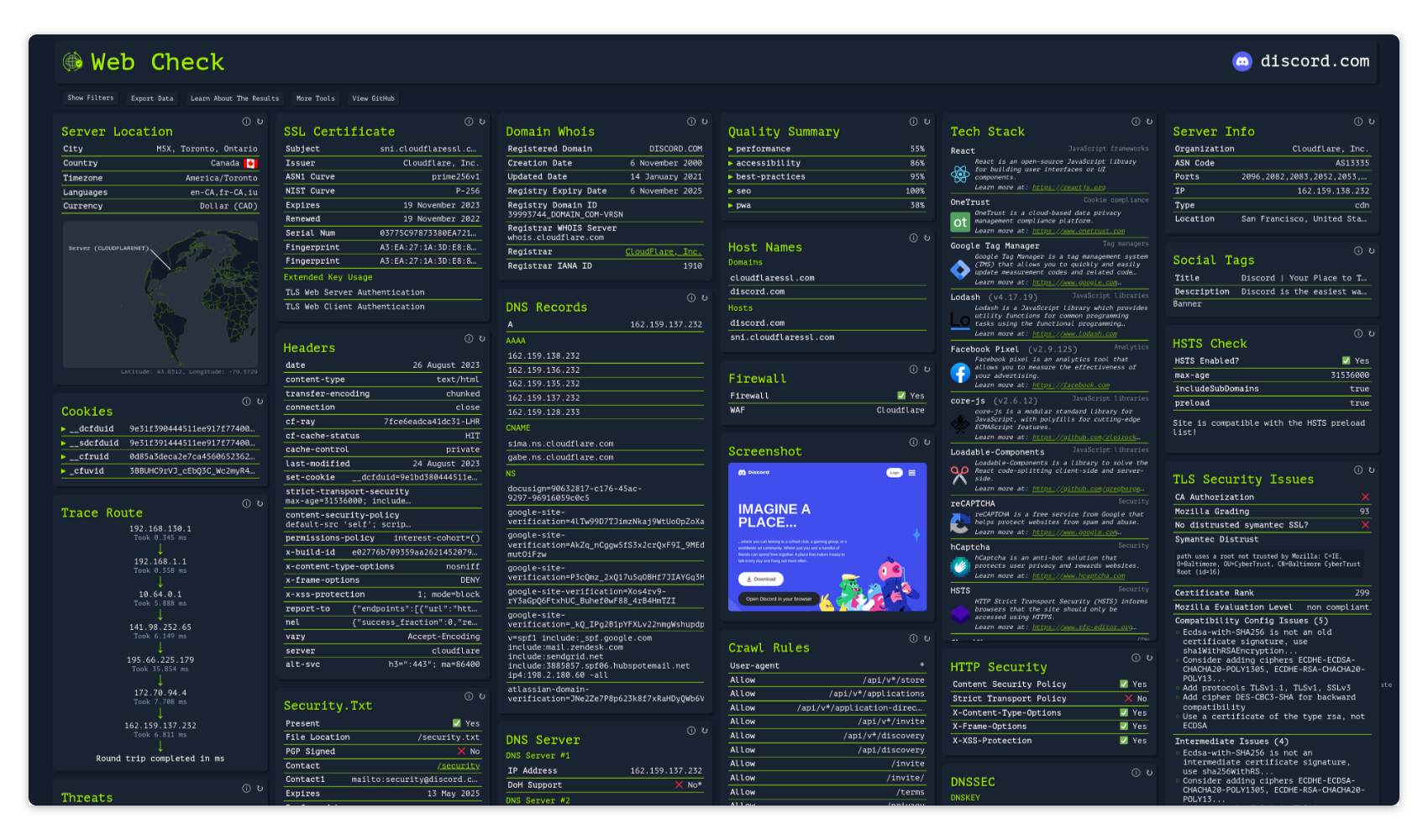
주어진 웹사이트의 내부 동작에 대한 통찰력을 얻으세요: 잠재적인 공격 벡터를 발견하고, 서버 아키텍처를 분석하며, 보안 구성을 확인하고, 사이트가 사용하는 기술을 파악할 수 있습니다.
목표는 웹사이트를 쉽게 이해하고, 최적화하며, 보호할 수 있도록 돕는 것입니다.
### 스크린샷
<details>
<summary>스크린샷 펼치기</summary>
[](https://web-check.as93.net/)
</details>
[](https://github.com/Lissy93/web-check/tree/master/.github/screenshots)
### 라이브 데모
호스팅된 버전은 다음에서 접속할 수 있습니다: **[web-check.as93.net](https://web-check.as93.net)**
### 미러
이 저장소의 소스는 CodeBerg에 미러링되어 있으며, 다음에서 이용할 수 있습니다: **[codeberg.org/alicia/web-check](https://codeberg.org/alicia/web-check)**
### 상태
빌드 및 배포: [](https://app.netlify.com/sites/web-check/deploys)
[](https://vercel.com/as93/web-check/)
[](https://github.com/Lissy93/web-check/actions/workflows/docker.yml)
[](https://github.com/Lissy93/web-check/actions/workflows/deploy-aws.yml)
<br />
저장소 관리 및 기타: [](https://github.com/Lissy93/web-check/actions/workflows/mirror.yml)
[](https://github.com/Lissy93/web-check/actions/workflows/credits.yml)
### 기능
전체 검사 목록과 각 검사가 수행하는 작업을 확인하려면 **[web-check.xyz/about](https://web-check.xyz/about)** 을 참조하세요
---
## 사용법
### 배포 - 옵션 #1: Netlify
아래 버튼을 클릭하여 Netlify에 배포하세요 👇
[](https://app.netlify.com/start/deploy?repository=https://github.com/lissy93/web-check)
### 배포 - 옵션 #2: Vercel
아래 버튼을 클릭하여 Vercel에 배포하세요 👇
[](https://vercel.com/new/clone?repository-url=https%3A%2F%2Fgithub.com%2Flissy93%2Fweb-check&project-name=web-check&repository-name=web-check-fork&demo-title=Web-Check%20Demo&demo-description=Check%20out%20web-check.xyz%20to%20see%20a%20live%20demo%20of%20this%20application%20running.&demo-url=https%3A%2F%2Fweb-check.xyz&demo-image=https%3A%2F%2Fraw.githubusercontent.com%2FLissy93%2Fweb-check%2Fmaster%2F.github%2Fscreenshots%2Fweb-check-screenshot10.png)
### 배포 - 옵션 #3: Hostinger
Hostinger에서 클릭 한 번으로 Web-Check를 배포하세요 – 사전 구성되어 바로 실행할 수 있습니다 👇
<a href="https://www.hostg.xyz/aff_c?offer_id=48&aff_id=243972&url_id=6826"><img height="32" src="https://assets.hostinger.com/vps/deploy.svg"></a>
### 배포 - 옵션 #4: Render
아래 버튼을 클릭하여 Render에 배포하세요 👇
[](https://render.com/deploy?repo=https://github.com/Lissy93/web-check)
### 배포 - 옵션 #5: Docker
`docker run -p 3000:3000 lissy93/web-check`를 실행한 다음, [`localhost:3000`](http://localhost:3000)을 여세요
<details>
<summary>Docker 옵션</summary>
Docker 이미지는 다음에서 받을 수 있습니다:
- DockerHub: [`lissy93/web-check`](https://hub.docker.com/r/lissy93/web-check)
- GHCR: [`ghcr.io/lissy93/web-check`](https://github.com/Lissy93/web-check/pkgs/container/web-check)
- 또는 저장소를 복제한 후 `docker build -t web-check .`를 실행하여 이미지를 직접 빌드할 수 있습니다
</details>
### 배포 - 옵션 #6: 소스에서
[개발](#developing) 섹션에 나열된 필수 구성 요소를 설치한 다음, 실행하세요:
```bash
git clone https://github.com/Lissy93/web-check.git # Download the code from GitHub
cd web-check # Navigate into the project dir
yarn install # Install the NPM dependencies
yarn build # Build the app for production
yarn start # Start the app (API and GUI)
```
---
### 구성
기본적으로 별도의 구성은 필요하지 않습니다.
하지만 일부 추가 검사를 사용하거나, 외부 API를 사용하는 일부 검사의 속도 제한을 늘리기 위해 설정할 수 있는 몇 가지 선택적 환경 변수가 있습니다.
**API 키 및 자격 증명**:
| 키 | 값 |
| ---------------------- | ----------------------------------------------------------------------------------------------------------------------------------------------------------------------------------------------------- |
| `GOOGLE_CLOUD_API_KEY` | PageSpeed Insights 및 Safe Browsing API가 활성화된 Google API 키 ([여기에서 받기](https://developers.google.com/speed/docs/insights/v5/get-started)). 품질 및 Safe Browsing 검사를 실행합니다 |
| `SHODAN_API_KEY` | Shodan API 키 ([여기에서 받기](https://account.shodan.io/)). 호스트 이름, 서버 정보 및 취약점 검사를 실행합니다 |
| `CLOUDMERSIVE_API_KEY` | Cloudmersive API 키 ([여기에서 받기](https://account.cloudmersive.com/)). 위협 검사에 Cloudmersive 웹사이트 스캔을 추가합니다 |
| `TRANCO_API_KEY` | Tranco API 키 ([여기에서 받기](https://tranco-list.eu/)). 순위 검사의 Tranco 속도 제한을 높입니다 |
| `TRANCO_USERNAME` | 위 키와 함께 사용되는 Tranco 계정 이메일 |
| `GITHUB_TOKEN` | GitHub 토큰 ([여기에서 받기](https://github.com/settings/tokens)). 소셜 존재 검사의 GitHub 속도 제한을 높입니다 |
| `CERTSPOTTER_TOKEN` | CertSpotter API 토큰 ([여기에서 받기](https://sslmate.com/certspotter/api/)). 하위 도메인 검사의 CertSpotter 속도 제한을 높입니다 |
**구성 설정**:
| 키 | 값 |
| -------------------------- | -------------------------------------------------------------------------- |
| `PORT` | server.js 실행 시 API를 제공할 포트 (예: `3000`) |
| `API_ENABLE_RATE_LIMIT` | /api 엔드포인트에 대한 속도 제한 활성화 (예: `true`) |
| `PUBLIC_API_TIMEOUT_LIMIT` | API 요청의 타임아웃 제한(밀리초) (예: `25000`) |
| `API_CORS_ORIGIN` | 허용할 호스트 이름을 설정하여 CORS 활성화 (예: `example.com`) |
| `API_DISABLED_CHECKS` | 비활성화할 검사의 쉼표로 구분된 목록 (예: `trace-route,ports`) |
| `API_ENABLED_CHECKS` | 설정된 경우 이 검사만 실행됩니다 (예: `get-ip,ssl,dns,headers`) |
| `API_BLOCKED_HOSTS` | 절대 스캔해서는 안 되는 호스트 (예: `lan.example.com,192.168.0.0/16`) |
| `CHROME_PATH` | Chromium 실행 파일의 경로 (예: `/usr/bin/chromium`) |
| `DISABLE_GUI` | GUI를 비활성화하고 API만 제공 (예: `false`) |
| `PUBLIC_API_ENDPOINT` | API의 엔드포인트, 로컬 또는 원격 (예: `/api`) |
모든 값은 선택 사항입니다.
이를 환경 변수로 추가할 수 있습니다. 프로젝트 루트의 `.env` 파일에 직접 넣거나, Netlify / Vercel UI를 통해, 또는 --env 플래그를 사용하여 Docker 컨테이너에 전달하거나, 자체 환경 변수 관리 시스템을 사용할 수 있습니다
`PUBLIC_` 접두사가 붙은 값은 빌드 시 프런트엔드에서 읽히므로, 변경 후에는 다시 빌드해야 합니다
---
### 개발
1. 저장소를 클론합니다, `git clone [email protected]:Lissy93/web-check.git`
2. 해당 디렉터리로 이동합니다, `cd web-check`
3. 의존성을 설치합니다: `yarn`
4. 개발 서버를 시작합니다, `yarn dev`
[Node.js](https://nodejs.org/en) (v22.22.3+ 또는 v24.16+)와 [yarn](https://yarnpkg.com/getting-started/install), 그리고 [git](https://git-scm.com/)이 설치되어 있어야 합니다.
일부 검사는 환경 내에 `chromium`, `traceroute`, `dns`가 설치되어 있어야 합니다. 해당 패키지가 없으면 해당 작업은 건너뜁니다.
---
## 커뮤니티
### 기여하기
어떤 형태의 기여든 매우 환영하며, 큰 도움이 됩니다.
행동 강령은 [Contributor Covenant](https://www.contributor-covenant.org/version/2/1/code_of_conduct/)를 참조하세요.
시작하려면 저장소를 포크하고, 변경 사항을 만들고, 코드를 추가, 커밋, 푸시한 다음, 여기로 돌아와 풀 리퀘스트를 열면 됩니다. GitHub나 오픈 소스가 처음이라면, [이 가이드](https://www.freecodecamp.org/news/how-to-make-your-first-pull-request-on-github-3#let-s-make-our-first-pull-request-)나 [git 문서](https://docs.github.com/en/pull-requests/collaborating-with-pull-requests/proposing-changes-to-your-work-with-pull-requests/creating-a-pull-request)가 시작하는 데 도움이 될 수 있지만, 지원이 필요하면 언제든지 연락해 주세요.
[](https://github.com/Lissy93/web-check/compare)
### 버그 신고
제대로 작동하지 않는 부분을 발견했거나 새로운 기능을 제안하고 싶다면, GitHub에 이슈를 등록해 주세요.
버그의 경우, 재현에 필요한 단계를 설명하고 시스템 정보와 결과 로그 등 관련 정보를 포함해 주세요.
[](https://github.com/Lissy93/web-check/issues/new/choose)
### 후원
이 앱은 100% 무료 오픈 소스로 유지됩니다.
하지만 호스팅 인스턴스에 유입되는 트래픽 때문에 람다 함수 사용료가 월 약 $25 정도 발생합니다.
GitHub Sponsorship을 통해 비용을 충당하는 데 도움을 주시면 큰 감사를 드립니다.
이 프로젝트가 모든 사람에게 무료로 제공될 수 있는 것은 커뮤니티의 지원 덕분입니다 :)
[](https://github.com/sponsors/Lissy93)
### 기여자
Web-Check에 기여해 주신 다음 사용자분들께 감사를 드립니다
[](https://github.com/lissy93/web-check/graphs/contributors)
### 후원자
GitHub에서 저를 후원해 주시는 이 멋진 분들께 큰 감사를 드립니다. 여러분의 지원은 Web-Check와 제 다른 프로젝트를 모든 사람에게 무료로 유지하는 데 필요한 비용을 충당하는 데 도움이 됩니다. 가능하시다면 [GitHub에서 저를 후원](https://github.com/sponsors/Lissy93)하여 함께해 주세요.
[](https://github.com/sponsors/lissy93)
---
## 라이선스
> _**[Lissy93/Web-Check](https://github.com/Lissy93/web-check)**는 [MIT](https://github.com/Lissy93/web-check/blob/HEAD/LICENSE) 라이선스에 따라 라이선스가 부여됩니다 © [Alicia Sykes](https://aliciasykes.com) 2023 - 2026._<br>
> <sup align="right">자세한 내용은 <a href="https://tldrlegal.com/license/mit-license">TLDR Legal > MIT</a>를 참조하세요</sup>
<details>
<summary>라이선스 펼치기</summary>
```
The MIT License (MIT)
Copyright (c) Alicia Sykes <[email protected]>
Permission is hereby granted, free of charge, to any person obtaining a copy
of this software and associated documentation files (the "Software"), to deal
in the Software without restriction, including without limitation the rights
to use, copy, modify, merge, publish, distribute, sub-license, and/or sell
copies of the Software, and to permit persons to whom the Software is furnished
to do so, subject to the following conditions:
The above copyright notice and this permission notice shall be included in all
copies or substantial portions of the Software.
THE SOFTWARE IS PROVIDED "AS IS", WITHOUT WARRANTY OF ANY KIND, EXPRESS OR IMPLIED,
INCLUDING BUT NOT LIMITED TO THE WARRANTIES OF MERCHANT ABILITY, FITNESS FOR A
PARTICULAR PURPOSE AND NON INFRINGEMENT. IN NO EVENT SHALL THE AUTHORS OR COPYRIGHT
HOLDERS BE LIABLE FOR ANY CLAIM, DAMAGES OR OTHER LIABILITY, WHETHER IN AN ACTION
OF CONTRACT, TORT OR OTHERWISE, ARISING FROM, OUT OF OR IN CONNECTION WITH THE
SOFTWARE OR THE USE OR OTHER DEALINGS IN THE SOFTWARE.
```
[](https://app.fossa.com/projects/git%2Bgithub.com%2FLissy93%2Fweb-check?ref=badge_large&issueType=license)
</details>
<!-- License + Copyright -->
<p align="center">
<i>© <a href="https://aliciasykes.com">Alicia Sykes</a> 2026</i><br>
<i><a href="https://gist.github.com/Lissy93/143d2ee01ccc5c052a17">MIT</a> 라이선스에 따라 라이선스가 부여됩니다</i><br>
<a href="https://github.com/lissy93"><img src="https://pixelflare.cc/alicia/images/octoface.webp?w=64" /></a><br>
<sup>방문해 주셔서 감사합니다 :)</sup>
</p>
<!-- Dinosaurs are Awesome -->
<!--
. - ~ ~ ~ - .
.. _ .-~ ~-.
//| \ `..~ `.
|| | } } / \ \
(\ \\ \~^..' | } \
\`.-~ o / } | / \
(__ | / | / `.
`- - ~ ~ -._| /_ - ~ ~ ^| /- _ `.
| / | / ~-. ~- _
|_____| |_____| ~ - . _ _~_-_
-->