
중앙 집중식 도메인 포트폴리오 관리자로, WHOIS, DNS, SSL 데이터를 자동으로 가져오고, 만료 알림, 가동 시간 모니터링, 시각적 분석을 제공합니다. Docker로 자체 호스팅 가능.
모든 도메인 이름을 위한 중앙 허브
🌐domain-locker.com

Domain Locker의 목표는 모든 도메인 이름 포트폴리오를 한 곳에서 완전히 확인할 수 있도록 하는 것입니다.
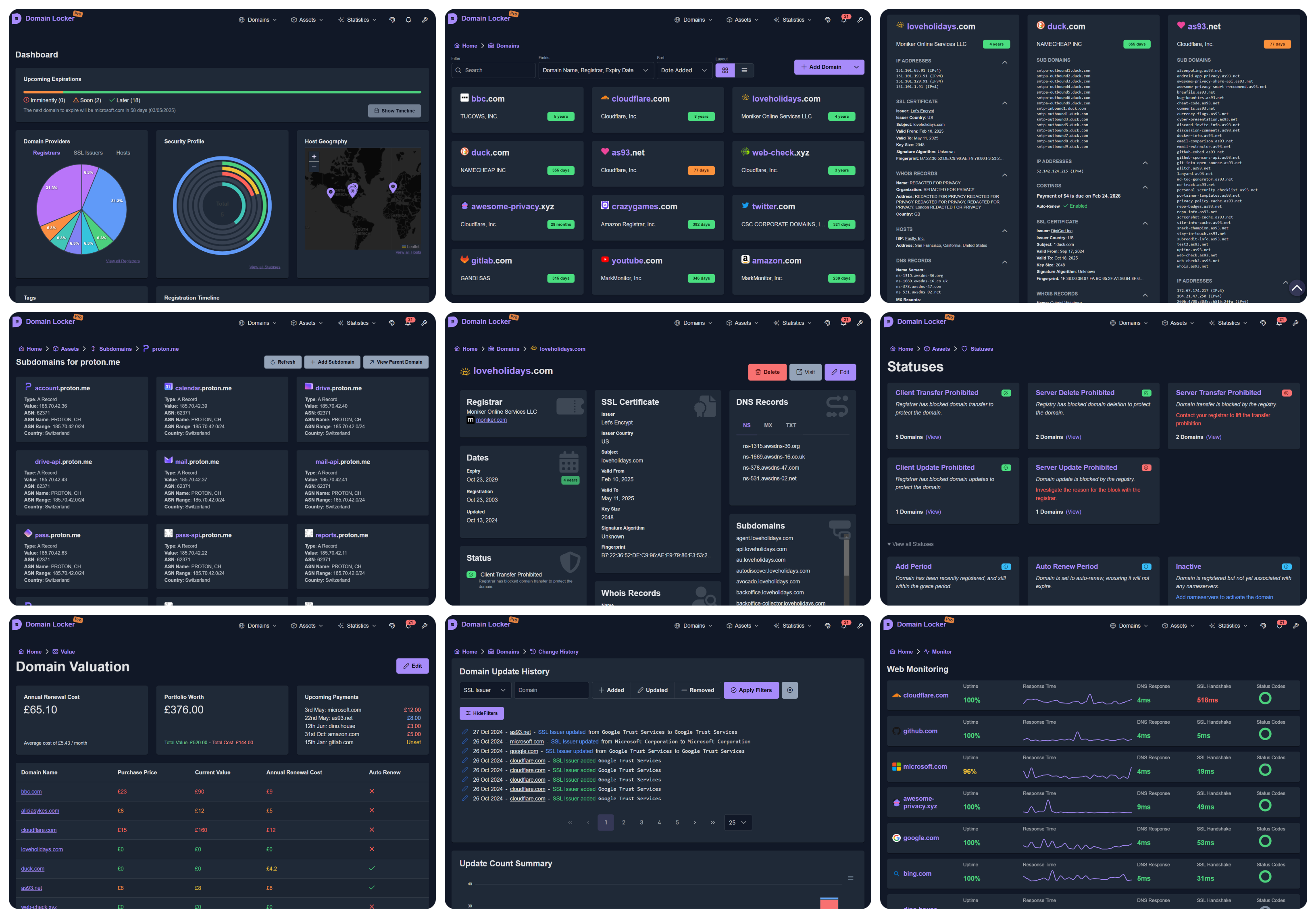
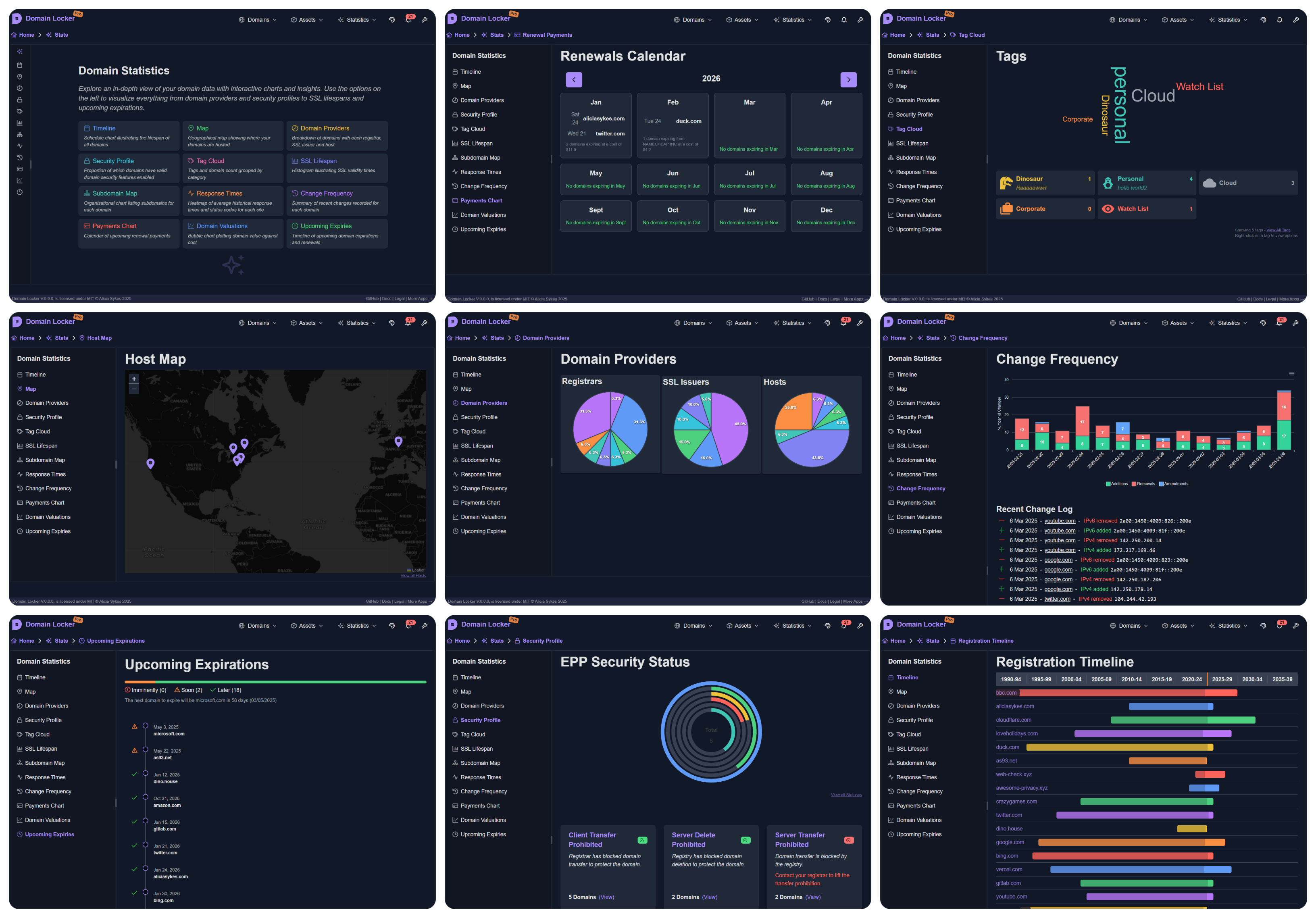
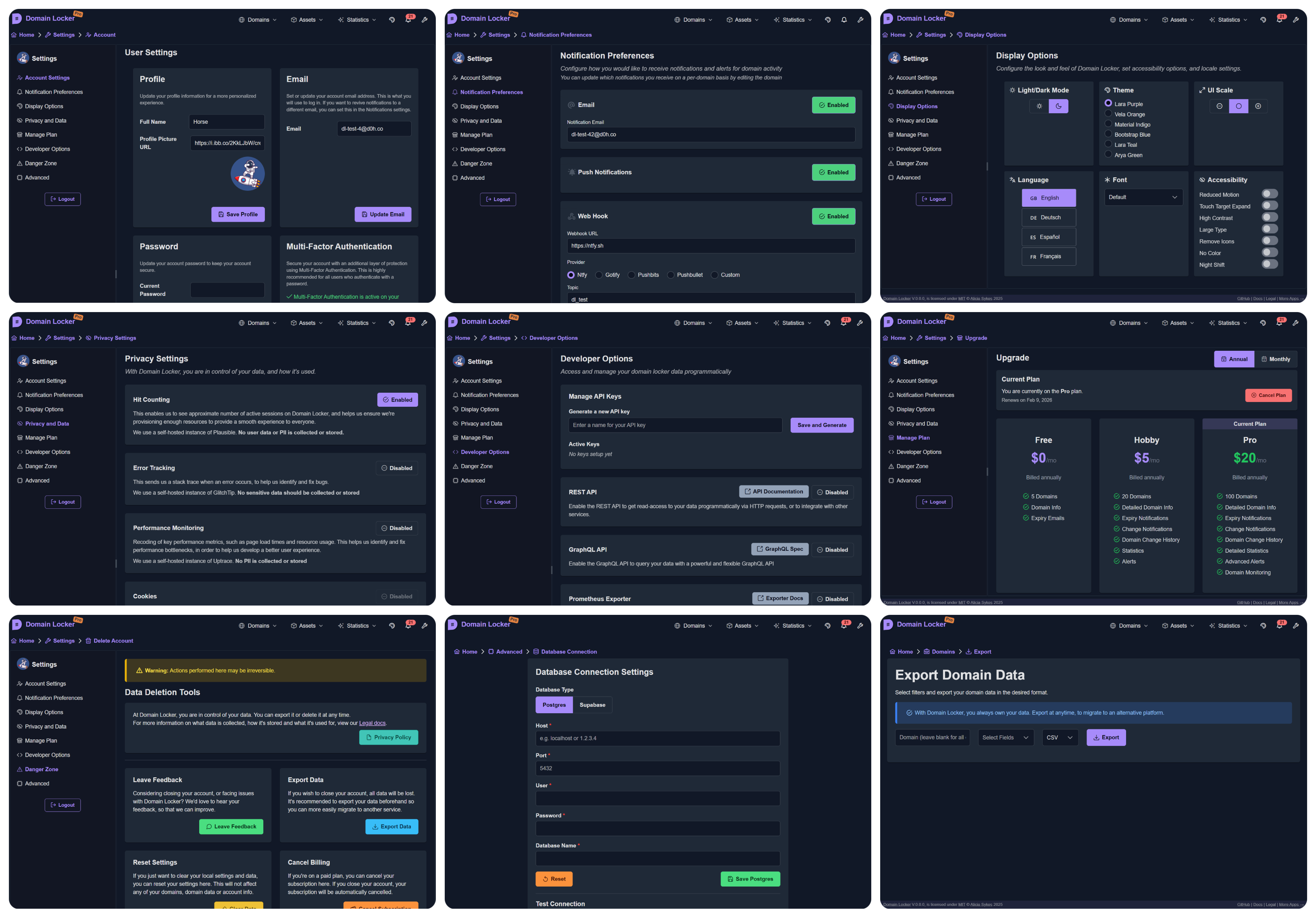
추가한 각 도메인에 대해 분석하고 모든 관련 데이터를 가져옵니다. 그런 다음 도메인을 지속적으로 모니터링하고 중요한 변경 사항이 있거나 곧 만료될 때 (사용자 기호에 따라) 알림을 보냅니다. 따라서 상세한 도메인 분석, 보안 통찰력, 변경 기록, 최근 성능, 평가 데이터 등을 얻을 수 있습니다.
Domain Locker를 사용하면 더 이상 도메인을 놓치거나, 만료를 놓치거나, 각 도메인이 어떤 등록기관과 제공업체를 사용하는지 잊어버리지 않을 것입니다.
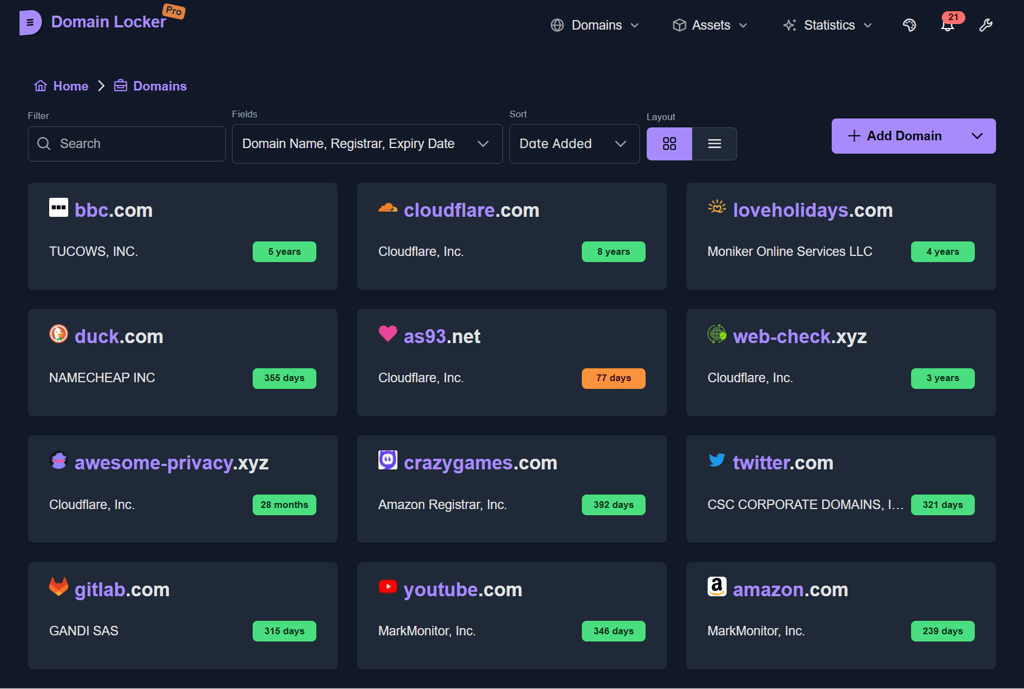
(5fps인 점 양해 부탁드립니다. 파일 크기를 줄이기 위해서입니다!)
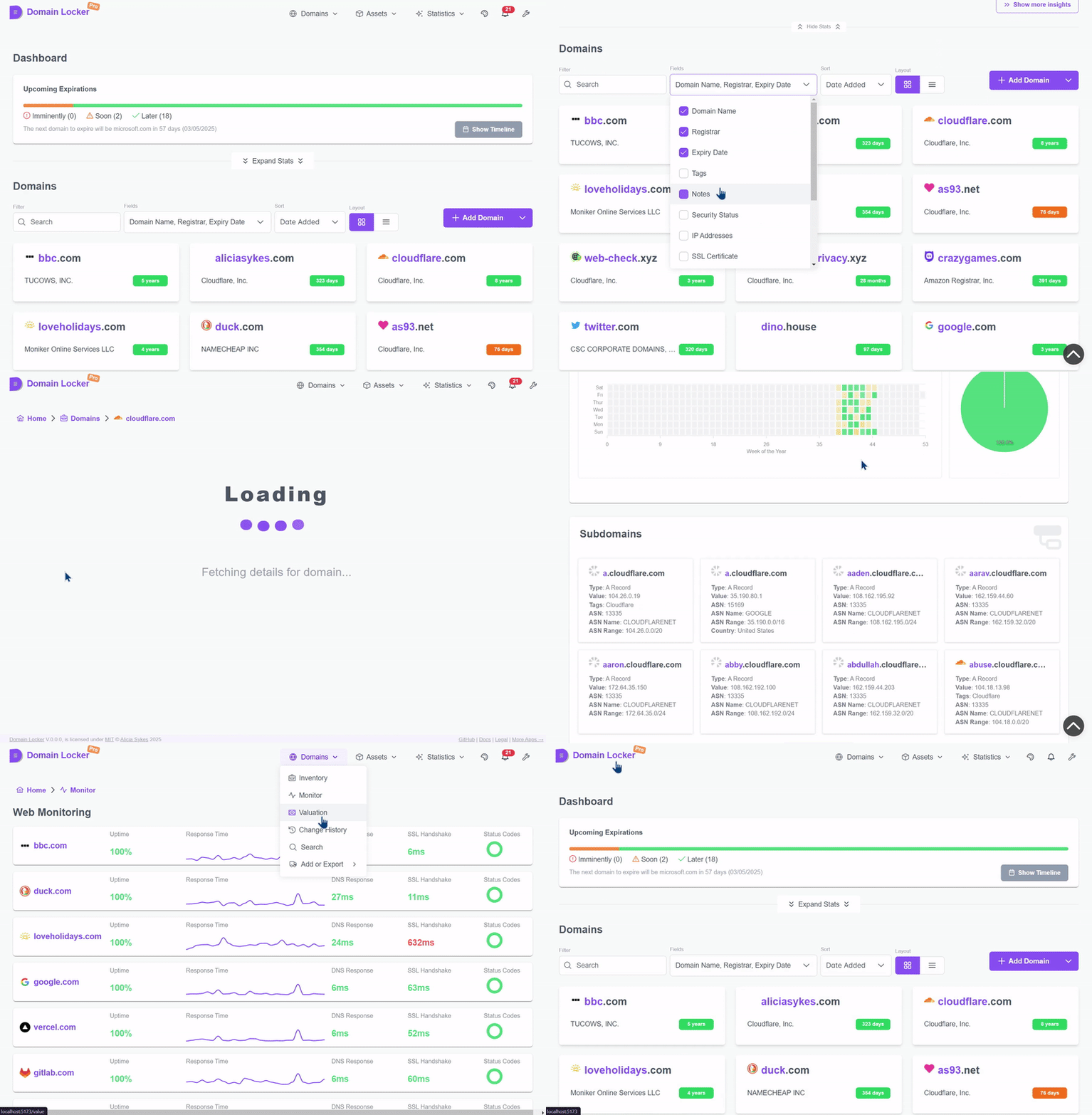
라이브 데모를 사용해 보세요: demo.domain-locker.com
(사용자 이름: [email protected] 비밀번호: domainlocker)
Domain Locker를 사용하려면 두 가지 옵션이 있습니다:
웹사이트로 이동하여 Google, GitHub 또는 이메일로 가입하세요.
스타터 플랜은 무료이며 설정이 필요 없습니다. 로그인하고 도메인을 추가한 후 추적을 시작하세요.
curl -fsSL https://install.domain-locker.com | bash
Use the one-liner above, or use the [`docker-compose.yml`](https://github.com/Lissy93/domain-locker/blob/main/docker-compose.yml)
<details>
<summary>Details</summary>
- **Prerequisites**:
- Domain Locker is intended to be run in a container, so you'll need Docker [installed](https://docs.docker.com/engine/install/) on your host system.
- **Containers**:
- We have a Docker image published to [`lissy93/domain-locker`](https://hub.docker.com/r/lissy93/domain-locker).
- You'll also need a Postgres database, such as the [`postgres:15-alpine`](https://hub.docker.com/_/postgres?tab=tags&name=15-alpine) container.
- **Environment**:
- When starting the container, bind `3000` in the container, to your host `PORT` (defaults to `3000`).
- Then specify the Postgres vars: `DL_PG_HOST`, `DL_PG_PORT`, `DL_PG_USER`, `DL_PG_PASSWORD` and `DL_PG_NAME`.
- **Volumes**:
- Mount a volume to `/var/lib/postgresql/data` to persist your Postgres data
- **Crons**
- `/api/domain-updater` - Execute this daily, to keep domain data up-to-date and trigger notifications
- `/api/domain-monitor` - Execute this every 15 minutes, to monitor website uptime and performance
- `/api/cleanup-monitor-data` - Execute this weekly, to aggregate old monitoring data
- **Example**:
- Putting it all together, you can use our [`docker-compose.yml`](https://github.com/Lissy93/domain-locker/blob/main/docker-compose.yml) file.
- For more details, view the [Self-Hosting Docs](https://domain-locker.com/about/self-hosting)
<details>
<summary>Docker Diagram</summary>```mermaid
flowchart TB
subgraph Volume Mounts
direction TB
Vpostgresdata([📦 postgres_data]) x-. /var/lib/postgresql/data .-x postgres[(🐘 PostgreSQL DB)]
Vdbschemasql{{📄 ./db/schema.sql}} -. Mounted on Init .-> postgres
end
subgraph Network
direction TB
domainlockernetwork[/🌐 domain_locker_network/]
end
postgres -.- domainlockernetwork
subgraph app[⚙️ App Container]
SSR[HTTP Server]
CLIENT[Client App]
API[API Endpoints]
SSR --> CLIENT
SSR --> API
end
app -.- domainlockernetwork
git clone [email protected]:Lissy93/domain-locker.git # Get the code cd domain-locker # Navigate into directory npm install --legacy-peer-deps # Install dependencies cp .env.example .env # Set environmental variables npm run dev # Start the dev server
- **전제 조건**
- 시스템에 Git과 Node가 설치되어 있어야 합니다.
- **구성**
- 예시 `.env.sample` 파일에는 Supabase 개발 인스턴스의 공개 자격 증명이 포함되어 있습니다.
- 대체 데이터베이스를 사용하려면 아래의 [Database](#database) 섹션을 참조하여 Postgres로 구성하십시오.
- **배포**
- `npm run build`로 코드를 빌드한 후 `npm start`로 실행할 수 있습니다.
- 또는 Docker를 사용하여 `docker build -t domain-locker .`로 컨테이너를 빌드할 수 있습니다.
- 개발 Supabase 인스턴스는 자주 초기화되므로 프로덕션에서 사용하지 마십시오.
---
## 앱 아키텍처
#### 기술 스택
Domain Locker는 앱, 데이터베이스 및 일부 API 엔드포인트로 구성됩니다.
- **앱**은 Angular로 구축되었으며, Analog+Nitro와 PrimeNg 구성 요소를 사용하고 Tailwind로 스타일링합니다.
- **서버**는 TypeScript 함수가 있는 일련의 Deno 엔드포인트입니다.
- **데이터베이스**는 Postgres 또는 Supabase가 될 수 있습니다.
자체 호스팅 인스턴스는 독립 실행형으로 배포되도록 설계되었지만, 관리형 버전은 몇 가지 추가 타사 서비스에 의존합니다. 아래에서 확인할 수 있으며, [해당 문서는 여기](https://domain-locker.com/about/developing/third-party-docs)에 있습니다.
<details>
<summary>이유</summary>
왜 Angular인가? 미래의 나에게 가하는 일종의 병적인 농담으로, 이걸 유지보수해야 하는 나를 위한 것이다.
</details>
<p align="center">
<img width="800" src="https://assets.kitploit.com/production/public/readmes/264/1449d16cb6a07bd766d3b86a8de608aaa4075270a0a634cd6f6af1f1a1d70c49.png" />
<br>
<span>사용된 기술 및 서비스에 대한 문서는 <a href="https://domain-locker.com/about/developing/third-party-docs">여기</a>에서 확인할 수 있습니다.</span>
</p>
#### 아키텍처
아키텍처는 매우 간단합니다.
앱(프론트엔드 및 API 엔드포인트로 구성)이 있으며, 사용자는 (어댑터를 통해) 데이터베이스에 읽고 쓸 수 있습니다. 그런 다음 cron 서비스가 주기적으로 API 엔드포인트를 호출하여 도메인 데이터를 최신 상태로 유지하고, 변경 사항을 추적하며, 상태를 모니터링하고, 특정 변경 사항(사용자 선호도에 따라) 또는 다가오는 만료 전에 알림을 트리거합니다.```mermaid
graph TD;
subgraph User Interactions
User[👤 User] -->|Enter domain| WebApp[🌐 Frontend];
WebApp -->|Send API request| API[⚙️ Nitro API];
API -->|Auth Check| Auth[🔐 Auth Service];
API -->|Store domain info| Database[🗄️ PostgreSQL / Supabase];
end
subgraph Automated Cron Jobs
CronService[⏳ Cron Service] -->|Trigger Updates| EdgeFunctions[⚡ Edge Functions];
EdgeFunctions -->|Fetch WHOIS, DNS, SSL| ExternalAPIs[🌎 Analysis Services];
EdgeFunctions -->|Store Data| Database;
CronService -->|Monitor Uptime| WebsiteMonitor[📡 Uptime Monitor];
WebsiteMonitor -->|Store Metrics| Database;
CronService -->|Check Expirations| ExpiryChecker[📆 Expiration Check];
ExpiryChecker -->|Update Status| Database;
CronService -->|Send Notifications| NotificationService[🔔 Notification System];
NotificationService -->|Email| Resend[📧 Resend];
NotificationService -->|SMS| Twilio[📱 Twilio];
end
Database -->|Serve Data| WebApp;
모든 도메인과 관련 정보를 저장하려면 데이터베이스가 필요합니다. Domain Locker는 데이터 저장을 위해 Supabase와 표준 Postgres를 모두 지원합니다. 사용되는 데이터베이스는 설정된 환경 변수에 따라 달라집니다.
Supabase: Supabase 셀프 호스팅 문서를 따라 진행한 후, dl-sb-iac를 사용하여 스키마를 가져오고 인증, 엣지 함수, 이메일 등을 구성합니다.
SUPABASE_URL과 SUPABASE_ANON_KEY를 설정합니다.Postgres: Postgres 인스턴스를 배포한 후 schema.sql을 적용합니다.
psql -h $DL_PG_HOST -U $DL_PG_USER -d $DL_PG_NAME -f ./db/schema.sqlsetup-postgres.sh를 사용합니다 (슈퍼유저 권한 필요)DL_PG_HOST, DL_PG_PORT, DL_PG_USER, DL_PG_PASSWORD, DL_PG_NAME을 설정합니다.```mermaid
classDiagram
class users {
uuid id
text email
timestamp created_at
timestamp updated_at
}<p align="center"><sub>스키마는 <a href="https://github.com/Lissy93/domain-locker/blob/main/db/schema.sql"<code>db/schema.sql</code></a>에서 다운로드할 수 있습니다</sub></p>
---
### 기여하기
모든 종류의 기여는 언제나 환영하며, 진심으로 감사드립니다! 💗
Git이 처음이시라면, 일반적인 기여 절차는 다음과 같습니다:
- [여기를 클릭](https://github.com/lissy93/domain-locker/fork)하여 저장소를 포크합니다.
- 포크를 클론합니다 (`git clone [email protected]:[사용자 이름]/domain-locker.git` 사용).
- 위의 [프로젝트 설정](#project-setup)에 따라 개발 모드에서 프로젝트를 실행합니다.
- 멋진 새 기능 또는 놀라운 버그 수정을 구현합니다...
- `git checkout -b feature-branch`로 브랜치를 생성하고, `git add`로 변경 사항을 스테이징한 후, conventional commits를 사용하여 `git commit`하고, 브랜치에 `git push`합니다.
- GitHub으로 돌아와 `main` 브랜치에 PR을 열 수 있습니다. 변경한 내용, 이유 및 관련 이슈에 대한 링크를 반드시 포함해 주세요.
- 그런 다음 검토, 피드백, 병합을 진행하며, 릴리스 후 변경 사항은 프로덕션에 반영되고 최신 Docker 이미지에서도 사용할 수 있습니다.
<details>
<summary>Git 브랜치 예시</summary>```mermaid
%%{init: {"theme": "default"}}%%
gitGraph
commit id: "Initial commit"
branch trunk
commit id: "Feature A"
commit id: "Feature B"
commit id: "v1.0.0 (Tag)"
branch demo
checkout main
commit id: "Feature C"
commit id: "v1.1.0 (Tag)"
checkout demo
merge main id: "Merge main into demo"
checkout main
commit id: "Feature D"
commit id: "v1.2.0 (Tag)"
checkout demo
merge main id: "Merge main into demo (v1.2.0)"
checkout main
branch feature-branch-1
commit id: "Contributor Feature 1"
checkout main
merge feature-branch-1 id: "Merge contributor feature 1"
commit id: "v1.3.0 (Tag)"
checkout demo
merge main id: "Merge main into demo (v1.3.0)"
checkout main
branch feature-branch-2
commit id: "Contributor Feature 2"
checkout main
merge feature-branch-2 id: "Merge contributor feature 2"
commit id: "v1.4.0 (Tag)"
checkout demo
merge main id: "Merge main into demo (v1.4.0)"
Lissy93/Domain-Locker 는 MIT © Alicia Sykes 2025 에 따라 라이선스가 부여됩니다.
자세한 내용은 TLDR Legal > MIT를 참조하세요
Permission is hereby granted, free of charge, to any person obtaining a copy of this software and associated documentation files (the "Software"), to deal in the Software without restriction, including without limitation the rights to use, copy, modify, merge, publish, distribute, sub-license, and/or sell copies of the Software, and to permit persons to whom the Software is furnished to do so, subject to the following conditions:
The above copyright notice and this permission notice shall be included install copies or substantial portions of the Software.
THE SOFTWARE IS PROVIDED "AS IS", WITHOUT WARRANTY OF ANY KIND, EXPRESS OR IMPLIED, INCLUDING BUT NOT LIMITED TO THE WARRANTIES OF MERCHANT ABILITY, FITNESS FOR A PARTICULAR PURPOSE AND NON INFRINGEMENT. IN NO EVENT SHALL THE AUTHORS OR COPYRIGHT HOLDERS BE LIABLE FOR ANY CLAIM, DAMAGES OR OTHER LIABILITY, WHETHER IN AN ACTION OF CONTRACT, TORT OR OTHERWISE, ARISING FROM, OUT OF OR IN CONNECTION WITH THE SOFTWARE OR THE USE OR OTHER DEALINGS IN THE SOFTWARE.
</details>
<!-- License + Copyright -->
<p align="center">
<i>© <a href="https://aliciasykes.com">Alicia Sykes</a> 2025</i><br>
<i><a href="https://gist.github.com/Lissy93/143d2ee01ccc5c052a17">MIT</a> 라이선스에 따라 사용 허가됨</i><br>
<a href="https://github.com/lissy93"><img src="https://assets.kitploit.com/production/public/readmes/264/2dd6b50bb46f34f56ce0166642faf6ef16cd4102cd8a3805f1be707c9f7c0a3d.png" /></a><br>
<sup>방문해 주셔서 감사합니다 :)</sup>
</p>
<!-- Dinosaurs are Awesome -->
<!--
. - ~ ~ ~ ~ - .
.. _ .-~ ~-.
//| \ `..~ `.
|| | } } / \ \
(\ \\ \~^..' | } \
\`.-~ o / } | / \
(__ | / | / `.
`- - ~ ~ -._| /_ - ~ ~ ~ ^| /- _ `.
| / | / ~-. ~- _
|_____| |_____| ~ - . _ _~_-_
-->
class domains { uuid id uuid user_id text domain_name date expiry_date text notes timestamp created_at timestamp updated_at uuid registrar_id timestamp registration_date timestamp updated_date }
class registrars { uuid id text name text url uuid user_id }
class tags { uuid id text name text color text description text icon uuid user_id }
class domain_tags { uuid domain_id uuid tag_id }
class notifications { uuid id uuid user_id uuid domain_id text change_type text message boolean sent boolean read timestamp created_at }
class billing { uuid id uuid user_id text current_plan timestamp next_payment_due text billing_method timestamp created_at timestamp updated_at jsonb meta }
class dns_records { uuid id uuid domain_id text record_type text record_value timestamp created_at timestamp updated_at }
class domain_costings { uuid id uuid domain_id numeric purchase_price numeric current_value numeric renewal_cost boolean auto_renew timestamp created_at timestamp updated_at }
class domain_hosts { uuid domain_id uuid host_id }
class domain_links { uuid id uuid domain_id text link_name text link_url timestamp created_at timestamp updated_at text link_description }
class domain_statuses { uuid id uuid domain_id text status_code timestamp created_at }
class domain_updates { uuid id uuid domain_id uuid user_id text change text change_type text old_value text new_value timestamp date }
class uptime { uuid id uuid domain_id timestamp checked_at boolean is_up integer response_code numeric response_time_ms numeric dns_lookup_time_ms numeric ssl_handshake_time_ms timestamp created_at }
class ssl_certificates { uuid id uuid domain_id text issuer text issuer_country text subject date valid_from date valid_to text fingerprint integer key_size text signature_algorithm timestamp created_at timestamp updated_at }
class whois_info { uuid id uuid domain_id text country text state text name text organization text street text city text postal_code }
class user_info { uuid id uuid user_id jsonb notification_channels timestamp created_at timestamp updated_at text current_plan }
class hosts { uuid id inet ip numeric lat numeric lon text isp text org text as_number text city text region text country uuid user_id }
class ip_addresses { uuid id uuid domain_id inet ip_address boolean is_ipv6 timestamp created_at timestamp updated_at }
class notification_preferences { uuid id uuid domain_id text notification_type boolean is_enabled timestamp created_at timestamp updated_at }
class sub_domains { uuid id uuid domain_id text name timestamp created_at timestamp updated_at jsonb sd_info }
users --> domains : user_id registrars --> domains : registrar_id users --> registrars : user_id users --> tags : user_id domains --> domain_tags : domain_id tags --> domain_tags : tag_id users --> notifications : user_id domains --> notifications : domain_id users --> billing : user_id domains --> dns_records : domain_id domains --> domain_costings : domain_id domains --> domain_hosts : domain_id hosts --> domain_hosts : host_id domains --> domain_links : domain_id domains --> domain_statuses : domain_id domains --> domain_updates : domain_id users --> domain_updates : user_id domains --> uptime : domain_id domains --> ssl_certificates : domain_id domains --> whois_info : domain_id users --> user_info : user_id users --> hosts : user_id domains --> ip_addresses : domain_id domains --> notification_preferences : domain_id domains --> sub_domains : domain_id