 l4rm4nd/pyadrecon
Python3 기반 ADRecon 구현으로 NTLM 및 Kerberos 인증을 지원하며 LDAP 질의를 수행합니다. 개별 CSV 파일과 단일 XSLX + HTML 보고서를 귀하의 AD 도메인에 대해 생성합니다.


PyADRecon는 펜테스터 및 블루 팀을 위해 개선된 ADRecon의 Python3 구현체입니다.
ADRecon은 MS Active Directory에 대한 정보를 수집하고 XLSX 보고서를 생성하여 대상 AD 환경의 현재 상태에 대한 전체적인 그림을 제공하는 도구입니다.
[!TIP] 레드 팀이라면 ADRecon-ADWS를 대신 확인해보세요.
# pypi의 안정 릴리스
pipx install pyadrecon

# github의 최신 커밋
pipx install git+https://github.com/l4rm4nd/PyADRecon
그런 다음 설치를 확인합니다:
pyadrecon --version
[!TIP] Windows의 경우 이 문서를 참고하세요. NTLM + Kerberos를 지원합니다.
usage: pyadrecon.py [-h] [--version] [--generate-excel-from CSV_DIR] [-dc DOMAIN_CONTROLLER] [-u USERNAME] [-p [PASSWORD]] [-d DOMAIN] [--auth {ntlm,kerberos}] [--tgt-file TGT_FILE] [--tgt-base64 TGT_BASE64]
                    [--ssl] [--port PORT] [-o OUTPUT] [--page-size PAGE_SIZE] [--threads THREADS] [--dormant-days DORMANT_DAYS] [--password-age PASSWORD_AGE] [--only-enabled] [--collect COLLECT]
                    [--no-excel] [-v]

PyADRecon - Python Active Directory Reconnaissance Tool

options:
  -h, --help            show this help message and exit
  --version             show program's version number and exit
  --generate-excel-from CSV_DIR
                        Generate Excel report from CSV directory (standalone mode, no AD connection needed)
  --generate-dashboard-from CSV_DIR
                        Generate HTML dashboard from existing CSV files (standalone mode)
  -dc, --domain-controller DOMAIN_CONTROLLER
                        Domain Controller IP or hostname
  -u, --username USERNAME
                        Username for authentication
  -p, --password [PASSWORD]
                        Password for authentication (optional if using TGT)
  -d, --domain DOMAIN   Domain name (e.g., DOMAIN.LOCAL) - Required for Kerberos auth
  --auth {ntlm,kerberos}
                        Authentication method (default: ntlm)
  --tgt-file TGT_FILE   Path to Kerberos TGT ccache file (for Kerberos auth)
  --tgt-base64 TGT_BASE64
                        Base64-encoded Kerberos TGT ccache (for Kerberos auth)
  --ssl                 Force SSL/TLS (LDAPS). No LDAP fallback allowed.
  --port PORT           LDAP port (default: 389, use 636 for LDAPS)
  -o, --output OUTPUT   Output directory (default: PyADRecon-Report-<timestamp>)
  --page-size PAGE_SIZE
                        LDAP page size (default: 500)
  --dormant-days DORMANT_DAYS
                        Days for dormant account threshold (default: 90)
  --password-age PASSWORD_AGE
                        Days for password age threshold (default: 180)
  --only-enabled        Only collect enabled objects
  --collect COLLECT     Comma-separated modules to collect (default: all)
  --workstation WORKSTATION
                        Explicitly spoof workstation name for NTLM authentication (default: empty string, bypasses userWorkstations restrictions)
  --no-excel            Skip Excel report generation
  --no-dashboard        Skip interactive HTML dashboard generation
  -v, --verbose         Verbose output

Examples:
  # Basic usage with NTLM authentication
  pyadrecon.py -dc 192.168.1.1 -u admin -p password123 -d DOMAIN.LOCAL

  # With Kerberos authentication (bypasses channel binding)
  pyadrecon.py -dc dc01.domain.local -u admin -p password123 -d DOMAIN.LOCAL --auth kerberos

  # With Kerberos using TGT from file (bypasses channel binding)
  pyadrecon.py -dc dc01.domain.local -u admin -d DOMAIN.LOCAL --auth kerberos --tgt-file /tmp/admin.ccache

  # With Kerberos using TGT from base64 string (bypasses channel binding)
  pyadrecon.py -dc dc01.domain.local -u admin -d DOMAIN.LOCAL --auth kerberos --tgt-base64 BQQAAAw...

  # Only collect specific modules
  pyadrecon.py -dc 192.168.1.1 -u admin -p pass -d DOMAIN.LOCAL --collect users,groups,computers

  # Output to specific directory
  pyadrecon.py -dc 192.168.1.1 -u admin -p pass -d DOMAIN.LOCAL -o /tmp/adrecon_output

  # Generate Excel report from existing CSV files (standalone mode)
  pyadrecon.py --generate-excel-from /path/to/CSV-Files -o report.xlsx
[!TIP] PyADRecon은 항상 먼저 TCP/636을 통해 LDAPS를 시도합니다.
--ssl플래그를 사용하지 않으면, TCP/389의 LDAP를 폴백으로 시도할 수 있습니다.
[!WARNING] LDAP 채널 바인딩이 활성화된 경우, ldap3가 이를 지원하지 않으므로 이 스크립트는
automatic bind not successful - strongerAuthRequired오류와 함께 실패합니다 (여기](https://github.com/cannatag/ldap3/issues/1049#issuecomment-1222826803) 참조). 대신 Kerberos 인증을 사용해야 합니다.Linux에서 Kerberos 인증을 사용하는 경우, 유효한
/etc/krb5.conf와/etc/hosts에 DC 호스트명 항목을 생성하세요. 이 문서를 참고하세요. Windows를 사용하는 경우, 유효한 Kerberos 티켓이 있는지 확인하세요. 이 문서를 참고하세요.--tgt-file또는--tgt-base64옵션을 통해 이미 존재하는 TGT 티켓을 스크립트에 제공할 수 있습니다. 예를 들어 Netexec를 통해netexec smb <TARGET> <ARGS> --generate-tgt <FILEMAME>로 획득할 수 있습니다.
GHCR.IO에서 Docker 이미지도 사용할 수 있습니다.
docker run --rm -v /etc/krb5.conf:/etc/krb5.conf:ro -v /etc/hosts:/etc/hosts:ro -v ./:/tmp/pyadrecon_output ghcr.io/l4rm4nd/pyadrecon:latest -dc dc01.domain.local -u admin -p password123 -d DOMAIN.LOCAL -o /tmp/pyadrecon_output
기본적으로 PyADRecon은 모든 수집 모듈을 실행합니다. 이는 default 또는 all로 참조됩니다.
하지만 원하는 모듈 조합을 자유롭게 선택할 수 있습니다:
| 아이콘 | 의미 |
|---|---|
| 🛑 | 도메인 관리자 권한 필요 (예: Domain Admins) |
| ✅ | 일반 도메인 권한 필요 (예: Authenticated Users) |
| 💥 | 베타 상태의 새로운 수집 모듈. 결과가 부정확할 수 있음 |
Forest 및 Domain
forest ✅domain ✅trusts ✅sites ✅subnets ✅schema 또는 schemahistory ✅도메인 컨트롤러
dcs 또는 domaincontrollers ✅사용자 및 그룹
users ✅userspns ✅groups ✅groupmembers ✅protectedgroups ✅💥krbtgt ✅asreproastable ✅kerberoastable ✅컴퓨터 및 프린터
computers ✅computerspns ✅printers ✅OU 및 그룹 정책
ous ✅gpos ✅gplinks ✅암호 및 자격 증명
passwordpolicy ✅fgpp 또는 finegrainedpasswordpolicy 🛑laps 🛑bitlocker 🛑💥관리 서비스 계정
gmsa 또는 groupmanagedserviceaccounts ✅💥dmsa 또는 delegatedmanagedserviceaccounts ✅💥
인증서
adcs 또는 certificates ✅💥
DNS
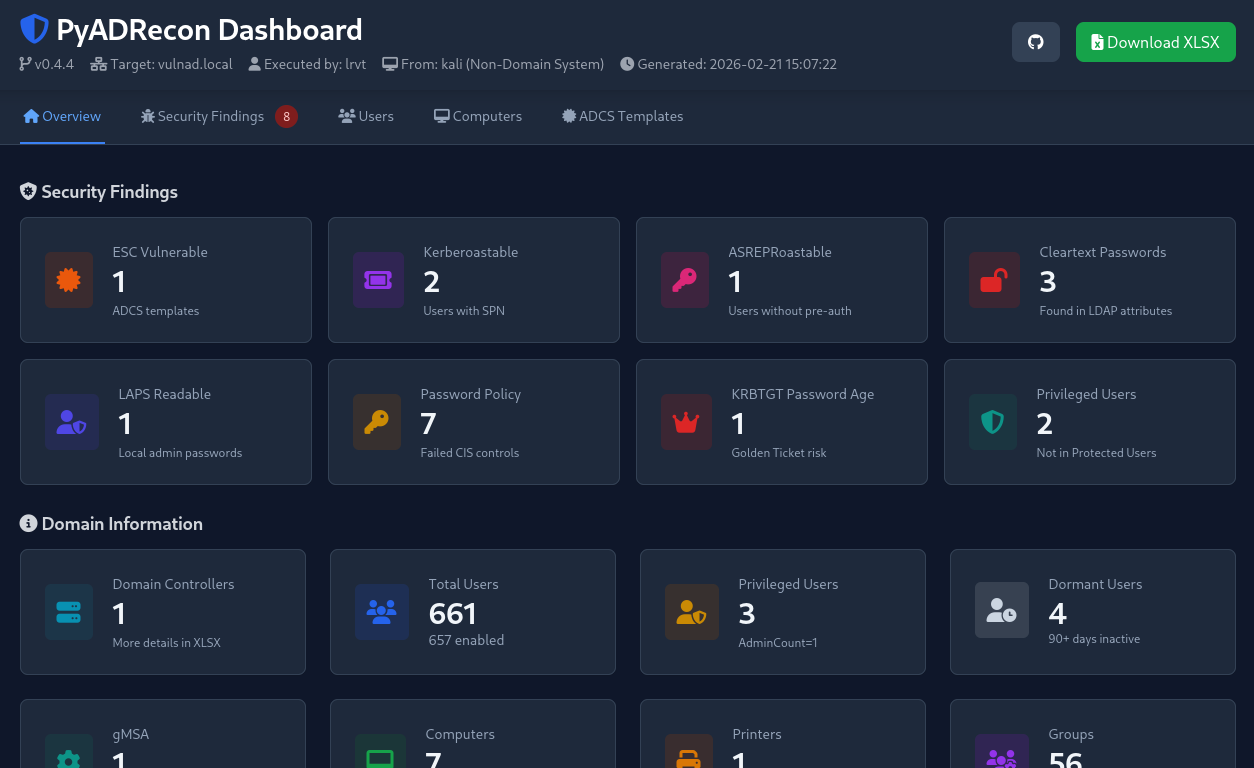
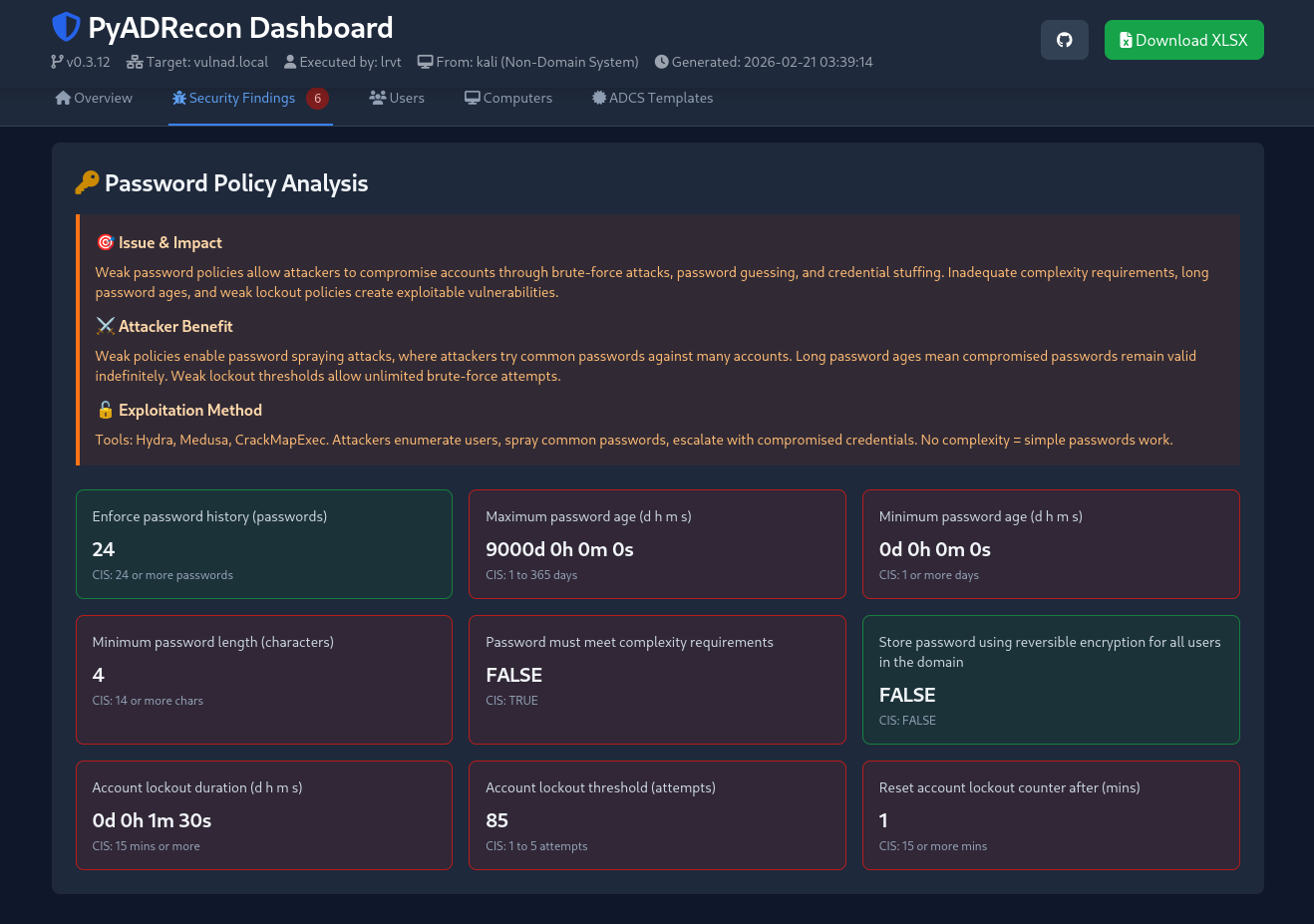
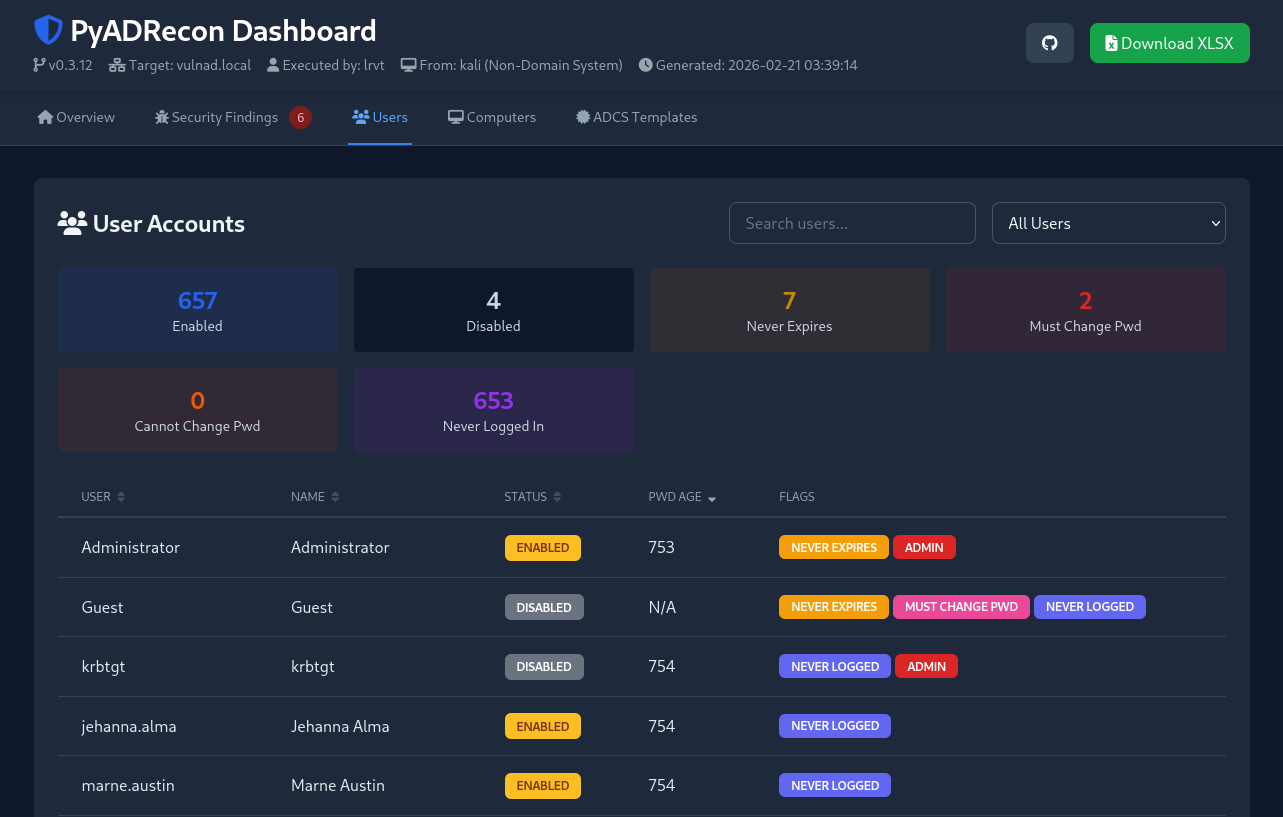
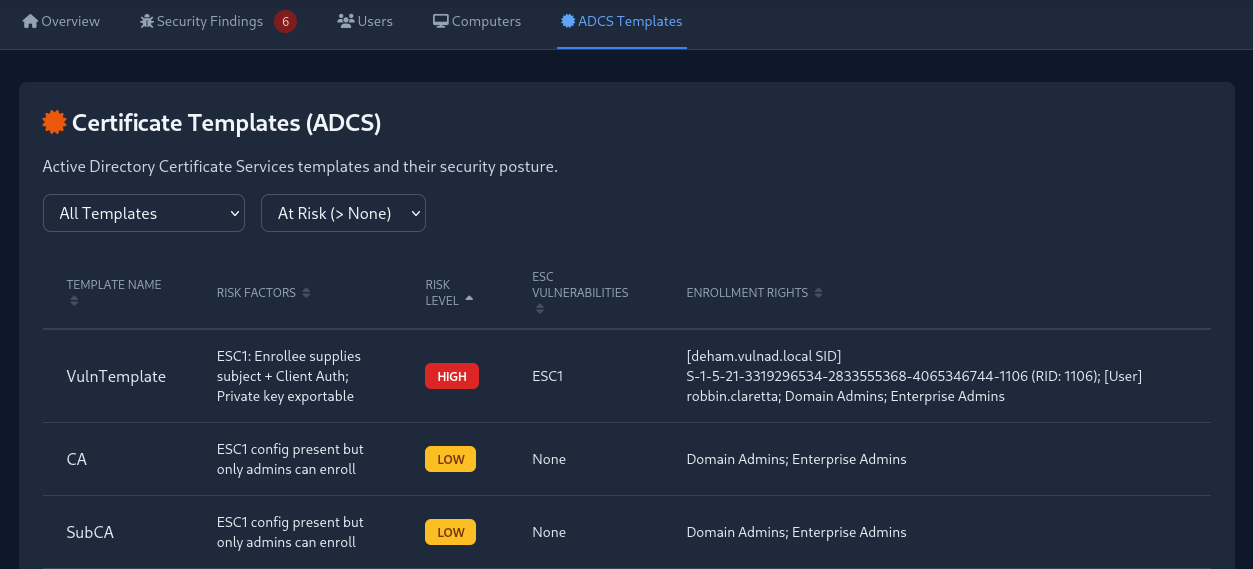
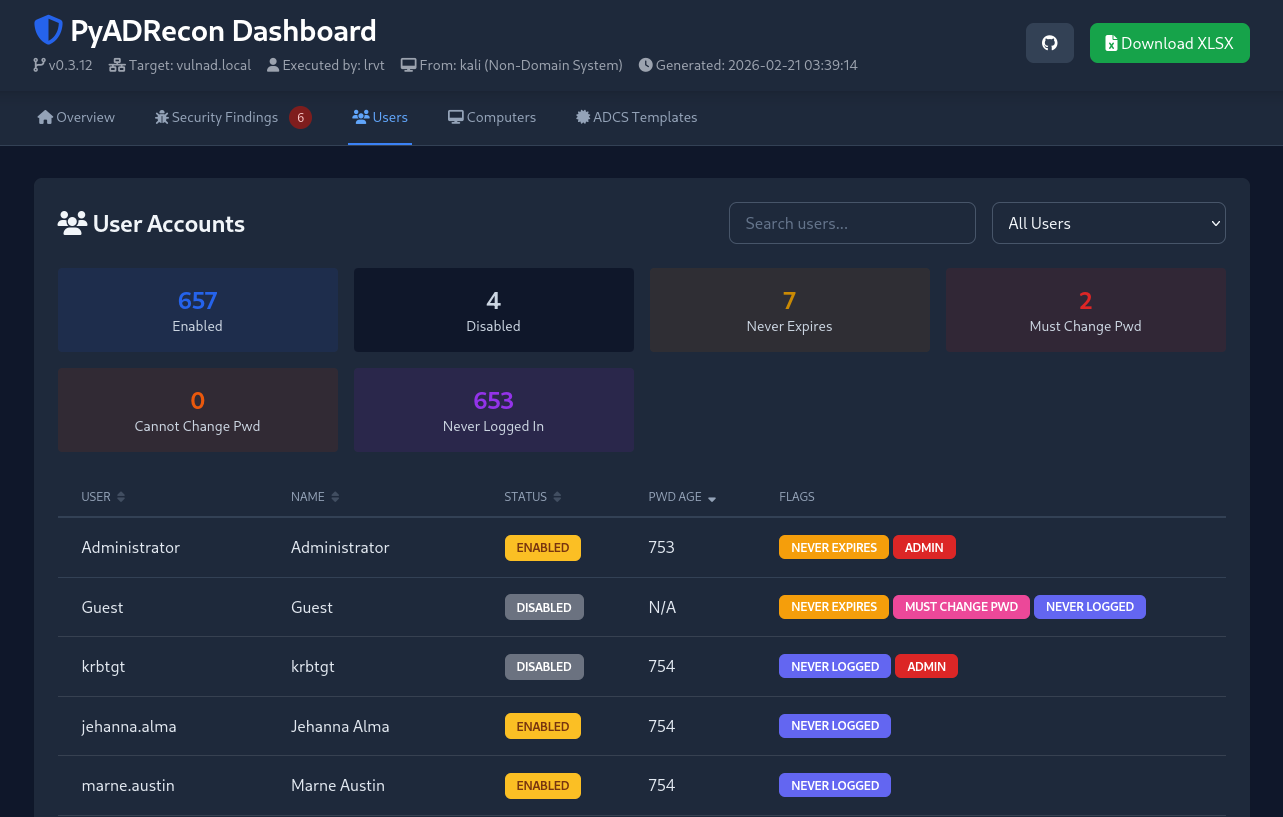
dnszones ✅dnsrecords ✅PyADRecon은 모든 수집 모듈이 실행될 때 주요 통계 및 보안 결과를 포함하는 HTML 대시보드를 자동으로 생성합니다.
필요한 경우 --no-dashboard를 사용하여 초기 데이터 수집 중 대시보드 생성을 비활성화할 수 있습니다. 나중에 --generate-dashboard-from <CSV_DIR>을 사용하여 기존 CSV 파일에서 대시보드를 생성할 수 있습니다.
[!CAUTION] 이것은 베타 기능입니다. 표시된 데이터가 잘못 파싱되거나 문제로 보고될 수 있습니다. 참고용으로만 사용하세요!