 kgretzky/pwndrop
레드 팀을 위한 자체 배포 가능한 파일 호스팅 서비스로, HTTP 및 WebDAV를 통해 페이로드를 쉽게 업로드하고 공유할 수 있습니다.



pwndrop은 레드팀 페이로드를 전송하거나 개인 파일을 HTTP 및 WebDAV를 통해 안전하게 공유하기 위한 자체 배포형 파일 호스팅 서비스입니다.
만약 파일을 호스팅하기 위해 빠르게 nginx/apache 웹 서버를 설정해야 했고, python -m SimpleHTTPServer의 제한에 항상 만족하지 못했다면, pwndrop이 바로 당신을 위한 도구입니다!
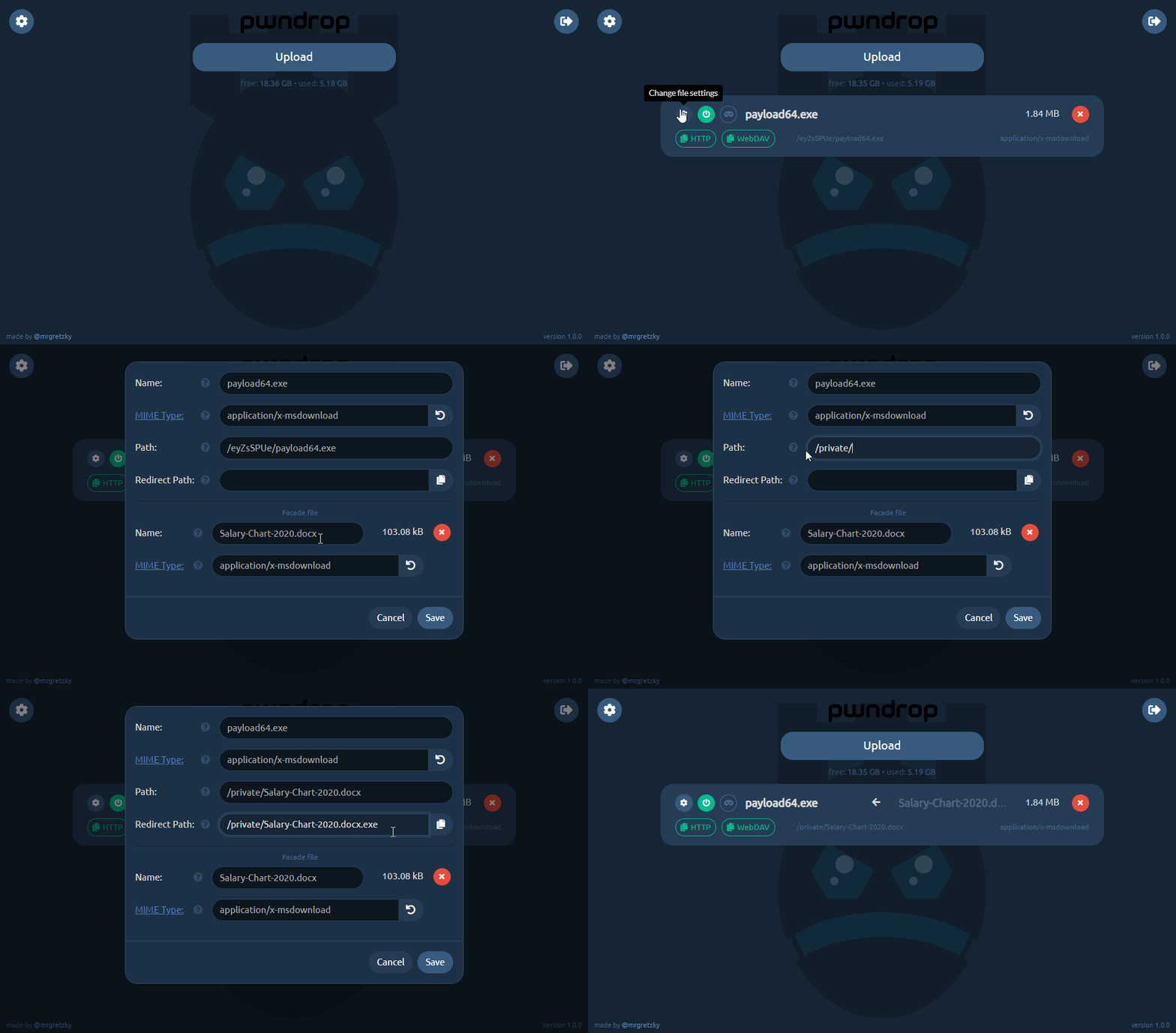
pwndrop으로 다음을 할 수 있습니다:
주요 목표는 레드팀 평가를 지원하는 추가 기능을 구현하면서 파일 공유를 최대한 쉽고 직관적으로 만드는 것입니다.
pwndrop의 프론트엔드는 순수 Vue.js + Bootstrap으로 개발되었으며, npm이나 webpack 종속성이 없습니다. 백엔드는 REST API를 제공하고 GO 언어로 구동되는 로컬 데이터베이스를 관리합니다.
pwndrop 사용법을 배우거나 최신 릴리스에서 구현된 새로운 기능을 알아보려면 제 블로그의 게시물을 확인하세요:
Luke Turvey (@TurvSec)가 제작한 훌륭한 비디오를 확인하세요. pwndrop 사용을 시작하는 방법을 완전히 설명합니다.

아직 배포할 서버가 없다면 Digital Ocean을 적극 추천합니다. 가장 저렴한 월 $5의 Debian 9 서버(25GB 스토리지)로도 충분히 잘 작동합니다. 제 추천 링크를 사용하면 60일 동안 서버에 사용할 추가 $100을 무료로 받을 수 있습니다.
새 도메인을 등록하고 DNS A 레코드를 VPS IP로 지정하세요. 또한 도메인을 등록하고 ns1 및 ns2 네임서버를 pwndrop 인스턴스 IP로 지정할 수도 있습니다. 그러면 pwndrop이 자동으로 유효한 DNS A 응답을 반환합니다.
도메인 없이 pwndrop을 설정하려면 아래에서 로컬 인스턴스를 설정하는 방법을 확인하세요. 이 경우 HTTPS 인증서가 자동 생성되지 않습니다.
pwndrop을 설치하기 전에 실행 중인 DNS 또는 HTTP(S) 서버가 없는지 확인하세요.
스크립트 코드를 다운로드하여 확인하기 전에 원라이너를 실행하는 것을 권장하지 않지만, 정말 급하다면 다음과 같이 실행하세요:
curl https://raw.githubusercontent.com/kgretzky/pwndrop/master/install_linux.sh | sudo bash
이렇게 하면 최신 amd64 릴리스 바이너리가 다운로드되고 백그라운드에서 실행되는 데몬이 완전히 설치됩니다.
먼저 https://github.com/kgretzky/pwndrop/releases 에서 원하는 릴리스 패키지를 다운로드하세요.
그런 다음 다음을 수행합니다(원라이너와 동일한 작업을 수행):
tar zxvf pwndrop-linux-amd64.tar.gz
./pwndrop stop
./pwndrop install
./pwndrop start
./pwndrop status
먼저 GO 버전이 최소 1.13 이상 설치되어 있는지 확인하세요: https://golang.org/doc/install
그런 다음 다음을 수행합니다:
sudo apt-get -y install git make
git clone https://github.com/kgretzky/pwndrop
cd pwndrop
make
make install
pwndrop이 실행 중인지 확인하세요.
https://yourdomain.com/pwndrop (기본값입니다. 미리 구성한 비밀 경로를 사용해야 합니다.)https://yourdomain.com/ (브라우저가 인증되었으므로 이제 관리자 패널 로그인 페이지가 표시됩니다.)/pwndrop이 아닌 다른 값으로 변경했는지 확인하세요.준비 완료!
pwndrop을 데몬으로 설치하지 않고 콘솔에서 직접 실행할 수 있습니다.
usage: pwndrop [start|stop|install|remove|status] [-config <config_path>] [-debug] [-no-autocert] [-no-dns] [-h]

daemon management:
    start           : start the daemon
    stop            : stop the daemon
    install         : install the daemon using the available system manager (systemd, systemv and upstart supported)
    remove          : uninstall the daemon
    status          : check status of the installed daemon

parameters:
    -config         : specify a custom path to a config file (def. 'pwndrop.ini' in same directory as the executable)
    -debug          : enable debug output
    -no-autocert    : disable automatic TLS certificate retrieval from LetsEncrypt; useful when you want to connect over IP or/and in a local network
    -no-dns         : do not run a DNS server on port 53 UDP; use this if you don't want to use pwndrop as a nameserver
    -h              : usage help
기본적으로 pwndrop은 처음 실행 시 실행 파일과 동일한 디렉토리에 새 구성 파일 pwndrop.ini를 생성합니다. 나중에 수정하거나 직접 제공된 파일을 사용할 수 있습니다. 예를 들어 설치 전에 pwndrop을 사전 구성하여 도구 배포를 더욱 자동화할 수 있습니다.
다음은 사용 가능한 모든 구성 변수와 설명이 포함된 예제 구성 파일입니다:
[pwndrop]
listen_ip = "190.33.86.22"                  # the external IP of your pwndrop instance (must be set if you want to use the nameserver feature)
http_port = 80                              # listening port for HTTP and WebDAV
https_port = 443                            # listening port for HTTPS
data_dir = "./data"                         # directory path where data storage will reside (relative paths are from executable directory path)
admin_dir = "./admin"                       # directory path where the admin panel files reside (relative paths are from executable directory path)

[setup]                                     # optional: put in if you want to pre-configure pwndrop (section will be deleted from the config file on first run)
username = "admin"                          # username of the admin account
password = "secretpassword"                 # password of the admin account
redirect_url = "https://www.somedomain.com" # URL to which visitors will be redirected to if they supply a path, which doesn't point to any shared file (put blank if you want to return 404)
secret_path = "/pwndrop"                    # secret URL path, which upon visiting will allow your browser to access the login page of the admin panel (make sure to change the default value)
설치 스크립트를 사용하여 배포 전에 pwndrop 인스턴스를 사전 구성하려면 구성 파일을 /usr/local/pwndrop/pwndrop.ini에 넣으면 pwndrop 데몬이 처음 실행될 때 파싱됩니다.
@jaredhaight님께 Vue를 배우도록 영감을 주신 Faction C2 프레임워크에 대해 큰 감사를 드립니다!
또한 사전 릴리스 피드백을 주시고 도구에 대한 의견을 지지해 주신 모든 분들께 감사드립니다!
pwndrop은 Kuba Gretzky (@mrgretzky)가 만들었으며 GPL3 라이선스로 배포됩니다.
