 kaisonox/apiscope
Windows 애플리케이션을 가로채고 모니터링하기 위한 API 후킹 프레임워크


ApiScope는 새 프로세스 또는 실행 중인 프로세스에서 선택한 API 호출을 추적하기 위한 Windows x64 연구 도구입니다. Windows 디버거 API를 통해 DLL 로드 이벤트를 추적하고, 디버그 대상 프로세스가 각 이벤트에서 계속 실행되기 전에 후크를 설치합니다.
포함된 후크:
ntdll.dll!NtCreateFile (대상 경로 기록)ntdll.dll!NtOpenFile (대상 경로 기록)ntdll.dll!NtReadFilentdll.dll!NtWriteFilentdll.dll!NtClosentdll.dll!NtOpenKey (키 경로 기록)ntdll.dll!NtSetValueKeyntdll.dll!NtQueryValueKeybcrypt.dll!BCryptOpenAlgorithmProvider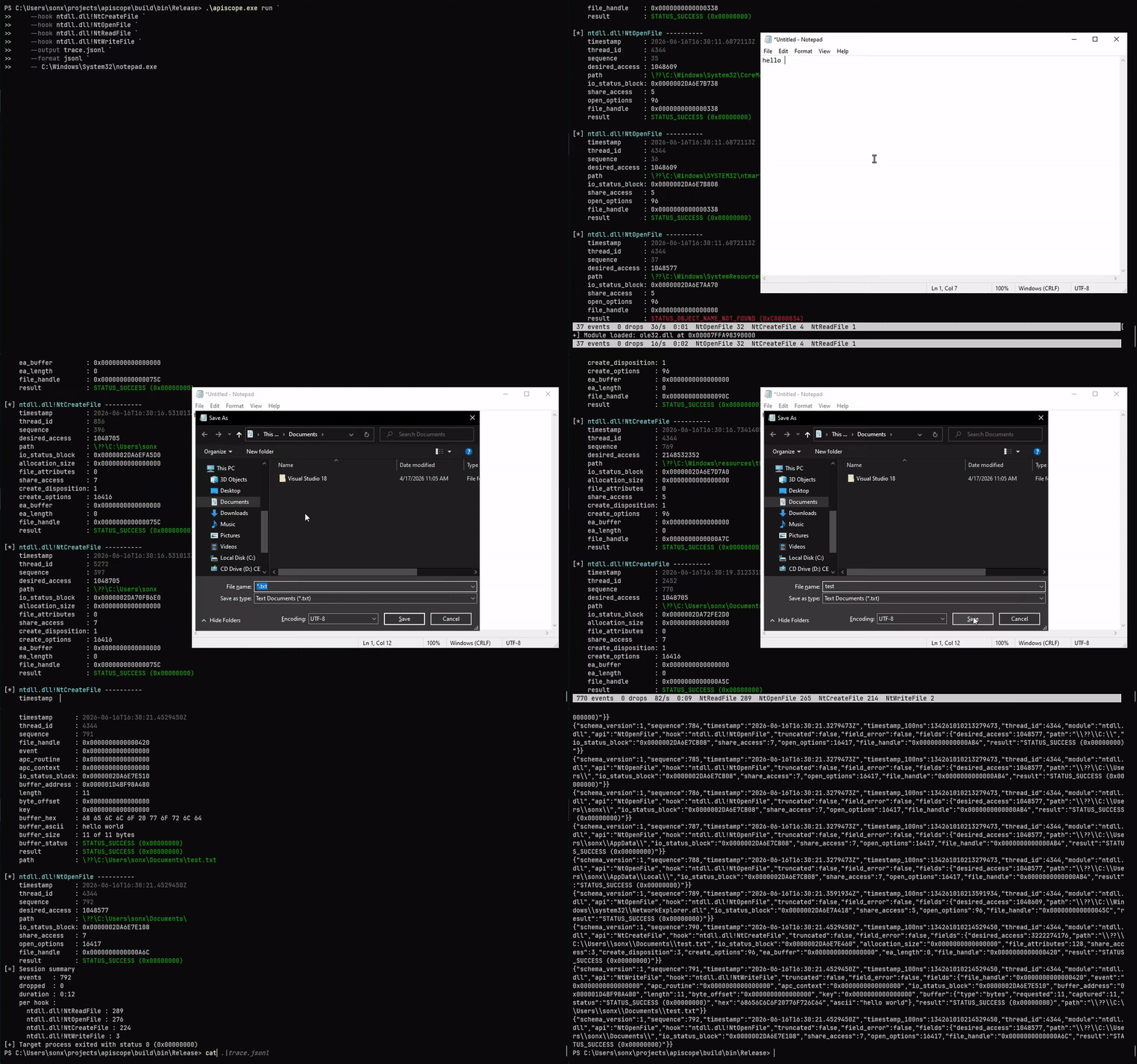
요구 사항:
cmake -S . -B build -A x64
cmake --build build --config Release
ctest --test-dir build -C Release --output-on-failure
powershell -ExecutionPolicy Bypass -File .\scripts\validate-apiscope-hooks.ps1 .\build\bin\Release\apiscope-hooks.dll
powershell -ExecutionPolicy Bypass -File .\scripts\smoke.ps1 -SkipBuild
Zydis v4.1.1은 고정된 커밋에서 가져와 apiscope.exe에만 링크됩니다. 주입되는 apiscope-hooks.dll은 import가 없는 상태로 유지됩니다.
apiscope.exe [--help | --version | --list-hooks]
apiscope.exe run -k <module!export|all> [-k <module!export>] [-f text|jsonl] [-o <path>] [-q] -- <program> [args...]
apiscope.exe attach -p <pid> -k <module!export|all> [-k <module!export>] [-f text|jsonl] [-o <path>] [-q]
후크 이름은 항상 모듈로 한정됩니다. 모듈 매칭은 대소문자를 구분하지 않지만, export 매칭은 대소문자를 구분합니다.
.\apiscope.exe run `
  --hook ntdll.dll!NtCreateFile `
  --hook bcrypt.dll!BCryptOpenAlgorithmProvider `
  -- C:\path\app.exe

.\apiscope.exe attach --pid 4242 --hook all

.\apiscope.exe run --hook all --format jsonl --output trace.jsonl --quiet -- app.exe
--output으로 텍스트 또는 JSONL을 선택적으로 파일로 내보내는 동안에도 터미널 이벤트는 계속 읽을 수 있습니다. --quiet는 터미널 이벤트 미러를 표시하지 않습니다. --color auto|always|never는 터미널 색상을 제어합니다(기본값 auto: TTY에서는 켜지고, 파이프되거나 NO_COLOR가 설정된 경우 꺼짐). 색상은 --output 파일에는 절대 포함되지 않습니다. TTY에서 ApiScope는 이벤트, 드롭, 속도, 후크별 카운트를 표시하는 실시간 상태 푸터를 제자리에서 다시 그리며 보여줍니다. --status auto|always|never로 제어할 수 있습니다.
[*] ntdll.dll!NtWriteFile ----------
    timestamp      : 2026-06-07T17:44:23.3834340Z
    thread_id      : 3508
    sequence       : 3
    file_handle    : 0x000000000000008C
    length         : 16
    buffer_ascii   : Hello, ApiScope!
    result         : STATUS_SUCCESS (0x00000000)
JSONL 이벤트에는 공통 메타데이터와 후크별 필드가 포함됩니다:
{"schema_version":1,"sequence":1,"module":"bcrypt.dll","api":"BCryptOpenAlgorithmProvider","hook":"bcrypt.dll!BCryptOpenAlgorithmProvider","fields":{"flags":0,"result":"STATUS_SUCCESS (0x00000000)"}}
이벤트 봉투(envelope)와 유형별 필드 인코딩(포인터와 상태는 0x 16진수 문자열로 표시)에 대해서는 SCHEMA.md를 참조하세요.
Ctrl+C 또는 Ctrl+Break를 누르면 활성 후크가 복원되고 원격 인스트루멘테이션이 해제된 후 분리(detach)됩니다. 대상 프로세스는 계속 실행됩니다. 자연스러운 종료 시 ApiScope는 대상 상태를 10진수와 16진수로 출력한 다음, 세션 요약(이벤트, 드롭, 후크별 카운트)을 stderr로 출력합니다.
NtCreateFile, NtOpenFile, NtOpenKey는 OBJECT_ATTRIBUTES에서 대상 path를 확인하고 결과 핸들을 보고합니다. ApiScope는 성공한 각 열기(open)를 기록하고, 동일한 핸들에 대한 이후 작업(읽기, 쓰기, 레지스트리 값 접근, 그리고 그에 대응하는 NtClose)에 확인된 path를 주석으로 추가하므로 핸들을 수동으로 추적하지 않아도 활동을 읽을 수 있습니다. NtClose는 또한 핸들을 제거하며, 상대 경로 열기는 이전에 확인된 root_directory 핸들을 통해 처리됩니다.
[*] ntdll.dll!NtCreateFile ----------
    sequence          : 2
    path              : test_file.txt
    file_handle       : 0x000000000000008C
    result            : STATUS_SUCCESS (0x00000000)

[*] ntdll.dll!NtReadFile ----------
    sequence       : 3
    file_handle    : 0x000000000000008C
    buffer_ascii   : Hello, ApiScope!
    result         : STATUS_SUCCESS (0x00000000)
    path           : test_file.txt
읽기 및 쓰기 이벤트의 path는 호출 자체에서 관찰된 것이 아니라 핸들에서 상관 관계로 유추된 것입니다.
각 후크는 src/apiscope-hooks/hooks/ 아래의 단일 파일이며, 소스 모듈, export, 핸들러, 트램펄린 슬롯, 호출 규약, 시그니처를 함께 선언합니다:
DEFINE_API_HOOK(
    BCryptOpenAlgorithmProvider,
    "bcrypt.dll",
    "BCryptOpenAlgorithmProvider",
    NTSTATUS,
    WINAPI,
    PVOID* Algorithm,
    const wchar_t* AlgorithmId,
    const wchar_t* Implementation,
    ULONG Flags) {
    TraceEvent event;
    InitializeTraceEvent(&event, "bcrypt.dll", "BCryptOpenAlgorithmProvider");
    AddTraceUInt32(&event, "flags", Flags);

    NTSTATUS result = CALL_ORIGINAL(
        BCryptOpenAlgorithmProvider,
        Algorithm,
        AlgorithmId,
        Implementation,
        Flags);
    AddTraceStatus(&event, "result", result);
    EmitTraceEvent(&event);
    return result;
}
apiscope.exe --list-hooks는 후크 DLL이 내보내는 고정 레이아웃 디스크립터를 발견합니다. 중앙 API 목록이나 실행기(launcher) 측 이벤트 스키마는 필요하지 않습니다.
sequenceDiagram
    actor User
    participant ApiScope as apiscope.exe
    participant Debugger as Windows debugger API
    participant Target as Target process
    participant Modules as Loaded DLLs
    participant Hooks as apiscope-hooks.dll
    participant Ring as Shared-memory ring

    User->>ApiScope: run program or attach PID
    alt run
        ApiScope->>Debugger: CreateProcess(DEBUG_ONLY_THIS_PROCESS)
    else attach
        ApiScope->>Debugger: DebugActiveProcess(PID)
    end
    ApiScope->>Debugger: DebugSetProcessKillOnExit(FALSE)
    Debugger-->>ApiScope: CREATE_PROCESS_DEBUG_EVENT
    ApiScope->>Target: Map import-free hook image
    ApiScope->>Ring: Create and initialize bounded ring
    ApiScope->>Target: Map shared section with NtMapViewOfSection

    loop CREATE_PROCESS / LOAD_DLL events
        Debugger-->>ApiScope: Module base and file handle
        ApiScope->>Modules: Register module name and base
        alt ntdll.dll loaded
            ApiScope->>Target: Build unpatched NtReadVirtualMemory bypass
        end
        ApiScope->>Modules: Resolve module.dll!Export and forwarders
        alt export and dependencies are loaded
            ApiScope->>Hooks: Resolve handler and trampoline slot
            ApiScope->>Target: Allocate trampoline and patch export
        else dependency is not loaded yet
            ApiScope->>ApiScope: Keep hook pending
        end
        ApiScope->>Debugger: ContinueDebugEvent
    end

    Target->>Hooks: Call patched API
    Hooks->>Target: CALL_ORIGINAL through trampoline
    Hooks->>Ring: Publish bounded TLV event
    opt first event in a pending batch
        Hooks->>Target: Signal reader through unpatched NtSetEvent
    end
    Ring-->>ApiScope: Drain event batches
    ApiScope-->>User: Readable text and optional JSONL

    opt UNLOAD_DLL_DEBUG_EVENT
        Debugger-->>ApiScope: Module unloaded
        ApiScope->>Target: Release associated hook state
        ApiScope->>Debugger: ContinueDebugEvent
    end

    alt target exits
        Debugger-->>ApiScope: EXIT_PROCESS_DEBUG_EVENT and exit status
        ApiScope->>Ring: Drain queued events
        ApiScope-->>User: Print decimal and hexadecimal exit status
    else Ctrl+C or Ctrl+Break
        User->>ApiScope: Stop tracing
        ApiScope->>Target: DebugBreakProcess
        ApiScope->>Target: Restore hooks and free instrumentation
        ApiScope->>Debugger: DebugActiveProcessStop
        ApiScope-->>User: Target continues running
    end
컨트롤러는 페이징 파일 지원 섹션을 생성하여 두 프로세스 모두에 매핑합니다. 후크 스레드는 슬롯별 시퀀스 번호를 사용하여 고정 용량의 다중 생산자 링에 게시합니다. 패치되지 않은 NtSetEvent 우회는 보류 중인 각 배치에 대해 하나의 병합된 웨이크업을 보내고, 컨트롤러는 이벤트를 배치 단위로 드레인합니다. 생산자는 리더를 기다리지 않습니다. 링이 가득 차면 이벤트를 드롭하고 카운트합니다. 버퍼 미리보기는 여전히 패치되지 않은 NtReadVirtualMemory 우회를 사용하므로 잘못된 대상 포인터는 후크를 크래시시키지 않고 실패합니다.
