SSH 서버 및 클라이언트 보안 감사 (배너, 키 교환, 암호화, MAC, 압축, 호환성, 보안 등)
ssh-audit는 SSH 서버 및 클라이언트 구성 감사(auditing)를 위한 도구입니다.
jtesta/ssh-audit (v2.0+)은 비활성 상태로 인해 arthepsy/ssh-audit (v1.x)에서 포크된 ssh-audit의 업데이트되고 유지 관리되는 버전입니다.
usage: ssh-audit.py [-h] [-4] [-6] [-b] [-c] [-d] [-g min1:pref1:max1[,min2:pref2:max2,...] / <x-y[:step]>] [-j] [-l {info,warn,fail}] [-L] [-M custom_policy.txt] [-m] [-n] [-P "Built-In Policy Name" / custom_policy.txt] [-p N] [-T targets.txt] [-t N] [-v] [--conn-rate-test N[:max_rate]] [--dheat N[:kex[:e_len]]] [--get-hardening-guide platform] [--list-hardening-guides] [--lookup alg1[,alg2,...]] [--skip-rate-test] [--socks5 host:port] [--threads N] [host]
positional arguments: host target hostname or IPv4/IPv6 address
optional arguments: -h, --help show this help message and exit -4, --ipv4 enable IPv4 (order of precedence) -6, --ipv6 enable IPv6 (order of precedence) -b, --batch batch output -c, --client-audit starts a server on port 2222 to audit client software config (use -p to change port; use -t to change timeout) -d, --debug enable debugging output -g min1:pref1:max1[,min2:pref2:max2,...] / <x-y[:step]>, --gex-test min1:pref1:max1[,min2:pref2:max2,...] / <x-y[:step]> conducts a very customized Diffie-Hellman GEX modulus size test. Tests an array of minimum, preferred, and maximum values, or a range of values with an optional incremental step amount -j, --json enable JSON output (use -jj to enable indentation for better readability) -l {info,warn,fail}, --level {info,warn,fail} minimum output level (default: info) -L, --list-policies list all the official, built-in policies. Combine with -v to view policy change logs -M custom_policy.txt, --make-policy custom_policy.txt creates a policy based on the target server (i.e.: the target server has the ideal configuration that other servers should adhere to), and stores it in the file path specified -m, --manual print the man page (Docker, PyPI, Snap, and Windows builds only) -n, --no-colors disable colors (automatic when the NO_COLOR environment variable is set) -P "Built-In Policy Name" / custom_policy.txt, --policy "Built-In Policy Name" / custom_policy.txt run a policy test using the specified policy (use -L to see built-in policies, or specify filesystem path to custom policy created by -M) -p N, --port N the TCP port to connect to (or to listen on when -c is used) -T targets.txt, --targets targets.txt a file containing a list of target hosts (one per line, format 'HOST[:PORT]'; for UNIX socket servers, use 'unix:///path/socket'). Use -p/--port to set the default port for all hosts. Use --threads to control concurrent scans -t N, --timeout N timeout (in seconds) for connection and reading (default: 5) -v, --verbose enable verbose output --conn-rate-test N[:max_rate] perform a connection rate test (useful for collecting metrics related to susceptibility of the DHEat vuln). Testing is conducted with N concurrent sockets with an optional maximum rate of connections per second --dheat N[:kex[:e_len]] continuously perform the DHEat DoS attack (CVE-2002-20001) against the target using N concurrent sockets. Optionally, a specific key exchange algorithm can be specified instead of allowing it to be automatically chosen. Additionally, a small length of the fake e value sent to the server can be chosen for a more efficient attack (such as 4). --get-hardening-guide platform retrieves the hardening guide for the specified platform name (use --list-hardening-guides to see list of available guides). --list-hardening-guides list all official, built-in hardening guides for common systems. Their full names can then be passed to --get-hardening-guide. Add -v to this option to view hardening guide change logs and prior versions. --lookup alg1[,alg2,...] looks up an algorithm(s) without connecting to a server. --skip-rate-test skip the connection rate test during standard audits (used to safely infer whether the DHEat attack is viable) --socks5 host:port connect via a SOCKS5 proxy (implies --skip-rate-test) --threads N number of threads to use when scanning multiple targets (-T/--targets) (default: 32)
* IPv4와 IPv6가 모두 사용되는 경우, `-46` 또는 `-64`를 사용하여 우선순위를 설정할 수 있습니다.
* 배치 플래그 `-b`는 헤더와 빈 줄 없이 섹션을 출력합니다(verbose 플래그를 의미).
* verbose 플래그 `-v`는 각 줄 앞에 섹션 유형과 알고리즘 이름을 접두사로 추가합니다.
* 모든 알고리즘이 안전한 것으로 간주되면(표준 감사) 또는 정책 검사를 통과하면(정책 감사) 종료 코드 0이 반환됩니다.
기본 서버 감사:```
ssh-audit localhost
ssh-audit 127.0.0.1
ssh-audit 127.0.0.1:222
ssh-audit ::1
ssh-audit [::1]:222
ssh-audit unix:///run/ssh-unix-local/socket
많은 서버를 대상으로 표준 감사를 실행하려면 (대상을 servers.txt에 넣고 각 줄에 HOST[:PORT] 형식으로 하나씩 입력):```
ssh-audit -T servers.txt
클라이언트 구성을 감사하려면 (기본적으로 2222/tcp 포트에서 수신 대기; `ssh -p 2222 anything@localhost`로 연결):```
ssh-audit -c
포트 4567/tcp에서 리스너를 사용하여 클라이언트 구성을 감사하려면:``` ssh-audit -c -p 4567
모든 공식 내장 정책을 나열하려면(힌트: 결과 정책 이름을 `-P`/`--policy`와 함께 사용):```
ssh-audit -L
서버에 대해 정책 감사를 실행하려면:``` ssh-audit -P ["policy name" | path/to/server_policy.txt] targetserver
클라이언트에 대해 정책 감사를 실행하려면:```
ssh-audit -c -P ["policy name" | path/to/client_policy.txt]
여러 서버에 대해 정책 감사를 실행하려면:``` ssh-audit -T servers.txt -P ["policy name" | path/to/server_policy.txt]
대상 서버를 기반으로 정책을 생성하려면(수동으로 편집할 수 있음):```
ssh-audit -M new_policy.txt targetserver
10개의 동시 소켓을 사용하여 대상에 대해 DHEat CPU 고갈 DoS 공격(CVE-2002-20001)을 실행하려면:``` ssh-audit --dheat=10 targetserver
DHEat 공격을 `diffie-hellman-group-exchange-sha256` 키 교환 알고리즘을 사용하여 실행하려면:```
ssh-audit --dheat=10:diffie-hellman-group-exchange-sha256 targetserver
diffie-hellman-group-exchange-sha256 키 교환 알고리즘과 함께 매우 작지만 비표준적인 패킷 길이를 사용하여 DHEat 공격을 실행하려면 (이 경우 동일한 CPU 소진이 발생할 수 있지만, 초당 전송되는 바이트는 훨씬 적습니다):```
ssh-audit --dheat=10:diffie-hellman-group-exchange-sha256:4 targetserver
## 스크린샷
### 서버 표준 감사 예시
다음은 강화되지 않은 OpenSSH v5.3 서비스에 연결할 때 표준 서버 감사 출력의 스크린샷입니다:

### 서버 정책 감사 예시
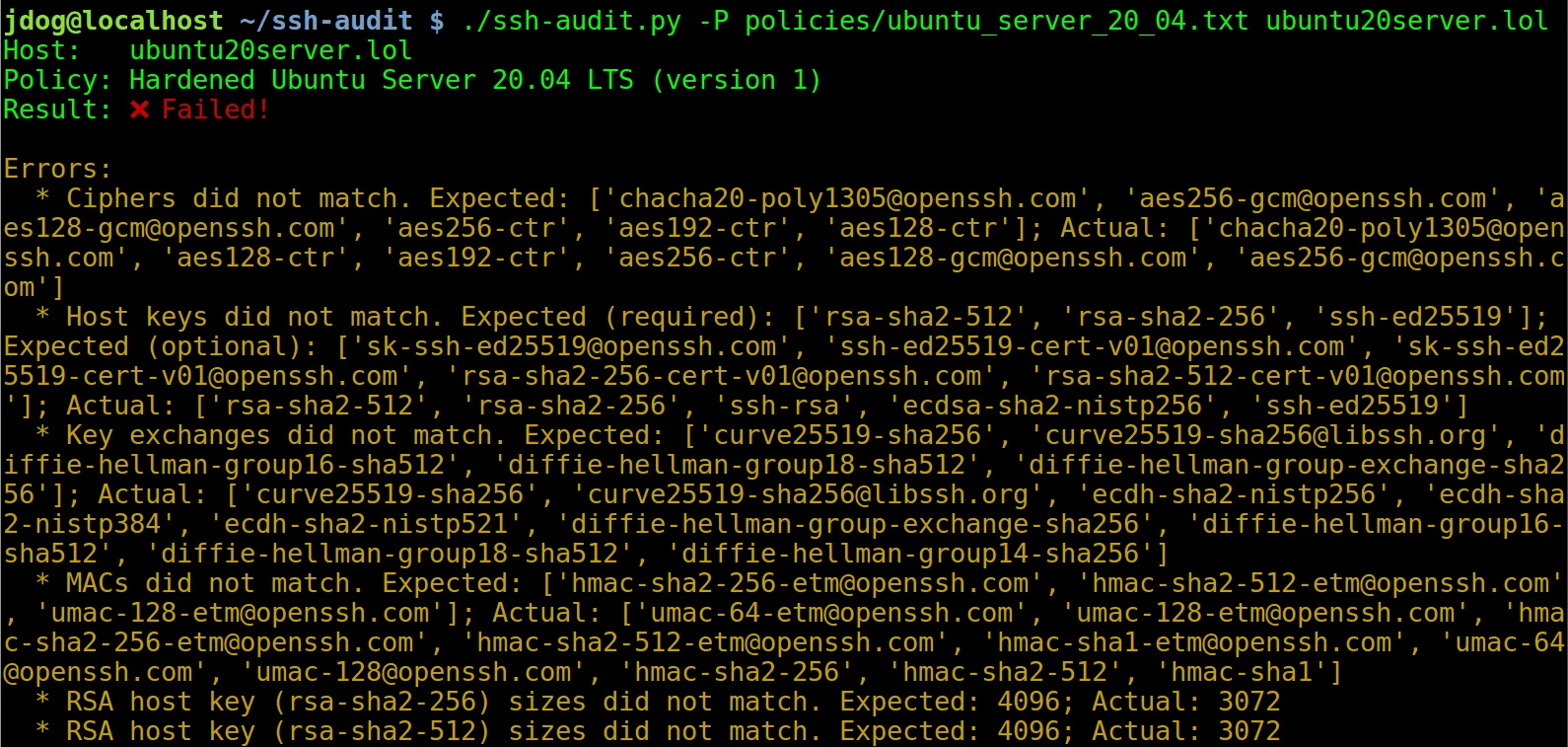
다음은 강화되지 않은 Ubuntu Server 20.04 머신에 연결할 때 정책 감사 출력의 스크린샷입니다 (힌트: `-L`/`--list-policies`를 사용하여 `-P`/`--policy`와 함께 사용할 내장 정책 이름을 확인하세요):

강화 가이드 (아래 참조)의 단계를 적용한 후에는 출력이 다음과 같이 변경됩니다:

### 클라이언트 표준 감사 예시
다음은 강화되지 않은 OpenSSH v7.2 클라이언트가 연결할 때 클라이언트 감사 출력의 스크린샷입니다:

## 강화 가이드
서버 및 클라이언트 구성을 강화하기 위한 가이드가 도구에 내장되어 있습니다 (`--list-hardening-guides` 및 `--get-hardening-guide` 옵션 참조). 또한 온라인에서도 확인할 수 있습니다: [https://www.ssh-audit.com/hardening_guides.html](https://www.ssh-audit.com/hardening_guides.html)
## 사전 빌드 패키지
사전 빌드 패키지는 Windows ([Releases](https://github.com/jtesta/ssh-audit/releases) 페이지 참조), PyPI, Snap 및 Docker에서 사용할 수 있습니다:
PyPI에서 설치하려면:```
$ pip3 install ssh-audit
Snap 패키지를 설치하려면:``` $ snap install ssh-audit
Dockerhub에서 설치하려면:```
$ docker pull docker.io/positronsecurity/ssh-audit
(그런 다음 실행하세요: docker run -it --rm -p 2222:2222 docker.io/positronsecurity/ssh-audit 10.1.1.1)
다양한 다른 플랫폼 패키지의 상태는 아래에서 확인할 수 있습니다(Repology 제공):
편의를 위해 명령줄 도구 위에서 동작하는 웹 프런트엔드가 https://www.ssh-audit.com/에서 제공됩니다.
--list-hardening-guides 및 --get-hardening-guide 참조). 이전에는 https://ssh-audit.com/hardening_guides.html에서만 사용할 수 있었지만, 이제 편의를 위해 내장되어 있습니다. 부분 기여: oam7575.allow_hostkey_subset_and_reordering 정책 옵션을 추가했습니다.getopt 모듈에서 argparse로 마이그레이션했습니다. 부분 기여: oam7575.-b)는 때때로 혼란스러운 결과를 초래하여 더 이상 자동으로 상세 모드를 활성화하지 않습니다. 사용자는 여전히 -v 플래그를 사용하여 상세 모드를 명시적으로 활성화할 수 있습니다.unix:///path/to/socket으로 대상 지정).-P와 -T 옵션을 동시에 사용할 때 발생하던 충돌을 수정했습니다.--conn-rate-test 기능을 수정했습니다.-T/--targets 사용) -p/--port 옵션이 기본 포트로 사용됩니다(-p/--port를 지정하지 않으면 22로 설정). 파일에 지정된 호스트는 명시적 포트 번호(예: "host1:1234")로 이 기본값을 재정의할 수 있습니다. 예를 들어 를 사용하면 에 포트 번호를 명시하지 않은 모든 호스트는 기본값 222를 사용하며, ( 없이)를 사용하면 모든 호스트는 기본값 22를 사용합니다.--dheat 옵션 참조; CVE-2002-20001).ecdsa-sha2-nistp* CA 서명 구문 분석을 수정했습니다. 또한 이제 표준 호스트 키와 마찬가지로 잠재적 백도어로 플래그가 지정됩니다.-m, --manual)를 Windows 빌드 외에도 Docker, PyPI, Snap 빌드에서 사용할 수 있게 되었습니다.python:3-slim에서 python:3-alpine으로 변경하여 이미지 크기를 59% 줄였습니다. 기여: Daniel Thamdrup.-L -v로 확인 가능).allow_algorithm_subset_and_reordering 지시문을 지원하여 대상이 호스트 키, kex, 암호, MAC의 하위 집합 및/또는 재정렬된 목록으로 통과할 수 있도록 합니다. 이를 통해 대상이 선택적으로 더 엄격한 제어를 구현할 수 있는 기준 정책을 만들 수 있습니다. 부분 기여: yannik1015.allow_larger_keys 지시문을 지원하여 대상이 더 큰 호스트 키, CA 키, Diffie-Hellman 키로 통과할 수 있도록 합니다. 이를 통해 대상이 선택적으로 더 엄격한 제어를 구현할 수 있는 기준 정책을 만들 수 있습니다. 부분 기여: .[email protected] 및 ssh-ed25519 호스트 키 유형을 모든 인증서 유형의 끝으로 이동했습니다.additional_notes 필드를 추가했습니다.ecdsa-sha2-curve25519, ecdsa-sha2-nistb233, ecdsa-sha2-nistb409, ecdsa-sha2-nistk163, ecdsa-sha2-nistk233, ecdsa-sha2-nistk283, ecdsa-sha2-nistk409, ecdsa-sha2-nistp224, , , , .[email protected]에서 실험적 경고 태그를 제거했습니다.-g 및 --gex-test 옵션을 추가했습니다. 기여: Adam Russell.[email protected], [email protected], [email protected], [email protected], [email protected], , , , , , , , , , , , , , , , , , , , , , , , , , , , .-jj를 사용하면 이제 들여쓰기가 적용된 JSON을 출력합니다(디버깅에 유용).-d/--debug 옵션을 추가했습니다. 기여: Adam Russell.rsa-sha2-512 및 rsa-sha2-256이 포함되도록 업데이트했습니다.gss-gex-sha1-eipGX3TCiQSrx573bT1o1Q==, gss-group1-sha1-eipGX3TCiQSrx573bT1o1Q==, gss-group14-sha1-eipGX3TCiQSrx573bT1o1Q==.hmac-ripemd160-96, AEAD_AES_128_GCM, AEAD_AES_256_GCM.-m/--manual 참조). 기여: Adam Russell.[email protected].[email protected] 및 [email protected] 호스트 키 유형의 공개 키 크기를 이제 구문 분석합니다.[email protected]을 실패로 플래그 지정합니다.--lookup)가 이제 유사한 알고리즘을 대소문자 구분 없이 조회합니다. 기여: Adam Russell.[email protected].-L/--list-policies, -M/--make-policy, -P/--policy 참조). 심층 튜토리얼은 https://www.positronsecurity.com/blog/2020-09-27-ssh-policy-configuration-checks-with-ssh-audit/를 참조하세요.ssh-audit.1 파일 참조).--lookup 참조). 기여: Adam Russell.ssh-rsa1, [email protected], ssh-gost2001, , , , , , , , .[email protected], [email protected].des, 3des.-c / --client-audit 옵션 참조).-j / --json 옵션 참조; Andreas Jaggi님의 기여).gss-group1-sha1-toWM5Slw5Ew8Mqkay+al2g==, gss-gex-sha1-toWM5Slw5Ew8Mqkay+al2g==, gss-group14-sha1-, gss-group14-sha1-toWM5Slw5Ew8Mqkay+al2g==, gss-group14-sha256-toWM5Slw5Ew8Mqkay+al2g==, gss-group15-sha512-toWM5Slw5Ew8Mqkay+al2g==, diffie-hellman-group15-sha256, ecdh-sha2-1.3.132.0.10, curve448-sha512.[email protected], [email protected], [email protected], diffie-hellman-group16-sha256, diffie-hellman-group17-sha512.des-cbc-ssh1, blowfish-ctr, twofish-ctr.hmac-sha2-56, hmac-sha2-224, hmac-sha2-384, hmac-sha3-256, , , , , , .--socks5 host:port로 프록시 지정). 부분 기여: Michał Majchrowicz.mlkem768nistp256-sha256, mlkem1024nistp384-sha384.[email protected], mldsa-44, [email protected], mldsa-65, mldsa-87, ssh-mldsa-44, ssh-mldsa-65, ssh-mldsa-87, ssh-mldsa44, ssh-mldsa65, ssh-mldsa87.AEAD_CAMELLIA_128_GCM, AEAD_CAMELLIA_256_GCM.-T targets.txt -p 222targets.txt-T targets.txt-pgrasshopper-ctr128.mlkem768x25519-sha256, sntrup761x25519-sha512.NO_COLOR 환경 변수가 설정되면 색상 출력이 비활성화됩니다(https://no-color.org/ 참조).gss-nistp384-sha384-*.[email protected].ecdsa-sha2-nistp192ecdsa-sha2-nistt571ssh-dsax509v3-sign-rsa-sha256[email protected], [email protected], [email protected], [email protected], [email protected], [email protected], [email protected], kexAlgoDH14SHA1, kexAlgoDH1SHA1, kexAlgoECDH256, kexAlgoECDH384, kexAlgoECDH521, sm2kep-sha2-nistp256, [email protected], [email protected].[email protected], cast128-12-cbc, cast128-12-cfb, cast128-12-ecb, cast128-12-ofb, des-cfb, des-ecb, des-ofb.cbcmac-3des, cbcmac-aes, cbcmac-blowfish, cbcmac-des, cbcmac-rijndael, cbcmac-twofish, hmac-sha256-96, md5, md5-8, ripemd160, ripemd160-8, sha1, sha1-8, umac-128.nullpgp-sign-dsspgp-sign-rsaspki-sign-dssspki-sign-rsassh-rsa-sha2-256ssh-rsa-sha2-512x509v3-ecdsa-sha2-1.3.132.0.10x509v3-sign-dss-sha1x509v3-sign-rsa-sha1[email protected], diffie-hellman_group17-sha512, [email protected], [email protected], ecdh-sha2-1.2.840.10045.3.1.1, ecdh-sha2-1.2.840.10045.3.1.7, ecdh-sha2-1.3.132.0.1, ecdh-sha2-1.3.132.0.16, ecdh-sha2-1.3.132.0.26, ecdh-sha2-1.3.132.0.27, ecdh-sha2-1.3.132.0.33, ecdh-sha2-1.3.132.0.34, ecdh-sha2-1.3.132.0.35, ecdh-sha2-1.3.132.0.36, ecdh-sha2-1.3.132.0.37, ecdh-sha2-1.3.132.0.38, ecdh-sha2-4MHB+NBt3AlaSRQ7MnB4cg==, ecdh-sha2-5pPrSUQtIaTjUSt5VZNBjg==, ecdh-sha2-9UzNcgwTlEnSCECZa7V1mw==, ecdh-sha2-D3FefCjYoJ/kfXgAyLddYA==, ecdh-sha2-h/SsxnLCtRBh7I9ATyeB3A==, ecdh-sha2-m/FtSAmrV4j/Wy6RVUaK7A==, ecdh-sha2-mNVwCXAoS1HGmHpLvBC94w==, ecdh-sha2-qCbG5Cn/jjsZ7nBeR7EnOA==, ecdh-sha2-qcFQaMAMGhTziMT0z+Tuzw==, ecdh-sha2-VqBg4QRPjxx1EXZdV0GdWQ==, ecdh-sha2-wiRIU8TKjMZ418sMqlqtvQ==, ecdh-sha2-zD/b3hu/71952ArpUG4OjQ==, ecmqv-sha2, gss-13.3.132.0.10-sha256-*, gss-curve25519-sha256-*, gss-curve448-sha512-*, gss-gex-sha1-*, gss-gex-sha256-*, gss-group14-sha1-*, gss-group14-sha256-*, gss-group15-sha512-*, gss-group16-sha512-*, gss-group17-sha512-*, gss-group18-sha512-*, gss-group1-sha1-*, gss-nistp256-sha256-*, gss-nistp384-sha256-*, gss-nistp521-sha512-*, [email protected], [email protected].3des-cfb, 3des-ecb, 3des-ofb, blowfish-cfb, blowfish-ecb, blowfish-ofb, [email protected], [email protected], [email protected], [email protected], [email protected], [email protected], cast128-cfb, cast128-ecb, cast128-ofb, [email protected], idea-cfb, idea-ecb, idea-ofb, [email protected], [email protected], [email protected], [email protected], [email protected], [email protected], twofish-cfb, twofish-ecb, twofish-ofb[email protected], [email protected], [email protected], [email protected], hmac-whirlpool.ssh-gost2012-256ssh-gost2012-512spki-sign-rsassh-ed448x509v3-ecdsa-sha2-nistp256x509v3-ecdsa-sha2-nistp384x509v3-ecdsa-sha2-nistp521x509v3-rsa2048-sha256diffie-hellman-group1-sha256, kexAlgoCurve25519SHA256, Curve25519SHA256, gss-group14-sha256-, gss-group15-sha512-, gss-group16-sha512-, gss-nistp256-sha256-, gss-curve25519-sha256-.blowfish, AEAD_AES_128_GCM, AEAD_AES_256_GCM, [email protected], [email protected].[email protected], hmac-sha3-224, [email protected].### v2.2.0 (2020-03-11)ssh-rsa 호스트 키 유형을 실질적인 SHA-1 충돌 때문에 약한(weak) 것으로 표시했습니다.ecdsa-sha2-1.3.132.0.10, x509v3-sign-dss, x509v3-sign-rsa, [email protected], x509v3-ssh-dss, x509v3-ssh-rsa, [email protected], [email protected], [email protected], [email protected].[email protected], [email protected], [email protected], [email protected], [email protected], [email protected], ecdh-sha2-curve25519, ecdh-sha2-nistb233, ecdh-sha2-nistb409, ecdh-sha2-nistk163, ecdh-sha2-nistk233, ecdh-sha2-nistk283, ecdh-sha2-nistk409, ecdh-sha2-nistp192, ecdh-sha2-nistp224, ecdh-sha2-nistt571, gss-gex-sha1-, gss-group1-sha1-.camellia128-cbc, camellia128-ctr, camellia192-cbc, camellia192-ctr, camellia256-cbc, camellia256-ctr, aes128-gcm, aes256-gcm, chacha20-poly1305.aes128-gcm, aes256-gcm.ecdsa-sha2-1.3.132.0.10.idea-cbc, serpent128-cbc, serpent192-cbc, serpent256-cbc.[email protected], [email protected], hmac-ripemd, [email protected], [email protected], [email protected].hmac-sha3-384hmac-sha3-512hmac-sha256hmac-sha512-t / --timeout)를 추가했습니다.