확장 가능한 Azure 보안 도구 - 문서
확장 가능한 Azure 보안 도구(이하 E.A.S.T)는 Azure 및 일부 Azure AD 보안 제어를 평가하기 위한 도구입니다. EAST의 주요 사용 사례는 Azure 평가에서 평가를 위한 보안 데이터 수집입니다. 이 정보(JSON 콘텐츠)는 다양한 보고 도구에서 사용될 수 있으며, 이를 통해 데이터를 추가로 상호 연관시키고 조사합니다.
이 도구는 MIT 라이선스에 따라 라이선스가 부여됩니다.


목차
v 0.5
miGeneral.js입니다.query.js를 참조하세요.v 0.4
미리보기 브랜치 도입
변경 사항:
설치 시 이제 종속성과 관련하여 Azure Cloud Shell의 업데이트된 버전 사용을 고려합니다(Cloud Shell에는 이제 Node.JS v16 버전이 설치됨).
권고에 따른 Databricks 클러스터 유형 확인
Content.json은 이제 키 및 콘텐츠 기반 정렬을 갖습니다. 이를 통해 git diff HEAD^1¹을 사용하여 델타 검사를 수행할 수 있습니다. content.json의 결과 순서가 미리 결정되어 있기 때문입니다.

¹ ⚠️ 주의 사항: content.json의 델타를 확인하려면 content.json을
.gitignore에서 "unignore"해야 하며, 이로 인해 구성된 업스트림에 결과가 노출될 수 있습니다.이 기능을 주의해서 사용하고, 이 기능을 사용하는 브랜치에 대해 공개 업스트림이 설정되어 있지 않은지 확인하세요.
더 큰 데이터 세트에서 발생할 수 있는 경합 상태를 피하기 위한 프로그래밍 패턴 변경. 이는 주로 for await 스타일 루프에서 var 대신 let을 사용하는 변경입니다.
⚠️ 현재 도구 상태는 베타입니다.
exec()를 사용합니다. 모든 경로를 검토하지는 않았지만, 셸코드 실행을 달성하는 것이 간단하다고 생각합니다. 이 도구는 적대적 입력을 가정하지 않으므로, 실행 인수를 검토하지 않고 명령줄에 붙여넣지 않는 것이 좋습니다.코드 양을 줄이기 위해 작동 및 미적 목적으로 다음 종속성을 사용합니다 (이 훌륭한 패키지의 유지 관리자에게 감사드립니다).
도구 실행을 위한 기타 종속성: Azure Cloud Shell에서 실행하려는 경우 Azure CLI를 설치할 필요가 없습니다.
Azure Cloud Shell (BASH) 또는 해당 Linux 배포판 / WSL
| 요구 사항 | 설명 | 설치 |
|---|---|---|
| ✅ AZ CLI | AZCLI 사용 | curl -sL https://aka.ms/InstallAzureCLIDeb | sudo bash |
| ✅ Node.js 런타임 14 | EAST용 Node.js 런타임 | NVM으로 설치 |
EAST는 기본, 고급, 복합의 세 가지 제어 범주를 제공합니다.
머신이 읽을 수 있는 제어는 유형(기본/고급/복합)에 관계없이 다음과 같습니다.```json { "name": "fn-sql-2079", "resource": "/subscriptions/6193053b-408b-44d0-b20f-4e29b9b67394/resourcegroups/rg-fn-2079/providers/microsoft.web/sites/fn-sql-2079", "controlId": "managedIdentity", "isHealthy": true, "id": "/subscriptions/6193053b-408b-44d0-b20f-4e29b9b67394/resourcegroups/rg-fn-2079/providers/microsoft.web/sites/fn-sql-2079", "Description": "\r\n Ensure The Service calls downstream resources with managed identity", "metadata": { "principalId": { "type": "SystemAssigned", "tenantId": "033794f5-7c9d-4e98-923d-7b49114b7ac3", "principalId": "cb073f1e-03bc-440e-874d-5ed3ce6df7f8" }, "roles": [{ "role": [{ "properties": { "roleDefinitionId": "/subscriptions/6193053b-408b-44d0-b20f-4e29b9b67394/providers/Microsoft.Authorization/roleDefinitions/b24988ac-6180-42a0-ab88-20f7382dd24c", "principalId": "cb073f1e-03bc-440e-874d-5ed3ce6df7f8", "scope": "/subscriptions/6193053b-408b-44d0-b20f-4e29b9b67394/resourceGroups/RG-FN-2079", "createdOn": "2021-12-27T06:03:09.7052113Z", "updatedOn": "2021-12-27T06:03:09.7052113Z", "createdBy": "4257db31-3f22-4c0f-bd57-26cbbd4f5851", "updatedBy": "4257db31-3f22-4c0f-bd57-26cbbd4f5851" }, "id": "/subscriptions/6193053b-408b-44d0-b20f-4e29b9b67394/resourceGroups/RG-FN-2079/providers/Microsoft.Authorization/roleAssignments/ada69f21-790e-4386-9f47-c9b8a8c15674", "type": "Microsoft.Authorization/roleAssignments", "name": "ada69f21-790e-4386-9f47-c9b8a8c15674", "RoleName": "Contributor" }] }] }, "category": "Access" },
### Basic
기본 제어는 초기 ARM 개체에 대한 간단한 "켜기/끄기" 불리언 설정(즉, 해당 서비스의 설정)을 확인하는 것을 포함합니다.
**예시: Azure Container Registry adminUser**
[acr_adminUser](https://github.com/jsa2/east/blob/public/providers/microsoft.containerregistry/functions/acr_adminUser.js)
Portal|EAST
-|-
 | ``if (item.properties?.adminUserEnabled == false ){returnObject.isHealthy = true }``
### Advanced
고급 제어는 초기 ARM 개체를 넘어서는 확인을 포함합니다. 종종 새 요청을 호출하여 범위 내 리소스와 다른 서비스와의 관계에 대한 추가 정보를 얻습니다.
**예시: 역할 할당(Role Assignments)**
구독의 역할 할당을 확인하는 것 외에도 Azure AD 조건부 액세스 보고를 통해 MFA를 추가로 확인하고, 권한 있는 계정이 비밀번호만으로 보호되지 않는지(클라이언트 비밀을 사용하는 SPN) 확인합니다.
**예시: Azure Data Factory**
[ADF_pipeLineRuns](https://github.com/jsa2/east/blob/public/providers/microsoft.datafactory/functions/ADF_pipeLineRuns.js)
Azure Data Factory 파이프라인 매핑은 파이프라인 -> 활동 -> 데이터 대상을 결합한 다음, 해당 활동의 실행 기록을 통해 로그에 유출된 비밀을 확인합니다.

---
### Composite
복합 제어는 파이프라인의 두 개 이상의 제어 결과를 결합하여 하나 이상의 새로운 제어를 형성합니다. 복합 제어를 사용하면 EAST의 두 가지 사용 사례를 해결할 수 있습니다.
1. 파이프라인에서 반환되는 제어 결과의 순서를 보장할 수 없습니다.
2. 단일 검사에서 둘 이상의 제어 결과를 반환해야 합니다.
**예시: [composite_resolve_alerts](https://github.com/jsa2/east/blob/public/composites/composite_resolve_alerts.js)**
1. 구독 검사에서 Microsoft Cloud Defender의 경고 가져오기
2. 경고에 대해 resourceProvider별 새 제어 구성
## Reporting
EAST는 자동화된 보고서 생성을 제공하는 데 중점을 두지 않습니다. 주로 제어 및 평가 상태가 포함된 JSON 파일을 제공하기 때문입니다. 별도의 도구를 사용하여 보고서를 만드는 것이 아이디어이며, Markdown 생성 스크립트와 [Pandoc](https://github.com/jgm/pandoc#the-universal-markup-converter) 같은 도구를 사용하면 상당히 간단하게 자동화할 수 있습니다.
- 보고에 중점을 두지는 않지만, 이 리포지토리는 단일 문서 형식으로 결과를 쉽게 읽을 수 있도록 pandoc을 사용한 보고서 생성을 위한 예제 자동화를 포함합니다.
이 도구는 pandoc을 배포하지 않지만, 보고서를 생성할 때 사용할 수 있으므로 다음 인용이 추가되었습니다: https://github.com/jgm/pandoc/blob/master/CITATION.cff```
cff-version: 1.2.0
title: Pandoc
message: "If you use this software, please cite it as below."
type: software
url: "https://github.com/jgm/pandoc"
authors:
- given-names: John
family-names: MacFarlane
email: [email protected]
orcid: 'https://orcid.org/0000-0003-2557-9090'
- given-names: Albert
family-names: Krewinkel
email: [email protected]
orcid: '0000-0002-9455-0796'
- given-names: Jesse
family-names: Rosenthal
email: [email protected]
이 부분은 BASH@linux 또는 Azure Cloud Shell에서 BASH를 사용하여 실행하는 방법에 대한 안내를 제공합니다. (Cloud Shell도 당연히 Linux이지만, 사용자가 자신의 Linux 상자를 소유할 필요는 없습니다.)
⚠️ 도구를 Cloud Shell에서 실행하는 경우, Cloud Shell이 다양한 세션 설정을 유지하지 않으므로 일부 설치를 다시 적용해야 할 수 있습니다.
클라우드 셸에서 사전 요구사항을 한 번 설정하고 끝내기```bash curl -o- https://raw.githubusercontent.com/jsa2/EAST/preview/sh/initForuse.sh | bash;
[jump to next step](#login-az-cli-and-run-the-scan)
#### 상세 사전 요구 사항 ( "발사 후 망각" 버전을 선택하지 않은 경우)
**사전 요구 사항**```bash
git clone https://github.com/jsa2/EAST --branch preview
cd EAST;
npm install
클라우드 셸에 Pandoc 설치```bash
wget "https://github.com/jgm/pandoc/releases/download/2.17.1.1/pandoc-2.17.1.1-linux-amd64.tar.gz"; tar xvzf "pandoc-2.17.1.1-linux-amd64.tar.gz" --strip-components 1 -C ~
**APT를 지원하는 배포판에 pandoc 설치하기**```bash
# Get pandoc for reporting (first time only)
sudo apt install pandoc
az account clear az login
cd EAST
subId=6193053b-408b-44d0-b20f-4e29b9b67394
node ./plugins/main.js --batch=10 --nativescope=true --roleAssignments=true --helperTexts=true --checkAad=true --scanAuditLogs --composites --subInclude=$subId

**보고서 생성**
``cd EAST; node templatehelpers/eastReports.js --doc``
- 보고서에 모든 Azure Security Benchmark 결과를 포함하려면
``cd EAST; node templatehelpers/eastReports.js --doc --asb``
**클라우드 셸에서 보고서 내보내기**
`` pandoc -s fullReport2.md -f markdown -t docx --reference-doc=pandoc-template.docx -o fullReport2.docx ``

**Azure DevOps (실험적)**
파이프라인 로그를 덤프하기 위한 Azure DevOps 컨트롤이 있습니다. 다음 예시와 같이 컨트롤 실행을 지정할 수 있습니다:``` node ./plugins/main.js --batch=10 --nativescope=true --roleAssignments=true --helperTexts=true --checkAad=true --scanAuditLogs --composites --subInclude=$subId --azdevops "organizationName" ```
---
## Licensing
**Community use**
- Share relevant controls across multiple environments as community effort
**Company use**
- Companies have possibility to develop company specific controls which apply to company specific work. Companies can then control these implementations by decision to share, or not share them based on the operating principle of that company.
**Non IPR components**
- Code logic and functions are under MIT license. since code logic and functions are alredy based on open-source components & vendor API's, it does not make sense to restrict something that is already based on open source
If you use this tool as part of your commercial effort we only require, that you follow the very relaxed terms of [MIT license](https://github.com/jsa2/east/blob/public/LICENSE)
[Read license](https://github.com/jsa2/EAST/blob/public/LICENSE)
---
# Tool operation documentation
## Principles
### AZCLI USE
**Existing tooling enhanced with Node.js runtime**
Use rich and maintained context of [Microsoft Azure CLI](https://github.com/Azure/azure-cli#microsoft-azure-cli) ``login & commands`` with Node.js control flow which supplies enhanced rest-requests and maps results to schema.
- This tool does not include or distribute Microsoft Azure CLI, but rather uses it when it has been installed on the source system (Such as Azure Cloud Shell, which is primary platform for running EAST)
### Speedup
View more [details](https://github.com/jsa2/east/blob/public/speedup.md)
✅ Using Node.js runtime as orchestrator utilises Nodes asynchronous nature allowing batching of requests. Batching of requests utilizes the full extent of Azure Resource Managers incredible speed.
✅ Compared to running requests one-by-one, the speedup can be up to 10x, when Node executes the batch of requests instead of single request at time
## Parameters reference
**Example:**
```shell
node ./plugins/main.js --batch=10 --nativescope --roleAssignments --helperTexts=true --checkAad --scanAuditLogs --composites --shuffle --clearTokens```
Param| Description | Default if undefined
-|-|-
`` --nativescope `` | Currently mandatory parameter | no values
`` --shuffle `` | Can help with throttling. Shuffles the resource list to reduce the possibility of resource provider throttling threshold being met | no values
`` --roleAssignments `` | Checks controls as per [microsoft.authorization](https://github.com/jsa2/east/blob/public/providers/microsoft.authorization/controls) | no values
`` --includeRG `` | Checks controls with ResourceGroups as per [microsoft.authorization](https://github.com/jsa2/east/blob/public/providers/microsoft.authorization/controls) | no values
`` --checkAad `` | Checks controls as per [microsoft.azureactivedirectory](https://github.com/jsa2/east/blob/public/providers/microsoft.azureactivedirectory/controls) | no values
`` --subInclude `` | Defines subscription scope | no default, requires subscriptionID/s, if not defined will enumerate all subscriptions the user have access to
`` --namespace `` | text filter which matches full, or part of the resource ID <br> **example** `` /microsoft.storage/storageaccounts`` all storage accounts in the scope| optional parameter
`` --notIncludes `` | text filter which matches full, or part of the resource ID <br> **example** `` /microsoft.storage/storageaccounts`` all storage accounts in the scope are **excluded**| optional parameter
`` --batch `` | size of batch interval between throttles |5
`` --wait `` | size of batch interval between throttles | 1500
`` --scanAuditLogs `` | optional parameter. When defined in hours will toggle Azure Activity Log scanning for weak authentication events <br> **defined in:** [scanAuditLogs](https://github.com/jsa2/east/blob/public/providers/microsoft.authorization/functions/scanAuditLogs.js) | 24h
`` --composites `` | read [composite](#composite)| no values
`` --clearTokens `` | clears tokens in session folder, use this if you get authorization errors, or have just changed to other `` az login `` account <br> use `` az account clear`` if you want to clear AZ CLI cache too | no values
`` --tag `` | Filter all results in the end based on single tag``--tag=svc=aksdev`` | no values
``--ignorePreCheck`` | use this option when used with browser delegated tokens| no values
``--helperTexts`` | Will append text descriptions from [general](https://github.com/jsa2/east/blob/public/providers/microsoft.general/controls) to manual controls| no values
``--reprocess`` | Will update results to existing content.json. Useful for incremental runs| no values
**Parameters reference for example report:**
```shell
node templatehelpers/eastReports.js --asb```
Param| Description | Default if undefined
-|-|-
`` --asb `` | gets all ASB results available to users | no values
`` --policy `` | gets all Policy results available to users | no values
`` --doc`` | prints pandoc string for export to console | no values
## (Highly experimental) Running in restricted environments where only browser use is available
Read here [Running in restricted environments](https://github.com/jsa2/EAST/tree/DelegationToken#highly-experimental---bypassing-trusted-device-requirements-for-azure-cli-in-highly-restricted-environments-where-apis-are-available-for-browser-sessions)
## Developing controls
Developer guide including control flow description is here [``dev-guide.md``](https://github.com/jsa2/east/blob/public/dev-guide.md)
## Updates and examples
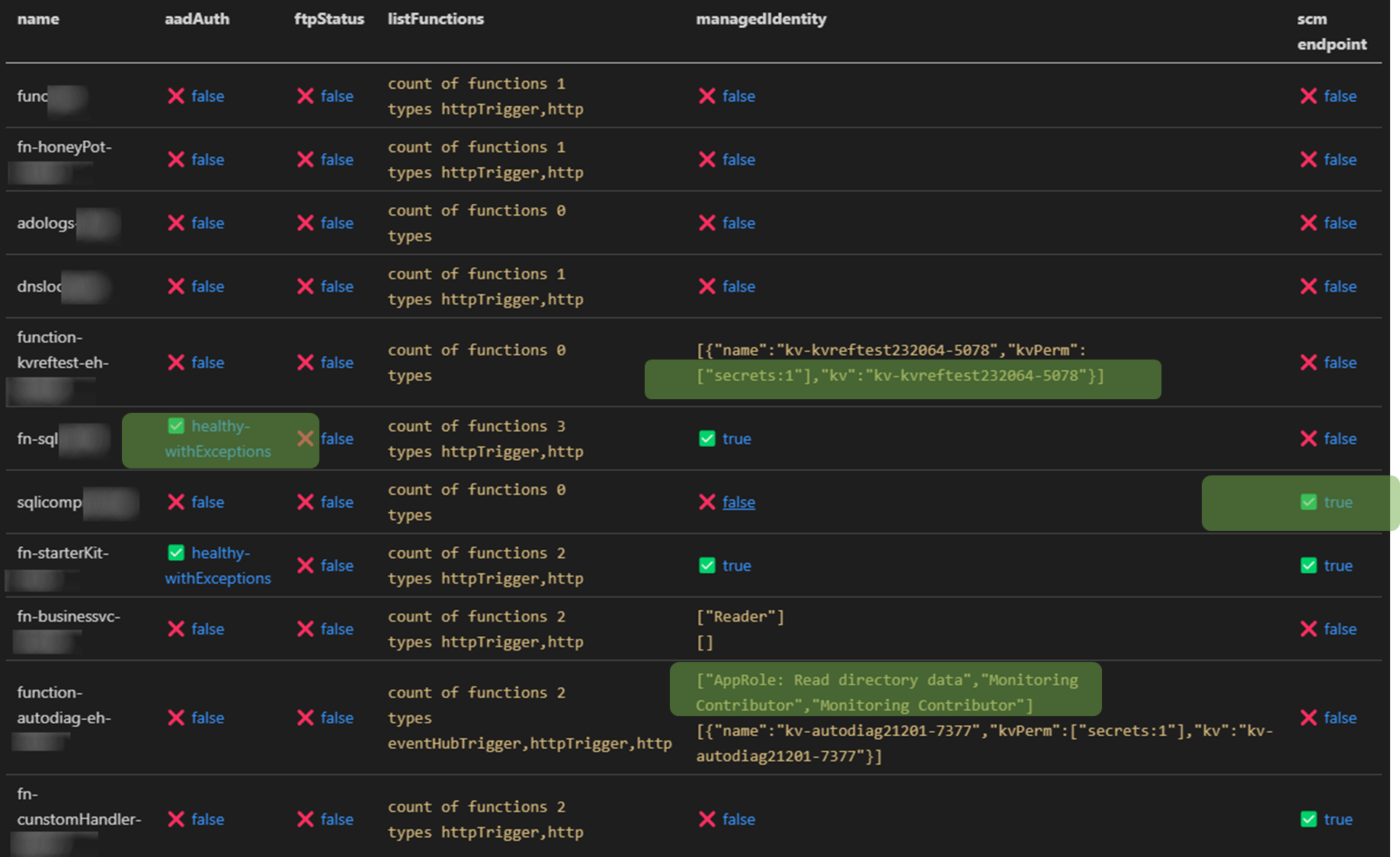
### Auditing Microsoft.Web provider (Functions and web apps)
✅ Check roles that are assigned to function managed identity in Azure AD and all Azure Subscriptions the audit account has access to <br>
✅ Relation mapping, check which keyVaults the function uses across all subs the audit account has access to<br>
✅ Check if Azure AD authentication is enabled
✅ Check that generation of access tokens to the api requires assigment ``.appRoleAssignmentRequired`` <br>
✅ Audit bindings <br>
- Function or Azure AD Authentication enabled
- Count and type of triggers
<br>
✅ Check if [SCM](https://docs.microsoft.com/en-us/azure/azure-functions/security-concepts#secure-the-scm-endpoint) and [FTP](https://docs.microsoft.com/en-us/azure/azure-functions/security-concepts#disable-ftp) endpoints are secured

### Azure RBAC baseline authorization
⚠️ Detect principals in privileged subscriptions roles protected only by password-based single factor authentication.
- Checks for users without MFA policies applied for set of conditions
- Checks for ServicePrincipals protected only by password (as opposed to using Certificate Credential, workload federation and or workload identity CA policy)
Maps to [App Registration Best Practices](https://docs.microsoft.com/en-us/azure/active-directory/develop/security-best-practices-for-app-registration#credential-configuration)
- *An unused credential on an application can result in security breach. While it's convenient to use <span style="color:red">password</span>. secrets as a credential, we strongly recommend that you use x509 certificates as the only credential type for getting tokens for your application*
``✅State healthy`` - **User result example**
```JSON
{
"subscriptionName": "EAST -msdn",
"friendlyName": "[email protected]",
"mfaResults": {
"oid": "138ac68f-d8a7-4000-8d41-c10ff26a9097",
"appliedPol": [{
"GrantConditions": "challengeWithMfa",
"policy": "baseline",
"oid": "138ac68f-d8a7-4000-8d41-c10ff26a9097"
}],
"checkType": "mfa"
},
"basicAuthResults": {
"oid": "138ac68f-d8a7-4000-8d41-c10aa26a9097",
"appliedPol": [{
"GrantConditions": "challengeWithMfa",
"policy": "baseline",
"oid": "138ac68f-d8a7-4000-8d41-c10aa26a9097"
}],
"checkType": "basicAuth"
},
}
⚠️State unHealthy - Application principal example
{
"subscriptionName": "EAST - HoneyPot",
"friendlyName": "thx138-kvref-6193053b-408b-44d0-b20f-4e29b9b67394",
"creds": {
"@odata.context": "https://graph.microsoft.com/beta/$metadata#servicePrincipals(id,displayName,appId,keyCredentials,passwordCredentials,servicePrincipalType)/$entity",
"id": "babec804-037d-4caf-946e-7a2b6de3a45f",
"displayName": "thx138-kvref-6193053b-408b-44d0-b20f-4e29b9b67394",
"appId": "5af1760e-89ff-46e4-a968-0ac36a7b7b69",
"servicePrincipalType": "Application",
"keyCredentials": [],
"passwordCredentials": [],
"OnlySingleFactor": [{
"customKeyIdentifier": null,
"endDateTime": "2023-10-20T06:54:59.2014093Z",
"keyId": "7df44f81-a52c-4fd6-b704-4b046771f85a",
"startDateTime": "2021-10-20T06:54:59.2014093Z",
"secretText": null,
"hint": null,
"displayName": null
}],
"StrongSingleFactor": []
}
}
Following methods work for contributing for the time being:
| package | aesthetics | operation | license |
|---|
| axios | ✅ | MIT | |
| yargs | ✅ | MIT | |
| jsonwebtoken | ✅ | MIT | |
| chalk | ✅ | MIT | |
| js-beautify | ✅ | MIT |