 jonathansalwan/triton
Triton은 동적 바이너리 분석 라이브러리입니다. 자신만의 프로그램 분석 도구를 구축하고, 리버스 엔지니어링을 자동화하며, 소프트웨어 검증을 수행하거나 코드를 에뮬레이션할 수 있습니다.


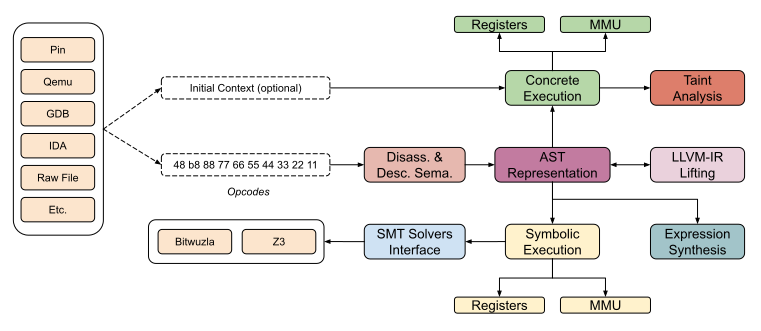
Triton은 동적 바이너리 분석 라이브러리입니다. 이 라이브러리는 프로그램 분석 도구를 구축하고, 리버스 엔지니어링을 자동화하며, 소프트웨어 검증을 수행하거나 코드를 에뮬레이션할 수 있는 내부 구성 요소를 제공합니다.

Triton은 일종의 파트타임 프로젝트이므로, 완전히 신뢰할 수 없더라도 우리를 탓하지 마세요. 이슈 열기나 풀 리퀘스트를 보내는 것이 항상 트롤링보다 낫습니다 =). 하지만, 트위터 @qb_triton에서 개발을 팔로우할 수 있습니다.







from triton import *
Create the Triton context with a defined architecture
ctx = TritonContext(ARCH.X86_64)
Define concrete values (optional)
ctx.setConcreteRegisterValue(ctx.registers.rip, 0x40000)
Symbolize data (optional)
ctx.symbolizeRegister(ctx.registers.rax, 'my_rax')
Execute instructions
ctx.processing(Instruction(b"\x48\x35\x34\x12\x00\x00")) # xor rax, 0x1234 ctx.processing(Instruction(b"\x48\x89\xc1")) # mov rcx, rax
Get the symbolic expression
rcx_expr = ctx.getSymbolicRegister(ctx.registers.rcx) print(rcx_expr) (define-fun ref!8 () (_ BitVec 64) ref!1) ; MOV operation - 0x40006: mov rcx, rax
Solve constraint
ctx.getModel(rcx_expr.getAst() == 0xdead) {0: my_rax:64 = 0xcc99}
0xcc99 XOR 0x1234 is indeed equal to 0xdead
hex(0xcc99 ^ 0x1234) '0xdead'
## pip을 사용한 설치

Triton은 `pip`를 사용하여 설치할 수 있습니다:```console
pip install triton-library
Triton은 다음 의존성이 필요합니다:```
### Linux 및 MacOS```console
$ git clone https://github.com/JonathanSalwan/Triton
$ cd Triton
$ mkdir build ; cd build
$ cmake ..
$ make -j3
$ sudo make install
기본적으로 LLVM과 Bitwuzla는 컴파일되지 않습니다. Triton의 모든 기능을 활용하려면, cmake 컴파일은 다음과 같습니다:```console $ cmake -DLLVM_INTERFACE=ON -DCMAKE_PREFIX_PATH=$(llvm-config --prefix) -DBITWUZLA_INTERFACE=ON ..
#### MacOS M1 Note:

만약 다음과 같은 컴파일 오류가 발생하는 경우:```
Could NOT find PythonLibs (missing: PYTHON_LIBRARIES PYTHON_INCLUDE_DIRS)
사용 중인 Python 버전에 맞게 PYTHON_EXECUTABLE, PYTHON_LIBRARIES 및 PYTHON_INCLUDE_DIRS를 지정해 보세요:```console
cmake -DCMAKE_INSTALL_PREFIX=/opt/homebrew/
-DPYTHON_EXECUTABLE=/opt/homebrew/bin/python3
-DPYTHON_LIBRARIES=/opt/homebrew/Cellar/[email protected]/3.10.8/Frameworks/Python.framework/Versions/3.10/lib/libpython3.10.dylib
-DPYTHON_INCLUDE_DIRS=/opt/homebrew/opt/[email protected]/Frameworks/Python.framework/Versions/3.10/include/python3.10/
..
이 스니펫에서 얻을 수 있는 정보:```python
from sysconfig import get_paths
info = get_paths()
print(info)
Python 자동 완성이 작동하지 않는 경우 다음 단계를 따르세요:
/usr/lib/python3.13/).IDE는 .pyi 파일을 파싱할 수 있어야 합니다.
cmake를 사용하여 libTriton의 .sln 파일을 생성할 수 있습니다.```console
git clone https://github.com/JonathanSalwan/Triton.git cd Triton mkdir build cd build cmake -G "Visual Studio 14 2015 Win64"
-DBOOST_ROOT="C:/Users/jonathan/Works/Tools/boost_1_61_0"
-DPYTHON_INCLUDE_DIRS="C:/Python36/include"
-DPYTHON_LIBRARIES="C:/Python36/libs/python36.lib"
-DZ3_INCLUDE_DIRS="C:/Users/jonathan/Works/Tools/z3-4.6.0-x64-win/include"
-DZ3_LIBRARIES="C:/Users/jonathan/Works/Tools/z3-4.6.0-x64-win/bin/libz3.lib"
-DCAPSTONE_INCLUDE_DIRS="C:/Users/jonathan/Works/Tools/capstone-5.0.1-win64/include"
-DCAPSTONE_LIBRARIES="C:/Users/jonathan/Works/Tools/capstone-5.0.1-win64/capstone.lib" ..
당신은 setup.py를 사용하여 Windows에서 triton.pyd의 디버그 버전을 생성할 수 있습니다.```console
> git clone https://github.com/JonathanSalwan/Triton.git
> cd Triton
> $env:COMPILER_DIR="C:/deps/llvm/llvm2116r/bin"
> $env:CMAKE_PREFIX_PATH="C:/deps/llvm/llvm-project-21.1.6.src/install/lib/cmake/llvm;C:/code/cxx-common-cmake/build/install"
> python_d -m build --wheel
> python_d -m pip install (Get-ChildItem .\dist\triton_library*)
However, if you prefer to directly download the precompiled library, check out our AppVeyor's artefacts. Note that if you use AppVeyor's artefacts, you probably have to install the Visual C++ Redistributable packages for Visual Studio 2012.
vcpkg의 Triton 포트는 Microsoft 팀 구성원 및 커뮤니티 기여자에 의해 최신 상태로 유지됩니다. vcpkg의 URL은 https://github.com/Microsoft/vcpkg입니다. vcpkg 종속성 관리자를 사용하여 Triton을 다운로드하고 설치할 수 있습니다:```console $ git clone https://github.com/Microsoft/vcpkg.git $ cd vcpkg $ ./bootstrap-vcpkg.sh # ./bootstrap-vcpkg.bat for Windows $ ./vcpkg integrate install $ ./vcpkg install triton
만약 버전이 오래된 경우, vcpkg 저장소에서 [이슈 또는 풀 리퀘스트를 생성해 주세요](https://github.com/Microsoft/vcpkg).


# 기여자
