
최신 JavaScript 및 TypeScript 코드베이스를 위한 의존성 분석 및 최적화 툴킷입니다. 매우 빠른 CLI를 통해 의존성 그래프를 깔끔하게 유지하고 사용되지 않는 코드를 제거할 수 있습니다.
현대적인 JavaScript 및 TypeScript 코드베이스를 위한 의존성 분석 및 최적화 툴킷입니다.
매우 빠른 CLI로 의존성 그래프 위생을 강화하고 사용되지 않는 코드를 제거하세요.
코드베이스가 확장됨에 따라 의존성에 대한 머릿속 지도를 유지하는 것은 불가능해집니다. Rev-dep은 대규모 JS/TS 프로젝트 전반에서 아키텍처 무결성과 의존성 위생을 강제하도록 설계된 초고속 정적 분석 도구입니다.
Rev-dep을 의존성 그래프를 위한 초고속 린터라고 생각하세요.
여러 느린 도구에서 파편화되어 순차적으로 실행되던 검사들을 단일 고성능 엔진으로 통합하세요. Rev-dep은 순환 참조, 고아, 모듈 경계 등을 포함한 전체 거버넌스 검사 스위트를 하나의 병렬화된 패스로 실행합니다. Node 기반 분석의 성능 병목을 우회하기 위해 Go로 구현되었으며, 약 150ms 안에 50만 줄 이상의 프로젝트를 감사할 수 있습니다. 성능 비교 보기
Rev-dep은 수동적 스캐닝을 넘어 능동적 강제로 나아가며, 다음과 같은 까다로운 질문에 답하고 (그리고 이에 대해 CI를 실패시킵니다):
node_modules가 사용되지 않나요?".Rev-dep은 CI를 위한 초고속 게이트키퍼 역할을 하여, 반복 개발 과정에서 의존성 그래프가 가볍게 유지되고 아키텍처가 온전하게 유지되도록 보장합니다.
현대적인 워크스페이스(pnpm, yarn, npm)를 위해 설계되었습니다. Rev-dep은 package.json의 exports/imports 매핑과 TypeScript 별칭을 기본적으로 해석하고, 패키지 경계를 넘어 의존성을 추적합니다.
수동적 스캐닝을 넘어서세요. 구성 엔진을 사용해 모듈 경계와 import 규칙을 강제하세요. CI를 위한 초고속 게이트키퍼 역할을 하는 단일 병렬화 패스에서 (순환 참조, 고아, 미사용 모듈 등) 전체 위생 검사 스위트를 실행하세요.
파일 간 의존성 문제를 디버깅하는 데 도움이 되는 CLI 툴킷입니다. 파일 간 전이적 관계를 이해하고 문제를 해결하세요.
Node 기반 분석의 성능 비용을 없애기 위해 Go로 구현되었습니다. 파일을 병렬로 처리함으로써 Rev-dep은 대안들보다 17배~90배 더 빠른 실행을 제공하며, CI 비용과 개발자 대기 시간을 크게 줄여줍니다.
Rev-dep은 약 150ms 안에 50만 줄 이상의 프로젝트를 감사할 수 있습니다. 성능 비교 보기
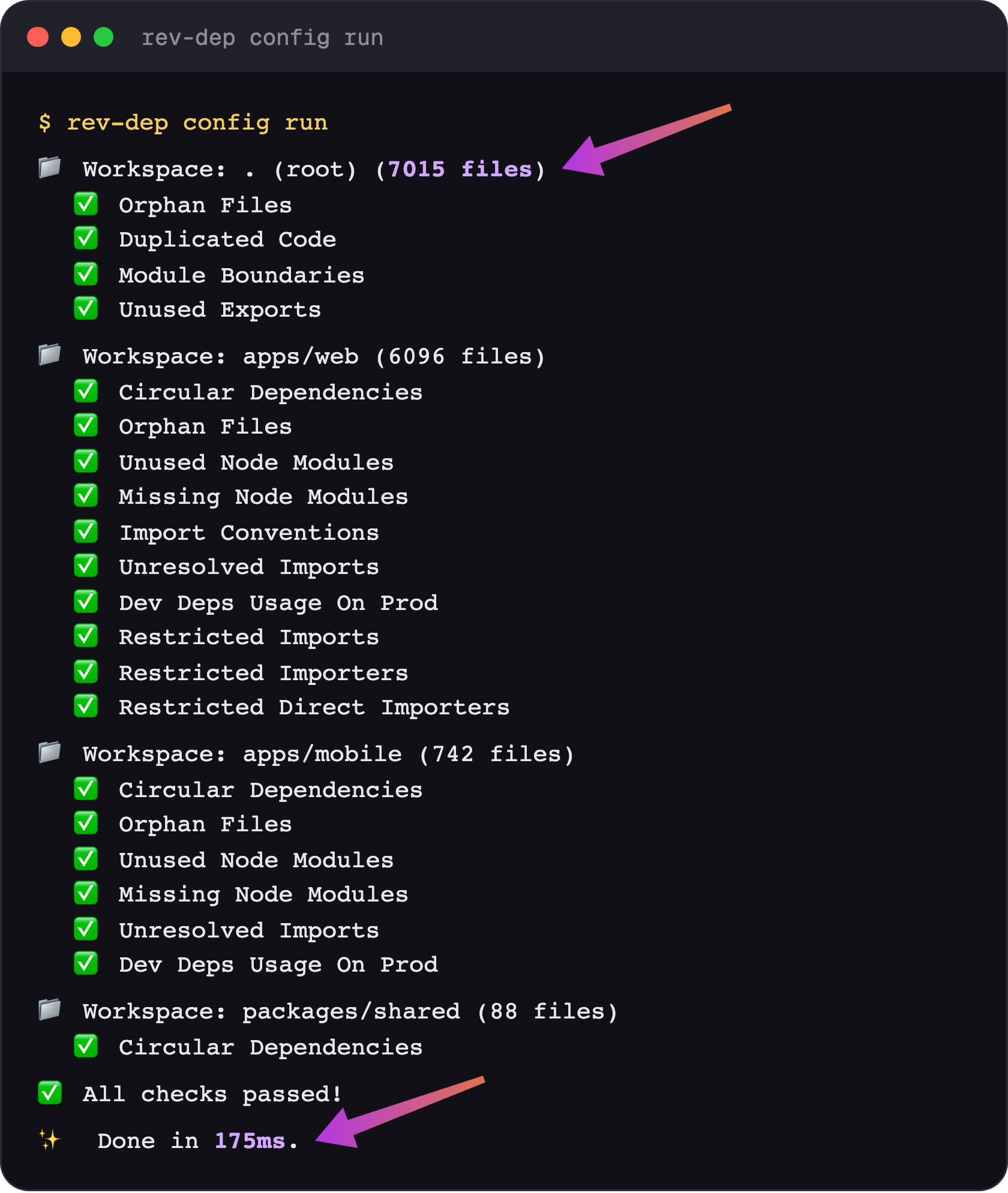
rev-dep config run을 사용하여 모든 패키지에 대해 여러 검사를 한 번에 실행하세요.
사용 가능한 검사:
moduleBoundaries - 모듈 간 아키텍처 경계를 강제합니다.importConventions - import 스타일 규칙을 강제합니다 (자동 수정 지원).unusedExportsDetection - 사용되지 않는 export를 감지합니다 (자동 수정 지원).orphanFilesDetection - 죽은/고아 파일을 감지합니다 (자동 수정 지원).unusedNodeModulesDetection - 선언되었지만 사용되지 않는 의존성을 감지합니다.missingNodeModulesDetection - package json에 없는 import를 감지합니다.unresolvedImportsDetection - 확인되지 않는 import 요청을 감지합니다.circularImportsDetection - 순환 import를 감지합니다.duplicatedCodeDetection - 복사-붙여넣기된 코드(반복 블록 및 JSX 요소)를 감지합니다.devDepsUsageOnProdDetection - 프로덕션 코드에서 사용되는 dev 의존성을 감지합니다.restrictedImportsDetection - 선택된 엔트리 포인트에서 금지된 파일/모듈을 import하지 못하도록 차단합니다.임시 의존성 탐색을 위해 CLI 명령을 사용하세요:
entry-points - 프로젝트 엔트리 포인트를 발견합니다.files - 주어진 엔트리 포인트에 대한 의존성 트리 파일을 나열합니다.resolve - 파일 간 의존성 경로를 추적합니다(이 파일을 누가 import하는지).imported-by - 파일을 직접 import하는 항목을 나열합니다.circular - 순환 의존성 체인을 나열합니다.duplicated-code - 복사-붙여넣기된 코드 블록과 JSX 요소를 찾습니다.node-modules - used, unused, missing, installed 노드 모듈을 검사합니다.lines-of-code - 실제 LOC를 계산합니다.unresolved - 파일별로 그룹화하여 해결되지 않은 import를 나열합니다.list-cwd-files - CWD의 모든 소스 코드 파일을 나열합니다전체 문서: rev-dep.com/docs/intro
로컬에 설치하여 프로젝트 검사 스크립트를 설정하세요``` yarn add -D rev-dep
No Markdown content provided for translation.```
npm install -D rev-dep
입력 내용이 비어 있습니다. 번역할 chunk 5 텍스트를 다시 제공해 주세요.``` pnpm add -D rev-dep
빠른 시작을 위한 구성 파일을 생성하세요:```
npx rev-dep config init
CLI 도구로 사용하려면 전역으로 설치하십시오:``` yarn global add rev-dep
(no content provided)```
npm install -g rev-dep
입력 내용이 비어 있습니다. 번역할 chunk 텍스트가 제공되지 않았으니, 해당 chunk의 원문을 보내 주세요.``` pnpm global add rev-dep
### 단계별 통합 가이드
프로젝트에 맞는 가이드를 따라 제로에서 작동하는 설정까지 진행하세요:
- [Monorepo 통합 가이드](https://rev-dep.com/docs/monorepo-integration-guide) - `pnpm`/`yarn`/`npm` 워크스페이스용.
- [단일 워크스페이스 통합 가이드](https://rev-dep.com/docs/single-workspace-integration-guide) - 단일 패키지 프로젝트용.
## **빠른 예제 💡**
도구의 느낌을 파악할 수 있는 몇 가지 즉시 사용 가능한 예제입니다:```bash
# Detect circular imports/dependencies
rev-dep circular
# Find copy-pasted code
rev-dep duplicated-code
# Detect unused node modules
rev-dep node-modules unused
# List all entry points in the project
rev-dep entry-points
# Check which files an entry point imports
rev-dep files --entry-point src/index.ts
# Find every entry point that depends on a file
rev-dep resolve --file src/utils/math.ts
# Resolve dependency path between files
rev-dep resolve --file src/utils/math.ts --entry-point src/index.ts
Rev-dep은 프로젝트 검사를 조율하기 위한 구성 시스템을 제공합니다. 구성 방식은 속도에 최적화되어 있으며 프로젝트 검사를 구현하는 선호되는 방법입니다. 모든 검사를 단일 패스로 실행할 수 있어 여러 개별 명령을 따로 실행하는 것보다 훨씬 빠릅니다.
사용 가능한 검사 목록:
moduleBoundaries - 모듈 간 아키텍처 경계를 강제합니다.importConventions - import 스타일 규칙을 강제합니다(자동 수정 제공).unusedExportsDetection - 사용되지 않는 export를 감지합니다(자동 수정 제공).orphanFilesDetection - 죽은/고아 파일을 감지합니다(자동 수정 제공).unusedNodeModulesDetection - 선언되었지만 사용되지 않는 의존성을 감지합니다.missingNodeModulesDetection - package json에서 누락된 import를 감지합니다.unresolvedImportsDetection - 해석되지 않은 import 요청을 감지합니다.circularImportsDetection - 순환 import를 감지합니다.duplicatedCodeDetection - 복사/붙여넣기된 코드 블록과 JSX 요소를 감지합니다.devDepsUsageOnProdDetection - 프로덕션 코드에서 사용되는 dev 의존성을 감지합니다.restrictedImportsDetection - 선택된 진입점에서 금지된 파일/모듈을 import하는 것을 차단합니다.restrictedImportersDetection - 특정 파일/모듈 집합에 전이적으로 도달할 수 있는 진입점을 허용 목록으로 지정합니다.검사는 워크스페이스 단위로 그룹화됩니다. 예를 들어 각 모노레포 패키지에 대해 여러 워크스페이스를 가질 수 있습니다.
프로젝트에서 구성 파일을 초기화하세요:```bash
rev-dep config init
`rev-dep config init`의 동작:
- Monorepo 루트: 작업 공간 루트에서 `rev-dep config init`을 실행하면 루트 작업 공간과 발견된 각 작업 공간 패키지에 대한 작업 공간이 생성됩니다.
- Monorepo 작업 공간 패키지 또는 일반 프로젝트: 디렉터리 안에서 `rev-dep config init`을 실행하면 이 디렉터리에 대해 `path: "."`인 단일 작업 공간으로 config가 생성됩니다.
구성된 모든 검사를 실행합니다(드라이런, 아직 수정 사항은 적용되지 않음):```bash
# Execute all workspaces and checks defined in the config
rev-dep config run
감지된 모든 문제를 나열하세요:```bash
rev-dep config run --list-all-issues
수정 가능한 모든 검사를 수정하세요:```bash
# Fix checks configured with autofix
rev-dep config run --fix
구성 파일(rev-dep.config.json(c) 또는 .rev-dep.config.json(c))을 사용하면 특정 검사를 활성화한 상태로 코드베이스의 각기 다른 부분을 대상으로 하는 여러 워크스페이스를 정의할 수 있습니다.
{ "configVersion": "2.0", "$schema": "https://github.com/jayu/rev-dep/blob/master/config-schema/2.0.schema.json?raw=true", "nodeModulesResolution": { "resolutionType": "entry-package", "includeDevDepsFromRoot": false }, "workspaces": [ { "path": ".", "prodEntryPoints": ["src/main.tsx", "src/pages//*.tsx"], "devEntryPoints": ["scripts/", "**/.test."], "unusedExportsDetection": { "enabled": true, "autofix": true }, "orphanFilesDetection": { "enabled": true, "autofix": true }, "unusedNodeModulesDetection": { "enabled": true }, "circularImportsDetection": { "enabled": true }, "devDepsUsageOnProdDetection": { "enabled": true, "ignoreTypeImports": true } } ] }
#### 포괄적인 구성 예제
다음은 사용 가능한 모든 속성을 보여주는 포괄적인 예제입니다:```jsonc
{
"configVersion": "1.10",
"$schema": "https://github.com/jayu/rev-dep/blob/master/config-schema/1.10.schema.json?raw=true", // enables json autocompletion
"conditionNames": ["import", "default"],
"ignoreFiles": ["**/*.test.*"],
"nodeModulesResolution": { "resolutionType": "entry-package", "includeDevDepsFromRoot": false },
"workspaces": [
{
"path": ".",
"followMonorepoPackages": true,
"prodEntryPoints": ["src/main.tsx", "src/pages/**/*.tsx", "src/server.ts"],
"devEntryPoints": ["scripts/**", "**/*.test.*"],
"ignoreEntryPoints": ["src/legacy/oldDashboard.tsx"],
"moduleBoundaries": [
{
"name": "ui-components",
"pattern": "src/components/**/*",
"allow": ["src/utils/**/*", "src/types/**/*"],
"deny": ["src/api/**/*"]
},
{
"name": "api-layer",
"pattern": "src/api/**/*",
"allow": ["src/utils/**/*", "src/types/**/*"],
"deny": ["src/components/**/*"]
}
],
"importConventions": [
{
"rule": "relative-internal-absolute-external",
"autofix": true,
"domains": [
{
"path": "src/features/auth",
"alias": "@auth",
"enabled": true
},
{
"path": "src/shared/ui",
"alias": "@ui-kit",
"enabled": false // checks disabled for this domain, but alias is still used for absolute imports from other domains
}
]
}
],
"circularImportsDetection": {
"enabled": true,
"ignoreTypeImports": true
},
"orphanFilesDetection": {
"enabled": true,
"ignoreTypeImports": true,
"graphExclude": ["**/*.test.*", "**/stories/**/*"],
"autofix": true
},
"unusedNodeModulesDetection": {
"enabled": true,
"includeModules": ["@myorg/**"],
"excludeModules": ["@types/**"],
"pkgJsonFieldsWithBinaries": ["scripts", "bin"],
"filesWithBinaries": ["scripts/check-something.sh"],
"filesWithModules": [".storybook/main.ts"],
"outputType": "groupByModule"
},
"missingNodeModulesDetection": {
"enabled": true,
"includeModules": ["lodash", "axios"],
"excludeModules": ["@types/**"],
"outputType": "groupByFile"
},
"unusedExportsDetection": {
"enabled": true,
"autofix": true,
"ignoreTypeExports": true,
"graphExclude": ["**/*.stories.tsx"],
"ignore": {
"src/types.ts": "B*",
"**/generated/**/*.ts": "*"
},
"ignoreFiles": ["**/*.generated.ts"],
"ignoreExports": ["default", "unused*"],
},
"unresolvedImportsDetection": {
"enabled": true,
"ignore": {
"src/index.ts": "legacy-*"
},
"ignoreFiles": ["**/*.generated.ts"],
"ignoreImports": ["@internal/*"]
},
"devDepsUsageOnProdDetection": {
"enabled": true,
"ignoreTypeImports": true
},
"restrictedImportsDetection": {
"enabled": true,
"entryPoints": ["src/server.ts", "src/server/**/*.ts"],
"graphExclude": ["some-file-coupling-other-files.ts"],
"denyFiles": ["**/*.tsx"],
"denyModules": ["react", "react-*"],
"ignoreMatches": ["src/server/allowed-view.tsx", "react-awsome-lib"],
"ignoreTypeImports": true
}
}
]
}
configVersion (필수): 구성 버전 문자열$schema (선택): 검증을 위한 JSON 스키마 참조conditionNames (선택): 내보내기 해석을 위한 조건 이름 배열customAssetExtensions (선택): 해석 가능한 임포트로 처리되는 추가 에셋 확장자 (예: ["glb", "mp3"]). 기본 목록은 글꼴, 이미지, 구성 파일의 일반적인 확장자를 포함합니다.ignoreFiles (선택): 모든 워크스페이스에서 무시할 전역 파일 패턴. Git 무시 파일은 기본적으로 건너뜁니다.processIgnoredFiles (선택): gitignore나 ignoreFiles와 일치하더라도 처리할 전역 파일 패턴.nodeModulesResolution (선택): missingNodeModules, unusedNodeModules, unresolvedImports 검사에서 각 타사 import가 어느 을 기준으로 검증되는지 지정합니다. 이 생성하는 객체 형태로 구성합니다. 은 (기본값, 워크스페이스의 엔트리 을 기준으로 검증) 또는 (각 파일을 소유한 을 기준으로 검증 - 각 패키지가 자신의 의존성만 해석하는 pnpm 기본 레이아웃에 사용)입니다. (기본값 )는 패키지 코드가 모노레포 루트에만 선언된 dev 의존성을 사용할 때 또는 가 이를 플래그하지 않도록 합니다. 와 같은 단순 문자열도 의 하위 호환 축약형으로 허용됩니다. 모든 워크스페이스에 적용됩니다. 를 참조하세요.각 워크스페이스는 다음 속성을 포함할 수 있습니다:
path (필수): 이 워크스페이스의 대상 디렉터리 경로 (. 또는 하위 디렉터리 이름으로 시작하는 경로)followMonorepoPackages (선택): 모노레포 패키지 해석을 제어합니다. true는 모든 워크스페이스 패키지를 추적하고(기본값), false는 비활성화하며, 배열은 선택된 패키지 이름만 추적합니다.prodEntryPoints (선택): 감지기 기본값을 위한 워크스페이스 레벨 프로덕션 엔트리 포인트 패턴devEntryPoints (선택): 감지기 기본값을 위한 워크스페이스 레벨 개발 엔트리 포인트 패턴ignoreEntryPoints (선택): 더 이상 신경 쓰지 않는 남은 엔트리 포인트에 대한 워크스페이스 레벨 패턴. 이 패턴과 일치하는 파일은 이슈로 처리되지 않습니다 - 고아 파일로 보고되지 않으며, 사용되지 않는 내보내기도 보고되지 않습니다. 커밋 상태를 유지해야 하지만 더 이상 앱에 연결되지 않은 파일에 유용합니다.moduleBoundaries (선택): 모듈 경계 규칙 배열circularImportsDetection (선택): 순환 임포트 감지 구성 (단일 객체 또는 객체 배열)duplicatedCodeDetection (선택): 중복 코드 감지 구성 (단일 객체 또는 객체 배열)name (필수): 경계의 이름pattern (필수): 이 경계의 파일에 대한 Glob 패턴allow (선택): 허용된 임포트 패턴 배열deny (선택): 거부된 임포트 패턴 배열 (allow를 재정의함)rule (필수): 규칙 유형, 현재는 relative-internal-absolute-external만 지원autofix (선택): 임포트 규칙 위반을 자동으로 수정할지 여부 (기본값: false)domains (필수): 도메인 정의 배열. 문자열(glob 패턴) 또는 다음을 포함하는 객체일 수 있습니다:
path (필수): 도메인 파일이 있는 디렉터리alias (선택): 이 도메인의 코드를 절대 임포트할 때 사용할 별칭enabled (선택): 이 도메인에 대한 검사를 건너뛰려면 false로 설정 (기본값: true)각 감지 속성은 다음 중 하나로 구성할 수 있습니다:
CircularImportsDetection:
enabled (필수): 순환 임포트 감지 활성화/비활성화ignoreTypeImports (선택): 그래프를 구축할 때 타입 전용 임포트 제외 (기본값: false)DuplicatedCodeDetection:
enabled (필수): 중복 코드 감지 활성화/비활성화blindIdentifiers (선택): 이름을 와일드카드로 처리하여 이름이 바뀐 복사본도 중복으로 간주 (기본값: false)blindStrings (선택): 문자열 및 템플릿 내용을 와일드카드로 처리 (기본값: false)blindNumbers (선택): 숫자 리터럴을 와일드카드로 처리 (기본값: false)minTokens (선택): 보고할 최소 중복 크기 (토큰 단위, 기본값: 50)minLines (선택): 보고할 최소 중복 크기 (줄 단위, 기본값: 3)minDepth (선택): 블록 자체를 포함한 최소 중첩 깊이. 2는 최소한 한 단계의 중첩을 요구합니다 (기본값: 0)minStatements (선택): 최소 문(statement) 수; 문 블록에만 적용 (기본값: 0)minDuplicates (선택): 청크가 보고되기 전 필요한 복사본 수 (기본값: 2)skipObjects (선택): 객체 리터럴뿐인 중복은 보고하지 않음 (기본값: false)ignoreFiles (선택): 분석에서 제외할 Glob 패턴OrphanFilesDetection:
enabled (필수): 고아 파일 감지 활성화/비활성화validEntryPoints (선택): 유효한 엔트리 포인트 패턴 배열. 생략하면 워크스페이스 레벨의 prodEntryPoints + devEntryPoints로 기본 설정됩니다.ignoreTypeImports (선택): 그래프를 구축할 때 타입 전용 임포트 제외 (기본값: false)graphExclude (선택): 그래프 분석에서 제외할 파일 패턴autofix (선택): rev-dep config run --fix 실행 시 감지된 고아 파일을 자동으로 삭제 (기본값: false)UnusedNodeModulesDetection:
enabled (필수): 사용되지 않는 모듈 감지 활성화/비활성화includeModules (선택): 분석에 포함할 모듈 패턴excludeModules (선택): 분석에서 제외할 모듈 패턴pkgJsonFieldsWithBinaries (선택): 바이너리 참조가 포함된 package.json 필드 (예: lint-staged). 일반 텍스트 조회를 수행합니다filesWithBinaries (선택): 바이너리 사용을 검색할 파일 패턴. 일반 텍스트 조회를 수행합니다filesWithModules (선택): 모듈 임포트를 검색할 JS/TS가 아닌 파일 패턴 (예: 셸 스크립트). 일반 텍스트 조회를 수행합니다outputType (선택): 출력 형식 - "list", "groupByModule", "groupByFile"MissingNodeModulesDetection:
enabled (필수): 누락된 모듈 감지 활성화/비활성화includeModules (선택): 분석에 포함할 모듈 패턴excludeModules (선택): 분석에서 제외할 모듈 패턴outputType (선택): 출력 형식 - "list", "groupByModule", "groupByFile", "groupByModuleFilesCount"UnusedExportsDetection:
enabled (필수): 사용되지 않는 내보내기 감지 활성화/비활성화validEntryPoints (선택): 내보내기가 사용되지 않는 것으로 보고되지 않는 파일에 대한 Glob 패턴. 생략하면 워크스페이스 레벨의 prodEntryPoints + devEntryPoints로 기본 설정됩니다.ignoreTypeExports (선택): 분석에서 export type / export interface 제외 (기본값: false)graphExclude (선택): 사용되지 않는 내보내기 분석에서 제외할 파일 패턴ignore (선택): 파일 경로 glob(워크스페이스 경로 디렉터리 기준)과 억제할 내보내기 이름/지정자 glob의 매핑; 각 값은 문자열 또는 문자열 배열일 수 있습니다ignoreFiles (선택): 파일 경로 glob; 일치하는 파일의 모든 사용되지 않는 내보내기가 억제됩니다ignoreExports (선택): 전역으로 억제할 내보내기 이름/지정자(또는 glob) ("default" 지원)autofix (선택): 실행 시 수정 가능한 사용되지 않는 내보내기 변경 사항을 자동으로 적용 (기본값: false)UnresolvedImportsDetection:
enabled (필수): 해석되지 않는 임포트 감지 활성화/비활성화ignore (선택): 파일 경로 glob(워크스페이스 경로 디렉터리 기준)과 억제할 임포트 요청 glob의 매핑; 각 값은 문자열 또는 문자열 배열일 수 있습니다ignoreFiles (선택): 파일 경로 glob; 일치하는 파일의 모든 해석되지 않는 임포트가 억제됩니다ignoreImports (선택): 해석되지 않는 결과에서 전역으로 억제할 임포트 요청(또는 glob)DevDepsUsageOnProdDetection:
enabled (필수): 제한된 dev 의존성 사용 감지 활성화/비활성화prodEntryPoints (선택): 의존성을 추적할 프로덕션 엔트리 포인트 패턴. 생략하면 워크스페이스 레벨 prodEntryPoints로 기본 설정됩니다.ignoreTypeImports (선택): 그래프 탐색 및 모듈 매칭에서 타입 전용 임포트 제외 (기본값: false)RestrictedImportsDetection:
enabled (필수): 제한된 임포트 감지 활성화/비활성화entryPoints (활성화 시 필수): 도달 가능한 의존성 그래프를 구축하는 데 사용되는 엔트리 포인트 패턴 (워크스페이스 레벨 엔트리 포인트는 여기에 적용되지 않음)graphExclude (선택): 제한된 임포트 그래프 분석에서 제외할 파일 패턴denyFiles (선택): 거부된 파일 경로 패턴 (예: ["**/*.tsx"])denyModules (선택): 거부된 모듈 패턴 (예: ["react", "react-*"])ignoreMatches (선택): 제한된 임포트 결과에서 억제할 파일/모듈 패턴ignoreTypeImports (선택): 탐색에서 타입 전용 임포트 제외 (기본값: false)구성 기반 접근 방식은 상당한 성능 이점을 제공합니다:
이로 인해 구성 기반 검사는 개별 명령을 순차적으로 실행하는 것보다 빠르며, 특히 여러 하위 패키지가 있는 대규모 코드베이스에서 그렇습니다.
실용적인 예제는 rev-dep CLI 명령을 사용하여 프로젝트의 코드 품질 검사를 탐색, 디버그 또는 구축하는 방법을 보여줍니다.
rev-dep resolve --file path/to/file.ts
파일을 암시적으로 요구하는 모든 진입점과 해석 경로를 볼 수 있습니다.
### **파일이 사용되는지 확인하는 방법**```
rev-dep resolve --file path/to/file.ts --compact-summary
파일에 간접적으로 의존하는 엔트리 포인트 수를 표시합니다.
rev-dep entry-points
필요한 경우 `--result-exclude`를 사용하여 프레임워크 진입점을 제외하세요.
예를 들어 pages router를 사용할 때 Next.js 유효한 진입점을 제외하고, scripts 디렉토리를 제외하세요 - scripts는 유효한 진입점이며 모든 테스트 파일을 제외하세요:```
rev-dep entry-points --result-exclude "pages/**","scripts/**","**/*.test.*"
rev-dep files --entry-point path/to/file.ts
무거운 구성 요소나 의도하지 않은 종속성을 식별하는 데 유용합니다.
### **엔트리 포인트의 불필요한 임포트를 줄이는 방법**
1. 임포트된 모든 파일을 나열하세요: ```
rev-dep files --entry-point path/to/entry.ts
rev-dep circular
### **중복 코드를 감지하는 방법**```
rev-dep duplicated-code
반복되는 코드 블록과 JSX 요소(추출할 수 있는 단위)를 반복되는 줄 대신 보고합니다. 변수의 이름이 변경된 복사본을 찾으려면 --blind-identifiers를 추가하세요.
rev-dep node-modules unused
### **누락된 node modules를 찾는 방법**```
rev-dep node-modules missing
rev-dep node-modules dirs-size
### **프로덕션 코드에서 사용되는 개발 의존성을 감지하는 방법**```
rev-dep config run
devDepsUsageOnProdDetection(이)가 구성에서 활성화되면 rev-dep은(는) 다음을 수행합니다:
devDependencies에 나열되어 있는지 확인합니다예제 출력:``` ❌ Restricted Dev Dependencies Usage Issues (2): lodash (dev dependency) - src/components/Button.tsx (from entry point: src/pages/index.tsx) - src/utils/helpers.ts (from entry point: src/pages/index.tsx) eslint (dev dependency) - src/config/eslint-config.js (from entry point: src/server.ts)
**중요 사항:**
- 타입 전용 임포트(예: `import type { ReactNode } from 'react'`)는 `ignoreTypeImports`가 활성화되면 무시됩니다
- package.json의 `devDependencies`에 있는 종속성만 플래그 처리됩니다
- `dependencies`의 프로덕션 종속성은 허용됩니다
- 프로덕션 빌드에서 런타임 오류를 방지하는 데 도움이 됩니다
## 모노레포 작업 🏗️
Rev-dep은 모노레포 프로젝트에 대한 일급 지원을 제공하여 작업 공간 패키지 전반에 걸친 정확한 종속성 분석을 가능하게 합니다.
### followMonorepoPackages 플래그
`--follow-monorepo-packages` 플래그는 모노레포 작업 공간 패키지에서의 임포트 해석을 활성화합니다. 기본적으로 이 플래그는 단일 패키지 프로젝트와의 호환성을 유지하기 위해 `false`로 설정되어 있습니다.```bash
# Enable monorepo package resolution
rev-dep circular --follow-monorepo-packages
rev-dep resolve --file src/utils.ts --follow-monorepo-packages
rev-dep entry-points --follow-monorepo-packages
활성화되면 rev-dep은 다음을 수행합니다:
Rev-dep은 package.json 파일의 exports 필드를 완전히 지원합니다. 이는 현대 Node.js 프로젝트에서 패키지 진입점을 정의하는 표준 방식입니다.
Exports map 지원에는 다음이 포함됩니다:
node, import, default 및 사용자 정의 조건과 같은 조건 사용해석할 조건부 exports를 제어하려면 --condition-names 플래그를 사용하세요. 이 플래그를 통해 패키지 exports를 해석할 때 조건의 우선순위를 지정할 수 있습니다:```bash
rev-dep circular --condition-names=node,import,default rev-dep resolve --file src/utils.ts --condition-names=import,node rev-dep entry-points --condition-names=default,node,import
조건은 지정된 순서대로 처리되며, 첫 번째로 일치하는 조건이 사용됩니다. 일반적인 조건은 다음과 같습니다:
- `node` - Node.js 환경
- `import` - ES 모듈
- `require` - CommonJS
- `default` - 대체(fallback) 조건
- 프로젝트 또는 빌드 도구에 특화된 사용자 정의 조건
exports가 있는 package.json 예시:```json
{
"name": "@myorg/utils",
"exports": {
".": {
"import": "./dist/index.mjs",
"require": "./dist/index.js",
"default": "./dist/index.js"
},
"./helpers": "./dist/helpers.js",
"./types/*": "./dist/types/*.d.ts"
}
}
모노레포 감지: followMonorepoPackages가 활성화되면 rev-dep은 워크스페이스 구성(pnpm-workspace.yaml, package.json workspaces 등)을 스캔합니다.
패키지 해석: 워크스페이스 패키지에 대한 가져오기는 패키지의 exports 구성을 사용하여 해석되며, exports가 정의되지 않은 경우 main/module 필드로 대체됩니다.
의존성 검증: 이 도구는 교차 패키지 가져오기가 대상 패키지가 소비자의 dependencies 또는 devDependencies에 나열된 경우에만 허용되는지 검증합니다.
경로 해석: 모든 경로는 각 패키지 루트를 기준으로 해석되어 모노레포 전체에 걸친 정확한 의존성 추적을 보장합니다.
이로 인해 rev-dep은 코드 품질과 아키텍처를 유지하는 데 교차 패키지 의존성 이해가 중요한 대규모 모노레포 프로젝트에서 특히 효과적입니다.
Rev-dep은 여러 하위 패키지를 포함한 50만 줄 이상의 모노레포에서 약 150ms 내에 여러 검사를 수행할 수 있습니다.
Madge, dpdm, dependency-cruiser, skott, knip, depcheck 및 기타 유사한 도구보다 뛰어난 성능을 보입니다.
다음은 rev-dep과 대안 도구 간의 특정 작업별 성능 비교입니다.
플랫폼: WSL Linux Debian Intel(R) Core(TM) i9-14900KF CPU
측정:
hyperfine -w 4 -r 8(워밍업 4회 + 측정 8회 실행)프로젝트: 58만 줄의 코드, 6024개의 소스 코드 파일로 구성된 next.js 앱
아래 표는 순환 가져오기 감지를 수행하는 여러 도구 간의 성능 비교를 보여줍니다.
rev-dep 순환 검사는 가장 빠른 대안보다 약 20배 빠릅니다.
* knip은 항상 타입 전용 가져오기 엣지를 무시하며 이를 포함할 수 있는 플래그를 제공하지 않습니다. 이 코드베이스의 모든 순환 구조에는
최소한 하나의 타입 전용 가져오기가 포함되어 있으므로 knip은 0개의 순환 구조를 보고합니다. 3 040 ms는 더 작은 그래프에 대한
실제 전체 분석입니다. 동일한 규칙을 적용하는 rev-dep circular -t는 143.3 ms ± 10.3에서 정확히 일치하는 결과(0 cycles)를 냅니다.
플랫폼: WSL Linux Debian Intel(R) Core(TM) i9-14900KF CPU
측정:
hyperfine -w 4 -r 8(워밍업 4회 + 측정 8회 실행)프로젝트: 58만 줄의 코드, 6024개의 소스 코드 파일로 구성된 next.js 앱
평균 시간과 사용된 명령을 포함한 자세한 측정값은 PERFORMANCE.md를 참조하세요.
프로젝트에서 순환 의존성 감지
프로젝트를 분석하여 모듈 간 순환 의존성을 찾습니다. 순환 의존성은 디버깅하기 어려운 문제를 일으킬 수 있으므로 일반적으로 피해야 합니다.``` rev-dep circular [flags]
#### 예제```
rev-dep circular --ignore-types-imports
--condition-names strings List of conditions for package.json imports resolution (e.g. node, imports, default)
-c, --cwd string Working directory for the command (default "$PWD") --follow-monorepo-packages strings Enable resolution of imports from monorepo workspace packages. Pass without value to follow all, or pass package names -h, --help help for circular -t, --ignore-type-imports Exclude type imports from the analysis --process-ignored-files strings Glob patterns to process even if they are ignored by gitignore or exclude patterns --tsconfig-json string Path to tsconfig.json (default: ./tsconfig.json) -v, --verbose Show warnings and verbose output
### rev-dep config
rev-dep 구성 파일 생성 및 실행
#### 개요
rev-dep 구성 파일을 생성하고 실행하는 명령입니다.
#### 옵션```
-c, --cwd string Working directory (default "$PWD")
-h, --help help for config
(.)rev-dep.config.json(c)에 정의된 모든 검사를 실행합니다.
(.)rev-dep.config.json(c)를 처리하고 워크스페이스별로 활성화된 모든 검사(순환 임포트, 고아 파일, 모듈 경계, 임포트 규칙, 노드 모듈, 사용하지 않는 익스포트, 해결되지 않은 임포트, 제한된 임포트 및 제한된 개발 종속성 사용)를 실행합니다.``` rev-dep config run [flags]
#### 옵션```
-c, --cwd string Working directory (default "$PWD")
--fix Automatically fix fixable issues
--format string Output format (json, issues-list)
-h, --help help for run
--lint-config Also lint the config after running; prints only error/warning counts and fails (non-zero exit) on any lint error. Use 'config lint' for details and --fix
--lint-config-rules strings Which lint rules to run with --lint-config (comma-separated). Default: all. Implies --lint-config
--list-all-issues List all issues instead of limiting output
--recheck Run all checks again after '--fix' to validate the final state
--update-snapshot Rewrite every configured duplicated-code snapshot from this run, acknowledging what it found.
-v, --verbose Show warnings and verbose output
--workspaces strings Subset of workspaces to run (comma-separated list of workspace paths)
새 rev-dep.config.json 파일 초기화
현재 디렉터리에 기본 설정으로 새 rev-dep.config.json 구성 파일을 생성합니다.``` rev-dep config init [flags]
#### 옵션```
-c, --cwd string Working directory (default "$PWD")
-h, --help help for init
아무것도 일치하지 않는 config의 glob/경로 패턴을 보고하고(선택적으로 제거합니다)
(.)rev-dep.config.json(c)에서 "dead"(죽은) glob 및 경로 패턴 - 더 이상 발견된 파일이나 모듈과 일치하지 않는 무시 패턴, 진입점 패턴, 작업 공간 경로, 그래프 제외 항목, 거부된 파일/모듈 등 - 을 검사합니다. 시간이 지나면서 config에는 이름이 바뀌거나 삭제된 파일에 대한 패턴이 누적됩니다. 이 명령은 해당 패턴을 드러내어 config를 간결하게 유지합니다.
--fix를 사용하면 죽은 패턴이 원래 위치에서 제거되며 모든 주석과 서식이 보존됩니다. 일부 패턴은 보고만 되고 자동 제거는 되지 않습니다. 삭제하면 검사 동작이 바뀌거나 config가 유효하지 않게 될 수 있기 때문입니다 - 작업 공간 경로, 필수 진입점/파일 /모듈, 모듈 경계 선택자. 이러한 항목은 "not auto-removed"로 표시되므로 직접 해결해야 합니다.``` rev-dep config lint [flags]
#### 옵션```
-c, --cwd string Working directory (default "$PWD")
--fix Remove dead patterns from the config file (preserves comments and formatting)
-h, --help help for lint
--rules strings Lint rules to run (comma-separated): orphan-file-globs, orphan-module-globs, overlapping-globs, trailing-commas, compact. Default: all. orphan-file-globs/overlapping-globs use file discovery; orphan-module-globs parses the dependency tree; trailing-commas and compact only read the config file.
-v, --verbose Show warnings and verbose output
v2 설정을 v3 (2.0) 스키마로 업그레이드합니다.
(.)rev-dep.config.json(c) 파일을 v2 스키마에서 v3 (설정 버전 2.0)으로 업그레이드합니다.
이 명령은 안전하고 모호하지 않은 변경을 제자리에서 적용합니다(최상위 'rules' 배열을 'workspaces'로 이름을 바꾸고, 'configVersion'을 2.0으로 올리며, 단종된 'algorithm' 옵션을 circular-imports 감지기에서 제거합니다). 모든 주석과 서식을 보존합니다. 커밋하기 전에 git으로 변경 사항을 검토하세요.
그런 다음 사용자를 위해 변경할 수 없는 항목을 나열합니다: v3의 더 엄격하고 gitignore에 맞춰진 규칙 아래에서 일치 집합이 달라졌을 수 있는 glob 패턴과, 어떤 설정 편집으로도 해결할 수 없는 동작 변경입니다. 이러한 항목은 수동으로 검토하세요 - v3 breaking-changes 가이드를 참조하세요.``` rev-dep config migrate [flags]
#### 옵션```
-c, --cwd string Working directory (default "$PWD")
-h, --help help for migrate
파서 및 리졸버 내부를 검사하는 디버깅 도구
rev-dep이 파일을 파싱하고 종속성을 해결하는 방식을 검사하는 디버깅 도구입니다. 출력은 semver를 따르지 않습니다.
-h, --help help for debug
### rev-dep debug get-tree-for-cwd
디버그: 분석을 위한 전체 종속성 트리 표시
#### 개요
전체 종속성 트리를 검사하기 위한 디버깅 도구입니다. 출력은 semver를 따르지 않습니다.```
rev-dep debug get-tree-for-cwd [flags]
--condition-names strings List of conditions for package.json imports resolution (e.g. node, imports, default)
--cwd string Working directory for the command (default "$PWD")
--follow-monorepo-packages strings Enable resolution of imports from monorepo workspace packages. Pass without value to follow all, or pass package names
-h, --help help for get-tree-for-cwd -t, --ignore-type-imports Exclude type imports from the analysis --include-dev-deps-from-root Treat the monorepo root package.json devDependencies as available to package code, so they are not reported as missing or unresolved. Mirrors config nodeModulesResolution.includeDevDepsFromRoot --node-modules-resolution string Which package.json each import is validated against: 'entry-package' (the cwd package.json, default) or 'nearest-package' (each file's own nearest package.json) (default "entry-package") --tsconfig-json string Path to tsconfig.json (default: ./tsconfig.json) -v, --verbose Show warnings and verbose output
### rev-dep debug list-cwd-files
현재 작업 디렉토리의 모든 파일을 나열합니다
#### 개요
지정된 디렉토리의 모든 파일을 재귀적으로 나열하며,
결과를 필터링하는 옵션이 있습니다.```
rev-dep debug list-cwd-files [flags]
rev-dep debug list-cwd-files --include='.ts' --exclude='.test.ts'
#### 옵션```
--count Only display the count of matching files
--cwd string Directory to list files from (default "$PWD")
--exclude strings Exclude files matching these glob patterns
-h, --help help for list-cwd-files
--include strings Only include files matching these glob patterns
디버그: 단일 파일의 파싱된 imports 표시
파서가 특정 파일을 처리하는 방식을 검사하기 위한 디버깅 도구입니다. 출력은 semver를 따르지 않습니다.``` rev-dep debug parse-file [flags]
#### 옵션```
--condition-names strings List of conditions for package.json imports resolution (e.g. node, imports, default)
--cwd string Working directory for the command (default "$PWD")
--file string file to parse
--follow-monorepo-packages strings Enable resolution of imports from monorepo workspace packages. Pass without value to follow all, or pass package names
-h, --help help for parse-file
--include-dev-deps-from-root Treat the monorepo root package.json devDependencies as available to package code, so they are not reported as missing or unresolved. Mirrors config nodeModulesResolution.includeDevDepsFromRoot
--node-modules-resolution string Which package.json each import is validated against: 'entry-package' (the cwd package.json, default) or 'nearest-package' (each file's own nearest package.json) (default "entry-package")
--tsconfig-json string Path to tsconfig.json (default: ./tsconfig.json)
-v, --verbose Show warnings and verbose output
Debug: 구문 분석된 TypeScript 구성 별칭 표시
TypeScript 구성이 구문 분석되는 방식과 추출되는 별칭을 검사하는 디버깅 도구입니다. 출력은 semver를 따르지 않습니다.``` rev-dep debug parse-tsconfig [flags]
#### 옵션```
-h, --help help for parse-tsconfig
--tsconfig string Path to TypeScript configuration file
프로젝트의 파일들 사이(및 파일 내부)에서 중복된 코드를 찾습니다.
모든 소스 파일에서 복사-붙여넣기 가능한 청크(중괄호 블록과 JSX 요소)를 모든 중첩 수준에서 스캔하여 두 번 이상 나타나는 항목을 보고합니다.
비교는 서식과 주석을 완전히 무시하므로 들여쓰기가 다시 조정된 복사본도 여전히 일치합니다.
네 가지 필터가 보고할 가치가 있는 대상을 결정합니다. --min-tokens와 --min-lines는 크기를 측정하고, --min-depth와 --min-statements는 복잡성을 측정합니다. 복잡성은 중복된 세 개의 키를 가진 설정 객체와 중복된 로직을 구분하는 기준입니다. 크기 하한으로는 구분할 수 없습니다. 객체의 키와 문자열 값이 길 수 있기 때문입니다. --min-duplicates는 보고 대상이 되기 위해 필요한 복사본 수를 설정합니다.
기본적으로 코드는 작성된 그대로 일치해야 합니다. 각 --blind-* 플래그는 비교에서 토큰의 한 범주를 제외하며, 플래그들은 자유롭게 결합할 수 있습니다:
--blind-identifiers 이름은 와일드카드로 처리되므로, 변수·함수 또는 컴포넌트의 이름이 바뀌어도 해당 복사본은 여전히 보고됩니다. --blind-strings 문자열과 템플릿 내용은 와일드카드로 처리됩니다. --blind-numbers 숫자 리터럴은 와일드카드로 처리됩니다.``` rev-dep duplicated-code [flags]
#### 예제```
rev-dep duplicated-code --cwd ./src --blind-identifiers
--blind-identifiers Ignore the spelling of names, so a copy whose variables, functions or components were renamed still counts as duplication.
--blind-numbers Ignore the value of numeric literals, so a copy with different constants still counts
--blind-strings Ignore the text of string and template literals, so a copy with different messages or keys still counts
-c, --cwd string Working directory for the command (default "$PWD") -f, --format string Output format: "human" or "json". JSON reports every finding with its canonical hash and the byte and line range of each occurrence, for comparing against another run or another tool (default "human") -h, --help help for duplicated-code --ignore-files strings Glob patterns of files to leave out of the analysis. --json-snippets Include the source of each finding in JSON output. Off by default because snippets dominate the file size and a comparison keyed on ranges does not need them --min-depth int Smallest duplication to report, in nesting levels counting the block itself. 1 admits everything; 2 requires at least one nested level, which is what filters out flat objects and single JSX elements however long their keys or strings are --min-duplicates int How many copies a chunk needs before it is reported. Raise to 3 to ignore code that has only been copied once (default 2) --min-lines int Smallest duplication to report, in lines of the first occurrence (default 3) --min-statements int Smallest duplication to report, in statements directly inside the block. Applies only to statement blocks (function and control-flow bodies); object literals and JSX elements are expressions and are not filtered by it - use --min-depth for those --min-tokens int Smallest duplication to report, in tokens. Tokens rather than characters because the count does not change when a --blind-* flag is applied, so one number means the same amount of code whatever is being ignored (default 50) --process-ignored-files strings Glob patterns to analyse even when gitignore excludes them. --skip-objects Do not report duplications that are only object literals. --snapshot string Path to a JSON snapshot of acknowledged duplications. With it, the command reports what changed since the snapshot instead of everything that exists, and exits non-zero on any difference --update-snapshot Rewrite the --snapshot file from this run, acknowledging everything it found. Always explicit: nothing updates a snapshot on its own
### rev-dep entry-points
프로젝트의 모든 진입점을 검색하고 나열합니다
#### 개요
프로젝트 구조를 분석하여 잠재적인 진입점을 모두 식별합니다.
애플리케이션의 아키텍처와 종속성을 이해하는 데 유용합니다.```
rev-dep entry-points [flags]
rev-dep entry-points --print-deps-count
#### 옵션```
--condition-names strings List of conditions for package.json imports resolution (e.g. node, imports, default)
-n, --count Only display the number of entry points found
-c, --cwd string Working directory for the command (default "$PWD")
--follow-monorepo-packages strings Enable resolution of imports from monorepo workspace packages. Pass without value to follow all, or pass package names
--graph-exclude strings Exclude files matching these glob patterns from analysis
-h, --help help for entry-points
-t, --ignore-type-imports Exclude type imports from the analysis
--print-deps-count Show the number of dependencies for each entry point
--process-ignored-files strings Glob patterns to process even if they are ignored by gitignore or exclude patterns
--result-exclude strings Exclude files matching these glob patterns from results
--result-include strings Only include files matching these glob patterns in results
--tsconfig-json string Path to tsconfig.json (default: ./tsconfig.json)
-v, --verbose Show warnings and verbose output
엔트리 포인트의 의존성 트리에 있는 모든 파일을 나열합니다
지정된 엔트리 포인트에 필요한 모든 파일을 재귀적으로 찾아 나열합니다.``` rev-dep files [flags]
#### 예제```
rev-dep files --entry-point src/index.ts
--condition-names strings List of conditions for package.json imports resolution (e.g. node, imports, default)
-n, --count Only display the count of files in the dependency tree -c, --cwd string Working directory for the command (default "$PWD") -p, --entry-point string Entry point file to analyze (required) --follow-monorepo-packages strings Enable resolution of imports from monorepo workspace packages. Pass without value to follow all, or pass package names -h, --help help for files -t, --ignore-type-imports Exclude type imports from the analysis --process-ignored-files strings Glob patterns to process even if they are ignored by gitignore or exclude patterns --tsconfig-json string Path to tsconfig.json (default: ./tsconfig.json) -v, --verbose Show warnings and verbose output
### rev-dep imported-by
지정된 파일을 직접 import하는 모든 파일을 나열합니다
#### 개요
프로젝트에서 지정된 파일을 직접 import하는 모든 파일을 찾아 나열합니다.
특정 파일의 변경이 미치는 영향을 이해하는 데 유용합니다.```
rev-dep imported-by [flags]
rev-dep imported-by --file src/utils/helpers.ts
#### 옵션```
--condition-names strings List of conditions for package.json imports resolution (e.g. node, imports, default)
-n, --count Only display the count of importing files
-c, --cwd string Working directory for the command (default "$PWD")
-f, --file string Target file to find importers for (required)
--follow-monorepo-packages strings Enable resolution of imports from monorepo workspace packages. Pass without value to follow all, or pass package names
-h, --help help for imported-by
--list-imports List the import identifiers used by each file
--process-ignored-files strings Glob patterns to process even if they are ignored by gitignore or exclude patterns
--tsconfig-json string Path to tsconfig.json (default: ./tsconfig.json)
-v, --verbose Show warnings and verbose output
프로젝트에서 주석과 빈 줄을 제외한 실제 코드 줄 수를 계산합니다.``` rev-dep lines-of-code [flags]
#### 예제```
rev-dep lines-of-code
-c, --cwd string Directory to analyze (default "$PWD") -h, --help help for lines-of-code
### rev-dep list-cwd-files
현재 작업 디렉터리의 모든 파일 나열
#### 개요
지정된 디렉터리의 모든 파일을 재귀적으로 나열하며,
결과를 필터링하는 옵션을 제공합니다.```
rev-dep list-cwd-files [flags]
rev-dep list-cwd-files --include='.ts' --exclude='.test.ts'
#### 옵션```
--count Only display the count of matching files
--cwd string Directory to list files from (default "$PWD")
--exclude strings Exclude files matching these glob patterns
-h, --help help for list-cwd-files
--include strings Only include files matching these glob patterns
프로젝트에서 해결되지 않은 임포트를 나열합니다
임포트 해석 중에 해결할 수 없었던 임포트를 감지하여 나열합니다. 임포트를 파일별로 그룹화합니다.``` rev-dep unresolved [flags]
#### 옵션```
--condition-names strings List of conditions for package.json imports resolution (e.g. node, imports, default)
--custom-asset-extensions strings Additional asset extensions treated as resolvable (e.g. glb,mp3)
-c, --cwd string Working directory for the command (default "$PWD")
--follow-monorepo-packages strings Enable resolution of imports from monorepo workspace packages. Pass without value to follow all, or pass package names
-h, --help help for unresolved
--ignore stringToString Map of file path (relative to cwd) to exact import request to ignore (e.g. --ignore src/index.ts=some-module) (default [])
--ignore-files strings File path glob patterns to ignore in unresolved output
--ignore-imports strings Import requests to ignore globally in unresolved output
--include-dev-deps-from-root Treat the monorepo root package.json devDependencies as available to package code, so they are not reported as missing or unresolved. Mirrors config nodeModulesResolution.includeDevDepsFromRoot
--node-modules-resolution string Which package.json each import is validated against: 'entry-package' (the cwd package.json, default) or 'nearest-package' (each file's own nearest package.json) (default "entry-package")
--process-ignored-files strings Glob patterns to process even if they are ignored by gitignore or exclude patterns
--tsconfig-json string Path to tsconfig.json (default: ./tsconfig.json)
-v, --verbose Show warnings and verbose output
Node.js 종속성 분석 및 관리
Node.js 모듈 종속성을 분석하고 관리하기 위한 도구입니다. 프로젝트에서 사용되지 않거나 누락되었거나 중복된 종속성을 식별하는 데 도움이 됩니다.
rev-dep node-modules used -p src/index.ts rev-dep node-modules unused --exclude-modules=@types/* rev-dep node-modules missing --entry-points=src/main.ts
#### 옵션```
-h, --help help for node-modules
node_modules의 디스크 사용량 분석
node_modules 디렉터리의 상세 크기 분석을 제공합니다. 공간을 많이 차지하는 의존성을 식별하는 데 도움이 됩니다.``` rev-dep node-modules analyze-size [flags]
#### 예제```
rev-dep node-modules analyze-size
-c, --cwd string Working directory for the command (default "$PWD") -h, --help help for analyze-size
### rev-dep node-modules dirs-size
Calculates cumulative files size in node_modules directories
#### Synopsis
Calculates and displays the size of node_modules folders
in the current directory and subdirectories. Sizes will be smaller than actual file size taken on disk. Tool is calculating actual file size rather than file size on disk (related to disk blocks usage)
---
### rev-dep node-modules dirs-size
node_modules 디렉터리의 누적 파일 크기를 계산합니다.
#### 개요
현재 디렉터리와 하위 디렉터리에 있는 node_modules 폴더의 크기를 계산하고 표시합니다. 표시되는 크기는 디스크에서 실제 차지하는 파일 크기보다 작을 수 있습니다. 이 도구는 디스크의 파일 크기(디스크 블록 사용과 관련)가 아닌 실제 파일 크기를 계산합니다.```
rev-dep node-modules dirs-size [flags]
rev-dep node-modules dirs-size
#### 옵션```
-c, --cwd string Working directory for the command (default "$PWD")
-h, --help help for dirs-size
중복 설치된 패키지 찾기 및 최적화
node_modules에 여러 번 설치된 패키지를 식별합니다. 중복 패키지 간 심볼릭 링크를 생성하여 저장 공간을 최적화할 수 있습니다.``` rev-dep node-modules installed-duplicates [flags]
#### 예제```
rev-dep node-modules installed-duplicates --optimize --size-stats
-c, --cwd string Working directory for the command (default "$PWD") -h, --help help for installed-duplicates --isolate Create symlinks only within the same top-level node_module directories. By default optimize creates symlinks between top-level node_module directories (eg. when workspaces are used). Needs --optimize flag to take effect --optimize Automatically create symlinks to deduplicate packages --size-stats Print node modules dirs size before and after optimization. Might take longer than optimization itself --verbose Show detailed information about each optimization
### rev-dep node-modules installed
프로젝트에 설치된 모든 npm 패키지를 나열합니다.
#### 개요
node_modules 디렉터리를 재귀적으로 스캔하여 설치된 모든 패키지를 나열합니다. 모노레포 전반의 종속성을 감사하는 데 유용합니다.```
rev-dep node-modules installed [flags]
rev-dep node-modules installed --include-modules=@myorg/*
#### 옵션```
-c, --cwd string Working directory for the command (default "$PWD")
-e, --exclude-modules strings list of modules to exclude from the output
-h, --help help for installed
-i, --include-modules strings list of modules to include in the output
package.json에 나열되지 않은 임포트된 패키지 찾기
코드에서 임포트했지만 package.json의 dependencies에 선언되지 않은 패키지를 식별합니다.``` rev-dep node-modules missing [flags]
#### 예제```
rev-dep node-modules missing --entry-points=src/main.ts
--condition-names strings List of conditions for package.json imports resolution (e.g. node, imports, default)
-n, --count Only display the count of modules -c, --cwd string Working directory for the command (default "$PWD") -p, --entry-points strings Entry point file(s) to start analysis from (default: auto-detected) -e, --exclude-modules strings list of modules to exclude from the output -b, --files-with-binaries strings Additional files to search for binary usages. Use paths relative to cwd -m, --files-with-node-modules strings Additional files to search for module imports. Use paths relative to cwd --follow-monorepo-packages strings Enable resolution of imports from monorepo workspace packages. Pass without value to follow all, or pass package names --group-by-file Organize output by project file path --group-by-module Organize output by npm package name --group-by-module-files-count Organize output by npm package name and show count of files using it -h, --help help for missing -t, --ignore-type-imports Exclude type imports from the analysis --include-dev-deps-from-root Treat the monorepo root package.json devDependencies as available to package code, so they are not reported as missing or unresolved. Mirrors config nodeModulesResolution.includeDevDepsFromRoot -i, --include-modules strings list of modules to include in the output --node-modules-resolution string Which package.json each import is validated against: 'entry-package' (the cwd package.json, default) or 'nearest-package' (each file's own nearest package.json) (default "entry-package") --pkg-fields-with-binaries strings Additional package.json fields to check for binary usages --tsconfig-json string Path to tsconfig.json (default: ./tsconfig.json) -v, --verbose Show warnings and verbose output --zero-exit-code Use this flag to always return zero exit code
### rev-dep node-modules prune-docs
설치된 node_modules 패키지에서 markdown/docs류 파일을 제거합니다.
#### 개요
설치된 node_modules 패키지에서 glob 패턴을 기반으로 파일을 제거합니다.
README/LICENSE/docs 파일을 정리하여 의존성 크기를 줄이는 데 유용합니다.```
rev-dep node-modules prune-docs [flags]
rev-dep node-modules prune-docs --defaults rev-dep node-modules prune-docs --patterns ".md,README.md,docs/**" rev-dep node-modules prune-docs --defaults --patterns ".txt"
#### 옵션```
-c, --cwd string Working directory for the command (default "$PWD")
--defaults Use default prune patterns: LICENSE, README.md, docs/**
-h, --help help for prune-docs
--pattern strings Alias for --patterns
-p, --patterns strings Glob patterns (relative to each package root) of files to remove, e.g. "*.md,README.md,docs/**"
코드에서 import되지 않는 설치된 패키지를 찾습니다
package.json 의존성을 코드베이스의 실제 import와 비교하여 잠재적으로 사용되지 않는 패키지를 식별합니다.``` rev-dep node-modules unused [flags]
#### 예제```
rev-dep node-modules unused --exclude-modules=@types/*
--condition-names strings List of conditions for package.json imports resolution (e.g. node, imports, default)
-n, --count Only display the count of modules -c, --cwd string Working directory for the command (default "$PWD") -p, --entry-points strings Entry point file(s) to start analysis from (default: auto-detected) -e, --exclude-modules strings list of modules to exclude from the output -b, --files-with-binaries strings Additional files to search for binary usages. Use paths relative to cwd -m, --files-with-node-modules strings Additional files to search for module imports. Use paths relative to cwd --follow-monorepo-packages strings Enable resolution of imports from monorepo workspace packages. Pass without value to follow all, or pass package names -h, --help help for unused -t, --ignore-type-imports Exclude type imports from the analysis --include-dev-deps-from-root Treat the monorepo root package.json devDependencies as available to package code, so they are not reported as missing or unresolved. Mirrors config nodeModulesResolution.includeDevDepsFromRoot -i, --include-modules strings list of modules to include in the output --node-modules-resolution string Which package.json each import is validated against: 'entry-package' (the cwd package.json, default) or 'nearest-package' (each file's own nearest package.json) (default "entry-package") --pkg-fields-with-binaries strings Additional package.json fields to check for binary usages --tsconfig-json string Path to tsconfig.json (default: ./tsconfig.json) -v, --verbose Show warnings and verbose output --zero-exit-code Use this flag to always return zero exit code
### rev-dep node-modules 사용됨
코드에서 가져온 모든 npm 패키지를 나열합니다.
#### 개요
코드를 분석하여 실제로 사용 중인 npm 패키지를 식별합니다.
프로젝트의 런타임 종속성을 추적하는 데 도움이 됩니다.```
rev-dep node-modules used [flags]
rev-dep node-modules used -p src/index.ts --group-by-module
#### 옵션```
--condition-names strings List of conditions for package.json imports resolution (e.g. node, imports, default)
-n, --count Only display the count of modules
-c, --cwd string Working directory for the command (default "$PWD")
-p, --entry-points strings Entry point file(s) to start analysis from (default: auto-detected)
-e, --exclude-modules strings list of modules to exclude from the output
-b, --files-with-binaries strings Additional files to search for binary usages. Use paths relative to cwd
-m, --files-with-node-modules strings Additional files to search for module imports. Use paths relative to cwd
--follow-monorepo-packages strings Enable resolution of imports from monorepo workspace packages. Pass without value to follow all, or pass package names
--group-by-entry-point Organize output by entry point file path
--group-by-entry-point-modules-count Organize output by entry point and show count of unique modules
--group-by-file Organize output by project file path
--group-by-module Organize output by npm package name
--group-by-module-entry-points-count Organize output by npm package name and show count of entry points using it
--group-by-module-files-count Organize output by npm package name and show count of files using it
--group-by-module-show-entry-points Organize output by npm package name and list entry points using it
-h, --help help for used
-t, --ignore-type-imports Exclude type imports from the analysis
--include-dev-deps-from-root Treat the monorepo root package.json devDependencies as available to package code, so they are not reported as missing or unresolved. Mirrors config nodeModulesResolution.includeDevDepsFromRoot
-i, --include-modules strings list of modules to include in the output
--node-modules-resolution string Which package.json each import is validated against: 'entry-package' (the cwd package.json, default) or 'nearest-package' (each file's own nearest package.json) (default "entry-package")
--pkg-fields-with-binaries strings Additional package.json fields to check for binary usages
--tsconfig-json string Path to tsconfig.json (default: ./tsconfig.json)
-v, --verbose Show warnings and verbose output
프로젝트의 파일 간 의존성 경로를 추적하고 표시합니다.
지정된 파일 간의 의존성 체인을 분석하고 표시합니다. 코드베이스의 서로 다른 부분이 어떻게 연결되어 있는지 이해하는 데 도움이 됩니다.``` rev-dep resolve [flags]
#### 예제```
rev-dep resolve -p src/index.ts -f src/utils/helpers.ts
-a, --all Show all possible resolution paths, not just the first one --compact-summary Display a compact summary of found paths --condition-names strings List of conditions for package.json imports resolution (e.g. node, imports, default) -c, --cwd string Working directory for the command (default "$PWD") -p, --entry-points strings Entry point file(s) or glob pattern(s) to start analysis from (default: auto-detected) -f, --file string Target file to check for dependencies --follow-monorepo-packages strings Enable resolution of imports from monorepo workspace packages. Pass without value to follow all, or pass package names --graph-exclude strings Glob patterns to exclude files from dependency analysis -h, --help help for resolve -t, --ignore-type-imports Exclude type imports from the analysis --include-dev-deps-from-root Treat the monorepo root package.json devDependencies as available to package code, so they are not reported as missing or unresolved. Mirrors config nodeModulesResolution.includeDevDepsFromRoot --module string Target node module name to check for dependencies --node-modules-resolution string Which package.json each import is validated against: 'entry-package' (the cwd package.json, default) or 'nearest-package' (each file's own nearest package.json) (default "entry-package") --process-ignored-files strings Glob patterns to process even if they are ignored by gitignore or exclude patterns --tsconfig-json string Path to tsconfig.json (default: ./tsconfig.json) -v, --verbose Show warnings and verbose output
<!-- cli-docs-end -->
## Glossary 📚
**rev-dep**이 다루는 문제 영역에서 사용되는 용어 중 일부는 혼란스러울 수 있습니다.
개념을 이해하는 데 도움이 되는 작은 용어 사전을 준비했습니다.
### Dependency
*dependency*(종속성)는 말 그대로 이해할 수 있습니다. 프로젝트의 dependency graph(종속성 그래프) 맥락에서 다음을 가리킬 수 있습니다:
* **node module / package**(패키지는 프로젝트 또는 파일의 종속성(dependency)입니다), 또는
* **source code file**(파일이 다른 파일을 import하는 경우 그 파일의 dependency입니다).
### Entry point
*entry point*(진입점)는 **다른 어떤 파일에서도 import되지 않는** 소스 파일입니다.
다음을 나타낼 수 있습니다:
* 애플리케이션의 메인 진입점
* 개별 페이지 또는 기능
* 구성(configuration) 또는 테스트 부트스트랩 파일
- 프로젝트 구조에 따라 다릅니다.
### Unused / Dead file
파일이 *unused*(사용되지 않음) 또는 *dead*(죽은)로 간주되는 경우는 다음과 같습니다:
* **entry point**(진입점)이고(아무도 import하지 않음), **그리고**
* 실행해도 **의미 있는 출력(output)이나 부수 효과(side effect)를 생성하지 않는** 경우입니다.
실제로 이러한 파일은 대개 안전하게 제거할 수 있습니다.
### Circular dependency
*circular dependency*(순환 종속성)는 파일이 import 체인을 통해 **직간접적으로 자신을 import**할 때 발생합니다.
이로 인해 예측할 수 없는 런타임 동작, 초기화되지 않은 값, 또는 미묘한 버그가 발생할 수 있습니다.
하지만 **TypeScript type-only import** 간의 순환 종속성은 대개 무해합니다.
### Reverse dependency (or "dependents")
특정 파일을 *import*하는 파일들입니다.
"이 파일을 변경하거나 삭제하면 무엇이 깨질까?"라는 질문에 답할 때 유용합니다.
### Import graph / Dependency graph
파일 또는 모듈이 서로를 import하는 방식을 시각적으로 나타낸 것입니다.
### Missing dependency / unused node module
코드에서 import하지만 **package.json에 나열되지 않은** 모듈입니다.
### Unused dependency / unused node module
**package.json**에 나열되어 있지만 소스 코드에서 **한 번도 import되지 않는** dependency입니다.
### Root directory / Project root
dependency 분석의 시작점으로 사용되는 최상위 디렉터리입니다.
## Telemetry
Rev-Dep은 `rev-dep config run` 중에만 **익명** 이벤트 하나를 수집합니다. 자세한 내용은 [Telemetry 문서](https://rev-dep.com/docs/telemetry)를 참조하세요.
`REV_DEP_TELEMETRY_OFF=true`를 설정하면 완전히 거부(opt out)할 수 있습니다.
## 🇵🇱와 🇯🇵에서 🧠을 담아 [@jayu](https://github.com/jayu)가 제작
이 작은 소프트웨어가 프로젝트의 복잡성을 발견하고 이해하는 데 도움이 되어 리팩토링할 때 더 자신감을 갖게 되길 바랍니다. 이 도구가 유용했다면 망설이지 말고 ⭐을 눌러 주세요!
### 내 다른 프로젝트
- [CodeQue - 구조적 코드 검색](https://codeque.co)
- [Structural Code Search VSCode](https://marketplace.visualstudio.com/items?itemName=CodeQue.codeque)
restrictedImportersDetectionrestrictedDirectImportersDetection - 특정 파일/모듈 집합을 직접 import할 수 있는 파일을 제한합니다(비전이적).debug - rev-dep이 내부적으로 파싱, 해결, 발견하는 내용을 검사합니다.restrictedDirectImportersDetection - 특정 파일/모듈 집합을 직접 import할 수 있는 파일을 제한합니다(비전이적).package.jsonrev-dep config init{ "resolutionType": ..., "includeDevDepsFromRoot": ... }resolutionType"entry-package"package.json"nearest-package"package.jsonincludeDevDepsFromRootfalsemissingNodeModulesunresolvedImports"nearest-package"resolutionTypeworkspaces (필수): 워크스페이스 객체 배열orphanFilesDetection (선택): 고아 파일 감지 구성 (단일 객체 또는 객체 배열)unusedNodeModulesDetection (선택): 사용되지 않는 node modules 감지 구성 (단일 객체 또는 객체 배열)missingNodeModulesDetection (선택): 누락된 node modules 감지 구성 (단일 객체 또는 객체 배열)unusedExportsDetection (선택): 사용되지 않는 내보내기 감지 구성 (단일 객체 또는 객체 배열)unresolvedImportsDetection (선택): 해석되지 않는 임포트 감지 구성 (단일 객체 또는 객체 배열)devDepsUsageOnProdDetection (선택): 제한된 dev 의존성 사용 감지 구성 (단일 객체 또는 객체 배열)restrictedImportsDetection (선택): 선택된 엔트리 포인트에서 금지된 파일/모듈 임포트 제한 (단일 객체 또는 객체 배열)restrictedImportersDetection (선택): 파일/모듈 집합에 전이적으로 도달할 수 있는 엔트리 포인트를 화이트리스트로 지정 (단일 객체 또는 객체 배열)restrictedDirectImportersDetection (선택): 파일/모듈 집합을 직접 임포트할 수 있는 파일 제한; 비전이적 (단일 객체 또는 객체 배열)importConventions (선택): 임포트 규칙 배열snapshotPath (선택): 승인된 중복의 커밋된 기준선 경로 (워크스페이스 기준). 설정하면 검사가 전체가 아닌 변경 사항을 보고합니다rev-dep config run --fix| 작업 | 실행 시간 [ms] | 대안 도구 | 대안 도구 시간 [ms] | rev-dep보다 느린 배수 |
|---|
| 순환 의존성 찾기 | 151 | knip | 3 040 | 20x |
| 사용되지 않는 내보내기 찾기 | 186 | knip | 3 176 | 17x |
| 사용되지 않는 파일 찾기 | 168 | knip | 3 006 | 18x |
| 사용되지 않는 node modules 찾기 | 170 | knip | 3 069 | 18x |
| 누락된 node modules 찾기 | 160 | knip | 3 076 | 19x |
| 진입점이 가져오는 모든 파일 나열 | 81 | madge | 6 591 | 81x |
| 진입점 발견 | 149 | madge | 13 632 | 92x |
| 모듈 경계 강제 | 164 | dependency-cruiser | 8 140 | 50x |
| 제한된 가져오기 찾기 | 170 | dependency-cruiser | 10 995 | 65x |
| 제한된 가져오기 사용처 찾기 | 179 | dependency-cruiser | 9 234 | 52x |
| 파일 간 의존성 경로 해석 | 221 | 제안 요청 | ||
| 코드 줄 수 계산 | 251 | 제안 요청 | ||
| node_modules 디렉터리 크기 분석 | 561 | 제안 요청 |
| 도구 | 버전 | 시간 [ms] |
|---|
| 🥇 rev-dep | 3.0.0 | 154 |
| 🥈 knip * | 6.29.0 | 3 040 |
| 🥉 circular-dependency-scanner | 3.0.1 | 3 355 |
| dpdm-fast | 1.0.14 | 6 070 |
| dpdm | 4.2.0 | 6 667 |
| dependency-cruiser | 18.1.0 | 8 258 |
| madge | 8.0.0 | 13 569 |
| skott | 0.35.11 | 61 613 |