 hahwul/deadfinder
웹사이트, 사이트맵, URL 목록에서 끊어진 링크를 스캔하는 빠른 CLI 도구로, 동시 작업자, 적용 범위 보고, 여러 출력 형식을 지원합니다.


데드 링크(깨진 링크) 찾기


문서 • 설치 • GitHub Action • 기여하기 • 변경 로그
데드 링크(깨진 링크)는 웹 페이지 내에서 연결할 수 없는 링크를 의미합니다. 이러한 링크는 SEO와 보안에 부정적인 영향을 미칠 수 있습니다. 이 도구를 사용하면 쉽게 식별하고 수정할 수 있습니다.
v1 (Ruby gem)을 찾고 계신가요? 이제
legacy/v1브랜치에 있으며, 버그 수정 및 보안 릴리스를 위해deadfindergem을 계속 게시합니다.main브랜치는 Crystal 재작성(v2+)을 호스팅합니다.
brew install deadfinder
# https://formulae.brew.sh/formula/deadfinder
docker run ghcr.io/hahwul/deadfinder:latest deadfinder url https://example.com
해당 플랫폼의 아카이브를 최신 릴리스에서 다운로드하고, 압축을 풀고, deadfinder를 PATH에 배치하세요.
nix run github:hahwul/deadfinder
nix profile install github:hahwul/deadfinder
nix develop github:hahwul/deadfinder
Crystal >= 1.19.1과 cmake가 필요합니다 (lexbor HTML 파서의 사후 설치(postinstall)를 위해 — 없으면 shards install이 'cmake': No such file or directory 오류로 실패합니다).
# macOS
brew install crystal cmake

# Debian / Ubuntu
sudo apt install crystal cmake
shards install
crystal build src/cli_main.cr -o deadfinder --release
# or: just build
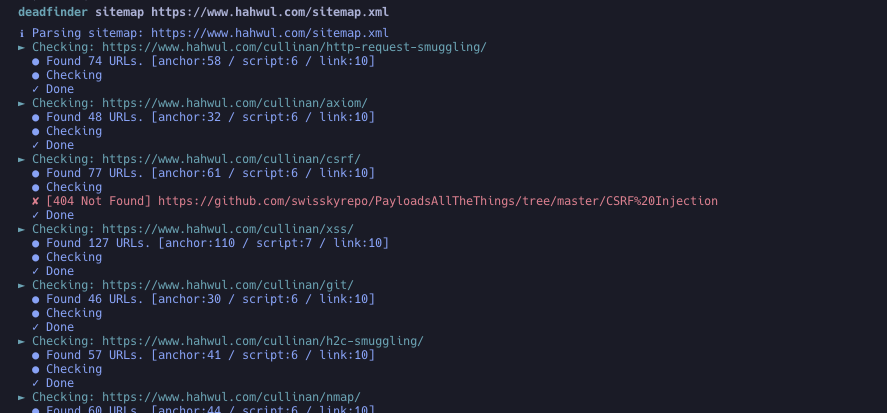
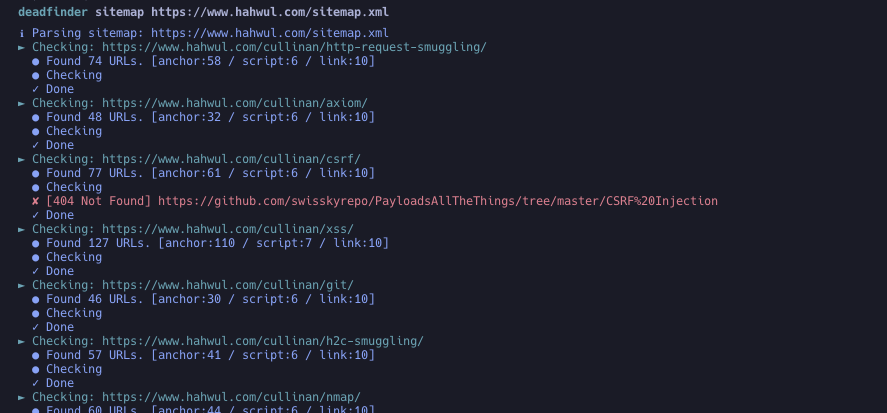
deadfinder sitemap https://www.hahwul.com/sitemap.xml
특정 릴리스 태그를 고정하세요. @latest는 유효한 Actions 참조가 아닙니다.
steps:
- name: Run DeadFinder
  uses: hahwul/deadfinder@v2       # tracks the latest 2.x — pin a specific tag (e.g. @2.0.2) for stricter reproducibility
  id: broken-link
  with:
    command: sitemap           # url / file / sitemap / pipe
    target: https://www.hahwul.com/sitemap.xml
    # timeout: 10
    # concurrency: 50
    # silent: false
    # headers: "X-API-Key: 123444"
    # worker_headers: "User-Agent: Deadfinder Bot"
    # include30x: false
    # user_agent: "Apple"
    # proxy: "http://localhost:8070"
    # proxy_auth: "id:pw"
    # match:  ""
    # ignore: ""
    # coverage: true
    # visualize: report.png

- name: Output Handling
  run: echo '${{ steps.broken-link.outputs.output }}'
데드 링크를 발견하여 자동으로 이슈로 추가하려면, "자동 데드 링크 감지" 문서를 참조하세요.
Usage: deadfinder <command> [options]

Commands:
  pipe                        Scan the URLs from STDIN
  file <FILE>                 Scan the URLs from File
  url <URL>                   Scan the Single URL
  sitemap <SITEMAP-URL>       Scan the URLs from sitemap
  completion <SHELL>          Generate completion script (bash/zsh/fish)
  version                     Show version

Options:
  -r, --include30x                 30x 리디렉션을 데드 링크로 포함
  -c, --concurrency=N              동시 작업자 수 (기본값: 50)
  -t, --timeout=N                  타임아웃 (초) (기본값: 10)
  -o, --output=FILE                결과를 쓸 파일
  -f, --output_format=FORMAT       출력 형식: json, yaml, toml, csv, sarif (기본값: json)
  -H, --headers=HEADER             초기 요청의 사용자 정의 HTTP 헤더
      --worker_headers=HEADER      작업자 요청의 사용자 정의 HTTP 헤더
      --user_agent=UA              User-Agent 문자열
  -p, --proxy=PROXY                프록시 서버 (HTTP 및 HTTPS CONNECT)
      --proxy_auth=USER:PASS       프록시 인증
  -m, --match=PATTERN              일치시킬 URL 패턴 (정규식)
  -i, --ignore=PATTERN             무시할 URL 패턴 (정규식)
  -s, --silent                     조용한 모드
  -v, --verbose                    상세 모드
      --debug                      디버그 모드
      --limit=N                    스캔할 URL 수 제한
      --coverage                   커버리지 추적 및 보고 활성화
      --visualize=PATH             시각화 PNG 생성
# STDIN에서 URL 스캔 (여러 URL)
cat urls.txt | deadfinder pipe

# 파일에서 URL 스캔
deadfinder file urls.txt

# 단일 URL 스캔
deadfinder url https://www.hahwul.com

# 사이트맵에서 URL 스캔
deadfinder sitemap https://www.hahwul.com/sitemap.xml
deadfinder sitemap https://www.hahwul.com/sitemap.xml -o output.json
cat output.json | jq
{
  "Target URL": [
    "DeadLink URL",
    "DeadLink URL",
    "DeadLink URL"
  ]
}
--coverage 사용 시:
deadfinder sitemap https://www.hahwul.com/sitemap.xml --coverage -o output.json
{
  "dead_links": {
    "Target URL": ["DeadLink URL 1", "DeadLink URL 2"]
  },
  "coverage": {
    "targets": {
      "Target URL": {
        "total_tested": 14,
        "dead_links": 7,
        "coverage_percentage": 50.0
      }
    },
    "summary": {
      "total_tested": 14,
      "total_dead": 7,
      "overall_coverage_percentage": 50.0
    }
  }
}
deadfinder completion bash > /etc/bash_completion.d/deadfinder
deadfinder completion zsh  > ~/.zsh/completion/_deadfinder
deadfinder completion fish > ~/.config/fish/completions/deadfinder.fish
기여를 환영합니다! 개선 아이디어가 있거나 버그를 신고하려면:
feature/awesome-feature 또는 bugfix/annoying-bug).main 브랜치로 Pull Request (PR)를 제출하세요.
