 hacksider/deep-live-cam
실시간 얼굴 교체 및 단일 이미지만으로 원클릭 비디오 딥페이크

<h1 align="center">Deep-Live-Cam 2.1.6</h1>
<p align="center">
단 한 장의 이미지와 클릭 한 번으로 실시간 얼굴 교체 및 비디오 딥페이크를 구현합니다.
</p>
<p align="center">
<a href="https://trendshift.io/repositories/11395" target="_blank"><img src="https://trendshift.io/api/badge/repositories/11395" alt="hacksider%2FDeep-Live-Cam | Trendshift" style="width: 250px; height: 55px;" width="250" height="55"/></a>
</p>
<p align="center">
<img src="https://raw.githubusercontent.com/hacksider/deep-live-cam/HEAD/media/demo.gif" alt="Demo GIF" width="800">
</p>
## 면책 조항
이 딥페이크 소프트웨어는 AI 생성 미디어 산업을 위한 생산적인 도구로 설계되었습니다. 아티스트가 커스텀 캐릭터를 애니메이션화하고, 매력적인 콘텐츠를 제작하며, 심지어 의류 디자인을 위한 모델로 활용하는 데 도움을 줄 수 있습니다.
우리는 비윤리적인 활용 가능성을 인지하고 있으며 예방 조치에 전념하고 있습니다. 내장된 검사 기능은 프로그램이 부적절한 미디어(노출, 잔혹한 콘텐츠, 전쟁 영상과 같은 민감한 자료 등)를 처리하는 것을 방지합니다. 우리는 법과 윤리를 준수하며 이 프로젝트를 책임감 있게 계속 개발해 나갈 것입니다. 법적으로 요구될 경우 프로젝트를 종료하거나 워터마크를 추가할 수 있습니다.
- 윤리적 사용: 사용자는 이 소프트웨어를 책임감 있고 합법적으로 사용해야 합니다. 실제 인물의 얼굴을 사용하는 경우 해당 인물의 동의를 받고, 온라인에 공유할 때 모든 결과물을 딥페이크로 명확히 표시해야 합니다.
- 콘텐츠 제한: 이 소프트웨어에는 노출, 잔혹한 콘텐츠 또는 민감한 자료와 같은 부적절한 미디어의 처리를 방지하는 내장 검사 기능이 포함되어 있습니다.
- 법적 준수: 우리는 모든 관련 법률과 윤리 지침을 준수합니다. 법적으로 요구될 경우 프로젝트를 종료하거나 결과물에 워터마크를 추가할 수 있습니다.
- 사용자 책임: 우리는 최종 사용자의 행동에 대해 책임지지 않습니다. 사용자는 소프트웨어 사용이 윤리적 기준과 법적 요구 사항에 부합하도록 보장해야 합니다.
이 소프트웨어를 사용함으로써 귀하는 본 약관에 동의하며, 타인의 권리와 존엄성을 존중하는 방식으로 사용할 것에 동의합니다.
사용자는 이 소프트웨어를 책임감 있고 합법적으로 사용해야 합니다. 실제 인물의 얼굴을 사용하는 경우 해당 인물의 동의를 받고, 온라인에 공유할 때 모든 결과물을 딥페이크로 명확히 표시해야 합니다. 우리는 최종 사용자의 행동에 대해 책임지지 않습니다.
## 사전 빌드된 Deep-Live-Cam 2.8 Ultimate!
<p align="center">
<a href="https://deeplivecam.net/index.php/quickstart">
<img src="https://assets.kitploit.com/production/public/readmes/6640/b6806ad2b3ee5f222bcac66032bbbba2ce2c84f5014ec76409dcc44acbbd5b9d/d8fab0c6e55134d0aeba1b9dd865b7e1689cb3acb17059e45fbcc3e53bb5bf19-display-v1.webp" width="100%" alt="Lite / Ultimate Download Banner">
</a>
</p>
<p align="center">
<a href="https://deeplivecam.net/index.php/plans/nvidia-gpu?plan_id=0&group_id=1">
<img src="https://assets.kitploit.com/production/public/readmes/6640/8cbe6be38dd1bb7522f64252ee8c42b88e560501e8e087dc3d1a04fd0cc63c1c/371e319994bd17b616cfd940b971a7dc2f0b214bd394a0dfca5e37b8844cb54b-display-v1.webp" width="40" alt="Windows">
</a>
<a href="https://deeplivecam.net/index.php/plans/nvidia-gpu?plan_id=0&group_id=2">
<img src="https://assets.kitploit.com/production/public/readmes/6640/44cbb6b2b28f1f91a981a01dab8a16391f8789042afb9df6194c0b4bf0ae7dea/39db8e9ae965d382d53cd7bf766568a7b8186ef910fbf54cd0b663039089f665-display-v1.webp" width="34" alt="Mac Silicon">
</a>
<a href="https://deeplivecam.net/index.php/plans/nvidia-gpu?plan_id=0&group_id=3">
<img src="https://assets.kitploit.com/production/public/readmes/6640/0eddbcacd5062065cdabf0623d5a6f693ae7676dc1445b0a5c4b5a0196e70a8c/ce52644ad2415ab82f4c0259c94996ea5d9283602ed23ac0b8406a81b8ed839f-display-v1.webp" width="40" alt="CPU">
</a>
</p>
<p align="center">
<strong>Windows • Mac Silicon • CPU • NVIDIA • AMD</strong>
</p>
<p align="center">
하드웨어에 최적화된 빌드.
</p>
<p align="center">
<a href="https://deeplivecam.net/index.php/quickstart">
<img src="https://assets.kitploit.com/production/public/readmes/6640/cd5bef4c32ac43c8b8e0824e57f91eb06fee076e43b08a9574ea95dd608129ef.png" width="280" alt="Download">
</a>
</p>
> **Ultimate**에는 **30개 이상의 독점 기능**, 성능 최적화 및 **우선 지원**이 포함되어 있습니다. 공식 웹사이트는 https://deeplivecam.net 단 하나뿐입니다. 해당 웹사이트와 이 GitHub 저장소 외의 다른 곳에서 이 애플리케이션의 다른 버전을 다운로드할 때는 주의하시기 바랍니다.
**수동 설치가 전혀 필요 없는** 가장 빠른 설정, 사전 구성된 종속성, 그리고 지원되는 모든 플랫폼에 최적화된 빌드를 원하는 분께 완벽합니다.
## TLDR; 단 3번의 클릭으로 라이브 딥페이크
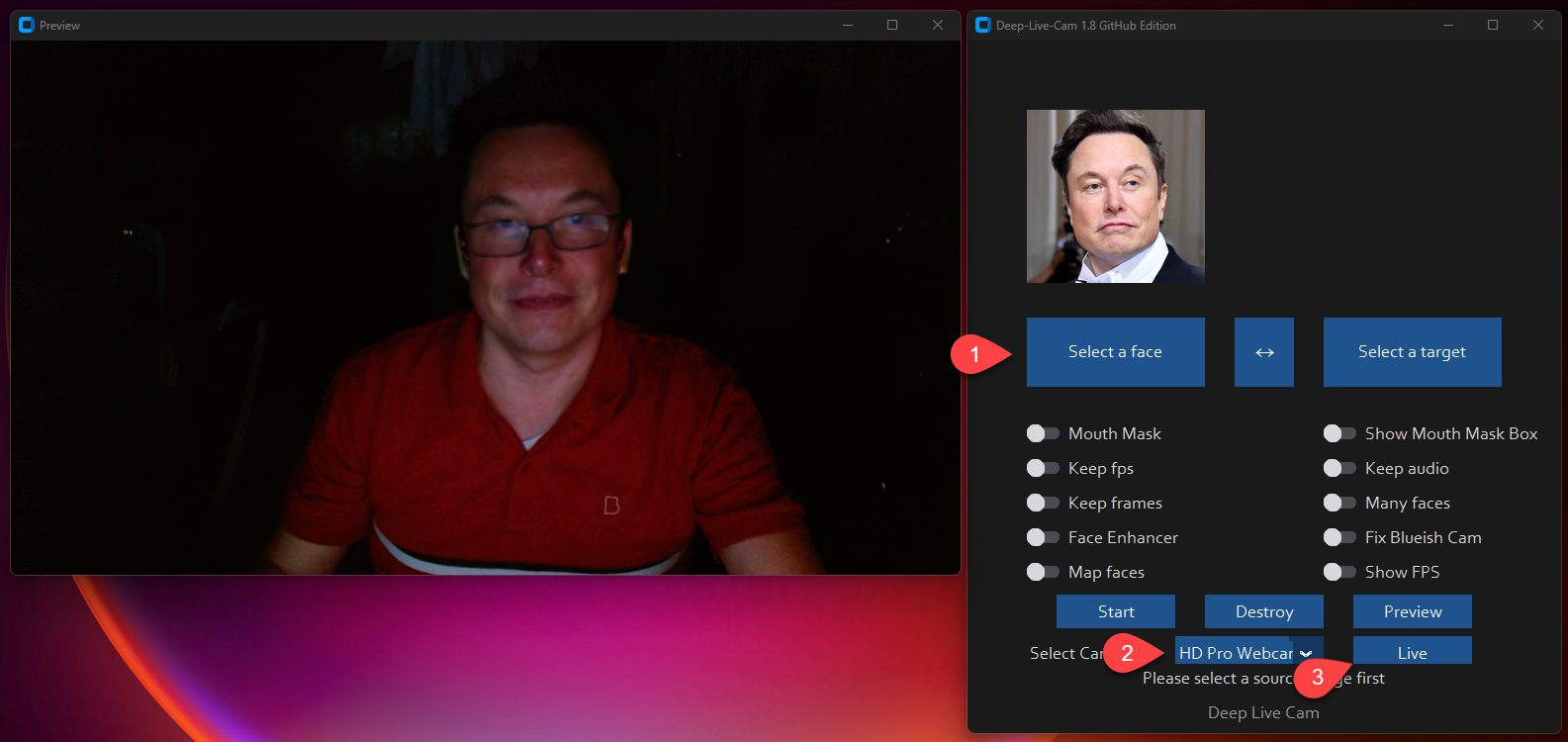
1. 얼굴 선택
2. 사용할 카메라 선택
3. live! 누르기
## 기능 및 용도 - 모든 것이 실시간으로
### Mouth Mask
**Mouth Mask를 사용하여 정확한 움직임을 위해 원래의 입을 유지하세요**
<p align="center">
<img src="https://assets.kitploit.com/production/public/readmes/6640/ac57219d7b64849dcee23eff5782d7420db8eb791e953992d7ffbb1a184d563a.gif" alt="resizable-gif">
</p>
### Face Mapping
**여러 대상에 서로 다른 얼굴을 동시에 사용하세요**
<p align="center">
<img src="https://raw.githubusercontent.com/hacksider/deep-live-cam/HEAD/media/streamers.gif" alt="face_mapping_source">
</p>
### Your Movie, Your Face
**어떤 얼굴로든 실시간으로 영화를 시청하세요**
<p align="center">
<img src="https://raw.githubusercontent.com/hacksider/deep-live-cam/HEAD/media/movie.gif" alt="movie">
</p>
### Live Show
**라이브 쇼와 공연을 진행하세요**
<p align="center">
<img src="https://assets.kitploit.com/production/public/readmes/6640/67e6154c2836c1f9575e16f1516c46952ef0ed90ef8b332a72b8a7d1566b6a3e.gif" alt="show">
</p>
### Memes
**가장 바이럴한 밈을 만들어 보세요**
<p align="center">
<img src="https://assets.kitploit.com/production/public/readmes/6640/f2e9a17dbc835a39a9318839866e688fd957757223e95c4af517a223990f538c.gif" alt="show" width="450">
<br>
<sub>Deep-Live-Cam의 Many Faces 기능을 사용하여 제작됨</sub>
</p>
### Omegle
**Omegle에서 사람들을 놀라게 하세요**
<p align="center">
<video src="https://github.com/user-attachments/assets/2e9b9b82-fa04-4b70-9f56-b1f68e7672d0" width="450" controls></video>
</p>
## 설치 (수동)
**설치는 기술적 능력을 요구하며 초보자용이 아님을 유의하세요. 퀵스타트 버전을 다운로드하는 것을 고려하세요.**
<details>
<summary>과정을 보려면 클릭하세요</summary>
### 설치
이 방법은 컴퓨터에서 작동할 가능성이 더 높지만 CPU를 사용하므로 더 느립니다.
**1. 플랫폼 설정**
- Python (3.14 권장, 3.11-3.14 지원)
- pip
- git
- [ffmpeg](https://www.youtube.com/watch?v=OlNWCpFdVMA) - ```iex (irm ffmpeg.tc.ht)```
- [Visual Studio 2022 Runtimes (Windows)](https://visualstudio.microsoft.com/visual-cpp-build-tools/)
**2. 저장소 복제**
```bash
git clone --depth 1 https://github.com/hacksider/Deep-Live-Cam.git
cd Deep-Live-Cam
```
**3. 모델 다운로드**
1. [gfpgan-1024.onnx](https://huggingface.co/hacksider/deep-live-cam/resolve/main/gfpgan-1024.onnx)
2. [inswapper\_128\_fp16.onnx](https://huggingface.co/hacksider/deep-live-cam/resolve/main/inswapper_128_fp16.onnx)
이 파일들을 "**models**" 폴더에 넣으세요.
**4. 종속성 설치**
문제를 방지하기 위해 `venv` 사용을 적극 권장합니다.
Windows의 경우:
```bash
python -m venv venv
venv\Scripts\activate
pip install -r requirements.txt
```
Linux의 경우:
```bash
# Ensure you use the installed Python 3.14
python3 -m venv venv
source venv/bin/activate
pip install -r requirements.txt
```
**macOS의 경우:**
Apple Silicon(M1~M5)에는 특정 설정이 필요합니다:
```bash
# Install Python 3.14
brew install [email protected]
# Install tkinter package (required for the GUI)
brew install [email protected]
# Create and activate virtual environment with Python 3.14
python3.14 -m venv venv
source venv/bin/activate
# Install dependencies
pip install -r requirements.txt
```
** 무언가 잘못되어 가상 환경을 다시 설치해야 하는 경우 **
```bash
# Deactivate the virtual environment
rm -rf venv
# Reinstall the virtual environment
python -m venv venv
source venv/bin/activate
# install the dependencies again
pip install -r requirements.txt
# gfpgan and basicsrs issue fix
pip install git+https://github.com/xinntao/BasicSR.git@master
pip uninstall gfpgan -y
pip install git+https://github.com/TencentARC/GFPGAN.git@master
```
**실행:** GPU가 없다면 `python run.py`를 사용하여 Deep-Live-Cam을 실행할 수 있습니다. 최초 실행 시 모델(약 300MB)이 다운로드된다는 점에 유의하세요.
### GPU 가속
**CUDA 실행 공급자(Nvidia)**
1. [CUDA Toolkit 12.8.0](https://developer.nvidia.com/cuda-12-8-0-download-archive) 설치
2. [CUDA 12.x용 cuDNN v8.9.7](https://developer.nvidia.com/rdp/cudnn-archive) 설치 (onnxruntime-gpu에 필요):
- CUDA 12.x용 cuDNN v8.9.7 다운로드
- cuDNN bin 디렉터리가 시스템 PATH에 있는지 확인
3. 종속성 설치:
```bash
pip install -U torch torchvision torchaudio --index-url https://download.pytorch.org/whl/cu128
pip uninstall onnxruntime onnxruntime-gpu
pip install onnxruntime-gpu==1.26.0
```
3. 사용법:
```bash
python run.py --execution-provider cuda
```
**CoreML 실행 공급자 (Apple Silicon)**
Apple Silicon(M1~M5) 전용 설치:
1. Python 3.14를 사용하여 위의 macOS 설정을 완료했는지 확인하세요.
2. 추가 설치 단계는 필요하지 않습니다 — `requirements.txt`가 공식
`onnxruntime` 빌드를 가져오며, 해당 macOS 휠에는 CoreML 실행 공급자가 포함되어 있습니다.
이전에 유지보수가 중단된 `onnxruntime-silicon` 포크를 설치했다면,
실제 패키지를 가리므로 먼저 제거하세요:
```bash
pip uninstall onnxruntime-silicon
pip install -r requirements.txt
```
3. 사용법:
```bash
python3.14 run.py --execution-provider coreml
```
**macOS 관련 중요 참고 사항:**
- Python 3.11이 최소 요구 사항이며(onnxruntime이 3.10 지원을 중단함), 3.14를 권장합니다
- 여러 Python 버전이 설치되어 있는 경우 `python`이 아닌 `python3.14` 명령으로 항상 실행하세요
- `_tkinter`가 없다는 오류가 발생하면 tkinter 패키지를 재설치하세요: `brew reinstall [email protected]`
- 모델 로딩 오류가 발생하면 모델이 올바른 폴더에 있는지 확인하세요
- 다른 Python 버전과 충돌이 발생하면 해당 버전을 제거하는 것을 고려하세요:
```bash
# List all installed Python versions
brew list | grep python
# Uninstall conflicting versions if needed
brew uninstall --ignore-dependencies [email protected]
# Keep only Python 3.14
brew cleanup
```
**CoreML 실행 공급자 (Apple 레거시)**
1. 종속성 설치:
```bash
pip uninstall onnxruntime onnxruntime-coreml
pip install onnxruntime-coreml==1.21.0
```
2. 사용법:
```bash
python run.py --execution-provider coreml
```
**DirectML 실행 공급자(Windows)**
1. 종속성 설치:
```bash
pip uninstall onnxruntime onnxruntime-directml
pip install onnxruntime-directml==1.21.0
```
2. 사용법:
```bash
python run.py --execution-provider dml
```
**OpenVINO™ 실행 공급자 (Intel)**
1. 종속성 설치:
```bash
pip uninstall onnxruntime onnxruntime-openvino
pip install onnxruntime-openvino==1.21.0
```
**참고:** 1.21.0보다 새로운 `onnxruntime-openvino`는 `openvino`와 함께 설치해야 하며, 두 버전은 일대일로 대응해야 합니다. 지원되는 조합은 다음과 같습니다:
| onnxruntime-openvino | OpenVINO |
| --- | --- |
| 1.24.1 | 2025.4.1 |
| 1.23.0 | 2025.3 |
| 1.22.0 | 2025.1 |
```bash
# Example: onnxruntime-openvino 1.24.1 pairs with OpenVINO 2025.4.1
pip install openvino==2025.4.1
pip install onnxruntime-openvino==1.24.1
```
전체 버전 매핑 세부 정보는 [OpenVINO Execution Provider 요구 사항](https://onnxruntime.ai/docs/execution-providers/OpenVINO-ExecutionProvider.html#requirements)을 참조하세요.
2. 사용법:
```bash
python run.py --execution-provider openvino
```
</details>
## 사용법
**1. 이미지/비디오 모드**
- `python run.py`를 실행합니다.
- 소스 얼굴 이미지와 대상 이미지/비디오를 선택합니다.
- "Start"를 클릭합니다.
- 출력은 대상 비디오의 이름을 딴 디렉터리에 저장됩니다.
**2. 웹캠 모드**
- `python run.py`를 실행합니다.
- 소스 얼굴 이미지를 선택합니다.
- "Live"를 클릭합니다.
- 미리보기가 나타날 때까지 기다립니다(10-30초).
- OBS와 같은 화면 캡처 도구를 사용하여 스트리밍합니다.
- 얼굴을 변경하려면 새 소스 이미지를 선택합니다.
## 이 huggingface 링크에서 모든 모델 다운로드
- [**여기에서 모델 다운로드**](https://huggingface.co/hacksider/deep-live-cam/tree/main)
## 명령줄 인수 (유지보수되지 않음)
```
options:
-h, --help show this help message and exit
-s SOURCE_PATH, --source SOURCE_PATH select a source image
-t TARGET_PATH, --target TARGET_PATH select a target image or video
-o OUTPUT_PATH, --output OUTPUT_PATH select output file or directory
--frame-processor FRAME_PROCESSOR [FRAME_PROCESSOR ...] frame processors (choices: face_swapper, face_enhancer, ...)
--keep-fps keep original fps
--keep-audio keep original audio
--keep-frames keep temporary frames
--many-faces process every face
--map-faces map source target faces
--mouth-mask mask the mouth region
--video-encoder {libx264,libx265,libvpx-vp9} adjust output video encoder
--video-quality [0-51] adjust output video quality
--live-mirror the live camera display as you see it in the front-facing camera frame
--live-resizable the live camera frame is resizable
--max-memory MAX_MEMORY maximum amount of RAM in GB
--execution-provider {cpu} [{cpu} ...] available execution provider (choices: cpu, ...)
--execution-threads EXECUTION_THREADS number of execution threads
-v, --version show program's version number and exit
```
CLI 모드를 찾고 계신가요? `-s/--source` 인자를 사용하면 프로그램이 cli 모드로 실행됩니다.
## 언론 보도
- [**Ars Technica**](https://arstechnica.com/information-technology/2024/08/new-ai-tool-enables-real-time-face-swapping-on-webcams-raising-fraud-concerns/) - *"Deep-Live-Cam이 입소문을 타며 누구나 디지털 도플갱어가 될 수 있게 되다"*
- [**Yahoo!**](https://www.yahoo.com/tech/ok-viral-ai-live-stream-080041056.html) - *"좋아요, 이 화제의 AI 라이브 스트리밍 소프트웨어는 정말 소름 끼칩니다"*
- [**CNN Brasil**](https://www.cnnbrasil.com.br/tecnologia/ia-consegue-clonar-rostos-na-webcam-entenda-funcionamento/) - *"AI가 웹캠에서 얼굴을 복제할 수 있다; 작동 방식을 알아보자"*
- [**Bloomberg Technoz**](https://www.bloombergtechnoz.com/detail-news/71032/kenalan-dengan-teknologi-deep-live-cam-bisa-jadi-alat-menipu) - *"Deep Live Cam 기술을 알아보자, 사기 도구로 사용될 수 있다."*
- [**TrendMicro**](https://www.trendmicro.com/vinfo/gb/security/news/cyber-attacks/ai-vs-ai-deepfakes-and-ekyc) - *"AI 대 AI: 딥페이크와 eKYC"*
- [**PetaPixel**](https://petapixel.com/2024/08/14/deep-live-cam-deepfake-ai-tool-lets-you-become-anyone-in-a-video-call-with-single-photo-mark-zuckerberg-jd-vance-elon-musk/) - *"딥페이크 AI 도구로 단 한 장의 사진만으로 영상 통화에서 누구든 될 수 있다"*
- [**SomeOrdinaryGamers**](https://www.youtube.com/watch?time_continue=1074&v=py4Tc-Y8BcY) - *"이건 미쳤어, 세상에. 이건 정말 기괴하다고... 이건 정말 대단해"*
- [**IShowSpeed**](https://www.youtube.com/live/mFsCe7AIxq8?feature=shared&t=2686) - *"좋아 봐봐 봐봐, 이제 채팅 봐, 우리가 원하는 어떤 얼굴이든 채팅처럼 보일 수 있어"*
- [**TechLinked (Linus Tech Tips)**](https://www.youtube.com/watch?v=wnCghLjqv3s&t=551s) - *"포즈, 표정, 심지어 조명까지 꽤 잘 맞춘다"*
- [**IShowSpeed**](https://youtu.be/JbUPRmXRUtE?t=3964) - *"뭐야 이 X발! 왜 내가 Vinny Jr처럼 보이는 거야? 나 완전히 Vinny Jr 같잖아!? 아니, 이거 미쳤어! 형 이거 X발 미쳤다고!"*
## 크레딧
- [ffmpeg](https://ffmpeg.org/): 비디오 관련 작업을 쉽게 만들어 주었습니다
- [Henry](https://github.com/henryruhs): 이 저장소의 주요 기여자 중 한 명입니다
- [deepinsight](https://github.com/deepinsight): 잘 만들어진 라이브러리와 모델을 제공한 [insightface](https://github.com/deepinsight/insightface) 프로젝트를 위해. [모델의 사용은 비상업적 연구 목적으로만 한정됩니다](https://github.com/deepinsight/insightface?tab=readme-ov-file#license)는 점을 유의해 주세요.
- [havok2-htwo](https://github.com/havok2-htwo): 웹캠 관련 코드를 공유해 주었습니다
- [GosuDRM](https://github.com/GosuDRM): roop의 오픈 버전을 위해
- [pereiraroland26](https://github.com/pereiraroland26): 다중 얼굴 지원
- [vic4key](https://github.com/vic4key): 이 프로젝트를 지원/기여해 주었습니다
- [kier007](https://github.com/kier007): 사용자 경험을 개선해 주었습니다
- [qitianai](https://github.com/qitianai): 다국어 지원을 위해
- [laurigates](https://github.com/laurigates): 모든 것을 더 빠르게 만들기 위해 구성 요소를 분리했습니다!
- [maxwbuckley](https://github.com/maxwbuckley): 이 프로젝트를 mac에 맞게 최적화하기 위해 노력해 주었습니다!
- 그리고 이 프로젝트에서 사용된 라이브러리 뒤에 있는 [모든 개발자들](https://github.com/hacksider/Deep-Live-Cam/graphs/contributors).
- 각주: 코드의 원저자는 [s0md3v](https://github.com/s0md3v/roop)임을 알려드립니다
- 저장소에 별을 눌러 이 프로젝트가 입소문을 타도록 도와주신 모든 멋진 사용자들께 ❤️
[](https://github.com/hacksider/Deep-Live-Cam/stargazers)
## 기여
## 달까지 가는 별들 🚀
<a href="https://star-history.com/#hacksider/deep-live-cam&Date">
<picture>
<source media="(prefers-color-scheme: dark)" srcset="https://api.star-history.com/svg?repos=hacksider/deep-live-cam&type=Date&theme=dark" />
<source media="(prefers-color-scheme: light)" srcset="https://api.star-history.com/svg?repos=hacksider/deep-live-cam&type=Date" />
<img alt="스타 히스토리 차트" src="https://api.star-history.com/svg?repos=hacksider/deep-live-cam&type=Date" />
</picture>
</a>