 genymobile/scrcpy
Android 기기를 표시하고 제어하세요

> [!WARNING]
> **이 GitHub 저장소(<https://github.com/Genymobile/scrcpy>)가 프로젝트의 유일한 공식
소스입니다. 이름에 `scrcpy`가 포함되어 있더라도 무작위 웹사이트에서 릴리스를
다운로드하지 마십시오.**
# scrcpy (v5.0.1)
<img src="https://raw.githubusercontent.com/genymobile/scrcpy/HEAD/app/data/scrcpy.svg" width="128" height="128" alt="scrcpy" align="right" />
_"**scr**een **c**o**py**"라고 발음합니다_
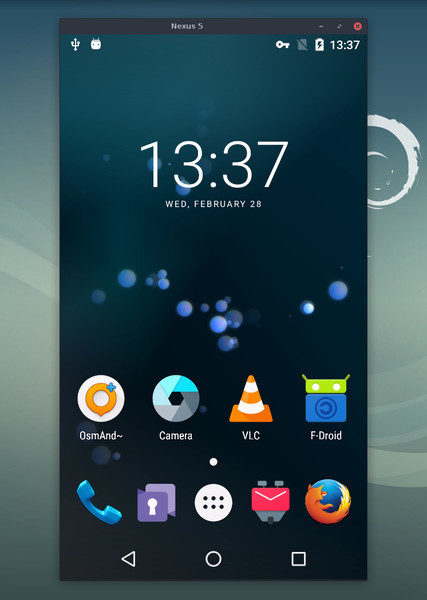
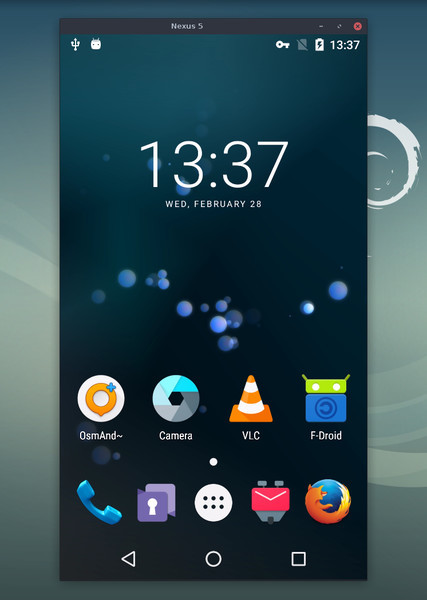
이 애플리케이션은 USB 또는
[TCP/IP](https://github.com/genymobile/scrcpy/blob/master/doc/connection.md#tcpip-wireless)로 연결된 Android 기기를 미러링(영상 및 오디오)하고,
컴퓨터의 키보드와 마우스로 제어할 수 있게 해줍니다. _root_ 권한이나 기기에
설치된 앱이 필요하지 않습니다. _Linux_, _Windows_, _macOS_에서 동작합니다.
[](doc/linux.md)
[](doc/windows.md)
[](doc/macos.md)
다음에 중점을 둡니다:
- **가벼움**: 네이티브이며, 기기 화면만 표시합니다
- **성능**: 기기에 따라 30~120fps
- **품질**: 1920×1080 이상
- **낮은 지연 시간**: [35~70ms][lowlatency]
- **빠른 시작 시간**: 첫 화면 표시까지 약 1초
- **비침투성**: Android 기기에 아무것도 설치된 채로 남지 않습니다
- **사용자 이점**: 계정 없음, 광고 없음, 인터넷 불필요
- **자유**: 자유 오픈 소스 소프트웨어
[lowlatency]: https://github.com/Genymobile/scrcpy/pull/646
기능은 다음과 같습니다:
- [오디오 전달](https://github.com/genymobile/scrcpy/blob/master/doc/audio.md) (Android 11+)
- [녹화](https://github.com/genymobile/scrcpy/blob/master/doc/recording.md)
- [가상 디스플레이](https://github.com/genymobile/scrcpy/blob/master/doc/virtual-display.md)
- [Android 기기 화면 꺼짐](https://github.com/genymobile/scrcpy/blob/master/doc/device.md#turn-screen-off) 상태에서 미러링
- 양방향 [복사-붙여넣기](https://github.com/genymobile/scrcpy/blob/master/doc/control.md#copy-paste)
- [조정 가능한 품질](https://github.com/genymobile/scrcpy/blob/master/doc/video.md)
- [카메라 미러링](https://github.com/genymobile/scrcpy/blob/master/doc/camera.md) (Android 12+)
- [웹캠으로 미러링 (V4L2)](https://github.com/genymobile/scrcpy/blob/master/doc/v4l2.md) (Linux 전용)
- 물리적 [키보드][hid-keyboard] 및 [마우스][hid-mouse] 시뮬레이션 (HID)
- [게임패드](https://github.com/genymobile/scrcpy/blob/master/doc/gamepad.md) 지원
- [OTG 모드](https://github.com/genymobile/scrcpy/blob/master/doc/otg.md)
- 그리고 더 많은 기능…
[hid-keyboard]: https://raw.githubusercontent.com/genymobile/scrcpy/master/doc/keyboard.md#physical-keyboard-simulation
[hid-mouse]: https://raw.githubusercontent.com/genymobile/scrcpy/master/doc/mouse.md#physical-mouse-simulation
## 사전 요구 사항
Android 기기는 최소 API 21 (Android 5.0)이 필요합니다.
[오디오 전달](https://github.com/genymobile/scrcpy/blob/master/doc/audio.md)은 API >= 30 (Android 11+)에서 지원됩니다.
기기에서 [USB 디버깅을 활성화][enable-adb]했는지 확인하십시오.
[enable-adb]: https://developer.android.com/studio/debug/dev-options#enable
일부 기기(특히 Xiaomi)에서는 다음과 같은 오류가 발생할 수 있습니다:
```
Injecting input events requires the caller (or the source of the instrumentation, if any) to have the INJECT_EVENTS permission.
```
이 경우, 키보드와 마우스로 제어하려면 [추가 옵션][control] `USB 디버깅
(보안 설정)`(이는 `USB 디버깅`과 다른 항목임)을 활성화해야 합니다. 이 옵션을
설정한 후에는 기기를 한 번 재부팅해야 합니다.
[control]: https://github.com/Genymobile/scrcpy/issues/70#issuecomment-373286323
[OTG 모드](https://github.com/genymobile/scrcpy/blob/master/doc/otg.md)에서 scrcpy를 실행하는 데는 USB 디버깅이 필요하지
않습니다.
## 앱 받기
- [Linux](https://github.com/genymobile/scrcpy/blob/master/doc/linux.md)
- [Windows](https://github.com/genymobile/scrcpy/blob/master/doc/windows.md) ([실행 방법](https://github.com/genymobile/scrcpy/blob/master/doc/windows.md#run) 참고)
- [macOS](https://github.com/genymobile/scrcpy/blob/master/doc/macos.md)
## 꼭 알아야 할 팁
- [해상도 줄이기](https://github.com/genymobile/scrcpy/blob/master/doc/video.md#size)는 성능을 크게 향상시킬 수 있습니다
(`scrcpy -m1024`)
- [_오른쪽 클릭_](https://github.com/genymobile/scrcpy/blob/master/doc/mouse.md#mouse-bindings)은 `BACK`을 트리거합니다
- [_가운데 클릭_](https://github.com/genymobile/scrcpy/blob/master/doc/mouse.md#mouse-bindings)은 `HOME`을 트리거합니다
- <kbd>Alt</kbd>+<kbd>f</kbd>는 [전체 화면](https://github.com/genymobile/scrcpy/blob/master/doc/window.md#fullscreen)을 전환합니다
- 그 밖에도 다양한 [단축키](https://github.com/genymobile/scrcpy/blob/master/doc/shortcuts.md)가 있습니다
## 사용 예시
별도의 페이지에 [문서화된](#user-documentation) 많은 옵션이 있습니다.
다음은 몇 가지 일반적인 예시일 뿐입니다.
- H.265(더 나은 품질)로 화면을 캡처하고, 크기를 1920으로 제한하며, 프레임
레이트를 60fps로 제한하고, 오디오를 비활성화하며, 물리적 키보드를 시뮬레이션하여
기기를 제어합니다:
```bash
scrcpy --video-codec=h265 --max-size=1920 --max-fps=60 --no-audio --keyboard=uhid
scrcpy --video-codec=h265 -m1920 --max-fps=60 --no-audio -K # short version
```
- 새 가상 디스플레이에서 VLC를 시작합니다(기기 디스플레이와 별도):
```bash
scrcpy --new-display=1920x1080 --start-app=org.videolan.vlc
```
- 비트레이트 16 Mbps의 H.265를 사용하여 새 _flex_ 디스플레이에서 VLC를
시작하며, 디스플레이가 꺼지지 않도록 활성 상태를 유지합니다:
```bash
scrcpy --new-display -x --keep-active --start-app=org.videolan.vlc --video-codec=h265 -b16M
```
- 기기 카메라를 1920x1080의 H.265(및 마이크)로 MP4 파일에 녹화합니다:
```bash
scrcpy --video-source=camera --video-codec=h265 --camera-size=1920x1080 --record=file.mp4
```
- 기기 전면 카메라를 캡처하여 컴퓨터의 웹캠으로 노출합니다(Linux에서):
```bash
scrcpy --video-source=camera --camera-size=1920x1080 --camera-facing=front --v4l2-sink=/dev/video2 --no-playback
```
- 미러링 없이 물리적 키보드와 마우스를 시뮬레이션하여 기기를 제어합니다
(USB 디버깅 불필요):
```bash
scrcpy --otg
```
- 컴퓨터에 연결된 게임패드로 기기를 제어합니다:
```bash
scrcpy --gamepad=uhid
scrcpy -G # short version
```
## 사용자 문서
이 애플리케이션은 많은 기능과 구성 옵션을 제공합니다. 이들은 다음 페이지에
문서화되어 있습니다:
- [연결](https://github.com/genymobile/scrcpy/blob/master/doc/connection.md)
- [비디오](https://github.com/genymobile/scrcpy/blob/master/doc/video.md)
- [오디오](https://github.com/genymobile/scrcpy/blob/master/doc/audio.md)
- [제어](https://github.com/genymobile/scrcpy/blob/master/doc/control.md)
- [키보드](https://github.com/genymobile/scrcpy/blob/master/doc/keyboard.md)
- [마우스](https://github.com/genymobile/scrcpy/blob/master/doc/mouse.md)
- [게임패드](https://github.com/genymobile/scrcpy/blob/master/doc/gamepad.md)
- [기기](https://github.com/genymobile/scrcpy/blob/master/doc/device.md)
- [창](https://github.com/genymobile/scrcpy/blob/master/doc/window.md)
- [녹화](https://github.com/genymobile/scrcpy/blob/master/doc/recording.md)
- [가상 디스플레이](https://github.com/genymobile/scrcpy/blob/master/doc/virtual-display.md)
- [터널](https://github.com/genymobile/scrcpy/blob/master/doc/tunnels.md)
- [OTG](https://github.com/genymobile/scrcpy/blob/master/doc/otg.md)
- [카메라](https://github.com/genymobile/scrcpy/blob/master/doc/camera.md)
- [Video4Linux](https://github.com/genymobile/scrcpy/blob/master/doc/v4l2.md)
- [단축키](https://github.com/genymobile/scrcpy/blob/master/doc/shortcuts.md)
## 리소스
- [FAQ](https://github.com/genymobile/scrcpy/blob/master/FAQ.md)
- [번역][wiki] (최신 상태가 아닐 수 있음)
- [빌드 지침](https://github.com/genymobile/scrcpy/blob/master/doc/build.md)
- [개발자](https://github.com/genymobile/scrcpy/blob/master/doc/develop.md)
- [릴리스 서명 검증](https://github.com/genymobile/scrcpy/blob/master/doc/verify-release.md)
[wiki]: https://github.com/Genymobile/scrcpy/wiki
## 기사
- [Introducing scrcpy][article-intro]
- [Scrcpy now works wirelessly][article-tcpip]
- [Scrcpy 2.0, with audio][article-scrcpy2]
[article-intro]: https://blog.rom1v.com/2018/03/introducing-scrcpy/
[article-tcpip]: https://www.genymotion.com/blog/open-source-project-scrcpy-now-works-wirelessly/
[article-scrcpy2]: https://blog.rom1v.com/2023/03/scrcpy-2-0-with-audio/
## 연락처
버그 보고, 기능 요청 또는 일반적인 질문이 있으면 [이슈][issue]를 열 수 있습니다.
버그를 보고할 때는 먼저 [FAQ](https://github.com/genymobile/scrcpy/blob/master/FAQ.md)를 읽어 보십시오. 문제에 대한 해결책을
바로 찾을 수 있을지도 모릅니다.
[issue]: https://github.com/Genymobile/scrcpy/issues
다음도 사용할 수 있습니다:
- Reddit: [`r/scrcpy`](https://www.reddit.com/r/scrcpy)
- BlueSky: [`@scrcpy.bsky.social`](https://bsky.app/profile/scrcpy.bsky.social)
- Twitter: [`@scrcpy_app`](https://twitter.com/scrcpy_app)
## 후원
저는 _scrcpy_의 작성자이자 유지관리자인 [@rom1v](https://github.com/rom1v)입니다.
이 애플리케이션이 마음에 드신다면, [제 오픈 소스 작업을 후원][donate]하실 수 있습니다:
- [GitHub Sponsors](https://github.com/sponsors/rom1v)
- [Liberapay](https://liberapay.com/rom1v/)
- [PayPal](https://paypal.me/rom2v)
[donate]: https://blog.rom1v.com/about/#support-my-open-source-work
## 라이선스
Copyright (C) 2018 Genymobile
Copyright (C) 2018-2026 Romain Vimont
Licensed under the Apache License, Version 2.0 (the "License");
you may not use this file except in compliance with the License.
You may obtain a copy of the License at
http://www.apache.org/licenses/LICENSE-2.0
Unless required by applicable law or agreed to in writing, software
distributed under the License is distributed on an "AS IS" BASIS,
WITHOUT WARRANTIES OR CONDITIONS OF ANY KIND, either express or implied.
See the License for the specific language governing permissions and
limitations under the License.