红/蓝队环境自动化部署工具 | 레드/블루 팀 환경 자동화 배포 도구
IaC 자동 배포 도구 RedC가 새롭게 출시되었습니다. Terraform + Wails GUI 기반으로 멀티 클라우드 자동 배포 및 프로젝트 오케스트레이션을 지원합니다. 한번 사용해보세요!





English | 简体中文
WgpSec Infra 스택에서 f8x는 호스트 측 소프트웨어 프로비저닝 계층입니다. 독립적으로 사용할 수도 있고, RedC가 클라우드 호스트에 원격으로 전달하여 소프트웨어 스토어, 배치 도구 설치, 노드 부트스트랩 워크플로의 실행 엔진 역할을 할 수도 있습니다. 동일한 스택에서 redc-template은 시나리오 및 템플릿 자산을 제공하고, RedC는 멀티 클라우드 오케스트레이션, 라이프사이클 관리, SSH 접근, 플러그인 및 AI 기반 운영을 처리합니다.
다운로드
EdgeOne Pages 링크
wget -O f8x https://f8x.wgpsec.org/f8xcurl -o f8x https://f8x.wgpsec.org/f8xgithub raw
wget -O f8x https://raw.githubusercontent.com/ffffffff0x/f8x/main/f8xcurl -o f8x https://raw.githubusercontent.com/ffffffff0x/f8x/main/f8x사용법
bash f8x -h
환경 변수에 추가하는 것을 권장합니다.
wget -O f8x https://raw.githubusercontent.com/ffffffff0x/f8x/main/f8x && mv --force f8x /usr/local/bin/f8x && chmod +x /usr/local/bin/f8x
f8x -hcurl -o f8x https://raw.githubusercontent.com/ffffffff0x/f8x/main/f8x && mv --force f8x /usr/local/bin/f8x && chmod +x /usr/local/bin/f8x
f8x -h시스템 종속성
f8x는 기본적으로 어떤 종속성도 필요하지 않습니다. 여러분이 다양한 종속성을 설치하는 데 도움을 주기 위해 만들어졌습니다😁
f8x-ctf
이 스크립트는 CTF 환경(Web, Misc, Crypto, Pwn, Iot)을 배포하는 데 사용됩니다.
wget -O f8x-ctf https://raw.githubusercontent.com/ffffffff0x/f8x/main/f8x-ctf
bash f8x-ctf -helpcurl -o f8x-ctf https://raw.githubusercontent.com/ffffffff0x/f8x/main/f8x-ctf
bash f8x-ctf -helpf8x-dev
미들웨어, 데이터베이스 배포 (apache, nginx, tomcat, Database, php)
wget -O f8x-dev https://raw.githubusercontent.com/ffffffff0x/f8x/main/f8x-dev
bash f8x-dev -helpcurl -o f8x-dev https://raw.githubusercontent.com/ffffffff0x/f8x/main/f8x-dev
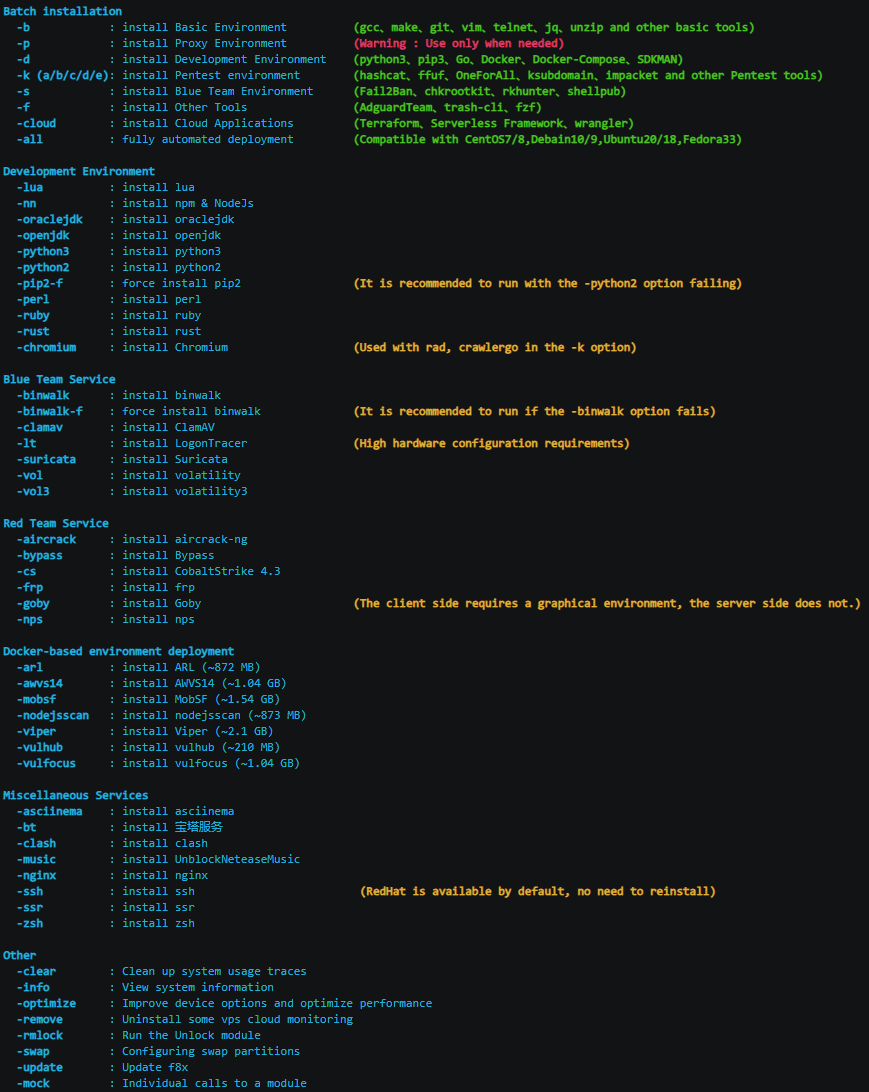
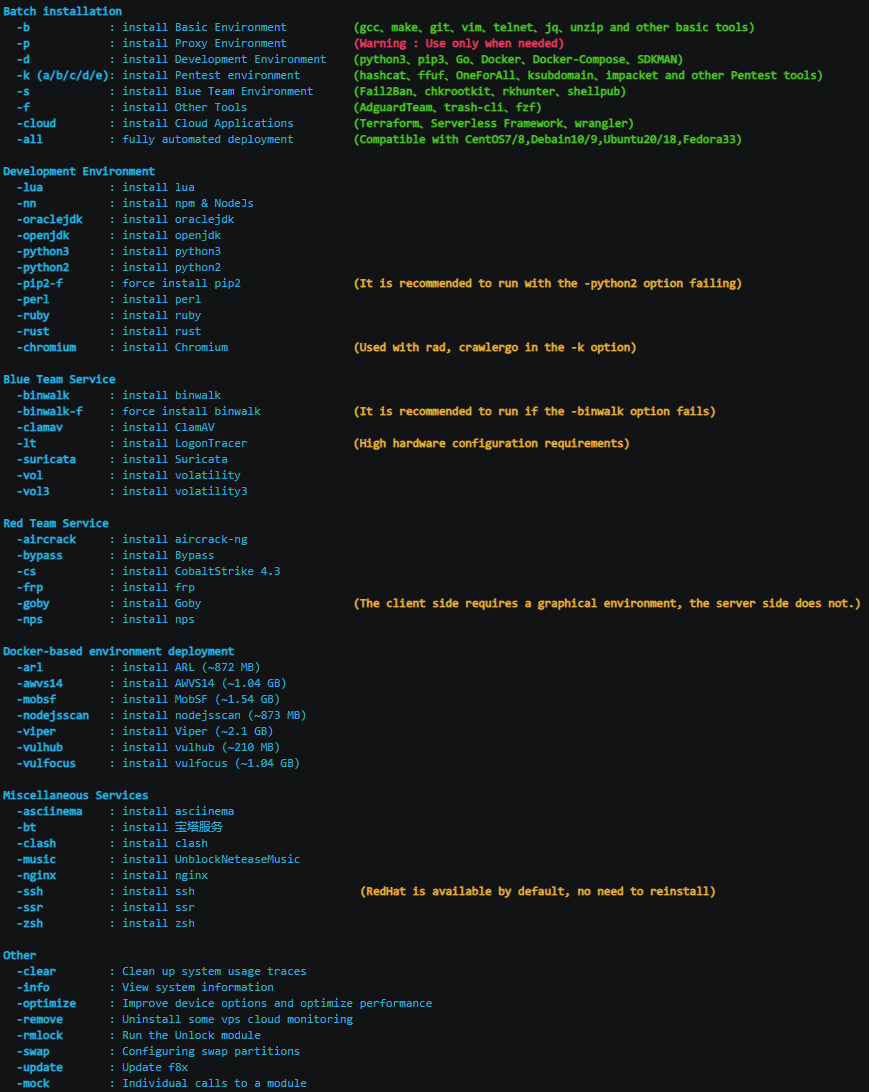
bash f8x-dev -help현재 f8x가 지원하는 옵션은 다음과 같습니다.
배치 설치
-b : 기본 환경 설치 (gcc, make, git, vim, telnet, jq, unzip 등 기본 도구)-p : 프록시 환경 설치 (주의: 필요할 때만 사용)-d : 개발 환경 설치 (python3, pip3, Go, Docker, Docker-Compose, SDKMAN)-k (a/b/c/d/e): 침투 테스트 환경 설치 (hashcat, ffuf, OneForAll, ksubdomain, impacket 등 침투 테스트 도구)-s : 블루 팀 환경 설치 (Fail2Ban, chkrootkit, rkhunter, shellpub)-f : 기타 도구 설치 (AdguardTeam, trash-cli, fzf)-cloud : 클라우드 애플리케이션 설치 (Terraform, Serverless Framework, wrangler)-all : 완전 자동 배포 (CentOS7/8, Debian10/9, Ubuntu20/18, Fedora33 호환)개발 환경
-docker : docker 설치-lua : lua 설치-nn : npm & NodeJs 설치-go : go 설치-oraclejdk(8/11): oraclejdk 설치-openjdk : openjdk 설치-py3(7/8/9/10) : python3 설치-py2 : python2 설치-pip2-f : pip2 강제 설치 (-python2 옵션이 실패할 때 실행 권장)-perl : perl 설치-ruby : ruby 설치-rust : rust 설치-code : code-server 설치-chromium : Chromium 설치 (-k 옵션의 rad, crawlergo와 함께 사용)-phantomjs : PhantomJS 설치블루 팀 서비스
-binwalk : binwalk 설치-binwalk-f : binwalk 강제 설치 (-binwalk 옵션이 실패할 때 실행 권장)-clamav : ClamAV 설치-lt : LogonTracer 설치 (높은 하드웨어 사양 필요)-suricata : Suricata 설치-vol : volatility 설치-vol3 : volatility3 설치레드 팀 서비스
-aircrack : aircrack-ng 설치-bypass : Bypass 설치-goby : Goby 설치 (클라이언트 측은 그래픽 환경 필요, 서버 측은 불필요)-wpscan : wpscan 설치-yakit : yakit 설치레드 팀 인프라
-awvs14 : AWVS14 설치 (~1.04 GB)-cs : CobaltStrike 4.3 설치-cs45 : CobaltStrike 4.5 설치-frp : frp 설치-interactsh : interactsh 설치 (https://github.com/projectdiscovery/interactsh)-merlin : merlin 설치 (https://github.com/Ne0nd0g/merlin)-msf : Metasploit 설치-nps : nps 설치-pupy : pupy 설치 (https://github.com/n1nj4sec/pupy)-rg : RedGuard 설치 (https://github.com/wikiZ/RedGuard)-sliver : sliver-server && client 설치 (https://github.com/BishopFox/sliver)-sliver-client : sliver-client 설치-sps : SharPyShell 설치 (https://github.com/antonioCoco/SharPyShell)-viper : Viper 설치 (~2.1 GB)Docker 기반 환경 배포
-arl : ARL 설치 (~872 MB)-mobsf : MobSF 설치 (~1.54 GB)-nodejsscan : nodejsscan 설치 (~873 MB)-vulhub : vulhub 설치 (~210 MB)-vulfocus : vulfocus 설치 (~1.04 GB)-TerraformGoat: TerraformGoat 설치기타 서비스
-asciinema : asciinema 설치-bt : 宝塔服务 (BT 패널) 설치-clash : clash 설치 (https://github.com/juewuy/ShellClash)-nginx : nginx 설치-ssh : ssh 설치 (RedHat은 기본 제공, 재설치 불필요)-ssr : ssr 설치-zsh : zsh 설치AI 친화적인 도구 관리
-install <tool> : 이름으로 단일 도구 설치 (예: -install nuclei, -install nmap)--list-tools : 사용 가능한 모든 117개 도구를 JSON으로 출력 (AI Agent 파싱용)--list-tools table : 사용 가능한 모든 도구를 사람이 읽기 쉬운 테이블로 출력--search <keyword> : 이름으로 도구 퍼지 검색 (예: --search scan)참고:
--list-tools와--search는 루트 권한이 필요하지 않습니다.
기타
-clear : 시스템 사용 흔적 정리-info : 시스템 정보 보기-optimize : 장치 옵션 개선 및 성능 최적화-remove : 일부 VPS 클라우드 모니터링 제거-rmlock : 잠금 해제 모듈 실행-swap : 스왑 파티션 구성-update : f8x 업데이트-upgrade : 침투 테스트 도구 업그레이드-h 도움말 보기
-all 완전 자동 배포
vultr VPS를 예로 들면
CentOS 7 | Debian 10 |
|---|---|
|
|
Fedora 33 | Ubuntu 20.10 |
|
|
-p 옵션은 무엇을 하나요?
CI/CD에서 f8x를 실행하고 싶지만, 대화형 모드를 원하지 않나요?
/tmp에 빈 파일 IS_CI를 생성하기만 하면 됩니다.
touch /tmp/IS_CI
wget -O f8x https://raw.githubusercontent.com/ffffffff0x/f8x/main/f8x && mv --force f8x /usr/local/bin/f8x && chmod +x /usr/local/bin/f8x
f8x -k