 fatlan/haproxy-keepalived-sec-highloads
✨ HAProxy 및 Keepalived를 로드 밸런서와 클러스터 외에도 보안(취약한 SSL/암호화 사용(LOGJAM) (CVE-2015-4000) 취약점 방지) 및 높은 부하에 대응하여 다룹니다.

HAProxy는 고가용성(high availability)을 갖춘 로드 밸런싱(load balancing)과 함께 TCP 및 HTTP 기반 애플리케이션을 위한 proxy 서버 서비스를 제공하는 오픈 소스 소프트웨어입니다.
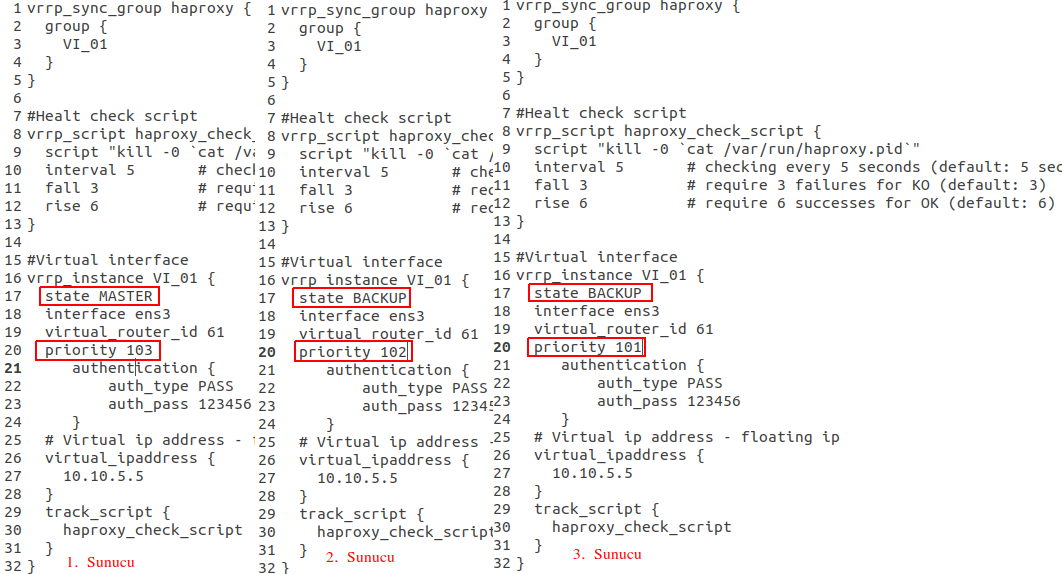
Keepalived는 둘 이상의 서버를 위해 IP failover(장애 조치) 기능을 제공할 수 있는 오픈 소스 소프트웨어입니다. Keepalived는 서로 간에 Multicast 통신 기술을 사용합니다.
우리는 구성에서 HAProxy 로드 밸런서를 위해, Keepalived를 IP를 넘겨주는, 즉 HAProxy 구성을 Cluster 상태로 만들기 위해 사용할 것입니다.
시나리오에는 3개의 서버가 있습니다. 이 3개 서버에 HAProxy를 설치하여 로드 밸런서로 만들 것입니다. 그런 다음 Keepalived 서비스를 설치하여 서버 중 하나가 다운되면 IP failover를 통해 중단 없이 다른 서버로 전환하여 로드 밸런서 서비스가 계속 작동하도록 할 것입니다.
이를 위해 4개의 IP를 사용할 것입니다(IP는 완전히 임의의 값입니다).
이제 3개 서버 모두에 HAProxy 및 Keepalived 서비스를 다음과 같이 설치합니다.
sudo add-apt-repository ppa:vbernat/haproxy-2.7 -y
sudo apt update
sudo apt install haproxy keepalived -y
sudo openssl dhparam -out /etc/haproxy/dhparams.pem 2048
NoT1 : 서버에 “net.ipv4.ip_nonlocal_bind=1”이 설정되어 있어야 합니다. 그렇지 않으면 HAProxy에 사용할 구성에서 동시에 동일한 IP를 보유할 수 없으므로 바인드 오류가 발생하고 서비스가 작동하지 않습니다. 따라서 다음 절차를 따라야 합니다.
먼저 “vi /etc/sysctl.conf” 파일을 편집하고 다음 매개변수를 붙여넣은 뒤 저장하고 종료하세요.
net.ipv4.ip_nonlocal_bind=1
그런 다음 다음 명령을 실행하세요.
sysctl -p
Not2: 443 SSL을 사용할 경우 “/etc/ssl/private/” 디렉터리 안에 “haproxy.pem” 이름으로 SSL 인증서의 Bundle(.crt,.ca,*.key) 형태가 있어야 합니다.
이제 예시로 아래 HAPoxy 구성을 살펴보겠습니다. 구성의 각 HAProxy에 동일한 구성을 사용하게 됩니다.
이를 위해 “/etc/haproxy/haproxy.cfg” 파일을 편집할 것입니다. 다음 구성은 최소 HAv2를 지원합니다.
vi /etc/haproxy/haproxy.cfg
다음은 기본값입니다.
global
        log /dev/log    local0
        log /dev/log    local1 notice
        chroot /var/lib/haproxy
        stats socket /run/haproxy/admin.sock mode 660 level admin expose-fd listeners
        stats timeout 30s
        user haproxy
        group haproxy
        daemon
#        maxconn 100000 #replaceable


        # Default SSL material locations
        ca-base /etc/ssl/certs
        crt-base /etc/ssl/private

        # Default ciphers to use on SSL-enabled listening sockets.
        # For more information, see ciphers(1SSL). This list is from:
        #  https://hynek.me/articles/hardening-your-web-servers-ssl-ciphers/
        # An alternative list with additional directives can be obtained from
        #  https://mozilla.github.io/server-side-tls/ssl-config-generator/?server=haproxy
        ssl-default-bind-ciphers ECDH+AESGCM:DH+AESGCM:ECDH+AES256:DH+AES256:ECDH+AES128:DH+AES:RSA+AESGCM:RSA+AES:!aNULL:!MD5:!DSS
        #ssl-default-bind-options no-sslv3
	ssl-default-bind-ciphers ECDHE-ECDSA-AES128-GCM-SHA256:ECDHE-RSA-AES128-GCM-SHA256:ECDHE-ECDSA-AES256-GCM-SHA384:ECDHE-RSA-AES256-GCM-SHA384:ECDHE-ECDSA-CHACHA20-POLY1305:ECDHE-RSA-CHACHA20-POLY1305:DHE-RSA-AES128-GCM-SHA256:DHE-RSA-AES256-GCM-SHA384
	ssl-default-bind-options ssl-min-ver TLSv1.2 no-tls-tickets
	ssl-dh-param-file /etc/haproxy/dhparams.pem
	#tune.ssl.default-dh-param 2048


#	nbproc 1
#	nbthread 8

	tune.maxrewrite 16384
	tune.bufsize 32768

defaults
        log     global
        mode    http
        option  httplog
        option  dontlognull
	option forwardfor
#        maxconn 1000000 #replaceable
        timeout connect 3000000
        timeout client  6000000
        timeout server  6000000
        errorfile 400 /etc/haproxy/errors/400.http
        errorfile 403 /etc/haproxy/errors/403.http
        errorfile 408 /etc/haproxy/errors/408.http
        errorfile 500 /etc/haproxy/errors/500.http
        errorfile 502 /etc/haproxy/errors/502.http
        errorfile 503 /etc/haproxy/errors/503.http
        errorfile 504 /etc/haproxy/errors/504.http
HAProxy용 Dashboard 구성 부분(모니터링을 위한 prometheus 통합 추가됨)
listen stats
        bind fatlan.com:8989
        mode http
        stats enable
        stats uri /stats
        option http-use-htx
        http-request use-service prometheus-exporter if { path /metrics }
        #stats hide-version
        stats realm HAProxy\ Statistics
        stats auth admin:admin
다음 구성에서는 두 블록에서 ACL이 사용되었습니다. 첫 번째 블록은 링크의 어디에서든 “rest” 단어가 나오면 middleware-fatlan-backend 블록이 동작하고, 두 번째는 다른 도메인 요청(forum.fatlan.com)일 때 backend fatlan-forum-backend가 동작하며, 그 외의 모든 요청은 fatlan-backend443 블록에서 동작합니다. 다른 포트 리다이렉션은 제외합니다.
80 포트를 443 포트로 리다이렉션하는 부분
frontend fatlan80
        bind fatlan.com:80
        mode http
        redirect scheme https if !{ ssl_fc }

frontend fatlan443
        bind fatlan.com:443 ssl crt /etc/ssl/private/haproxy.pem ciphers ECDH+AESGCM:DH+AESGCM:ECDH+AES256:DH+AES256:ECDH+AES128:DH+AES:ECDH+3DES:DH+3DES:RSA+AESGCM:RSA+AES:RSA+3DES:!aNULL:!MD5:!DSS
        option httplog
	option forwardfor
 	#http-request set-header X-Client-IP req.hdr_ip([X-Forwarded-For])
        #option forwardfor except 127.0.0.0/8
        option http-server-close
	http-request set-header X-Forwarded-Proto https
#        reqadd X-Forwarded-Proto:\ https #old config
        mode http
        default_backend fatlan-backend443
ACL 예제 구성(proxypass) 링크의 어디에서든 rest 단어가 나오면 리다이렉트합니다
        acl middleware-fatlan path_beg /rest
        use_backend middleware-fatlan-backend if middleware-fatlan
ACL 다른 forum 호스트로 리다이렉트
    	acl host_fatlanforum hdr(host) -i forum.fatlan.com
    	use_backend fatlan-forum-backend if host_fatlanforum
기본 리다이렉션 부분, 443용 리다이렉션 부분
backend fatlan-backend443
        mode http
        balance roundrobin
        stick store-request src
        stick-table type ip size 256k expire 30m
        option forwardfor
#        option httplog
        option httpchk HEAD /

        server frontend_01 10.10.37.12:8001 check port 8001 inter 3000 rise 2 fall 3
        server frontend_02 10.10.37.13:8001 check port 8001 inter 3000 rise 2 fall 3
ACL로 들어온 rest 리다이렉션 부분
backend middleware-fatlan-backend
        mode http
        balance roundrobin
        stick store-request src
        stick-table type ip size 256k expire 30m
        option forwardfor
#        option httplog
        option httpchk OPTIONS /login HTTP/1.0
        http-check expect status 200
	http-request replace-path (.*)(?:rest\/)(.*) \1\2
#        reqrep ^([^\ :]*)\ /rest[/]?(.*) \1\ //\2  #old config

        server middleware_01 10.10.37.34:3000 check port 4000 inter 12000 rise 3 fall 3
        server middleware_02 10.10.37.35:3000 check port 4000 inter 12000 rise 3 fall 3
ACL로 들어온 forum 리다이렉션 부분
backend fatlan-forum-backend
        mode http
        option forwardfor
#        option httplog
        option httpchk HEAD /

        server forum_01 10.10.37.45:8080 check port 8080 inter 3000 rise 2 fall 3
외부 예제도 다음과 같이 구성할 수 있습니다.
5000 포트 예제;
frontend Panel5000
        bind fatlan.com:5000
#        option httplog
        option forwardfor except 127.0.0.0/8
        #option http-server-close
	http-request set-header X-Forwarded-Proto https
#        reqadd X-Forwarded-Proto:\ https #old config
        mode http
        default_backend panel-backend5000
5000 포트 리다이렉션 부분
backend panel-backend5000
        mode http
        balance roundrobin
        stick store-request src
        stick-table type ip size 256k expire 30m
        option forwardfor
#        option httplog
        option httpchk HEAD /

        server panel_01 10.10.37.43:5000 check port 5000 inter 12000 rise 3 fall 3
        server panel_02 10.10.37.44:5000 check port 5000 inter 12000 rise 3 fall 3
3306 mysql 예제;
frontend fatlanmysql
        bind fatlan.com:3306
        mode tcp
        default_backend fatlanmysql-backend3306
