 dutchosintguy/tiktok-scraper
인증 없이 사용자 프로필, 해시태그, 트렌드에서 TikTok 비디오 게시물과 메타데이터를 스크래핑 및 다운로드합니다. JSON, CSV, ZIP 아카이브를 출력합니다.

TikTok에서 유용한 정보를 스크래핑하고 다운로드합니다.
로그인이나 비밀번호가 필요하지 않습니다.
공식 API 지원 등이 아닙니다. TikTok 웹 API를 사용하여 미디어를 스크래핑하는 스크래퍼일 뿐입니다.
참고:
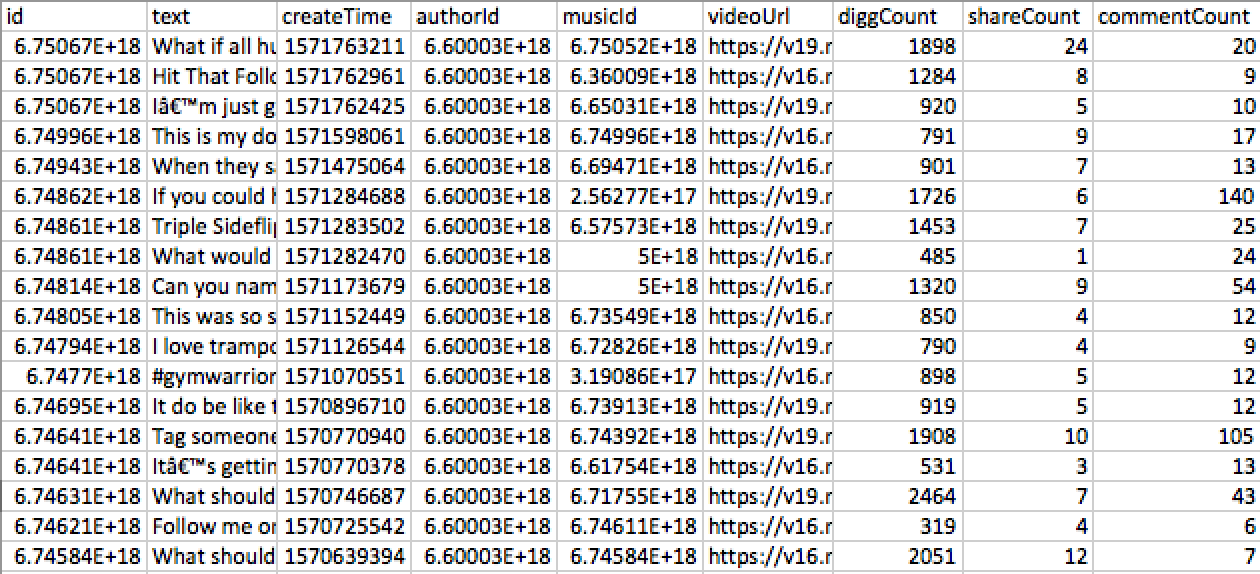
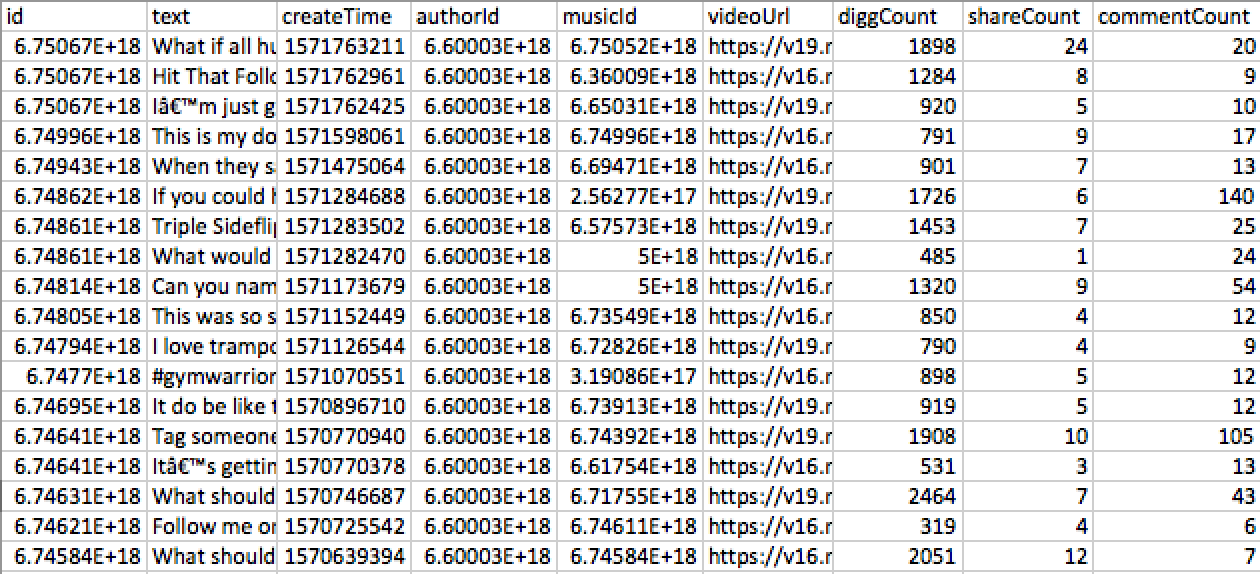
게시물 - JSON/CSV 출력:
    id: '6748606789551410438',
    text:'TEXT',
    createTime: '1571282470',
    authorId: '123123',
    musicId: '123123',
    videoUrl: 'VIDEO_URL',
    diggCount: 485,
    shareCount: 1,
    commentCount: 24
가능한 오류
tiktok-scraper는 실행에 Node.js v8.6.0+가 필요합니다.
NPM으로 설치
$ npm i -g tiktok-scraper
YARN으로 설치
$ yarn global add tiktok-scraper
$ tiktok-scraper --help

Usage: tiktok-scraper <command> [options]

Commands:
  tiktok-scraper user [id]     Scrape videos from username. Enter only username
  tiktok-scraper hashtag [id]  Scrape videos from hashtag. Enter hashtag without #
  tiktok-scraper trend         Scrape posts from current trends

Options:
  --help, -h              help                                         [boolean]
  --version               Show version number                          [boolean]
  --number, -n            Number of posts to scrape. If you will set 0 then all
                          posts will be scraped                    [default: 20]
  --proxy, -p             Set proxy                                [default: ""]
  --timeout               If you will receive 'rate limit' error , you can try
                          to set timeout. Timeout is in mls: 1000 mls = 1 second
                                                                    [default: 0]
  --download, -d          Download and archive all scraped videos to a ZIP file
                                                      [boolean] [default: false]
  --filepath              Directory to save all output files.
                [default: "/Users/jackass/Documents/lang/NodeJs/tiktok-scraper"]
  --filetype, --type, -t  Type of output file where post information will be
                          saved. 'all' - save information about all posts to a
                          'json' and 'csv'
                                [choices: "csv", "json", "all"] [default: "csv"]

Examples:
  tiktok-scraper user USERNAME -d -n 100
  tiktok-scraper hashtag HASHTAG_NAME -d -n 100
  tiktok-scraper trend -d -n 100
예제 1: 사용자 {USERNAME}의 동영상 게시물 300개를 스크래핑합니다. 게시물 정보를 CSV 파일에 저장합니다(기본값).
$ tiktok-scraper user USERNAME -n 300

출력:
CSV path: /{CURRENT_PATH}/user_1552945544582.csv
예제 2: 해시태그 {HASHTAG_NAME}의 게시물 100개를 스크래핑하고, 다운로드하여 ZIP 아카이브로 저장합니다. 게시물 정보를 JSON 및 CSV 파일에 저장합니다 (--filetype all).
$ tiktok-scraper hashtag HASHTAG_NAME -n 100 -d -t all

출력:
ZIP path: /{CURRENT_PATH}/hashtag_1552945659138.zip
JSON path: /{CURRENT_PATH}/hashtag_1552945659138.json
CSV path: /{CURRENT_PATH}/hashtag_1552945659138.csv
예제 3: 트렌드 섹션에서 게시물 50개를 스크래핑하고, ZIP으로 다운로드한 후 정보를 csv 파일에 저장합니다.
$ tiktok-scraper trend -n 50 -d -t csv

출력:
ZIP path: /{CURRENT_PATH}/trend_1552945659138.zip
CSV path: /{CURRENT_PATH}/tend_1552945659138.csv
더 나은 가시성을 위해 게시물 다운로드 시 진행 상황이 터미널에 표시됩니다.
Downloading 6750670497744309509 [==============================] 100%
Downloading 6749962264020782342 [==============================] 100%
Downloading 6749433991113264390 [==============================] 100%
Downloading 6750671571968429318 [==============================] 100%
Downloading 6750668198011505926 [==============================] 100%
Downloading 6748611221903117574 [==============================] 100%
Downloading 6748606789551410438 [==============================] 100%
Downloading 6748139550251535621 [==============================] 100%
Downloading 6748616311166799110 [==============================] 100%
Downloading 6748048372625689861 [==============================] 100%
const TikTokScraper = require('tiktok-scraper');

let options = {
    number: 100,
};

(async () => {
    try{
        let posts = await TikTokScraper.user({USERNAME}, options);
        console.log(posts)
    } catch(error){
        console.log(error)
    }
})()
프로미스는 현재 결과를 반환합니다
{
    collector:[ARRAY_OF_DATA]
    //If {filetype} and {download} options are enbabled then:
    zip: '/{CURRENT_PATH}/user_1552963581094.zip',
    json: '/{CURRENT_PATH}/user_1552963581094.json',
    csv: '/{CURRENT_PATH}/user_1552963581094.csv'
}
const TikTokScraper = require('tiktok-scraper');
let options = {
    count: 100,
    event: true, // Enable event emitter, you won't be able to use promises
};

let posts = TikTokScraper.user({USERNAME}, options);

posts.on('data', (json) => {
  //data in JSON format
})

posts.on('done', () => {
  //completed
})
posts.on('error', (error) => {
  //error message
})
함수
.user(id, options) //특정 사용자의 게시물 스크래핑
.hashtag(id, options) //해시태그 섹션에서 게시물 스크래핑
.trend('', options) //트렌드 섹션의 게시물 스크래핑
옵션
let options = {
    // 스크래핑할 게시물 수: {int 기본값: 20}
    number: 50,

    // 프록시 설정, 예: 127.0.0.1:8080: {string 기본값: ''}
    proxy: '',

    // 이벤트 이미터 활성화 또는 비활성화. true이면 이벤트를 통해 데이터를 수신할 수 있습니다: {boolean 기본값: false}
    event: false,

    // 요청 간 시간 초과. 'rate limit' 오류가 발생하면 이 옵션이 유용할 수 있습니다: {int 기본값: 0}
    timeout: 0

    // 게시물 다운로드 여부. true이면 {filepath}에 ZIP 아카이브가 생성됩니다: {boolean 기본값: false}
    download: false,

    // 비동기로 다운로드할 게시물 수. {download:true}인 경우에만: {int 기본값: 5}
    asyncDownload: 5,

    // 모든 파일이 저장될 파일 경로: {string 기본값: 'CURRENT_DIR'}
    filepath: `CURRENT_DIR`,
};
MIT
Free Software
